
When scaling CI/CD pipelines, choosing between Spot Instances and Reserved Instances can significantly impact your costs and reliability. Here's the gist:
- Spot Instances: Offer up to 90% cost savings by utilising spare cloud capacity. They're ideal for tasks that can handle interruptions, like parallel test runners or batch jobs.
- Reserved Instances: Provide consistent savings (up to 72%) and guaranteed capacity for critical, always-on components like orchestrators or control planes.
Key Takeaways:
- Spot Instances: Best for bursty, fault-tolerant workloads. Requires retry logic, checkpointing, and automation tools to handle interruptions.
- Reserved Instances: Perfect for steady, predictable workloads. Simplifies budgeting and ensures reliability but requires long-term commitment.
Quick Comparison:
| Factor | Spot Instances | Reserved Instances |
|---|---|---|
| Cost Savings | Up to 90% off On-Demand | Up to 72% off On-Demand |
| Payment | Pay-as-you-go | 1–3-year commitment |
| Reliability | Risk of interruptions | Guaranteed capacity |
| Best Use Case | Parallel tests, burst jobs | Control planes, steady tasks |
For a cost-efficient CI/CD strategy, combine both: use Reserved Instances for baseline capacity and Spot Instances for handling spikes.
::: @figure 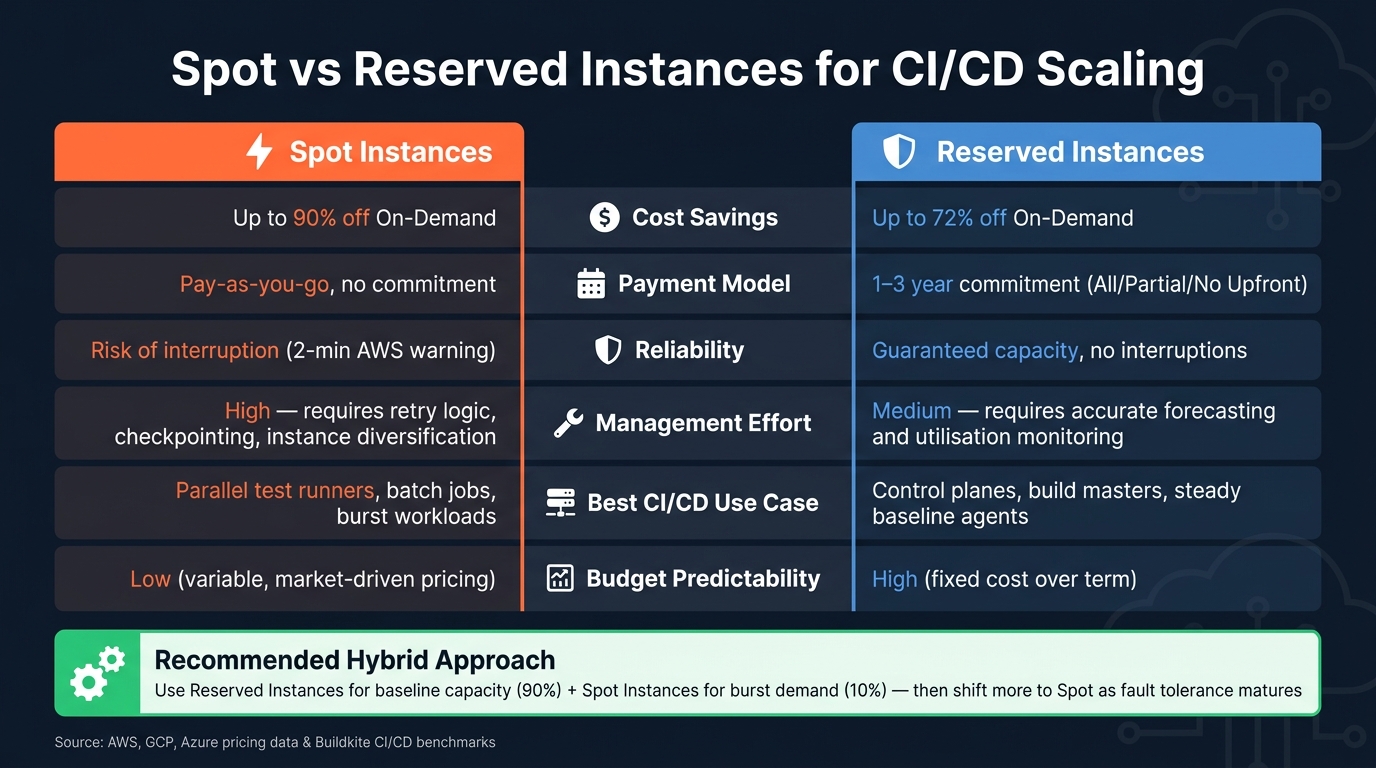 {Spot vs Reserved Instances for CI/CD: Cost, Reliability & Use Cases}
:::
{Spot vs Reserved Instances for CI/CD: Cost, Reliability & Use Cases}
:::
AWS EC2 Spot Instances | How to create a Spot EC2 Instance | Reserved Up Front | Savings Plan Amazon
Need help optimizing your cloud costs?
Get expert advice on how to reduce your cloud expenses without sacrificing performance.
What Are Spot Instances and How Do They Fit into CI/CD Pipelines?
Spot Instances are a cost-saving option offered by cloud providers like AWS, GCP, and Azure. These instances utilise spare cloud capacity and are available at heavily reduced rates. However, their pricing can fluctuate based on real-time demand, and they come with the risk of interruptions. Providers may reclaim these instances with minimal notice - AWS typically gives two minutes, while GCP and Azure may provide as little as 30 seconds' warning [5][4]. Let’s explore their features, potential use cases, and what’s needed to make them work seamlessly in CI/CD pipelines.
While the possibility of interruptions might seem like a drawback, CI/CD workloads are generally well-equipped to handle such disruptions. Tasks like compiling code, running unit tests, or building container images are usually stateless and idempotent. This means if an instance is reclaimed mid-task, the job can restart on another instance without any data loss, provided the pipeline has a reliable retry mechanism [8].
Key Features of Spot Instances
Spot Instances can offer savings of up to 90% compared to On-Demand instances [5][1]. Pricing is dynamic and depends on demand in different availability zones. There’s no requirement for upfront commitments - you only pay for what you use. However, because their availability isn’t guaranteed, they are best suited for workloads that can tolerate interruptions.
When to Use Spot Instances in CI/CD Pipelines
Spot Instances shine in scenarios where workloads are parallel, bursty, or can be restarted without issue. For example, using a large fleet of Spot Instances for parallel test runners can significantly cut down build times [8][3]. They’re also a great fit for batch compilation jobs and large-scale integration tests. Teams can take advantage of these instances by over-provisioning during busy times - like when developers are actively merging code - and scaling back during quieter periods.
Technical Requirements for Running Spot Instances
To make the most of Spot Instances in CI/CD pipelines, consider the following:
- Retry Logic: Ensure your pipeline includes robust retry mechanisms to detect lost connections and requeue interrupted jobs automatically [8].
- Checkpointing: Record completed tasks so that retries only need to handle unfinished work [8][3].
- Instance Diversification: Spread your workload across at least 10 different instance types and multiple availability zones to reduce the impact of instance reclamations [5][4].
- Automation Tools: Use solutions like the EC2 Fleet Jenkins Plugin or Karpenter for Kubernetes to manage instance diversification and replace interrupted agents efficiently [6][1].
- External Persistent Storage: Store any critical state, such as a Jenkins
JENKINS_HOMEdirectory, on durable storage like Amazon EFS. This ensures that replacement instances can pick up where the interrupted ones left off without losing pipeline history [6].
Reserved Instances: Stable Baseline Capacity for CI/CD Pipelines
Reserved Instances (RIs) provide guaranteed capacity through fixed-term commitments. By committing to a specific instance type for one or three years, you ensure your core CI/CD infrastructure remains available, regardless of market demand or capacity limitations.
Reserved instances add consistent compute to your agent fleet.- Buildkite [5]
Key Features of Reserved Instances
RIs offer savings of up to 72% compared to On-Demand pricing [7][9]. The longer the commitment, the greater the discount. For example, a c5d.4xlarge Linux instance running continuously for three years would cost approximately £19,900 with On-Demand pricing. However, opting for a three-year All Upfront Reserved Instance reduces this cost to around £7,270 - a saving of over £12,600 [9].
There are flexible payment options, including All Upfront, Partial Upfront, or No Upfront [9]. Additionally, you can choose between Standard RIs, which offer maximum savings but lock you into a specific instance family, and Convertible RIs, which allow you to switch instance families as your needs evolve, albeit with slightly lower discounts [4][9]. This pricing structure not only cuts costs but also simplifies capacity planning.
When to Use Reserved Instances in CI/CD Pipelines
One of the most critical applications of RIs is safeguarding your CI/CD control plane. Key components like the Jenkins master node, GitLab Runner manager, or similar orchestration layers must always remain operational. If these go offline, your entire pipeline grinds to a halt. Relying on Spot Instances for these components introduces significant risk, as a single instance reclamation could disrupt all builds across your teams [6]. Reserved Instances eliminate this risk entirely.
RIs are also ideal for covering the minimum number of build agents needed to maintain normal operations during regular working hours. This represents your steady-state capacity - the workload that remains constant every day, regardless of peaks. For additional capacity during high-demand periods, Spot Instances can handle the overflow [5].
A common approach is to leverage Reserved Instances when provisioning more predictable workloads and use Spot Instances for smaller, fault-tolerant tasks.- Andrew DeLave, Senior FinOps Specialist, ProsperOps [2]
Reduced Management Overhead with Reserved Instances
RIs not only deliver steady performance but also reduce the operational complexity involved in managing instance capacity. Unlike Spot Instances, RIs require minimal oversight - once purchased, they run without interruptions, retry logic, or the need for instance diversification [4][7].
This simplicity extends to budgeting as well. Fixed costs over the term of the RI allow finance teams to forecast expenses with confidence, free from concerns about unexpected cloud spend spikes. However, RIs operate on a use-it-or-lose-it basis, meaning underutilised reservations still incur costs [2]. To avoid unnecessary spending, it's crucial to right-size your instances before committing. Analysing your baseline usage over several weeks can help ensure you're locking in the correct capacity [4].
Spot vs Reserved Instances: A Direct Comparison for CI/CD Scaling
Let's break down how Spot and Reserved Instances stack up, focusing on their strengths and trade-offs.
Cost and Savings Potential
Spot Instances can slash costs by up to 90% compared to on-demand pricing [5][1]. This makes them ideal for burst workloads like parallel test runners or temporary build agents. On the other hand, Reserved Instances offer steady, predictable discounts over a locked-in term, which is great for budget planning. While Spot discounts fluctuate based on capacity, Reserved Instances ensure consistent savings throughout their term.
| Factor | Spot Instances | Reserved Instances |
|---|---|---|
| Max discount vs On-Demand | Up to 90% off (variable) [5][1] | Consistent discount (typically lower) |
| Cost model | Variable, market-driven | Fixed for 1 or 3 years |
| Upfront commitment | None | Multiple payment options |
| Budget predictability | Low | High |
| Best value scenario | High-volume, interruptible workloads | Steady, high-utilisation baseline capacity |
Now, let's see how these cost differences translate to reliability and pipeline stability.
Reliability and Pipeline Stability
Reserved Instances guarantee capacity in specific zones, ensuring critical components remain operational. In contrast, Spot Instances can be reclaimed, with AWS providing a 2-minute warning before termination [2][4]. While this might be enough to checkpoint some workloads, it can disrupt tasks like integration tests.
For example, a 5% Spot interruption rate led to a 25% increase in average build times until retry mechanisms were optimised [3]. Such delays can snowball across teams, making Spot Instances less suitable for components where downtime causes significant ripple effects.
These reliability factors also influence the operational effort required, as shown below.
Operational Complexity and Design Considerations
Spot Instances demand a robust, fault-tolerant design. This means stateless jobs, automated retries, and diversified instance use are must-haves. For tools like Jenkins that rely on state, critical data should be stored externally [6].
In comparison, Reserved Instances are simpler to manage day-to-day. Once purchased, they eliminate the need for extensive fault-tolerance measures. However, they require organisations to forecast their compute needs accurately, as underused Reserved Instances still incur costs [1][2].
| Factor | Spot Instances | Reserved Instances |
|---|---|---|
| Management effort | High (requires fault-tolerant architecture and retries) | Medium (requires forecasting and utilisation monitoring) |
| Flexibility | High (no commitment, easily scaled to zero) | Low (1–3-year commitment) |
| Interruption risk | Present (AWS provides a 2-minute warning) | None (guaranteed capacity) |
| Setup complexity | High (requires a resilient, fault-tolerant setup) | Low (standard provisioning processes) |
| Best CI/CD fit | Stateless workers, batch jobs, test runners | Critical services (e.g. build masters, persistent servers) |
Building a Cost-Efficient CI/CD Scaling Strategy
To optimise costs while maintaining reliability in your CI/CD pipelines, consider a hybrid approach. This involves using Reserved Instances for stable, predictable workloads and Spot Instances for managing bursts in demand. The key is finding the right balance between these two options to ensure both cost control and operational flexibility.
Defining Baseline and Burst Capacity
Start by identifying your minimum viable capacity - the number of build agents required to handle off-peak workloads and critical-path tasks without delays. This number represents your Reserved Instance commitment. Any additional capacity, such as the surge during sprint pushes or release days, can be managed with Spot Instances.
Before committing, assess your CPU and memory usage over a 2–4 week period to determine the right instance size. A good starting point is a 90/10 split, where 90% of your capacity is Reserved, and 10% relies on Spot Instances. Over time, as you gain confidence in your system's fault tolerance, you can shift more workloads to Spot Instances.
Once your baseline is set, ensure your pipelines are designed to handle the interruptions that come with Spot Instances.
Designing Pipelines for Spot-Aware Scaling
AWS provides a two-minute warning before Spot Instances are interrupted. While brief, this window is sufficient if your pipelines are designed to manage interruptions effectively.
- Make jobs stateless by storing intermediate build artefacts in external storage like Amazon S3. This allows replacement agents to pick up interrupted tasks without starting from scratch.
- Add automatic retry logic to your job scheduler to handle failures seamlessly.
- If you're using Kubernetes, tools like Karpenter or the Cluster Autoscaler can help by pulling from a broad range of instance types and families. Additionally, implementing a Node Termination Handler ensures workloads are drained and shifted to Reserved or On-Demand capacity when interruptions occur.
Monitoring and Cost Governance
Once your pipelines are resilient, monitoring becomes essential to maintain cost efficiency.
- Tag resources by team, environment, and pipeline to track spending effectively.
- Use AWS Cost Explorer to optimise Reserved Instance utilisation and set AWS Budgets alerts to keep tabs on usage and prevent lapsed commitments, which can revert costs to higher On-Demand rates.
- Apply the 80/20 rule to pinpoint the most expensive pipelines - large, monolithic CI jobs often account for the bulk of compute expenses, making them a priority for optimisation.
For additional help in setting up this governance layer, Hokstad Consulting offers a no-savings, no-fee engagement model, providing expert guidance to streamline your CI/CD strategy.
Conclusion: Picking the Right Instances for Your CI/CD Pipeline
When it comes to choosing between Spot and Reserved Instances, the key lies in striking the right balance to keep costs low while ensuring your pipeline remains reliable. There’s no one-size-fits-all solution here - your decision should be based on your pipeline's workload patterns, tolerance for interruptions, and budget goals. Reserved Instances offer a steady and predictable option for critical tasks, while Spot Instances provide a cost-effective way to manage unexpected workload spikes.
A smart approach would be a hybrid one: use Reserved Instances for your consistent, baseline workloads and rely on Spot Instances to handle occasional surges. As your pipelines evolve to handle interruptions more effectively - with features like stateless jobs, retry mechanisms, and interruption management - you can gradually shift more tasks to Spot Instances, squeezing out additional savings without compromising performance.
Avoid defaulting to On-Demand Instances or overcommitting to Reserved Instances without thoroughly analysing your usage. Both approaches can lead to unnecessary spending.
If you’re not sure where to begin, Hokstad Consulting can help. They specialise in auditing cloud expenses, finding the right mix of instances, and building CI/CD pipelines that balance cost and reliability. Their cloud cost engineering services often cut cloud costs by 30–50%, and their no-savings, no-fee model ensures there’s no financial risk in seeking their expertise.
FAQs
How do I decide my baseline vs burst capacity for CI/CD?
To determine the right baseline and burst capacity for your CI/CD setup, consider two key factors: how predictable your workloads are and your ability to handle interruptions. For consistent, reliable baseline requirements, rely on Reserved Instances or On-Demand Instances. To manage bursts in demand while saving money, incorporate Spot Instances.
A good starting point is to allocate a small percentage of Spot Instances, such as 10–20%, and carefully monitor their performance. Based on the results, you can gradually increase this percentage. To ensure stability during interruptions, implement fallback mechanisms. This approach balances cost savings with system reliability.
What happens to builds when a Spot Instance is interrupted?
When a Spot Instance is interrupted, the build process might halt after receiving a two-minute warning. To reduce interruptions, set up your CI/CD system to either retry jobs or pick up where they left off automatically. This way, builds can carry on seamlessly without needing manual input, even if an instance shuts down unexpectedly.
Should I use Reserved Instances or Spot Instances for my CI/CD control plane?
When deciding between the two, it comes down to how much reliability your workload demands and how much you're looking to save. Spot Instances can slash costs by as much as 90%, but they come with the trade-off of potential interruptions with little warning. This makes them a great fit for tasks like CI/CD pipelines or other jobs that can handle retries or flexibility. On the other hand, Reserved Instances offer steady availability and minimal downtime, making them the go-to choice for critical workloads. A smart approach? Use Reserved Instances for stability and Spot Instances for scaling to strike the right balance between cost-efficiency and dependability.