
Spot Instances are a cost-effective way to use cloud computing resources by renting spare capacity at discounted rates, often saving up to 90% compared to On-Demand prices. However, these instances can be interrupted at short notice, making them ideal for stateless and fault-tolerant workloads like batch processing, CI/CD pipelines, and big data tasks. They are less suited for critical or stateful applications requiring uninterrupted operation.
Key takeaways:
- Savings: Up to 70–90% compared to On-Demand pricing.
- Providers: AWS offers a 2-minute interruption notice, while Azure and Google Cloud provide 30 seconds.
- Workload Fit: Best for flexible, non-critical tasks; unsuitable for databases or latency-sensitive apps.
- Pricing Models: AWS uses market-based pricing; Azure allows capped bids; Google Cloud offers dynamic pricing.
To maximise savings, combine Spot Instances with On-Demand resources, diversify across instance types, and use tools like Auto Scaling groups or Kubernetes for efficient management. For UK businesses, analysing cloud usage in GBP and employing strategies like checkpointing and multi-region setups can further optimise costs.
How Do Spot Instances Reduce Cloud Costs?
How Spot Pricing Works
::: @figure 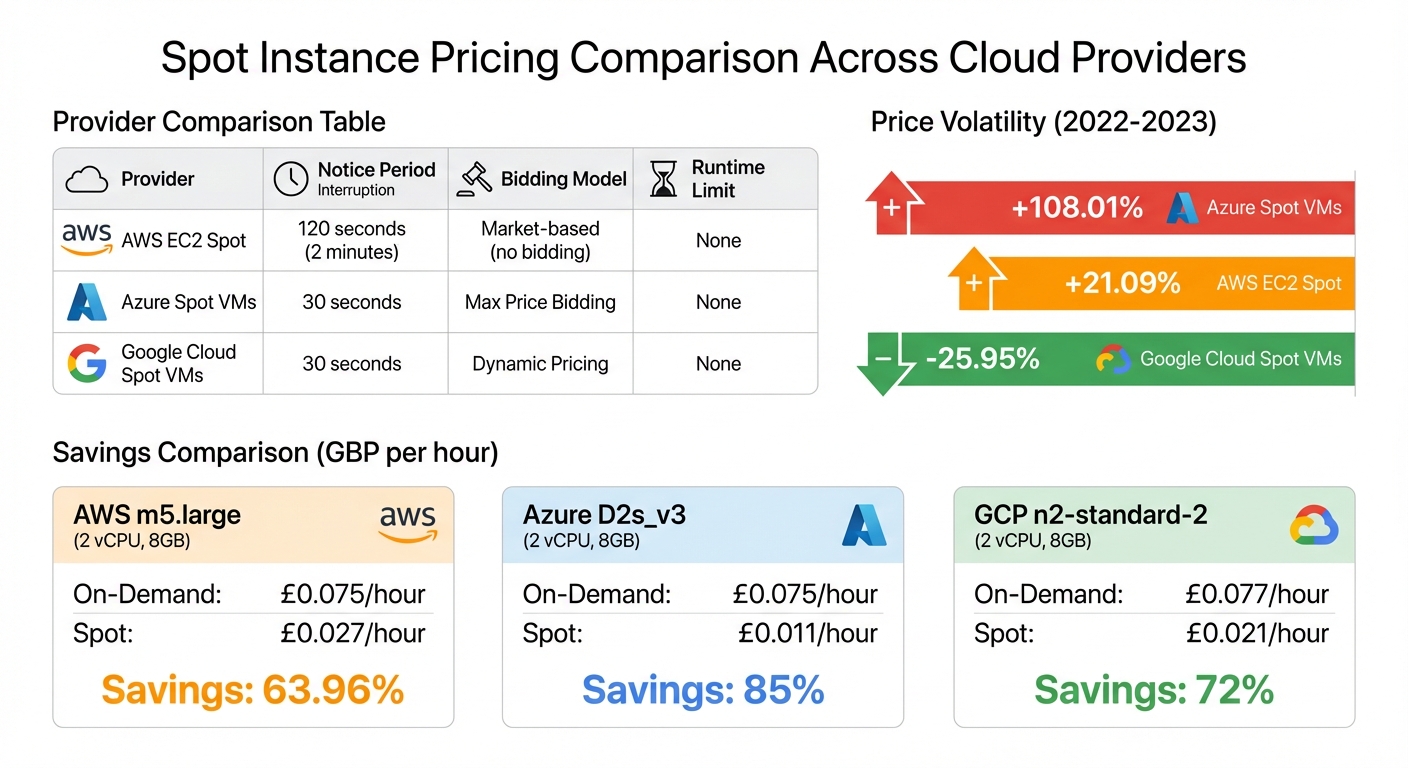 {Cloud Spot Instance Pricing Comparison: AWS vs Azure vs Google Cloud}
:::
{Cloud Spot Instance Pricing Comparison: AWS vs Azure vs Google Cloud}
:::
Spot pricing is all about taking advantage of unused computing power at discounted rates. Cloud providers sell this surplus capacity at lower prices, but they can reclaim it with little notice when demand spikes. Unlike Reserved Instances, which lock you into commitments of one to three years, Spot Instances come with no upfront commitments and generally lack service-level agreements (SLAs).
Each provider approaches Spot pricing differently. AWS employs a market-based model, where you no longer place bids but instead pay the current Spot price, which fluctuates based on supply and demand. Azure uses a max price
bidding system, allowing you to set a cap on what you're willing to pay - up to the On-Demand price or a lower amount. If the Spot price exceeds your cap, your instance gets evicted[13]. Google Cloud, meanwhile, has transitioned from its older Preemptible VMs to Spot VMs, which feature dynamic pricing and no runtime limits[11]. Now, let’s see how these pricing methods compare across major cloud providers.
Comparing Spot Pricing Across Cloud Providers
While the potential savings are comparable across AWS, Azure, and Google Cloud, the differences lie in how interruptions are handled and how prices are set. AWS offers the most generous interruption notice of 120 seconds (two minutes), while Azure and Google Cloud provide only 30 seconds[10]. AWS also gives a rebalance recommendation
signal before the two-minute notice, letting you prepare workloads in advance[4].
| Provider | Notice Period | Bidding Model | Runtime Limit |
|---|---|---|---|
| AWS EC2 Spot | 120 seconds[10] | Market-based (no bidding)[1] | None |
| Azure Spot VMs | 30 seconds[10] | Max Price Bidding[13] | None |
| Google Cloud Spot VMs | 30 seconds[10] | Dynamic Pricing[11] | None |
Spot pricing volatility has been on the rise. Between 2022 and 2023, Azure Spot VM prices surged by 108.01%, while AWS prices increased by 21.09%. In contrast, Google Cloud reduced its Spot prices by 25.95%[11]. For UK businesses, the impact varies by region. For instance, in Azure's uksouth
region, Spot prices jumped by 127.58%, and in germanywestcentral
, they soared by 150.01%[11].
Understanding Interruptions
Interruptions occur when providers reclaim capacity for On-Demand customers, when your bid is exceeded on Azure, or during hardware maintenance[14][15]. If interrupted, you typically have three options: terminate (delete the instance entirely), stop (deallocate the instance but keep attached disks, which may incur storage costs), or hibernate (save the RAM state for quick recovery)[14][15]. Given the short notice periods - especially the 30-second warnings from Azure and Google Cloud - automation is essential. For example, querying the metadata endpoint (169.254.169.254) every second can help you detect interruption signals immediately[14].
To minimise risks, UK businesses can distribute workloads across multiple instance families and Availability Zones. For example, spreading workloads between regions like London (eu-west-2) and Ireland (eu-west-1) can help reduce the impact of regional capacity fluctuations, which often coincide with local business hours[14]. Additionally, AWS's rebalance recommendation signal provides extra time to drain connections and save application states before the two-minute notice arrives[4]. These strategies are essential for balancing cost savings with reliability.
Calculating Savings in GBP
Now, let’s break down the potential savings using GBP. Here's a comparison of common instance types:
| Provider | Instance Type (Specs) | On-Demand Price per Hour | Spot Price per Hour | Savings % |
|---|---|---|---|---|
| AWS | m5.large (2 vCPU, 8GB) | £0.075 | £0.027 | 63.96%[12] |
| Azure | D2s_v3 (2 vCPU, 8GB) | £0.075 | £0.011 | 85%[12] |
| GCP | n2-standard-2 (2 vCPU, 8GB) | £0.077 | £0.021 | 72%[12] |
For larger workloads, consider an AWS m7i.2xlarge instance in the US-East-1 region. Its On-Demand price is £0.32/hour, but Spot pricing drops to £0.047/hour - a discount of 85%[17]. Running this instance for 730 hours would cost ~£233.60 On-Demand but just ~£34.31 on Spot, saving nearly £200 each month.
UK businesses should account for currency conversions, as cloud providers often list prices in USD. Using mid-market exchange rates and avoiding foreign transaction fees (typically around 3%) can help maximise savings[16]. Multi-currency accounts are a practical way to pay cloud bills in USD without incurring hidden conversion costs[16].
Identifying Workloads for Spot Instances
Spot Instances are a great fit for workloads that can handle interruptions. Stateless applications, in particular, are well-suited since they can recover quickly if an instance is terminated [2].
Workload Suitability Checklist
To determine if Spot Instances are right for your tasks, focus on jobs that are flexible and can restart without causing disruption. Examples include CI/CD pipelines, batch processing jobs, and background analytics [2]. Compute-heavy tasks like machine learning training, 3D rendering, and ETL pipelines also thrive on Spot Instances, especially when designed to use checkpointing or multiple replicas to handle interruptions effectively [18]. Development and testing environments are another ideal use case, as they don't typically require high availability [2].
However, some workloads are not a good match. For example, primary databases, real-time systems with low-latency demands, or tightly coupled distributed applications should avoid Spot Instances due to their need for uninterrupted operation [10].
Once you've identified potential workloads, take a closer look at your current usage to ensure they’re suitable for Spot Instances.
Auditing Your Current Cloud Usage
To uncover opportunities for Spot Instances, start by auditing your cloud usage. Use cost and usage reports from your provider to pinpoint services consuming the most compute resources. Tools like AWS Cost Explorer and Trusted Advisor can help identify these areas [7]. Cost allocation tags (e.g., createdBy or environment) are also useful for tracking which applications are driving costs and assessing if they can transition to Spot Instances [2].
If you’re already using managed services like Amazon EMR, ECS, EKS, or AWS Batch, keep in mind that these often come with built-in support for Spot Instances [3]. For better availability, apply the 10-instance rule
, which ensures your workload can run across at least 10 different instance types [3]. Tools such as the AWS Spot Instance Advisor can provide historical interruption rates, while the Spot Placement Score offers near real-time insights into the likelihood of successfully fulfilling a Spot request [3].
After completing your audit, you’ll be in a better position to decide the best mix of Spot and On-Demand Instances for your needs.
Mixing Spot and On-Demand Instances
Once you’ve identified suitable workloads, aim to balance your instance mix. Instead of relying entirely on Spot Instances, combine them with On-Demand Instances. Use On-Demand Instances for critical, stateful components, and reserve Spot Instances for non-critical worker nodes [19]. This approach can result in significant cost savings - clusters using only Spot Instances can save up to 77%, while a balanced mix can still achieve an average cost reduction of 59% [8].
To improve resilience, diversify across at least 10 instance types and all Availability Zones within a region. For example, using four instance types across three Availability Zones creates 12 distinct capacity pools, improving availability [19]. To further optimise, apply the price-capacity-optimised allocation strategy in Auto Scaling groups, which automatically provisions instances from the most available and cost-effective pools [3].
For Kubernetes users, node selectors or taints and tolerations can ensure fault-tolerant pods are assigned to Spot nodes, while stateful pods remain on On-Demand nodes [19]. This division ensures reliability where it’s needed most while keeping costs under control.
Building a Fault-Tolerant Spot Architecture
After identifying suitable workloads and selecting the right mix of instances, the next step is crafting an architecture that can handle interruptions smoothly. The key is to design systems that treat instances as temporary while ensuring the application remains available.
Designing for Resilience
A strong Spot Instance strategy starts with a stateless architecture. By externalising session data and application state to persistent storage solutions like Amazon S3 or DynamoDB, you create a solid foundation for resilience [20]. For tasks that run over longer periods, make sure they regularly save progress to external storage. This way, if an instance is interrupted, replacements can pick up right where they left off [20].
Diversification is another critical factor. By spreading your architecture across six Availability Zones and using four different instance types, you create 24 unique capacity pools. This approach greatly increases your chances of maintaining capacity even during interruptions [19]. The price-capacity-optimised allocation strategy takes this further by automatically selecting instances from pools with the best availability and lowest costs, reducing the likelihood of disruptions [3].
Spot Instances and containers are an excellent combination, because containerised applications are often stateless and instance flexible.
– Chris Foote, Sr. EC2 Spot Specialist Solutions Architect [19]
Once your architecture is resilient, the next focus is on efficiently managing interruptions.
Managing Spot Interruptions
Amazon EC2 provides a two-minute warning before reclaiming a Spot Instance. Additionally, the rebalance recommendation signal offers an earlier alert when an instance is at a higher risk of interruption [3]. You can monitor for these signals through the Instance Metadata Service (IMDS) at http://169.254.169.254/latest/meta-data/spot/instance-action [20].
By following best practices, interruptions can have minimal impact. As Scott Horsfield, Sr. Specialist Solutions Architect for EC2 Spot, explains:
When you follow the best practices, the impact of interruptions is insignificant because interruptions are infrequent and don't affect the availability of your application
[20].
One important tip: avoid immediately switching to On-Demand instances during a Spot interruption. Doing so can unintentionally cause further interruptions for your remaining Spot capacity [3].
To make recovery even smoother, orchestration tools can play a vital role in managing resilience.
Using Orchestration Tools
Orchestration tools simplify the process of managing Spot capacity. EC2 Auto Scaling groups are particularly useful, as they manage overall capacity and replace interrupted instances automatically based on your allocation strategy [3].
In Kubernetes environments, the AWS Node Termination Handler runs as a DaemonSet, monitoring for interruption signals. It ensures that pods are cordoned and drained before an instance is shut down [19]. For Amazon ECS, enabling Spot Instance draining by setting ECS_ENABLE_SPOT_INSTANCE_DRAINING=true in the container agent configuration ensures tasks are gracefully moved before termination [20]. Managed services like AWS Batch, Amazon EMR, ECS, and EKS also come with built-in Spot Instance support to streamline orchestration [3].
When configuring the Kubernetes Cluster Autoscaler, the random
expander is recommended to maximise diversification across Spot pools [19]. For critical components like the Cluster Autoscaler itself, run them on On-Demand instances to maintain stability [19].
Testing your architecture is just as important as building it. Use the AWS Fault Injection Service (FIS) to simulate Spot interruptions and confirm that your architecture can recover automatically without affecting your services [21]. Regular testing ensures that your shutdown mechanisms and automated recovery processes are ready for real-world interruptions.
Measuring and Improving Your Savings
To keep your savings on track and refine your approach, start with a fault-tolerant architecture. A simple way to measure your savings is by using this formula:
(On-Demand Price – Spot Price) / On-Demand Price = % Savings [2].
Since providers like AWS typically display prices in USD, switch your currency to GBP in AWS Billing and Cost Management for more accurate tracking. For UK-based operations, ensure all calculations and analyses are done in GBP.
Tracking Your Cost Reductions
Once you've conducted a cost audit, measure how effectively your strategies are translating into savings. AWS Cost and Usage Reports (CUR) allow you to track savings over time with detailed, resource-level data [2]. The EC2 console provides estimated savings for specific timeframes, like the last hour or the past three days, and also shows average costs per vCPU and memory hour [4]. Beyond total expenditure, analysing cost per unit - such as per customer or software feature - can give you a clearer view of the impact on profit margins [22]. To better organise and monitor your Spot Instance spend, use cost allocation tags like application name
or team
to categorise expenses across different business units [2].
Monitoring Performance Metrics
Cost tracking is just one side of the coin; keeping an eye on performance metrics is equally important. Monitor both your percentage savings compared to On-Demand rates and the frequency of interruptions, which reflects how often Spot capacity is reclaimed [4][6]. The Spot Placement Score (rated 1–10) provides a near real-time estimate of how likely a Spot request will succeed in a specific Region or Availability Zone [3][6]. Ensure your Auto Scaling groups maintain target capacity during interruptions and use Amazon EventBridge to capture rebalance recommendations and interruption notices [3][9]. Tools like the Spot Placement Score Tracker can automate the process, storing placement scores as metrics in Amazon CloudWatch for historical analysis [9].
Refining Your Spot Strategy
With performance metrics in hand, fine-tune your strategy to maximise savings. Diversify your workloads across at least 10 instance types, varying by size, generation, and family [3][9]. Instead of manually choosing instances, use Attribute-Based Selection (ABS) to specify your vCPU and memory requirements, which automatically adds new instance types to your fleet as they become available [3][9]. Opt for the price-capacity-optimised allocation strategy to identify instance pools with the best availability at the lowest prices [3][9]. Including older-generation instances can also improve availability as demand shifts to newer hardware [9]. For workloads with flexible timing, consider running them during off-peak hours or in Regions with lower demand, which can increase Spot availability [9]. Lastly, use the AWS Fault Injection Simulator (FIS) to test your applications' resilience against Spot interruptions, ensuring your architecture can maintain target capacity even during disruptions [9].
For expert advice on optimising your Spot Instance strategy and cutting cloud costs in the UK, check out Hokstad Consulting. They specialise in streamlining cloud infrastructure and reducing hosting expenses.
Conclusion
Spot Instances can deliver incredible savings - up to 90% compared to On-Demand pricing [9]. To make the most of them, you’ll need a strategy that prioritises flexibility and automation. By diversifying across more than 10 instance types, employing price-capacity optimisation, and leveraging Auto Scaling groups, you can ensure your workloads remain resilient even during interruptions [9].
These instances shine brightest when used for flexible, stateless workloads. While they aren’t suitable for everything, they’re perfect for tasks like stateless applications, batch processing, CI/CD pipelines, and containerised environments. Not only do they help manage costs, but they also support improved throughput [5]. For UK businesses, monitoring your savings in GBP and using placement scores can further enhance long-term value.
Finally, if you’re looking to refine your Spot Instance strategy, expert guidance can make all the difference. Hokstad Consulting offers tailored DevOps expertise for AWS, Azure, and Google Cloud. Their services focus on cloud cost engineering, helping businesses slash expenses by 30–50%. Whether you prefer hourly consulting or retainer-based support, their flexible options ensure solutions that align with your needs.
FAQs
What are the advantages of using Spot Instances instead of On-Demand Instances?
Spot Instances provide huge cost reductions, often cutting cloud expenses by as much as 90% compared to On-Demand Instances. They work especially well for fault-tolerant tasks like big data processing, batch jobs, or running containerised applications.
By tapping into unused cloud capacity, Spot Instances allow businesses to save money while also encouraging a more efficient use of resources. They are straightforward to configure, scale, and manage, making them a smart option for organisations aiming to streamline their cloud infrastructure.
How can businesses minimise risks when using Spot Instances?
Spot Instances can help businesses save big on costs, but they do come with the risk of interruptions. To keep things running smoothly, it’s crucial to build workloads that are fault-tolerant. One way to do this is by leveraging tools like Auto Scaling groups or Spot Fleets with capacity-optimised allocation strategies. These tools ensure that if a Spot Instance is interrupted, a replacement is automatically deployed - whether in a different Availability Zone or using another instance type. Spreading workloads across various instance families and zones can further reduce the chances of widespread disruptions.
When interruptions happen, workloads need to handle them without a hitch. This can be done by saving progress to persistent storage solutions like Amazon S3, EBS, or DynamoDB. Other strategies include using hibernation or stop behaviours, or breaking tasks into smaller, independent jobs that can be easily re-queued. These approaches protect critical data and allow workloads to pick up right where they left off on new instances.
Hokstad Consulting specialises in helping UK businesses implement these strategies. Whether it’s configuring Auto Scaling, setting up multi-type Spot Fleets, or designing automated storage pipelines, they ensure businesses achieve up to 90% in cost savings - all while maintaining performance and compliance.
What types of workloads are ideal for Spot Instances?
Spot Instances are a smart option for workloads that are stateless, fault-tolerant, and can easily adjust to changes. These workloads might include big data processing, analytics, containerised applications, CI/CD pipelines, web servers, high-performance computing (HPC), rendering, machine learning, and software testing or development.
Because they are budget-friendly, Spot Instances are especially useful for tasks that can handle interruptions or adjust to varying resource availability, offering businesses a way to cut down on cloud costs significantly.