
If your team runs a lot of CI, the cheapest runner on paper can end up costing more overall. I’d judge shared and dedicated runners on four things: monthly spend, queue delays, engineer time lost waiting, and upkeep work.
Here’s the short version:
- Shared runners are often the best starting point for small teams with uneven usage.
- Dedicated runners start to make more sense when builds are long, usage is steady, or isolation matters.
- Queue time can cost more than runner minutes. The article notes median waits above 153 seconds on shared pools, with some waits above 22 minutes.
- A hybrid setup is often the best middle ground: shared for small checks, dedicated for deploys, long tests, and sensitive jobs.
If I were making the call, I’d keep it simple:
- Use shared runners for linting, unit tests, and low-risk pull request checks.
- Use dedicated runners for release pipelines, integration tests, large builds, and jobs that use secrets.
- Track where time is lost: billed minutes, queue time, failed jobs, and team hours spent waiting.
GitLab Runners Explained: Architecture, Scaling & Best Practices
Quick Comparison
| Area | Shared runners | Dedicated runners |
|---|---|---|
| Cost model | Pay for usage after included minutes | Pay for reserved capacity or your own cloud compute |
| Best for | Small teams, uneven demand, low setup effort | High CI volume, steady demand, stricter isolation |
| Queue risk | Higher | Lower if sized well |
| Team upkeep | Low | Higher |
| Security isolation | Multi-tenant | Single-team or single-org |
| Good fit for | Short, non-sensitive jobs | Long, heavy, or sensitive jobs |
The main point: I wouldn’t pick runners by minute price alone. I’d pick the setup that cuts total delivery cost without slowing the team down.
Shared runners: lower upfront cost, less control
Shared runners are often the cheapest place for smaller teams to start. The provider owns the machines, handles the software, and charges you only for the minutes you use.
How shared runner pricing works
Billing usually comes in two parts: included minutes, then overage.
On GitLab, the free tier includes 400 compute minutes per month, the Premium plan costs around £21.75 per user per month and includes 10,000 minutes, and Ultimate includes 50,000 minutes [4]. Overage costs $10 per 1,000 minutes, which works out at about $0.01 per minute [4]. GitHub Actions charges $0.006 per minute for Linux runners, $0.010 per minute for Windows runners, and $0.062 per minute for macOS runners once the included minutes run out [2][3].
For UK finance teams, it helps to think of this like a utility bill. You have a base subscription, then a variable charge linked to usage. If pipelines get longer or run more often during release periods, that variable spend can climb fast even when the subscription tier stays the same.
Where shared runners save money
The main saving is simple: you avoid paying for idle machines. If nothing is running, you’re not carrying spare infrastructure cost while servers sit around doing nothing.
You also avoid the salary cost and overhead tied to running a CI fleet yourself. There’s no separate line item for patching, capacity planning, or on-call cover either.
This model tends to suit teams with spiky workloads best. If usage stays light for most of the month and then ramps up before a release, pay-as-you-go can work well. You pay more during the busy spells instead of carrying fixed costs all year.
Hidden costs in shared environments
The downside is control. And that cost often shows up in developer time, not on the invoice.
Shared runners work in a multi-tenant setup, so your jobs can end up waiting behind other customers’ workloads during busy periods. GitLab’s own SLO aims for 90% of jobs to start within 120 seconds [5], which tells you queue time is a normal part of managed fleets.
That’s where the maths gets a bit less tidy. Shared runners can keep direct spend low, but indirect cost rises when queues get longer. Slow pipelines mean slower feedback. Developers wait longer to merge, lose focus while switching between tasks, and may bundle larger changes together just to avoid repeated slow CI runs. That can push risk up at the same time as throughput drops.
| Cost factor | Shared runners |
|---|---|
| Billed minutes | Included monthly allowance + overage at $10 per 1,000 minutes |
| Queue time exposure | High; driven by multi-tenant demand and limited control |
| Maintenance responsibility | Provider-managed |
| Security isolation | Multi-tenant; avoid for sensitive workloads [6][7] |
| Typical fit | Early-stage startups, small SaaS teams, spiky workloads |
The low entry price starts to lose its edge once queueing and usage swings begin to slow delivery. At that point, the conversation usually moves from “Are the minutes cheap?” to “Would fixed capacity cost less overall?”
Dedicated runners: higher fixed cost, better isolation
When shared runners start dragging, getting noisy, or feeling a bit risky, dedicated runners offer a different trade-off: more fixed cost, more control.
Dedicated runners are isolated compute resources - VMs, bare metal, or containers - that are used only by your team or your pipelines. You can run them yourself in your own cloud account, or pay for a managed service that still gives you isolated capacity.
What drives dedicated runner cost
The biggest cost is usually compute. In a UK cloud region, a general-purpose VM often costs about £0.08 to £0.25 per hour, depending on the instance size and whether you use reserved pricing.[8] On top of that, you’re paying for storage, networking, and the work involved in running the fleet.
The part people often miss is engineer time. Someone has to maintain base images, patch the OS, rotate secrets, tune auto-scaling, and keep build tools up to date. Then there’s the day-to-day work around metrics, logs, alerting, and general fleet upkeep.[11]
| Cost factor | Dedicated runners |
|---|---|
| Infrastructure (compute, storage, network) | Reserved VMs or servers; higher baseline spend, lower marginal cost per minute at high utilisation |
| Ops effort | Internal team manages scaling, patching and observability; adds engineer time but enables full control |
| Queue control | No contention with other customers |
| Isolation | Only your pipelines run on the node; stronger security posture and predictable performance |
| Suitability for high-volume workloads | More cost-effective than shared runners once utilisation passes a consistent threshold |
Why dedicated runners can cost less at scale
This is where the maths changes. If your CI usage is high, steady, and time-sensitive, a small pool of dedicated runners can end up costing less than per-minute shared billing.[9][11]
The break-even point usually shows up when that dedicated capacity stays busy for most of the day. Long-running test suites push you there faster. Think end-to-end tests or performance tests. Shared billing charges by the minute, so heavy jobs can get expensive fast, while dedicated runners handle that kind of sustained load more efficiently.[8][11]
Security and noisy neighbour advantages
Because no other tenant’s code runs on your machines, dedicated runners give you a stronger security baseline. You control the OS image, network placement, firewall rules, and how secrets get injected - for example, through a cloud key management service. You can also place runners in private subnets so they can reach internal package registries or databases without putting those systems on the public internet.[10][12]
They also deal with the noisy neighbour problem. If another customer on shared infrastructure burns CPU, memory, or I/O, your builds can slow down. With dedicated runners, that issue mostly goes away. Build times are more consistent, which means fewer random timeouts and fewer out-of-memory failures. For regulated organisations, that level of control may not just be nice to have - it can be required for compliance.[10][12]
That’s why dedicated runners tend to make sense when total delivery cost matters more than the monthly CI bill alone.
Shared vs dedicated runners: direct and indirect costs compared
The monthly CI bill is only one part of the picture. The bigger cost often sits in the background: queue delays, rework, and the time your team spends keeping things running. Those costs are easy to miss because they do not show up as one neat line on an invoice.
This is where the gap between shared and dedicated runners starts to matter. If you only look at platform spend, shared runners can seem like the cheap option. If you look at total cost, the answer is often less simple.
| Cost area | Shared runners | Dedicated runners | Likely business impact |
|---|---|---|---|
| Direct spend | Variable; usage-based after included minutes | Fixed; reserved capacity or runner pool | Shared is cheaper at low volume; dedicated is more predictable at scale |
| Queue time | Can rise sharply at peak; jobs wait in a shared queue | Little or no contention; capacity is yours alone | Long queues slow feedback and delay releases |
| Developer time lost | High during busy periods; compounds across the team | Significantly reduced with adequately sized runners | Waiting time is a hidden productivity cost |
| Maintenance overhead | Provider-managed; minimal internal effort | Internal team handles patching, scaling, monitoring | Dedicated adds DevOps time; shared removes it |
Direct platform spend
Shared runners keep costs variable because minute-based billing goes up as usage climbs. That works well when build volume is low or uneven.
Dedicated runners flip that model. You pay a fixed cost for reserved capacity or a runner pool, which makes budgeting steadier. The trade-off is simple: if utilisation is low, you can end up paying for idle capacity.
Developer time lost to queueing
Queue time is a hidden labour cost. Every minute a job sits waiting is paid engineering time that is not moving work forward.
Shared runners can become painful during busy periods, especially when demand spikes and jobs stack up in a common queue. That delay slows feedback, breaks focus, and can lead to extra rework when issues are found later than they should be.
Dedicated runners cut that queue-driven lag by giving your team capacity that is yours alone. In practice, that usually means faster feedback, fewer context switches, and less time wasted waiting around for CI to catch up.
Operational overhead and support burden
Shared runners remove most of the hands-on ops work. The provider deals with the underlying setup, so internal effort stays low.
Dedicated runners ask more from your team. Patching, scaling, monitoring, and incident response all land on internal shoulders. That may be fine for teams with strong DevOps support, but it is still time and effort that need to be counted as part of the cost.
Which model comes out ahead depends on team size, release frequency, and how much operational load your team is willing to carry.
Shared vs dedicated runners: cost comparison by business type
::: @figure 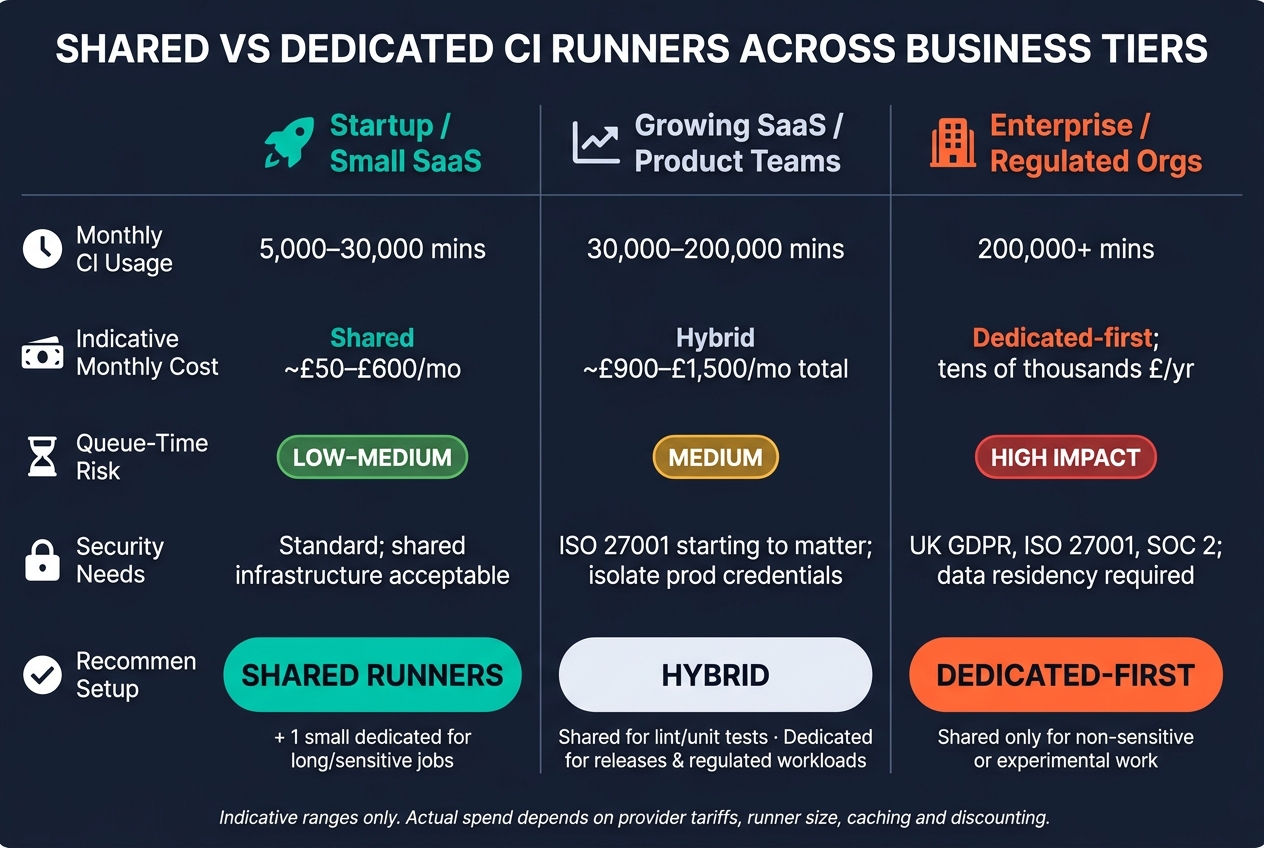 {Shared vs Dedicated CI Runners: Total Cost Comparison by Business Type}
:::
{Shared vs Dedicated CI Runners: Total Cost Comparison by Business Type}
:::
Runner choice shifts with scale, compliance demands and how much ops work your team can take on. The break-even point isn’t fixed either. It moves with team size, workload mix and how strict your compliance needs are.
| Business type | Monthly CI usage | Indicative cost | Queue-time risk | Security needs | Recommended setup |
|---|---|---|---|---|---|
| Startup / Small SaaS | 5,000–30,000 mins | Shared: ~£50–£600/mo; Dedicated baseline: ~£80–£250/mo [11][1][14] | Low to medium; occasional slowdowns tolerable | Standard; managed shared infrastructure usually acceptable | Primarily shared runners; one small dedicated runner for sensitive or long-running jobs if needed |
| Growing SaaS / Product teams | 30,000–200,000 mins | Hybrid: shared for quick checks; dedicated pool ~£300–£1,500/mo [11] | Medium; shared queues can bottleneck during business hours on critical paths | Growing need to isolate production credentials and customer data; some industry standards, such as ISO 27001, start to matter | Hybrid: shared for linting and unit tests; dedicated for main branch, release pipelines and regulated workloads |
| Larger enterprises / Regulated orgs | 200,000+ mins | Dedicated-first: tens of thousands of pounds a year, but lower effective cost per minute at scale [11][13] | High business impact if pipelines slow; variable shared performance unacceptable | Strong: data residency, network isolation and audit trails for UK GDPR, ISO 27001 and SOC 2 | Primarily dedicated runners (self-hosted or private cloud); shared runners only for non-sensitive or experimental work |
Indicative ranges only: actual spend depends on provider tariffs, runner size, caching and any discounting. [11][1][13][14]
Startups and small SaaS teams
For most early-stage teams, shared runners are the sensible place to start. A 6–8 person engineering team running 10–15 pipelines a day will usually land near the lower end of the £50–£600 monthly shared-runner range. [11][1][14]
There is still a case for one dedicated runner, but it’s a narrow one. If your team often runs long jobs, like nightly integration tests or large Docker builds, a single small dedicated instance at £80–£250 a month can make those jobs far more predictable without changing your total spend much. [11][1][14]
The same applies when an early customer in finance or healthcare asks for build isolation. In that case, a small self-hosted runner inside your own VPC or private network can deal with the requirement without forcing a full infrastructure rebuild. [11]
When long-running jobs stop being the exception and start becoming normal, a hybrid setup begins to make more sense.
Growing SaaS firms and product teams
For growing teams, a hybrid model is often the most practical option. The idea is simple: split work by weight and by how much it matters. Light checks like linting, fast unit tests and PR checks can stay on shared runners, where elastic capacity matters more than raw speed. Heavy builds, full regression suites and anything that touches production credentials can move to a dedicated pool.
A team using around 80,000 minutes a month might cut shared spend to roughly £400–£600 a month, then add a dedicated pool at about £500–£900 a month. That can leave total direct cost in a similar range, or a bit higher, while giving much faster feedback on the pipelines that matter most. [11]
At this stage, teams usually care less about the minute-by-minute price and more about steady performance and cleaner isolation.
Larger enterprises and regulated organisations
At enterprise scale, compliance often settles the issue before cost does. Rules around data residency, network isolation and audit trails, driven by frameworks such as UK GDPR, ISO 27001 and SOC 2, often rule out shared multi-tenant runners for sensitive workloads. [11][13]
Large organisations also get a clear upside from splitting runner pools by team or by workload criticality. That reduces cross-team contention and gives delivery teams more predictable capacity, instead of forcing everyone to compete in the same shared queue. [11]
When to combine both runner types
When queue time, sensitivity, or build length starts slowing things down, it usually makes sense to split the workload instead of pushing every job onto one runner type. Use shared runners for lower-risk work, and keep dedicated runners for jobs where queue time, isolation, or throughput matters more.
Workloads that fit shared runners
Shared runners are a good match for short, low-risk, non-sensitive jobs. That includes linting, formatting checks, schema validation, quick unit tests, and static analysis that does not need secrets.
These jobs are short, easy to parallelise, and simple to rerun. That helps keep direct platform spend low, with very little to manage beyond the pipeline itself.
A simple way to decide: look at the job’s runtime, sensitivity, and resource use.
Workloads that fit dedicated runners
Dedicated runners make more sense for jobs that run for a long time, need a lot of resources, require elevated access, or fall under compliance rules. Integration and end-to-end tests that spin up multiple services, performance and load tests, large monorepo builds, container image builds, infrastructure-as-code deployments, and production release jobs all sit in this group.
For these workloads, shared runners often become the weak point. You can run into queueing, noisy-neighbour issues, and weaker isolation. In one published comparison, shared runners took around 40× longer for deployment jobs in that environment [15].
How to phase a hybrid rollout
The simplest path is to begin with shared runners, then shift only the jobs where the pain is most obvious.
- Start on shared runners. Make sure pipelines are reproducible and instrumented in a consistent way.
- Move only the slow, sensitive, or heavy jobs. Pick the three to five jobs with the biggest upside. That usually means jobs with long durations, regular timeouts, or high sensitivity, such as production deploys or jobs that use secrets.
- Tag those jobs and scale down idle dedicated capacity. Use runner tags such as
dedicated-releaseordedicated-integrationso jobs land in the right place. Keep base images unchanged at first, so the only thing changing is the execution environment. Roll out one repository at a time. Once the dedicated pool is stable, review autoscaling rules so capacity can scale down outside business hours and you do not pay for idle machines.
| Pipeline stage | Shared | Dedicated | Hybrid |
|---|---|---|---|
| Linting / formatting | Best fit | Usually unnecessary | Shared for PR checks |
| Unit tests | Best fit | If long-running or performance-sensitive | Shared for routine checks; dedicated for heavy suites |
| Integration tests | If short and non-sensitive | Best fit for multi-service or database-dependent tests | Very common split |
| Security scans | Low-risk scanners | If scans touch protected artefacts or secrets | Light scan on shared; deep scan on dedicated |
| Container / packaging builds | Simple builds | Best fit for large or dependency-heavy builds | Split by build complexity |
| Staging / production deploys | Poor fit | Best fit | Typically dedicated |
That split helps keep delivery fast without paying for dedicated capacity on every single job.
Conclusion: Picking the lowest-cost model without slowing delivery
Judge runners by total delivery cost, not CI spend alone. So the real question isn't Which is cheaper?
It's Which lowers total delivery cost for this workload?
across spend, time and overhead.
That matters because a small monthly saving can vanish fast when developers are stuck waiting on slow builds.
Key takeaways for decision-makers
Use these four checks to make the call:
- Compare CI spend with developer waiting time and turn queueing into labour cost.
- Add maintenance overhead for provisioning, patching, monitoring and support.
- Move only critical, sensitive or slow jobs to dedicated runners.
- Start with shared runners, measure queue time, then move only the jobs that clearly benefit from dedicated capacity.
For teams reviewing their CI setup, this is often where an external review helps. Hokstad Consulting helps teams review pipeline cost, runner strategy and delivery automation.
FAQs
When should we switch from shared to dedicated runners?
Consider switching when you need tight security, regulatory compliance, full control over data residency, or support for sensitive data, specialised hardware, or legacy systems.
Dedicated runners can also help you avoid noisy neighbour issues. They may cost less at higher volumes, often once you’re above 1,000 jobs a month, if your team has the in-house expertise to run the infrastructure.
How do we calculate the real cost of CI delays?
Look past the monthly cloud invoice and work out the total cost of ownership.
Start with lost developer time. Take the number of developers, then multiply it by their average daily wait time and hourly rate. That gives you a much clearer picture of what slow pipelines are costing day to day.
Then factor in the less obvious costs too:
- delayed feature releases
- wasted compute from job re-runs
- any revenue loss tied to downtime caused by pipeline failures
This is where the numbers can stack up fast. A cloud bill might look fine on the surface, but once you add time loss, rework, and missed revenue, the actual cost can be far higher.
What jobs should stay on shared runners?
Shared runners work best for stateless jobs that don’t need sensitive internal data or special hardware. They’re a good fit for general builds, parallel test suites, and other tasks that are easy to restart if something fails.
They’re not the right choice for jobs that handle proprietary secrets, internal databases, or compliance-sensitive data that needs strict isolation. That keeps costs under control and leaves dedicated runners free for work that needs tighter security or stronger performance.