
In modern microservice setups, securing communication between services is critical. Kubernetes, by default, allows unrestricted pod-to-pod communication, which can lead to risks like data breaches or unauthorised access. Service mesh authentication addresses these issues by shifting security from IP-based rules to identity-based measures, with Mutual TLS (mTLS) at its core.
mTLS ensures that both the client and server validate digital certificates before communication, preventing unauthorised access and encrypting traffic. Service meshes like Istio, Linkerd, or Consul automate this process through sidecar proxies and control planes acting as Certificate Authorities. However, mTLS alone isn't enough - it must be paired with strict authorisation policies, encrypted traffic, and continuous monitoring.
Key steps to secure your service mesh include:
- Default-Deny Policies: Block all traffic by default and allow only necessary connections.
- Strict mTLS: Encrypt all traffic and enforce certificate verification.
- Authorisation Rules: Define explicit policies to control access based on identity, paths, and methods.
- Secure Egress Traffic: Restrict outbound traffic to approved destinations via egress gateways.
- Continuous Monitoring: Track logs, metrics, and unauthorised traffic attempts to maintain security.
::: @figure 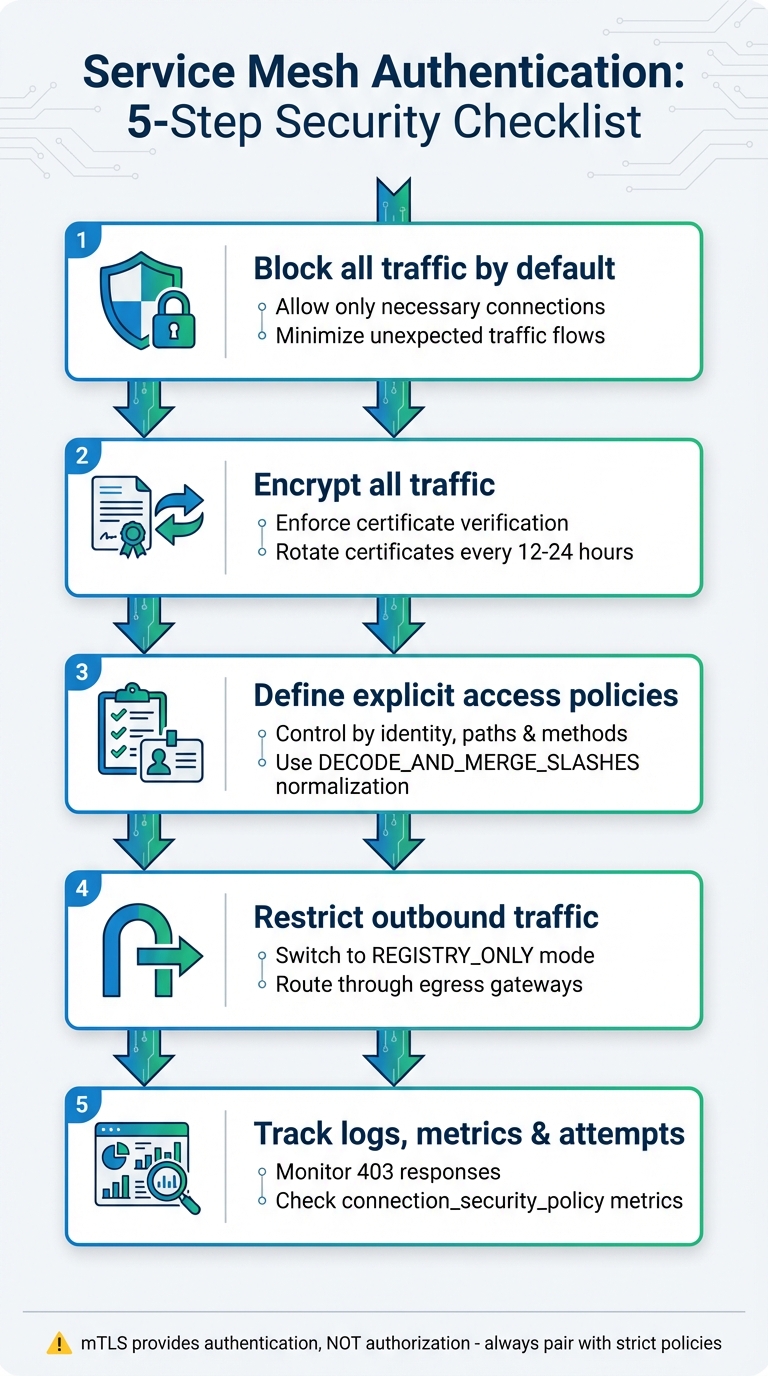 {Service Mesh Authentication Security Checklist: 5 Essential Steps}
:::
{Service Mesh Authentication Security Checklist: 5 Essential Steps}
:::
Istio Security: mTLS and Authorization Policies Explained | Kubernetes Service Mesh Tutorial
Need help optimizing your cloud costs?
Get expert advice on how to reduce your cloud expenses without sacrificing performance.
Prerequisites for Secure Authentication
Building a secure service mesh starts with establishing robust controls to protect both data traffic and the underlying infrastructure. Before diving into mutual TLS (mTLS), it's essential to implement measures that prevent unauthorised access and tampering.
Enable Default Deny Policies
Begin by setting up default-deny policies, only allowing specific connections that are explicitly required. This approach minimises the risk of unexpected traffic flows caused by missing configurations, which could lead to security incidents [4].
The exact implementation depends on the service mesh platform you're using:
- Istio: Create an
AuthorizationPolicywith an empty spec in theistio-systemnamespace to enforce a mesh-wide deny policy [4][5]. - Linkerd: Use the annotation
config.linkerd.io/default-inbound-policy: denyon pods or workloads [6]. - Consul: Update the agent configuration by setting
default_policy = "deny"[7].
To avoid accidental service disruptions, test your configurations using dry-run or audit modes. Define positive matches for specific paths to prevent bypasses caused by path normalisation issues [4]. Additionally, enable namespace isolation to restrict service communication to its own namespace unless explicitly allowed for cross-namespace traffic [3].
Once access is tightly controlled, the next step is to secure communication channels.
Secure Communication Channels
Encrypt all TCP and UDP traffic, enforce strict certificate verification (verify_incoming and verify_outgoing), and start with permissive mTLS mode. Transition to strict mTLS once all services are configured to encrypt their traffic [8][9][10]. Nawaz Dhandala from OneUptime explains:
Strict mode means all traffic between mesh services must be encrypted with mutual TLS. If a service tries to send plaintext, it gets rejected[10].
To further strengthen security:
- Apply strict URI normalisation (
DECODE_AND_MERGE_SLASHES). - Set the minimum TLS version to 1.2 or 1.3.
- Disable outdated cryptographic suites.
- Restrict service listeners to bind only to the loopback address (127.0.0.1), ensuring all traffic routes through the sidecar proxy [1][2][4][8][9].
Protect Sensitive Files
Once traffic is encrypted, focus on safeguarding the files and certificates that support these processes.
- Use operating system access controls to secure configuration and data directories.
- Leverage external secret management tools like HashiCorp Vault or managed hardware security modules (HSMs) for key management.
- Encrypt sensitive files with AES-256-GCM.
- Bind administrative interfaces to the loopback address.
- Opt for minimal Docker images to reduce potential attack vectors [9].
These measures collectively create a strong foundation for secure authentication within your service mesh.
Core Authentication Checklist
To ensure secure service-to-service communication, it's crucial to implement these core authentication measures, building on a solid foundation of prerequisites.
Mandate Mutual TLS (mTLS) Everywhere
Start by setting up a trusted Certificate Authority (CA) to issue SPIFFE-based cryptographic identities (X.509 certificates) to all services. Istio adopts the SPIFFE identity format, structured as spiffe://<trust-domain>/ns/<namespace>/sa/<service-account> [11]. For mTLS to work effectively, inject sidecar proxies (e.g., Envoy) into every workload, as these proxies handle the encryption and handshake processes on both ends.
When deploying mTLS, begin in PERMISSIVE mode, which supports both plaintext and mTLS traffic. Once all services are verified, switch to STRICT mode either across the mesh or per namespace to block plaintext traffic. Use DestinationRules to configure client sidecars to prefer or enforce mTLS when communicating with other services. Keep an eye on proxy metrics, specifically for connection_security_policy="none", to identify any services still using plaintext before enforcing strict mode.
Automate certificate management - issuance, renewal, and revocation - using short-lived certificates, typically rotated every 12–24 hours. For environments requiring heightened security, store CA private keys in hardware security modules (HSMs) or secure vaults like HashiCorp Vault.
Assign each workload a unique Kubernetes ServiceAccount instead of relying on the default account. This approach ensures individual identities for mTLS certificates and allows for more granular authorisation. However, it’s important to note:
mTLS provides only authentication, not authorization. This means that anyone with a valid certificate can still access a service[4].
To address this limitation, pair mTLS with robust authorisation policies to control which authenticated identities can access specific resources.
Enforce Intentions and Authorisation Policies
Adopt a deny-all
policy at the mesh or namespace level to enforce a zero-trust model [12][4][9]. Istio processes policies in a specific order: CUSTOM (external authorisation) > DENY > ALLOW. If any ALLOW rule exists for a workload, all other requests are denied unless they explicitly match the rule [12].
Set up detailed rules to restrict access based on HTTP methods (e.g., GET, POST), URL paths (e.g., /api/v1/*), and ports [12][10]. Configure proxies to normalise URIs before evaluation, which helps prevent attackers from bypassing path-based rules. In Istio, enable pathNormalization with the setting DECODE_AND_MERGE_SLASHES for maximum protection. This ensures that percent-encoded slashes (like %2F) are decoded and merged, preventing manipulation attempts such as interpreting /a%2fb differently from /a/b.
Use ALLOW-with-positive-matching
policies by explicitly listing permitted paths, as this approach reduces the risk of accidentally allowing unintended patterns [4]. When defining host-based policies, use prefix matches (e.g., example.com:*) to cover all potential port variations generated by the mesh [4]. Regularly monitor telemetry for response.code == 403 to identify and resolve legitimate traffic being blocked by new policies [10][1].
Once strict authorisation rules are in place, focus on controlling outbound traffic to secure your mesh further.
Secure Egress Traffic
Switch your mesh configuration from ALLOW_ANY to REGISTRY_ONLY to block all outbound traffic that isn’t explicitly defined in the service registry [13][14]. Adjust this setting using meshConfig.outboundTrafficPolicy.mode=REGISTRY_ONLY via istioctl or Helm [14].
Create ServiceEntry resources to whitelist specific external hosts, ports, and protocols required by your applications. Route all outbound traffic through a dedicated egress gateway, providing a centralised control point for monitoring, auditing, and enforcing policies [13][14]. At the egress gateway, apply AuthorizationPolicy rules to restrict external access based on the source workload's identity (e.g., Service Account) or namespace [13][14].
Use the Sidecar resource to define the egress section for each namespace. This approach reduces proxy memory usage and limits the potential for lateral movement by attackers [13][15]. With ServiceEntry resources, use the exportTo attribute to ensure that external services are only visible and accessible to the namespaces that need them [14][15]. Strengthen service mesh policies with Kubernetes Network Policies and VPC firewall rules to prevent workloads from bypassing the sidecar proxy to access the internet directly [13][4].
To prevent man-in-the-middle attacks, specify caCertificates, subjectAltNames, and sni in the DestinationRule [4]. Deploy egress gateways on dedicated nodes with taints to prevent general application workloads from sharing the same infrastructure, reducing the risk of bypassing controls [13].
Monitoring and Policy Enforcement
Continuous monitoring ensures authentication rules are upheld and helps detect any attempts to bypass controls.
Enforce Logging and Auditing
Set up access logs (accessLogFile: /dev/stdout) to record every request passing through your service mesh [17]. This provides a clear view of all activity. Use telemetry resources to focus specifically on logging unauthorised or forbidden responses, as well as failed connections that don't use mTLS [10].
Use the AuthorizationPolicy with AUDIT mode to track access patterns. This helps capture critical operations for later forensic analysis [16]. For more detailed investigations, filters like EnvoyFilter can include extra metadata such as request methods, original paths, and response codes in your logs [17].
Run istioctl analyze regularly to identify any misconfigurations [10]. Keep an eye on metrics like pilot_total_xds_rejects and connection_security_policy to detect plaintext traffic or other issues [4][10]. To ensure your audit and authorisation rules are working as intended, enable RBAC debug logging in Envoy by running pilot-agent POST 'logging?rbac=debug' [16].
Make sure your logging setup captures both proxy and non-proxy traffic to ensure comprehensive network activity monitoring.
Monitor Non-Proxy Traffic
Since authorisation policies only apply to pods with sidecar proxies, it's essential to identify pods that lack the istio-proxy container. Use the following command to find such pods:
kubectl get pods -A -o custom-columns=NAMESPACE:.metadata.namespace,NAME:.metadata.name,CONTAINERS:.spec.containers[*].name | grep -v istio-proxy.
Additionally, audit namespace labels (e.g., istio-injection=enabled) to confirm that automatic proxy injection is configured correctly.
To monitor traffic going to unregistered or unauthorised destinations, query Prometheus for workloads interacting with the BlackHoleCluster:
sum(rate(istio_requests_total{destination_service="BlackHoleCluster"}[5m])) by (source_workload, source_workload_namespace).
Traffic metrics associated with the PassthroughCluster can also indicate potential policy bypasses. As a backup measure, use Kubernetes Network Policies to block or log traffic attempting to bypass service mesh proxies at Layer 3/4. This aligns with HashiCorp Consul's principle:
A failure of intentions due to misconfiguration always results in denied traffic, rather than unwanted allowed traffic[9].
Conclusion and Key Takeaways
Securing authentication within a service mesh demands a layered approach. Mutual TLS (mTLS) serves as the backbone, offering cryptographic identity and encryption for all service-to-service communication. However, as Istio's documentation points out:
mTLS alone is not always enough to fully secure traffic... it provides only authentication, not authorization. This means that anyone with a valid certificate can still access a service[4].
To strengthen this foundation, pair mTLS with strict default-deny authorisation policies, allowing only the necessary communication paths.
Once the basics are in place, turn your attention to operational security. Key actions include transitioning quickly from permissive to strict mTLS, enforcing short-lived certificate rotations (ideally every 12–24 hours), and securing egress traffic by implementing a REGISTRY_ONLY outbound policy. This prevents compromised pods from communicating with unauthorised external endpoints [4][1].
Another critical step is applying strict URI normalisation, such as DECODE_AND_MERGE_SLASHES, to block potential bypass attempts [4][9].
To ensure these configurations are effective, continuous monitoring is essential. Combine Layer 7 service mesh policies with Layer 3/4 Kubernetes Network Policies for a layered defence. Keep an eye on core metrics like latency, traffic patterns, error rates, and the success of mTLS handshakes to maintain both security and performance. Regularly running tools like istioctl analyze can help identify misconfigurations before they impact production environments [10].
For organisations operating in regulated industries, additional steps may be required. For example, ensure your data plane relies on FIPS 140-2 validated encryption modules to meet compliance standards [1][2].
If you’re seeking tailored solutions to enhance security or optimise your cloud infrastructure, Hokstad Consulting offers expertise in DevOps transformation and strategic cloud services designed to meet your specific needs.
FAQs
What’s the quickest way to move from permissive to strict mTLS without outages?
To shift from permissive to strict mTLS effectively, Istio's PERMISSIVE mode can be your starting point. This mode supports both HTTP and mutual TLS traffic, allowing legacy clients to continue functioning without issues. Once you've confirmed that all services are ready for mutual TLS, you can progressively implement strict mTLS policies. It's crucial to monitor traffic during this process to ensure everything runs smoothly. Only after verifying a successful migration should you fully enforce strict mode. This step-by-step strategy helps reduce potential disruptions.
How can I stop pods from bypassing the sidecar to access the internet directly?
To ensure pods don't bypass the sidecar, don't just depend on outbound traffic policies. Instead, implement strict ingress and egress controls using Kubernetes NetworkPolicies or compatible CNI plugins. Set up the service mesh to enforce strict mutual TLS (mTLS) and robust authorisation policies. Additionally, make sure that sidecars are configured as the sole egress points. Regularly audit your configurations and actively monitor traffic to identify and address any bypass attempts.
Which metrics and logs best prove mTLS and authorisation are enforced?
Key signs to look for include audit logs that highlight authorisation policy denials, traffic logs that confirm mutual TLS (mTLS) encryption is in place, and compliance reports that verify policy enforcement. Together, these logs and reports provide clear evidence that authentication and authorisation measures are functioning as intended.