
If your batch or background cloud jobs can stop and retry, you may cut compute spend by 40–70%, and in some cases up to 90% compared with on-demand rates.
I’d boil it down like this: use serverless services for control, use Spot for the heavy compute, and only do it for workloads that can survive interruption. For a team spending £10,000 a month, that can mean costs falling to about £3,000–£6,000 when the workload fits.
Before I’d green-light this approach, I’d check four things:
- The workload can retry safely without breaking data or creating duplicates
- Progress is saved to S3, DynamoDB, or another managed store
- Work is queue- or event-driven, such as ETL, CI/CD, media processing, ML training, or some stream consumers
- There is fallback capacity for jobs that cannot wait when Spot disappears
Here are the workload types covered in the article:
- Batch ETL and scheduled jobs: often one of the best places to start
- Media processing: such as transcoding and image pipelines
- CI/CD runners: good for test-heavy pipelines, less so for time-sensitive stages
- ML training: works when checkpointing is built in
- Event stream consumers: can fit at higher throughput, but only for paths that can pause
Quick comparison
| Workload | Typical savings | Can it handle interruption? | Good first pilot? |
|---|---|---|---|
| Batch ETL / scheduled jobs | 50–60% | High | Yes |
| Media processing | 50–70% | High | Yes |
| CI/CD runners | 30–50% | Medium | Yes, for non-critical jobs |
| ML training | 50–70% | Medium–High | Maybe, if checkpointing exists |
| Stream consumers | 20–40% | Low–Medium | Usually later |
The short version is simple: start with batch, media, or CI/CD work, keep state out of the instance, spread capacity across zones and instance types, and model savings in £ per month rather than relying on headline discount claims.
::: @figure 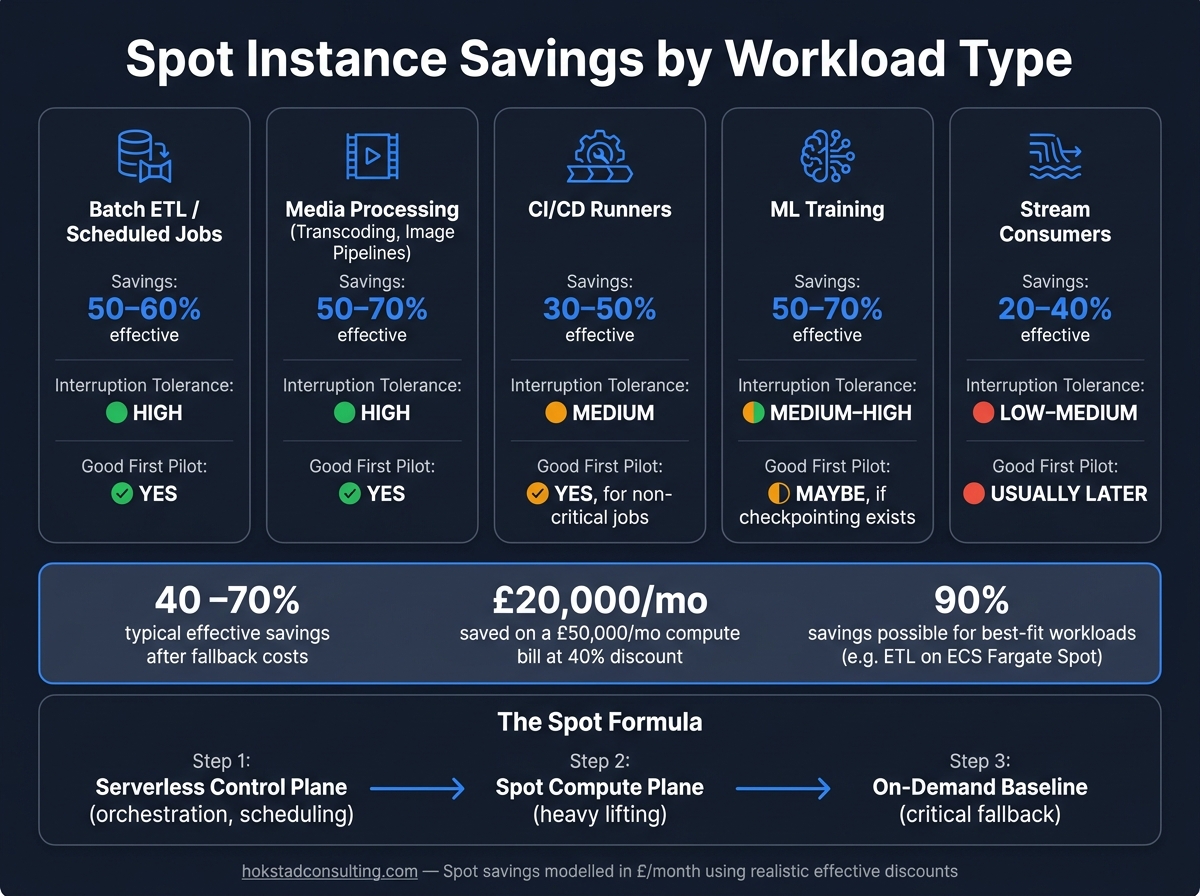 {Spot Instance Savings by Workload Type: Real-World Cost Comparison}
:::
{Spot Instance Savings by Workload Type: Real-World Cost Comparison}
:::
Use cases that deliver the most savings
Batch data processing, ETL, and scheduled jobs
Batch and ETL work are a strong fit for Spot-backed compute. These jobs run to a schedule, process set chunks of data, and can restart from checkpoints if a worker gets interrupted mid-run.
A common setup uses a serverless orchestrator such as AWS Lambda or Step Functions, with Spot-backed workers in AWS Batch or ECS. The serverless layer deals with scheduling, queue handling, and status tracking. The Spot workers handle the heavy lifting.
One team used this pattern to process tens of millions of records each day during a fixed off-peak window. They first ran the whole pipeline in Lambda. But as volumes grew, monthly costs rose into the low thousands once compute, state tracking, and logging were added up. Shifting the compute-heavy part to ECS Fargate on Spot cut monthly spend to under £800 - an 80–90% drop - while Lambda stayed in place as the event-driven orchestrator.[4] AWS Batch supports much the same model with mixed job queues, where Spot is tried first and on-demand steps in as backup.[2][5][6]
AWS advises keeping task units to 30 minutes or less for Spot.[9][10][11] It also helps to write checkpoint data to durable storage such as S3 at set intervals. That way, if a job restarts, it resumes from the last saved point instead of going back to square one. The same checkpoint pattern works well for media tasks, CI/CD runs, and ML training.
Media processing, CI/CD, and short-lived environments
Media processing and build workloads also suit interruptible compute. Video transcoding, image resizing, automated tests, and build pipelines are self-contained. A transcoding task doesn't care which machine handled the last file, and a build runner doesn't keep state between jobs.
GoPro and Kiwify are among the organisations that moved transcoding workloads to Spot fleets, with reported cost cuts of 50–70% against on-demand pricing.[13][14][15] In CI/CD, Lyft cut monthly compute costs by 75% after moving its Jenkins pipeline to Spot instances. Expedia Group reduced CI/CD compute costs by 90%, saving about £1.8 million each year. The same idea applies to short-lived development and staging setups: start them on Spot, shut them down when the job is done, and pay only for the time used. That pattern also carries over to training jobs and always-on event consumers.
Machine learning pipelines and event stream consumers
ML training can work well on Spot when checkpointing is set up properly. Saving model weights to S3 every few minutes, or once per epoch, limits any lost work to the gap since the last save. Intuit moved ML training to Spot instances and cut compute costs by 85%, saving about £2.5 million a year, by using TensorFlow checkpointing every 10 minutes across more than 500 jobs.
GPU pricing can make the case even stronger. A g4dn.xlarge is about 70% cheaper on Spot than on-demand.[16] On training jobs that run for hours, those savings stack up fast.
For event stream consumers, the choice between serverless functions and long-running containers on Spot nodes often comes down to throughput. At lower volumes, Lambda can process Kinesis or SQS events well. At higher, steady volumes, long-running containers on Spot nodes are often cheaper, with serverless functions handling scaling triggers and control-plane tasks while containers do the continuous data processing.[7][8]
Because the consumer logic is stateless, a Spot interruption usually means processing pauses until a replacement container starts and resumes from the last committed offset. But the lower spend only holds if retries and checkpointing are in place, and if capacity is spread across several instance types and Availability Zones.
Architecture patterns that make Spot safe to use
Serverless control plane and Spot compute plane
The use cases above stay cheap only when the setup can take an interruption without falling apart. The goal is simple: make interruptions cheap to absorb, not expensive to fix.
A common pattern is to run orchestration on a serverless control plane and place interruptible jobs on a Spot compute plane. If a task fails because a Spot instance disappears, the control plane can requeue it on its own.[17][19] On AWS, putting Spot instances inside an Auto Scaling group means replacements can launch after an interruption without anyone stepping in.[19][23]
The strongest setups usually mix three things: a serverless control plane, a Spot compute plane, and a small on-demand baseline for anything that can't handle interruption.[20][12] That split matters. Once orchestration is separated from compute, recovery stops being a manual firefight and becomes something you handle in code.
Retries, checkpointing, and idempotent task design
Batch jobs, media pipelines, and ML runs all lean on the same set of recovery rules. In practice, that comes down to three controls: queue work, checkpoint progress, and make tasks idempotent.
AWS gives a two-minute interruption notice before a Spot instance is terminated.[1][18] That short window is often enough to stop taking new work, finish the task in hand, and write a checkpoint. An event-driven interruption-handling pattern using EventBridge → SQS → Lambda can catch these notices in a reliable way and process them asynchronously.[17]
Idempotency matters just as much. Retries are part of normal Spot use, so the same task may run more than once. If that task writes a record, updates a database, or triggers a downstream process, you need deduplication keys or status checks to avoid duplicate outcomes.[20][5] Pair that with checkpointing to durable storage such as S3 or DynamoDB, and the damage from any one interruption stays small.[10][5][21]
Spreading capacity across instance types and zones
Diversification is one of the most direct ways to cut interruption rates. Each instance type, size, and Availability Zone is its own Spot capacity pool. So if you spread work across several pools, a shortage in one place doesn't bring the whole pipeline to a halt.[11][24]
AWS recommends using three unique subnets across zones when making diversified Spot requests. It also suggests including up to 20 launch options in an EC2 Fleet request to give AWS more ways to fulfil capacity.[24][25] For allocation strategy, capacity-optimised placement is usually the better fit than the lowest-price strategy in production.
That last point often gets missed. Recovery logic helps, but at scale it works far better when capacity is spread across pools. Fewer bottlenecks means fewer reruns, fewer delays, and less wasted spend.
| Design choice | Recommended pattern | Why it helps |
|---|---|---|
| Capacity placement | Capacity-optimised allocation | Selects deeper pools with lower near-term interruption risk [22][23] |
| Work distribution | Multi-instance-type, multi-AZ | Reduces dependence on any single Spot pool [23][24][25] |
| Job handling | Checkpointed, idempotent, queued | Lets work resume cleanly after interruption [17][10][5] |
| Critical services | On-demand baseline | Prevents outages when Spot capacity disappears [20][12] |
Cost savings, trade-offs, and how to compare workloads
Typical savings ranges and what they mean in £
Once the recovery pattern is in place, the next step is simple: do the savings pay for the extra work?
Spot discounts are often advertised as high as 90% off on-demand pricing.[3] That sounds great on paper, but most teams won’t see that level in day-to-day use. After you factor in fallback to on-demand, retries, and recovery logic, effective savings usually land in the 40–60% range.[26] For many common general-purpose workloads, Spot pricing tends to sit at about 50% below on-demand.[27] That’s a much better baseline for a business case.
In pound terms, this gets easier to judge. If a team spends £50,000 per month on compute that can move to Spot, a blended 40% effective discount would mean about £20,000 per month, or £240,000 per year, in savings.[26] That’s not pocket change.
The catch is that realised savings drop when workloads fall back to on-demand or need extra retry and checkpoint logic. Say a batch ETL job costs £4,000 per month on on-demand instances. It might see a 70% raw Spot discount, but if fallback adds back about 20% of cost, the effective saving ends up closer to 50% - roughly £2,000 per month.[26] That’s why the model should use average Spot prices over time, not the lowest price you happened to spot on a good day.
When serverless-only is simpler and when Spot adds value
For API handlers and lightweight event tasks, serverless on its own is often enough. For batch, media, and ML jobs, Spot usually starts to earn its place.
Short-lived, event-driven work - things like API request handling, low-volume scheduled jobs, and simple queue consumers - tends to fit managed serverless services best. If monthly compute spend is only in the low hundreds of pounds, the extra engineering work usually doesn’t pay back.
Spot makes more sense when workloads are compute-heavy, parallelisable, and able to handle interruption. It also helps when the monthly bill is big enough that saving 40–70% on compute covers the effort of adding checkpointing and retry logic.[26] Good examples include CI/CD runner fleets, ML training jobs, and batch or media pipelines.
A simple rule of thumb works well here: when compute spend reaches the high thousands of pounds per month, Spot will often give you net value. Below that, serverless-only is usually the simpler option. The table below makes that trade-off easier to scan.
Comparison table: workload fit, savings potential, and interruption tolerance
Use the table below to match workload type to savings potential and interruption tolerance.
| Workload type | Savings potential | Interruption tolerance | Operational complexity | Best-fit architecture |
|---|---|---|---|---|
| Batch ETL / scheduled jobs | High (50–60% effective) | High | Medium | Serverless orchestration + Spot worker fleet |
| Media processing (transcoding, image pipelines) | High (50–70% effective) | High | Medium | Queue-based control plane + Spot processing nodes |
| CI/CD runners | Medium (30–50% effective) | Medium | Medium–High | Hybrid: on-demand for critical pipelines, Spot for bulk test runs |
| ML training | High (50–70% effective savings) | Medium–High | High | Checkpointed training on Spot + serverless control plane |
| Stream consumers | Low to medium (20–40% effective) | Low–Medium | Medium | Serverless-only or mixed Spot/on-demand for tolerant paths |
The savings column shows realistic effective discounts after fallback costs, not the headline figures in provider marketing.[26] Stream consumers sit lower because strict latency targets or SLA needs often limit how much of the workload can move to Spot safely. ML training is a different beast again: it needs frameworks that support resumable checkpoints, plus a team that can handle longer wall-clock times when interruptions happen.[28][29]
Batch ETL and media jobs are usually the easiest first pilots. They offer strong savings without turning recovery design into a nightmare, which makes them a sensible starting point for rollout planning.
Master EC2 Spot Instances: Ultimate Guide to Massive Savings - Part 21
Conclusion: Start with the right workloads
Taken together, these examples point to a simple pattern: serverless control, Spot-heavy compute, and workloads built to handle interruption. In practice, workload choice matters more than the headline discount.
Spot works when interruption handling is part of the design from day one. Miss those controls, and Spot can turn into extra operational overhead.
The best first pilots are usually batch, CI/CD, and media jobs. So the next practical move is to start there: CI/CD test runners, nightly ETL, and offline media processing. Once those patterns are proven, and savings are being tracked clearly in £ per month, it becomes much easier to make the internal case for extending Spot to ML training or larger data pipelines.
Key points to carry into planning
Use this checklist before approving a Spot-backed workload:
- Tasks are independent and stateless, with state held in managed storage - queues, object stores, or managed databases - rather than in memory on the instance
- Idempotent operations and automated retries are in place so that rerunning a task never causes duplication or data corruption
- Checkpointing to durable storage is set up so that an interruption means resuming from a safe point, with savings modelled in £ per month and per year using realistic effective discounts after fallback costs, tracked alongside job completion rates
Hokstad Consulting helps UK organisations identify and redesign Spot-ready workloads, with cost reporting in £ figures.
FAQs
How do I know if my workload is Spot-ready?
Check whether your workload is stateless, fault-tolerant, and able to cope with interruptions. Good fits include batch processing, data analytics, containerised applications, and CI/CD pipelines that can restart now and then without affecting critical services.
Avoid Spot instances for rigid, stateful, or mission-critical systems such as primary databases, where downtime isn’t acceptable.
When should I keep some on-demand capacity?
Keep some on-demand capacity for workloads that need steady availability, uninterrupted performance, or support business-critical tasks, such as databases, singleton controllers, and stateful services.
It also acts as a fallback for flexible workloads. Keeping around 10% to 30% of your capacity on-demand helps systems keep running during large-scale Spot interruptions or regional capacity shortages.
What should I checkpoint before an interruption?
Checkpoint your workload’s progress to external storage, such as Amazon S3, DynamoDB, or other cloud-native object stores, every 5 to 15 minutes. That way, if an instance stops, the task can pick up from the last saved point instead of going back to square one.
It also helps to make your application idempotent and able to catch termination signals such as SIGTERM. In plain English, it should handle the same action more than once without breaking, and it should know how to shut down cleanly when it gets told to stop. That gives it time to save its final state within the notification window.
Don’t just assume this works. Manually terminate instances and see how the application behaves in practice.