
CI/CD pipelines are essential for deploying code, but they can expose your Kubernetes cluster to risks if not properly secured. Overly permissive access, privilege escalation, and default settings like automountServiceAccountToken can make your infrastructure vulnerable. Kubernetes RBAC (Role-Based Access Control) helps mitigate these risks by enforcing the Principle of Least Privilege, ensuring tools and users have only the permissions they need.
Key takeaways:
- RBAC Basics: Roles define permissions; RoleBindings assign them to users or ServiceAccounts.
- Minimise Permissions: Avoid using wildcards (
*) and limit access to specific actions or resources. - ServiceAccount Security: Disable
automountServiceAccountTokenunless necessary. - High-Risk Verbs: Restrict actions like
escalate,bind, orimpersonate. - Namespace Isolation: Use
RoleBindingsinstead ofClusterRoleBindingsto limit access to specific namespaces. - Monitoring: Regularly audit RBAC policies, use tools like
kube-benchorKubescape, and analyse Kubernetes audit logs for suspicious activity.
::: @figure 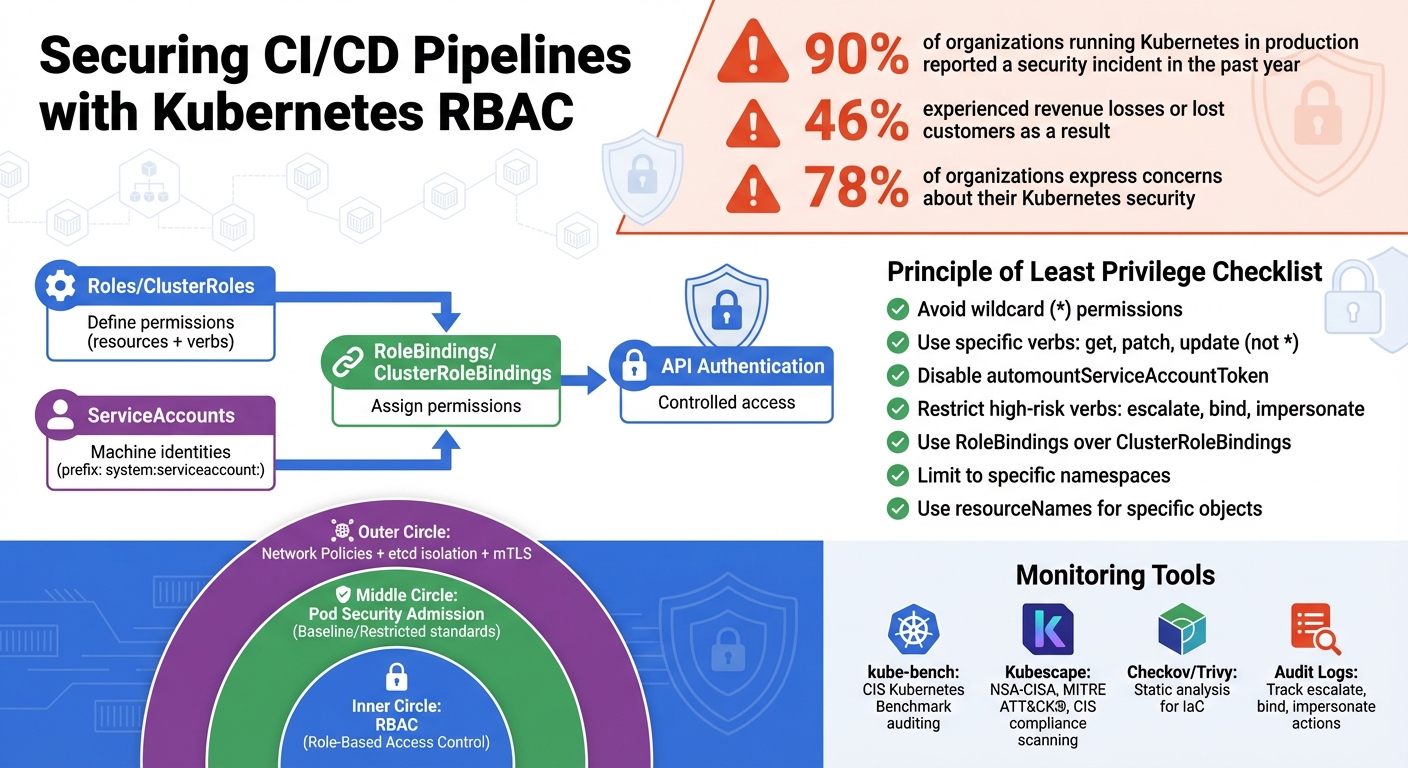 {Kubernetes RBAC Components and CI/CD Pipeline Security Implementation Guide}
:::
{Kubernetes RBAC Components and CI/CD Pipeline Security Implementation Guide}
:::
Day 25/40 - Kubernetes Service Account - RBAC Continued
Understanding Kubernetes RBAC
Kubernetes RBAC (Role-Based Access Control) revolves around four key components: Roles and ClusterRoles, which define what actions are allowed, and RoleBindings and ClusterRoleBindings, which assign those permissions to specific identities. A Role operates within a single namespace, while a ClusterRole applies across the entire cluster or to cluster-wide resources like nodes.
Permissions in RBAC are a combination of resources (such as pods, secrets, or deployments) and verbs (like get, list, create, update, delete). These permissions are additive - there are no deny
rules - so it's crucial to grant access carefully. As the Kubernetes documentation notes:
RBAC authorization uses the
rbac.authorization.k8s.ioAPI group to drive authorization decisions, allowing you to dynamically configure policies through the Kubernetes API.
RBAC Components Explained
A Role specifies permissions within a single namespace, while a RoleBinding links those permissions to a ServiceAccount, which is then used for API authentication. For example, you might create a Role called deployer
to allow updates to deployments in a staging namespace and bind it to your CI/CD tool's ServiceAccount. If cluster-wide access is required - for instance, to manage custom resource definitions - you would use a ClusterRole and ClusterRoleBinding, though this should be avoided for CI/CD tools whenever possible.
ServiceAccount usernames have the prefix system:serviceaccount:, distinguishing them from human users. When your CI/CD pipeline interacts with the Kubernetes API, RBAC ensures that the ServiceAccount has the necessary permissions. This setup is essential for enforcing the least privilege
principle.
Using the Principle of Least Privilege
RBAC allows fine-grained control, letting you define exactly what actions a ServiceAccount can perform. Instead of granting broad read/write
access, you can limit permissions to specific verbs like patch and update - enough for rolling out new container images without allowing deletions or the creation of new resources.
Avoid using the wildcard * in roles, as it grants access to all current and future resource types, which can lead to unintended consequences. Similarly, be cautious with verbs like list or watch on secrets, as they could expose sensitive information. It's generally better to use RoleBindings instead of ClusterRoleBindings to confine CI/CD tools to specific namespaces, minimising the impact of potential credential leaks.
RBAC Example for CI/CD
A typical CI/CD pipeline often needs to update deployments with new container images and monitor the rollout process. Here's an example configuration tailored to these needs:
apiVersion: v1
kind: ServiceAccount
metadata:
  name: ci-deployer
  namespace: production
automountServiceAccountToken: false
---
apiVersion: rbac.authorization.k8s.io/v1
kind: Role
metadata:
  name: deployment-updater
  namespace: production
rules:
- apiGroups: ["apps"]
  resources: ["deployments"]
  verbs: ["get", "patch", "update"]
- apiGroups: [""]
  resources: ["pods"]
  verbs: ["get", "list"]
---
apiVersion: rbac.authorization.k8s.io/v1
kind: RoleBinding
metadata:
  name: ci-deployer-binding
  namespace: production
subjects:
- kind: ServiceAccount
  name: ci-deployer
  namespace: production
roleRef:
  kind: Role
  name: deployment-updater
  apiGroup: rbac.authorization.k8s.io
This configuration creates a ServiceAccount named ci-deployer in the production namespace, granting it permissions to update deployments and check pod statuses. The automountServiceAccountToken: false setting prevents the token from being automatically mounted, reducing the risk of credential theft. For even tighter control, you can use the resourceNames field to limit permissions to specific deployments, such as resourceNames: ["web-app"]. This precise setup helps secure your CI/CD pipelines while maintaining the necessary functionality.
Setting Up RBAC for CI/CD Pipelines
Creating Roles and Permissions
When setting up RBAC (Role-Based Access Control) for your CI/CD pipelines, it’s important to define permissions carefully. Each pipeline should only have access to the actions it absolutely needs. For example, a deployment pipeline might need permissions to update deployments and check pod statuses, while a build pipeline might only require the ability to create pods and read logs. Use ClusterRole objects sparingly, as they are designed for cluster-wide resources like nodes or persistent volumes, which are rarely needed for CI/CD workflows.
Be specific about the verbs you allow, such as patch or get, and avoid using the * wildcard in both the resources and verbs fields. The wildcard could unintentionally grant access to new resource types introduced in future Kubernetes updates. If you want to limit permissions to specific objects, use the resourceNames field. For instance, you can restrict updates to a deployment named web-app.
In role definitions, the core API group (which includes resources like pods, services, and secrets) is represented by an empty string (""). Meanwhile, resources like deployments belong to the apps API group. If your pipeline only needs access to specific subresources, like pods/log for viewing logs or pods/portforward for debugging, grant access to those subresources rather than the entire pod object.
Once roles are defined, the next step is to connect them to your pipeline’s service accounts for controlled access.
Connecting Roles to Service Accounts
CI/CD tools interact with Kubernetes through Service Accounts, which act as machine identities within namespaces. After creating a role, you can link it to a service account using a RoleBinding. This binding connects the service account (the identity) with the permissions defined in the role.
To improve security, keep bindings specific to namespaces by using RoleBinding instead of ClusterRoleBinding. This approach ensures that CI/CD tools are limited to specific environments and reduces the risk of widespread damage if credentials are compromised. Keep in mind that the roleRef field in a binding cannot be modified - if you need to assign a different role, you’ll need to delete and recreate the RoleBinding.
To test the permissions granted to a service account, use the following command:
kubectl auth can-i <verb> <resource> --as=system:serviceaccount:<namespace>:<name>
Service account usernames are prefixed with system:serviceaccount:, which differentiates them from human user accounts.
Connecting RBAC with CI/CD Tools
With roles bound to service accounts, you can integrate these credentials into your CI/CD tools. This step is crucial for managing credentials securely and mitigating the risks of credential theft.
For push-based workflows (used by tools like Jenkins or GitHub Actions), the CI/CD platform holds the cluster credentials and pushes changes using tools like kubectl or helm. This requires you to store sensitive tokens securely outside the cluster. In contrast, pull-based workflows (used by tools like Argo CD or Flux) rely on an in-cluster agent that pulls changes from Git, keeping credentials within the cluster for added security.
In push-based setups, you’ll need to generate a token for your service account and configure it in your CI/CD tool’s secrets management system, along with the cluster’s API server URL. Starting with Kubernetes 1.24, tokens are no longer created automatically. You’ll need to generate them manually using the kubectl create token command or the TokenRequest API. For pods that don’t need the token, disable automounting by setting automountServiceAccountToken: false in their specifications. This reduces the risk of token theft.
Be cautious about granting high-risk permissions. Verbs like escalate, bind, and impersonate can allow users to bypass RBAC restrictions and gain elevated privileges. Also, granting create permissions for workloads can inadvertently expose all secrets and ConfigMaps in the namespace, as these can be mounted by deployed pods. Always review permissions carefully to minimise security risks.
Need help optimizing your cloud costs?
Get expert advice on how to reduce your cloud expenses without sacrificing performance.
RBAC Best Practices for Pipeline Security
Auditing and Monitoring RBAC Policies
It's essential to routinely review your RBAC configurations to identify and remove outdated or excessive permissions. Pay close attention to roles that grant powerful verbs like escalate, bind, or impersonate, and inspect bindings associated with high-risk default groups such as system:anonymous, system:unauthenticated, and system:authenticated [2][1]. For instance, the system:unauthenticated group, which includes anyone able to contact the API server, is a frequent target for automated attacks [2][5]. Similarly, the system:authenticated group encompasses any user with valid credentials, and in some managed Kubernetes environments, this could even include accounts like Gmail [5].
Using GitOps pipelines to manage RBAC policies can significantly improve security. This approach ensures every policy change is subjected to peer review and version control, creating a reliable audit trail and maintaining consistency across different environments.
Adding Extra Security Layers to RBAC
After auditing RBAC policies, take the next step by reinforcing them with additional security measures. While RBAC plays a key role in securing CI/CD pipelines, it doesn't prevent pods from running with elevated privileges or accessing sensitive host resources. This is where Pod Security Admission (PSA) comes into play. PSA enforces container behaviour standards, offering layers of protection. For example:
- The Baseline standard helps block common privilege escalations.
- The Restricted standard imposes stricter restrictions, such as disallowing pods from running as root or accessing the host filesystem [2][3].
These measures provide an added layer of defence, helping to safeguard against potential host-level exploitation even if RBAC permissions are misconfigured.
Additionally, network policies can restrict pod-to-pod communication, limiting lateral movement in case of a breach. To further secure the cluster, isolate etcd behind a firewall and use mutual TLS (mTLS) for API server communications. Protecting etcd is critical, as gaining direct access to it is tantamount to achieving root access [3].
Managing Emergency Access
For scenarios requiring temporary elevated permissions, implement a break-glass policy with clear guidelines on who can access these permissions and under what circumstances [6]. The system:masters group should be reserved strictly for emergency situations rather than routine administrative tasks [2][7].
The `system:masters` group is not used for user or component authentication after bootstrapping... `system:masters` should only be used as a break-glass mechanism, as opposed to an admin user.
- Kubernetes Security Checklist [7]
Consider using just-in-time (JIT) access to grant temporary, narrowly defined permissions that automatically expire once a task is completed [8]. Another option is assigning low-privileged accounts impersonation rights for specific administrative tasks, reducing the risks associated with full administrative access [2]. To bolster security, enforce multi-factor authentication and maintain secure audit logs for all break-glass access [6][7]. Continuous monitoring of these policies is crucial to ensure they remain effective and up to date.
Monitoring RBAC in Production
Ensuring strong Role-Based Access Control (RBAC) in production environments is essential for safeguarding your CI/CD pipelines and maintaining overall security.
Scanning for Compliance Standards
Automated tools like kube-bench and Kubescape can help you verify RBAC compliance. For instance, kube-bench audits your cluster settings against the CIS Kubernetes Benchmark [10]. Meanwhile, Kubescape, a CNCF incubating project, scans clusters, YAML files, and Helm charts against frameworks such as NSA-CISA, MITRE ATT&CK®, and CIS Benchmarks [9]. To maintain compliance, you can schedule kube-bench as a Kubernetes Job [10] and use the Kubescape operator in-cluster to monitor configuration drift and detect runtime vulnerabilities [9].
For infrastructure-as-code, static analysis tools like Checkov and Trivy are invaluable. They identify misconfigurations early in the deployment pipeline, preventing them from reaching production [9]. This layered approach ensures potential issues are caught at multiple stages. Additionally, reviewing audit logs can provide real-time insights into RBAC violations.
Analysing Kubernetes Audit Logs
Kubernetes audit logs serve as a detailed timeline of actions performed by users, applications, and the control plane [11]. To enable audit logging, pass a policy file to the kube-apiserver using the --audit-policy-file flag [11]. Audit levels should be tailored to the sensitivity of resources: for instance, use the Metadata level for general monitoring, the Request level for tracking changes to ConfigMaps, and the RequestResponse level for high-value resources like Secrets in the kube-system namespace [11].
Pay close attention to high-risk actions such as escalate, bind, and impersonate. Set up alerts for repeated unauthorised access attempts, such as multiple HTTP 401 or 403 responses within a short timeframe [2][1][4]. The system:unauthenticated group deserves special scrutiny, as attackers could exploit misconfigured API servers that permit anonymous requests [4][1]. To preserve logs for forensic purposes, store them off-cluster [11][3].
While real-time monitoring is critical, conducting periodic reviews ensures long-term security.
Regular RBAC Reviews and Updates
Regularly reviewing RBAC settings is key to maintaining minimal access privileges. Remove unused permissions and ensure service accounts have only the access they need [2][7]. Adopting GitOps pipelines to manage RBAC configurations can streamline policy updates, enforce peer reviews, and maintain a versioned audit trail across environments [4].
For organisations seeking additional support, services like those from Hokstad Consulting can provide comprehensive cloud security audits alongside DevOps transformation initiatives, helping to maintain effective RBAC policies while optimising infrastructure costs. Runtime monitoring tools, such as Inspektor Gadget via Kubescape, offer real-time insights into how permissions are being used by workloads in production, leveraging eBPF technology for deeper visibility [9].
Conclusion
Key Takeaways for CI/CD Security
Reflecting on the role of RBAC within CI/CD pipelines, it’s evident that Kubernetes RBAC acts as a critical security measure, controlling access to APIs and resources. By ensuring that only authorised users or service accounts can perform specific actions, it provides a strong defence against unauthorised access. Consider this: 90% of organisations running Kubernetes in production reported a security incident in the past year, with 46% experiencing revenue losses or losing customers as a direct consequence [4]. These numbers highlight just how crucial it is to secure your CI/CD pipelines.
The Principle of Least Privilege is your strongest ally in this effort. By granting users and service accounts only the permissions they need for their tasks, you can limit potential damage. High-risk actions like escalate, bind, and impersonate should be tightly restricted to reduce the impact of any potential breach [2]. As Upwind aptly puts it:
If attackers gain unauthorised access to the API, they aren't just breaching a single container; they are gaining administrative control over the cluster itself [4].
This approach lays the groundwork for meaningful security improvements.
Practical Steps to Strengthen Pipeline Security
Start by auditing your current RBAC configuration. Disable automountServiceAccountToken for any pods that don’t require direct API access, and remove wildcard (*) permissions that grant unnecessarily broad access to current and future object types [2]. Incorporating RBAC into your GitOps workflows ensures that policy changes are version-controlled, peer-reviewed, and consistently applied across all environments [4].
For organisations looking for expert guidance, Hokstad Consulting offers tailored cloud security audits and DevOps transformation services. Their team can help maintain robust RBAC policies while optimising infrastructure costs. With expertise in cloud cost management and strategic migrations, they can enhance your security measures while keeping your CI/CD pipelines cost-effective.
Regularly audit, update, and review your RBAC settings to remove redundant roles and secure your pipelines [2]. With 78% of organisations expressing concerns about their Kubernetes security, taking proactive steps today can safeguard your business against emerging threats and ensure operational efficiency.
FAQs
How does Kubernetes RBAC support the Principle of Least Privilege?
Kubernetes RBAC (Role-Based Access Control) is a powerful way to implement the Principle of Least Privilege, allowing administrators to assign permissions with precision. It lets you create Roles or ClusterRoles that specify exactly what users, applications, or service accounts can access and what actions they can perform. This avoids granting permissions that are too broad or unnecessary.
By binding these roles to specific subjects at either the namespace or cluster level, Kubernetes ensures that every entity gets access to only what’s essential for its tasks. This approach not only strengthens security but also helps minimise the chances of accidental or intentional misuse.
What are the risks of using wildcards in Kubernetes RBAC roles?
Using wildcards (*) in Kubernetes RBAC roles can create serious security vulnerabilities. These permissions essentially allow unrestricted access to all API groups, resources, and actions. This opens the door to risks like privilege escalation, user impersonation, and even complete cluster control. Worse, wildcard permissions also apply to any new resource types added in the future, leaving your system exposed as it evolves.
To keep your cluster secure, it’s essential to avoid using wildcard permissions. Instead, focus on creating specific, least-privileged access rules that align with your requirements. This approach significantly lowers the chances of accidental or malicious actions compromising your cluster.
How can Kubernetes Service Accounts enhance the security of CI/CD pipelines?
To ensure a secure integration of your CI/CD pipelines with Kubernetes, start by setting up a dedicated ServiceAccount exclusively for the pipeline. Pair this with a carefully defined Role or RoleBinding that grants just the permissions necessary for deployment tasks. This aligns with the principle of least privilege, reducing potential security risks.
Next, configure your CI/CD jobs to authenticate with the Kubernetes API using the token tied to this ServiceAccount. This method not only limits unauthorised access but also helps maintain a secure and controlled deployment process.