
API keys are essential for automating tasks in CI/CD pipelines, but if mishandled, they can expose sensitive systems to attacks. Leaking keys - whether through hard-coded repositories, plaintext files, or build logs - can lead to compliance issues, such as UK GDPR breaches, and result in fines or reputational damage. Here's how to keep them safe:
- Use least privilege: Limit each key's permissions to its specific task or environment.
- Use short-lived credentials: Temporary keys reduce risk if exposed.
- Store keys securely: Use tools like AWS Secrets Manager or HashiCorp Vault to encrypt and control access.
- Inject keys at runtime: Avoid hard-coding; use environment variables or secure mounts.
- Automate key rotation: Regularly update keys to minimise exposure risks.
- Monitor and audit: Log all key usage and set alerts for unusual activity.
Preventing leaks starts with mapping where keys are stored and used, scanning repositories for exposed secrets, and isolating keys by environment. If a leak occurs, act fast by revoking the key, reviewing access logs, and updating processes to avoid repeat incidents. For UK organisations, ensuring compliance with GDPR is critical, especially when personal data is at risk. Proper API key management not only secures systems but also supports regulatory requirements.
::: @figure 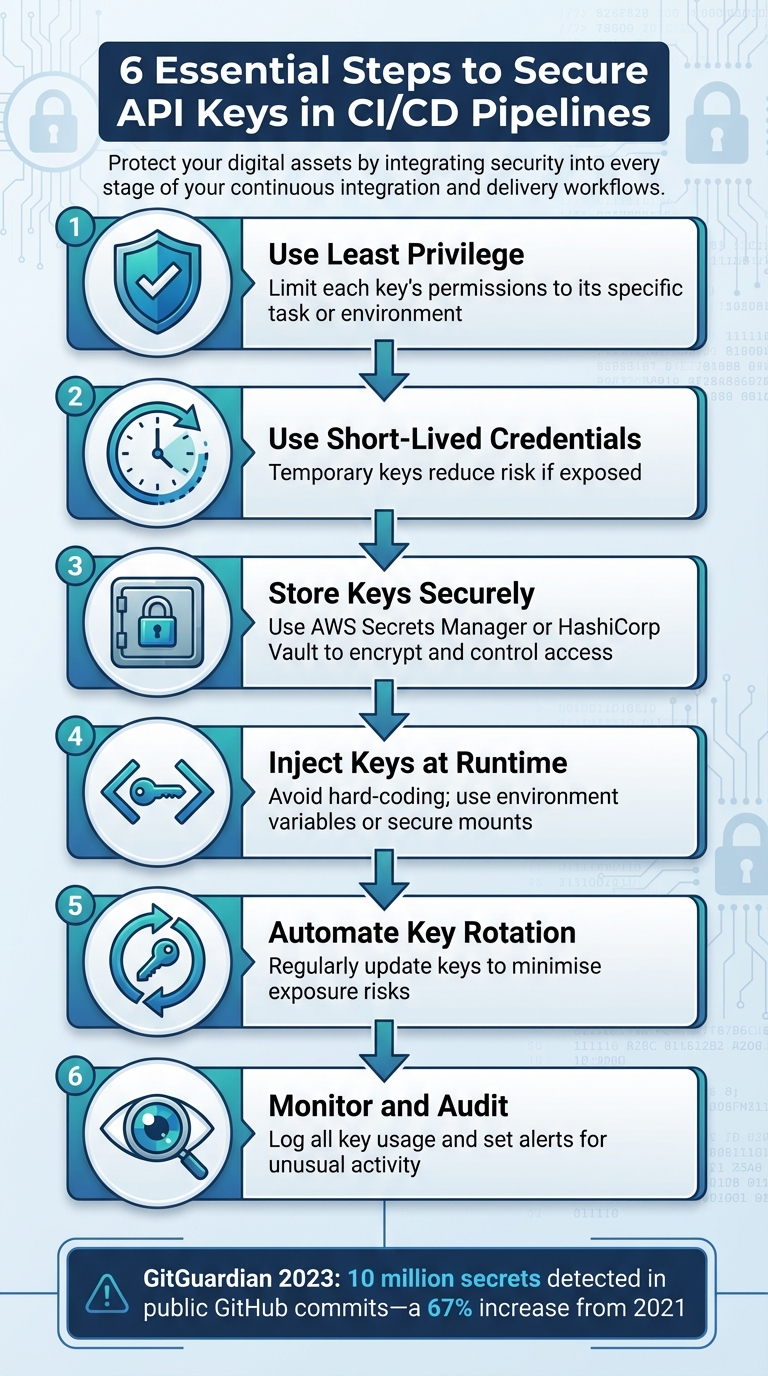 {6 Essential Steps to Secure API Keys in CI/CD Pipelines}
:::
{6 Essential Steps to Secure API Keys in CI/CD Pipelines}
:::
How I Manage Sensitive Data Across The Entire Stack and my CI-CD Processes
Mapping API Key Usage in Your Pipelines
The first step in securing your API keys is figuring out exactly where they are. These keys tend to be scattered - hidden in repositories, configuration files, deployment scripts, or even on individual workstations. As OWASP's CI/CD Security Cheat Sheet points out, you cannot secure API keys you have not mapped
[5]. To strengthen your pipeline, you need to understand where these secrets are used, what permissions they grant, and which systems can access them. This groundwork is essential to uncover vulnerabilities and secure your API key usage.
Creating an Inventory of All API Keys
Start by combing through every pipeline configuration in your CI/CD toolchain. Look into configuration files, scripts, and any custom deployment code to spot where API keys are referenced or, worse, hard-coded. Automated tools like GitHub Secret Scanning or Trivy can make this process easier by detecting exposed keys in repositories. Once identified, categorise keys by their service (e.g., AWS, Stripe, Docker Hub), environment (development, staging, production), and purpose.
Document all this information in a secure, centralised inventory - this could be a well-protected spreadsheet or a dedicated tool like HashiCorp Vault. For each key, include details such as its creation date, the team responsible for it, the permissions it grants, and its rotation or expiry schedule. Avoid using the same high-privilege keys across multiple environments. This inventory becomes your go-to reference, helping you spot duplicated keys, overly broad permissions, or outdated keys that need to be retired [5].
Mapping API Key Flows
Once your inventory is complete, take it a step further by mapping out how each key flows through your system. Create data-flow diagrams to visualise key storage and runtime injection methods, such as environment variables or mounted files. These diagrams can highlight potential leak points, like keys appearing in build logs, temporary files, or cached artefacts. They also help you understand network boundaries and trust zones - for instance, whether a key moves from your corporate network to a public cloud provider or between different accounts or tenants.
This mapping exercise is invaluable for identifying weak spots. It ensures encryption is used for data in transit, access is tightly controlled by network policies, and keys are promptly discarded after use rather than lingering in logs or temporary files [4].
Isolating API Keys by Environment
Segregating API keys by environment is a must. A development key falling into the wrong hands should never grant access to production systems. Use separate keys for development, staging, and production environments. Configure your CI/CD platform to restrict access to production-scoped keys, allowing only protected branches or specific pipelines to use them.
This isolation reduces the damage in case of a breach and simplifies key rotation. For example, you can replace a staging key without affecting production systems. It also makes auditing easier, ensuring that each environment's keys are managed independently and securely [5]. Keeping keys isolated is a crucial step in minimising risks and maintaining control over your pipeline.
Storing and Injecting API Keys Securely
Once you've mapped out how your API keys are used, the next step is to secure their storage and injection. This means ensuring your keys are encrypted both when stored and during transmission, access is tightly controlled, and every action involving the keys is logged for auditing.
Using Centralised Secrets Management Tools
Centralised tools like HashiCorp Vault, AWS Secrets Manager, Azure Key Vault, and GCP Secret Manager are great options for managing secrets. They offer features like policy-based access control, automatic encryption, versioning, and APIs for rotation. These tools go beyond what most CI/CD platforms provide with their basic encrypted variables
features. By using a single, centralised system, you avoid the risk of secret sprawl across multiple platforms and reduce the chances of credentials being lost or misconfigured.
Take, for instance, a UK-based e-commerce platform. They might store a payment gateway's API key in AWS Secrets Manager, encrypting it with a KMS key stored in the London region. This key is never written to disk, included in build artefacts, or exposed in logs. Once the job is done, the environment variable holding the key is cleared. This ensures least privilege is enforced and creates a full audit trail.
When setting up a secrets manager, organise secrets by application and environment (e.g., app-name/prod/api/my-service). Assign separate policies for each environment to ensure production keys aren't accessible to development or testing pipelines. Instead of granting access to individual users, allow CI/CD service identities to retrieve secrets, limiting each pipeline’s access to only the keys it needs. Avoid read all secrets
permissions; instead, define explicit paths for access. For UK organisations, particularly those handling sensitive data under GDPR, namespaces or projects within the secrets manager can separate team access, preventing accidental exposure of critical API keys.
Once your keys are securely stored, the next challenge is injecting them into your pipelines in a secure way.
Injecting API Keys at Runtime
The method you use to inject secrets into your pipeline jobs is just as important as their storage. Common approaches include environment variables, secure files or mounted volumes, and sidecar containers.
- Environment variables are easy to use and widely supported, but they can be risky. If not carefully managed, they might show up in debug logs, crash dumps, or child process environments.
- Secure files or mounted volumes involve writing secrets to files with restricted permissions (e.g.,
0600) or mounting them using tools like Kubernetes Secrets. This reduces exposure risks but requires proper clean-up and file isolation. - Sidecar containers take it a step further. Here, a sidecar retrieves secrets from a vault and exposes them via a local service (like a Unix socket). This way, the main container never directly handles long-lived keys, although this setup can be more complex to manage.
Regardless of the method, limit injection to the specific job needing the key, and ensure secrets are cleared from memory or disk after use. Disable verbose logging for commands that interact with secrets, and scan debug outputs to ensure keys aren’t unintentionally logged. Configure CI/CD platforms and log aggregators to mask patterns resembling API keys before storing logs. Build artefacts should never include real keys - use placeholders instead, and inject the actual secrets only during deployment. These measures are especially critical in regulated sectors like finance and healthcare in the UK, where GDPR and strict log retention policies apply.
For even greater security, consider moving away from static API keys altogether by using short-lived credentials with OIDC.
Using OIDC and Short-Lived Credentials
OpenID Connect (OIDC) provides a modern alternative to static, long-lived API keys. With OIDC, your CI/CD platform issues a signed identity token for a pipeline run. This token can be exchanged by a cloud provider or identity broker for temporary credentials or access tokens. Instead of managing static API keys, the pipeline authenticates based on its identity and context (e.g., repository, branch, workflow) and receives a time-limited token. These tokens expire automatically, reducing the risk of misuse if intercepted. They also enable policies like restricting production workflows to specific branches, aligning with zero-trust security practices.
Setting up OIDC involves several steps:
- Enable federation between your CI/CD platform and cloud provider (e.g., configure GitHub’s OIDC issuer as a trusted identity provider in AWS, Azure, or GCP).
- Define roles or service principals that trust the OIDC provider based on claims (like repository name, branch, or workflow).
- Update pipeline definitions to request cloud tokens at runtime (e.g., using AWS's
AssumeRoleWithWebIdentityor Azure's federated token login).
With this setup, static API keys are replaced by role-based permissions that allow pipelines to access secrets managers or APIs directly using short-lived tokens. Test these configurations in non-production environments to ensure roles are scoped correctly.
While static API keys are still necessary for some third-party services that don’t support OIDC, they should always be stored securely and rotated frequently. For cloud-native resources or internal services, OIDC-based credentials are the better choice. They reduce the reliance on long-lived secrets and enhance overall security. Organisations looking to transition to OIDC can seek expert advice - Hokstad Consulting, for example, specialises in helping UK businesses optimise their DevOps pipelines while meeting compliance requirements like GDPR.
Need help optimizing your cloud costs?
Get expert advice on how to reduce your cloud expenses without sacrificing performance.
Setting Up Governance and Key Rotation
Securing API keys isn’t just about storing them safely - it’s about managing their entire lifecycle. A solid governance framework ensures that these keys are created, used, rotated, and revoked in a way that minimises risk. This includes defining clear policies on who can handle keys and using tools to enforce these rules automatically. Regular key rotation is also critical, as it reduces the chances of attackers exploiting a compromised key.
Applying Least Privilege to API Keys
When it comes to API keys, less is more - at least when it comes to permissions. Each key should only have access to what’s absolutely necessary. For example, if a deployment pipeline needs to read from an S3 bucket, it shouldn’t have write access or permissions for other AWS services. Similarly, a staging environment key should never be able to operate in production.
To achieve this, create specific IAM roles with limited permissions, like AWS IAM policies for read-only S3 access. GitHub Actions also allows for fine-grained personal access tokens that can be restricted to individual repositories or specific actions, such as reading packages. Avoid using broad admin
keys that can access everything, as they pose a huge risk if exposed.
Regular permission audits are essential. Tools like AWS IAM Access Analyzer can help identify keys with excessive permissions. According to OWASP, CI/CD environments often hold numerous secrets that can access highly sensitive systems, making strict adherence to the principle of least privilege a must. The 2023 23andMe breach, which exposed data from 6.9 million users due to over-privileged keys, highlights the dangers of neglecting this practice[5].
For organisations in the UK, especially those handling personal data under GDPR, applying least privilege isn’t just a good idea - it’s a compliance requirement. Limiting permissions not only reduces the impact of a potential breach but also demonstrates accountability.
Automating API Key Rotation
Let’s face it - manually rotating API keys is tedious and often forgotten. Automating this process not only reduces human error but also ensures keys are updated regularly, limiting the damage if one is leaked. Tools like HashiCorp Vault, AWS Secrets Manager, Azure Key Vault, and GCP Secret Manager can automate key rotation with custom schedules.
The rotation frequency should align with the key’s sensitivity. High-risk keys, such as those used for payment APIs or accessing personal data, should be rotated every 30 days or even more frequently. For less critical keys, a 90-day cycle might be sufficient. Short-lived credentials, like those issued via OIDC, can expire within hours, eliminating the need for manual rotation altogether.
Here’s how automated rotation works: a secrets manager generates a new key according to a predefined schedule, updates the stored secret, and triggers the CI/CD pipeline via a webhook. The pipeline retrieves the new key at runtime, updates dependent services like Kubernetes secrets, tests the deployment, and revokes the old key once the new one is confirmed - all without downtime or manual intervention.
The 2022 CircleCI breach serves as a cautionary tale. Following the incident, CircleCI implemented automated 24-hour key rotation and role-based access controls, reportedly cutting exposure risk by 90%[2]. Once automated rotation is in place, strict access controls and comprehensive audit logs become even more crucial for detecting and responding to anomalies.
Implementing Access Controls and Audit Logs
Automated rotation is just one piece of the puzzle. Strong access controls are equally important to keep your API keys secure. With role-based access control (RBAC), you can ensure that only authorised users or service accounts can view, create, or rotate keys. Define roles like key rotator
, approver
, and auditor
to enforce strict access boundaries. Combining RBAC with multi-factor authentication (MFA) and separating duties (e.g., preventing developers from approving their own changes to production keys) adds an extra layer of protection.
Platforms like GitHub Actions allow you to create custom roles to restrict access to workflows and secrets, while Jenkins offers similar functionality through plugins like Role Strategy. Regularly reviewing role assignments - especially after staff changes - is critical to maintaining security.
Audit logging acts as a safety net. Enable logging in your secrets manager (e.g., Vault’s audit backend) and CI/CD platforms (e.g., GitHub audit logs). Forward these logs to a central SIEM solution and capture details like timestamps, IP addresses, and requesters’ identities for every key fetch. Alerts for unusual activity - such as off-hours access or sudden spikes in usage - can help catch potential breaches early. Retaining logs for at least one to two years supports forensic investigations and helps meet GDPR requirements for accountability[1].
For sensitive operations, like creating production keys or rotating keys for critical systems, consider multi-stage approval workflows. GitHub Environments, for instance, can require manual approval before a deployment runs, enforcing a two-person rule
to prevent insider threats and accidental errors[2].
If your organisation is looking to improve its governance framework, expert support can make all the difference. Hokstad Consulting offers tailored solutions for UK businesses, helping to streamline DevOps pipelines with automated workflows and tools that reduce manual errors - key to maintaining both security and compliance.
Preventing and Responding to API Key Leaks
Even with secure pipelines in place, leaks can still happen. A 2023 report by GitGuardian uncovered that public GitHub commits in 2022 contained 10 million detected secrets - a staggering 67% increase from the previous year. It also revealed that 1 in 10 code authors exposed a secret during that period [3]. To tackle this, it’s vital to focus on both prevention and an effective response when leaks occur.
This section builds on established practices for secure key storage and governance, outlining strategies to prevent leaks and respond promptly if they happen.
Preventing API Key Exposure
The golden rule is simple: never commit secrets to source control. To enforce this, use pre-commit hooks and server-side checks that block commits containing API key patterns. Additionally, integrate secret scanning tools into your repositories and CI pipelines. These tools can catch leaks before they reach production. Configure them to automatically fail builds if new secrets are detected, ensuring immediate attention to the issue.
To further protect sensitive information, mask API keys in CI/CD logs using built-in redaction features. Store secrets in encrypted, centralised vaults, and inject them at runtime through environment variables or ephemeral files. Another effective approach is replacing static keys with short-lived credentials, such as OIDC-based tokens or cloud-native identity solutions like AWS IAM roles. This drastically reduces the potential damage if a key is exposed.
Education is also key. Make sure engineers are trained on secure secret handling practices. API keys should never appear in tickets, emails, chat messages, or screenshots. If these precautions fail, swift action is necessary.
Responding to Leaked API Keys
If an API key leak does occur, treat it as a security incident immediately. Start by identifying the scope of the exposure. Determine which repositories, branches, logs, or third-party services contain the compromised key. Assess how long it has been visible and whether the affected areas are public or internal. Once identified, revoke or disable the key in the upstream service and generate a secure replacement.
Next, review access logs for unusual activity, such as unexpected IP addresses, login times, or API calls. If there are signs of misuse, isolate the affected systems, invalidate any active sessions tied to the compromised key, and rotate any related credentials. For public repositories, tools like git filter-repo or BFG Repo-Cleaner can help remove traces of the secret from the repository’s history. However, weigh the operational impact of these actions carefully.
Document the incident thoroughly and update CI/CD processes to prevent similar issues in the future. Communicate findings to stakeholders as needed. GitHub’s 2023 report noted that over 100 million secret exposures were blocked using automated secret scanning, demonstrating the scale of the problem and the importance of proactive measures [3].
UK GDPR Considerations for Key Leaks
If a leaked API key could potentially grant access to personal data belonging to UK residents, it might qualify as a personal data breach under UK GDPR. In such cases, organisations must assess the risk to individuals' rights. If a risk is identified, the Information Commissioner’s Office (ICO) must be notified within 72 hours of discovering the breach. If the leak involves sensitive health or financial data, affected individuals should also be informed as soon as possible.
To ensure accountability, record all personal data breaches. Under UK GDPR, organisations face fines of up to £17.5 million or 4% of their annual global turnover - whichever is greater - for major violations, such as failing to safeguard personal data. Effective coordination among Security, DevOps, and Data Protection teams is crucial to ensure compliance with regulatory standards during incident response, documentation, and notification processes.
Conclusion
Key Takeaways
Protecting API keys in CI/CD pipelines is a critical part of modern software development. This guide has outlined a practical checklist to enhance security: identify all keys in repositories and pipelines, store them centrally using encrypted secrets managers, separate keys by environment and service, apply least privilege access, automate processes like injection and rotation, monitor access with audit logs and RBAC, and act quickly if leaks occur. Following these steps helps maintain security across the entire CI/CD workflow.
Strong governance is equally important. Clear ownership, role-based access controls, and detailed audit trails ensure security remains manageable as teams and infrastructure grow. These practices also demonstrate compliance with UK GDPR by showcasing robust technical and organisational measures. By embedding API key security into DevOps, it becomes a standard practice. Tools like secret scanning, policy-as-code, and security metrics can sit alongside deployment frequency and lead time on dashboards, helping UK teams align with NCSC guidance and ISO 27001 standards while maintaining development speed.
How Hokstad Consulting Can Help

Hokstad Consulting specialises in implementing effective API key security within your CI/CD pipelines. Their DevOps Transformation services focus on creating automated pipelines and Infrastructure as Code, reducing manual errors and minimising the risk of accidental key exposure.
Through Strategic Cloud Migration and Cloud Cost Engineering, Hokstad Consulting ensures that security, performance, and cost are balanced. They integrate secrets management solutions - such as AWS Secrets Manager in the London region or Azure Key Vault in UK data centres - seamlessly with your cloud and CI/CD tools. Their Custom Development & Automation services can also deliver tailored workflows for tasks like key rotation, OIDC-based authentication, and incident response playbooks. Clients have reported up to 75% faster deployments and a 90% reduction in errors related to key rotation and governance.
Whether you’re looking for a cloud cost audit to optimise secrets management, ongoing DevOps support to maintain governance and audit logs, or a full transformation to incorporate security into every stage of your delivery process, Hokstad Consulting offers the expertise to enhance your API key security, lower risks, and meet UK compliance standards.
FAQs
How can API keys be securely managed in CI/CD pipelines?
To keep API keys safe within your CI/CD pipelines, here are some practical steps to consider:
- Store keys securely using environment variables or specialised secret management tools to prevent exposure.
- Never hardcode keys directly into your codebase or scripts.
- Make it a habit to rotate keys regularly to lower the chances of unauthorised access.
- Limit access permissions strictly to those who absolutely need them, adhering to the principle of least privilege.
- Use multi-factor authentication (MFA) when accessing secret repositories to add an extra layer of security.
These measures can greatly reduce the risk of security breaches and help maintain the integrity of your CI/CD workflows.
What is the best way to automate API key rotation in CI/CD pipelines?
To keep API key rotation seamless and secure, leverage Infrastructure as Code (IaC) alongside CI/CD pipelines to schedule regular updates. Use secret management tools like HashiCorp Vault or AWS Secrets Manager to safely store and handle keys. By automating key invalidation and renewal, you minimise manual work while ensuring your systems stay protected consistently.
What should I do if an API key is accidentally exposed?
If an API key gets exposed, it's crucial to act fast to limit any potential damage. The first step? Revoke or disable the compromised key right away to block unauthorised access. Then, generate a new key and update all affected systems to use the replacement. Be sure to comb through access logs to spot any unusual or unauthorised activity.
To reduce the risk of future leaks, you might want to step up your security game. Options include using IP whitelisting, applying rate limits, and storing keys securely - an encrypted secrets manager works well for this. Make it a habit to regularly review and improve your security practices to keep sensitive information safe.