
If I need both sprint planning and steady releases, I would not pick Scrum or Kanban on their own. I’d use a hybrid.
For continuous delivery, the article’s main point is simple:
- Scrum helps me plan work in a fixed rhythm
- Kanban helps me move work through the pipeline without waiting for sprint end
- A hybrid setup works well when I have feature work, support tickets, incidents, and release demands all happening together
That matters because continuous delivery is about keeping software ready to ship at all times through automated build, test, and deployment. In that kind of setup, I need more than planning. I also need flow control, short lead times, and low release risk.
Here’s the short version:
- Use Scrum when I want predictable delivery and set review points
- Use Kanban when work changes often and interruptions are common
- Use hybrid Scrum–Kanban when I need both cadence and flow
- Track results with lead time, deployment frequency, change fail rate, and MTTR
- Set WIP limits so work does not pile up in review, test, or release
- Keep an eye on pipeline and cloud spend in £, especially if release frequency goes up
One practical point stands out: sprint timing should guide planning, not block deployment.
Quick comparison
| Model | Best fit | Planning style | Release timing | Unplanned work |
|---|---|---|---|---|
| Scrum | Product work with a set roadmap | Time-boxed sprints | Often linked to sprint rhythm | Harder to fit in mid-sprint |
| Kanban | Support and interrupt-heavy work | Pull by capacity | Release when ready | Easier to handle |
| Hybrid | DevOps, platform, SRE, mixed workloads | Sprint rhythm + pull flow | Release when ready | Easier, with rules in place |
The core trade-off is planned delivery versus continuous flow. This piece shows how I can use Scrum for planning, Kanban for daily flow, and a hybrid model to keep delivery moving without turning the process into a mess.
Scrumban Explained: The Agile Hybrid of Scrum and Kanban
Scrum vs Kanban: Core differences in delivery flow
::: @figure 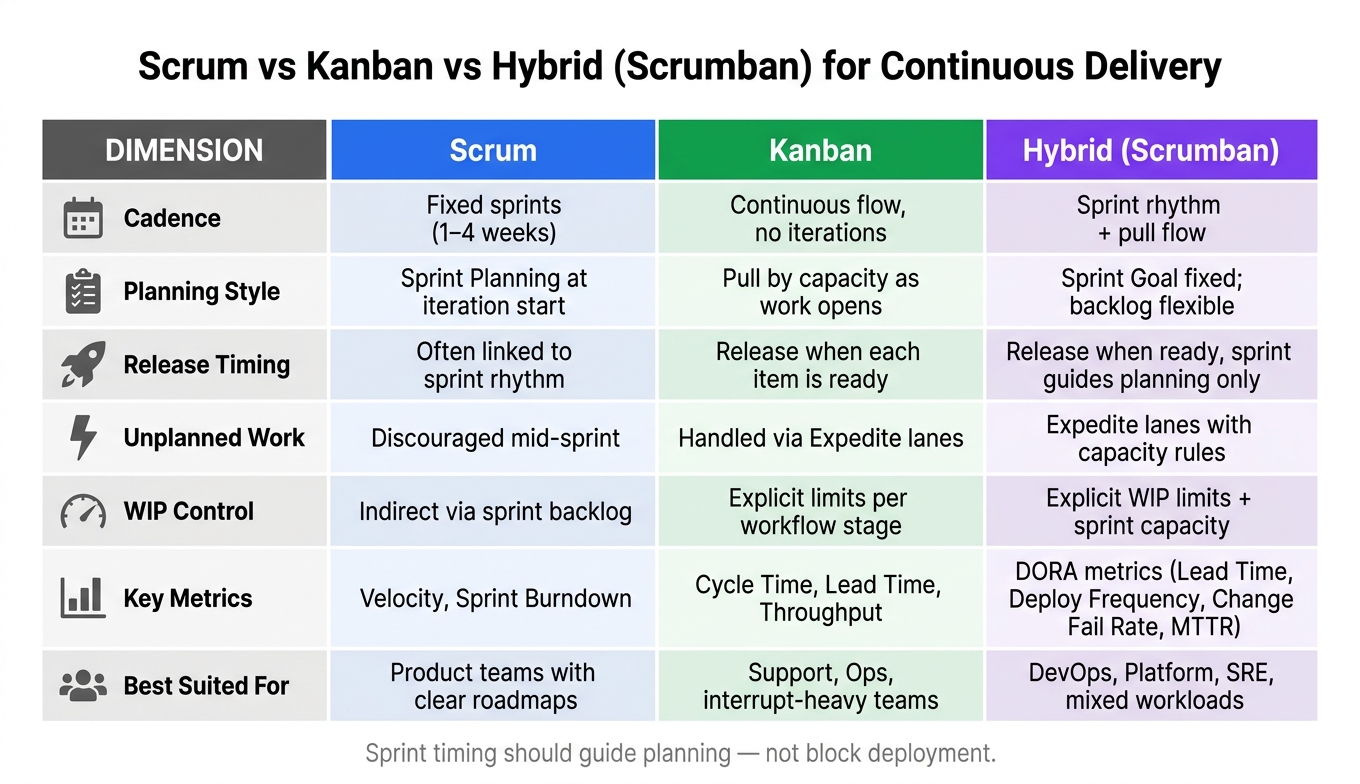 {Scrum vs Kanban vs Hybrid: Continuous Delivery Comparison}
:::
{Scrum vs Kanban vs Hybrid: Continuous Delivery Comparison}
:::
How Scrum supports planned, incremental delivery
Scrum works in fixed-length sprints, usually one to four weeks, with a Sprint Goal agreed at the start. The team plans a realistic increment, delivers it, and then runs a review and retrospective.[3][1]
In a continuous delivery setup, there’s a clear trade-off. Finished work may still sit and wait until the sprint ends before it goes live. A sprint sets the pace for planning and review, not for release.[1] That means sprint boundaries can reduce release frequency unless deployment is separated from the sprint cycle.[1][2] So Scrum is strong when a team needs structure and planning, but it’s less flexible when release timing has to shift at short notice.
How Kanban supports continuous flow and faster releases
Kanban doesn’t use sprints. Instead, work is pulled from the backlog when capacity becomes available, usually through backlog replenishment rather than sprint planning.[3][5] WIP limits help keep flow steady and make bottlenecks visible as they happen.[4]
That setup makes Kanban a natural match for CI/CD pipelines. Work moves across the board and can be released as soon as it’s ready. If a production issue lands out of nowhere, it can move through an Expedite lane without bringing everything else to a halt.[2][3] WIP limits also bring bottlenecks to the surface early and help cut cycle time, which suits release-heavy pipelines and support queues. The clearest gap between Scrum and Kanban shows up in cadence, WIP control, and release timing.
The table below shows where the two models differ in continuous delivery.
Comparison table: Scrum and Kanban in continuous delivery
| Dimension | Scrum | Kanban |
|---|---|---|
| Cadence | Fixed-length sprints, typically 1–4 weeks | Continuous flow; no fixed iterations |
| Planning | Sprint Planning at the start of each iteration | Work is pulled in as capacity opens up |
| Release model | Potentially releasable each sprint, though DevOps teams often release sooner | Release on completion of each item |
| Unplanned work | Mid-sprint changes are generally discouraged to protect the Sprint Goal | Handled via Expedite lanes and backlog reprioritisation |
| Primary metrics | Velocity and Sprint Burndown | Cycle Time, Lead Time, Throughput and Flow Efficiency |
| WIP control | Indirect, through sprint backlog capacity | Direct, through explicit limits per workflow stage |
| Deployment frequency | Often tied to the sprint rhythm unless deployment is decoupled | Continuous; items deploy as soon as they pass through the pipeline |
These differences explain why many teams blend Scrum’s planning rhythm with Kanban’s flow controls.
Hybrid Scrum–Kanban: A practical model for continuous delivery
What teams keep from Scrum and what they take from Kanban
A hybrid setup works well for teams that want some structure without slowing the work down.
Scrumban keeps Scrum’s review rhythm and Kanban’s continuous flow.[3] Teams still run Sprint Reviews, Retrospectives, and backlog grooming from Scrum, which helps protect the feedback loop and keeps priorities tied to business goals. The Sprint Goal stays fixed, even if the tasks inside the sprint shift.[1][3][5]
From Kanban, teams bring in clear WIP limits, flow metrics, and pull-based work based on available capacity. That changes one big thing: deployment no longer has to wait for the sprint to end. In Scrumban, the sprint drives planning cadence, not release cadence.[3]
Where the hybrid model improves CI/CD and support work
This is where the model tends to pay off: faster movement through the pipeline and fewer blocked issues.
Cycle time often drops soon after WIP limits are put in place.[3] When fewer items are in progress at once, teams do less context-switching, deal with fewer blocked hand-offs, and move work through the CI/CD pipeline with less drag. Lower WIP can also cut wasted cloud spend because fewer builds and test environments sit idle.
For urgent production fixes, a dedicated Expedite lane lets a single SEV-1 card bypass normal WIP limits without throwing the rest of the board into chaos.[3]
This setup suits Platform, DevOps and SRE teams in particular. They’re often handling planned feature work, infrastructure tasks, and unpredictable support requests all at once. Splitting WIP capacity by class of service, with set capacity for features, fixed-date work, expedites, and technical debt, helps stop reactive work from swallowing everything else. The result is simple: urgent fixes can move fast without bringing feature delivery to a halt.[3]
Scrumban keeps Scrum ceremonies but uses Kanban flow to run delivery.
Daily stand-ups shift into board reviews that make blocked work easier to spot.[1][3]
Comparison table: Scrum vs Kanban vs hybrid Scrum–Kanban
The table below shows the delivery differences that matter most in day-to-day operations.
| Dimension | Scrum | Kanban | Hybrid (Scrumban) |
|---|---|---|---|
| Commitment | Sprint Backlog fixed at planning | Pull-based on capacity | Sprint Goal fixed; backlog flexible |
| Change tolerance | Low - mid-sprint changes discouraged | High - reorder queue at any time | High - no mid-sprint commitment lock |
| Governance overhead | High - prescribed roles and events | Low - minimal prescriptions | Moderate - retains core Scrum ceremonies |
| Best suited for | Product teams with clear roadmaps | Support, Ops, interrupt-heavy teams | Platform engineering, mixed feature/support |
How to implement a hybrid model in a DevOps and cloud environment
Once the hybrid model is clear, the next step is simple: make the board, metrics and cost controls match the way work actually moves.
Map the delivery workflow and set WIP limits
Before changing anything, run a value-stream mapping session and follow one real story from start to finish. That gives you a grounded view of where work flows well and where it gets stuck. In a hybrid model, Scrum sets the planning rhythm, while Kanban manages execution flow. So the board needs to show both.
A typical board might read: Ready for Dev → In Dev → Review → Test → Release → Production. Each column should map to a real step in your CI/CD tooling, whether that is GitHub Actions, GitLab CI or Azure DevOps. A card moving across the board should mean something has moved in the pipeline, not just that someone updated a status.
Once the board reflects the actual workflow, set WIP limits where queues tend to build up. Code review, testing and release approval are common pressure points. A good starting point is to set the WIP limit for a column to about the number of people working in that stage, or one fewer if you want to push swarming. Waiting time often makes up most of cycle time, so cutting WIP in these stages can do more than trying to make each task a bit faster.[6]
Use delivery metrics that connect engineering speed to business results
Once flow is visible, you need to check if it is getting faster and more dependable. The right metrics turn the hybrid model from a process trial into proof that delivery is improving. The DORA metrics are a solid place to start.[8][10][11][13]
| Metric | What it measures | Business outcome |
|---|---|---|
| Lead time for changes | Code committed to running in production | Faster response to market or regulatory change |
| Deployment frequency | How often production is updated | Delivery maturity and release cadence |
| Change fail rate | Share of deployments that cause incidents or rollbacks | Incident costs and service risk |
| MTTR (mean time to recovery) | Time to restore service after failure | Lower downtime cost |
Start small. Manually track one metric for a month before automating data collection, and deployment frequency is usually the easiest one to begin with.[12] Once these numbers sit on a shared dashboard and come up in sprint reviews, the team can tie process changes to results. For example, smaller batch sizes may lower change fail rate, while tighter WIP limits may cut cycle time.
Control cloud and hosting costs while increasing release frequency
More frequent releases only make sense if pipeline spend does not creep out of control.
Autoscale build agents and workloads to match actual demand, using queue length or concurrent jobs instead of fixed schedules. Use ephemeral test environments that spin up for a branch or pull request and shut down after merge. That can replace long-lived staging environments that quietly rack up costs 24/7. Add build caching and parallelised test suites, and you can cut both build time and compute spend per run.[7][9]
It also helps to put cost guardrails straight into the pipeline. That can mean enforcing resource limits, blocking pricey instance types and requiring approvals for high-cost deployments. Track cost telemetry in £ and review it monthly so cost per deployment, cost per feature and the financial effect of pipeline changes become part of the team’s normal discussion, instead of an unpleasant surprise at month-end.[14]
Conclusion: When a hybrid approach is the right fit
Use Scrum when the goal is predictable product delivery. Use Kanban when the work is full of interruptions and day-to-day operational demands. Go hybrid when a team needs both: a steady planning rhythm and control over work as it moves through the system.
That’s why this model fits DevOps teams so well. In practice, these teams rarely live in a neat, tidy world of planned work alone. They’re often balancing delivery plans with support requests, releases, and incident response. In continuous delivery, that mix matters. A hybrid setup works because it gives teams a way to handle both sides without forcing everything into one box.
Hybrid models also make sense when release governance, regulation, or outside dependencies mean pure Scrum feels too stiff. Some teams can’t work in a clean sprint-only pattern because the work arrives when it arrives, or because approvals and hand-offs shape the pace.
A simple way to choose is to ask three questions:
- Can the team manage flow without leaning on sprint batching?
- How much of the work is interrupt-driven versus planned, or linked to outside dependencies?
- Do governance or compliance needs call for a fixed planning cadence?
One warning matters here: without clear rules, a hybrid model can turn into a vague mix of habits instead of a delivery model that people can rely on.
The choice, then, comes down to what your workflow needs most: cadence, flow, or both. When used well, a hybrid Scrum–Kanban model links planning with flow in a way that fits continuous delivery for DevOps teams.
FAQs
When should we choose a hybrid model?
Choose a hybrid Scrum and Kanban model if your team already works in Scrum, but day-to-day delivery keeps getting knocked off course by operational work. That often happens when there are frequent interruptions, changing priorities, or a blend of feature work and operational tasks that doesn’t sit neatly inside a sprint.
This setup tends to work well for teams with less predictable workflows, such as support, DevOps, SRE, or platform infrastructure. It gives you room for continuous delivery while still keeping Scrum’s review cadence in place.
How do WIP limits improve continuous delivery?
WIP limits help teams improve continuous delivery by capping how many items can sit in one workflow stage at the same time.
That sounds simple, but it changes how work moves. When fewer tasks are in play, people switch context less often, bottlenecks show up sooner, and the team stays focused on finishing work already in motion instead of piling on more.
Once a limit is hit, no one pulls in new work until blockers are cleared or current tasks are done. That push to finish first leads to a smoother, more predictable flow, with shorter lead times and faster feedback.
Which metrics should we track first?
Start with lead time for changes. It tracks the time from a code commit to a successful production deployment. That gives you a clear view of where work slows down, so you can spot bottlenecks and improve flow.
Once you have a baseline, add cycle time, throughput and velocity. Taken together, these metrics show how work moves through the team and whether delivery is getting better, rather than the team simply staying busy.