
When a tool call breaks, I check the contract before changing the prompt. A renamed field, stricter type check or changed response can cause a failure - even when the agent follows the schema it was given.
I work through 3 steps:
- Compare versions: check the tool definition, validator, adapter and API versions used by the failed call.
- Find the first mismatch: replay a sanitised request in isolated staging, checking each boundary without triggering real transactions.
- Block repeat failures: add regression tests and release checks for every supported version pairing.
I also check requests and responses separately. A timeout leaves the outcome unknown, so I reconcile before retrying. Version-linked alerts, clear migration plans and tested rollbacks help me keep deployed agents and APIs in step.
::: @figure 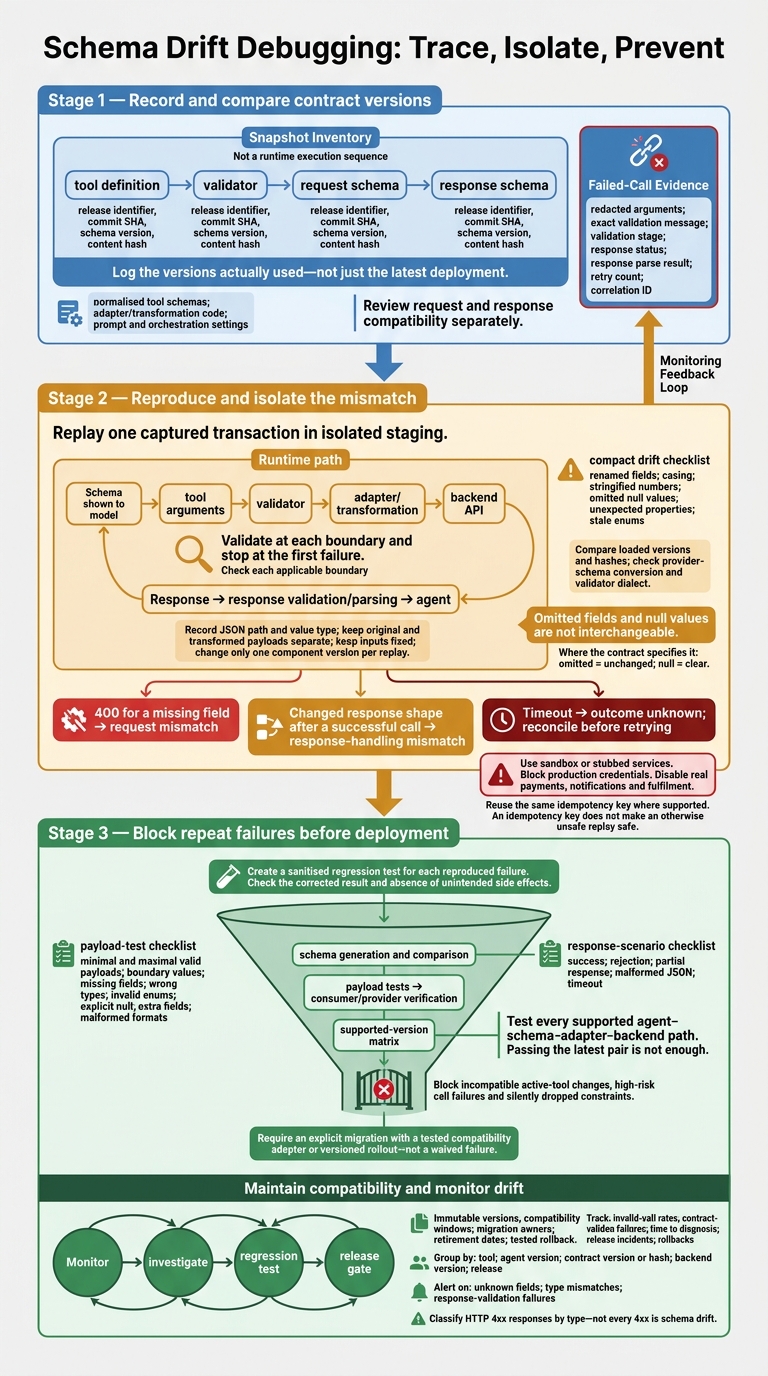 {Schema Drift Debugging: Trace, Isolate, Prevent}
:::
{Schema Drift Debugging: Trace, Isolate, Prevent}
:::
Step 1: Record and Compare Contract Versions
Record Contracts and Failed Calls
Once you know where the call fails, record the exact contract version at each layer. Store immutable snapshots of all four contracts: tool definition → validator → request schema → response schema. Link each snapshot to its release identifier, commit SHA, schema version and content hash.
Also record normalised tool schemas, adapter/transformation code, and prompt and orchestration settings. During rolling deploys or cached sessions, log the versions actually used, not just the latest deployment.
Keep one canonical contract covering the tool name, description, fields, types, enums, defaults, nullability, constraints, unknown-property handling, output shape, error responses, endpoint and side effects. Don't assume schema defaults are applied. Record which layer inserts them, then test what happens when a field is missing.
For each failed call, attach the version identifiers and hashes alongside the redacted arguments, exact validation message, validation stage, response status, response parse result, retry count and correlation ID. Retain enough payload structure to reproduce the failure, but remove personal data and restrict access to the originals.
Classify Changes by Compatibility Risk
Use these snapshots to check whether a change breaks request or response compatibility. In every pull request, compare proposed OpenAPI or JSON Schema changes against the production baseline.
Review request and response compatibility separately, checking request producers and response consumers along the agent path. Test every active supported version - not just the release immediately before the proposed change.
Step 2: Reproduce and Isolate the Mismatch
Validate Arguments at Each Boundary
Using the versions recorded in Step 1, replay one captured transaction in isolated staging. Use the original arguments and the schema shown to the model, and keep original and transformed payloads separate. Validate at each boundary and stop at the first failure. Record its JSON path and the value type seen.
Keep inputs fixed and change only one component version per replay. Use sandbox or stubbed services, block production credentials, and disable real payments, notifications and fulfilment. An idempotency key protects retries only where the backend guarantees that behaviour. It does not make an otherwise unsafe replay safe.
Check Adapters and Loaded Versions
Once you find the first failing boundary, compare the exact versions loaded at each layer. Check for differences between arguments and outbound requests: renamed fields, casing, stringified numbers, omitted null values, unexpected properties and stale enums. Omitted fields and null values are not interchangeable: where the contract specifies it, omitted means unchanged, while null means clear.
Compare the loaded versions and hashes for the tool registry, cached session, prompt config, adapter, client, validator and backend during the failed run. Check when the session was created and whether clients use the intended contract.
Compare the canonical schema with the definition actually sent to the model. Conversion to a provider schema subset may drop constraints, so a correct source file is not enough. Confirm that required fields, enums and supported format checks survive conversion. Also check that the validator uses the intended JSON Schema dialect.
Distinguish Request Rejections from Response Errors
Classify the failure using the request and response shapes before changing code. A 400 for a missing field points to a request mismatch. A changed response shape after a successful call points to a response-handling mismatch.
Treat timeouts as outcome unknown; reconcile before retrying, reusing the same idempotency key where supported. Do not hide either mismatch by removing required-field checks or allowing arbitrary properties globally.
Step 3: Block Contract Mismatches Before Deployment
Use the failure recorded in Step 2 to build a sanitised regression test for each reproduced failure. Keep the failing structure, contract versions and expected outcome. Prioritise active tools that create orders, authorise payments, issue refunds or change customer records. Check both the corrected result and the absence of unintended side effects.
Test Payloads and Generated Tool Schemas
For every registered tool, test minimal and maximal valid payloads, boundary values, missing fields, wrong types, invalid enums, explicit null, extra fields and malformed formats.
Where practical, derive definitions from a shared, versioned contract. Check that generated schemas, runtime validation and adapter output behave compatibly with backend requirements. Every required backend input must be exposed or supplied through a documented, tested transformation.
Test Agent and API Compatibility
Once schema and payload checks pass, test the full agent-to-backend contract. Use consumer-driven contract tests to record the request method, path, headers, authentication assumptions, serialised arguments and response fields read by the agent or adapter.[1][3]
Run provider verification against the API before deployment. Test every supported agent–schema–adapter–backend path, including versions that coexist during rolling releases. Check compatibility in both requests and responses, paying particular attention to renamed fields, changed enum values, altered error codes and pagination behaviour. Passing the latest pair is not enough.
Add property-based cases for unusual input combinations, alongside separate business-rule tests for authorisation, amounts and state transitions. Stage success, rejection, partial response, malformed JSON and timeout cases. Check that response handling cannot report a failed operation as a success. Keep all these tests isolated from real transactions.
Make Contract Checks a Release Gate
Once contract tests are in CI, make schema generation and comparison, payload tests, consumer/provider verification and the supported-version matrix release checks.
Block deployment when active-tool changes are incompatible, high-risk calls fail or schema constraints are silently dropped. Require an explicit migration with a tested compatibility adapter or versioned rollout - not a waived failure.
Report the affected tool, old and new versions, failing interaction and owner. Log any remaining mismatches for production monitoring.
Conclusion: Maintain Compatibility and Monitor Drift
Treat each incident as a contract failure, then use what you learn to stop the same drift from recurring.
Plan Support for Active Agent Versions
Publish immutable versions with clear compatibility windows, named migration owners and retirement dates. Favour backward-compatible additions. Introduce new argument or tool versions before removing existing behaviour.
If backend changes outpace agent upgrades, use a tested adapter that rejects ambiguous translations. Keep a tested rollback procedure ready. Retire old behaviour only once supported agents have migrated or remain protected by an adapter.
Track Failures by Contract Version
Use the same version tags in monitoring so you can trace failures back to releases. Track invalid-call rates, contract-validation failures, time to diagnosis, release incidents and rollbacks against a baseline.
Break down these measures by tool, agent version, contract version or hash, backend version and release. Use correlation IDs to connect traces, contract diffs and incident records.
Set alerts for increases in unknown fields, type mismatches and response-validation failures. Classify HTTP 4xx responses by type rather than treating every 4xx as drift. Link release-related failures to the deployment that introduced them - not just the date they were discovered.
Use a Contract Management Checklist
Before release, check that the controls to prevent repeat drift are in place:
- Named owners, immutable versions and hashes, and documented compatibility windows.
- Sanitised replay fixtures, passing contract tests and blocking checks.
- Dashboards with alert and rollback routes.
FAQs
How can I distinguish schema drift from an agent error?
Check the raw tool response separately from the agent’s reasoning. Pass it directly to your parser to check for truncation, missing fields or data type mismatches. If these checks fail while the agent is working as expected, the problem is structural - not a reasoning error.
To confirm, run the recorded arguments in a sandbox and check that they match the expected schema, units and currency definitions.
Which schema changes are safe for older agents?
Safe schema changes avoid adding required fields or removing features that older agents rely on [4][2]. Pin each run to a workflow version and keep an immutable history of tool definitions and state formats. For historical data, use version markers or tested migrations [1][2].
Use versioned endpoints to run old and new versions side by side [3]. Before deployment, run contract tests to check that inputs and outputs match the agreed definitions [4].
How do I prioritise contract tests for high-risk tools?
Focus first on agent–tool boundaries where state-changing actions or mismatches could cause major business failures or disrupt operations. Use deterministic assertions against a sandbox or stub to check that recorded arguments meet expected types, ranges and authorisation requirements.
Test malformed inputs, timeouts and authentication failures. For tools that change state, check that idempotency keys prevent duplicate actions when requests are retried. Record failure metrics to guide test coverage towards areas where schema drift, truncation or field-level mismatches pose the greatest risk.