
Scaling stateful applications is challenging because these apps need to retain data even when containers restart or move. Persistent storage solves this by providing durable, external volumes that keep data intact, regardless of container lifecycle events. This makes it possible to scale stateful workloads, like databases or message queues, without risking data loss or inconsistency.
Key points:
- Stateful apps (e.g., MySQL, Redis, Kafka) rely on data persistence for functionality.
- Persistent storage ensures data durability during restarts or scaling.
- Kubernetes tools like PersistentVolumes (PVs) and PersistentVolumeClaims (PVCs) manage storage for stateful apps.
- Storage types include block storage (fast, zonal), network file systems (shared access), distributed/container-native storage (resilient), and object storage (cost-effective for backups).
- Challenges include performance bottlenecks, data durability, and cost management.
To scale stateful apps efficiently:
- Match storage types to workload needs (e.g., block storage for databases, object storage for backups).
- Use Kubernetes features like
StorageClassesfor provisioning and cost control. - Optimise storage costs through tiering, thin provisioning, and lifecycle policies.
Persistent storage is the backbone of scalable stateful applications, ensuring data integrity and availability while managing costs effectively.
Choosing the right storage for stateful workloads on Kubernetes
Storage Classes and Their Properties
::: @figure 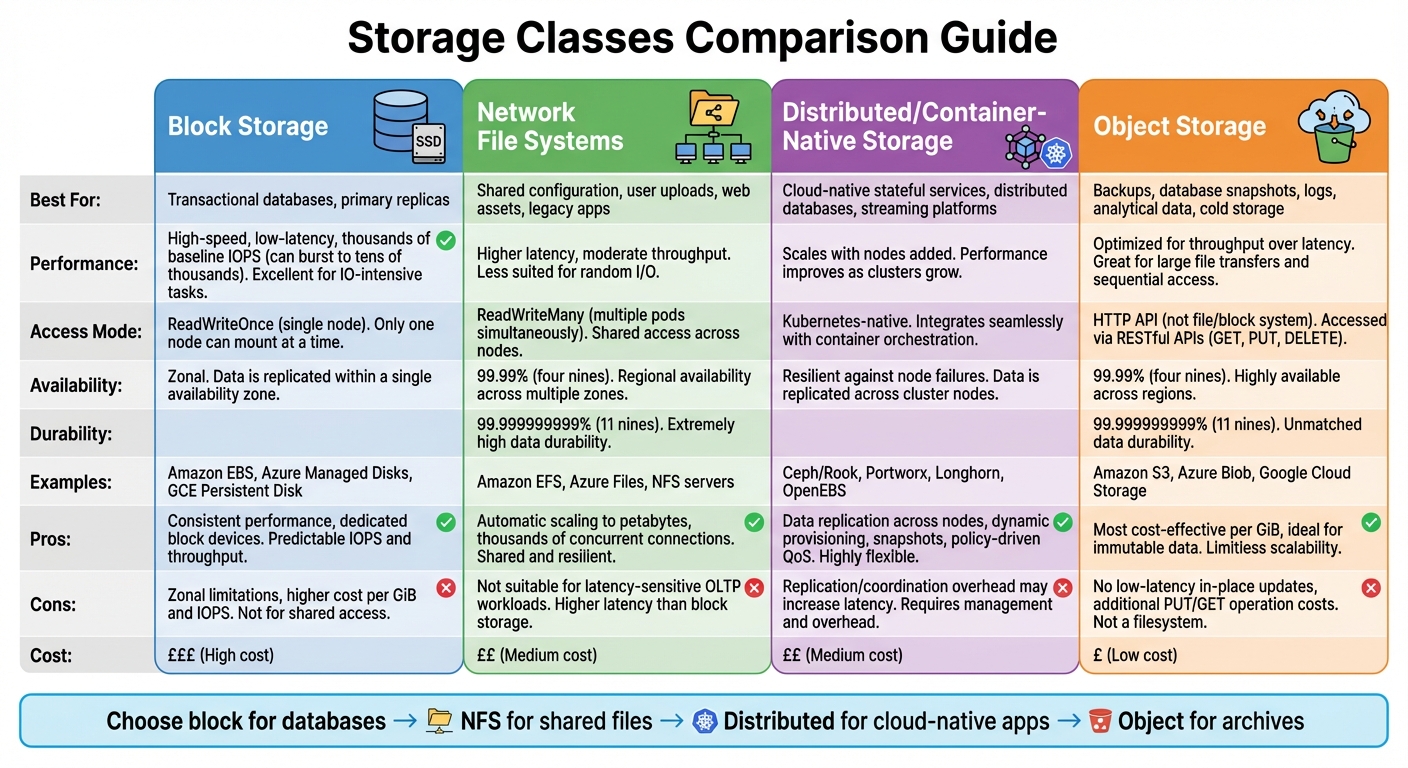 {Storage Classes Comparison for Stateful Applications: Performance, Access Patterns, and Cost}
:::
{Storage Classes Comparison for Stateful Applications: Performance, Access Patterns, and Cost}
:::
Choosing the right storage class is a key step in scaling stateful applications. Each storage class - block storage, network file systems, distributed/container-native storage, and object storage - is designed to meet specific performance and cost needs. Here's a breakdown of these four types and how they align with different workloads based on performance, access patterns, and costs [2][4].
Block Storage for Transactional Workloads
Block storage is the go-to option for workloads that require high-speed, low-latency data access. It provides dedicated block devices with consistent performance, making it ideal for transactional databases and primary replicas [2][4]. Examples include Amazon EBS, Azure Managed Disks, and GCE Persistent Disk. These services typically offer baseline IOPS in the thousands, with the ability to burst into tens of thousands of IOPS for high-throughput tasks [4].
However, block storage often comes with limitations. Most cloud block volumes are zonal and support only ReadWriteOnce access, meaning they can attach to a single node at a time [2]. This constraint can complicate high-availability setups, as pods need to be co-located with the volume, or database-level replication must be implemented. For organisations in the UK, premium SSD tiers come with higher costs per GiB and per IOPS, so it's important to balance performance requirements with monthly budgets.
Network File Systems for Shared State
While block storage is perfect for transactional tasks, network file systems are better suited for workloads requiring shared access. These systems allow multiple pods to read and write simultaneously, supporting ReadWriteMany access modes [2][7]. Popular options include Amazon EFS, Azure Files, and traditional NFS servers. They are commonly used for shared configuration files, user uploads, web assets, and home directories, as well as legacy applications that rely on shared filesystems.
Amazon EFS, for instance, can scale automatically to petabytes and handle thousands of concurrent connections. It offers impressive durability (11 nines or 99.999999999%) and up to four nines (99.99%) availability for filesystem objects [7]. However, network file systems typically exhibit higher latency and moderate throughput compared to block storage. This makes them less suitable for latency-sensitive workloads like OLTP but highly effective for managing shared content and state.
Distributed and Container-Native Storage
Distributed and container-native storage solutions are designed to integrate seamlessly with Kubernetes environments. Platforms such as Ceph/Rook, Portworx, Longhorn, and OpenEBS operate as Kubernetes services, pooling local or attached disks into a distributed storage system [2][5]. These systems replicate data across nodes, ensuring resilience against node failures and enabling pods to be rescheduled with their data intact.
One of the key advantages of these platforms is their scalability: as you add more nodes, both capacity and performance improve. They also offer Kubernetes-native features like dynamic provisioning, snapshots, thin provisioning, and policy-driven quality of service, all managed via StorageClass parameters. For UK teams running hybrid or on-premises clusters, these solutions provide greater control over compliance, data residency in specific UK regions, and cost savings in pound sterling.
Object Storage for Cold and Analytical Data
Object storage, offered by services like Amazon S3, Azure Blob, and Google Cloud Storage, is designed for storing immutable data in buckets that are accessed via HTTP APIs rather than traditional file or block systems [4]. For example, AWS S3 offers 11 nines (99.999999999%) durability and 99.99% availability for its Standard storage class [4].
This type of storage is ideal for managing large datasets, backups, database snapshots, logs, and analytical data. Since it doesn't support low-latency, in-place updates, object storage is better suited for workloads involving whole-object writes or overwrites, such as periodic backups or log archives. Additionally, it is more cost-effective on a per-GiB basis compared to block or file storage. However, UK organisations should account for additional costs like PUT/GET operations and data egress when calculating long-term expenses.
Technical Challenges When Scaling Persistent Storage
Scaling persistent storage for stateful applications presents a host of technical challenges. For UK organisations, these include managing performance bottlenecks, ensuring data durability, and keeping costs under control across availability zones and regions.
Performance and Latency Under Load
When workloads grow, issues like IOPS limits, throughput constraints, and network latency can become major hurdles [2]. Block storage is well-suited for low-latency random I/O, but as multiple pods or virtual machines (VMs) share the same volume, I/O queue limits can lead to increased delays [2]. Network file systems, on the other hand, add network overhead and metadata processing, which can cause higher latency variations - especially for workloads dealing with numerous small files or metadata-heavy operations [1][2].
What matters most isn’t the average latency but the p95 and p99 tail latencies, which highlight when storage tiers are reaching their limits [2]. Distributed and container-native storage can scale performance by adding nodes, but replication and coordination overhead may increase latency if configurations aren’t optimised [2]. These challenges are compounded by intra-region network performance variability and the cost of provisioned IOPS in pound sterling [2]. Testing under load - particularly during peak business hours - helps identify contention patterns before they disrupt production systems [2][4].
But performance isn’t the only concern; scaling also requires robust systems to protect data integrity.
Data Durability and Availability
As storage scales, the likelihood of hardware failures, network issues, and software bugs grows, increasing the risk of data loss or downtime [2]. To mitigate this, storage systems use techniques like replication (synchronous or asynchronous), checksums, and erasure coding [2][4]. Synchronous replication ensures that writes survive a single-node failure, but it also introduces additional latency to each write operation [2][4].
Availability is maintained through features like automatic failover and self-healing. When a node, disk, or zone fails, systems promote replicas and reattach volumes to replacement pods [2][5]. Container-native storage works seamlessly with Kubernetes, allowing persistent volumes to follow pods when they are rescheduled to new nodes [2]. However, handling multi-writer workloads adds complexity, often requiring shared file systems or distributed consensus protocols to prevent corruption and ensure consistency during failovers [2][4]. For UK organisations, regularly testing these mechanisms through disaster recovery drills or game days helps ensure that recovery point objectives (RPO) and recovery time objectives (RTO) are met.
Cost Implications at Scale
Storage costs can quickly escalate as workloads grow. The expenses break down into several categories: capacity (£/GiB per month), performance tiers (IOPS/throughput), replication and backups (extra copies and snapshots), and data transfer charges, particularly for cross-availability zone (AZ) or cross-region traffic [4][7]. Moving from general-purpose storage to high-IOPS tiers can significantly increase monthly costs for UK businesses [4].
For highly resilient configurations, network file systems and managed databases often double or triple capacity costs due to multi-AZ or cross-region replication in pound sterling [7]. Object storage, while economical for capacity, introduces request charges and cross-region replication fees, which can add up at petabyte scale or with high access rates [4]. Additionally, data transfers between regions - such as between eu-west-2 (London) and another EU region - incur outbound transfer costs. Even intra-region cross-AZ traffic can result in unexpected charges for organisations relying on synchronous replication [7]. What starts as a modest £/GiB cost can balloon as storage needs and performance demands increase.
To manage costs effectively, UK organisations should focus on right-sizing volumes, using tiering to keep frequently accessed data on SSDs while migrating older data to more economical object storage. Aligning compute and storage locations can also reduce cross-region data transfer costs [4][7]. For more complex environments, working with consultancies like Hokstad Consulting can help optimise storage usage, align storage classes with workload needs, and control expenses while maintaining service level agreements (SLAs) in hybrid or multi-cloud setups.
Need help optimizing your cloud costs?
Get expert advice on how to reduce your cloud expenses without sacrificing performance.
How to Select the Right Storage Class
Matching Workloads to Storage Classes
Once you've identified the available storage classes, the next step is to align them with your specific workload needs. To do this, categorise workloads based on factors like access patterns, latency requirements, and consistency demands. For example:
- Transactional databases (like those using StatefulSets) demand high-IOPS block storage on SSDs [2][4].
- Shared-state applications, such as content management systems or monolithic applications needing multiple concurrent writers, are best suited for a network file system (NFS) or a file service supporting ReadWriteMany access [2][7].
- Cloud-native, horizontally scaled stateful services, including distributed databases or streaming platforms, benefit from distributed or container-native storage. These systems replicate data across nodes, balancing performance, resilience, and simplicity [2][4][5].
- Cold data, backups, logs, and analytical datasets thrive on object storage, which prioritises throughput and cost-efficiency over low latency [4].
To streamline decisions, document these workload-to-storage mappings in an inventory. This record should include details like latency, IOPS, durability, capacity growth, and retention needs. For UK teams, it's helpful to define service level objectives (SLOs) based on user expectations. For instance, if your goal is 99% of API requests must complete within 200 ms
, you can derive storage-specific SLOs, like p95 volume read latency ≤ 2 ms.
Tools such as fio can then simulate realistic loads to measure and refine these metrics [2].
Kubernetes Integration and Storage Configuration
In Kubernetes, StorageClasses play a pivotal role in defining how volumes are provisioned. They determine aspects like the CSI driver, performance tier, replication policies, and reclaim behaviour [2][4]. When a PersistentVolumeClaim (PVC) is linked to a StorageClass, it triggers dynamic provisioning of a PersistentVolume (PV). For StatefulSets, volumeClaimTemplates create individual PVCs per pod, ensuring persistent data and identity [2][3][4][6].
To optimise your setup, consider these tips:
- Use the volumeBindingMode
WaitForFirstConsumerfor zonal block storage. This ensures volumes are provisioned in the same availability zone as the pod, avoiding cross-zone latency or scheduling issues [2][4]. - Set the reclaimPolicy to
Retainfor critical data andDeletefor ephemeral data [2]. - Label StorageClasses clearly (e.g.,
fast-ssd,balanced, orarchive) to help developers select the right option without guesswork. - Enable topology-aware provisioning and snapshots to simplify backups and environment creation.
This approach not only makes management easier but also ensures your storage scales seamlessly with application demands.
Cost Reduction Strategies for Storage
After selecting and configuring the right storage class, managing costs becomes a top priority. Here are some strategies to keep expenses in check:
- Right-size volumes: Match storage sizes to actual usage.
- Enable thin provisioning: Pay only for the space you use.
- Implement data tiering: Move infrequently accessed data from high-cost SSDs to more affordable HDD or object storage tiers [2][4].
- Regularly audit and delete unused PVCs and PVs to avoid
zombie
storage charges from retired StatefulSets [3][6]. - Use lifecycle policies to archive or delete outdated test environments, preview deployments, and short-term datasets.
For UK organisations, these measures can lead to substantial savings. For instance, shifting 10,000 GiB of data from a £0.08/GiB-month tier to a £0.02/GiB-month tier could save around £600 each month.
Hokstad Consulting offers expertise in DevOps transformation, cloud cost engineering, and strategic cloud migration. They help organisations review storage usage, performance, and billing to identify misaligned StorageClasses and over-provisioned volumes. Their approach includes designing tiered storage architectures - mapping production databases to high-performance block storage, shared workloads to resilient file or distributed storage, and cold data to object or archival tiers. By integrating dynamic provisioning, data tiering, and lifecycle rules into CI/CD pipelines, they ensure new workloads follow cost-efficient patterns automatically.
Moreover, Hokstad Consulting builds tools for automation and observability, such as dashboards, policies, and AI-driven agents. These tools flag inefficient storage use in real time and suggest corrective actions, enabling UK teams to cut recurring storage costs while maintaining reliability and development speed. Their methods have helped clients reduce cloud spending by 30–50%, improving performance through better resource allocation and automation [8]. These cost-saving strategies complement the earlier storage class recommendations, creating a scalable and efficient storage solution.
Conclusion: Choosing the Right Storage Strategy for Scaling Stateful Applications
Picking the right storage strategy for stateful applications is all about aligning your storage classes with the specific needs of your workloads. It’s essential to balance performance, durability, and cost considerations from the outset. For UK-based teams, this means carefully documenting how workloads map to storage options and defining service-level agreements (SLAs) in terms of both GBP and milliseconds. Using Kubernetes tools like StorageClasses and StatefulSets can help ensure persistence is handled in a consistent and repeatable manner.
When implementing a storage selection framework, watch out for common mistakes like relying too heavily on a single technology or mixing different types of data inappropriately. Start with a 30–60 day period to measure key metrics such as storage latency, IOPS, throughput, and monthly costs for each storage class. Use this information to pilot one or two high-impact workload migrations. This allows you to validate any performance and cost improvements before scaling the solution more broadly [2][4].
Hokstad Consulting offers expert guidance in assessing storage and workload configurations. Their approach focuses on optimising your setup for both cost and performance. By profiling existing databases and stateful services, they identify latency bottlenecks, resilience issues, and tiering opportunities - all measured in terms of monthly cloud expenditure in GBP. They specialise in designing Kubernetes-native storage architectures, selecting and configuring StorageClasses, and implementing container-native or distributed storage solutions. Using GitOps-based deployment patterns tailored to your cloud and hosting mix, they automate tasks like volume provisioning, snapshot scheduling, and lifecycle management. They also establish dashboards to track storage-related KPIs, such as £/GB, £/request, and recovery times. Clients have reported cloud spend reductions of 30–50% while achieving better performance through their methods [8].
To ensure long-term success, set up a small cross-functional governance team. This team should monitor key metrics, approve storage patterns, and collaborate with partners. By doing so, you’ll maintain control over costs while meeting availability and performance targets [2].
FAQs
What role does persistent storage play in scaling stateful applications?
Persistent storage plays a key role in scaling stateful applications by ensuring data is securely stored and remains accessible, even when compute instances are added, removed, or experience failures. By separating data storage from compute resources, applications can expand effortlessly without the risk of losing data or facing downtime.
This method enhances load distribution, speeds up recovery, and supports efficient growth, making it a cornerstone for building reliable and scalable stateful systems.
What challenges arise when scaling persistent storage in Kubernetes?
Scaling persistent storage in Kubernetes comes with its fair share of hurdles. One major concern is maintaining data consistency and performance as applications expand. This becomes even trickier in distributed systems, where managing these factors across multiple nodes adds layers of complexity. On top of that, ensuring reliable orchestration of storage resources while keeping latency low can be particularly challenging during periods of heavy demand.
Another pressing issue is keeping costs under control. As storage requirements grow, finding the right balance between performance and budget calls for meticulous planning and fine-tuning. Lastly, integrating storage solutions with Kubernetes often introduces additional complexity, requiring a high level of expertise to scale effectively without sacrificing reliability or efficiency.
How can organisations in the UK optimise costs when using different storage classes?
Organisations across the UK can cut costs by tailoring their storage choices to match their unique requirements. By right-sizing storage allocations, you ensure you're not wasting money on unused capacity. Additionally, automating tier transitions allows data to shift to more cost-effective storage tiers as access needs evolve, saving both time and resources.
Keeping a close eye on usage patterns and steering clear of over-provisioning are essential steps for managing expenses effectively. Regular reviews of storage setups, aligned with your organisation's data access priorities, can deliver noticeable savings - all without compromising on performance or reliability.