
Most enterprise CI/CD problems are not tool problems. They are coordination problems.
If I had to sum up the article in a few lines, it would be this:
- I need one joined-up flow from ticket to pull request, pipeline, approval, deployment and incident record
- I need clear role controls so the same person cannot code, approve and deploy a high-risk change
- I need audit records built into the pipeline, with time-stamped approvals and deployment logs
- I need shared templates and naming rules across teams, so 100+ repositories do not turn into 100+ different ways of working
- I need less noise in chat and more useful signals, such as failed builds, rollbacks and high-severity security findings
- I need cost signals in the workflow, so teams can spot spend impact before it shows up in a monthly bill
The article also makes a plain point about UK firms: if I work in finance, health, government, or any regulated area, weak audit trails and informal approvals are not just annoying. They can become a compliance problem.
A few practical ideas stand out:
- Link every change to a work item
- Push test, build and scan results back to that record
- Use ChatOps for production approvals, but write each decision back to the delivery system
- Enforce RBAC and separation of duties across Git, CI/CD and chat
- Store rules as code, including scans, approval gates and deployment windows
- Track a small set of metrics: build duration, test failure rate, deployment success rate and rollback frequency
- Show cost impact in pull requests, tickets and chat, ideally in £
In short: I scale CI/CD by making collaboration repeatable, traceable and low-noise across every team.
| Area | What matters most |
|---|---|
| Change flow | Ticket, branch, PR, pipeline and deployment all linked |
| Approvals | Done in the workflow, logged with timestamps |
| Security | Scan results routed to the right people at the right time |
| Governance | RBAC, least privilege, policy checks and secret controls |
| Scale | Shared templates, team ownership and common naming |
| Signal quality | Fewer alerts, better dashboards, clear incident links |
| Cost | Spend shown early, near the code and infra change |
So before I add more tools, I should fix the system that connects the tools I already have.
Enterprise GitOps for Multi-Environment Delivery & Promotion
Need help optimizing your cloud costs?
Get expert advice on how to reduce your cloud expenses without sacrificing performance.
Collaboration patterns that work inside enterprise CI/CD
::: @figure 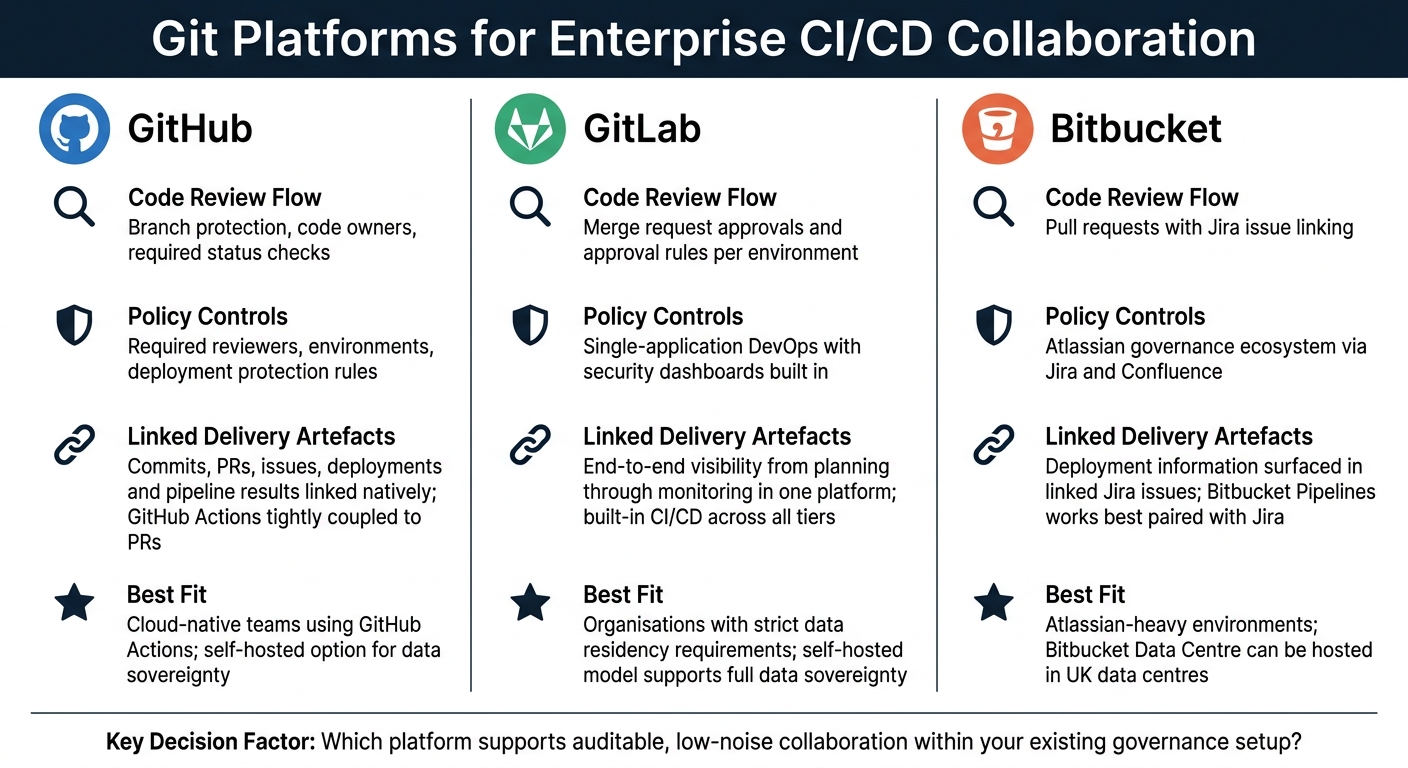 {Git Platforms for Enterprise CI/CD Collaboration: GitHub vs GitLab vs Bitbucket}
:::
{Git Platforms for Enterprise CI/CD Collaboration: GitHub vs GitLab vs Bitbucket}
:::
The aim is simple: keep decisions close to the code, the build and the release. That sounds obvious, but at enterprise scale it only works if teams use a clear, repeatable way to collaborate.
ChatOps, issue-driven workflows and deployment approvals
Once the compliance model is in place, the next step is to standardise how every change moves through the pipeline.
Start each change with a work item that holds the context, risk and acceptance criteria. Then link the branch and PR to that ticket. CI pipelines should push build, test and security results back to the same ticket through webhooks, so anyone reviewing the change can see everything in one place.
For deployment approvals, one of the best patterns is a ChatOps bot that posts a structured message in the right service channel when a release hits the production approval gate. The bot shares the PR, ticket, test results and risk summary. Approvers sign off in chat. The bot then writes the time-stamped decision back to the CI/CD system and the change record.
If a major failure happens, the incident tool should open a dedicated incident room with links to dashboards, logs, the failed run and the post-mortem record. After the issue is fixed, archive the room alongside the incident record, with links to any follow-up change tickets.
Mapping collaboration to each pipeline stage
A good rule here is to map each stage to one communication channel and one audit artefact. That cuts notification noise and makes tracing decisions far less messy.
| Pipeline Stage | Collaboration Pattern | Audit Artefact |
|---|---|---|
| Code / PR | Inline review comments, required approvals, branch protection | PR review log |
| Build & Test | Automated failure notifications to the service channel, commit author mentioned | Build/test logs |
| Security Scan | Alerts routed to the security or risk channel, issues created in the repository | Security report |
| Release Approval | ChatOps approval message with risk summary, product and security sign-off | Approval record |
| Rollback | Automated post to the service channel with previous version and cause | Rollback record |
| Post-Release | Technical metrics and business indicators shared in channel, linked to the change record | Post-release dashboard |
The main discipline is routing only the events that matter to team channels:
- failed builds
- security findings above a set severity
- production deployments
- rollbacks
Routine success messages are better kept in dashboards or daily digests, not dropped into channels where engineers are trying to focus.
Comparison tables: chat platforms and Git platforms for CI/CD
These patterns depend on the chat and Git platforms doing the job cleanly. If the plumbing is awkward, the process usually becomes awkward too.
Slack vs Microsoft Teams for CI/CD ChatOps
| Consideration | Slack | Microsoft Teams |
|---|---|---|
| Integration depth | Extensive developer-friendly APIs; native apps from most CI/CD tools | Deep integration with Azure DevOps, GitHub and Power Automate |
| Governance controls | Enterprise SSO, admin policies, data retention controls and regional data residency options | Strong alignment with Microsoft 365 compliance centre, eDiscovery and UK data centre regions; well-suited to public sector and regulated industries |
| Audit features | Channel and bot activity logs, often centralised in logging tools | Native integration with Microsoft audit and identity stack (Azure AD) |
| Best fit | Heterogeneous stacks, open-source tooling, developer-led organisations | Microsoft-heavy environments with existing M365 governance frameworks |
GitHub vs GitLab vs Bitbucket for CI/CD collaboration
| Consideration | GitHub | GitLab | Bitbucket |
|---|---|---|---|
| Code review flow | Branch protection, code owners and required status checks | Merge request approvals and approval rules per environment | Pull requests with Jira issue linking |
| Policy controls | Required reviewers, environments and deployment protection rules | Single-application DevOps with security dashboards built in | Atlassian governance ecosystem via Jira and Confluence |
| Linked delivery artefacts | Commits, pull requests, issues, deployments and pipeline results linked natively; GitHub Actions tightly coupled to pull requests | End-to-end visibility from planning through monitoring in one platform; built-in CI/CD across all tiers | Deployment information surfaced in linked Jira issues; Bitbucket Pipelines works best when paired with Jira |
| Best fit | Cloud-native teams already using GitHub Actions; self-hosted option available for data sovereignty | Organisations with strict data residency requirements; self-hosted model supports full data sovereignty | Atlassian-heavy environments; Bitbucket Data Centre can be hosted in UK data centres |
For many UK enterprises, the practical choice comes down to what is already in place. A team running Azure and Microsoft 365 will usually find Teams-based ChatOps easier to govern and audit. A team with a mixed open-source stack may find Slack’s integration ecosystem easier to work with.
The same goes for Git platforms. The real question is not which one looks best on paper. It’s which one supports auditable, low-noise collaboration at enterprise scale inside the organisation’s current governance setup.
Governance, security and compliance in collaborative pipelines
Chat, Git and CI/CD tools are only dependable when permissions, approvals and logs are applied the same way every time. If governance is bolted on at the end, gaps appear fast: missed deployments, informal sign-offs and shared admin access that won't stand up in an audit and often lead to rework. Treat the CI/CD platform as the system of record. Every change should link back to a work item, and every approval and deployment should be enforced by automation. That makes life easier for internal audit and regulators such as the FCA, PRA, ICO and NHS Digital.
Once collaboration is built into the pipeline, governance needs to control how that collaboration is used.
RBAC, least privilege and separation of duties
Use one identity provider and one role map across Git, CI/CD and chat.
Start by defining who can do what, and where.
| Role | Typical Permissions | Environment Access |
|---|---|---|
| Developer | Read/write repositories, trigger builds | Development and feature branches only |
| Reviewer | Approve pull requests, view build logs | Code review stage |
| Release Manager | Authorise production deployments, control approvals | Staging and production via approval gates |
| Security Engineer | Manage scanning policies, view security reports | Security tooling layer |
| Auditor | Read-only access to logs, policies and configurations | View-only across all environments |
| Platform Engineer | Manage CI/CD templates and IaC modules | Tooling and infrastructure layer |
Keep a single RBAC matrix and enforce it as code. That way, permission drift is spotted in code review instead of during an incident or an audit.
Separation of duties also needs to be hard-wired in. The engineer who writes the code should not be the person who approves it for production. Put that into branch protection rules that block self-approval. Then back it up with environment rules in GitHub Environments, GitLab Protected Environments or Azure DevOps Environments that require Release Manager approval. ChatOps bots should follow the same rule, so only named roles can trigger a production deployment command.
Audit trails, compliance as code and secrets handling
Role control is only half of the picture. The other half is evidence.
Log every pipeline run, approval and deployment with UTC timestamps and links to the originating work item. When CI/CD logs feed into a central SIEM such as Splunk or Azure Sentinel, security teams can match events, flag policy breaches and produce the evidence auditors expect.
Policy as code keeps controls consistent as teams and pipelines grow. Put mandatory scans, coverage thresholds, approval gates and deployment windows into version-controlled policy. Tools like Open Policy Agent (OPA), HashiCorp Sentinel or Conftest can check those rules during pipeline execution and block non-compliant changes automatically.
Secrets handling needs tight control in collaborative pipelines. Never paste secrets into chat, tickets or pipeline files. Use a secrets manager and short-lived, job-scoped credentials. Secret access should be treated as a privileged event and logged separately. If pipelines run untrusted code, such as external pull requests, use isolated or ephemeral runners that are destroyed after each job and have no access to production secrets.
Comparison table: centralised versus federated governance
For large UK enterprises, the governance model itself is a serious choice. A centralised model gives auditors one source of truth, but it can slow teams down. A federated model gives teams more room to move, but it only works if policy tooling is strong enough to keep things aligned. Most mature organisations end up somewhere in the middle: core controls and shared templates stay central, while day-to-day pipeline setup is handled by teams within clear boundaries.
| Dimension | Centralised | Federated | Hybrid |
|---|---|---|---|
| Consistency | Very high - one set of policies | Variable - depends on team discipline | High - guardrails enforced centrally |
| Team autonomy | Low | High | Medium to high |
| Compliance reporting | Straightforward - single source of truth | Complex - requires aggregation across teams | Automated with a central reporting layer |
| Operating overhead | High - central team carries the load | Low - distributed, but risks duplication | Medium - platform team enables self-service |
| Speed of change | Slow - central approval required | Fast - teams move independently | Fast - self-service within guardrails |
| Scalability | Limited at enterprise scale | High | Very high |
| Best fit | Highly regulated, smaller-scale environments | High-growth teams with strong DevOps maturity | Large UK enterprises with significant regulatory burden |
With governance in place, the next challenge is keeping shared pipelines scalable without adding noise.
Scaling CI/CD architecture without creating noise or bottlenecks
Once governance is in place, the next job is more practical: how do you run pipelines across dozens or even hundreds of teams without ending up with copied YAML, noisy alerts, and approval queues nobody seems to own?
Shared templates, service ownership and shared conventions
The best way to build on a hybrid governance model is to standardise only the parts of delivery that teams can reuse. Use a versioned pipeline-templates repository for common build, test and deploy patterns.[11] Each template should package standard steps for security scanning, artefact management, environment promotion and compliance checkpoints, so controls are applied the same way across the estate.[2][3]
The split in ownership matters here. Platform engineers maintain the shared template, while product teams pass in service-specific parameters.[3][5][11] That keeps responsibility clear. If a security scan or compliance checkpoint needs to change, the update happens once in the platform-owned repo and then flows out to every team using it, instead of forcing each team to fix its own copy.[3][8][11]
Naming conventions help more than people expect. A pattern such as domain-service-environment-action - for example, payments-checkout-prod-deploy - makes dashboards, logs and alerts much easier to scan. Add a service metadata file, such as service.yaml, to every repository and record details like owner, domain, on-call and risk.[10][11]
That metadata can then be pulled into service catalogues and internal developer portals, linking CI/CD events to the right service entries, ownership pages and runbooks. The result is simpler incident routing and smoother approval flows.[5] Approval rules should point to team groups like @payments, @platform and @security, not named individuals, so the process still works when people move roles or leave.[9][1]
Reducing noise, improving observability and reviewing performance
Alert routing needs some discipline. Send successes to dashboards, warnings to daily summaries, and page people only for production rollbacks or critical security failures.[12] Failures in development or test should usually be logged or bundled into scheduled summaries, rather than blasted out to the whole team in real time. Repeated non-production build failures can also be grouped into one periodic notification, which makes it easier for engineers to spot patterns instead of chasing one-off noise.[3][12]
On observability, CI/CD events should be treated as first-class signals. Emit structured data such as service name, environment, deployment ID, commit hash, pipeline run ID and change type. Then annotate dashboards with deployments, so engineers can tie a latency spike or error surge to a specific release in seconds.[3][8]
A small set of metrics goes a long way:
- build duration
- test failure rate
- deployment success rate
- rollback frequency
Track them by team, service and environment, then review them monthly or quarterly with platform, product and operations teams.[7][1] Long approval delays often point to unclear ownership or manual gates that are too strict. Frequent production failures often show weak staging coverage.[7][1][12] Feed those findings back into team-owned templates and governance policies. That feedback loop is what turns a pile of pipelines into an operating model. It also cuts wasted compute and rework, which matters for the cost-focused model that follows.
Comparison table: central platform versus team-owned pipelines
The real decision is where standardisation ends and team ownership begins. Here are the usual trade-offs:[6]
| Dimension | Central Platform | Team-Owned Pipelines | Hybrid |
|---|---|---|---|
| Scalability | Strong for governance and consistency, but can become a bottleneck | Good for local autonomy, but duplication can creep in | Strong balance: central guardrails with local execution |
| Maintenance effort | Lower, because platform-owned logic changes once | Higher, because logic is repeated across repos | Medium: shared foundations, local configuration |
| Governance and compliance | Central policy, consistent enforcement | Variable, depending on team discipline | Strong, with central policy and federated ownership |
| Developer experience | Standardised, but may feel restrictive | Flexible and tailored to the domain | Good balance of standardisation and local variation |
| Onboarding | Faster with common templates and documentation | Slower when every team follows different patterns | Fast, with a shared starting point |
| Best fit | Smaller organisations or high-risk regulated domains | Mature teams with strong platform skills | Large UK enterprises with diverse domains and regulatory obligations |
Hybrid keeps shared foundations in the centre and service logic with the teams - built on shared foundations inside platform guardrails.[4][5][6]
Cost-aware operations, consulting support and conclusion
Cost signals and AI-assisted workflows in CI/CD collaboration
Once pipelines run in a steady way across teams, cost becomes the next signal that needs to show up in the pipeline. The key idea is simple: show cost at the moment a team is making a choice, not months later at quarter end.
Cost should sit beside security and performance as a quality gate. A Terraform plan should add the monthly cost impact to the pull request. Spend alerts should go to the right chat channel and link back to the commit. That keeps cost inside day-to-day delivery work, instead of turning it into a separate FinOps track.
This matters because teams can only act on cost when they see it early enough to change the design. Enterprises still waste billions on unused cloud spend when engineers don't have real-time visibility. Put cost signals where engineers already work: Git, chat and tickets. Even one simple move, like automating shutdown schedules for non-production environments, can cut uptime by about 70%, which lowers spend without slowing delivery. [13][14][15][20]
AI can help here, but it needs tight guardrails. It can summarise IaC changes against pricing and usage data, and it can add useful context during incident triage, such as ownership, recent deploys and known issues. But there should be clear limits: keep personal data out of prompts, log every invocation, and require human approval for final decisions. [17][18]
Where Hokstad Consulting fits
This is often the point where specialist help saves time. Hokstad Consulting supports enterprises with DevOps operating models, cloud cost controls, secure pipeline automation and AI-assisted workflows that cut spend and speed up delivery.
Conclusion: the operating model that scales
The pattern running through this guide is straightforward: collaboration needs to be built into CI/CD stages, not added later. Standardisation should remove repetitive work and reduce ambiguity, without stopping teams from owning their services. When spend signals show up in tickets, pull requests, pipeline steps and chat channels - in pounds sterling and linked to the commit - cost choices become part of everyday delivery, not a separate finance task. [16][19]
At enterprise scale, this takes both technical integration and shared ownership across teams. The organisations that do this well treat the operating model as something they keep maintaining, measuring and improving, with collaboration, governance and spend visibility living inside the same CI/CD tools that run the pipelines.
FAQs
How do we scale CI/CD without adding more tools?
Scale CI/CD by standardising the setup you already have, not by piling on more moving parts. Hokstad Consulting recommends taking pipeline logic out of individual repositories and placing it in a shared platform with version-controlled templates.
A central template library gives teams a simple way to reuse approved patterns for builds, security scans, and deployments. Pair that with infrastructure as code, and you get more consistency, better compliance, and less duplicated work.
What should we standardise first across enterprise teams?
Start by standardising pipelines. A shared platform team can handle common pipeline logic, templates and infrastructure-as-code so teams stay consistent, cut down complexity and avoid drift across repositories.
Then automate controls and compliance checks, and make it easier for teams to use the platform well. This standardise-automate-enable approach helps organisations scale while keeping governance in place and giving teams room to move.
How can we keep CI/CD compliant without slowing delivery?
Move away from manual, centralised approvals and towards automated, policy-based governance. Hokstad Consulting recommends a federated model: security and compliance teams set the guardrails, and application teams operate within them.
That means putting the right checks in place upfront instead of relying on slow hand-offs later. Use automated security scanning, secure-by-default templates, and Infrastructure as Code. Run regulatory checks before production, and apply resource tagging with automated policies so teams can track what’s in use and why.
The payoff is simple: compliance stays consistent without turning every release into a bottleneck.