
Want to cut your AWS costs? You’ve got two main options: Savings Plans (SPs) and Reserved Instances (RIs). Both can save you money compared to On-Demand rates, but they work differently. Here's the short version:
- Savings Plans: Flexible. Commit to a fixed hourly spend (£/hour) for 1 or 3 years. Discounts apply across services like EC2, Lambda, and Fargate. Great for workloads that change or move between regions. Savings: up to 66%.
- Reserved Instances: Fixed. Commit to specific instance configurations (e.g., instance type, region) for 1 or 3 years. Best for stable, predictable workloads. Savings: up to 75%.
Quick Comparison:
| Feature | Savings Plans (SPs) | Reserved Instances (RIs) |
|---|---|---|
| Max Savings | Up to 66% | Up to 75% |
| Flexibility | Covers multiple services, regions, and instance types | Tied to specific configurations |
| Capacity Reservation | No | Yes (Zonal RIs only) |
| Services Covered | EC2, Lambda, Fargate, SageMaker | EC2, RDS, Redshift, etc. |
| Payment Options | All Upfront, Partial Upfront, No Upfront | Same options |
Key Takeaway: Use Savings Plans if your workloads are dynamic or multi-service. Choose Reserved Instances for steady, always-on setups needing capacity guarantees. Either way, forecasting usage is critical to avoid wasted spend.
::: @figure 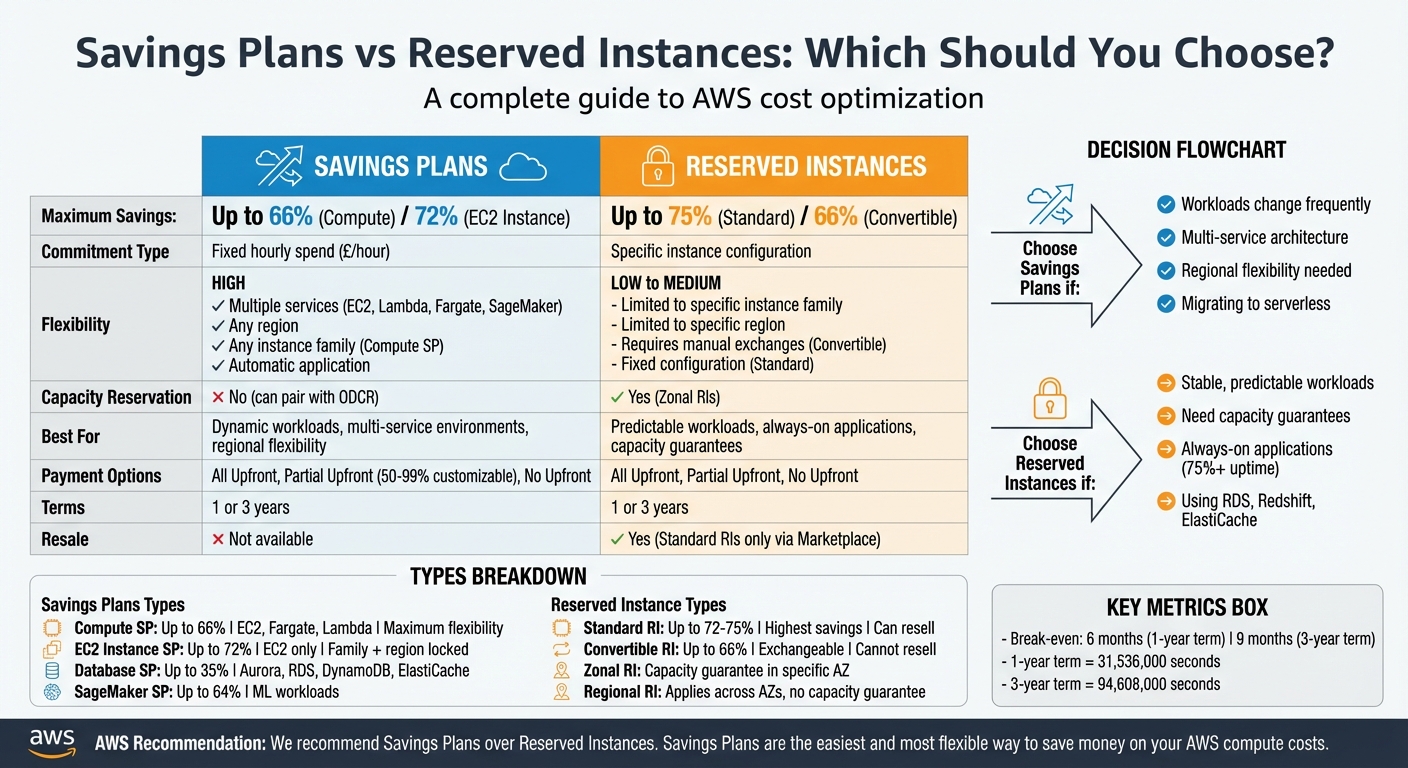 {AWS Savings Plans vs Reserved Instances: Complete Comparison Guide}
:::
{AWS Savings Plans vs Reserved Instances: Complete Comparison Guide}
:::
Reserved Instances vs Savings Plans vs On-Demand | Cloud Pricing Explained
What Are AWS Savings Plans?
AWS Savings Plans offer a flexible pricing model where you commit to a specific hourly spend - measured in pounds per hour (£/hour) - over one or three years. In return, AWS automatically applies discounts to eligible compute usage. Rather than locking you into specific instance configurations, these plans focus on a consistent spending level, not tied to a particular instance type or region.
If your usage stays within the committed hourly amount, you enjoy discounted rates. However, any usage beyond the commitment is billed at On-Demand rates [8]. Unused portions of your hourly commitment are not carried over and are effectively lost. AWS provides recommendations for optimal commitments through Cost Explorer, based on your historical usage data [2][7], but accurate forecasting remains essential. AWS Savings Plans are available in different types, catering to various workload requirements.
Types of Savings Plans
AWS offers four main types of Savings Plans [1]:
Compute Savings Plans
These plans provide the most flexibility, covering EC2, Fargate, and Lambda services. They apply regardless of the instance family, size, operating system, tenancy, or AWS region [1][8]. This makes them a great choice for workloads that frequently shift between services or regions. Discounts can go up to 66% off On-Demand rates [4][1].
EC2 Instance Savings Plans
While offering higher discounts - up to 72% - these plans are more restrictive [4][1]. They require a commitment to a specific instance family within a single region (e.g., M5 instances in London). You can adjust the instance size, operating system, or tenancy within that family, but switching to a different family or region forfeits the discount [1][8].
Database Savings Plans
These plans reduce costs by up to 35% on services like Aurora, RDS, DynamoDB, and ElastiCache [1]. They apply to both provisioned and serverless usage, allowing you to switch between database engines without losing the discount.
SageMaker AI Savings Plans
Designed for machine learning workloads, these plans offer up to 64% savings on SageMaker instance usage [1].
If you hold multiple types of Savings Plans, AWS applies them in a specific order. EC2 Instance Savings Plans are prioritised over Compute Savings Plans due to their more specific scope [5].
| Feature | Compute Savings Plans | EC2 Instance Savings Plans |
|---|---|---|
| Max Savings | Up to 66% [4] | Up to 72% [4] |
| Services Covered | EC2, Fargate, Lambda [8] | EC2 only [8] |
| Family Flexibility | Automatic across all families [1] | Restricted to one family [1] |
| Region Flexibility | Automatic across all regions [1] | Restricted to one region [1] |
| OS/Tenancy Flexibility | Yes [1] | Yes [1] |
| Term Length | 1 or 3 years [4] | 1 or 3 years [4] |
Benefits of Savings Plans
One of the standout features of AWS Savings Plans is their automatic flexibility. For instance, Compute Savings Plans eliminate the need for manual adjustments, unlike Convertible Reserved Instances. If you migrate workloads from EC2 to Fargate or move applications between regions - say, from London to Frankfurt - the discounts follow your spend without requiring any changes [1][8].
This flexibility is particularly advantageous for businesses using multiple AWS services. For example, a company running EC2 instances, Lambda functions, and Fargate containers can manage costs across all these services with a single Compute Savings Plan, simplifying billing and cost management.
Additionally, AWS Savings Plans offer payment options - All Upfront, Partial Upfront, or No Upfront - allowing you to choose a structure that aligns with your financial planning [2].
Drawbacks of Savings Plans
While Savings Plans offer significant discounts, they may not always match the savings achievable with certain Reserved Instance options. Compute Savings Plans cap discounts at 66%, whereas EC2 Instance Savings Plans can go up to 72% [4][1].
Forecasting your usage accurately is another challenge. Committing to an hourly spend means that underestimating your needs could result in missed savings, while overestimating leads to paying for unused capacity. A one-year term equals 31,536,000 seconds, and a three-year term is 94,608,000 seconds [2]. Once committed, these plans cannot be cancelled or modified [4][1], making precise planning essential.
Savings Plans also lack capacity reservations. Unlike Zonal Reserved Instances, they don't guarantee instance availability when needed. However, they can be applied to On-Demand Capacity Reservations (ODCR) to reduce costs [4][9]. Additionally, Savings Plans don't cover Spot Instance usage or instances already covered by Reserved Instances [4].
If you're using Dedicated Instances, note that Savings Plans won't discount the £2/hour regional fee associated with these instances [1].
What Are AWS Reserved Instances?
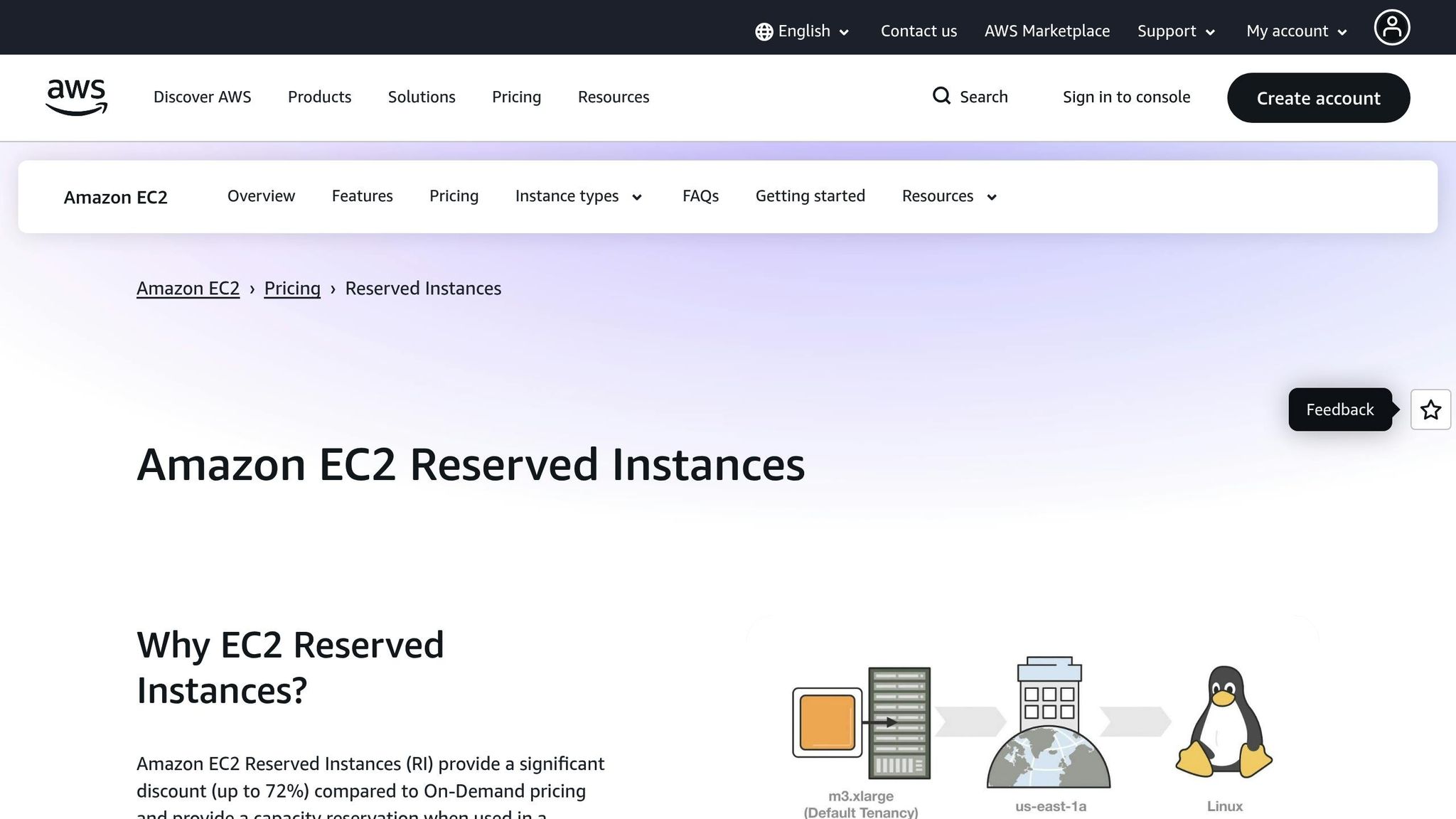
Unlike the flexible nature of Savings Plans, AWS Reserved Instances (RIs) require a commitment to specific configurations in exchange for reduced costs. These billing discounts are designed for workloads that remain consistent over one or three years, offering savings on On-Demand pricing when instances match the RI's specific attributes like instance type, region, tenancy, and operating system [6][11]. For example, an RI purchased for an M5 instance in London running Linux will only apply if all these attributes align.
RIs operate on a use it or lose it
principle. If a reserved hour isn't used by a matching instance, the discount for that hour is forfeited [10]. A one-year commitment covers 31,536,000 seconds (365 days), while a three-year term spans 94,608,000 seconds (1,095 days) [6]. These commitments do not automatically renew, so once they expire, instances revert to On-Demand pricing unless you purchase a new RI.
One standout feature of certain RIs is capacity reservation. When you purchase a Zonal RI for a specific Availability Zone, AWS ensures that capacity is available for your use, providing a safety net for mission-critical applications [6].
The reality is that a one-year term commitment will almost always break even after six months.– VMware Tanzu CloudHealth [10]
Below, we’ll explore the different types of RIs, their benefits, and their limitations to help you determine when they’re the right fit for your predictable workloads.
Types of Reserved Instances
AWS offers three main types of Reserved Instances, each balancing cost savings and flexibility differently.
Standard Reserved Instances deliver the deepest discounts - up to 72% compared to On-Demand pricing [6]. However, they come with limited flexibility. You can adjust certain parameters, such as the Availability Zone, scope, or instance size within the same family [10], but you cannot switch to a different instance family. If your needs change significantly, you can sell Standard RIs on the AWS Reserved Instance Marketplace, offering an exit option [10].
Convertible Reserved Instances provide more flexibility, with savings of up to 66% [10]. These allow you to exchange your reservation for different instance families, operating systems, tenancy types, or regions, as long as the new reservation is of equal or greater value [10]. For example, you could switch from M5 to C5 instances if your workload demands change. However, Convertible RIs cannot be sold on the RI Marketplace [10].
Zonal Reserved Instances are tied to a specific Availability Zone and guarantee capacity reservation [10]. This ensures that instances will be available when needed, which is critical for certain applications. On the other hand, Regional Reserved Instances apply to any Availability Zone within a specified region but do not guarantee capacity. Regional RIs also support instance size flexibility for Amazon Linux/Unix with default tenancy, automatically applying discounts across any size within the same instance family [10].
| Feature | Standard RIs | Convertible RIs |
|---|---|---|
| Maximum Savings | Up to 72% [6] | Up to 66% [10] |
| Flexibility | Modify AZ, scope, and size within family [10] | Exchange for different families, OS, tenancy, or regions [10] |
| Marketplace | Can be sold [10] | Cannot be sold [10] |
Benefits of Reserved Instances
The primary advantage of Reserved Instances lies in their cost savings and capacity reservation options. Standard RIs can reduce costs by up to 72%, while Convertible RIs offer savings of up to 66% [6][10]. For workloads requiring guaranteed availability in a specific Availability Zone, Zonal RIs are particularly valuable.
RIs also offer various payment options to suit different financial strategies. With All Upfront payment, you get the largest discount and avoid ongoing hourly charges. Partial Upfront requires an initial payment, with the rest billed at a discounted hourly rate. No Upfront eliminates any initial payment but locks you into a discounted hourly rate for the term [6]. Typically, a one-year RI breaks even after about six months, while a three-year RI achieves break-even in roughly nine months [10]. This ensures significant savings for workloads running consistently for at least half the commitment period.
Drawbacks of Reserved Instances
While RIs offer substantial savings, they also come with some limitations that require careful planning. The main challenge is that RIs demand accurate workload forecasting. You need to predict not only your usage levels but also the specific instance type, region, tenancy, and operating system [6][11]. For instance, if you switch from M5 to C5 instances, Standard RIs will no longer apply, and you may face higher On-Demand rates unless you’ve opted for Convertible RIs.
Another drawback is the lack of flexibility compared to Savings Plans. If you shift workloads between regions or migrate from EC2 to Fargate, your RI discounts won’t follow. Standard RIs can only be modified within limited parameters, while Convertible RIs require manual exchanges [10]. Overcommitting can result in paying for unused capacity.
Additionally, RIs are non-cancellable. While Standard RIs can be sold on the AWS Reserved Instance Marketplace [10], this process isn’t instantaneous and may not recover the full value. Regional RIs, while offering billing discounts, do not guarantee capacity. If capacity reservation is critical, you’ll need Zonal RIs, which sacrifice some flexibility in instance size [10].
We recommend Savings Plans over Reserved Instances. Savings Plans are the easiest and most flexible way to save money on your AWS compute costs.– AWS [6]
Lastly, RIs do not auto-renew. Monitoring expiration dates through AWS Cost Explorer is essential, as reverting to On-Demand pricing can lead to a significant cost increase. This requires ongoing management and planning to maintain cost efficiency.
Cost Comparison: Savings Plans vs Reserved Instances
Let’s break down the cost considerations between Savings Plans and Reserved Instances to help you understand their financial impact.
Discount Levels and Savings Potential
The primary difference lies in the balance between savings and flexibility. Standard Reserved Instances (RIs) offer the biggest discounts - up to 75% compared to On-Demand pricing [3]. Meanwhile, EC2 Instance Savings Plans come close, with savings of up to 72% [4]. Both Compute Savings Plans and Convertible Reserved Instances provide discounts capped at 66% [4]. However, the higher the discount, the stricter the commitment. For instance, Standard RIs and EC2 Instance Savings Plans require a commitment to specific configurations or instance families. On the other hand, Compute Savings Plans and Convertible RIs offer more flexibility but at slightly reduced savings.
For specialised workloads, Database Savings Plans can cut costs by up to 35% on services like Aurora and RDS [1], and SageMaker AI Savings Plans provide up to 64% savings for machine learning workloads [1].
| Feature | Standard RIs | EC2 Instance SPs | Convertible RIs | Compute SPs |
|---|---|---|---|---|
| Maximum Savings | Up to 75% [3] | Up to 72% [4] | Up to 66% [4] | Up to 66% [4] |
| Instance Family Flexibility | Fixed | Restricted to one family [4] | Manual exchange required [4] | Automatic (any family) [4] |
| Region Flexibility | Fixed | Restricted to one region [4] | Manual exchange required [4] | Automatic (any region) [4] |
| Services Covered | EC2, RDS, Redshift [3] | EC2 only [4] | EC2 only [4] | EC2, Fargate, Lambda [4] |
These differences highlight how savings and flexibility vary across the options, setting the stage for further comparisons on workload adaptability and payment terms.
Flexibility and Use Cases
Reserved Instances are ideal for workloads with predictable, steady demands and fixed configurations. In contrast, Savings Plans offer dynamic flexibility. For example, if you transition from M5 to C5 instances or shift workloads between regions (e.g., moving from London to Frankfurt), Compute Savings Plans automatically apply discounts without requiring manual adjustments [3]. Standard RIs, however, would lose their cost benefits in such scenarios.
If you need always-on compute power, say for an application under constant usage, and that application will be running for at least a year, reserved instances are a much better option than on-demand because you will save a huge amount.- Nelson Ford, Founder and Principal Solutions Architect, Pilotcore [5]
Savings Plans are easier to manage because discounts are applied automatically, while Convertible RIs require active monitoring and manual exchanges to maintain optimal coverage [3]. AWS applies Reserved Instances first to eligible usage, followed by EC2 Instance Savings Plans and then Compute Savings Plans [5].
Another key distinction is capacity reservation. Zonal Reserved Instances guarantee capacity within a specific Availability Zone [4]. Savings Plans don’t include this feature but can be paired with On-Demand Capacity Reservations for similar functionality. Additionally, only Standard EC2 RIs can be resold on the AWS Reserved Instance Marketplace, whereas Savings Plans and Convertible RIs cannot [3].
Payment Options and Commitment Terms
Payment structures and term lengths also play a role in decision-making. Both models typically offer one- or three-year commitments with three payment options: All Upfront, Partial Upfront, and No Upfront [2].
- All Upfront: Pay the full amount upfront for the lowest effective hourly rate.
- Partial Upfront: Split the cost between an initial payment and discounted hourly charges.
- No Upfront: No initial payment but a discounted hourly rate throughout the term [5].
Three-year commitments generally yield greater savings compared to one-year terms [6]. For example, a one-year commitment usually breaks even within six months, while a three-year term reaches the break-even point in about nine months [10].
Savings Plans also offer an additional advantage: they allow you to customise your upfront payment between 50% and 99% for Partial Upfront plans, unlike RIs, which have fixed percentages [10]. Plus, Savings Plans automatically optimise your commitment, directing it to the usage that provides the highest percentage of savings [5].
Need help optimizing your cloud costs?
Get expert advice on how to reduce your cloud expenses without sacrificing performance.
When to Choose Savings Plans
Savings Plans automatically provide discounts when workloads move between AWS regions or instance families, making them a flexible choice for dynamic environments [1][9]. In contrast, Reserved Instances are tied to specific regions and instance families, which can limit their cost-saving potential in such scenarios.
Compute Savings Plans are ideal for organisations undergoing digital transformation. For example, if you're migrating from EC2 to serverless options like Fargate or Lambda, these plans ensure your discounts adapt to your spending [1][9]. One commitment can cover multiple services, spanning regions, instance families, sizes, operating systems, and tenancies [13].
For businesses with multi-region strategies, Savings Plans are particularly advantageous. They allow you to shift workloads between regions while maintaining your discount, enabling you to consolidate savings across different locations [8][13].
The big shift with Savings Plans is the unit of commitment... you instead make an aggregate hourly dollar commitment... and then AWS applies discounts automatically on eligible usage.- Matt Stellpflug, Senior FinOps Specialist, ProsperOps [13]
Savings Plans also bring flexibility to database workloads. Database Savings Plans combine various reservation options into a single commitment, covering nine managed database services such as Aurora, RDS, DynamoDB, and DocumentDB [12]. If you switch from RDS to Aurora, for instance, your discount adjusts automatically [12]. Tools like AWS Cost Explorer can help you fine-tune your commitment levels for maximum efficiency [7].
When to Choose Reserved Instances
Reserved Instances (RIs) are a smart choice when your infrastructure is steady and predictable. For workloads like always-on production environments - think database servers or web applications that require consistent uptime - RIs can provide savings of up to 72–75% with Standard RIs [10]. They're particularly ideal for tasks that run at least 75% of the time over the term.
One standout advantage of RIs is their capacity reservation feature. With Zonal Reserved Instances, you can secure resources in a specific Availability Zone, ensuring availability even during periods of high demand [10]. This is essential for mission-critical applications that can't afford interruptions. It's worth noting that Regional RIs and Savings Plans don’t include capacity reservations by default [10].
Another reason to consider RIs is their discounts on services not covered by Savings Plans. If you're using tools like Amazon RDS, Redshift, ElastiCache, OpenSearch, MemoryDB, or DynamoDB, RIs are your only option for commitment-based discounts [14].
To make the most of RIs, start by analysing your usage patterns with Amazon CloudWatch. If a workload consistently runs at a steady level, it's a strong candidate for RIs. Use them to cover your baseline compute needs, while handling variable peaks with Savings Plans or On-Demand instances. This balanced approach ensures you're maximising cost efficiency.
Standard RIs also offer flexibility with a resale option if your requirements change. On the other hand, Convertible RIs can't be sold but can be exchanged for different instance families or operating systems, giving you some adaptability for evolving workloads.
How Cloud Cost Engineering Improves Savings
Deciding between Savings Plans and Reserved Instances isn't something you want to leave to guesswork. Cloud cost engineering helps you make informed, data-backed choices about which model best suits your workloads. Services like Hokstad Consulting specialise in auditing your cloud usage to figure out exactly where your money is going and how to manage it more effectively.
By tracking usage over a period of 1–3 months, you can uncover detailed costs - whether by customer, team, or environment. This data helps identify stable workloads that are a good fit for Reserved Instances [3]. For workloads with more variability, Compute Savings Plans might be the better option. This kind of analysis lays the groundwork for effective right-sizing and commitment strategies, which we'll touch on later.
One crucial takeaway is understanding the payback period. For example, one-year commitments typically break even after six months, while three-year terms take about nine months to recoup their value [10]. This ensures you don’t overcommit to resources that won't deliver returns quickly enough.
Optimisation is just as important as it's always been. If a Savings Plan is applied to an overprovisioned EC2 instance, the discount is being wasted on services that aren't being used[10].
Overprovisioning is a common pitfall. If you're paying for resources you don't actually use, even the best discounts won't save you money. That’s why right-sizing - adjusting your resource allocation to match actual needs - is a critical step before committing to any Savings Plan or Reserved Instance. Cloud cost engineering identifies these inefficiencies, ensuring your discounts are applied to resources you genuinely need.
From there, Hokstad Consulting crafts tailored strategies to maximise savings. Whether it’s choosing the right payment option (All Upfront, Partial Upfront, or No Upfront), balancing Reserved Instances for steady workloads with Savings Plans for unpredictable peaks, or setting up continuous monitoring to adapt to changes, they’ve got you covered. Their No Savings, No Fee
approach ensures you see measurable cost reductions without unnecessary risk.
Conclusion
Deciding between Savings Plans and Reserved Instances (RIs) comes down to understanding your workload patterns and cost priorities. If your workloads are steady and predictable, and you need guaranteed capacity in specific Availability Zones, Reserved Instances - especially Zonal RIs - can be a strong choice. They offer discounts of up to 75%, and if your requirements shift, you can resell them on the AWS Marketplace[15]. On the other hand, Savings Plans are better suited for businesses with changing or flexible workloads, as they automatically apply across regions and services, providing greater adaptability without locking you into specific capacity needs[7].
To make the right decision, start with the data. Use AWS Cost Explorer to review your historical usage and identify areas where committing to a plan makes sense[2]. Begin with smaller commitments and adjust as your usage patterns become clearer[16]. Don’t forget to set up AWS Budgets to track expiration dates, as RIs don’t renew automatically, and lapses could lead to unexpected On-Demand charges[6].
Another key step is ensuring your resources are properly sized to avoid wasting discounts. For businesses managing complex multi-account environments or uncertain requirements, consulting with experts like Hokstad Consulting can be invaluable. Their No Savings, No Fee
model ensures you only pay if tangible savings are achieved. These strategies form the foundation for optimising your cloud costs over the long term.
FAQs
Which is better for my business: Savings Plans or Reserved Instances?
When deciding between Savings Plans and Reserved Instances, the right choice hinges on your business’s specific needs and usage patterns.
If your workloads are steady and you can commit to particular instance types for one or three years, Reserved Instances usually deliver the biggest discounts. On the other hand, if your operations demand flexibility - whether it’s switching between instance families, regions, or services like EC2, Lambda, or Fargate - a Savings Plan might suit you better. These plans still offer impressive savings, potentially up to 72%, while allowing you to adapt to evolving requirements.
For more tailored guidance on managing your cloud costs effectively, it’s worth seeking advice from professionals in cloud cost management. They can help ensure your choices align with your financial and operational goals.
What are the key benefits of choosing Savings Plans over Reserved Instances?
Savings Plans provide more flexibility than Reserved Instances by letting you commit to a consistent hourly spend (£/hour) without tying yourself to a specific instance type or configuration. This means discounts are automatically applied across various instance families, sizes, operating systems, tenancy options, regions, and even services like Lambda and Fargate.
What’s more, Savings Plans can offer cost reductions of up to 72%, making them a smart option for businesses looking to manage cloud expenses effectively while keeping their infrastructure adaptable. They are especially beneficial for workloads that are dynamic or for environments where resource requirements frequently change.
Are Savings Plans applicable to all AWS services, or do they have specific limitations?
Savings Plans are a great way to cut costs on AWS compute services and some database services, but they don’t cover everything AWS offers. They automatically apply to Amazon EC2, AWS Fargate, and AWS Lambda, as well as eligible managed databases through Database Savings Plans.
That said, services outside these categories aren’t included. So, it’s crucial to evaluate your usage patterns carefully before committing. This way, you can make sure your Savings Plan aligns with your cloud infrastructure needs while helping you save more effectively.