
When a deployment fails, you’re left with two choices: rollback or rollforward. Rollback means reverting to a previous stable version, which is often faster but can risk data loss. Rollforward, on the other hand, fixes the issue by deploying a new version, preserving data and deployment history but taking more time. The decision hinges on factors like database changes, failure type, and recovery speed needed.
Key Points:
- Rollback: Reverts to a prior version; faster (minutes) but risks losing new data.
- Rollforward: Deploys a fix; slower (30 mins–1 hour) but safer for data integrity.
- Rollback is better for quick fixes without database changes.
- Rollforward is safer for complex systems or destructive database changes.
Quick Comparison:
| Factor | Rollback | Rollforward |
|---|---|---|
| Speed | Minutes | 30 mins to 1 hour |
| Data Loss Risk | High | Low |
| Database Changes | Risky for destructive changes | Safer for all schema changes |
| Testing Requirements | Requires undo script testing | Standard CI/CD testing |
| Flexibility | All-or-nothing | Allows targeted fixes |
Your choice depends on the type of failure, database state, and system complexity. Rollbacks are quicker but risky for data-heavy systems, while rollforward ensures safety at the cost of time.
::: @figure 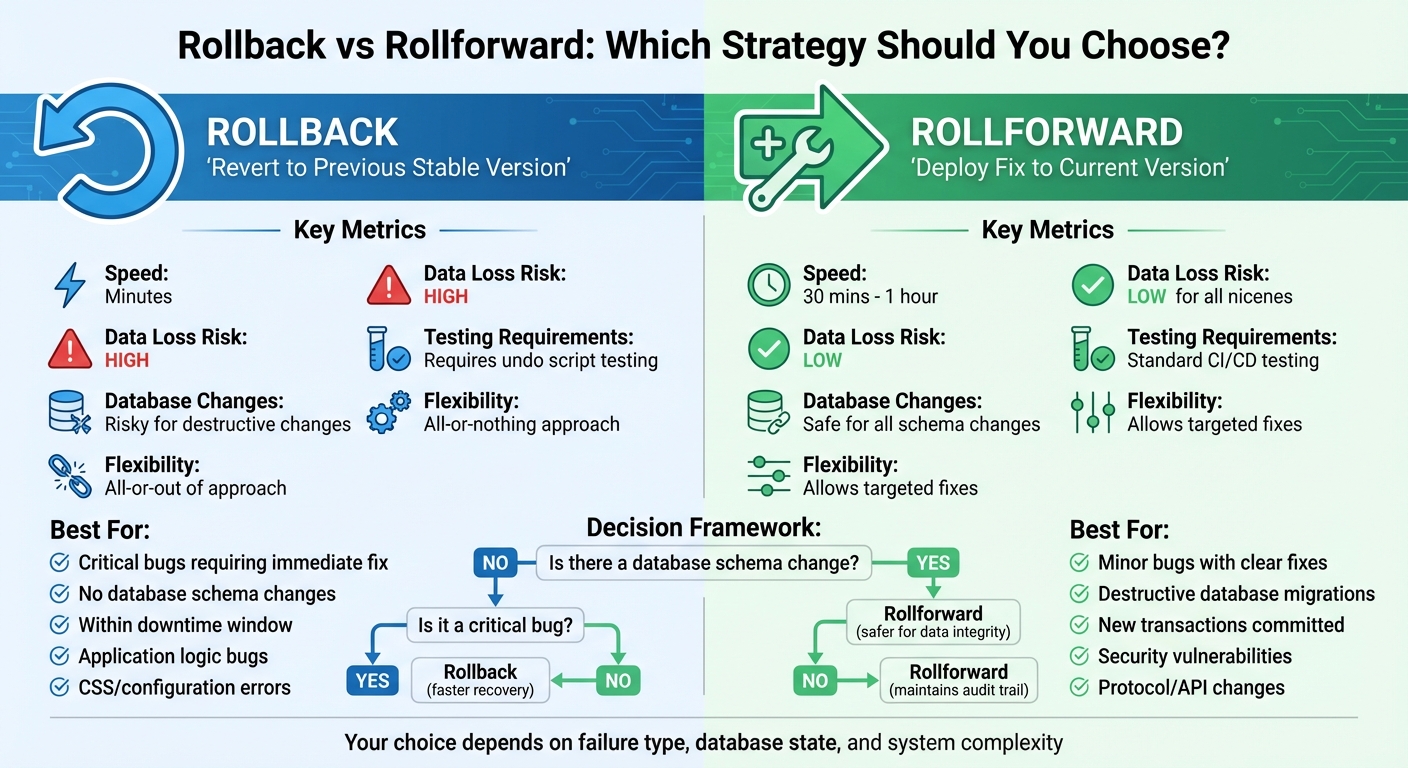 {Rollback vs Rollforward Deployment Strategy Comparison}
:::
{Rollback vs Rollforward Deployment Strategy Comparison}
:::
Rollback strategies with Octopus Deploy
What is a Rollback Strategy?
A rollback is a process that restores your application to a previous stable version when a deployment fails. It’s a quick way to recover from critical issues, often taking minutes instead of hours.
The method used for rollback depends on the component. For application code, it typically involves reinstating earlier versions of container images, WAR files, or other version-controlled artefacts. Eric Calabretta, Lead Solutions Architect at Chef Software, explains:
Rollback is a good choice if you can return to a previous working version of your application... this could be as simple as removing your failed WAR file and redeploying the previous working WAR file.[8]
However, rolling back database changes can be more challenging. There are two primary approaches:
- State-based: This uses schema comparison tools to generate scripts that revert the database to an earlier state.
- Migration-based: Developers create
undo
(ordown
) scripts alongside each migration to reverse changes.
It’s important to note that these approaches aren’t flawless. Some changes, like deleting tables, might require a full database restore rather than relying on scripts.
To avoid such complications, it’s safer to design database changes with backwards compatibility in mind. For example, adding nullable columns ensures that rolling back won’t require additional database alterations. Additionally, breaking applications into smaller components allows for more targeted rollbacks, avoiding the need to reverse an entire system. These factors highlight the complexities of executing a rollback in modern systems.
How Rollback Works
Modern deployment systems differentiate between deployment modes - such as new deployments, rollbacks, or redeployments - by comparing release numbers. This distinction plays a key role in managing failures effectively.
One method to improve rollback safety is the two-phase deployment process. In the Prepare
phase, all nodes are configured to handle both old and new data formats. Only after this step is successfully completed does the Activate
phase begin, which switches the writing logic. If something goes wrong, this setup makes it easier to revert without major disruptions.
For database rollbacks, the state-based method generates rollback scripts by comparing the current schema with a previous version from version control, a snapshot, or an earlier package. Meanwhile, the migration-based approach relies on developers creating down
scripts to undo changes made during up
migrations.
Data serialisation also plays a major role. If the new version writes data in a format that the old version can’t interpret - such as compressed or altered formats - issues can arise. Using standard frameworks like JSON or Protocol Buffers can help maintain backwards compatibility, reducing the risk of rollback complications. These technical considerations are crucial when deciding if a rollback is the right course of action.
When to Use Rollback
Rollback is often the best option when a critical bug emerges that would take too long to fix. It’s particularly effective for updates involving styling, markup, or back-end code that don’t impact the public interface.
The main factor to evaluate is the database state. Rollback is generally safe when the schema remains unchanged or when changes are non-destructive, like adding nullable columns or performance indexes. If the system is still within its downtime window and the update hasn’t been exposed to users, rollback is usually a low-risk solution.
However, there are situations that Sandeep Pokkunuri refers to as one-way doors
- decisions that are difficult to reverse and carry significant risks. For example, rolling back a database after new transactions have been committed can cause data loss. Similarly, if microservices have already adapted to a new API, rolling back could lead to cascading failures across the system.
To reduce these risks, consider deploying database changes ahead of code updates using the Expand and Contract
pattern. Additionally, smaller, more frequent releases are generally safer than larger, infrequent ones. This approach gives you more control and flexibility when managing rollbacks.
What is a Rollforward Strategy?
A rollforward strategy, often called fix forward
, keeps the current deployment active while addressing issues by applying a correction or disabling the problematic feature [11][12]. Omri Amitay sheds light on this approach:
Modern deployment strategies separate code deployment from feature release. You can deploy code that's hidden, toggled off, or only visible to internal users[11].
Instead of reverting to an earlier version, rollforward progresses to a fixed version, maintaining the complete deployment history. This is particularly useful for compliance purposes, as it preserves an audit trail of all changes, including those that introduced issues [6]. Unlike a rollback, which restores a previous stable state, rollforward tackles problems directly within the live deployment.
Rollforward becomes especially critical when rollback isn't feasible. Doug Gorley explains:
Some changes simply don't lend themselves well to rollback, such as... changes to a database schema that were destructive on the original data[12].
For instance, if new transactions have been recorded in a different format or clients have started using a new communication protocol, reverting to an earlier state could lead to data loss or trigger system-wide failures [12].
Next, let’s explore how this strategy is put into action.
How Rollforward Works
For issues related to features, functionality can be toggled off using feature flags [11][5]. For code defects, the process involves committing a fix and deploying it through the CI/CD pipeline [5]. This method combines speed with precision, allowing teams to isolate and address the faulty behaviour while leaving other features unaffected.
Although rollforward typically takes longer than a rollback - about an hour compared to under five minutes - it ensures progress. Fixing the problem in place means you can move forward once the issue is resolved, avoiding the need to revert to an earlier state [12].
Database changes require extra care. Instead of attempting risky reversions, new migration scripts are created to advance the database schema to a corrected state [6]. These scripts might include undo
logic to safeguard data integrity while maintaining the continuous audit trail expected by regulators. Unlike rollback, which reverts to a prior state, rollforward evolves the database schema to address issues without losing critical data.
Timing is a key consideration. If a fix cannot be identified and applied within 20–30 minutes, a rollback might be necessary to minimise user impact [5][12]. This timeboxing approach helps prevent extended outages while the team works on a solution.
Now, let’s examine when rollforward is the best choice.
When to Use Rollforward
Rollforward is ideal for minor bugs with clear fixes or when contractual obligations require features to remain live [12][13]. It's also essential in scenarios where destructive database changes would otherwise erase recent transactions [12]. Similarly, if microservices have already upgraded to a new communication protocol, reverting to an older version may no longer be technically possible [12].
This strategy is particularly effective for organisations with well-established CI/CD pipelines and robust automated testing. These systems enable rapid validation and deployment of fixes, making rollforward nearly as fast as a rollback while avoiding its risks. Feature flags further enhance this approach by allowing major changes to be hidden behind toggles. In such cases, rolling forward can be as simple as flipping a switch rather than managing a complex redeployment process [11][5].
Key Differences Between Rollback and Rollforward
Building on the strategies covered earlier, let's delve into how rollback and rollforward compare in practice. Rollback focuses on restoring a previous stable state, while rollforward involves deploying a corrected version that retains the complete change history.
Bob Walker, Field CTO at Octopus Deploy, describes rollback as:
A rollback is getting back to a known good state by running a modified version of the original deployment process.[2]
Rollforward, on the other hand, results in an entirely new version. For instance, if version 4 fails, version 5 would be deployed as the fix.
The technical demands of each approach vary significantly. Rollback relies on backward compatibility and often requires pre-written undo scripts. Rollforward, however, leans on an efficient CI/CD pipeline to minimise Mean Time to Recovery (MTTR). It’s worth noting that rolling back a database schema can sometimes lead to permanent data loss, making rollforward a safer option for maintaining referential integrity.
Another key distinction lies in the balance between speed and safety. Rollbacks can be executed almost instantly using methods like Blue-Green deployments, while rollforwards generally take longer, as they require a full build and testing cycle. As Eric from DZone points out:
Rollforward is required for application types where returning to a previous version may be destructive making Rollback impossible.[4]
To better illustrate these approaches, here’s a step-by-step comparison of how they operate during a typical deployment failure.
Step-by-Step Comparison
| Phase | Rollback Steps | Rollforward Steps |
|---|---|---|
| Detection | Monitoring identifies issues, such as a 5% error rate spike | Monitoring flags a bug; developers investigate and diagnose the problem |
| Action | - Stop the current deployment - Run undo scripts (e.g., for databases) - Redeploy the previous artefact or switch the load balancer |
- Develop a code fix or revert a Git commit - Build a new version (vNext) - Run the full CI/CD pipeline |
| Verification | Conduct smoke tests to ensure stability | Perform a comprehensive regression suite to confirm the fix and detect any new issues |
| Post-Action | Prevent the failed version from advancing to other environments | Document the incident and deprecate the failed version |
This comparison highlights the operational nuances of each method, helping teams decide which strategy best suits their specific needs and technical constraints.
Need help optimizing your cloud costs?
Get expert advice on how to reduce your cloud expenses without sacrificing performance.
Advantages and Disadvantages
Now that we've explored the mechanics of rollback and rollforward, let's take a closer look at their strengths and weaknesses.
Both approaches come with trade-offs between system stability and recovery speed. Rollback is quicker, often acting as a critical escape hatch
during emergencies like application failures or authentication issues [3]. However, it comes with a significant downside: the potential for data loss.
Bob Walker, VP of Customer Success at Octopus Deploy, highlights this challenge:
The effort to successfully rollback a deployment far exceeds the effort it would take to push a fix to production[14].
Rollback is an all-or-nothing solution, unable to isolate individual issues. It also risks losing any new database entries made since the problematic deployment [2][3][14].
On the other hand, rollforward focuses on preserving data integrity by advancing the system state rather than reverting it. This approach avoids permanent data loss, maintains a detailed audit trail, and eliminates the need for rollback scripts, which can be risky if untested [6][9][14]. The downside? It generally takes longer to implement, as it requires time to develop, test, and deploy fixes. That said, automated deployments can often reduce this process to under 30 minutes [5][14].
Pros and Cons Comparison Table
| Factor | Rollback | Rollforward |
|---|---|---|
| Recovery Speed | Seconds to 10 minutes [3] | 30 minutes to 1 hour [5][14] |
| Data Loss Risk | High - user data entered since deployment is lost [3][14] | Low - maintains all data integrity [14] |
| Database Safety | Requires backward-compatible schema; risky for destructive changes [3] | Naturally compatible; safe for all schema changes [14][10] |
| Testing Burden | Must test both deployment and undo scripts weekly [2][14] | Uses standard deployment testing procedures [14] |
| Flexibility | All-or-nothing; cannot isolate specific features [2][3] | Targeted fixes preserve other changes [2][14] |
| Audit Trail | May obscure deployment history [6][9] | Maintains clear, continuous version history [6][9] |
This side-by-side comparison highlights the key considerations for deciding which approach suits your system best.
One critical factor to keep in mind is the behaviour of new user data. As users interact with the system and generate fresh data, rollback becomes increasingly risky. In such cases, rollforward often becomes the safer and more reliable choice [14].
Deciding Between Rollback and Rollforward
Choosing the right approach - rollback or rollforward - depends heavily on the type of failure and the risks to your data. For instance, if a critical application bug disrupts user logins, a rollback can quickly restore functionality. On the other hand, if the issue involves a database schema change with new transactions, rollforward is the safer route to maintain data consistency and avoid complications[9][3].
The type of failure plays a significant role in this decision. Application logic bugs, CSS glitches, or configuration errors often lean towards rollback since it allows for a quick recovery, sometimes within minutes[2]. However, destructive database migrations typically require rollforward to avoid permanent data loss or corruption[9][3].
In distributed systems, deployment complexity introduces additional challenges. For example, changes to protocols - like data compression methods or heartbeat intervals - can make rollbacks impossible if different software versions are running simultaneously. To address this, AWS suggests a two-phase deployment strategy. This involves a bake period
of several days, where changes are prepared and tested before activation, ensuring that rollback remains a viable option if needed[1].
Decision Framework
| Failure Type | Recommended Strategy | Reasoning |
|---|---|---|
| Application Logic Bug | Rollback | Allows quick recovery when no immediate fix is available[2]. |
| Database Schema Change | Rollforward | Ensures data integrity is maintained[9][3]. |
| Minor UI/Markup Issue | Rollforward | Low-risk and keeps session stability intact[2]. |
| Protocol/API Mismatch | Rollforward (Patch) | Prevents breaking downstream dependencies[1][2]. |
| Destructive Migration | Rollback & Delete | Stops faulty scripts from affecting other nodes[9]. |
| Security Vulnerability | Rollforward | Tracks fixes without removing critical updates[2]. |
Before rolling back, it’s essential to check if the failed deployment included database schema changes. If significant changes, such as non-nullable column additions, are involved, rollforward becomes the safer choice to avoid corrupting data. For complex systems, using the Expand and Contract
pattern to decouple database changes from code changes can allow application rollbacks without impacting the database[3].
This framework helps ensure that service continuity is preserved while addressing deployment failures effectively.
Conclusion
Deciding between rollback and rollforward hinges on three main factors: speed, risk, and the specifics of your deployment failure. Rollbacks are your go-to for urgent situations, as they can restore service in under five minutes by reverting to a stable code version. This makes them a solid choice when time is critical. As DevOps expert Dan Cornilescu puts it:
If you want to keep the MTTR low you rollback immediately, without debate. This removes the business risk and gives you a chance to check that the fix is actually working[7].
On the other hand, rollforward focuses on addressing the issue directly by applying fixes rather than undoing changes. While this method takes longer - about an hour - it’s often the better option when database changes are involved or when a quick fix can be implemented. However, rollforward carries its own risks, particularly when deploying untested code under pressure, which can lead to further complications if not handled carefully [5][7].
To maintain flexibility and protect data integrity, techniques like expand and contract
and two-phase deployments are invaluable. These methods separate database migrations from code changes, ensuring that applications can be rolled back without risking data corruption [3][1].
Your choice of strategy should align with your infrastructure’s specific needs. For instance, Hokstad Consulting offers expertise in crafting tailored rollback and rollforward processes for cloud environments. Their approach to DevOps transformation and custom automation helps minimise deployment risks and improve recovery times, whether you're operating in public, private, or hybrid cloud setups.
FAQs
When is it better to use a rollback instead of a rollforward?
When a deployment causes a critical issue that demands immediate attention, a rollback is often the smartest move. By reverting to the previous stable version, you can swiftly restore normal service and reduce downtime - especially helpful when the problem is complex or would take too long to fix on the spot.
Rollbacks are especially useful for code-only changes, as these often come with automated rollback options. This method eliminates the risks of trying to patch the issue while keeping the problematic release live, ensuring your users experience consistent and reliable service.
How do rollforward strategies ensure data accuracy and consistency?
Rollforward strategies play a key role in maintaining data accuracy and consistency. They begin with a verified starting point, like an initial balance or snapshot, and then apply each authorised change, transaction, or migration step in sequence. This approach creates a transparent, auditable record, ensuring every update is tracked and the final outcome is both reliable and consistent.
By methodically working from a trusted baseline, rollforward techniques help reduce errors and preserve the integrity of data throughout the entire process.
What are the potential risks of rolling back database changes?
Rolling back database changes comes with its challenges, particularly the risk of data loss. For instance, if key elements like tables or columns are dropped, recovering them without a backup can be nearly impossible. On top of that, rollbacks can trigger complex data migration problems, as scripts designed to reverse schema changes often struggle to undo everything seamlessly. This may lead to unplanned downtime, disrupting both customers and business operations.
To reduce these risks, having a solid backup and restore plan is essential before starting any rollback process. Additionally, running thorough tests on rollback procedures can help pinpoint and resolve potential problems ahead of time.