I treat a ROCm upgrade as a whole-stack change - not just a driver update. Before changing production, I check compatibility, pin the tested versions and start with one non-critical node, keeping unchanged capacity ready.
My release checklist covers:
- Compatibility: check the GPU, Linux kernel, driver, ROCm, framework, containers and compiled extensions together.
- Testing: compare latency, throughput, errors, memory use and output quality against production baselines.
- Rollout: set numerical pass limits, name approvers and stop expansion if any check fails.
- Recovery: rehearse restoring the previous host and application stack. Reverting a container cannot undo a host driver change.
My rule is simple: no rollout without passing tests and a rehearsed rollback. A successful installation alone does not prove your AI service will work.
::: @figure 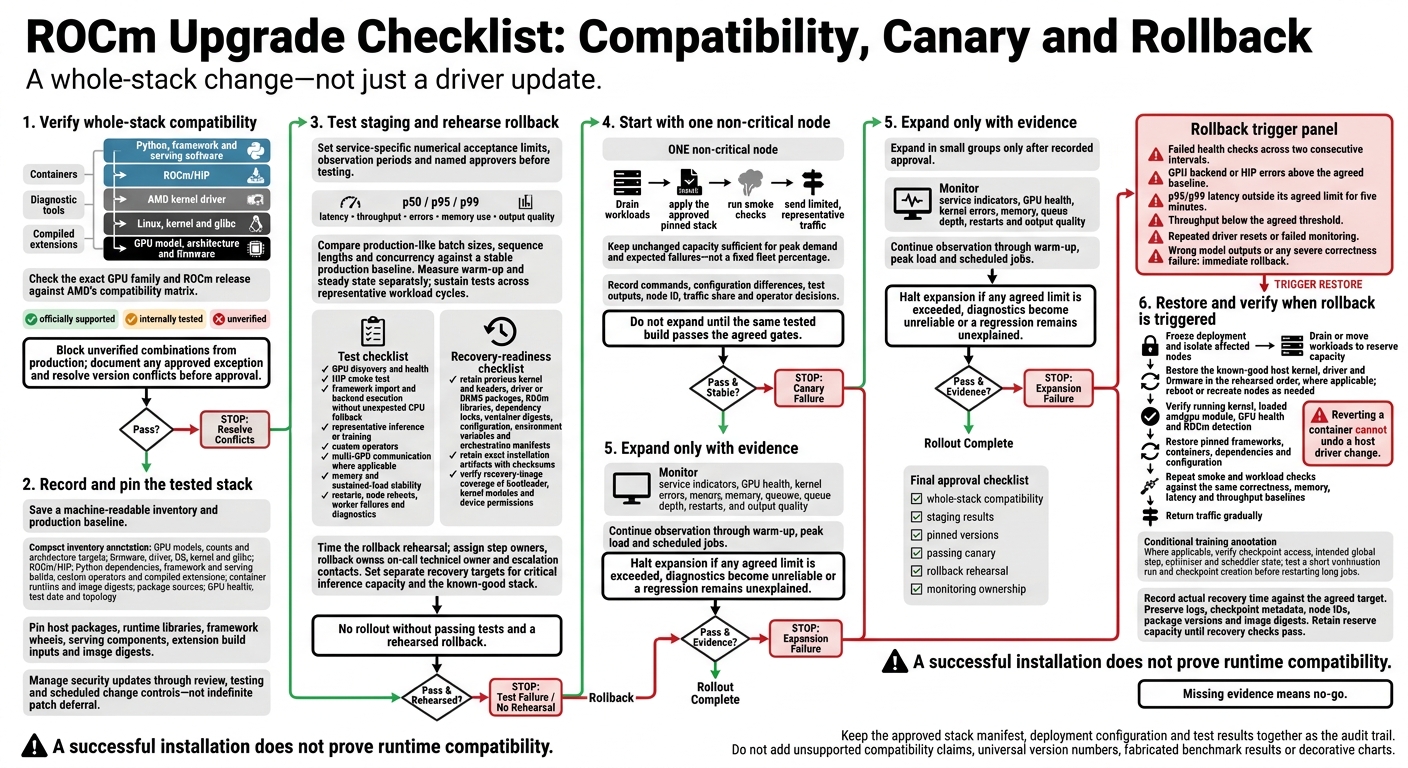 {ROCm Upgrade Checklist: Compatibility, Canary and Rollback}
:::
AMD ROCm™ Platform Installation
Verify compatibility and record the tested stack
Before changing production, check the exact stack and record the combination you tested.
Check compatibility across the GPU software stack
Trace dependencies from the GPU model, architecture and firmware through Linux, kernel, glibc, the AMD kernel driver, ROCm/HIP, Python, the framework and serving software. Include diagnostic tools, containers and compiled extensions. This map helps identify where an upgrade could break GPU discovery, runtime startup or framework execution.
Check AMD’s matrix for the exact GPU family and ROCm release. Support for one family does not extend to another.[3][7]
Label each component as officially supported, internally tested or unverified. Block unverified combinations from production, document any approved exception and resolve version conflicts before approval.
For each layer, identify the likely failure and validate the matching control.
| Stack layer | Failure symptom | Validation source | Corrective action |
|---|---|---|---|
| GPU, firmware and driver | Missing GPUs or initialisation errors | AMD compatibility matrix; host diagnostics | Confirm exact GPU support, firmware, driver and device permissions |
| Linux, kernel and glibc | Driver module fails to load | Release-specific system requirements | Align OS, kernel and glibc versions |
| ROCm and HIP | Backend initialisation fails | Release notes; HIP smoke test | Match runtime packages and remove conflicts |
| Containers and libraries | Missing libraries or blocked GPU access | AMD container guidance; host checks | Fix image libraries and host device access |
| Python and AI framework | Unsupported operators or CPU fallback | Framework support matrix; model tests | Select a supported build and verify the intended backend |
| Compiled extensions | Unresolved symbols or invalid-device-function errors | Extension build requirements | Rebuild for the target HIP, framework and GPU architecture |
| Diagnostic tools | Missing inventory or failed health checks | Tool-specific release notes | Use the release’s supported diagnostic utility |
Test containers against the target host driver and kernel. A correct image cannot override host incompatibility.[4][5]
Check release notes for warnings about multiple ROCm installations, library-path conflicts and amd-smi behaviour. Record the affected release and conditions; don’t treat these warnings as universal defects.[6]
Record production versions and pin the target stack
Save a machine-readable inventory with the change record. Include:
- GPU models, counts, architecture targets, firmware, driver, OS, kernel, glibc, ROCm/HIP, Python dependencies, framework and serving builds, custom operators, compiled extensions, container runtime and image digests.
- Package sources, baseline latency, throughput, error rate and memory utilisation, GPU health, test date and topology.
Attach the matrix entries, known limitations and approval owner. Use this inventory as the exact baseline for staging tests.
Pin the complete approved combination: host packages, runtime libraries, framework wheels, serving components, extension build inputs and image digests. Manage kernel, firmware and automatic updates through security review, testing and scheduled change controls - not indefinite patch deferral. Keep the pinned record as the baseline for staging and rollout.
Before release, test the pinned stack under production-like load. Require GPU discovery and health checks, a HIP smoke test, framework import and backend checks, representative model inference or training, custom-operator tests, multi-GPU communication tests where applicable, and sustained-load checks.
Test in staging and roll out through a canary
Once the stack is pinned, test it in staging before shifting any traffic. Set numerical acceptance limits and name the approvers before testing. If the upgrade needs a framework change, include that change in the candidate stack.
Compare staging workloads with production baselines
Run the pinned stack in staging with traffic that reflects production, including actual batch sizes, sequence lengths and concurrency. Compare p50, p95 and p99 latency, throughput, memory use, errors and output quality against a stable production period.
Measure warm-up and steady-state performance separately. Keep tests running across representative workload cycles: a successful start-up does not prove the stack will stay stable under sustained load.
For each gate below, record service-specific numerical limits, an observation period and a named owner for each role. Use the same baseline metrics to decide whether the canary can advance.
| Test category | Required check | Pass criterion | Owner | Action |
|---|---|---|---|---|
| Device and execution | Run framework operations across expected GPUs | All devices execute without unexpected CPU fallback or errors | GPU/platform engineer | Block on failure |
| Inference and quality | Replay and score representative requests | Latency, throughput, errors and quality meet service limits | ML service owner | Approve only within limits |
| Training and communication | Test training, checkpoint/resume and RCCL collectives where used | Step time, loss, checkpoint integrity and communication meet tolerances | ML platform owner | Required for affected workloads |
| Memory and stability | Sustain load through representative cycles | Memory growth, throttling and errors remain within limits | SRE | Hold for unexplained degradation |
| Recovery and diagnostics | Test process restarts, container recreation, node reboots and worker failures | Recovery meets limits and alerts identify faults without retry storms | Operations owner | Block if alerts miss faults |
| Evidence review | Review results and unresolved deviations | Named approvers accept evidence and stop conditions | Change owner | Approve, defer or reject |
Start with a canary and retain unchanged capacity
Start with one non-critical node. During maintenance, drain active workloads, apply the approved stack and run smoke checks. Then send limited traffic that reflects production. Deploy only the tested stack to the canary, and do not expand the rollout until that same build passes the gates.
Keep enough unchanged capacity for peak demand and expected failures; do not base the reserve on a fleet percentage. Record installation commands, config diffs, test outputs, node ID, traffic share and operator decisions in the rollout audit trail.
| Dimension | Fleet-wide upgrade | Pinned, staged canary rollout |
|---|---|---|
| Change scope | Many nodes change together | One defined node first |
| Detection opportunities | Faults may surface only after broad exposure | Staging, canary and expansion gates |
| Available capacity | Healthy capacity may be lost together | Unchanged capacity retained deliberately |
| Rollback complexity | Recovery may require fleet-wide coordination | Initial recovery scope is smaller |
| Possible service impact | Shared faults can affect many services | Initial exposure is limited, not eliminated |
Throughout the agreed workload cycles, monitor service indicators alongside GPU health, kernel errors, memory, queue depth, restarts and output quality. Expand in small groups only after approval has been recorded.
Halt expansion if any agreed limit is exceeded, diagnostics become unreliable or a regression remains unexplained. Any failed gate must stop the rollout before it reaches more nodes.
Prepare and rehearse rollback
If staging or canary checks fail, switch immediately to the documented rollback path. Make rollback readiness a release gate for compatibility, latency and correctness failures. Name the rollback owner, on-call technical owner and escalation contacts across platform, serving and application teams. Use a timed rehearsal to set separate recovery targets for critical inference capacity and the known-good stack.
Keep recovery assets and define rollback triggers
Keep the previous kernel and headers, amdgpu driver or DKMS packages, ROCm libraries, dependency locks, container digests, configuration, environment variables and orchestration manifests. Retain exact installation artefacts with checksums. Check that recovery images or snapshots cover the bootloader, kernel modules and device permissions. Reverting a container only restores its packaged user-space software; it cannot undo host kernel or driver changes.[1]
Rehearse recovery in staging, covering package retrieval, image restoration, driver loading and rebooting. Check for conflicts between installation methods.[8] Assign an owner to each step and record how long it takes.
Set clear rollback triggers: failed health checks across two consecutive intervals; GPU backend or HIP errors above the agreed baseline; p95/p99 latency outside its agreed limit for five minutes; throughput below the agreed threshold; repeated driver resets; or failed monitoring. Wrong model outputs or any severe correctness failure should trigger immediate rollback.
Restore the tested stack and check recovery
- Freeze deployment and isolate affected nodes: apply the same acceptance limits used for staging and canary rollout. Record the trigger and timestamp, stop new workload placement, then drain requests or move them to reserve capacity.
- Restore the host layer first: stop affected services. Restore the known-good kernel, driver and firmware in the rehearsed order, where applicable, then reboot or recreate nodes as needed.
- Verify the host and restore workloads: confirm the running kernel, loaded
amdgpumodule, GPU health and ROCm detection. Then restore pinned framework builds, containers, locked dependencies, configuration and environment variables. - Test the restored stack before returning more traffic: repeat the fixed-input smoke tests and workload checks used in staging. Compare correctness, memory use, latency and throughput against the same baselines. Use agreed quality ranges for non-deterministic outputs.
- Validate training and restore service gradually: confirm access to checkpoint storage. Resume from the intended global step with the correct optimiser and scheduler state, verify a short continuation run and checkpoint creation, then restart long jobs in measured steps.
Record actual recovery time against the agreed target. Keep logs, checkpoint metadata, node IDs, package versions and container digests for root-cause analysis. Retain reserve capacity until recovery checks pass.
Conclusion: require tested compatibility and rollback
After staging, canary testing and a rollback rehearsal, approve the upgrade only when every requirement is signed off: whole-stack compatibility, staging results, pinned versions, a passing canary, the rollback rehearsal and monitoring ownership. A successful installation does not prove runtime compatibility.[10]
Keep the approved stack manifest alongside the deployment configuration and test results. This creates an audit trail for future rollouts and lets teams reproduce both the target and known-good stacks.[9]
Keep monitoring beyond the launch window. Expand only when evidence from warm-up, peak load and scheduled jobs shows that upgraded nodes meet the agreed limits against the unchanged baseline. Missing evidence means no-go.
Hokstad Consulting provides AI strategy and implementation support for infrastructure dependency reviews and upgrade planning.
FAQs
How can I pinpoint driver, runtime or framework incompatibilities?
Map drivers, runtime libraries, AI frameworks and their dependencies in a version support matrix, checking each against vendor-supported ranges. Review the release notes between your current and target versions for breaking changes or deprecations [1].
Check code and dependencies for mismatches. Then test in isolated staging environments that mirror production, with container images and runtimes pinned to specific versions [2]. Record compatibility gaps in a decision table before deployment [1].
How should I set staging limits for a pinned ROCm stack?
Before maintenance, set thresholds for pass/fail decisions, investigation and rollback. Base them on historical job failure rates, queue waiting times and runner availability. Map dependencies by their business impact [1].
Match staging to production versions, plugins and runner types. Compare p95 latency and job duration with baselines and agreed tolerances, such as a 10% regression limit. Record these limits in a change register and get sign-off from named owners before moving to production [1][2].
How can I roll back without disrupting live requests?
Use blue-green deployments to keep a stable environment running alongside the new version. If something goes wrong, redirect traffic to roll back. For rolling updates, set a deregistration delay so requests already in progress can finish before instances terminate.
Where supported, use latency and error-rate monitoring to trigger automatic rollbacks. Test your rollback process under load in a production-like staging environment to check that it works without data loss or service gaps.