
Most release failures are planned in by mistake. If I want safer releases, I need to score the change first, pick the right rollout method, prove I can roll back, and watch live data closely during the release.
Here’s the whole article in plain English:
- Score the risk before booking the release using likelihood × impact on a 1–5 scale
- Match the release window to the risk, not to team habit or deadline pressure
- Use staged rollouts like feature flags, canaries, or blue-green to keep the blast area small
- Test rollback before approval, including code, config, and database paths
- Use live metrics such as error rate, p95 latency, and one business KPI to decide whether to continue or stop
- Avoid weak support periods like UK bank holidays, freeze windows, and thin out-of-hours cover
- Feed release results back into future planning so the next score is based on what happened, not guesswork
- Account for short-term cost too, because safer release methods can add spend like £600 for extra on-call cover or £1,000 per day for duplicate infrastructure
In short: small change does not always mean low risk. A release that touches shared services, payments, auth, or data can need tighter timing and stricter sign-off even if the code diff looks small.
Quick comparison
| Strategy | What I use it for | Main aim | What to check first |
|---|---|---|---|
| Risk scoring and scheduling | Decide timing, approvals, and test depth | Stop poor release timing | Likelihood, impact, support cover, dependencies |
| Progressive delivery | Roll out in steps | Limit user impact | Flags, traffic split, rollback thresholds |
| Rollback and recovery | Get back to a safe state | Cut outage time | Rehearsed steps, mixed-version safety, restore path |
| Observability and feedback | Make go/stop calls with live data | Spot faults early | Dashboards, alerts, traces, business KPI |
If I had to reduce the article to one rule, it would be this: plan each release around risk, recovery, and live evidence - not hope.
Mastering Software Risk Assessment: Strategies to Identify, Mitigate & Manage Risks
Why Release Risk Must Be Planned, Not Assumed
Don't label a release as low risk just because it looks small. You need evidence first.
That means checking the change itself, the systems around it, and the live support window before you lock in a deployment date. Those inputs should shape the release score before anyone agrees a date.
Technical, Operational, Business, and Compliance Risk
Score each category from 1 to 5, then link those thresholds to approvals and test depth. That score should drive approval, testing, and scheduling.
| Risk Category | Planning Impact |
|---|---|
| Technical | Senior sign-off, mandatory staging validation, non-functional testing |
| Operational | Dry-run deployments, explicit run-books, rehearsed rollback |
| Business | Lower-traffic windows, canary or A/B strategies, commercial approval |
| Compliance | Change Advisory Board (CAB) review, formal impact assessments, change records |
Use Incident History and Dependency Mapping Before Setting a Date
Look back at the last 6 to 12 months of incidents for the same service or change pattern before setting a release date. If schema changes have caused outages in the past, that pattern should shape the scope, sequence, and test depth for the next similar change.
Past incidents tell you where releases tend to break. Dependency maps show how far the damage can travel.
Map both upstream and downstream dependencies, including:
- databases
- queues
- shared APIs
- authentication
- third-party integrations
- monitoring
If a change touches a shared component used by more than one critical service, treat it as higher risk. That usually means more testing, more approvals, and tighter sequencing. If Tier 1 services share critical dependencies, keep their releases isolated.
Factor in UK Staffing, Public Holidays, and Regulated Change Constraints
Risk isn't just about code. The calendar matters too, and so does support cover.
Avoid UK bank holidays and known freeze periods. Thin staffing can slow approvals and make incident recovery harder. [2][4]
Schedule high-risk releases only when engineering and operations staff are fully available, with named on-call owners in place for post-release monitoring. [2] FCA/PRA and NHS-aligned organisations often have formal change-control rules that limit release timing and approval routes. [4][5] Those rules should feed straight into the risk score and the release window.
Use these constraints as inputs to the first release strategy below.
1. Risk-Based Release Assessment and Scheduling
Score each release before you put it on the calendar. That single score should shape three things: who signs it off, when it goes out, and what safety checks you put around it.
Work it out by multiplying likelihood of failure (1–5) by impact if failure occurs (1–5). That gives you an overall risk score, which you then map to a band [7]:
| Risk Score | Band | Typical Approval Path |
|---|---|---|
| 1–4 | Low | Delivery team, often the product owner or tech lead |
| 5–12 | Medium | Product owner plus a change manager or relevant operational manager |
| 13–25 | High | CAB or equivalent governance body, with operations, security, compliance and business stakeholders involved |
In plain terms, the higher the score, the more care the release needs. High-risk releases need full cover and a longer change window. Medium-risk changes should go out during normal working hours with a shorter window. Low-risk releases can often run off-peak, especially when automation is doing the heavy lifting.
That score should also decide how tightly you control the rollout in the next step. For high-risk changes, use one containment control before full rollout to keep the blast radius small [6][1].
Also, don’t approve the change until rollback and recovery steps are both documented and tested [3][9].
Safer rollout methods can push cloud spend up in the short term. Even so, that extra cost is often worth it because it cuts release risk.
Once the score is set, keep early rollout exposure limited before you widen the change.
2. Progressive Delivery with Feature Flags, Canary, and Blue-Green Deployments
A higher risk score should lead to tighter rollout control, not a bigger release. Instead of pushing a change to every user in one go, progressive delivery rolls it out bit by bit. That keeps the blast radius small while you watch for problems as the release moves through production. In practice, you're choosing between less blast radius, less downtime, or both.
Each method cuts risk in its own way. Feature flags let you ship code to production with the new behaviour turned off, then switch it on for a selected group, such as internal staff or 1–5% of UK users, without redeploying. If something goes wrong, you can turn the flag off straight away. That said, flags need discipline. They should have owners, expiry dates, and audit trails.
Canary deployments send 5–10% of live traffic to the new version and compare error rate, latency, and one business metric before moving further. A common rollout path is 1% → 5% → 25% → 100%, with automated rollback if metrics get worse at any point. This works well when lab testing isn't enough and you need live traffic to show what might break.
Blue-green deployments take a different route. You deploy the new version into a separate environment, validate it, and then switch traffic across in one step. This is a good fit for high-risk platform changes where instant fallback matters.
The rollout method should follow the risk score. Feature flags are a good match for business logic, localisation updates, or UK-specific regulatory flows. For example, you might enable a new FCA-compliant journey for a pilot group before switching it on for all customers. Canaries fit service-level or performance-sensitive changes where production traffic is the only way to spot trouble.
There’s also a cost angle. Blue-green costs more than canary or flags because it runs parallel environments.
Before release, set clear stop or rollback thresholds for:
- error rate
- p95 latency
- one business KPI
The next step is to pair each rollout method with a clear recovery path.
3. Documented Rollback and Recovery Planning
Every rollout needs a written, version-controlled, and rehearsed recovery plan.
That plan should spell out the basics in plain terms: triggers, owners, decision thresholds, data restore steps, and user communications. It also needs to state whether the rollback is full, partial or phased. That matters because rollback isn't just about pushing old code back live. Sometimes you also need to restore configuration, reverse database changes, or deal with side effects that can't simply be undone and must be compensated for instead.
Before approval, test a few things properly:
- Database migrations are reversible
- Dependent services can run mixed versions safely
- The rollback can finish within the required recovery time target
Those triggers should decide when rollback starts. Not halfway through the incident, when people are already under pressure.
Each recovery path should match the rollout method you've already picked. Keep the previous release artefact ready to deploy in Git. Blue-green can switch traffic back fast. Feature flags can turn off risky behaviour at once. Canaries keep exposure small before rollback even becomes necessary [10][12][13][11].
Avoid high-risk releases before weekends or holiday periods unless on-call cover is set and a tested recovery path is ready.
Fast rollback does cost more. Blue-green, mirrored traffic, and standby capacity all add spend. But in most cases, that's still cheaper than sitting through long downtime.
| Method | Rollback Speed | Blast Radius | Cloud Cost Trade-off |
|---|---|---|---|
| Blue-Green | Very fast | Environment-level | High - duplicate infrastructure |
| Canary | Fast | Small - limited subset of users | Medium - routing complexity |
| Feature Flags | Instant | Granular - specific feature | Low - configuration only |
Run rollback drills in a production-like non-production environment. Give people clear roles. Then record detection, decision, recovery, and restoration times. Feed those results into change governance and the next release score.
4. Observability-Driven Change Governance and Continuous Improvement
Rollback plans and progressive delivery only work when observability is clear. Without solid metrics, logs, traces, and business KPIs, governance turns into guesswork. In practice, observability acts as the control layer for release decisions: it tells you whether a rollout should continue, pause, or roll back.
Before a release, set up dashboards, alerts, and trace coverage for your most important user journeys. During rollout, watch error rates, latency percentiles like p95 and p99, resource use, and conversion in real time. If those numbers cross pre-agreed thresholds, the rollout should pause or trigger rollback. For example, if the HTTP 5xx error rate for the payment API goes above 0.5% for more than 5 minutes, initiate rollback. [15][11][17] Those thresholds should decide whether the next rollout step can go ahead. That keeps this tied to release planning, not just day-to-day monitoring.
After release, use what the data shows to tighten future approval rules. Post-release reviews should sharpen dashboards, alert thresholds, and rollback criteria. Those reviews should feed straight back into your risk register and change classification rules. If a schema change to the customer table caused an SLO breach, that component should be classed as high risk for future releases. Over time, this closes the loop: observed behaviour replaces assumptions, and release scoring gets better with each cycle. Elite DevOps teams keep change failure rate below 5% and recover from failed deployments in under one hour. That level of performance comes from disciplined feedback, not heroics. [14][8]
It also helps to track cost drift alongside performance. Higher spend should be backed by measurable release value. Cost dashboards can tag resources by environment and application, then link spend with performance data. That gives teams sensible guardrails and makes it easier to flag extra spend with no measurable gain against release outcomes. [16][17] Those findings should then feed into the next release score and schedule.
The practical result is a continuous improvement loop. Each release gives you better risk scores, sharper approval criteria, and clearer scheduling rules. Bit by bit, the team moves away from reactive firefighting and towards predictable, evidence-based change control.
Release Risk Scheduling Matrix
::: @figure 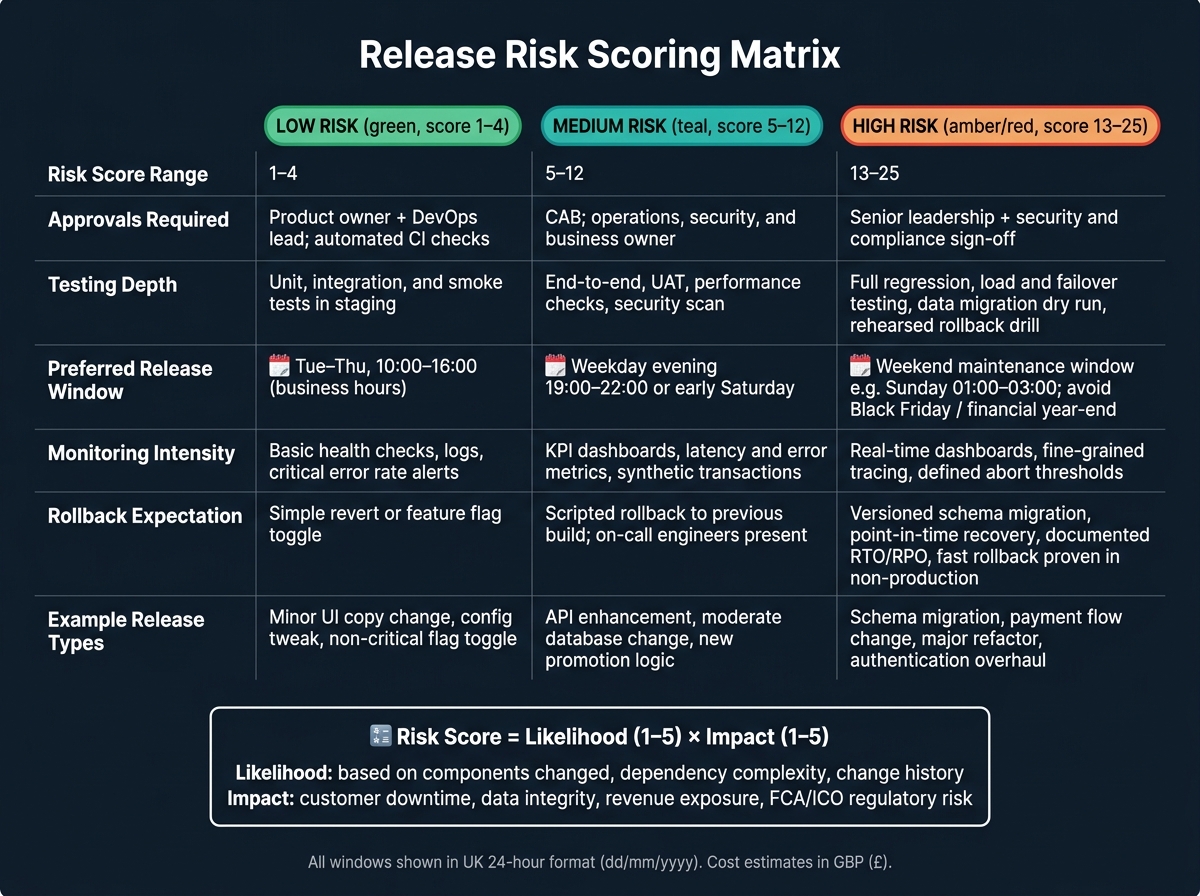 {Release Risk Scoring Matrix: Low vs Medium vs High Risk Releases}
:::
{Release Risk Scoring Matrix: Low vs Medium vs High Risk Releases}
:::
Once rollback and observability are set, the next step is simple: use the risk score to decide when a release happens, who signs it off, and how far rollback planning needs to go. In other words, the score should shape the full scheduling rule, not just a yes-or-no approval call.
Release calendars should use UK date formatting, such as 27/07/2026, and they should clearly show public holidays and agreed maintenance windows. That way, planners can see straight away which risk bands are allowed on a given date.
Score Likelihood and Impact Before Approvals and Scheduling
Use a 1–5 scale for both likelihood and impact, then multiply them to get one score. Likelihood reflects the chance of failure based on the components changed, dependency complexity, and change history. Impact covers customer-facing downtime, data integrity risk, revenue exposure, and regulatory exposure, such as FCA or ICO requirements, during core UK business hours. Map the results as 1–4 = low, 5–12 = medium, and 13–25 = high. [18][22]
That band should then drive the approval path, release window, and monitoring depth.
- Low-risk changes can run during normal UK business hours: Tuesday to Thursday, 10:00–16:00.
- Medium-risk changes should move to weekday evenings (19:00–22:00) or early Saturday.
- High-risk changes should be limited to planned weekend maintenance windows, such as Sunday 01:00–03:00, with freezes around peak trading periods like Black Friday or financial year-end. [19][21]
High-risk changes also need five to ten days' lead time for review, rollback rehearsal, and sign-off. [20]
Low-, Medium-, and High-Risk Release Comparison
| Risk Level | Score Range | Approvals Required | Testing Depth | Preferred Window | Monitoring Intensity | Rollback Expectation | Example Release Types |
|---|---|---|---|---|---|---|---|
| Low | 1–4 | Product owner + DevOps lead; automated CI checks | Unit, integration, and smoke tests in staging | Weekday business hours (Tue–Thu, 10:00–16:00) | Basic health checks, logs, critical error rate alerts | Simple revert or feature flag toggle | Minor UI copy change, config tweak, non-critical flag toggle |
| Medium | 5–12 | CAB; operations, security, and business owner | End-to-end tests, UAT, performance checks, security scan | Weekday evening (19:00–22:00) or early Saturday | KPI dashboards, latency and error metrics, synthetic transactions | Scripted rollback to previous build; on-call engineers present | API enhancement, moderate database change, new promotion logic |
| High | 13–25 | Senior leadership plus security and compliance sign-off | Full regression, load and failover testing, data migration dry run, rehearsed rollback drill | Weekend maintenance window (e.g. Sunday 01:00–03:00); avoid peak commercial periods | Real-time dashboards, fine-grained tracing, defined abort thresholds | Versioned schema migration, point-in-time recovery, documented RTO/RPO targets, and fast rollback proven in non-production | Schema migration, payment flow change, major refactor, authentication overhaul |
Progressive Delivery and Rollback Options at a Glance
With the release window fixed, the next step is choosing the safest way to ship. Once the risk score is clear, pick the lightest delivery method that still gives you a safe way back if things go wrong. Low-risk releases often lean on feature flags, medium-risk releases tend to suit canaries, and high-risk releases may call for blue-green.
Feature Flags vs Canary vs Blue-Green
| Strategy | Use Case | Complexity | Risk Reduction | Cloud Overhead | Use For |
|---|---|---|---|---|---|
| Feature Flags | Controlled feature activation, A/B testing, dark launches | Moderate - governance is needed to avoid flag sprawl | Very high - instant kill-switch at feature level | Low | UI and config changes |
| Canary Deployment | Gradual version rollout under live traffic | High - requires traffic splitting and observability | High - limits blast radius to a small user subset | Medium | API and backend rollouts |
| Blue-Green Deployment | Zero-downtime cutover for major releases | High - duplicate environments required | High - full environment-level rollback | High | Major platform cutovers |
For UK organisations working within regulated change windows, blue-green often fits well. It gives teams a clear, auditable cut-over point and a fallback environment that is ready to use. That matters when change control is tight and every step may need to be shown later.
Rollback and Recovery Method Comparison
Every delivery method needs a recovery path that matches it. Shipping is only half the job; getting back to a safe state is the other half.
| Method | Implementation Effort | Data Risk | Recovery Time | User Impact |
|---|---|---|---|---|
| Feature Kill-Switch | Low | Very low | Instant | Minimal - feature-specific only |
| Environment Switch | High (upfront setup) | Low to medium for stateful apps | Fast | Brief, broad routing change |
| Artefact Rollback | Moderate | Medium - schema compatibility must be confirmed | Moderate | Moderate - possible brief service degradation |
| Database Rollback | Very high | High - potential data loss or inconsistency | Variable | High - may require partial downtime or data restoration |
In practice, mature UK teams usually treat feature kill-switches and environment switches as their main recovery routes. Artefact rollback sits in the second line, and database rollback is kept under tight control as an emergency-only move. That makes sense: rolling back code is one thing, but rolling back data can get messy fast.
These decisions also shape short-term cloud spend, especially when duplicate environments or standby capacity are part of the plan.
UK-Specific Cost and Planning Considerations
Once you've picked a release method, write down its timing and cost in UK formats so approvers can scan the document and judge risk, spend and cover without second-guessing the details.
Use UK Formats in Release Calendars and Risk Registers
Stick to one date format across release documents. It sounds small, but mixed formats are a classic way to end up with deployment-window mistakes. In change requests, risk registers and runbooks, use day–month–year formats such as 28 July 2026 or 28/07/2026.
For machine-readable data and logs, use ISO 8601 (2026-07-28T22:30). Deployment windows should use the 24-hour clock, like 22:30–23:00, which removes confusion in UK release planning. Show all cost estimates in pounds sterling - for example, £12,500.00. Use UK spelling throughout.
These details carry weight when release documents feed into regulatory audits or contractual sign-off.
After the release record is standardised, link the chosen method to its short-term hosting and staffing cost.
Balance Release Safety Against Short-Term Hosting Spend
Add the short-term cost effect of the chosen release method to the change request. Feature flags bring licence and test effort. Canaries bring observability and traffic-splitting cost. Blue-green can temporarily double infrastructure spend.
A service that costs £500 per day can climb to about £1,000 per day during a blue-green cutover, before on-call support is added. On-call cover should sit inside the release cost, not outside it as an afterthought.
A late-night cutover at 22:30–23:00 may also need extra on-call support of around £600 - say, three engineers at £200 each - on top of the infrastructure bill. Put those figures plainly in change board submissions. For example: Risk mitigation cost: £1,200; reduces incident likelihood from medium to low. That gives approvers something concrete to work with instead of asking them to compare fuzzy trade-offs.
Hokstad Consulting helps UK teams model release-cost trade-offs before approval.
Conclusion
Safer releases come from matching the deployment method and release timing to the risk level of each change. Each control deals with a different point where things can go wrong. Use all four together: assess risk first, release in stages, keep rollback ready, and feed production data back into governance.
A simple place to start is with one risk score. From there, add phased rollout, rollback, and monitoring controls. Low-risk changes can move through standard approvals. High-risk changes need a safer release window, a gradual rollout, and a tested rollback plan.
Timing matters too. Release only when staffing, monitoring, and recovery cover are strong. If the right people aren’t around and your safety net is thin, that’s not the moment to push a risky change.
For teams putting these controls in place, expert support can help speed things up. Hokstad Consulting can help embed deployment automation, progressive delivery, and observability into release pipelines.
FAQs
How do I score release risk quickly?
Use a risk matrix to rate each issue by likelihood and impact.
Judge likelihood based on past incidents and how complex the system is. Then rate impact by looking at what could happen if the issue hits, such as service downtime, missed sales, or direct financial loss.
The score is simple:
Risk score = likelihood × impact
Once you have that score, plot each risk on a 3×3 or 5×5 grid. That makes it much easier to see which risks sit in the low, medium, or high range and which ones need attention first.
Which rollout method should I choose?
Choose the deployment approach that fits your goals, your setup, and the level of risk you’re willing to take:
- Blue-green if you want near-zero downtime
- Canary if you want to limit the impact of failures and learn from live traffic as you go
- Feature flags if you want fine-grained control and fast rollbacks
- Rolling deployments if resources are tight
Hokstad Consulting can help you assess which option makes the most sense for your operational needs and cloud strategy.
What should I monitor during a release?
Monitor four core areas to help keep a release steady: system performance, application health, user experience, and business impact.
That means watching the numbers that show whether your product is holding up under pressure and whether people can still use it without friction. On the system side, keep an eye on CPU, memory, disk I/O, and network throughput. For application health, watch error rates, response times, database query efficiency, and API availability. For user experience, track page load speeds, transaction success rates, and session data. Then look at business impact through conversion rates, revenue trends, and new feature adoption.
Use automated dashboards so your team can spot changes at a glance, and set up real-time alerts for anything that needs fast attention. It also helps to compare live data against baselines from standard UK business hours, 09:00–17:00 GMT, so you can tell the difference between normal traffic patterns and a release problem.