
Rightsizing cloud resources can save businesses up to 36% on costs while improving efficiency. Most organisations overpay for cloud infrastructure due to oversized or idle resources. Rightsizing ensures resources align with actual workload demands through continuous adjustments.
Key Takeaways:
- Only 16% of cloud instances are properly sized, leading to significant waste.
- Idle resources and over-provisioning account for up to 30% of cloud spending.
- Monitoring metrics like CPU, memory, and disk I/O is essential for optimisation.
- Automated scaling and scheduling can cut costs by up to 70% for non-essential workloads like dev/test environments.
- Tools like AWS CloudWatch, Compute Optimizer, and third-party platforms simplify tracking and adjustments.
Rightsizing isn’t a one-off task - it requires regular monitoring, tagging, and reviews to avoid inefficiencies. By focusing on usage data and automating processes, businesses can reduce waste and control costs effectively.
Rightsizing - lets make it easy | The Keys to AWS Optimization | S7 E7
Identifying Variable Workload Patterns
::: @figure 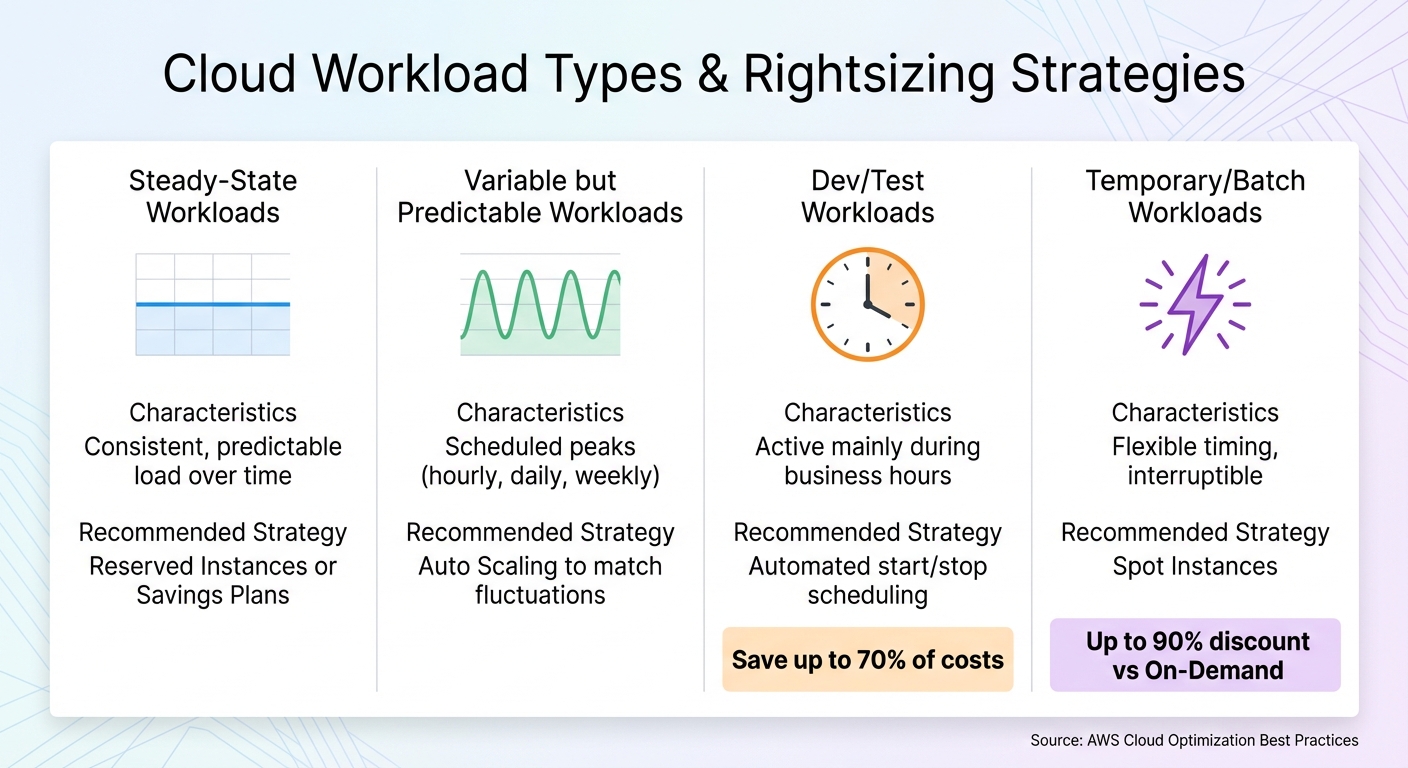 {Cloud Workload Types and Rightsizing Strategies Comparison}
:::
{Cloud Workload Types and Rightsizing Strategies Comparison}
:::
Understanding workload patterns is a critical step in addressing the challenges of over-provisioning and achieving effective rightsizing. This process begins with analysing workload behaviour by tracking the right metrics over a meaningful period and organising resources based on their usage patterns.
Measuring Utilisation Metrics
Accurate data is the backbone of any rightsizing effort. To start, monitor these four key metrics: vCPU utilisation, memory utilisation, network throughput (both inbound and outbound), and disk I/O. These metrics help determine whether your instances are oversized or struggling to keep up with demand [6][2].
It's worth noting that standard cloud monitoring tools often don’t track memory usage by default. For AWS users, installing the CloudWatch agent on Linux or Windows instances is necessary to capture memory and disk space metrics [6][2][7]. Without this data, you're missing a key component in your rightsizing decisions.
How long should you monitor? Aim for at least two weeks (360 hours), though a full month provides a clearer picture of weekly peaks and recurring patterns [6][2]. When reviewing the data, focus on maximum utilisation rather than averages to ensure your downsized instances can handle peak demand without throttling [11].
For instance, if peak CPU and memory usage remain below 40% over four weeks, you can safely reduce instance capacity by half [2]. To avoid performance risks, ensure the new instance’s capacity can handle at least 80% of the observed peak demand [11][6].
Types of Workloads
Not all workloads behave the same way, and understanding their patterns is key to applying the right optimisation strategy. Here’s a breakdown of common workload types:
| Workload Type | Characteristics | Recommended Strategy |
|---|---|---|
| Steady-State | Consistent, predictable load over time | Reserved Instances or Savings Plans [2] |
| Variable but Predictable | Scheduled peaks (hourly, daily, weekly) | Auto Scaling to match fluctuations [2] |
| Dev/Test | Active mainly during business hours | Automated start/stop scheduling [2] |
| Temporary/Batch | Flexible timing, interruptible | Spot Instances [2] |
Steady-state workloads, with their constant resource demands, are ideal for Reserved Instances or Savings Plans, which offer locked-in cost savings [2]. Variable but predictable workloads, such as e-commerce sites with evening traffic spikes, benefit from Auto Scaling to adjust capacity based on known patterns [2].
Dev/test environments typically operate during business hours. By automatically shutting down these instances after hours, you can save up to 70% of costs, assuming a 50-hour work week [2][11]. For temporary or interruptible workloads, such as data processing tasks with flexible schedules, Spot Instances are a cost-effective choice [2].
For workloads that are highly variable or unpredictable, real-time monitoring and dynamic scaling tools are essential to handle sudden traffic surges without compromising performance [9][10].
Tools for Tracking Workload Behaviour
Using the right tools simplifies the process of identifying workload patterns. AWS CloudWatch is a primary tool for monitoring metrics like CPU, network, and disk I/O. For memory tracking, you’ll need to install the CloudWatch agent, which is free, though custom metrics may incur standard CloudWatch ingestion costs [6][2][7].
AWS Compute Optimizer takes CloudWatch data a step further by using machine learning to recommend rightsizing actions for EC2, EBS, and Lambda resources [7][12]. It analyses historical usage and suggests alternative instance types that better align with your workload needs. Meanwhile, AWS Cost Explorer tracks cost trends and anomalies over a 13-month period, helping you identify optimisation opportunities [6].
For databases, focus on metrics such as average and peak CPU usage, minimum available RAM, and average disk read/write speeds when assessing RDS instances [2]. RDS allows independent scaling of storage and compute, offering flexibility in optimising resources.
If you’re managing multi-cloud environments, third-party tools like CloudHealth, Cloudability, and CloudCheckr provide automated insights and cross-cloud visibility [6]. For Kubernetes workloads, tools like Prometheus and Grafana help visualise trends, while the Vertical Pod Autoscaler (VPA) can dynamically adjust resource requests based on historical usage [8][9].
Consistently monitoring, tagging, and reviewing your data ensures you stay ahead of inefficiencies. These insights lay the groundwork for the rightsizing strategies that follow.
Rightsizing Strategies That Work
Once you've analysed your workload patterns, the next step is to align your resources with actual demand. Instead of planning for peak usage, focus on provisioning for average usage and let cloud elasticity handle any surges [13]. This marks a shift from the traditional on-premises approach, where infrastructure had to be built to handle worst-case scenarios. By applying these strategies, you can turn your workload data into meaningful configuration changes.
Setting a Baseline Configuration
Using your utilisation metrics, establish a baseline configuration that reflects average consumption rather than infrequent spikes. For instance, if your CPU and memory usage consistently stay below 40% over four weeks, you might reduce instance capacity while keeping an 80% safety buffer. This buffer ensures resilience against unexpected demand while still achieving cost reductions [2][6].
For example, if your current instance peaks at 30% CPU usage, you could downsize to a smaller instance where that 30% would equate to roughly 60% of the new capacity.
Cloud environments minimise costs because capacity is provisioned based on average usage rather than peak usage.- AWS [13]
Additionally, for RDS databases, remember that scaling is decoupled - you can adjust compute power independently of storage [2].
Scaling Methods for Variable Environments
Auto Scaling is a valuable tool for environments with fluctuating demand. It adjusts capacity automatically, ensuring you only pay for what you use. For example, an e-commerce site with predictable evening traffic spikes can benefit greatly from Auto Scaling, which adapts to these patterns without requiring manual oversight [2].
Spot Instances are perfect for temporary or stateless workloads that can handle interruptions. They offer discounts of up to 90% compared to On-Demand pricing [4], making them ideal for tasks like batch processing or data analysis. However, it’s crucial to ensure your workloads can gracefully handle instance terminations to make the most of these savings.
Rightsizing Containers and Databases
Cost optimisation doesn’t stop at instances - containers and databases offer further opportunities. Use the Vertical Pod Autoscaler (VPA) to align CPU and memory requests with actual usage. For CPU, configure based on the 95th percentile of usage recommendations over a 14-day period. For memory, use the highest observed usage, aiming for 80% target utilisation [15].
Set memory requests equal to memory limits. While CPU usage can be throttled, memory is a fixed resource - when it’s exhausted, the Pod will crash with an Out of Memory error [15]. Matching requests to limits prevents these failures and avoids over-provisioning.
When it comes to databases, focus on IOPS metrics to assess storage-optimised instances. Monitor average read/write bytes and peak network traffic to identify over-provisioned capacity [2]. Keep in mind that smaller instance types may still meet your performance needs, as different sizes offer varying IOPS ratings.
To decide which workloads to optimise first, use this formula:
(CPU requested - CPU recommendation) + ((memory requested - memory recommendation) / price ratio) [15]. This helps you pinpoint resources with the highest potential savings, allowing you to prioritise efforts where they’ll have the greatest financial impact.
Need help optimizing your cloud costs?
Get expert advice on how to reduce your cloud expenses without sacrificing performance.
Monitoring and Governance
When it comes to rightsizing, the work doesn’t stop after the initial adjustments. It’s an ongoing process that demands regular monitoring and governance to maintain cost efficiency. Resource needs evolve, and without consistent oversight, you risk accumulating underused or idle resources that quietly inflate costs [5]. Adding to the challenge, new projects often lead to over-provisioning, and manual reviews can’t keep up with the increasing complexity of cloud environments. A telling statistic? 58% of organisations take weeks or longer to address identified cloud-cost waste [16].
Tagging and Resource Tracking
To stay on top of resource usage, implement detailed tagging across all instances. Useful tags include Owner, Application, Environment (e.g., Dev, Test, Prod), and Cost-Centre - these help you assign costs accurately and enable chargebacks [5][7]. Once your tags are in place, activate them in your billing tools for better visibility. You can also add a Rightsizing: enabled tag to measure the impact of optimisation efforts through tools like Cost Explorer [7].
Key Metrics to Monitor
Keep an eye on metrics that highlight efficiency and usage patterns. These include:
- vCPU and memory utilisation
- Network throughput and disk I/O
- Cost per vCPU-hour
Additionally, track your Savings Plan and Reserved Instance coverage to ensure your commitments align with actual usage [4][7]. Monitoring idle resource counts is also crucial for spotting inefficiencies [2].
Regular Reviews and Adjustments
Make rightsizing reviews a monthly habit to stay ahead of inefficiencies [5]. While quarterly reviews can establish a baseline, monthly assessments allow you to respond more quickly to changes like price drops or the release of more efficient resource types [14]. For better accuracy, analyse performance data over at least two weeks (ideally a month) to account for business peaks before making adjustments [6].
Automation can be a game-changer here. Set up systems to flag idle resources that have been inactive for over two weeks, so you can address waste without manual effort [2][16]. And don’t overlook simple strategies like automatically shutting down development and testing instances outside of business hours - this alone can cut operational costs by 70% [2].
How Hokstad Consulting Can Help

Hokstad Consulting offers tailored solutions to manage variable workloads efficiently. By blending cloud cost engineering with DevOps transformation, they address fluctuating demand with precision. Their approach builds on the strategies mentioned earlier, ensuring effective and economical cloud resource management.
Cloud Cost Engineering Services
Hokstad Consulting’s cloud cost audits focus on identifying and eliminating inefficiencies. They start by analysing workload patterns and then recommend rightsizing actions based on actual usage data. This service covers compute instances, containers, databases, and storage, aligning every recommendation with your business needs. What’s more, their savings-based pricing ensures you only pay when they deliver cost reductions, with fees capped as a percentage of the savings achieved.
Custom Automation and DevOps Transformation
For workloads that vary, automation is key. Hokstad Consulting develops custom solutions that monitor resource usage in real time and adjust configurations as demand changes. Their expertise includes automated CI/CD pipelines, infrastructure monitoring, and scaling mechanisms designed to handle everything from daily traffic peaks to seasonal surges. They also incorporate AI-driven automation to further streamline DevOps processes.
Results and Pricing Model
By following rightsizing principles, Hokstad Consulting delivers measurable savings and long-term efficiency. Their clients typically see cloud cost reductions of 30–50% through a combination of rightsizing, automation, and strategic resource planning. Flexible pricing options include project-based fees, retainer agreements, or savings-based models where costs are tied directly to the reductions achieved. This adaptability makes it simple to engage their services, whether you’re looking for a one-time audit or ongoing optimisation for your dynamic workloads.
Conclusion
Optimising workloads to match actual needs is crucial for managing cloud expenses and ensuring performance, especially considering that only 16% of instances are currently sized correctly [1][3]. By identifying unused resources, setting utilisation thresholds at 40%, and leveraging automated scaling, businesses can cut costs by 30–50%.
These strategies, from tracking utilisation metrics to using tagging for governance, provide a clear path to reducing waste. The savings are real and within reach when you focus on disciplined monitoring, thoughtful resource allocation, and automation.
A great starting point is to test these methods in non-production environments to minimise potential risks. For example, automating the shutdown of idle zombie
resources - those untouched for over two weeks - can deliver quick wins. Similarly, pausing development instances outside of business hours can slash costs by up to 70% for those workloads [2][3]. The golden rule? Optimise before committing to Reserved Instances or Savings Plans, so you avoid locking in inefficient configurations [18].
But it's not just about saving money. Rightsizing also aligns with sustainability goals by cutting energy use and lowering your carbon footprint - a cornerstone of GreenOps [17]. It boosts infrastructure reliability and predictability, making systems easier to manage and more consistent in performance. This balanced approach ensures both financial and environmental benefits.
If you're ready to take control of your cloud costs, Hokstad Consulting can help. Offering cloud cost audits, custom automation, and DevOps transformation, they operate on a savings-based pricing model - so you only pay when measurable reductions are achieved. Start optimising your cloud setup today.
FAQs
How can I tell if my cloud instances are over-provisioned or under-provisioned?
To figure out whether your cloud instances are over-provisioned or under-provisioned, start by examining key resource metrics like CPU usage, memory consumption, network throughput, and disk I/O. If an instance consistently uses less than 40% of its capacity over a four-week period, it's likely over-provisioned. On the other hand, instances regularly hitting 80-90% usage or showing signs of throttling are probably under-provisioned.
Tools like Amazon CloudWatch make it easier to monitor these metrics over time. For accurate insights, aim to track performance for at least two weeks, though a month is ideal to capture both peak and quieter periods. Additionally, automated solutions like AWS Cost Explorer and Compute Optimizer can generate tailored recommendations to help fine-tune your instance configurations.
Hokstad Consulting offers expertise in setting up monitoring systems, analysing usage data, and implementing optimisation strategies. Their services help UK businesses cut unnecessary expenses while ensuring cloud resources are aligned with actual workloads, boosting operational efficiency.
What are the most effective tools for automating cloud resource rightsizing?
Automating cloud resource rightsizing means keeping a close eye on usage patterns, comparing them with cost-efficient options, and making automatic adjustments to strike the right balance between performance and cost. This approach helps businesses avoid wasting resources through over-provisioning or running into performance bottlenecks. For organisations in the UK, where budgets are managed in pounds (£) and service standards are high, this is especially important.
AWS offers several powerful tools to streamline this process. Amazon CloudWatch tracks real-time usage metrics and can initiate automatic scaling when needed. AWS Compute Optimizer uses historical data to suggest the best instance types for your needs. AWS Cost Explorer identifies under-utilised resources and reveals trends to help manage expenses effectively. Meanwhile, Amazon EC2 Usage Reports deliver detailed logs, enabling you to build custom automation workflows.
Hokstad Consulting specialises in integrating these tools into automated workflows designed to handle variable workloads. Their expertise ensures that your cost-saving efforts meet UK compliance and financial standards, giving you full control over your cloud infrastructure.
How often should I review and adjust my cloud resources to maximise cost efficiency?
Regularly reviewing and adjusting your cloud resources - ideally on a monthly basis - can help you keep costs in check. This practice ensures your resources match your current workload needs, preventing overspending or performance issues.
For workloads that experience frequent changes, more frequent evaluations might be necessary. Keeping a close eye on usage and making timely adjustments can significantly impact both performance and cost efficiency.