
If you keep DevOps data too long, costs and risk go up. If you delete it too soon, you can break audits, incident reviews, and restore work.
I’d boil this article down to one idea: set clear retention rules by artefact type, enforce them in your tooling, and test that archive, restore, deletion, and legal hold all work as expected. That means shorter windows for short-life data like PR builds and debug logs, longer windows for release records, backups, and security logs, and separate rules for cleanup, archive, and hold.
Right at the start, here’s what matters most:
- classify artefacts by purpose and risk
- set retention periods based on legal duty and day-to-day use
- keep archive and deletion as separate actions
- retain metadata so old artefacts still make sense later
- enforce rules in CI/CD, storage, backups, and log platforms
- use hot, warm, and cold tiers to cut storage spend
- protect sensitive records with encryption, access control, and immutability
- test restore and deletion paths on a schedule
- review the policy at least yearly and when systems or contracts change
A few figures stand out. The article notes that UK GDPR failures can lead to fines of up to £17.5 million or 4% of worldwide annual turnover. It also points out that cutting log retention from 90 days to 14 days can reduce storage costs by 78–84% in some cases. And for backup testing, failure rates are still high enough that untested retention rules are a risk on their own.
This is, in plain terms, a guide to keeping the data you need, removing the data you don’t, and proving you handled both in the right way.
Retain Pipeline runs | Retention Policies | Azure Devops Tutorial | An IT Professional
Need help optimizing your cloud costs?
Get expert advice on how to reduce your cloud expenses without sacrificing performance.
What a DevOps Retention Policy Should Cover
Before you set any rules, pin down exactly what the policy covers.
A DevOps pipeline produces far more than code you deploy. The full scope should include release packages, container images, build and test outputs, SBOMs (Software Bills of Materials), cryptographic signatures, provenance attestations, infrastructure state, deployment and configuration records, and audit evidence. [7][9][10][11][13]
You also need to call out ephemeral items, such as temporary CI workspaces and short-lived branch builds. Are they in scope or out of scope? Spell it out. That decision shapes every retention rule that comes next.
Each artefact type brings a different kind of risk if you delete it too soon or keep it too long. Build and test outputs help with debugging and root-cause analysis. SBOMs and signatures let teams check what was shipped and trace a deployed artefact back to its source commit and build environment. Infrastructure state may be needed to change or rebuild cloud resources after drift or an outage.
The policy should also define four lifecycle states, because each one needs a different control:
| State | What it means | Typical trigger |
|---|---|---|
| Retention | Keep the artefact for a set period because it still has value | Operational, legal, or audit need |
| Archival | Move to lower-cost storage while preserving integrity and access | Retention period ends but long-term preservation is still required |
| Deletion | Permanently remove the artefact | Retention and archival periods have both expired with no hold active |
| Legal hold | Suspend deletion or archival for specific artefacts | Litigation, investigation, or regulatory request |
Mixing up archival and deletion is an expensive mistake. Moving a file into cold storage is not the same as removing it. If a team treats those two things as identical, it can end up scrambling for compliance evidence later and finding nothing usable. Legal holds matter just as much. They override automated clean-up rules, and the ICO's own retention guidance makes clear that records subject to a hold must not be destroyed until the hold is formally lifted. [15]
These lifecycle states only work if every artefact carries the right metadata. The policy should state what must travel with each retained artefact: at a minimum, creation date and time in UK format, for example 3 August 2026, 14:30 BST, pipeline or job ID, repository and commit reference, owning team, retention classification, and a checksum or hash. [8][11][12]
Without that, an archive is just a pile of files. It is not an auditable evidence trail. Once scope, states, and metadata are set, you can classify artefacts by purpose.
1. Classify Artefacts by Purpose
Before any retention rule can do its job, label every artefact by purpose. Those labels should line up directly with the retention, archival or deletion state set out above.
Use four purpose classes, each with a simple example:
- development and ephemeral artefacts (feature-branch builds)
- operational rollback artefacts (release candidates)
- compliance and audit records (SBOMs and cryptographic signatures)
- diagnostic and temporary data (crash dumps) [7][19]
Once an artefact has a purpose label, assigning a retention period gets much simpler.
Regulatory treatment
Purpose labels also make it clear which artefacts need tighter regulatory handling. Artefacts that may contain personal data, such as logs or snapshots, need clear justification, a maximum retention period and a recorded deletion date. Map each artefact class to a compliance attribute - for example, may contain personal data
or supports financial audit
- so teams apply the right treatment in a consistent way. [17][18]
Incident response
Purpose labels can save time during incident response. If artefacts carry consistent tags for environment, criticality and deployment ID, engineers can filter straight to production artefacts within a set date range instead of digging through a pile of mixed build outputs. [7][21]
Cost control
Purpose-based classification is a direct way to cut cloud storage spend. Ephemeral CI builds and verbose debug logs can be pruned hard, while production release artefacts and security logs may justify longer retention on the right storage tiers.
A simple model is to group build artefacts by usage frequency:
- hot: recent builds, short retention on fast storage
- warm: rollback versions, longer retention on lower-cost tiers
- cold: signed release bundles and provenance records, archival storage
That links classification straight to storage cost outcomes. [16][22]
Automation readiness
Classification only works at scale if machines can read it. Tag artefacts when they are created: pipelines assign tags at build time, log frameworks add purpose and environment to events, and configuration repositories enforce required metadata in pull requests. That lets automation tools apply deletion and archival rules without manual work. [4][20]
The same labels should also drive hot, warm and cold storage rules.
2. Set Retention Periods Based on Artefact Value
Once you've grouped artefacts by purpose, the next step is simple: give each type a retention window. Keep artefacts only for as long as they still serve an operational, audit, or legal purpose. The purpose labels from the previous step should drive that decision.
The UK ICO is clear here. Retention should be tied to business need and other legal duties, not some random fixed period picked out of thin air.[25] NIST says much the same: audit records should be kept for a period that matches the organisation's records retention policy, and only until they are no longer needed for administrative, legal, audit, or other operational use.[23][24]
Compliance impact
Regulated artefacts need clear minimum retention windows. For many UK organisations, a practical starting point could look like this:[23][24][25]
| Artefact Type | Suggested Retention | Rationale |
|---|---|---|
| Security and audit logs | 1–7 years | GDPR, FCA, ISO 27001, PCI-DSS |
| Financial transaction logs | 7 years | Financial record-keeping obligations |
| Application logs containing personal data | 1–2 years | GDPR data minimisation |
| Ephemeral debug logs | 30–90 days | Operational use only |
| Pull request and feature-branch build artefacts | 7–30 days | Short-lived operational value |
After those compliance windows, you can set operational windows. In most cases, those should be shorter, especially for high-volume detail logs.
Operational traceability
For incident response and root cause analysis, detailed logs have a short shelf life. They're most useful soon after release, then their day-to-day value drops off fast.
A tiered retention model works well here:
- Full-detail logs for 14–30 days
- Aggregated logs for 6–12 months
- Minimal deployment summaries for several years
That approach keeps the rich detail available when teams are most likely to need it, without paying to store everything forever.
Storage cost control
Retention windows can have a big effect on cost. One study found that cutting log retention from 90 days to 14 days reduced storage costs by up to 78%, while still keeping more than 97% of operationally useful logs.[5] That's a sharp drop in spend for a small trade-off.
The pricing side makes this even harder to ignore. Google Cloud charges $0.01 per GiB per month for logs stored past the default period.[3] If you keep too much for too long, the bill starts telling the story pretty fast.
Automation readiness
Tag each artefact when it's created with its retention window. Then let storage lifecycle rules and CI/CD pipeline settings handle deletion and archival automatically.
Once the windows are in place, separate cleanup from archival.
3. Keep Cleanup and Archival Separate
Cleanup deletes expired, low-value artefacts. Archival moves still-needed artefacts to lower-cost storage. Those are two different jobs, and treating them as the same thing can cause problems fast, especially when the archive still needs to support audits, investigations, or release reconstruction.
Compliance impact
Keeping these actions apart makes it much easier to apply the right retention rule to the right artefact. A short-lived container layer might be fine to clean up after a brief period. But release artefacts, deployment manifests, and production incident logs may need to be archived instead.
If cleanup and archival sit inside the same automated job, that line starts to blur. Once that happens, it becomes much harder to show that retention decisions were deliberate and documented. And that matters when someone asks why one artefact was deleted while another was kept. The next step is making sure archived artefacts still carry enough context to be useful later.
Operational traceability
Archived artefacts need enough context to make sense months or years later. That includes the creator, timestamp, source pipeline, commit or release, and storage location.
Archive keeps the artefact and its audit context. Delete removes both. That difference matters when you're piecing together a release path or rebuilding an incident timeline.
Storage cost control
Separating cleanup from archival stops active storage from turning into the catch-all home for every pipeline output. Cleanup cuts the amount of transient data sitting on active systems. Archival moves older but still-needed data to cheaper storage tiers.
The result is simpler cost control and fewer surprises in retention spend.
Automation readiness
Cleanup and archival should run as separate workflows, with separate triggers, approvals, and audit logs. That split keeps each process clear and easier to review.
- Cleanup automation should act only on artefacts that have passed their expiry window and have no active legal hold.
- Archival automation should move selected artefacts to a cheaper storage tier and keep their metadata intact.
- Legal holds should pause cleanup only; archival should stay a separate controlled process. [27][28]
4. Record Legal and Contractual Retention Rules
Once cleanup and archiving are split out, the next step is simple: set the rules that decide what stays, why it stays, and how long it stays.
Those rules should come from legal, regulatory, and contract duties. Then they need to be written down clearly. And not at a high level, either. They should map straight to pipeline artefacts, logs, and deployment records.
That last part matters. A vague rule for “system records” won’t help much when someone asks about a deleted build log from six months ago.
Compliance impact
UK GDPR requires retention to be tied to purpose. On top of that, sector-specific rules may set minimum time periods and ask for audit evidence.
A retention matrix turns those obligations into something people can actually use and enforce:
| Artefact type | Legal / regulatory driver | Minimum retention | Deletion action |
|---|---|---|---|
| CI/CD pipeline logs | ISO 27001, SLA | 12 months minimum; longer if needed | Secure delete |
| Application logs with user IDs | UK GDPR, DPA 2018 | Purpose-limited; record justification | Anonymise or purge |
| Deployment manifests | Contract, change control | Supported release period plus buffer | Secure delete |
| Security event logs | ISO 27001, incident investigation | 12 months operationally; longer where compliance requires it | Aggregate then purge |
| Debug logs | Operational need only | 7–14 days | Automated deletion |
A matrix like this removes guesswork. People can see the rule, the driver behind it, and the action that follows when the retention period ends.
Operational traceability
If an auditor asks why a deployment log was deleted, the answer should come from the documented rule, not a last-minute explanation.
Each entry in the retention matrix should include version history. That history should show:
- which legal or contract trigger caused the change
- when the change was adopted
- who approved it
Exceptions need the same treatment. Record the approver, the date, and the reason every time. If that sounds fussy, think of it like keeping a paper trail for a refund or a contract change. When someone checks later, the record is already there.
Automation readiness
The matrix should also be written in policy-as-code form. At a minimum, include:
- artefact ID
- retention period
- tier transition
- deletion action
- approver
Then wire those fields into CI/CD pipeline tagging, object storage lifecycle rules, and log platform retention settings. Audit logs should record every policy application or change [1][2].
That same structure should carry into metadata and provenance. So when an artefact is kept, moved, or deleted, you can still prove what it was, why it was handled that way, and where the rule came from.
5. Preserve Metadata and Provenance
Once retention windows are in place, the artefacts still need usable provenance. If you delete an artefact’s metadata, you also delete much of its audit value. Metadata and provenance records should move with the artefact into archives and cold storage.
Compliance impact
Deployment logs and configuration history show what changed, when it changed, and who made the change. That record helps prove why something met a retention or legal duty, and it gives auditors an evidence trail they can follow. Under UK GDPR, this matters in systems that handle personal data, where production-change records often need to be kept for several years. Store those records in tamper-evident, access-controlled storage so they’re easier to retrieve during an audit. The same record can also show why the artefact was kept, moved, or deleted. [22][30]
Operational traceability
Good provenance helps teams answer the questions that come up in the middle of an incident: What changed? Which release introduced this regression? Keep build and deployment lineage together in a single release record. That makes root-cause analysis less of a guessing game and helps teams roll back safely. It also explains why the artefact is still worth keeping. When capture is standardised, incident review and rollback move faster.
Storage cost control
Rich metadata does not have to mean higher storage spend. A simple way to handle this is to split verbose logs from the release record you actually need to keep long term. That compact record can include:
- commit ID
- build number
- approvals
- environment
- dependency manifest
Keep that smaller release record for years at a much lower cost than storing raw logs in full. Add an index so older records stay searchable without scanning entire buckets. [1][22][30]
Automation readiness
Define canonical schemas for builds, deployments, and incidents, with required fields set up as structured, machine-readable data from day one. Then expose those records through APIs so automation can enforce lifecycle rules. For example, a system might auto-archive release records after a set period or flag deployments that are missing approval metadata. Use a standard provenance format such as SLSA so tools can verify records in a consistent way. That structure gives automated retention controls something solid to act on. [32][33][31]
6. Automate Policy Enforcement
Once metadata and provenance are in place, the next step is to enforce policy inside the systems that run your pipeline. That means building the rules into the tooling you already use: CI/CD pipelines, backup systems, and logging platforms. The goal is simple. Artefacts should be archived, anonymised, or deleted on time, without relying on someone to remember.
Compliance impact
GDPR says personal data must be kept only for as long as it’s needed, and that rule covers backups and archives too, not just live systems. So retention rules need to live in versioned policy and lifecycle controls, not in someone’s head or a forgotten spreadsheet. Every automated action should also be written to a separate audit trail. [29][36][22]
Operational traceability
Each automated retention action - archive, deletion, tier change, or hold - needs a clear log entry. That record should include the artefact identifier, environment, ISO 8601 timestamp, triggering policy version, and the service account that carried out the action.
Store these logs centrally and protect them with RBAC. Keep them longer than the artefact itself, so compliance teams can filter by date range or policy rule without hitting a dead end.
Storage cost control
Automated lifecycle rules can cut storage spend without much drama. A sensible baseline looks like this: keep production logs for 30–90 days, staging logs for 14–30 days, and development logs for seven days. Then enforce those limits automatically, so they don’t drift over time. [34][6][35]
Automation readiness
It helps to start small. Begin with low-risk artefacts before rolling the rules out more broadly. At creation time, artefacts should already carry the tags they need, including the metadata and classification labels added in earlier pipeline stages.
A simple rollout path often works best:
- Start in dry-run mode with low-risk artefacts, such as build outputs
- Check the results and make sure the rules behave as expected
- Extend the same approach to backups and audit logs
- Run retention jobs asynchronously, away from the deployment path
That way, you can test the machinery before it touches the things that tend to cause headaches later.
7. Use Storage Tiers for Retained Data
Once you’ve set retention periods, the next step is deciding where each artefact should live during that time. The simple rule is this: store retained data based on how often you need it, not by leaving everything in hot storage by default. Tiering helps with archiving, but it does not replace deletion rules.
Use three tiers:
- Hot storage for recent data that gets queried often
- Warm storage for older data you still need to access from time to time
- Cold or archive storage for data you rarely touch
A common setup is hot for 0–30 days, warm for 30–180 days, and cold beyond 180 days. That split keeps things clean. Retention policy decides how long data stays. Tiering decides how much it costs to keep it there.
Storage cost control
The price gap between tiers is hard to ignore. Keeping 10 TB per month of logs entirely in hot storage costs roughly £2,300 per month. Move to a tiered hot/warm/cold model, and that drops to around £450 per month. With deep archive, it falls again to about £180 per month. [40]
That’s a big swing for the same retained data. You’re not changing how long you keep the logs. You’re just avoiding the mistake of paying premium rates for data that mostly sits untouched.
Compliance impact
Tiering doesn’t reduce compliance duties. If records need to stay immutable, that requirement still applies no matter where the data sits. WORM and object lock can remain in place at any tier, so audit-critical records can stay locked and unchanged. [38][14]
In practice, this means you can lower storage spend without weakening audit controls.
Automation readiness
Lifecycle rules should handle tier movement automatically as data ages. That saves teams from doing it by hand and cuts the chance of someone forgetting a move.
Use lifecycle rules to shift artefacts between tiers based on age or classification tags. A solid starting point is to move operational logs from hot to warm after 30 days, then to cold after 90 days. Security and audit logs usually need a longer runway, so keep them in warm storage for up to 12 months before moving them to archive. [37][39]
8. Secure Sensitive Artefacts
Once artefacts are kept or archived, access control becomes your next line of defence.
A retention policy needs to cover how long you keep data and how you protect it. Audit logs, deployment records, build outputs that contain personal data, and configuration snapshots all need access control, encryption, and tamper-evident storage for the full retention period.
Compliance impact
Sensitive artefacts often sit inside privacy, security, or audit rules. So encryption at rest and in transit is a must. For audit trails and legal-hold material that cannot be changed, use immutable or WORM storage. NIST SP 800-209 specifically recommends immutable storage paired with MFA-gated deletion for archived audit logs.[42]
Just as important, don’t log sensitive data you never needed in the first place. NIST SP 800-92 warns against recording unnecessary information such as passwords or tokens in log files.[26] If it doesn’t need to be there, leave it out.
Operational traceability
Access to retained artefacts should be fully auditable. You need a clear record of who accessed what, when, and why, including any export, modification, or deletion event. That kind of trail matters when something goes wrong, and it matters just as much when an auditor asks questions later.
Use least-privilege and role-based access controls so operational access and compliance access stay separate. Time-limited credentials also cut exposure. If access controls are weak, retained data can be exposed fast.
Automation readiness
Apply sensitivity labels when artefacts are created so encryption, access rules, and retention expiry can be enforced automatically. AWS recommends restricting create, update, and delete permissions in artefact repositories to emergencies, security use cases, and build or deployment processes only.[41]
In practice, that usually means:
- using separate encrypted buckets for build artefacts and deployment logs
- limiting access to operations and compliance roles
- forwarding all access events to an immutable audit store
- suspending deletion when a legal hold applies
Those controls only help if restore and deletion paths still work within policy, which the next section covers.
9. Test Restore and Deletion Workflows
Once artefacts are secured and any needed holds are in place, test the workflows that bring data back or remove it. A retention policy that hasn't been tested is just a plan on paper. One major study found that 58% of backups fail when someone tries to use them, and only 13% of organisations could restore everything during a full restore test.[47]
Compliance impact
ISO 27001, SOC 2, UK GDPR and PCI DSS all expect backup and deletion procedures to be tested and backed by written records. ISO 27001:2022 Annex A 8.10 says organisations must show defensible deletion across all storage locations, including backups, cloud services, endpoints and third-party systems.[45]
For restore workflows, tie each test to a specific RTO and RPO. Then log the result with a UK-format timestamp, such as 03/08/2026 14:35, and note who started the test and which datasets were involved.
Those records should flow straight into your central audit trail.
Operational traceability
Every restore and deletion event should be logged automatically in your central observability platform, with correlation IDs linking pipeline runs, infrastructure actions and application logs. Put retention, restore and deletion rules in Git so each change is versioned and easy to trace.
For deletion, a proper test checks every copy and derivative store, not just the source object. That includes:
- Replicas
- Search indices
- Analytics stores
Miss those, and you've got an expensive blind spot for GDPR erasure requests.[44][46]
Storage cost control
Deletion tests show whether expired build artefacts, container images and log archives are actually being removed, instead of quietly piling up in object storage. Organisations that carry out quarterly backup testing recover 48% faster than those testing once a year or not testing at all.[48]
Track storage use by artefact type and monthly spend in GBP (£) for each storage tier before and after scheduled deletion jobs run. That gives you a plain view of what those jobs are doing, both in storage terms and in cost.
Automation readiness
Run restore and deletion tests in CI/CD, not as manual runbook exercises. The aim is simple: make the test happen the same way every time, with proof at each step.
A restore test should:
- Spin up an isolated environment
- Restore from the latest backup
- Run smoke tests to check the restored state is operationally usable
- Tear everything down while recording logs and metrics
For deletion, use synthetic test data, never real PII, tagged for deletion in staging. Then check that only the tagged resources are removed.
Arcserve's 2026 research found that only 35.4% of organisations met both RPO and RTO targets in their most recent full-recovery test, and 24.1% had never tested full recovery at all.[49] Automated, scheduled tests are the clearest way to avoid landing in that group.
10. Review and Update Retention Policies Regularly
Even a well-automated retention policy can drift over time. Services change. Contracts change. Data gets used in new ways. And a policy that looked fine 12 months ago can leave you exposed now.
That’s why reviews matter. UK GDPR’s storage limitation principle says organisations need to check what they hold from time to time and erase or anonymise data that is no longer needed [51]. ISO 27001 guidance backs this up with a call for at least an annual review, plus extra updates when legal, operational or security requirements change [43][50].
Compliance impact
Recent UK data law puts more weight on documented retention schedules with a clear reason behind them. In practice, many teams run a formal yearly review, then add quarterly checks on top. They also carry out trigger-based reviews when something changes, such as:
- a regulatory update
- a new customer contract with custom retention clauses
- a major architecture change
- a data breach
For each update, record the change summary, owner, approval date and policy version. That gives you a paper trail for GDPR’s accountability principle [53].
Storage cost control
Reviews also help keep storage spend in check. They’re one of the most direct ways to cut waste without guessing.
Research on log retention found that reducing retention from 90 days to 14 days can cut log storage costs by 78–84% while still keeping more than 97% of logs that are useful for operations [54][52]. Before making any retention change live, run a staging cost simulation. Then record the projected monthly saving in GBP (£) next to the compliance risk.
Automation readiness
A common failure mode is policy drift - when the written rules no longer match the live settings. It sounds minor, but this is where things often go wrong.
Check that current retention rules are:
- stored in version control
- deployed through infrastructure as code or pipeline configuration
- enforced automatically
This is the control that spots gaps between policy and what your systems are doing day to day.
Operational traceability
Each review should also confirm that artefact classes, retention windows and storage tiers still line up with actual usage. If people are querying different data, or incidents are pointing to weak spots, that should feed into the next review cycle.
Use those review outputs to compare cleanup, archival and legal hold rules side by side.
Cleanup, Archival and Legal Hold: A Quick Comparison
::: @figure 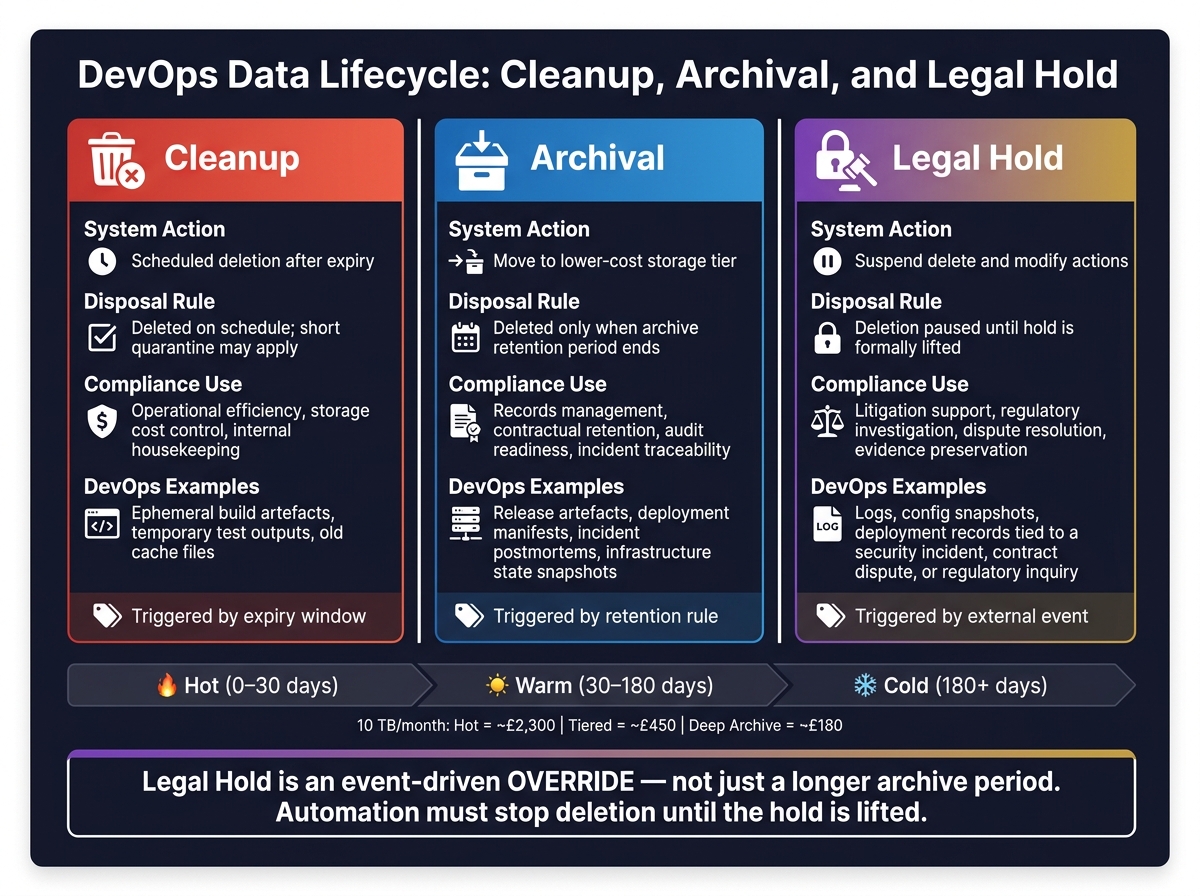 {DevOps Retention Policy: Cleanup vs Archival vs Legal Hold}
:::
{DevOps Retention Policy: Cleanup vs Archival vs Legal Hold}
:::
Use this comparison to decide whether an artefact should be deleted, archived, or frozen under legal hold. It takes a policy rule and turns it into a day-to-day action, which matters when lifecycle automation needs a clear trigger.
| Aspect | Cleanup | Archival | Legal Hold |
|---|---|---|---|
| System action | Scheduled deletion after expiry | Move to lower-cost storage | Suspend delete and modify actions |
| Disposal rule | Deleted on schedule; short quarantine may apply | Deleted only when archive retention ends | Deletion paused until hold is lifted [55][56] |
| Compliance use case | Operational efficiency, storage cost control, and internal housekeeping | Records management, contractual retention, audit readiness, and incident traceability | Litigation support, regulatory investigation, dispute resolution, and evidence preservation |
| DevOps artefact examples | Ephemeral build artefacts, temporary test outputs, and old cache files | Release artefacts, deployment manifests, incident postmortems, and infrastructure state snapshots | Logs, configuration snapshots, or deployment records tied to a security incident, contract dispute, or regulatory inquiry |
Legal hold is an event-driven override, not just a longer archive period. That difference matters. If a file is archived, it still follows its retention rule. If it is under legal hold, delete and change actions stop until the hold is lifted.
Your policy should spell out who can place a hold, who can remove it, and how automation responds. Otherwise, an automated cleanup job can wipe data that should have been frozen.
Here’s a simple way to think about it:
- Cleanup clears out data that no longer has day-to-day use.
- Archival keeps data for later reference, audit, or record-keeping.
- Legal hold freezes data because an external event, such as a dispute or investigation, changes the rules.
A deployment manifest is a good example. It may sit in archive for months with a set retention period. Then a dispute or investigation starts, and that same manifest moves under legal hold. At that point, your policy needs to state who can trigger the change and how automation stops deletion. That’s how you map each artefact type to the right retention window without guesswork.
Suggested Retention Windows by Artefact Type
These windows are starting points, not fixed rules. You’ll need to tune them to sector rules, client contracts, and your organisation’s risk appetite. Then use the policy matrix above to turn these defaults into enforceable rules for each artefact type.
| Artefact Type | Suggested Retention Window | Preferred Storage Tier | Notes |
|---|---|---|---|
| Feature-branch builds and PR artefacts | 7–14 days | Hot | Value drops fast once a change is merged or closed. |
| CI/CD pipeline logs (successful runs) | 7–30 days | Hot | Useful for short-term debugging; prune fast. |
| CI/CD pipeline logs (failed runs) | 90+ days | Hot → Warm | Keep longer than successful runs; they often help with root-cause analysis. |
| Nightly and integration build outputs | 30–90 days | Warm | Helps with regression analysis without piling up long-term storage. |
| Production release artefacts and images | 2–5 years | Warm → Cold | Supports rollback, long-term support, and audit readiness. |
| Untagged or intermediate container layers | 7–30 days | Hot | Prune on a regular basis to avoid wasted storage. |
| Infrastructure-as-code templates (Terraform, Ansible) | Environment lifetime plus 1–2 years | Cold | Helps with forensic investigation and rebuilding environments. |
| Application logs (non-personal data) | 30–180 days | Hot → Warm | Match the window to operational need and storage budget. |
| Security and access logs | 1–7 years | Warm → Cold | Many teams use 12 months as a practical baseline, with longer periods in regulated settings. |
| Database backups (daily full) | 30–90 days | Warm | Standard operational recovery window. |
| Database backups (monthly full) | 12–24 months | Cold | Useful for financial data and compliance snapshots. |
| Formal audit evidence (change approvals, test sign-offs, penetration test reports) | 7+ years | Cold or archive | Aligns with common UK record-retention and tax expectations. |
If an artefact contains personal data, use the shortest window that still meets operational and legal needs.
If an artefact includes personal data or is under an active hold, the legal rule takes precedence over the operational window.
Conclusion
A retention policy is not just a delete job. It’s a clear decision about what to keep, how long to keep it, and why.
The goal is balance. You need enough retention to support recovery, audit, and legal needs, but not so much that cost and risk keep climbing. These practices fit together in a practical way: classification sets the inventory, retention windows cut exposure, archival remains separate from deletion, and policy-as-code applies the rules the same way every time.
Metadata and provenance make retained artefacts auditable and useful during incident response.
Secure storage, tested restore and deletion workflows, and regular reviews help keep the policy dependable as systems and regulations shift. Track monthly storage spend in £, restore success rates, and over-retention so teams can spot drift fast. In day-to-day work, the strongest policies are the ones teams can enforce automatically and prove during an audit.
Hokstad Consulting can help DevOps teams design retention controls that balance compliance, cost, and automation.
FAQs
How should we choose retention periods?
Balance regulatory compliance, investigation needs, and cost control. A good starting point is to sort data by purpose.
For example, security logs may need long-term retention to meet rules such as PCI DSS (12 months) or SOX (7 years). By contrast, debug logs or non-production logs might only need to stay available for 7 to 30 days.
Retention periods should also line up with UK GDPR. That means keeping personal data only for as long as it’s needed, and recording the reason behind each retention period.
To keep spend in check, use tiered storage and automated policies so older data moves into lower-cost archive layers.
What should go under legal hold?
Place any logs or data needed for investigations or legal proceedings under a legal hold.
This keeps critical information for as long as needed for forensic review or evidence, without extending the standard retention period for every record. That way, you can support UK data protection rules while avoiding long-term storage of data you don’t need to keep.
How often should restore and deletion tests run?
There’s no set schedule for this. But regular testing and maintenance matter if you want to keep things efficient and stay compliant.
Before anything goes live, test cleanup configurations carefully in a staging environment. Then review retention settings at least quarterly so they still match changing regulatory requirements and business needs.