
If your AWS usage stays put, I’d usually pick Reserved Instances. If it changes often, I’d usually pick Savings Plans. That’s the short answer.
Here’s the simple version:
- Reserved Instances (RIs) often give the biggest discount for fixed workloads
- Savings Plans (SPs) give you more room to change across EC2, Fargate and Lambda
- RIs still matter for many database workloads
- A 3-year Standard RI can save about 62%, while a 3-year Compute Savings Plan may save about 52%
- A common setup is:
- RIs for the steady base
- Savings Plans for changing compute
- On-demand for spikes
The main point is simple: don’t choose by headline savings alone. I’d match the commitment to the way the workload behaves, then size it from the lowest stable usage level, not the average.
::: @figure 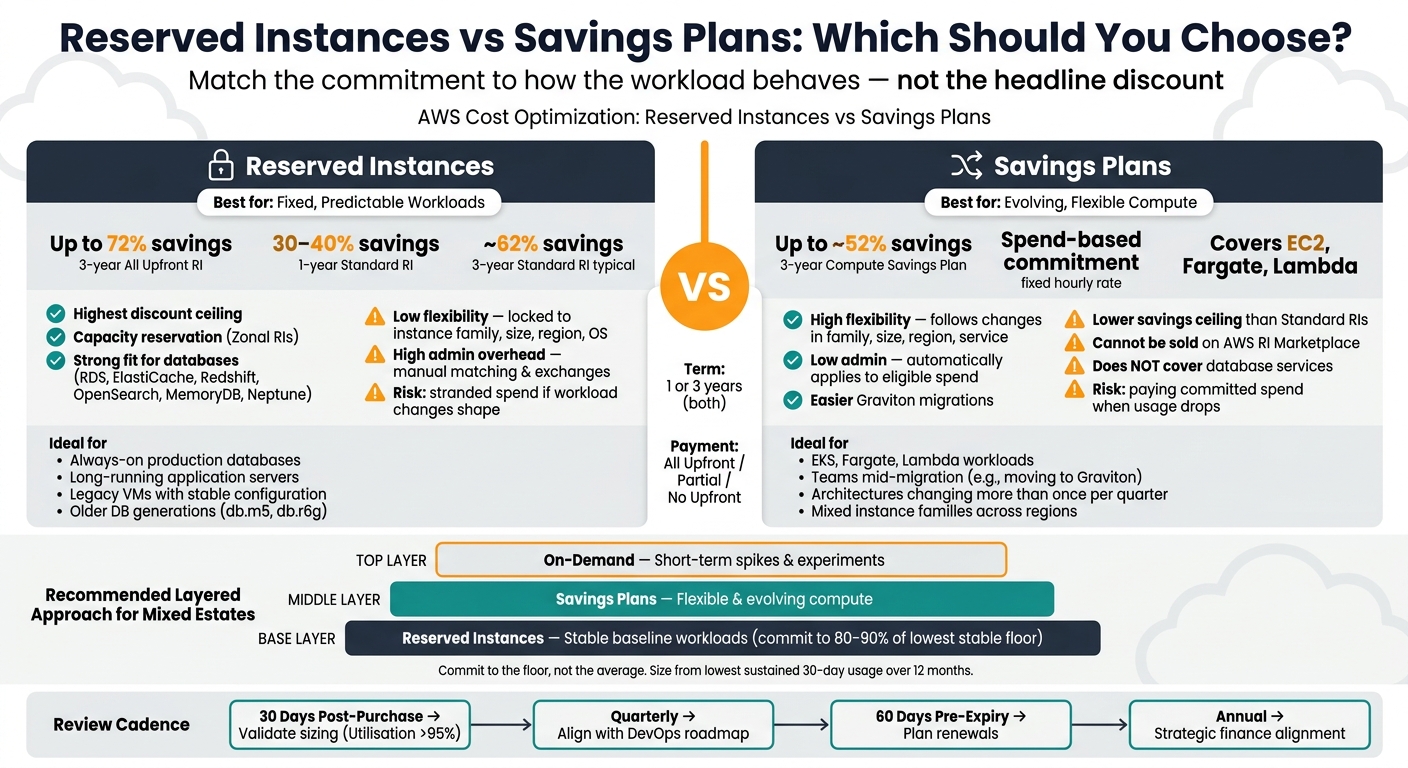 {Reserved Instances vs Savings Plans: AWS Cost Commitment Comparison}
:::
{Reserved Instances vs Savings Plans: AWS Cost Commitment Comparison}
:::
How To Choose Between RIs And Savings Plans?
Quick Comparison
| Criteria | Reserved Instances | Savings Plans |
|---|---|---|
| Best for | Fixed workloads | Changing compute |
| Discount level | Usually higher | Usually lower |
| Flexibility | Low | High |
| Term | 1 or 3 years | 1 or 3 years |
| Coverage | Specific instance setup or region | Eligible compute spend across services |
| Databases | Strong fit | Limited use |
| Capacity reservation | Yes, with zonal RIs | No |
| Main risk | Paying for the wrong shape later | Paying for committed spend when usage drops |
If I were making the call today, I’d use RIs for steady databases and long-running servers, and Savings Plans for estates moving between instance families, containers or serverless.
Reserved Instances: best for steady, predictable workloads
Reserved Instances make sense when a workload barely changes. You commit to a set instance family, size and region for one or three years. That lack of movement is exactly why the price drops. The main thing to ask is simple: will this workload still look the same for the whole term?
You’re trading flexibility for a bigger discount. A 1-year Standard RI will often cut costs by 30–40% compared with on-demand pricing, while a 3-year All Upfront RI can save as much as 72% [2][7]. All Upfront, Partial Upfront and No Upfront each change the balance between discount size and cash flow.
Where Reserved Instances deliver the most value
RIs are a strong fit for workloads that stay put, such as always-on production databases, long-running application servers and legacy VMs that keep the same shape for years.
They also matter a lot for AWS managed database services. For RDS, ElastiCache, Redshift, OpenSearch, MemoryDB and Neptune, RIs are still the main commitment option for older generations [3][6]. Database Savings Plans only apply to Gen 7 and newer instances, so if you’re still running older database generations like db.m5 or db.r6g, RIs are still the path to a committed discount [3][8].
Zonal RIs add something Savings Plans do not: a capacity reservation in a specific Availability Zone [6][8]. That can matter just as much as the discount itself. If a workload must stay available during peak demand or an outage, that reservation can be worth paying attention to.
But that upside fades fast when the workload starts moving around.
Main risks before committing to Reserved Instances
The main risk is blunt: workloads change, but the commitment doesn’t. If you buy a Standard RI for an m5.xlarge and later move that workload to a Graviton-based m7g instance, the RI gives you no discount on the new setup. You’re left paying for capacity that no longer fits, which turns into stranded spend [5].
That problem gets worse over longer terms. A 3-year commitment can outlast a full architecture cycle, especially when teams move workloads into containers, right-size instances or shift to another region. Before you commit, check for any planned migration, re-platforming or region move.
If your workload has changed shape, size or region in the last six months, don't commit yet.- The Node4 Team [1]
A sensible approach is to baseline usage for 12 months, then commit only to the stable floor, usually about 80%, so normal variation doesn’t turn into wasted spend [1][8].
When a workload no longer looks this fixed, Savings Plans tend to be the better fit.
Savings Plans: best for changing compute usage
If your workload is likely to move around, it often makes more sense to use a spend-based commitment instead of tying yourself to one instance setup.
Reserved Instances lock you into a specific configuration. Savings Plans work differently. You commit to a fixed hourly spend, and the discount follows eligible compute as that workload shifts over time [9][10].
Where Savings Plans are usually the stronger choice
Savings Plans tend to work best in setups where the compute layer doesn’t stay still for long. They suit teams running EKS, Fargate or Lambda. They also make Graviton migrations easier because you don’t need to manage manual exchanges [9][6].
That matters when compute changes faster than the commitment term. Maybe a team moves services between instance families. Maybe they change runtimes, or start shifting more work into containers and serverless. In those cases, a spend commitment is often the easier fit.
They also suit businesses that are still shaping their platform design. If your cloud architecture changes more than once per quarter, a spend-based commitment gives you room to keep optimising without ending up stuck with budget tied to setups you no longer use [9].
Main limits of Savings Plans
That flexibility comes with a trade-off. Compute Savings Plans usually offer a lower savings ceiling than Standard Reserved Instances. Put simply, you give up some discount in exchange for more freedom at the architecture level [9][10].
There’s another catch: you still pay the committed hourly amount even when usage falls. That can happen after rightsizing, during a quieter period, or when workloads are cut back on purpose. And unlike Standard RIs, Savings Plans can’t be sold on the AWS Reserved Instance Marketplace if your plans change [10][5].
Savings Plans also don’t apply to database services. So if you want commitment discounts for RDS, ElastiCache, Redshift or OpenSearch, you’ll still need Reserved Instances [6][7]. That’s why many estates use both.
Reserved Instances vs Savings Plans: choosing by workload
Pick the model based on the workload, how often it changes, and how long you’re happy to commit. The quickest way to make the call is to compare the pricing model to the workload itself, not just the discount.
| Criteria | Reserved Instances (Standard) | Savings Plans (Compute) |
|---|---|---|
| Flexibility | Low - fixed to instance family, region and OS | High - can follow changes in family, size, region and service type |
| Term | 1 or 3 years | 1 or 3 years |
| Regional scope | Single region; zonal options if you need a capacity reservation guarantee in a specific Availability Zone [7] | Broad - follows eligible spend across regions [7] |
| Ideal workload type | Fixed baseline, databases | Evolving compute, containers, serverless |
| Admin overhead | High - manual matching and exchanges | Low - automatically applies to eligible spend |
| Over-commitment risk | High - stranded spend if workloads change | Low - follows architectural shifts |
Decision criteria for UK organisations
Start with your stable hourly baseline and the changes that are already on the roadmap.
If you run a stable SaaS back end on a fixed instance family, a Standard RI on a 1-year term is usually a simple choice. RIs work best when the workload stays put. They work least well when change is already coming.
For workloads that move up and down across the year, a Compute Savings Plan is often the better fit. It gives you more room to change shape without leaving spend stuck on idle configurations.
Things get a bit trickier during staged cloud modernisation. If your team is mid-migration - for example, moving services from older EC2 instance families to Graviton - locking into a Standard RI before that work is finished can backfire [2][7]. That’s the big risk with committing too early.
A layered commitment approach for mixed estates
Most estates need both models because workloads rarely move at the same speed. Some parts stay steady for months. Others change every quarter. That’s where this comparison becomes practical: fixed baselines suit rigidity, while changing compute needs room to move.
A common pattern looks like this:
- Use RIs for the fixed baseline
- Use Savings Plans for flexible compute
- Use on-demand for short-term spikes
The main discipline is simple: commit to the floor, not the average. Work out the lowest stable hourly spend, then commit to 80–90% of that stable floor [8][11].
The next step is to sort workloads into two groups: those that are steady enough to commit, and those that still need room to change.
Planning, governance and next steps
What to check before committing
Once you’ve split workloads by stability, the next step is to size commitments with care and put clear guardrails around them.
Start with 12 months of usage data. Anything less can miss seasonal swings. Then set commitments from the lowest sustained 30-day average utilisation across that 12-month period, and size to 80–90% of that floor. [2]
It also pays to rightsize before you buy. If you lock in an inefficient setup, you’re just baking waste into the plan and making it harder to fix later. [2][7] After that, check the roadmap. If a move to Graviton or Fargate is likely within the next six months, hold off on Standard RI purchases until the migration is done. [2][7]
Once the purchase is in place, governance needs to become routine, not a one-off task. Review utilisation and coverage every quarter so drift doesn’t creep in unnoticed. Set automated alerts in AWS Budgets at least 60 days before expiry for any commitment, so you don’t get pushed back onto on-demand pricing by surprise. [2]
The table below gives a simple cadence to follow:
| Review Point | Purpose | Key Metric |
|---|---|---|
| 30 days post-purchase | Validate initial sizing | Utilisation > 95% [5] |
| Quarterly | Align with DevOps roadmap and growth | Coverage vs. on-demand spend [2] |
| 60 days pre-expiry | Plan renewals or strategy changes | Commitment expiration date [2] |
| Annual | Strategic alignment with finance | Realised savings vs plan |
One more thing: leave out parallel runs and short-term experiments when building the baseline. Those can inflate usage and push you into over-committing. [4]
Conclusion: use rigidity for stable workloads, flexibility for evolving ones
After sizing and governance, what matters is discipline and regular review.
The main idea hasn’t changed through this article: match the commitment model to the workload behaviour, not the headline discount. Reserved Instances fit fixed, predictable estates. Savings Plans fit compute that shifts between instance families, regions, or services over time.
Commit to the stable floor, keep flexible capacity flexible, and review on a regular basis.
FAQs
Can I use both RIs and Savings Plans together?
Yes. Reserved Instances (RIs) and Savings Plans can be used together, and they often work well side by side.
When both can apply, AWS uses them in this order: RIs first, then EC2 Instance Savings Plans, then Compute Savings Plans. Any usage left after that is billed at On-Demand rates.
How much of my AWS usage should I commit to?
It depends on how steady and predictable your workloads are. For stable production use, a common approach is to commit around 70–80% of your minimum usage, based on the lowest hourly spend from the past 12 months.
If your workloads move around more, like development, testing, or seasonal demand, it usually makes sense to be a bit more careful. In that case, 60–75% of baseline usage can help you balance savings with flexibility and reduce the risk of paying for commitment you don’t use.
What should I check before buying a 3-year commitment?
Check whether your workload is stable and predictable. A 3-year commitment can unlock the biggest discounts, especially with Standard Reserved Instances paid upfront. But there’s a catch: if usage shifts, you’re more likely to end up over-committed and stuck with idle capacity.
It also helps to look at a few other factors:
- utilisation
- coverage of steady-state usage, usually around 70–85%
- whether you need a capacity guarantee
- your organisation’s FinOps maturity
- likely workload changes
Reassess this every quarter so your commitments still match actual usage and business needs.