
Kubernetes cloud costs can quickly spiral out of control, especially when resources are over-allocated or left idle. KEDA (Kubernetes Event-Driven Autoscaling) offers a solution by dynamically scaling workloads based on real-time demand, including scaling down to zero during idle periods. This approach aligns resource usage with actual demand, helping organisations cut cloud expenses by 25–40%.
Key Takeaways:
- Static Resource Allocation Wastes Money: Over-provisioning for peak traffic leads to underutilised nodes and higher costs.
- KEDA vs HPA: While Kubernetes' Horizontal Pod Autoscaler (HPA) scales based on CPU/memory, KEDA uses external event triggers (e.g., message queues, HTTP requests).
- Scale-to-Zero Functionality: Ideal for workloads like AI/ML or internal tools, this feature eliminates costs during low-traffic periods.
- Real-World Savings: Companies have reduced infrastructure costs by over 20% using KEDA alongside autoscalers like Cluster Autoscaler or Karpenter.
By integrating KEDA into your Kubernetes setup, you’ll only pay for resources when they’re actively needed. This is especially impactful for workloads with unpredictable or bursty traffic. The result? Lower cloud bills and better resource efficiency.
Smarter Scaling for Kubernetes workloads with KEDA
What is KEDA and How Does it Work?
::: @figure 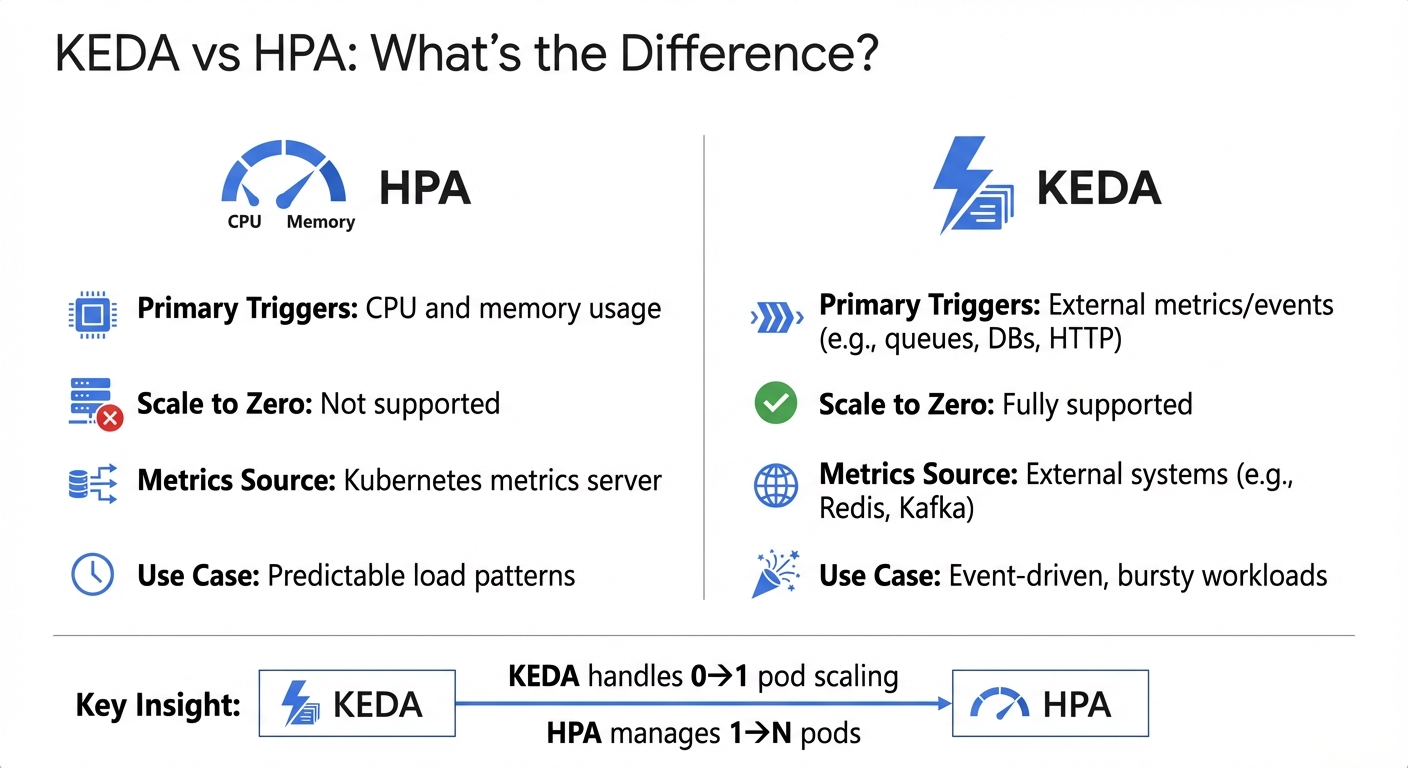 {KEDA vs HPA: Key Differences in Kubernetes Autoscaling}
:::
{KEDA vs HPA: Key Differences in Kubernetes Autoscaling}
:::
KEDA, short for Kubernetes Event-Driven Autoscaling, is an open-source operator designed specifically for Kubernetes. Unlike traditional scaling methods that rely on CPU or memory usage, KEDA adjusts workloads based on external events. This makes it particularly useful for dynamic and unpredictable workloads. It’s also worth noting that KEDA has earned the status of a Cloud Native Computing Foundation (CNCF) Graduate project, highlighting its maturity and adoption within the Kubernetes ecosystem [5][7].
KEDA’s architecture revolves around three main components. First, there’s the Operator, which manages the transition of deployments between zero and active pods. Then, the Metrics Server facilitates communication by passing external event data to Kubernetes’ Horizontal Pod Autoscaler (HPA). Finally, Scalers connect to various external systems - like Kafka or RabbitMQ - to gather metrics. With over 50 built-in scalers, KEDA supports a wide range of integrations, including messaging systems, databases, cloud services, and even Cron-based schedules [10]. By continuously monitoring event sources and feeding this data to the HPA, KEDA ensures efficient resource allocation and scaling.
How Event-Driven Scaling Works
Event-driven scaling, as the name suggests, reacts to specific events rather than relying on static resource metrics like CPU or memory. KEDA listens for triggers such as message queue backlogs, database query volumes, HTTP request rates, or specific time-based schedules. When activity spikes, it signals the HPA to add pods to handle the load. When the demand subsides, it scales back down [6].
KEDA is proactive in nature and scaling up according to indicators such as message queue size in event sources like Kafka.
– Anshu Mishra, Solution Architect [9]
Here’s a practical example: imagine a RabbitMQ queue suddenly receives 500 messages. KEDA detects this surge, prompting the HPA to scale up worker pods to process the backlog. Once the queue clears, KEDA instructs the system to scale back down. This approach is ideal for scenarios like video processing, managing order queues, or handling sudden spikes in traffic [7].
KEDA vs HPA: What's the Difference?
KEDA and Kubernetes’ native HPA serve different purposes but work together seamlessly. While the HPA focuses on scaling based on CPU and memory usage, KEDA extends this functionality by incorporating external metrics such as message queues, database activity, and HTTP requests.
| Feature | HPA | KEDA |
|---|---|---|
| Primary Triggers | CPU and memory usage | External metrics/events (e.g., queues, DBs, HTTP) |
| Scale to Zero | Not supported | Fully supported |
| Metrics Source | Kubernetes metrics server | External systems (e.g., Redis, Kafka) |
| Use Case | Predictable load patterns | Event-driven, bursty workloads |
KEDA doesn’t replace the HPA but complements it. It handles scaling from zero to one pod when triggered by an event, while the HPA takes over to manage scaling beyond one pod based on the metrics KEDA provides. This collaboration ensures both rapid responsiveness and efficient scaling, making it a powerful tool for managing dynamic workloads.
Scaling to Zero: Cutting Costs During Idle Time
One of KEDA’s standout features is its ability to scale workloads down to zero replicas during idle periods, significantly reducing cloud costs. This is especially beneficial for resource-intensive deployments, such as GPU-based AI/ML workloads [2].
In December 2024, Google Cloud demonstrated how KEDA’s HTTP add-on enabled scale-to-zero functionality for Large Language Model deployments on Google Kubernetes Engine. The system automatically scaled GPU-dependent pods down to zero when no inference requests were active, cutting expenses associated with idle GPUs. When new HTTP requests arrived, the pods scaled back up seamlessly [2].
Scaling deployments down to zero when they are idle can offer significant financial savings.
– Michal Golda, Product Manager, Google Cloud [2]
To avoid unnecessary scaling fluctuations, KEDA employs a cooldown period - set to 300 seconds by default - before scaling back to zero. This prevents rapid scaling adjustments if new events occur shortly after a previous one. Additionally, for workloads that only operate during specific hours, such as internal tools or staging environments, KEDA’s Cron scaler can schedule scaling to zero during off-hours like nights and weekends [2].
How KEDA Reduces Cloud Costs
KEDA takes a practical approach to cloud cost management by aligning resource usage with actual demand. Instead of paying for idle infrastructure, organisations are charged only for the resources they actively use. This shift from static provisioning to dynamic, event-driven scaling tackles the common issue of overprovisioning in cloud environments.
Matching Resources to Actual Demand
KEDA builds on automated scaling principles by monitoring external event sources - like message queues, database activity, or HTTP requests - and adjusting pod counts accordingly. For example, if a message queue backlog builds up, KEDA automatically scales up pods to handle the workload until the backlog is cleared.
The current default Kubernetes scaling mechanism is based on CPU and memory utilisation and is not efficient enough for event-driven applications. These mechanisms lead to over or under provisioned resources.
– AWS Solutions Library [11]
This event-driven approach ensures that resources are only used when needed, cutting costs associated with idle capacity.
Cost Savings During Low-Traffic Periods
With KEDA’s scale-to-zero functionality, organisations can save significantly during predictable low-traffic times. For example, internal tools, staging environments, or batch processes can scale down to zero replicas outside of peak hours - such as from 17:00 to 09:00 [6].
The savings are even more pronounced for GPU-intensive AI and ML workloads. GPUs often come with hefty hourly charges, so scaling GPU-dependent pods to zero when no inference requests are pending eliminates unnecessary costs [2][3].
With KEDA, you can align your costs directly with your needs, paying only for the resources consumed.
– Michal Golda, Product Manager, Google Cloud [2]
KEDA’s default cooldown period of 300 seconds ensures stability by preventing rapid scaling fluctuations. This balance allows for quick cost reductions without compromising operational efficiency [8].
Reducing Node Usage and Infrastructure Costs
Dynamic scaling doesn’t just match workloads to demand - it also optimises node usage. When KEDA reduces pod counts, unused nodes can be terminated by cluster autoscalers, cutting down compute costs [2][1]. By consolidating workloads across fewer nodes, organisations can make better use of their resources.
To illustrate, a reference architecture for event-driven autoscaling with KEDA on Amazon EKS - including the control plane, EC2 instances, SQS, and Prometheus - costs around £240 per month as of April 2024 [11]. However, for organisations managing multiple workloads with fluctuating demand, the savings from dynamic scaling typically far outweigh this base cost.
Need help optimizing your cloud costs?
Get expert advice on how to reduce your cloud expenses without sacrificing performance.
Implementing KEDA: A Practical Guide
Deployment Architecture and Best Practices
To get started with KEDA on Kubernetes 1.27 or newer, you can install it using Helm or YAML. For Helm, the command is straightforward:
helm install keda kedacore/keda --namespace keda --create-namespace
Alternatively, you can deploy it with YAML, using the --server-side flag for better compatibility [13].
KEDA introduces two essential components: the Operator, which manages deployment scaling, and the Metrics Server, which feeds event data to the Horizontal Pod Autoscaler (HPA) [9]. To take advantage of KEDA's ability to scale workloads to zero - something standard HPA doesn't support - configure your ScaledObject with minReplicaCount: 0 [8] [3]. This setting eliminates resource usage during idle times, offering a significant reduction in costs.
For optimal performance, fine-tune the following settings in your ScaledObject:
-
minReplicaCount: Set to 0 to enable scaling to zero. -
pollingInterval: Default is 15 seconds. Shorter intervals provide faster scaling but increase API calls. -
cooldownPeriod: Default is 300 seconds. Adjust this to avoid frequent scaling up and down.
Always define a maxReplicaCount to prevent unexpected costs from traffic spikes [12] [8]. These configurations are especially effective when integrated with Infrastructure as Code tools, aligning with cost-saving strategies.
Using KEDA with HPA and Infrastructure as Code
KEDA works alongside HPA to handle scaling from 0 to 1 pod, while HPA manages scaling beyond 1 [8] [3]. To avoid conflicts, don't create a separate HPA for workloads already managed by a KEDA ScaledObject [5].
KEDA works alongside standard Kubernetes components like the Horizontal Pod Autoscaler (HPA) and can extend functionality without overwriting or duplication.
– AWS Solutions Library [11]
When deploying with Infrastructure as Code, you can manage ScaledObject or ScaledJob Custom Resource Definitions (CRDs) using tools like Terraform or Kubernetes manifests [11] [3]. For secure credential management, use TriggerAuthentication or ClusterTriggerAuthentication CRDs. These let you handle AWS IAM roles, secrets, or similar credentials separately from your application deployments [11] [10].
If you're using cloud platforms like AKS or EKS, switch to Workload Identity for authentication. KEDA versions 2.15 and above no longer support pod identity [5].
For integration with Cluster Autoscaler or Karpenter, ensure your Pod Disruption Budgets have a minAvailable setting lower than the current replica count. This allows the autoscaler to safely drain under-utilised nodes, leading to tangible cost savings [4] [1].
These strategies help you harness KEDA's full potential in production environments.
Examples of KEDA in Production
Real-world use cases show how KEDA's dynamic scaling can deliver measurable savings in cloud environments.
In April 2024, AWS released a reference architecture for scaling applications on Amazon EKS using KEDA and Amazon SQS. In this setup, a ScaledObject with a pollingInterval of 10 seconds and a queueLength of 5 automatically scaled the sqs-consumer-backend from 0 to multiple replicas when 500 messages were queued. Once the queue emptied, the replicas scaled back to zero. The estimated monthly cost for this configuration was about £240 [11].
In December 2025, Google Cloud demonstrated a cost-saving scenario on GKE using KEDA to scale an Ollama LLM workload. By employing the KEDA-HTTP add-on and configuring an HTTPScaledObject, the system scaled GPU-backed g2-standard-4 nodes to zero during idle periods. A proxy buffered incoming HTTP requests, triggering a scale-up from zero to one pod only when needed, eliminating idle GPU costs [3].
For predictable traffic patterns, the Cron scaler can pre-scale replicas ahead of expected spikes [7]. For workloads involving long-running tasks, Kubernetes Jobs (via a ScaledJob) or lifecycle hooks like SIGTERM can ensure replicas aren't terminated prematurely during scale-down [8].
Monitoring and Measuring Success
Metrics to Track for KEDA Performance
To truly benefit from KEDA's scaling capabilities, it's essential to track specific metrics that highlight cost savings and performance improvements. One critical metric is the resource utilisation gap - the difference between provisioned and used CPU or memory. This gap reflects wasted resources that KEDA helps eliminate by scaling workloads to zero or precisely matching demand [15].
Another key focus is the scale-to-zero duration, which measures how long workloads stay at zero replicas during idle periods, such as weekends or after business hours. This directly impacts compute cost reductions [2][3]. Additionally, monitor event-driven scaling metrics, like AWS SQS queue lengths, Pub/Sub message backlogs, or HTTP request rates. These metrics provide a clearer picture of actual demand compared to traditional CPU or memory usage indicators [14][3].
Keep an eye on node count and utilisation to ensure KEDA’s pod scaling allows tools like Karpenter or Cluster Autoscaler to remove under-utilised nodes. Many cluster autoscalers use a 50% scale-down threshold, so monitoring this helps optimise hardware usage [1]. It's also crucial to track the processed count versus kill count (pods terminated mid-task) to avoid costly re-processing caused by abrupt scaling [14].
Lastly, measure cold start latency - the time it takes to scale from zero to one replica. This metric is vital for understanding the impact of scaling on user experience and meeting latency service level objectives (SLOs) [2].
| Metric Category | Key Metric to Track | Purpose |
|---|---|---|
| Efficiency | Cost per used CPU | Identifies over-provisioning waste [15] |
| Performance | Scaling Event Frequency | Tracks system responsiveness to load changes [12] |
| Reliability | Message Processed vs. Kill Count | Ensures scaling doesn't interrupt critical tasks [14] |
| Responsiveness | Cold Start Latency | Measures scale-up time from 0 to 1 replica [2] |
| Financial | Daily Spend vs. Budget | Detects cost anomalies in real-time [15] |
These metrics provide a clear picture of scaling efficiency, paving the way for deeper insights through Grafana visualisations in the next section.
Using Grafana to Visualise Scaling Patterns
KEDA works seamlessly with Prometheus, enabling teams to use Grafana to analyse how event-driven triggers correlate with pod scaling [12][6]. The KEDA Metrics Server exposes event data - like queue lengths or stream lags - to the Kubernetes Horizontal Pod Autoscaler, which Prometheus scrapes for display in Grafana dashboards [9].
Visualise trigger metrics (e.g., Kafka lag) alongside resource metrics (e.g., pod count) to confirm that KEDA is effectively aligning capacity with demand [9][6]. By overlaying replica counts with incoming request rates or message backlogs, you can identify patterns like cold starts or over-provisioning, both of which influence cloud costs [2][1].
For deeper analysis, use Grafana Loki to collect and visualise KEDA operator logs [17][12]. You can also inspect logs directly with kubectl logs -n keda -l app=keda-operator to review scaling events and understand why specific scale-up or scale-down actions were triggered [12].
Fine-tune settings like pollingInterval and cooldownPeriod to optimise scaling behaviour. For example, if pods are scaling down too quickly and immediately scaling back up, increasing the cooldown period can reduce this flapping
and its associated costs [8][12]. Additionally, configure applications to expose custom metrics - such as active user sessions or total HTTP requests - to Prometheus, enabling KEDA to scale based on data that is also visualised in Grafana [6].
Presenting Cost Savings to Decision-Makers
Visualising data in Grafana helps translate technical efficiencies into clear financial benefits, making it easier to communicate value to stakeholders. For example, matching resources to demand and decommissioning idle nodes drives cost savings, which can be quantified by comparing static resource allocation with KEDA's dynamic scaling. A key metric here is the duration of scale-to-zero periods during idle times [2][3]. Savings also accrue from reduced node pool sizes when autoscalers remove under-utilised capacity [2][1].
To further demonstrate value, track cost per transaction by comparing external metrics (e.g., SQS queue depth or Pub/Sub message lag) with the number of active replicas. This ensures resources are only consumed when demand exists [3][14]. Tools like Kubecost, Goldilocks, or KRR can help estimate the gap between requested and actual resource usage, providing more precise ROI calculations [1].
His mission is to help teams scale smarter, reduce cloud costs by 20–40%, and focus on building, not babysitting, infrastructure.– Zbynek Roubalik, Founder & CTO, Kedify [16]
When presenting to decision-makers, emphasise event-driven alignment - the concept of paying only for resources actively used. This is especially relevant for intermittent workloads, such as AI/ML inference or seasonal applications [2]. Use Grafana dashboards to show how KEDA scales infrastructure in response to real-time business events, such as scaling up for Black Friday traffic or down during off-hours [7].
Include cold start latency data to balance the narrative between cost efficiency and performance [2]. Breaking down costs by namespace and day can also pinpoint which teams or applications are driving cloud waste [15]. For a quick snapshot of potential savings, tools like the Kedify ROI Calculator can estimate autoscaling benefits in under a minute [14].
Conclusion: Reducing Cloud Costs with KEDA
KEDA offers a game-changing approach to managing cloud infrastructure by aligning expenses with actual usage. Its scale-to-zero feature eliminates the cost of idle resources, making it an ideal solution for GPU-heavy AI/ML tasks, staging environments, and sporadic batch jobs [2][3]. Unlike traditional scaling methods that rely on delayed CPU metrics, KEDA reacts to external triggers like message queue depth, ensuring you only pay for resources when they’re actively needed [9].
The financial benefits are hard to ignore. Take the example of Reco.se, a Swedish review platform, which in 2024 achieved a 21% reduction in infrastructure costs year-on-year after adopting KEDA alongside improved observability practices - all while expanding their platform [19]. Their CTO, Jacob Dobrzynski, highlighted the impact:
Lacking a dedicated DevOps team, we partnered with Hokstad Consulting for expert DevOps support and cost-saving strategies. They significantly curbed our GCP expenses, reducing infrastructure costs by 21% annually[19].
However, simply installing KEDA isn’t enough to unlock its full potential. To see real savings at the node level, organisations need to focus on strategic configuration, continuous monitoring, and integration with cluster autoscalers [2][1]. For workloads that qualify, combining KEDA with spot instance automation can slash costs by up to 90% [18]. At the same time, correctly configuring resource requests remains the most critical factor in keeping Kubernetes expenses under control [20].
For businesses without in-house DevOps expertise, working with specialists like Hokstad Consulting can fast-track the process. Their cloud cost engineering services aim to cut expenses by 30–50% through strategies like automated scaling, resource optimisation, and performance tuning. Whether your infrastructure is public, private, or hybrid, expert support ensures KEDA integrates seamlessly into your broader FinOps framework, from leveraging committed usage discounts to enhancing observability with tools like OpenTelemetry.
Ultimately, autoscaling isn’t just a feature - it’s a key part of a comprehensive cost management strategy. With the right setup, regular monitoring, and continuous adjustments, KEDA transforms cloud infrastructure from a static expense into a dynamic, demand-driven resource tailored to your business needs.
FAQs
How does KEDA's scale-to-zero feature help lower cloud costs?
KEDA’s scale-to-zero feature automatically shuts down all Pods when there are no active events or tasks to handle. This means businesses avoid wasting computing power, paying only for the resources they genuinely use.
By adjusting resource usage in real time based on demand, scale-to-zero minimises idle periods and helps lower cloud service costs. It’s a smart way to keep expenses under control while maintaining efficiency.
How does KEDA differ from Kubernetes' Horizontal Pod Autoscaler (HPA)?
KEDA and Kubernetes' Horizontal Pod Autoscaler (HPA) both manage pod scaling, but they cater to different needs and scenarios. KEDA operates on an event-driven model, scaling workloads based on external triggers like queue lengths or incoming HTTP requests. In contrast, HPA focuses on resource-based metrics, such as CPU or memory usage, to adjust scaling.
What sets KEDA apart is its ability to scale workloads down to zero and bring them back up when demand arises, making it especially useful for event-driven tasks like message queues or scheduled jobs. KEDA functions as an additional operator with built-in scalers, while HPA is a core Kubernetes feature that requires custom metrics for anything beyond basic resource utilisation. This distinction makes KEDA particularly effective for cutting cloud costs by ensuring resources are only active when needed.
How can organisations use KEDA to reduce cloud costs and optimise resources?
Organisations can take advantage of KEDA to cut cloud costs by tailoring workloads to demand through dynamic scaling. The process begins with deploying KEDA in your Kubernetes cluster and choosing an event-source scaler that aligns with your workload. Options include Pub/Sub, AWS SQS, or Azure Service Bus. Next, configure a ScaledObject to set scaling parameters, such as minimum and maximum replicas, and establish thresholds that trigger scaling actions.
To maximise savings, enable the scale-to-zero feature, which ensures resources are freed up during idle times. You can also fine-tune settings like cooldown periods to avoid unnecessary scaling fluctuations. Keep an eye on metrics like pod count and queue depth to refine thresholds and maintain efficient scaling. For workloads with predictable patterns, cron scalers are a great option to handle scheduled tasks while minimising resource usage.
If you're unsure about optimising your setup, Hokstad Consulting can provide expert advice. They can assess your configuration, suggest improvements, and align scaling policies with your budget, ensuring cost savings without compromising performance.