
If too many people can change cloud budgets, tags, or billing settings, cloud spend gets harder to track and easier to waste. I’d sum it up like this: RBAC helps cut cloud cost drift by giving each person the right level of access - no more, no less.
For me, the article’s main point is simple:
- Finance should see spend across the business, but not build or change infrastructure
- Engineers should see the costs they own, but not edit budgets or billing data
- Platform and FinOps teams should control budgets, tags, and policy rules
- Approvals should be split, so one person cannot request, approve, and make the same cost-related change
- Reviews should happen at least every quarter, with stale access removed after 30 to 90 days
- KPIs should track whether RBAC is cutting waste, such as 95%+ cost allocation accuracy and zero unapproved budget or tag changes
A few points stand out straight away. Poor access control often leads to untagged spend, weak reporting, and budget changes without sign-off. In multi-cloud setups, the same model should be used across AWS, Azure, and Google Cloud, even if each platform uses different role names. And in UK firms, that matters because finance teams need clean £-based reporting by cost centre, team, and environment.
Here’s the short version of what I take from it:
- Map cloud access to job duties
- Keep view roles separate from control roles
- Lock down production more than dev and test
- Treat tags and billing exports like financial records
- Audit role drift on a set timetable
- Measure results, not just permissions
The article then walks through how to set those rules, apply them in each cloud, and check that access still matches who owns the spend.
Azure Governance Explained: Management Groups, Policies, RBAC and Landing Zones

Need help optimizing your cloud costs?
Get expert advice on how to reduce your cloud expenses without sacrificing performance.
Map roles to cloud cost responsibilities
Start by linking each role to the part of cloud spend they own: who approves budgets, who manages tags, and who checks spend.
Assign visibility, control and approval rights by role
Not everyone needs the same access. A Finance Controller needs organisation-wide, read-only visibility of all cloud spend in £, split by cost centre and environment. They do not need permission to provision infrastructure. An Engineering Manager needs a much narrower view: spend data for their own team’s subscriptions, accounts or projects. That gives them enough detail to track costs and act on alerts, without exposing what other teams are spending.
The table below maps common UK roles:
| Role | Visibility Scope | Control Rights | Reporting Focus |
|---|---|---|---|
| Finance Controller | Organisation-wide (£) | Approve budgets and allocation logic | Monthly and quarterly reconciliation, budget variance |
| Cloud Platform Owner | Across multiple accounts and clouds | Manage budgets, alerts, tags and allocation rules | Governance drift, total cost of ownership |
| Engineering Manager | Team subscription / project | Right-sizing and resource optimisation | Team budget variance, unit economics |
| Product Manager | Specific project / environment | None - input on allocation priorities | Cost per feature, cost per transaction |
Once you’ve mapped the roles, turn that map into approval paths and permission boundaries.
Apply least privilege and separation of duties
The main rule is simple: no single person should be able to both initiate and approve a cost-impacting change. If an Engineering Manager asks for a production scale-up, that person should not also approve the spend and push the change through.
In practice, split the work across roles:
- The requester proposes the change
- The Cloud Platform Owner or DevOps team implements it
- The Finance Controller or budget owner approves the financial commitment
For higher-value decisions, some UK organisations also add a CIO or procurement lead as another approver. That lines up with existing procurement and CAPEX/OPEX approval processes, and it keeps the audit trail clear. A clean workflow helps here: finance signs off, engineers make the change, and platform teams keep the rules in place.
Those role boundaries then feed into policies based on scope, cost centre and environment.
Design RBAC policies that support visibility and spend control
::: @figure 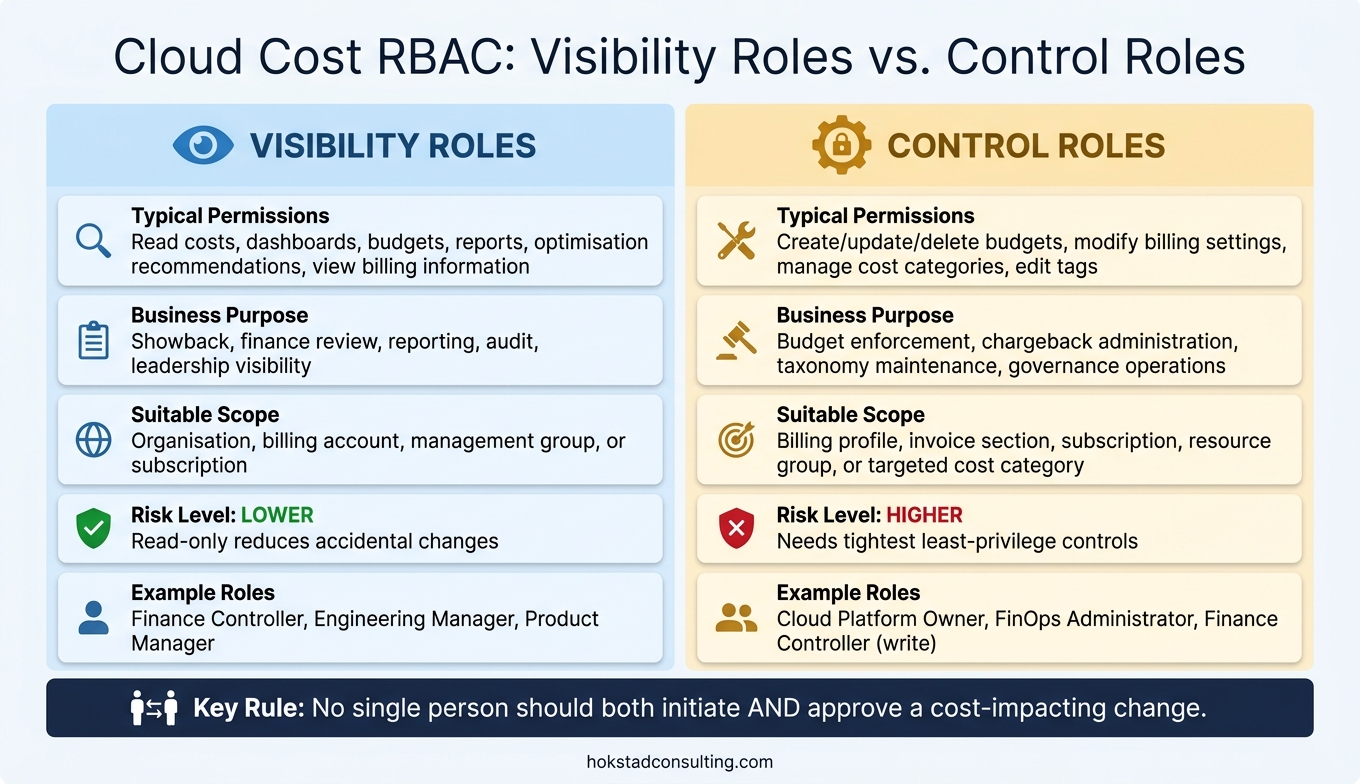 {RBAC Roles for Cloud Cost Management: Visibility vs. Control}
:::
{RBAC Roles for Cloud Cost Management: Visibility vs. Control}
:::
Set access by scope, cost centre and environment
Once you’ve mapped out who owns what, the next move is to turn those duties into provider-level policies. Keep RBAC lined up with your cloud hierarchy: organisation or management group, subscription or account, then project or resource group.
At the organisation or management group level, finance, central IT and cloud governance teams should have read access to all cost data. They may also need limited write access for shared rules, such as tagging standards, budget policies and cross-account budgets. At the subscription or account level, business-unit owners should be able to see all costs for their own subscription, approve budget updates and handle optimisation actions inside their unit. At the project or resource group level, product teams should be able to view the costs of their own workloads for reporting, with tightly limited rights to change only local tags and settings already agreed with governance.
It also helps to split production and non-production into separate subscriptions or accounts. Then you can lock production down more tightly and allow broader developer access in lower-risk environments. In production, only a small group should be allowed to change cost-affecting resources such as scaling, reserved capacity and networking. In development and test, policy-based controls like spend caps, automatic shutdown schedules and quotas help keep spend under control.
Each subscription or account should map to a cost centre code, and that code should appear the same way in tags and billing exports. That makes reconciliation far less painful. Tags such as CostCentre, BU, Product, Environment and Owner should be present from day one.
Protect tags, budgets and billing data
Tags used for cost allocation should be handled like financial data, not treated as just another bit of technical metadata.
A small tag-admin group should manage governance tags. Engineers should not edit those tags directly on production resources. Instead, tag updates should go through infrastructure-as-code reviews before deployment, with both technical and finance stakeholders checking the change. Policy tools such as Azure Policy, AWS Organizations SCPs or Google Cloud organisation policies can require tags on all resources and block deployments that miss mandatory cost tags.
Budget permissions need the same level of care. Only named budget holders and financial controllers should be able to create, change or delete budgets and alerts at the subscription or account level. Engineers should be able to view budgets and act on alerts, but they should not be able to alter the settings. For larger changes, a two-step approval flow is a sensible option: a requested budget increase gets sign-off from both the business owner and finance, with the approval recorded in the organisation's financial approval system.
Sensitive billing data, including negotiated rates, enterprise agreement terms, volume discounts, internal allocation models and custom price lists, should be limited to a very small group: central finance, procurement and cloud governance leads. Product teams and engineers usually need unit costs, not contract terms. RBAC should make sure general staff cannot access raw billing exports with detailed pricing.
Comparison table: visibility roles vs control roles
The table below shows the gap between view-only and control roles. This is often where organisations slip up.
| Aspect | Visibility roles | Control roles |
|---|---|---|
| Typical permissions | Read costs, dashboards, budgets, reports and optimisation recommendations; view billing information | Create, update or delete budgets, modify billing settings, manage cost categories and edit tags |
| Business purpose | Showback, finance review, reporting, audit and leadership visibility | Budget enforcement, chargeback administration, taxonomy maintenance and governance operations |
| Suitable scope | Organisation, billing account, management group or subscription, depending on reporting needs | Narrower scopes such as billing profile, invoice section, subscription, resource group or targeted cost category |
| Risk level | Lower - read-only access reduces the chance of accidental changes | Higher - needs tighter least-privilege controls to avoid budget or tagging drift |
These controls map directly to AWS, Azure and Google Cloud. What changes is the native role name and the policy tool you use. The next step is applying these rules in AWS, Azure and Google Cloud.
Implement RBAC across AWS, Azure and Google Cloud
Cost access patterns in Azure, AWS and Google Cloud
Translate your role model into the native IAM and RBAC controls for each cloud. The role names change from provider to provider, but the pattern does not: read-only cost visibility for finance, scoped cost visibility for teams, and tightly limited admin rights for FinOps.
In Azure, cost access follows the management group and subscription hierarchy. Central finance teams should get the Cost Management Reader role at management group scope, plus Billing Reader at billing-account scope if they need invoice-level detail. That gives them aggregated cost visibility across subscriptions without any rights to change resources. Engineering teams can receive Cost Management Reader at their own subscription or resource group, so they only see the costs tied to their workload. One catch: management-group reports can miss reservations and some Marketplace charges. So if finance needs invoice-level detail, they also need billing-scope access.
In AWS, billing access is off by default. You need to activate IAM access to Billing in the payer account before you grant cost read permissions. After that, finance teams in the payer account can use the AWSBillingReadOnlyAccess managed policy for Cost Explorer and billing console views. Engineering leads in member accounts can be given ce:GetCostAndUsage and budgets:ViewBudget permissions. On top of that, AWS Organizations Service Control Policies (SCPs) can block unwanted resource creation in production accounts.
In Google Cloud, billing roles and project roles sit at different scopes, which makes separation of duties much easier to handle. Central finance gets Billing Account Viewer (roles/billing.viewer) on the main billing account for read-only access to invoices and cost breakdowns, with no project-level infrastructure access. For product teams, Project Billing Costs Manager (roles/billing.projectCostsManager) is a practical option [1]. It limits cost data and recommendations to projects the user can already access, which helps keep cross-team financial data private.
For UK firms working across more than one cloud, it helps to use one role catalogue across all platforms. Names such as finops-billing-viewer-uk or engineering-cost-viewer-payments work well. You then map each one to the native roles and scopes in Azure, AWS and Google Cloud. That keeps governance steady as the estate gets bigger.
Minimum permissions for common cost roles
Use a small, standard role set to keep audits simple and stop permission sprawl before it starts.
| Role | AWS | Azure | Google Cloud |
|---|---|---|---|
| Billing Viewer |
AWSBillingReadOnlyAccess, budgets:ViewBudget, ce:GetCostAndUsage
|
Billing Reader (billing scope) + Cost Management Reader | roles/billing.viewer |
| Engineering Cost Viewer |
ce:GetCostAndUsage, budgets:ViewBudget in member accounts only; no aws-portal:*
|
Cost Management Reader at subscription or resource group scope only |
roles/viewer on the project + access to the cost export BigQuery dataset for that project |
| FinOps Administrator |
budgets:*, ce:*, Cost Allocation Tags management; no ec2:* or iam:CreateUser
|
Permissions to create and manage budgets, configure Cost Management exports and manage tag policies via Azure Policy; no Contributor on compute resources | Billing Account Costs Manager (roles/billing.costsManager) plus access to the BigQuery cost export datasets; read-only access to compute, storage and networking |
Use this table as your baseline. Keep read-only roles separate from budget and tag control roles. That split makes access reviews much easier and cuts down the odds of giving someone more power than they need.
Once these roles are in place, the next step is regular audit and drift detection.
Where Hokstad Consulting can help

Hokstad Consulting helps UK businesses encode cost RBAC in Terraform, Pulumi or native templates, so new accounts and projects inherit the right access from day one. Role changes then move through the same review flow as code changes.
Audit RBAC regularly and measure cost governance results
Review role assignments and detect access drift
Once roles are mapped and live, the job isn’t done. People change teams, contractors finish up, and budgets get reset. If no one checks access on a set schedule, permissions start drifting away from what the business needs. That’s access drift: automated provisioning keeps adding access, but access removal falls behind.
Audit RBAC at least every quarter, with a deeper annual review at tax year-end. It also helps to run ad-hoc reviews after restructures, MSP changes, or sudden invoice spikes.
When drift shows up, check who still has each role and why. Export current role and group memberships for cost-sensitive roles such as Finance Controller, Cloud Platform Owner, Engineering Manager, and Product Manager from AWS IAM, Azure Entra ID, and Google Cloud IAM. Then compare those exports with your responsibility matrix. That matrix should show who owns each cost centre and environment.
You’re looking for gaps between access and current duties. For example:
- Engineers who still have production cost-control rights after moving to another team
- Temporary access granted during an incident that was never removed
- Permissions inherited through groups, which are easy to miss and often behind unintended access
Use each cloud provider’s built-in controls to confirm whether assignments still fit current work.
In AWS, pair IAM Access Analyzer and IAM credential reports with CloudTrail logs to track changes to budgets, Cost Explorer, and tagging policies. In Azure, Entra ID access reviews help confirm group memberships for roles such as Billing Reader and Cost Management Contributor. In Google Cloud, IAM Recommender and Policy Analyzer cover roles like Billing Account Administrator and Billing Account Viewer; Cloud Audit Logs show who changed budgets, billing exports, or labels. Permissions that haven’t been used for more than 30–90 days should be removed or scaled back.[3][2]
Track outcomes: fewer errors, clearer ownership, lower waste
Track a small set of KPIs each quarter so you can show that the reviews are doing their job. These numbers make it easier to see whether RBAC is improving cost allocation and approval discipline.
| KPI | What it measures | Target |
|---|---|---|
| Cost allocation accuracy | Spend attributed to the correct cost centre via tags | 95%+ attribution |
| Budget breach frequency | Projects exceeding budgets without an approved exception | Declining quarter on quarter |
| Permission drift | Cost-related roles unused for more than 90 days | Zero unreviewed stale roles |
| Time to identify ownership | How quickly finance can answer who owns this? | Faster each quarter |
| Unapproved budget, tag or billing changes | Changes made without the correct approver role | Zero unapproved changes |
With RBAC kept up to date and tagging applied in a consistent way, businesses can reduce waste and tighten accountability.
Hokstad Consulting can help businesses move from ad-hoc RBAC checks to a structured, auditable cost governance framework. That includes automating access-drift detection, building review dashboards, and fitting RBAC reviews into existing DevOps pipelines.
FAQs
How does RBAC reduce cloud overspend?
Role-based access control helps cut cloud overspend by putting clear limits in place. That makes misuse and over-provisioning less likely.
It also means the power to create high-cost infrastructure sits with specialist teams that understand the spend behind those decisions. Put simply, not everyone gets the keys to the expensive stuff.
On top of that, it supports namespace-based cost tracking. Organisations can tie resources and budgets to specific departments, which makes ownership clearer and helps keep workloads within planned allocations.
Who should control budgets and cost tags?
Cloud cost governance works best when three teams share the job:
- The cloud strategy team sets budgets and checks return on investment.
- The cloud governance team watches costs across the organisation and applies policies.
- Cloud adoption teams manage their own usage within the limits they’ve been given.
Ownership also needs to be crystal clear at team or namespace level. That way, everyone knows what they’re responsible for. Pair that with consistent tagging, and it becomes much easier to track spend against budgets without playing guesswork later.
How often should cloud cost access be reviewed?
Review cloud cost access and permissions quarterly as a standard routine. For high-privilege roles, run checks monthly to keep tighter control and reduce risk.
It also makes sense to review access during key lifecycle events, such as onboarding, internal role changes and offboarding. That helps stop permission creep before it gets out of hand. Continuous monitoring and regular audits can spot unused privileges and keep access in line with business needs.