
Managing Kubernetes permissions effectively is critical for securing your cluster. Misconfigured Role-Based Access Control (RBAC) can lead to breaches, privilege escalation, or compliance failures. Here's a quick rundown of the key practices to follow:
- Apply Least Privilege Principles: Limit permissions to only what's necessary, reducing risks from compromised accounts or pods.
- Use Namespace-Level Bindings: Restrict permissions to specific namespaces instead of cluster-wide access.
- Avoid Wildcard Permissions: Define explicit roles to prevent unintended access to resources.
- Restrict Admin Access: Limit access to
cluster-adminandsystem:mastersroles to prevent overreach. - Control Token Distribution: Disable automatic token mounting and use short-lived tokens where possible.
- Secure Sensitive Resources: Tighten access to critical resources like Secrets and PersistentVolumes.
- Create Dedicated Service Accounts: Assign unique accounts to workloads for better isolation.
- Define Roles by Permission Sets: Base roles on functional needs, not individual service accounts, for easier management.
These practices help protect your cluster from attacks, reduce operational risks, and align with compliance standards. Regular audits and tools like OPA or Kyverno can further enforce these policies.
::: @figure 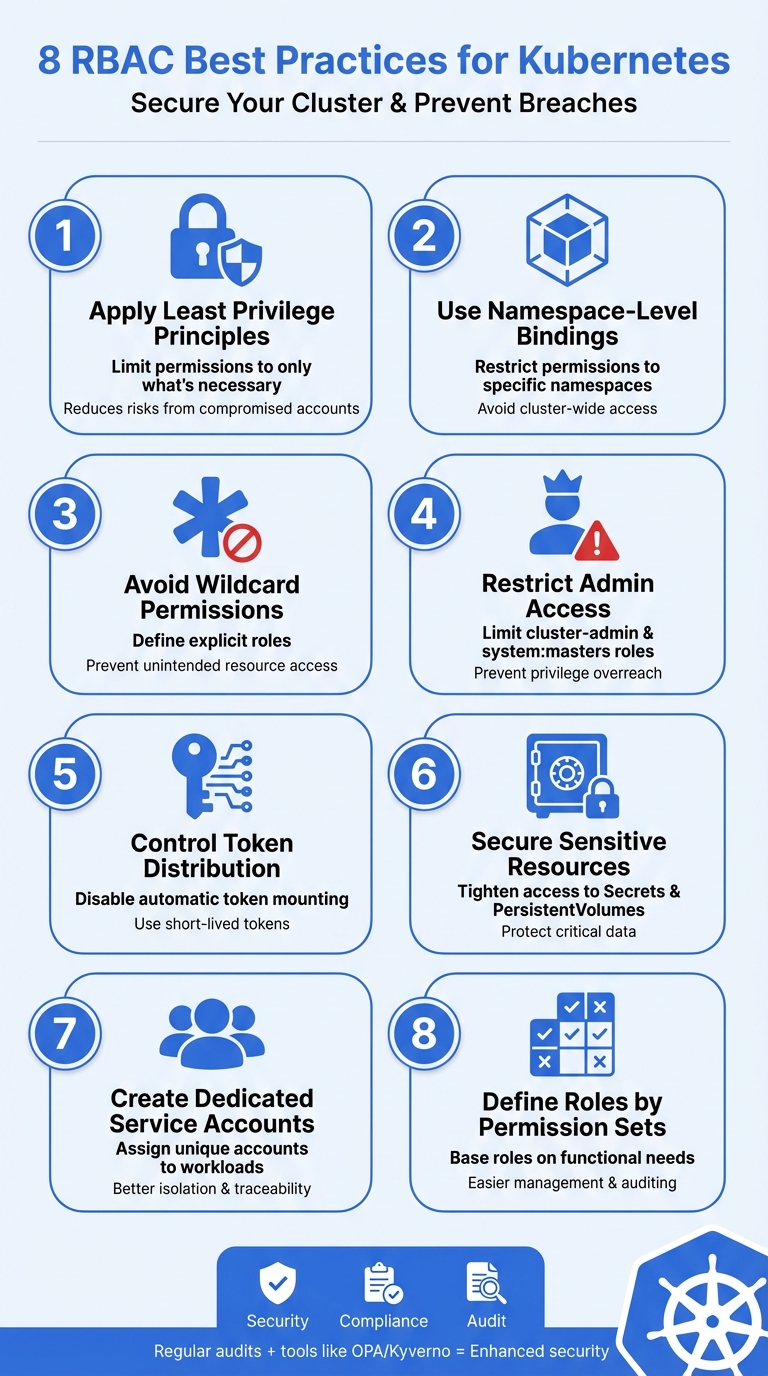 {8 RBAC Best Practices for Kubernetes Security}
:::
{8 RBAC Best Practices for Kubernetes Security}
:::
1. Apply Least Privilege Principles
Security Implications
The principle of least privilege (PoLP) ensures that users and systems are given only the permissions they absolutely need to perform their tasks [10][12]. This approach dramatically limits the potential damage from security breaches. For instance, if an attacker compromises a pod or user account, their ability to move laterally across the cluster is curtailed by the minimal permissions assigned to that identity [6][4].
Without PoLP, your cluster becomes an easy target for privilege escalation attacks. Attackers can exploit overly broad permissions - especially those involving the escalate, bind, or impersonate verbs - to gain administrative control over the entire cluster [1][5]. To mitigate this risk, use namespace-scoped bindings instead of cluster-wide permissions to reduce the impact of any potential breach.
Certain permissions come with hidden risks. For example, granting list access to Secrets allows users to view their contents, as the API response includes all data for every object in the list [1]. Similarly, users with create permissions for Pods can indirectly access all Secrets, ConfigMaps, and ServiceAccounts in that namespace by mounting these resources into newly created pods [1].
To strengthen your security posture, focus on carefully scoping permissions and configuring service accounts to limit exposure.
Practical Implementation Guidance
A good starting point is to limit permissions to specific namespaces using RoleBindings rather than cluster-wide ClusterRoleBindings [1][5]. This approach ensures that a security incident in one namespace doesn’t cascade across the entire cluster. When defining roles, specify the exact API groups, resources, and verbs required for the task [5][11].
Assign each workload its own dedicated service account. If a pod doesn’t need to interact with the Kubernetes API, disable automatic token mounting by setting automountServiceAccountToken: false [1][5][6][11]. This step eliminates an unnecessary attack vector.
When creating roles, explicitly define API groups, resources, and verbs. Restrict high-risk verbs such as escalate, bind, and impersonate by using the resourceNames field to limit access to specific resource instances [1][4][5].
Compliance and Audit Considerations
Implementing PoLP not only secures your cluster but also helps meet compliance requirements and industry standards.
Role-Based Access Control (RBAC) simplifies monitoring and logging, making it easier to verify that security policies are enforced. It also enables the generation of audit reports for both internal and external purposes [3]. By defining RBAC policies as code, you can version and track changes alongside your infrastructure, creating a clear audit trail for permission updates over time [6][14].
Granular access control is key to ensuring that only authorised personnel can perform sensitive operations, helping organisations meet regulatory obligations [4][3]. Regularly review RBAC settings to identify unused roles, redundant permissions, or potential privilege escalation risks [1][5][8]. Analysing audit logs to compare granted permissions against actual usage can highlight unused permissions
that should be removed to maintain a true least-privilege state [13]. By adopting these practices, you not only enhance security but also streamline compliance and minimise audit discrepancies.
2. Use Namespace-Level Bindings Instead of Cluster-Wide Access
Security Implications
Namespace-level bindings act as protective boundaries within your cluster. By using RoleBindings instead of ClusterRoleBindings, you confine potential damage from a compromised account to a single namespace rather than the entire cluster [1]. A notable RBAC misconfiguration incident demonstrated how attackers exploited anonymous API requests to establish backdoors and deploy cryptocurrency mining operations [4].
Namespaces isolate actions, preventing cross-environment compromises.
Keep in mind that granting permissions to create workloads in a namespace automatically includes access to its Secrets and ConfigMaps [1].
Practical Implementation Guidance
To strengthen security, adopt namespace-level bindings with these steps:
- Use
RoleBindingsto assign permissions within specific namespaces [1]. - For consistent permissions across multiple namespaces, define a
ClusterRole(e.g., 'view-only') and pair it withRoleBindingsin each namespace [5].
| Access Requirement | Components | Scope |
|---|---|---|
| Single namespace |
Role + RoleBinding
|
Limited to one namespace |
| Multiple specific namespaces |
ClusterRole + RoleBinding (per namespace) |
Only in the namespaces where bindings exist |
| Entire cluster |
ClusterRole + ClusterRoleBinding
|
All namespaces and cluster resources |
To validate permissions for a service account, use this command:
kubectl auth can-i <verb> <resource> -n <namespace> --as=system:serviceaccount:<namespace>:<sa-name>
Segment your cluster into dedicated namespaces for development, staging, and production. This separation ensures that vulnerabilities in non-production environments cannot compromise production data.
Compliance and Audit Considerations
Namespace-level bindings make audits more straightforward by offering a clear, contextual view of who has access to specific projects or environments. This granularity is crucial for meeting regulatory standards and maintaining isolation in multi-tenant setups.
Regularly review your RoleBindings to spot redundant entries or permissions tied to deleted users [1]. Keep in mind that roleRef in a binding is immutable - if you need to change the assigned role, you must delete and recreate the binding. This process ensures that any changes are deliberate and carefully managed [15].
3. Avoid Wildcard Permissions in Role Definitions
Security Implications
When defining roles, steering clear of wildcard permissions is a critical step in reducing unnecessary access and minimising potential risks.
Wildcard (*) permissions significantly expand access across your cluster, often in ways that are unpredictable. They don't just apply to existing resources but also to any Custom Resource Definitions (CRDs) that might be added in the future [1][3].
Avoid providing wildcard permissions when possible, especially to all resources. As Kubernetes is an extensible system, providing wildcard access gives rights not just to all object types that currently exist in the cluster, but also to all object types which are created in the future.
- Kubernetes.io [1]
Using * in verbs can enable high-risk actions like patch, delete, or deletecollection, which can lead to unintended consequences [5]. Wildcard permissions for resources can also expose sensitive objects, such as Secrets. For example, granting list or watch permissions through wildcards can result in API responses that include the full encrypted content of all Secrets within scope [1].
Practical Implementation Guidance
To ensure security, explicitly define the permissions each role requires. Instead of using verbs: ["*"], specify only the actions needed, such as verbs: ["get", "list", "watch"] for read-only access [5]. Similarly, avoid apiGroups: ["*"] and instead list specific groups like ["apps", "extensions"] [17][5].
| Recommended Practice | Insecure Wildcard | Risk |
|---|---|---|
resources: ["pods"], verbs: ["get", "list"]
|
resources: ["*"], verbs: ["*"]
|
Wildcards unnecessarily grant actions like delete and patch [5]
|
apiGroups: ["apps"] |
apiGroups: ["*"] |
Grants access to all future API groups and CRDs without review [1] |
resourceNames: ["my-config"] |
No resourceNames specified |
Allows modification of any ConfigMap in the namespace [5] |
Using the resourceNames field is another way to limit access. For example, you can allow a service to update only a specific ConfigMap rather than all ConfigMaps in a namespace [5]. Tools like Open Policy Agent (OPA) or Kyverno can help enforce these restrictions by rejecting any Role or ClusterRole containing wildcard definitions [4].
By being explicit, you naturally align with the least privilege principles discussed earlier.
Compliance and Audit Considerations
Compliance frameworks such as SOC2, HIPAA, and GDPR emphasise the importance of the principle of least privilege. Wildcard permissions, which grant unrestricted access, are a direct violation of this principle [17][5]. To meet compliance requirements, permissions must be explicitly defined to demonstrate deliberate and controlled access.
Enable API server auditing and routinely review roles for redundant or excessive permissions [1][4]. When drafting RBAC rules, create separate definitions for each verb and resource required. Combine only those that share identical verb lists to simplify manifests without granting excessive permissions [5]. This approach ensures clear, auditable configurations that support compliance and security goals.
4. Restrict Cluster-Admin and System:Masters Group Access
Security Implications
When it comes to Kubernetes, managing superuser roles carefully is a cornerstone of maintaining security. The system:masters group and the cluster-admin role hold the highest levels of privilege, which means any misstep in controlling access to these roles can open up serious vulnerabilities.
The system:masters group is particularly powerful because it bypasses all RBAC checks and authorisation webhooks entirely [1]. This privilege is hard-coded, meaning it can't simply be revoked by deleting RoleBindings or ClusterRoleBindings [1]. Similarly, the cluster-admin role provides sweeping permissions, allowing users to create, modify, or delete any resource, including sensitive data like Secrets, across all namespaces [5][6].
Any user who is a member of this group \[system:masters\] bypasses all RBAC rights checks and will always have unrestricted superuser access, which cannot be revoked by removing RoleBindings or ClusterRoleBindings.- Kubernetes Documentation [1]
These elevated roles are a prime target for attackers. There have been cases where misconfigurations enabled attackers to deploy backdoors or cryptocurrency miners [4]. One notable example is a vulnerability in the Argo CD deployment tool, which allowed unauthenticated users to bypass JWT verification and gain administrative access [4]. Given these risks, strict access control is essential, even during routine operations.
Practical Implementation Guidance
The system:masters group and cluster-admin role should only be used for initial cluster setup or in emergency break-glass
situations [18]. For day-to-day tasks, administrators should use low-privilege accounts and be granted impersonate rights for specific operations. This reduces the likelihood of accidental or unauthorised cluster-wide changes [1].
To further tighten security, enable the CertificateSubjectRestriction controller to reject Certificate Signing Requests (CSRs) that specify the system:masters group [18]. Additionally, run kube-controller-manager with the --use-service-account-credentials flag to avoid processes running with system:masters-level privileges [18]. For Google Kubernetes Engine (GKE) users on version 1.30.1 or later, use the --no-enable-insecure-binding-system-authenticated flag to block non-default RBAC bindings to broad system groups [5].
| Feature |
cluster-admin (ClusterRole) |
system:masters (Group) |
|---|---|---|
| Scope | Full control over all resources in the cluster [6] | Unrestricted superuser access [1] |
| RBAC Check | Subject to RBAC evaluation [5] | Bypasses all RBAC checks [1] |
| Webhook Check | Subject to authorisation webhooks [5] | Bypasses authorisation webhooks [1] |
| Revocation | Can be revoked by deleting the ClusterRoleBinding [5] | Cannot be revoked through RBAC bindings [1] |
Compliance and Audit Considerations
One of the challenges with the system:masters group is that actions performed by its members are never sent to authorisation webhooks. This makes it impossible to enforce external policies through tools like Open Policy Agent (OPA) [1]. To bridge this gap, Kubernetes audit logging should be enabled to track all actions performed by users, applications, and the control plane [21].
Regularly inspect the cluster by running commands like kubectl get clusterrolebindings with JSON filters to identify any unexpected subjects linked to high-privilege roles [5]. Use tools like kubectl auth can-i --as=[user] to test and confirm that restrictions are working as intended [20].
Conduct access reviews at least every two years to identify and remove unused roles, redundant permissions, or over-privileged accounts [18]. If a user is removed from an external identity provider, ensure their associated RoleBinding is also deleted. This prevents any new user with the same name from inheriting elevated privileges [1][9].
5. Limit Privileged Token Distribution Across Pods
Security Implications
Minimising token distribution is a critical step in reducing the potential impact of security breaches. Limiting access to privileged tokens ensures that even if a container is compromised, the damage remains contained.
By default, every Kubernetes pod includes a service account token. If these tokens have elevated privileges, they can provide a compromised container with full cluster access [1][6]. The RBAC Buster
attack campaign in 2023 highlighted this issue. Attackers exploited misconfigured Kubernetes API servers to set up malicious RBAC policies, enabling cryptocurrency mining operations [19]. Similarly, a vulnerability in Argo CD allowed unauthenticated users to bypass JWT verification, granting admin-level access to extract sensitive data and execute arbitrary commands [19].
Legacy Secret-based tokens, unlike modern ephemeral ones, don't expire or rotate automatically, making them particularly vulnerable to attacks [5]. Additionally, pods with permissions to use node proxy subresources can execute commands on all pods on the same node without leaving traces in audit logs [1].
Practical Implementation Guidance
To mitigate these risks, adopt strict token management practices that minimise exposure.
- Disable automatic token mounting: For workloads that don’t need to interact with the Kubernetes API, set
automountServiceAccountToken: falsein the Pod or ServiceAccount specification [1][5]. By default, Kubernetes mounts tokens in every pod, unnecessarily increasing exposure. - Use short-lived tokens: For workloads requiring API access, utilise the
TokenRequestAPI to generate ephemeral tokens that automatically rotate, instead of relying on persistent Secret-based tokens [5]. - Create dedicated service accounts: Assign a unique service account to each workload with the minimum permissions necessary. Restrict the
createverb on theserviceaccounts/tokenresource to prevent unauthorised users from generating tokens for privileged accounts [1][6].
| Token Type | Persistence | Rotation | Security Risk Level |
|---|---|---|---|
| Secret-based Token | Permanent (Legacy) | Manual only | High (No expiration) |
| Ephemeral Token | Short-lived | Automatic | Low (Time-bound) |
| Default SA Token | Automatic mount | Automatic | Medium (Over-provisioning risk) |
- Isolate privileged pods: Use Taints, Tolerations, and NodeAffinity to separate pods with elevated permissions from untrusted or publicly exposed workloads [1].
- Enforce security standards: Implement Pod Security Admission standards, such as Restricted or Baseline, to block users from creating pods that can mount host paths or escalate privileges [1].
Compliance and Audit Considerations
Failing to manage token distribution effectively can lead to blind spots, making it difficult to maintain the detailed audit trails required by many regulatory frameworks [19][22]. For example, the Wiz Kubernetes Security Report 2025 revealed that, during one assessment, over 10,000 containers were running across 50 clusters without the organisation’s security team being aware of them [19].
Access to the proxy sub-resource of node objects... allows for command execution on every pod on the node(s) to which they have rights. This access bypasses audit logging and admission control.- Kubernetes Documentation [1]Need help optimizing your cloud costs?
Get expert advice on how to reduce your cloud expenses without sacrificing performance.
6. Secure Access to Sensitive Resources and Subresources
Security Implications
When dealing with sensitive Kubernetes resources, it's essential to go beyond basic RBAC principles. Some resources and subresources carry risks that can extend far beyond their intended scope. For instance, creating Pods or Deployments within a namespace can inadvertently grant access to Secrets, ConfigMaps, and PersistentVolumes tied to that namespace [1]. Similarly, the ability to create arbitrary PersistentVolumes could allow the use of hostPath volumes, which can expose the host filesystem and lead to unauthorised host access [1][3].
The nodes/proxy subresource is particularly risky. Access to it provides direct access to the Kubelet API, allowing users to execute commands on any Pod running on that node, bypassing standard controls [1][3]. Additionally, users with create permissions for CertificateSigningRequests and update rights for approval can issue client certificates, potentially impersonating system components and escalating privileges across the cluster [1]. What's more, granting list or watch permissions on Secrets is practically the same as granting get access, as these permissions expose the complete content of all secrets in their responses [1].
Given these risks, permissions should always be as limited and specific as possible to prevent unintended access.
Practical Implementation Guidance
To address these risks effectively, access should be tightly controlled using detailed Role or ClusterRole definitions. The resourceNames field in these definitions can be used to restrict access to specific resource instances, such as a single ConfigMap, instead of allowing access to all resources of that type in a namespace [5]. Avoid using the * wildcard for verbs or resources in Role definitions - explicitly define the necessary permissions to avoid inadvertently granting access to new resource types added in the future [1][5].
| Sensitive Resource/Subresource | Primary Security Risk | Recommended Restriction |
|---|---|---|
Secrets (list/watch) |
Exposure of plaintext data | Restrict to specific resourceNames [1][5]
|
nodes/proxy |
Bypass of Kubelet API protections | Limit access to trusted administrators only [1] |
PersistentVolumes |
Host filesystem exposure via hostPath
|
Use PersistentVolumeClaims instead [1]
|
serviceaccounts/token |
Risk of impersonation or identity theft | Strictly limit create permissions [1]
|
Certain verbs, such as escalate, bind, and impersonate, can also bypass RBAC protections, enabling users to gain permissions they wouldn't normally have [1][3]. To further strengthen security, enforce Pod Security Standards at the Baseline or Restricted levels. This helps prevent users from creating privileged Pods, which could otherwise escalate privileges to the node level [1].
Compliance and Audit Considerations
This approach complements earlier strategies like token management and namespace-level restrictions. However, subresource access introduces unique challenges for auditing. For example, access to the proxy subresource on Nodes allows command execution on Pods, bypassing standard audit logs and admission controls. Specialised monitoring is necessary to track such activity [1][3]. Regular RBAC reviews are also critical to identify and remove outdated or unnecessary permissions, preventing privilege creep where new users inherit permissions that are no longer relevant [1][5].
Kubernetes RBAC is a key security control to ensure that cluster users and workloads have only the access to resources required to execute their roles.- Kubernetes Documentation [1]
Auditors should pay close attention to the escalate, bind, and impersonate verbs, as these can bypass RBAC protections [1][3]. Tools like kubectl-who-can for auditing permissions and Krane for static analysis can be invaluable in identifying overly permissive access and ensuring compliance with regulatory standards [23].
7. Create Dedicated Service Accounts for Workloads
Security Implications
In Kubernetes, it's a good practice to assign each workload its own service account instead of relying on the default service account in a namespace. Why? Because when workloads use the default account, they inherit all the permissions tied to it. This creates a major security risk. If one workload gets compromised, an attacker could potentially exploit all the privileges associated with the default account, opening the door to lateral movement across the cluster.
By assigning dedicated service accounts, you minimise the impact of a breach. Each workload operates with its own identity and specific permissions, limiting what an attacker can access if they compromise a pod. This isolation is critical. Shared accounts can lead to misconfigurations, giving attackers the opportunity to exploit API servers or gain unauthorised access through poor credential management. Tailored service accounts significantly reduce these risks.
Practical Implementation Guidance
To get started, create a unique service account for each application or microservice. For workloads that don’t need to interact with the Kubernetes API, you can prevent unnecessary credential exposure by setting automountServiceAccountToken: false in the pod's configuration.
When assigning permissions, use RoleBindings instead of ClusterRoleBindings. This restricts access to specific namespaces rather than the entire cluster. Additionally, opt for ephemeral tokens via the TokenRequest API instead of older Secret-based tokens, which don’t expire and pose long-term security risks. Tools like OPA Gatekeeper or Kyverno can enforce these policies by blocking deployments that attempt to use the default service account or fail to define a custom one.
| Component | Recommended Practice |
|---|---|
| Service Account | Create one per workload; avoid using default
|
| Token Mounting | Set automountServiceAccountToken: false unless needed |
| Binding Type | Use RoleBinding to limit access to specific namespaces |
| Token Type | Use ephemeral tokens via the TokenRequest API |
Compliance and Audit Considerations
Dedicated service accounts are also essential for meeting compliance requirements, such as GDPR and PCI-DSS. They allow for clear audit trails, as every action logged in the API server can be traced back to a specific workload. This makes it much easier to pinpoint which application performed a particular operation.
Regularly review your RoleBindings to spot unused permissions or orphaned accounts left behind by deleted workloads. These can be exploited as backdoors for privilege escalation. To verify the permissions tied to a service account, use tools like kubectl auth can-i or kubectl-who-can [7]. When combined with strict network policies, this layered approach ensures that even if a service account is compromised, the attacker’s ability to move laterally within the cluster is significantly limited.
8. Define Roles by Permission Sets, Not by Service Accounts
Security Implications
Building on the importance of limiting privileges and securing tokens, defining roles based on permission sets rather than service accounts can make Role-Based Access Control (RBAC) more manageable and secure.
When RBAC roles are tied to specific service accounts instead of functional permission sets, it often leads to a bloated system. Each new workload might require a unique role, creating complexity in management and auditing. Worse, this practice can result in over-permissioning, where roles are granted excessive access for convenience rather than necessity.
Recent security breaches highlight the dangers of associating roles with service accounts. Broad administrative permissions have allowed attackers to execute arbitrary commands and extract sensitive information, proving how risky this approach can be.
Practical Implementation Guidance
To address these risks, focus on designing roles around functional permission sets rather than individual service accounts.
Start by identifying the specific actions required for a task, not the identity performing it. For instance, instead of creating a role named payment-service-role, opt for functional roles like secret-accessor for accessing secrets or log-reader for reading logs. These roles can be reused across multiple workloads, ensuring a consistent and secure approach. For example, a secret-accessor role could include only get and list permissions for secrets within a defined namespace.
When defining roles, be explicit about the resources and actions they cover. For instance:
- If one service account needs
getpermissions on deployments, and another requireslistandwatchpermissions on daemonsets, create separate rules for these actions. - Use the resourceNames field to restrict access to specific instances, such as limiting
updatepermissions to a single ConfigMap rather than all ConfigMaps in a namespace. - Avoid using wildcards in
apiGroups,resources, orverbsto prevent unintentional access to future resources.
| Approach | Impact on Security | Maintenance Burden |
|---|---|---|
| Roles tied to service accounts | High risk of over-permissioning; hard to audit | High; frequent updates to multiple roles |
| Roles defined by permission sets | Enforces least privilege through standardised rules | Low; updating one role affects all linked accounts |
Compliance and Audit Considerations
Permission-set-based roles align more effectively with compliance standards like NIST and PCI-DSS. These frameworks emphasise clear, functional access controls over ad-hoc, identity-based permissions. Standardisation simplifies audits, as you only need to review functional roles instead of every individual role-account combination.
RBAC provides a clear and auditable record of who has access to what within your cluster, which is crucial for meeting compliance requirements like SOC 2, HIPAA, and PCI DSS.– The Apono Team [2]
To maintain compliance and security, regularly clean up unused roles and verify RoleBindings to ensure they don’t reference deleted accounts. If a new user is created with the same name as a deleted one, they could unintentionally inherit old permissions. Tools like OPA Gatekeeper can help enforce RBAC consistency by blocking roles with risky verbs such as escalate, bind, or impersonate [4]. These practices ensure your RBAC system stays secure, auditable, and adaptable as your cluster evolves.
Everything You Want to Know about Kubernetes RBAC and Were Too Afraid to Ask
Conclusion
Implementing these eight RBAC best practices can significantly minimise the impact of breaches and simplify access control. Enforcing least privilege, limiting cluster-wide permissions, and avoiding wildcards are all effective ways to reduce the potential damage from security incidents.
RBAC creates a dynamic, responsive security environment where access continuously evolves based on threats and operational needs[4].
Beyond bolstering security, properly configured RBAC helps prevent privilege escalation attacks, such as those caused by earlier RBAC misconfigurations. It also improves operational workflows. By assigning roles based on permission sets rather than individual users, administrative tasks become less burdensome, and compliance audits are easier to manage.
Regular audits are essential for maintaining a secure setup. Check for unused roles, remove inactive permissions tied to deleted accounts, and address any configuration drift. Automating these audits and managing RBAC configurations as code ensures consistent security and compliance practices. Tools like OPA Gatekeeper can help enforce policies, blocking risky actions like escalate, bind, or impersonate before they reach production. Automation makes it easier to adapt RBAC configurations as your cluster grows and changes.
Keep in mind, your cluster’s security needs will evolve as teams reorganise and applications develop. Treat RBAC as an ongoing process rather than a one-time setup. The time spent maintaining strict access controls pays off with fewer security breaches, easier compliance, and smoother cluster management. By regularly updating and refining your RBAC policies, you can ensure your Kubernetes environment remains secure, compliant, and efficient.
For more insights into improving your Kubernetes setup and implementing RBAC strategies, visit Hokstad Consulting.
FAQs
What are the risks of using wildcard permissions in Kubernetes RBAC?
Using wildcard permissions (*) in Kubernetes RBAC is a risky move when it comes to security. These permissions essentially give blanket access to all API groups, resources, and actions. That means unauthorised users could exploit this to escalate their privileges, tamper with critical resources, or even seize control of the entire cluster.
Another major concern is how this approach leaves your cluster exposed to changes. If new resources or APIs are added in the future, the wildcard will automatically apply to them, potentially creating unforeseen vulnerabilities. To keep your cluster secure, stick to the principle of least privilege - assign roles only the permissions they absolutely need to perform their tasks.
How do namespace-level bindings improve Kubernetes security?
Namespace-level bindings are a smart way to tighten security by limiting a user’s or service account’s permissions to a specific Kubernetes namespace rather than granting access across the entire cluster. By opting for RoleBindings (which are tied to a Role) instead of ClusterRoleBindings, you ensure access is confined to the resources within that namespace. This approach not only lowers the chances of unauthorised access but also reduces the fallout from compromised credentials.
When you treat each namespace as a self-contained unit, it becomes easier to enforce the principle of least privilege. This means teams or developers only have control over the resources they’re directly responsible for, simplifying permission audits and reducing the risk of privilege escalation. Plus, this strategy aligns security measures with organisational workflows - whether it’s separate namespaces for development, staging, or production - boosting compliance and overall cluster security.
Why should you use dedicated service accounts for Kubernetes workloads?
Using a dedicated service account for each Kubernetes workload ensures that each workload operates with only the permissions it truly needs. This setup helps keep access isolated, lowers security risks, and avoids unintentional privilege escalation.
By tailoring permissions for each workload, you minimise the chances of accidental misuse or malicious activity. This creates a safer, more controlled environment within your Kubernetes cluster.