
If I want safer cloud deployments, I’d put Pulumi and GitHub Actions together. That gives me one Git-based flow for preview, approval, deploy, rollback, and cleanup.
In plain terms, this setup means I can:
- run
pulumi previewon every pull request - run
pulumi upafter merge or approval - keep separate stacks for
dev,staging, andprod - protect production with GitHub Environments and reviewer sign-off
- use OIDC for short-lived cloud access instead of long-lived secrets
- add blue-green or canary releases to cut downtime
- trigger rollback from a known-good tag or commit
- destroy short-lived PR stacks so they do not keep adding to the monthly cloud bill
I’d also keep costs under control from day one. For example, ephemeral environments can stop teams paying for test stacks that sit idle for days, and concurrency rules stop two deploys from colliding in the same stack. If a canary check shows 5xx errors above 1% or p95 latency doubling, I can wire the workflow to roll back before the issue spreads.
A simple setup looks like this:
| Area | What I’d do | Why it matters |
|---|---|---|
| Project layout | Keep Pulumi code in infra/
|
Makes CI jobs simpler |
| Stacks | Use dev, staging, prod
|
Keeps each environment separate |
| Secrets | Store tokens in GitHub Secrets and Pulumi secret config | Cuts the risk of exposed credentials |
| Pull requests | Run pulumi preview and post the diff |
Review changes before merge |
| Production | Require environment approval before pulumi up
|
Adds change control |
| Deploy safety | Use stack-based concurrency | Stops overlapping deploys |
| Release pattern | Use blue-green or canary | Cuts downtime and deployment risk |
| Rollback | Reapply a known-good tag | Speeds up recovery |
| Cost control | Destroy PR stacks on close | Reduces wasted spend |
The main point is simple: I use GitHub Actions to enforce the process, and I use Pulumi to keep every infrastructure change in code, reviewed, tracked, and ready to deploy in the same repeatable way each time.
Advanced CI/CD for AWS using Pulumi and GitHub Actions | Workshop
Need help optimizing your cloud costs?
Get expert advice on how to reduce your cloud expenses without sacrificing performance.
Set up your Pulumi project and GitHub repository
Before you add any workflow files, make sure your GitHub repository already contains your Pulumi code, at least one stack for each environment, and cloud credentials that your workflows can use safely.
Start by running pulumi new inside your repository. This creates Pulumi.yaml and your entry file, such as index.ts for TypeScript or __main__.py for Python. A tidy setup usually keeps infrastructure code in an infra/ directory at the repository root, separate from the app code. In your workflows, point to that folder with working-directory: infra.[4]
Organise stacks, config files, and environment names
Create dev, staging, and prod stacks:
pulumi stack init dev
pulumi stack init staging
pulumi stack init prod
Each stack should have its own checked-in config file. For example:
-
Pulumi.dev.yaml -
Pulumi.staging.yaml -
Pulumi.prod.yaml
Put non-sensitive settings in these files, like region, instance size, and feature flags.
For UK production workloads, set the region clearly. For example, use aws:region: eu-west-2 for London or azure-native:location: uksouth. That way, there’s no doubt about where resources will run. For dev and staging, stick to approved UK or EU regions as well.
These stack names - dev, staging, and prod - are the exact targets your GitHub Actions jobs will use. They should line up with your branch strategy too. Pull requests should run pulumi preview against a non-production stack, while merges to main should move changes through a promotion path into production. That final production rollout should sit behind a GitHub environment that requires approval.[13] Put simply, these names are not just labels; they drive the workflow.
Store credentials and secrets securely
Never store cloud credentials or tokens in plain text. GitHub encrypted secrets, under Settings → Secrets and variables → Actions, are the right place for values like PULUMI_ACCESS_TOKEN, AWS_ACCESS_KEY_ID, and AWS_SECRET_ACCESS_KEY.[12][14] For production, use environment secrets so only workflows aimed at the protected production environment can read them.
For app-level secrets, such as database passwords or API keys, use Pulumi’s built-in encrypted config:
pulumi config set dbPassword "..." --secret --stack prod
Pulumi encrypts that value at rest. You can also back it with AWS KMS, Azure Key Vault, Google Cloud KMS, or another supported secrets provider instead of the default key.[5][8][9][10] If residency rules matter, use a UK or EU key management service.
Where possible, prefer OIDC token exchange. GitHub Actions can request short-lived credentials at runtime.[1][6][7] That means you don’t need to keep static credentials in GitHub at all, which is now the usual choice for new pipelines.
With your stacks and secrets sorted, the next step is to connect those environments to your preview and deployment workflows.
Build GitHub Actions workflows for preview and deployment
Use two focused workflows to tie your stacks into delivery: one to preview changes on every pull request, and one to apply them after an approved merge to the protected branch.
Create a pull request preview workflow
Pull requests become the approval point for infrastructure changes. The preview workflow runs pulumi preview on each pull request and posts the diff for review.
Create .github/workflows/pulumi-preview.yml with the following structure:
name: Pulumi preview

on:
  pull_request:
    branches:
      - main

jobs:
  preview:
    runs-on: ubuntu-latest

    permissions:
      contents: read
      pull-requests: write
      id-token: write

    steps:
      - name: Checkout repository
        uses: actions/checkout@v4

      - name: Set up Node.js
        uses: actions/setup-node@v4
        with:
          node-version: 20

      - name: Install dependencies
        working-directory: infra
        run: npm ci

      - name: Authenticate to AWS via OIDC
        uses: aws-actions/configure-aws-credentials@v4
        with:
          role-to-assume: ${{ secrets.AWS_ROLE_ARN }}
          aws-region: eu-west-2

      - name: Pulumi preview
        uses: pulumi/actions@v7
        with:
          command: preview
          stack-name: myorg/app/dev
          work-dir: infra
          refresh: true
          comment-on-pr: true
          github-token: ${{ secrets.GITHUB_TOKEN }}
        env:
          PULUMI_ACCESS_TOKEN: ${{ secrets.PULUMI_ACCESS_TOKEN }}
comment-on-pr: true posts the preview diff back to the pull request.[11][16][17] That matters because reviewers can see the planned infrastructure changes before anything lands on main.
Set this preview job as a required check on your protected main branch so no infrastructure change can be merged unless the preview passes.[2] That fits neatly with change control practices often seen in regulated UK sectors, where teams need an audit trail of proposed changes before sign-off.
Reuse the same stack mapping in the deployment workflow, then add approval and concurrency controls.
Create a production deployment workflow
Use the same repository layout and auth pattern as preview, but point the job at the protected production stack - myorg/app/prod in the examples below.
A solid setup for .github/workflows/pulumi-deploy.yml should do a few simple things well:
- Run tests first. Execute unit tests and any Pulumi-specific tests before touching infrastructure. If tests fail, the workflow stops and
pulumi upis never reached.[2][3] - Authenticate and select the stack. Use the same OIDC pattern as the preview workflow, but point to your production stack and credentials.
- Run
pulumi upwithout prompts in CI. The action handles approval without manual prompts.[1][15] - Enforce concurrency controls. Add a
concurrencyblock keyed to the stack name so only one deployment per environment runs at a time.[2]
concurrency:
  group: pulumi-deploy-${{ github.workflow }}-production
  cancel-in-progress: false
Setting cancel-in-progress: false is deliberate. If you cancel an infrastructure deployment halfway through, you can end up with resources in an awkward state. It’s much safer to let the current run finish and queue the next one.
Pick one production trigger model per environment. If you mix all three, release control gets blurry. Here’s how the common options compare:
| Trigger strategy | Advantages | Disadvantages | Operational fit |
|---|---|---|---|
| Deploy on release tags | Clear versioning; easy audit trail | Batches changes; harder to pinpoint failures | Production with stable release cycles |
| Deploy after environment approval | Human oversight; maximum safety | Manual bottleneck; can slow delivery | Mission-critical or regulated production stacks |
For many UK teams, the sweet spot is a blended setup: fully automated deployments to dev and staging on every merge, then a GitHub protected environment that needs at least one reviewer approval before the same workflow promotes to prod.[2][18] Tag-based triggers also fit teams that need formal release notes or versioned artefacts alongside deployments.
Add zero-downtime releases, rollback, and cost controls
::: @figure 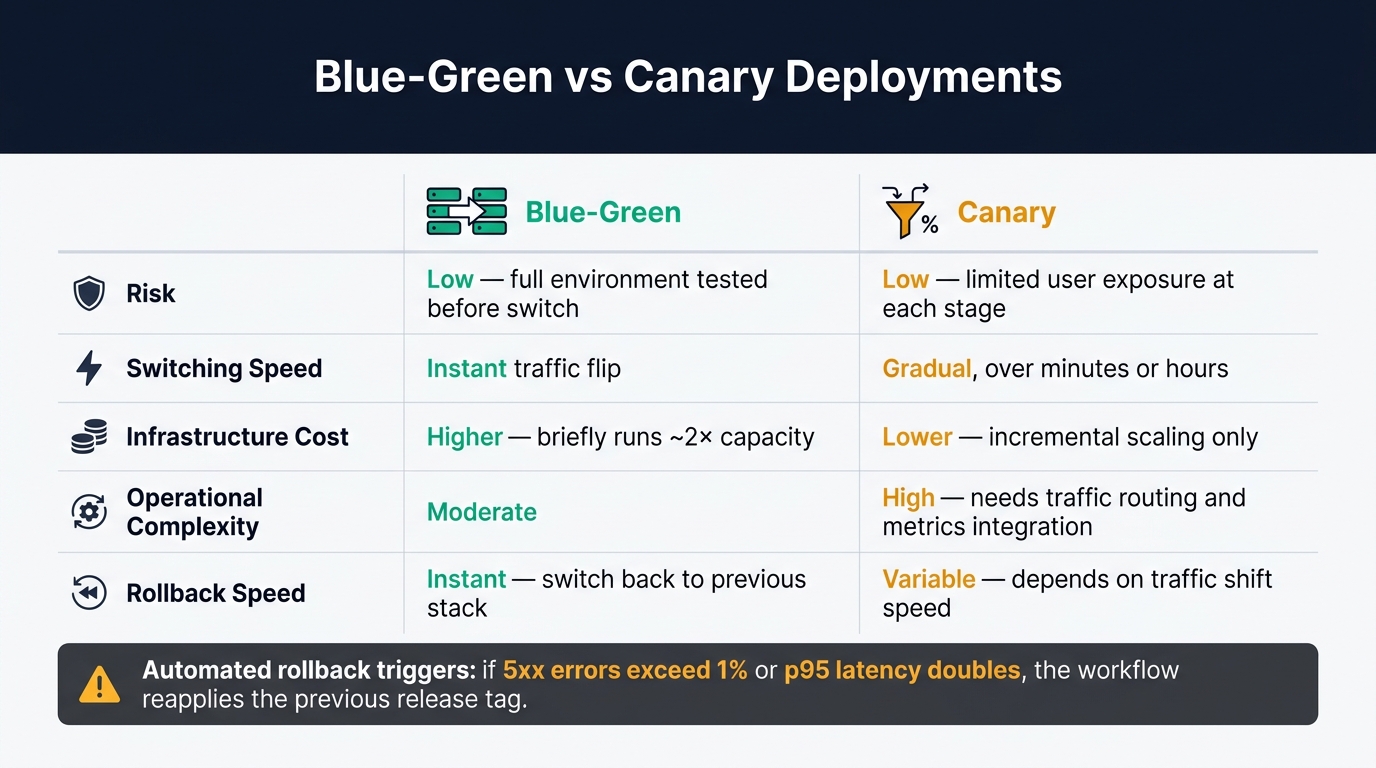 {Blue-Green vs Canary Deployments: A Side-by-Side Comparison}
:::
{Blue-Green vs Canary Deployments: A Side-by-Side Comparison}
:::
Once your preview and deployment workflows are in good shape, the next move is to make production releases safer and stop cloud spend from creeping up. The easiest way to do that is to add these controls to the same production workflow you already built.
Use blue-green or canary deployment patterns
Start with traffic-shifted releases for your production stack.
Both patterns avoid downtime, but they handle traffic in different ways. With blue-green, Pulumi provisions two parallel stacks - prod-blue and prod-green - using the same programme with different config. Your GitHub Actions workflow deploys the new version to the idle stack, runs smoke tests against it, and only then switches traffic by updating an AWS ALB listener rule or Route 53 record. The old stack stays live for a short period, then you decommission it.
Canary is more gradual. Pulumi adjusts traffic weights - for example, sending 5% of requests to the new version through ALB listener rules or a Kubernetes Ingress - while GitHub Actions checks error rates and latency before moving that percentage up step by step. It needs less spare capacity, but there’s a catch: you need tighter links with your observability tooling and more workflow logic to handle promotion gates.
| Blue-green | Canary | |
|---|---|---|
| Risk | Low - full environment tested before switch | Low - limited user exposure at each stage |
| Switching speed | Instant traffic flip | Gradual, over minutes or hours |
| Infrastructure cost (£) | Higher - briefly runs around 2× capacity | Lower - incremental scaling only |
| Operational complexity | Moderate | High - needs traffic routing and metrics integration |
| Rollback speed | Instant - switch back to previous stack | Variable - depends on traffic shift speed |
Automate rollback and clean up short-lived environments
Safe rollback starts with a clear link between Git commits, Pulumi stacks, and state. Tag your releases in Git and record the matching commit SHA in your release notes. If something breaks after deployment, a dedicated rollback workflow checks out that known-good tag, restores the right Pulumi config and secrets, and runs pulumi up against the target stack with the known-good release tag.[21][1]
You can also add automated rollback triggers. Post-deploy jobs can query your monitoring API and use if: conditions to check whether, say, the 5xx error rate has gone above 1% or p95 latency has doubled. If a threshold is breached, the workflow reapplies the previous tag. For stateful components or database schema changes, though, a manual approval gate through GitHub environment protection rules is the safer option.
Short-lived environments are often where you’ll see the fastest savings. Ephemeral PR stacks that hang around after they’re no longer needed quietly add to your bill. The fix is simple: run a workflow on pull_request closed events and call pulumi destroy straight away, removing the stack as soon as it’s no longer useful.[19][20]
You can trim costs further with smaller instance types in non-prod config files - t3.small instead of m5.large, or two Kubernetes replicas instead of six. That keeps staging and feature environments close enough to production for testing, without paying production-level costs. A scheduled cleanup workflow during off-peak UK hours can also catch stacks that outstay their welcome past a 14- or 30-day threshold.
These release controls work best when paired with protected environments and least-privilege access.
Harden the pipeline and plan your next steps
Once preview, approval, and rollback are set up, the last job is to make sure the pipeline itself is secure and easy to audit before it handles live production traffic. These controls are simple to set up, but they make a big difference for reliability and compliance.
Start with protected branches on main and any release branches. Block direct pushes, require pull requests, and make your Pulumi preview workflow a required status check before merge. Then add a CODEOWNERS file so changes to Pulumi programs and stack config always need review from a platform or DevOps engineer. For production deploys, set up a GitHub Environment called production with required reviewers. That way, any workflow aimed at that environment pauses in GitHub Actions until someone approves it. You get a clear approval trail for internal change control.
Next, tighten permissions. Give each job only what it needs. Use OIDC federation so every job gets short-lived credentials scoped to its own environment. Use separate IAM roles or service principals for each environment too, so if a dev credential is exposed, it still can't touch production state.
Then connect each deploy to validation. Add stack-scoped concurrency controls so only one deployment can target a stack at a time. After each deploy, publish health check results to GitHub deployment statuses so the state of every Pulumi deployment is easy to spot in the repository. For observability, export Pulumi run logs to a central place and set alerts that fire if error rates or latency jump after a deploy. It helps to post a deployment summary as a pull request comment as well, with links to dashboards and runbooks. When an incident hits, engineers can see straight away what changed and where to start looking.
Hokstad Consulting can help design secure, cost-efficient Pulumi and GitHub Actions pipelines for UK teams.
Key points to take into production
Used together, these controls turn deployment automation into a reliability control. Stack structure, guarded deploys, and safe release patterns cut the blast radius of any change. Automatic cleanup of short-lived environments keeps cloud costs in check without manual work.
FAQs
How should I map branches to Pulumi stacks?
Keep stable code in the main branch, and use environment-specific branches to manage root configurations.
That setup gives each environment its own space for change. So development, staging, and production can move at their own pace without stepping on each other.
When it's time to move infrastructure updates forward, promote them by merging the environment branch from development through to production.
Why does this work so well?
- It keeps changes isolated
- It helps stop accidental overwrites
- It gives you a clear history in version control
In plain terms, you get a cleaner promotion path and less branch-related chaos.
When should I use blue-green instead of canary?
Use blue-green when you need a clean, complete cutover between two identical environments, with an immediate, predictable switch.
Use canary when you want to reduce risk by shifting traffic in stages, such as 10% to 20%, and checking error rates and latency before the full rollout.
What is the safest way to handle database changes during rollback?
The safest way to handle rollback is to treat it as a first-class action in a declarative infrastructure-as-code setup.
When you define the target state of your system in code, Pulumi can compare that with what’s live and bring your infrastructure back into line. That helps when a deployment fails halfway through or when drift starts creeping in.
Always run pulumi preview before you deploy. It can flag issues early and helps keep production stable and secure.