
I would rule out any prompt versioning tool that fails a mandatory control - before comparing prices. I’d test one non-production prompt with three accounts: author, reviewer and deployer. Keep the model, settings and test inputs fixed so you can isolate the prompt change.
My checklist covers seven controls:
- Immutable history: earlier prompts and their settings stay unchanged and retrievable.
- Side-by-side comparisons: reviewers can see every managed change, including deletions.
- Release labels: production uses its pinned version until an approved promotion.
- Rollback: new requests return to the working version within a set target, such as 5 minutes.
- Approvals: self-approval and releases without permission are blocked.
- Environment separation: development changes cannot alter staging or production.
- Searchable audit records: each request can be traced to its version, settings, approval and release.
I’d mark each result Pass, Partial, Fail or Not tested, with version IDs, timestamps and saved test records. A feature claim is not a passed test. If a mandatory check fails, require a fix and retest before choosing the tool.
::: @figure 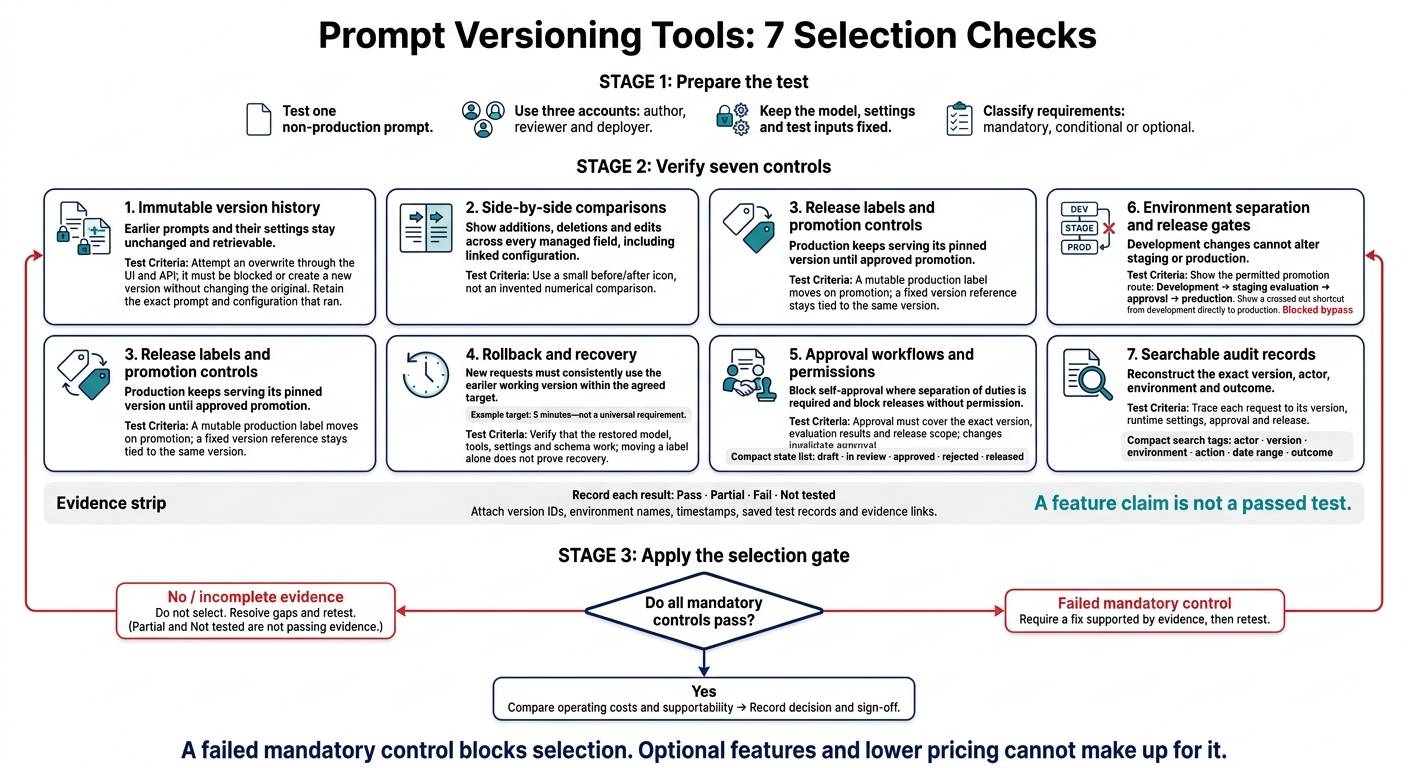 {Prompt Versioning Tools: 7 Selection Checks}
:::
{Prompt Versioning Tools: 7 Selection Checks}
:::
Check prompt history and changes
1. Immutable version history
Start with the immutable version history. It provides the record for every check that follows.
Use a hypothetical UK SaaS support agent to test the request: “I want to cancel my plan and receive a refund.” Publish
support-agent-v1with UK English, GBP currency formatting and human escalation when policy is unclear, and store the full baseline: system instruction, message template, variables, input schema, model name, model parameters, tool instructions and output format.[4][5][8]
The test must prove that the tool keeps the exact artefact that ran, not just a prompt snippet.
Create
support-agent-v2with the change “Offer a refund when eligible” → “Explain the refund policy and escalate”. Verify that version 1 remains unchanged, with its original text, author, timestamp, change note and linked configuration. Attempt to overwrite it through the UI and API: the tool must block the overwrite or create a new version, leaving the original unchanged and retrievable.[4][7][8]
Run the request through the app using each version, then inspect the trace. It must show the exact version, trace ID, timestamp, release, environment, model and runtime configuration. If the prompt and runtime settings have separate IDs, require both. You must be able to recover the configuration that actually ran, even if the model’s wording varies.[6][8][9]
2. Side-by-side change comparisons
Next, check that the tool shows what changed, rather than simply flagging a change.
Test each change separately across every managed field. The diffs must show additions, deletions and edits within structured configuration, so reviewers can inspect each one.[5][6]
Changed field Earlier version Later version Review significance System instruction Answer subscription questions.Answer subscription questions using the approved UK refund policy; escalate uncertainty.High: changes policy grounding and escalation behaviour. Message template Customer: {{question}}Customer question: {{question}}\nAccount tier: {{plan}}Medium: adds context that may affect responses. Variable refund_window = 30refund_window = 14High: changes a customer-facing policy value. Input schema question: stringAdds required account_id: stringHigh: may break existing callers. Model parameter Temperature 0.2Temperature 0.8Medium/high: may increase response variability. Tool instruction Look up account status.Look up account status; do not issue refunds without approval.High: changes permitted action. Output format Free text JSON with answer,escalateandpolicy_referencefieldsHigh: affects downstream parsing.
Ask the reviewer to identify the material changes. Include a deleted instruction, multiline instructions and structured data. Pass only if every managed change is visible, including linked configuration and deletions.[5][6][10]
Once the comparison makes the changes clear, move on to release labels and rollback.
Check release controls, rollback and approvals
3. Release labels and promotion controls
Once the diff is clear, test how the tool puts an approved version into production. Save an unreleased candidate in development or staging, then send production traffic before promotion. Production must keep serving its pinned version until the label moves.
Next, promote the candidate through review and approval. Test both a mutable production label and a fixed version reference. The label should move on promotion; the fixed reference must stay tied to the same version. Each promotion should record who moved the label, when it moved and which versions were involved.[11][15][17][12][13]
For staged releases, check whether you can pause, expand or reverse a rollout without redeploying the application. Use a canary rollout to compare task success, safety failures, latency, token usage and cost against the baseline before sending more traffic to the candidate.[12][19]
4. Rollback and recovery time
Measure recovery at the request level, not just the rollback action. Before testing, set a target: restore the previous prompt within 5 minutes of detecting a release problem.
Release a changed prompt outside production, send representative traffic and trigger rollback. Measure the time from the authorised rollback action until new requests consistently use the earlier version. Include cache propagation, worker refresh intervals, regional replicas and routing delays. Repeat under realistic load. Pass only when new requests consistently use the earlier version within your target, without overwriting history or redeploying the application.[12][17]
Check that earlier traces keep their original version references. The rollback event should record the operator, timestamp, reason, source version and destination version. Then test whether the restored prompt still works with the deployed model, tool definitions, system settings and structured-output schema. Moving a label does not prove recovery if the restored configuration fails.[11][16][18]
5. Approval workflows and permissions
Require draft, in review, approved, rejected and released states, with named approvers and timestamps. Use separate author, approver and deployer accounts to submit an editor’s change, then attempt a production release without permission through both the UI and API. Also attempt self-approval where separation of duties is required.
Release must stay blocked until the required approval is recorded against the exact version, evaluation results and release scope. Any change to the approved prompt, model, tools, schema or scope must void that approval. Then test gates for each environment and risk level, including required quality and security reviewers.[11][14][15][16][20]
Check environment boundaries and audit records
6. Environment separation and release gates
After testing release controls, check that the tool keeps environments separate.
Workspace names alone do not prove isolation. Development, staging and production should use separate prompt references, credentials and release pointers. Test that each identity works only in its permitted environment.
Publish a harmless development-only edit with a distinct marker instruction. Use both the interface and API to verify that staging and production outputs remain unchanged, along with the production version and release pointer.[28][29]
Follow the promotion route:
Development → staging evaluation → approval → production.
Then try promoting directly from development to production and editing production with development or runner credentials. The tool must block both attempts as cross-environment violations, record why they were blocked and leave production unchanged. Development identities must not inherit production access.[21][24][29]
If those boundaries hold, check whether every action leaves a usable record.
7. Searchable audit records
Audit records should let you reconstruct the exact version, actor, environment and outcome, not just show that something happened.
Create records for create, edit, approve, reject, promote and roll back actions. Check that you can filter them by actor, version, environment, action, date range and outcome, then export them as CSV or JSON. Each event should show the actor, action, exact version, environment, timestamp and outcome, with links to evaluations and approvals.
Choose a production request and reconstruct its release from retained content, model configuration and approval records. A content hash verifies identity; it does not replace the content needed for reconstruction.[21][26]
Try altering or deleting records without permission, then check that the system logs the attempt itself. Privileged changes must also create their own protected audit record. Test retention rules and incident holds, and check that exports keep explicit time zones.
Example timestamp: 8 October 2026, 14:30 UTC.
Check that role-based access and redaction apply to exports too. Keep credentials and unnecessary personal data out of logs.[25][26][27]
Use spend data to confirm that each request maps to one prompt version and environment. Link its request ID, model, billable units and applicable pricing entry, then reconcile totals against the provider’s billing export. Record the currency, rounding and VAT treatment where relevant. Keep per-request costs precise in pounds sterling - do not round early to pennies.[22][23]
Why Your LLM App Needs Git-Like Versioning for Prompts #ai #llm #prompt #git #version #shorts
Conclusion: Record results and choose a tool
Use your test results to create a selection decision record. Before scoring, classify each requirement as mandatory, conditional or optional. Complete the worksheet with evidence from your own tests - not supplier claims. In every row, use the version IDs, environment names and timestamps from the test run.
Include only evidence that determines whether the tool passes.
| Requirement | Test performed | Evidence | Pass condition | Risk if absent | Owner |
|---|---|---|---|---|---|
| Immutable version history | Retrieve an earlier revision | Version IDs and exported content | Prompt and configuration remain unchanged and retrievable | Unreproducible behaviour | Prompt owner |
| Side-by-side comparisons | Review a diff | Saved diff | All material changes are visible | Missed changes | Engineering reviewer |
| Release labels and promotion controls | Promote a labelled candidate | Promotion and deployment records | Each stage receives the intended immutable version | Wrong release | Release manager |
| Rollback and recovery | Roll back to a known-good release | Rollback record and elapsed time | Full configuration is restored within the agreed target | Prolonged user impact | Service owner |
| Approval workflows and permissions | Attempt an unapproved release | Denied attempt and approval record | Unapproved releases are blocked | Unreviewed releases | Security owner |
| Environment separation and release gates | Attempt to bypass a promotion gate | Version references and gate results | Other environments stay unchanged; the bypass attempt fails | Production disruption | Platform owner |
| Searchable audit records | Reconstruct a release using search/export | Search results and retained records | Authoring, testing, approval and deployment are traceable | Slow investigations | Governance owner |
For each row, record Pass, Fail, Partial or Not tested, along with the test date, tool version and evidence links. Include limitations, residual risks and sign-off.
A failed mandatory control blocks selection. Optional features and lower pricing cannot make up for it. Require a fix supported by evidence, then retest before proceeding. Compare operating costs and supportability only after all mandatory controls pass.
Store the worksheet, test artefacts and sign-offs with the decision record. Retest when permissions, deployment architecture or governance requirements change.
FAQs
Which controls should be mandatory for my team?
Require role-based access control (RBAC) and least privilege so only authorised personnel can access sensitive assets. Keep immutable audit logs that record who changed what, when and why. Make approval workflows mandatory for production deployments, ideally backed by policy-as-code engines that automatically block non-compliant releases.
Protect code branches by requiring successful security scans and peer reviews before code can be merged. Store credentials in dedicated secret stores to prevent exposure.
How can I test prompt changes reliably?
Treat prompts like code in a CI/CD pipeline. Pin model versions to keep results consistent, and use prompt control to standardise inputs. Before deployment, run automated unit and integration tests in temporary or staging environments that mirror production.
Use traceability tools to log outputs and reproduce them. Practise rollbacks regularly so you can restore a stable state when performance metrics, such as error rates, exceed defined thresholds.
How often should I retest release controls?
Run planned exercises regularly to check that release controls work under pressure and find ways to make rollbacks faster and more reliable [1]. Frequently test rollback procedures in staging environments that mirror production to confirm they still work as expected [2]. These checks keep recovery processes dependable and help your team restore a stable state quickly during an incident [3][2].