
Securing private cloud CI/CD pipelines is critical to protect sensitive data and systems. Unlike public clouds, private setups demand full security responsibility, making them a frequent target for attacks. Misconfigurations, exposed credentials, and lateral movement risks are common challenges. Here’s what you need to know:
- Access Control: Use Role-Based Access Control (RBAC) to limit permissions, prevent privilege creep, and separate environments like dev, staging, and production.
- Least Privilege Principle: Ensure users and processes only access resources essential for their tasks. Replace static credentials with temporary ones.
- Ephemeral Runners: Use temporary build environments to reduce persistent malware risks and ensure isolation between jobs.
- Secrets Management: Centralise and encrypt secrets to avoid leaks. Use tools like HashiCorp Vault for dynamic credentials.
- Repository Security: Enforce branch protection policies, signed commits, and dependency locking to safeguard source code.
- Dependency Scanning & SBOM: Generate a Software Bill of Materials (SBOM) to track third-party components and address vulnerabilities.
- Shift-Left Security: Detect vulnerabilities early with automated scans for code, dependencies, and configurations.
- Artefact Signing: Verify build outputs with cryptographic signatures to prevent tampering.
- Credential Rotation & MFA: Regularly rotate credentials and enforce multi-factor authentication for added security.
- Threat Modelling & Audits: Continuously assess risks, prioritise high-impact vulnerabilities, and automate pipeline audits.
Key takeaway: Implementing these practices reduces risks like credential-based attacks, unauthorised access, and software vulnerabilities. Regular updates and automation are essential to maintaining a secure private cloud CI/CD pipeline.
A Practical Guide to CI/CD Security Gating - Ben Hirschberg, ARMO
Need help optimizing your cloud costs?
Get expert advice on how to reduce your cloud expenses without sacrificing performance.
1. Implement Role-Based Access Control (RBAC)
Role-Based Access Control (RBAC) assigns permissions to roles rather than individual users, ensuring that team members only access the resources they need for their specific tasks in the CI/CD pipeline. Instead of manually configuring access for every developer, QA engineer, or deployment manager, you define roles once and assign users to these roles. This approach reduces administrative overhead while maintaining clear security boundaries within your private cloud infrastructure. It also lays the groundwork for more advanced security measures discussed in later sections.
Strengthened Security
By restricting permissions to specific roles, RBAC minimises the risk of lateral movement during a security breach. For example, if an attacker gains access to a developer’s credentials, they’ll inherit only the permissions tied to that role - typically limited to code repositories and development environments. This setup prevents access to critical systems like production environments or sensitive deployment keys, significantly reducing the potential damage caused by compromised credentials.
Seamless Integration with Private Clouds
RBAC works well with identity providers like LDAP, Active Directory, or OAuth, allowing you to enforce consistent security policies across your infrastructure. For Kubernetes-based private clouds, permissions can be assigned at the namespace level using RoleBindings rather than ClusterRoleBindings, ensuring users only have access within specific boundaries. For CI/CD workloads, use ServiceAccounts instead of shared credentials, and disable default token mounting by setting automountServiceAccountToken: false. This prevents pods from automatically receiving unnecessary tokens, further tightening security.
Simplified Maintenance and Scalability
One of RBAC’s key advantages is how it simplifies long-term maintenance. Updating a role’s permissions automatically applies changes to all users assigned to that role. This is especially useful during personnel changes - whether onboarding, offboarding, or role transitions - since you only need to update group memberships rather than reconfiguring the entire pipeline’s security settings.
To maintain a secure setup, conduct regular audits to identify and eliminate privilege creep
, where users accumulate unnecessary permissions over time. Keep development, staging, and production environments separate, each with its own RBAC rules, to ensure no unauthorised changes are made to production systems. For critical deployments, implement Just-In-Time (JIT) access, which grants temporary elevated permissions that automatically revert to standard levels after a set period.
2. Enforce Least Privilege Principle
The least privilege principle ensures that users, processes, or systems have only the permissions they absolutely need to perform their tasks. According to NIST, this approach is a security architecture designed so that each entity is granted the minimum system resources and authorisations that the entity needs to perform its function
[8]. In the context of CI/CD pipelines, this means tightly controlling access for pipeline execution nodes, service accounts, and deployment processes, ensuring they only interact with the resources required for their specific tasks. This practice not only limits the potential damage from breaches but also serves as a cornerstone of strong CI/CD security.
Security Benefits
Applying the least privilege principle reduces the impact of security breaches. For instance, if a build node with restricted permissions is compromised, the attacker’s ability to move laterally or access sensitive resources like production databases is severely limited. Additionally, by limiting each pipeline stage to only the secrets it requires - rather than using global credentials - you minimise the damage from any leaked tokens [2][9].
This principle works across several layers. At the network level, egress filtering ensures build nodes can only communicate with approved IP addresses, which helps prevent data leaks from compromised code [2]. At the operating system level, running pipeline jobs under non-root user accounts with restricted file system permissions further reduces risk [2][12]. For identity management, temporary credentials - such as IAM roles or OpenID Connect (OIDC) federation - replace long-term access keys, automatically rotating them to eliminate the risks posed by static credentials [8][10].
Practical Implementation in CI/CD Pipelines
Here are some practical steps to enforce least privilege in your pipelines:
- Replace static credentials with IAM roles that generate temporary, rotating credentials [8].
- In Kubernetes environments, use OIDC to federate identities, enabling temporary access without the need to store long-term secrets in tools like GitLab or GitHub Actions [8].
- Use tools like IAM Access Analyser to validate policies, ensuring permissions are not overly broad and removing unnecessary access before it becomes a risk [8].
Adopt a default-deny approach, where access is granted only when explicitly justified [12]. Leverage frameworks like HashiCorp Sentinel to enforce governance policies - for example, requiring specific tags on resources or restricting certain instance types. This ensures that infrastructure-as-code tools like Terraform cannot make unintended changes due to excessive permissions [8]. For Jenkins users, folder-based plugins can tie access controls to specific folders, restricting build agent operations to designated teams [7].
Long-Term Maintenance and Scalability
As your organisation grows, it's crucial to prevent privilege creep. Regularly review permissions to ensure they remain appropriate as the number of machine identities and pipelines increases [8]. Introduce tiered permission structures that separate approval and deployment responsibilities, often referred to as the four-eyed principle
, to ensure no single user has complete control over the release process [11]. Pipeline templates can enforce security scans and baseline protections, ensuring developers cannot bypass critical safeguards [10].
Treat build agents as temporary resources, creating clean, pre-configured instances for each job to avoid persistent malware or configuration drift [13]. This approach naturally scales with workload demands - more isolated runners can be provisioned as needed without accumulating security risks. For organisations with stricter governance requirements, self-hosted agents in private clouds provide tighter control over security configurations while maintaining scalability [10]. These strategies integrate seamlessly with broader CI/CD security measures, including regular threat modelling and pipeline audits, which are discussed later in this article.
3. Use Ephemeral and Isolated Build Runners
Ephemeral build runners are temporary environments that exist solely for the duration of a single job before being destroyed. This approach tackles a critical security risk: persistent compromise. If a malicious job runs on a non-ephemeral runner, it could install backdoors, steal sensitive credentials, or manipulate the environment for future builds. GitLab highlights the danger:
A job from a repository embedded with malicious code can compromise the security of other repositories serviced by the non-ephemeral runner [3].
By terminating the runner after each job, you eliminate the possibility of lingering threats, making this tactic a key component of a robust pipeline security strategy.
Security Benefits
Ephemeral runners offer a strong defence by limiting the time frame in which an attack can occur. Each job begins in a clean, consistent environment, preventing configuration drift and maintaining uniform security settings [15].
Shared runners in private cloud environments can create noisy neighbour
problems, where one project might inadvertently access another's secrets or cached data [14]. Isolated runners solve this issue by ensuring strict separation between projects. When using Docker-based runners, avoid the --privileged flag, as it grants root access to the host machine and disables container security features [12]. OWASP advises:
Perform builds in appropriately isolated nodes [12].
This underscores the importance of selecting the right executor type to align with your security needs.
Implementation in CI/CD Pipelines
Incorporating ephemeral runners into your CI/CD pipelines requires thoughtful executor selection. Parallels executors, for example, provide robust security with full system virtualisation and isolated mode, preventing access to peripherals or shared folders [3]. For Docker-based runners, operate in non-privileged mode to ensure strong isolation, and avoid Shell executors, which run jobs with the runner's user permissions. Autoscaled virtual machines should be configured for single-use execution by setting the MaxBuilds parameter to 1 [3]. For static hosts, enable features like FF_ENABLE_JOB_CLEANUP to clear build directories after every job [3].
Long-Term Maintenance and Scalability
While ephemeral runners may add some operational complexity, they contribute to better scalability by allowing private clouds to allocate resources dynamically, only when builds are active [14]. To enhance security further, segment your network - place runners in isolated network segments, block inbound SSH access, and limit communication between runner VMs [3] [10]. Use OIDC-based authentication to create short-lived credentials that expire immediately after a workflow completes, reducing the risk of stale devices lingering in your network [10]. Additionally, rely on SHA digests instead of mutable tags to verify image integrity [5], and enforce strict execution time limits to reduce the opportunity for malicious activity [10].
4. Centralise Secrets Management with Encryption
Storing sensitive information like API keys, database passwords, and certificates directly in configuration files or environment variables can expose your systems to security vulnerabilities. Instead, centralising secrets management within a single, encrypted platform helps minimise the risk of secrets sprawl
while enabling a unified approach to authentication and access control.
Private Cloud Compatibility
When working in private cloud environments like Kubernetes, it's essential to encrypt secrets at rest (e.g., within etcd) and secure them during transit using SSL/TLS protocols [16]. Tools like the Kubernetes Secrets Store CSI Driver allow you to mount secrets as volumes, keeping them out of logs. Additionally, secure pipeline access can be achieved using JWT/OIDC or LDAP authentication mechanisms.
Security Improvements
Dynamic secrets, such as those generated through tools like HashiCorp Vault, reduce security risks by providing short-lived, on-demand credentials. These minimise the window of exposure and include audit tracking capabilities [17]. In contrast, static credentials remain valid until rotated, which can be a vulnerability if not managed properly. Furthermore, Base64 encoding is not enough to secure sensitive data - ensure robust encryption at rest [16].
Simplifying CI/CD Pipeline Integration
Using JWT-based authentication allows CI/CD runners to generate tokens dynamically, eliminating the need for hardcoded master credentials [18]. Secrets can be structured hierarchically (e.g., /prod, /non-prod, /shared) to align with your environment setup, and protected branch policies can be enforced. For more complex configurations, like service account JSON files, file-based injection offers a practical solution. Additionally, configure your CI/CD platform to mask secrets in build logs, ensuring sensitive data remains concealed throughout the pipeline [19].
Long-Term Maintenance and Scalability
Centralised secrets management supports the consistent application of security policies across all pipelines, eliminating the risks associated with fragmented storage. Horizontal scalability can be achieved by deploying standby nodes for read requests and enabling cross-region replication. Incorporating TTL values ensures automatic revocation of credentials, while static secrets can be rotated on a schedule to maintain security over time.
5. Secure Source Code Repositories and Branch Policies
Your source code repository is the backbone of your CI/CD pipeline and a tempting target for attackers. Without proper safeguards, a single compromised commit could endanger your entire deployment process. Implementing branch protection policies and repository security measures creates essential checkpoints to stop unauthorised or malicious code from making its way into production. These measures also involve enforcing strict branch rules and robust review procedures.
Strengthening Security
Pull request gating is a key defence, ensuring that automated builds and security tests are completed successfully before any code is merged. This helps prevent poisoned pipeline attacks. Requiring signed commits adds a layer of identity verification, while locking dependency versions using SHA256 digests helps guard against supply chain attacks. For example, instead of using a generic image tag like node:latest, specify a digest such as image: node@sha256:[hash] to ensure you're deploying the exact image you've tested. Similarly, using commands like npm ci or yarn install --frozen-lockfile ensures that lock files are respected, keeping package updates predictable.
As the NCSC advises:
The pipeline should enforce rules that define whether code is accepted or rejected before deployment... It should not be possible for individuals to 'police themselves' by modifying these rules [21].
Assigning code ownership for critical directories - especially Infrastructure-as-Code (IaC) files - ensures that mandatory reviews are conducted before any changes are merged [20].
Simplifying Integration in CI/CD Pipelines
Modern source control management (SCM) platforms often include built-in branch protection features that work seamlessly with private cloud deployments. Automated status checks ensure that code cannot be merged until linting, testing, and security scans (SAST/DAST) have been successfully completed [22] [23]. Blocking force pushes creates an immutable commit history, which is invaluable for compliance and incident investigations [22] [24]. When using remote CI/CD templates, pin them to a specific commit hash or protected tag instead of a generic branch name to avoid configuration drift [5].
For repositories accepting external contributions, disabling automatic build triggers on forks reduces the risk of exposing secrets through malicious pipeline changes [10]. Additionally, modern zero-trust practices require engineers to reauthenticate using multi-factor authentication (MFA) when merging into protected branches [25].
Maintaining and Scaling Policies
Setting up these policies is just the beginning; their effectiveness depends on consistent upkeep. Treat repository configurations as policy as code to standardise security settings. Tools like Terraform can help manage branch policies as version-controlled templates, ensuring new projects automatically inherit the correct security configurations [24]. Opt for YAML-based pipelines over UI-based ones so that pipeline logic is version-controlled and subject to the same review processes as application code [26].
Regularly auditing repository permissions and activity logs can help detect anomalies, such as unexpected login locations or unusual API usage patterns [1] [10]. Minimising administrative permissions further reduces the risk of security breaches [24]. By consistently applying these practices across all repositories, you can significantly bolster the security of your CI/CD pipeline.
6. Scan Dependencies and Generate Software Bill of Materials (SBOM)
Adding an SBOM to your CI/CD pipeline is a crucial step in strengthening security. Modern applications often rely on numerous third-party libraries, each of which can introduce vulnerabilities. Between 2019 and 2022, the number of software packages impacted by supply chain attacks skyrocketed from 702 to 185,572 [32]. Without a clear inventory, managing vulnerabilities becomes guesswork. An SBOM acts as a machine-readable list of every component, its version, and its checksum within your application. This enables precise vulnerability tracking and quicker responses to incidents [27]. Incorporating SBOM generation early in your build process enhances your overall approach to vulnerability management.
Security Benefits
Third-party dependencies, especially transitive ones, are often overlooked in audits but can introduce significant risks [28]. As Ashur Kanoon from Security Boulevard highlights:
A single compromised dependency propagates to every pipeline that pulls it, turning your CI/CD system into a distribution mechanism for malicious code [30].
To address this, generate an SBOM during the build phase - after resolving dependencies but before packaging. This ensures the SBOM reflects the exact versions used [27]. Signing SBOMs with tools like Cosign or Sigstore adds an extra layer of security, safeguarding against tampering and verifying the integrity of your builds [38,42]. The OWASP Cheat Sheet Series underscores this importance:
Unsigned SBOMs can be forged; signing/attestation proves they come from the same trusted build [27].
Simplifying Integration into CI/CD Pipelines
Integrating SBOM generation into your CI/CD process is straightforward with the help of standard formats and automated tools. Formats like CycloneDX (focused on security) and SPDX (offering detailed metadata for compliance) are widely used to capture component data effectively [38,40]. Tools such as Grype, Trivy, or Snyk can automatically scan for vulnerabilities and even fail builds if critical issues are detected [38,41]. For private cloud setups, solutions like KubeClarity and GitLab Self-Managed allow scanning of private registries without exposing sensitive data externally [39,43]. Using remote scanner servers, such as a Trivy server, can also centralise vulnerability database management, saving bandwidth and reducing redundant database downloads across CI/CD runners [31].
Long-Term Management and Scalability
Keeping your SBOM up to date is essential, particularly in fast-paced development cycles where components and versions change rapidly. As Snyk notes:
Maintaining an up-to-date SBOM is crucial for keeping up with rapid software development, in which components and their versions change swiftly [29].
Centralising SBOM management with tools like Dependency-Track can help standardise package identifiers across multiple suppliers and projects [27]. For air-gapped environments, offline database flags (e.g., --set grypeOfflineDB.enabled=true) ensure scanners function without external connections [33]. Additionally, pinning dependencies with checksums and using container image digests instead of mutable tags like latest
can help prevent substitution attacks [41,47].
7. Integrate Shift-Left Security Scanning
Shift-left security scanning is all about catching vulnerabilities early in your development pipeline, before they become costly issues in production.
Early Detection of Vulnerabilities
By integrating security checks into your CI/CD pipeline, you can identify and address potential risks at the development stage. This proactive approach not only reduces the chances of vulnerabilities making it to production but also cuts down on remediation costs. Tools like Static Application Security Testing (SAST) analyse your custom code for flaws such as SQL injection or cross-site scripting, while Software Composition Analysis (SCA) focuses on vulnerabilities in third-party libraries and open-source components, helping to mitigate supply chain risks. Additionally, Infrastructure as Code (IaC) scanning ensures configuration files are secure, preventing misconfigurations that could expose private cloud resources.
The impact of automated security measures is clear. Studies show a 48% reduction in software vulnerabilities, a 42% drop in unauthorised access attempts, and a 60% decrease in credential-based attacks. As Google Cloud Documentation highlights:
Shift‐left security helps you to avoid implementation defects (bugs and misconfigurations) before changes are applied, and it enables fast, reliable fixes after deployment [34].
Balancing Security and Developer Productivity
Incorporating shift-left scanning into your pipeline doesn’t have to slow things down. Quick scans can be run on every Pull Request to provide immediate feedback, while more in-depth scans can be reserved for nightly builds or pre-release stages. This layered approach ensures thorough security checks without disrupting developer workflows.
To further enhance security during builds, use lock files and hash-verified installations to prevent malicious or vulnerable packages from slipping in. Ensuring image immutability can also safeguard against unintended updates. For private cloud environments, API-driven security tools or private worker pools can integrate seamlessly, maintaining access to VPC-native services without exposing them to the public internet.
As John Pieterse, Chief Security Officer at Racing Post, shared:
My team was initially concerned about the rollout... When we did it, it was simple and quick. It was one of the easiest solutions we've ever deployed.
This ease of integration ensures that security measures grow naturally with your pipeline.
Scaling and Maintaining Security Over Time
As your CI/CD pipeline evolves, codifying shift-left scanning policies ensures consistent risk management. Policy as Code helps define risk thresholds and approval gates across all projects, while pipeline templates and agent hooks ensure security scans are automatically applied to every project. To mitigate latency as your codebase grows, parallelisation and caching can keep things running smoothly. Automating workflows, such as triggering notifications or build failures when critical vulnerabilities are detected, reduces the need for constant manual oversight.
Gartner emphasises the importance of a unified approach:
Rather than treat development and runtime as separate problems - secured and scanned with a collection of separate tools - enterprises should treat security and compliance as a continuum across development and operations, and seek to consolidate tools where possible.
For organisations looking to refine and scale their CI/CD pipeline security in private cloud setups, expert advice is available from Hokstad Consulting (https://hokstadconsulting.com).
8. Sign Artefacts and Verify Provenance
Strengthening Security
When you sign artefacts, you're essentially creating a cryptographic fingerprint
that ties your identity to each build output. This process ensures the integrity of your software from its creation all the way to deployment, making it much harder for compromised artefacts to slip through. A glaring example of why this is critical is the SolarWinds breach of 2021. In that incident, attackers managed to alter code during the build process, distributing malicious software to 18,000 organisations without tampering with the original codebase [43]. As GitHub Documentation puts it:
Artifact attestations enable you to create unfalsifiable provenance and integrity guarantees for the software you build [35].
This practice is particularly important in private cloud setups, where artefacts often move between isolated zones or air-gapped environments. By signing artefacts, you establish an immutable record that links each build to its workflow, repository, commit SHA, and environment [44]. These measures form the backbone of secure artefact management in private cloud environments.
Tailored for Private Clouds
Private cloud deployments gain a lot from having internal signing systems that keep build metadata within the organisation. For instance, GitHub Enterprise Cloud employs an internal Sigstore instance that doesn’t depend on public transparency logs, keeping provenance data securely in-house [35][38]. Similarly, Kubernetes-based private clouds can use tools like Tekton Chains to store provenance as local annotations. This allows verification with tools like Cosign, without needing external systems [42].
To simplify key management, you can use keyless signing via OIDC. This approach generates short-lived certificates for immediate use, eliminating the need for long-term private key storage [41]. Alternatively, for organisations that require more control, services such as Azure Key Vault, AWS KMS, or HashiCorp Vault can centralise key management, ensuring cryptographic operations remain secure within your private cloud [36][37][40].
Integrating into CI/CD Pipelines
For maximum security, sign the immutable SHA256 digests of artefacts rather than tags. This ensures each signature is uniquely tied to a specific artefact [41]. Conduct both the build and signing steps within the same job to minimise the risk of tampering [41]. It's also wise to limit signing efforts to released software and production binaries, avoiding unnecessary workloads [35].
The real payoff comes during verification. As Harness Developer Hub points out:
Artifact signing provides a reliable way to guarantee that the artifact built at one stage is the exact same artifact consumed or deployed at the next, with no chance of compromise [37].
Set up your pipelines to verify signatures before artefacts are pulled, used in builds, or deployed to production [35][36]. In Kubernetes environments, you can enforce cluster policies to ensure only signed and verified images are allowed to run [36].
Ensuring Scalability and Compliance
Once in place, a solid artefact signing process not only boosts security but also supports compliance and scalability over time. For example, adhering to the Supply-chain Levels for Software Artefacts (SLSA) framework provides a clear path for scaling your signing infrastructure. Implementing artefact attestations can get you to SLSA v1.0 Build Level 2, while using isolated, reusable workflows can elevate you to Level 3 [35][39]. Automating verification workflows further strengthens your system by triggering alerts or build failures if signatures are missing or invalid.
9. Rotate Credentials and Apply Multi-Factor Authentication (MFA)
Strengthening Security
Building on measures like RBAC, least privilege access, and secure build processes, rotating credentials and enforcing MFA adds another layer of defence to your pipeline. These practices are essential for reducing unauthorised access in private cloud CI/CD pipelines.
Here’s why this matters: 57% of organisations have reported secret exposures during DevOps workflows [4], and insecure identities were a factor in 99% of cloud breaches over 18 months. By implementing MFA alongside strong access controls, you can cut credential-based attacks by 60%.
Rotating credentials regularly is a smart way to limit exposure. If a credential gets compromised, its validity is short-lived [45]. For OAuth tokens or similar credentials, set the time-to-live (TTL) to the shortest period your applications can handle [45]. This approach significantly reduces the risk, even if credentials are leaked, before they interact with private cloud tools.
Tailoring for Private Cloud
When combined with centralised secrets management, regular credential rotation ensures minimal damage from leaked secrets. Tools like HashiCorp Vault or CyberArk simplify this process by centralising identity management and automating credential rotation [48][6]. For cloud resource access, consider using OpenID Connect (OIDC), which allows CI/CD runners to request temporary credentials directly from your cloud provider. This eliminates the need for long-lived API keys [47][49][50].
MFA should be enforced across all access points, including user interfaces, APIs, and command-line tools [10]. For private cloud agents, use time-limited API tokens with automatic rotation. This way, even if an agent is compromised, the impact is minimised [10]. If a dedicated secrets management service isn’t available, agent-level environment hooks can be used to export secrets at runtime, avoiding the risks of static environment variables [19].
Long-Term Security and Scalability
Automating credential management doesn’t just improve security - it also reduces the operational burden as your pipelines expand. Manual rotation can be time-consuming and prone to errors [6]. Automate token expirations and clean up unused secrets to shrink your attack surface [45][47]. Include retry logic in your application code to handle the brief period when an old secret is invalidated before the new one propagates [45]. Tools like Trufflehog or GitLeaks can also scan Git history for secrets that may have been accidentally committed before rotation policies were in place [46].
| Aspect | Dynamic Secrets | Static Secrets |
|---|---|---|
| Lifespan | Short-lived (minutes to hours) | Long-lived (until manually changed) |
| Maintenance | Low (automated via API) | High (manual rotation) |
| Security Risk | Low (expires quickly) | High (permanent exposure if leaked) |
| Scalability | High (automation-friendly) | Poor (manual overhead grows) |
10. Conduct Regular Threat Modelling and Pipeline Audits
Strengthening Security
Turning security into a proactive defence rather than a last-minute fix starts with threat modelling and regular audits. Begin by compiling a detailed inventory of all your assets - this includes repositories, pipelines, runners, artefact stores, secret backends, and third-party integrations within your private cloud setup. For each asset, note the potential business impact of a breach, how likely it is to be compromised, and how challenging recovery might be. This documentation is key to managing risks effectively.
Next, prioritise risks by combining their impact and exploitability scores. Focus your efforts on addressing high-risk vulnerabilities, such as exposed production credentials or self-hosted runners with weak security measures. Pay special attention to critical trust boundaries - these are areas where secrets or data cross between different security zones, and they require extra vigilance during audits. These foundational steps ensure that threat modelling becomes an integral part of your pipeline workflows.
Integrating Threat Modelling into CI/CD Pipelines
Incorporate threat modelling into your pipeline design and sprint planning processes. When precise data isn’t available, use qualitative scales like Low, Medium, or High to assess risks. Align your pipeline security practices with established frameworks, such as the NIST Cybersecurity Framework, to guide your audits. This complements earlier measures like role-based access control (RBAC) and ephemeral runners by ensuring ongoing identification and mitigation of new risks.
Automate your audits by linking pipeline logs with Security Information and Event Management (SIEM) platforms. This allows you to detect anomalies such as unusual runner activity, unauthorised configuration changes, or suspicious access patterns. Tools like TruffleHog and GitGuardian are invaluable for identifying hard-coded secrets that need immediate attention [51]. Additionally, set up alert protocols - often called 'break glass' procedures - for manual overrides in case of emergencies.
Maintaining and Scaling Over Time
Initial assessments are just the beginning. To sustain and scale these practices, codify your risk thresholds and approval processes using policy-as-code methods. This ensures consistent security standards as your pipelines grow. Move from reactive security measures to optimised operations by achieving milestones like mandatory code reviews, artefact signing, and runtime attestation [20].
Regularly test your system’s resilience through Red, Blue, and Purple teaming exercises. These simulations help uncover weaknesses and validate your defences. With a 110% rise in intrusions reported in 2023 and attackers now taking just 62 minutes to escalate, these exercises are no longer optional - they’re essential. Embed risk reassessment into your development cycle to adapt to new integrations and evolving threats [20].
Comparison: RBAC vs ABAC Access Control Models
::: @figure 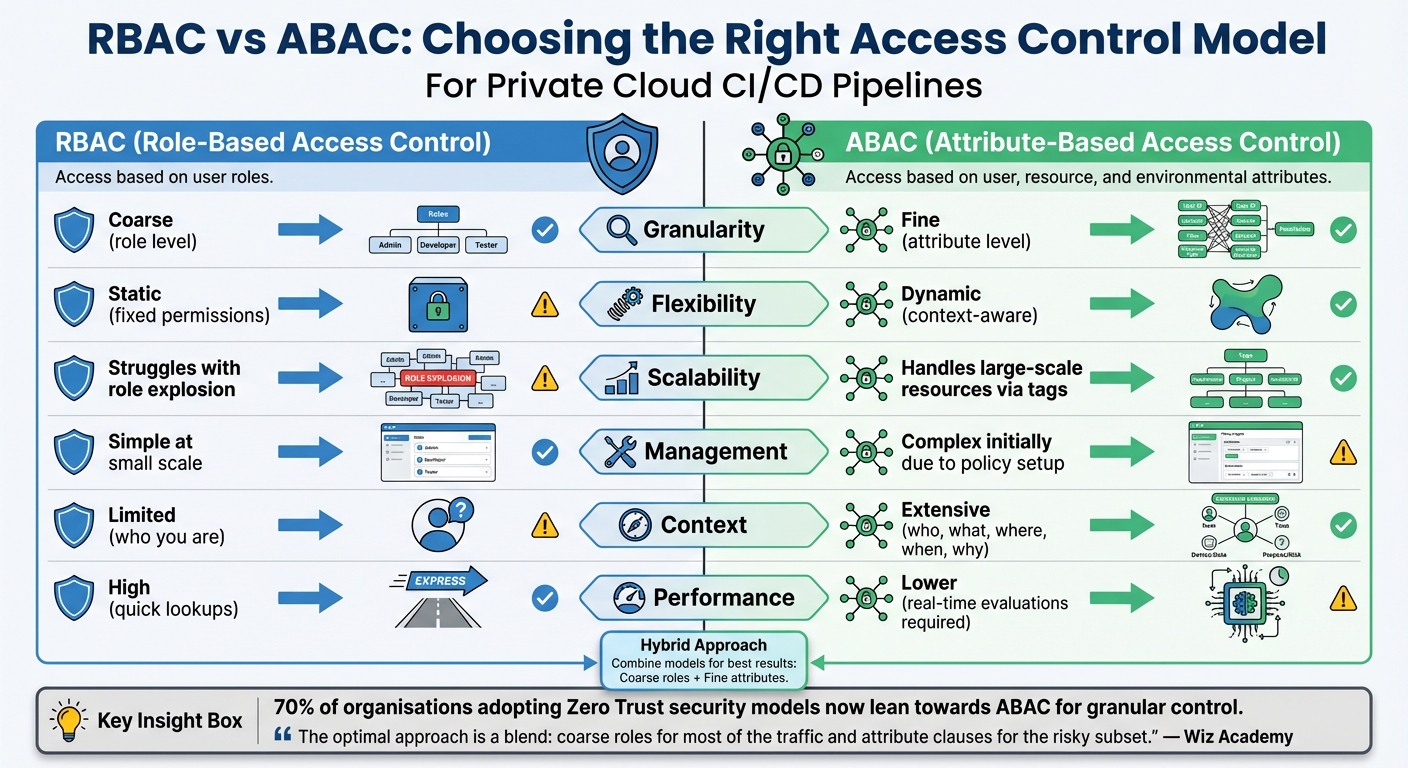 {RBAC vs ABAC Access Control Models Comparison for CI/CD Pipelines}
:::
{RBAC vs ABAC Access Control Models Comparison for CI/CD Pipelines}
:::
In private cloud CI/CD pipelines, selecting the right access control model is essential for balancing speed, scalability, and security. RBAC (Role-Based Access Control) and ABAC (Attribute-Based Access Control) take different approaches to managing permissions. RBAC assigns access based on predefined roles, such as Developer or Security Auditor, while ABAC evaluates dynamic attributes like user department, resource tags, IP address, and even time of day. In short, RBAC asks who you are
, whereas ABAC considers the broader context, including environmental factors[52][54].
RBAC is great for predictable environments, but it crumbles under dynamic business needs.
- John Kindervag, Creator of Zero Trust[54]
RBAC works well in smaller, stable team settings due to its quick, in-memory lookups[52]. However, as an organisation expands, RBAC can lead to role explosion
, where countless nearly identical roles emerge to accommodate different projects or environments. ABAC sidesteps this issue by relying on tags and contextual data, enabling policies that scale to handle millions of ephemeral resources. With 70% of organisations adopting Zero Trust security models now leaning towards ABAC for its granular control[54], the industry is clearly moving in that direction. Here's a quick breakdown of their differences:
| Criteria | RBAC | ABAC |
|---|---|---|
| Granularity | Coarse (role level) | Fine (attribute level) |
| Flexibility | Static (fixed permissions) | Dynamic (context-aware) |
| Scalability | Struggles with role explosion | Handles large-scale resources via tags |
| Management | Simple at small scale | Complex initially due to policy setup |
| Context | Limited (who you are) | Extensive (who, what, where, when, why) |
| Performance | High (quick lookups) | Lower (real-time evaluations required) |
These differences suggest that combining RBAC and ABAC can offer the best of both worlds. A hybrid approach allows organisations to maintain the simplicity of RBAC for everyday tasks while leveraging ABAC for high-risk operations, such as production deployments during specific hours or from approved IP ranges. This strategy not only mitigates role sprawl but also ensures robust security without sacrificing efficiency[52][54].
The optimal approach is a blend: coarse roles for most of the traffic and attribute clauses for the risky subset.
- Wiz Academy[52]
In private cloud CI/CD setups, RBAC can manage predictable team access, while ABAC can secure sensitive paths like secret management or production deployments. Tools such as Open Policy Agent (OPA) simplify this process by enabling policy management as code, complete with version control and automated testing through pull requests[52][53].
Conclusion
Securing private cloud CI/CD pipelines isn’t something you can set and forget - it demands ongoing attention. With the threat landscape growing rapidly, intrusions have surged by 110% in 2023, and attackers now average just 62 minutes to break out once inside. These pipelines are prime targets, holding everything from source code to production environments and sensitive credentials. A single breach could inject malicious code across your entire infrastructure.
99% of cloud security failures through 2025 are expected to stem from customer errors.
- Gartner
This statistic underlines the importance of staying vigilant through regular audits and updates. As threats escalate, a layered security approach becomes non-negotiable. The ten tips discussed - like implementing RBAC, enforcing least privilege, scanning dependencies, and rotating credentials - build a robust defence that can significantly lower risks. These practices lead to fewer vulnerabilities, fewer unauthorised access attempts, and a drop in credential-based attacks. On top of that, integrating security measures can improve operations, with benefits such as 25% faster lead times and 50% fewer deployment failures.
Security isn’t just about protecting systems - it’s also about enabling faster and more reliable delivery. Set clear KPIs, like vulnerability detection rates and Mean Time to Remediate (MTTR), to measure your progress. Automate tasks like secret rotation, schedule regular access reviews, and reset build runners after each use. For UK-based organisations, don’t overlook data residency audits to ensure compliance with GDPR and data sovereignty rules.
FAQs
What advantages do ephemeral runners offer for securing CI/CD pipelines?
Ephemeral runners play a key role in boosting security within CI/CD pipelines by offering a fresh, isolated environment for each build. This approach helps limit the attack surface and ensures that vulnerabilities or harmful code don't carry over between builds.
Since these runners are temporary and discarded immediately after use, the chances of unauthorised access or lingering security risks are drastically reduced. This makes them a strong option for maintaining high-security standards, particularly in private cloud settings.
How does role-based access control (RBAC) improve security in private cloud environments?
Role-based access control (RBAC) enhances security in private cloud environments by ensuring users and service accounts have only the permissions necessary to perform their tasks. This approach aligns with the principle of least privilege, which helps reduce the chances of unauthorised access while limiting the damage a potential breach could cause.
By assigning roles tailored to specific duties, RBAC helps prevent privilege escalation, reduces the likelihood of human error, and strengthens the overall integrity of the system. Adopting RBAC is a critical measure for protecting sensitive data and ensuring compliance within private cloud infrastructures.
Why is applying the principle of least privilege crucial for securing CI/CD pipelines?
Applying the principle of least privilege in CI/CD pipelines is crucial because it ensures that each task or process only has access to the resources and data it genuinely needs. This reduces the likelihood of unauthorised actions or harm if malicious code manages to run.
By narrowing the attack surface and limiting the ability to move laterally within the pipeline, this method greatly decreases the risk of security breaches. Even if a specific part of the system is compromised, the damage can be effectively contained.