
When your CI/CD pipelines take too long, productivity suffers. Developers lose focus, context-switch, and delays pile up. The solution? Parallelisation. By running tasks simultaneously instead of sequentially, you can cut pipeline times by up to 70%. Here's how:
- What is it? Parallelisation involves running multiple tasks (e.g., tests, builds) at the same time, reducing overall execution time.
- Why do it? Faster pipelines mean quicker feedback, fewer bottlenecks, and better resource utilisation.
- How to start? Ensure your infrastructure supports parallel tasks, make tests independent, and configure your CI/CD tool for parallel execution.
For example, splitting 20 tests into 10 groups can reduce a 100-minute sequential run to just 10 minutes. Tools like Jenkins, GitLab, CircleCI, and Azure Pipelines offer features to implement this effectively. Focus on balancing workloads, isolating shared resources, and monitoring performance to optimise your setup.
Parallelisation isn't just about speed; it's about improving efficiency and delivering updates faster. Ready to transform your pipelines? Let's dive into the details.
::: @figure 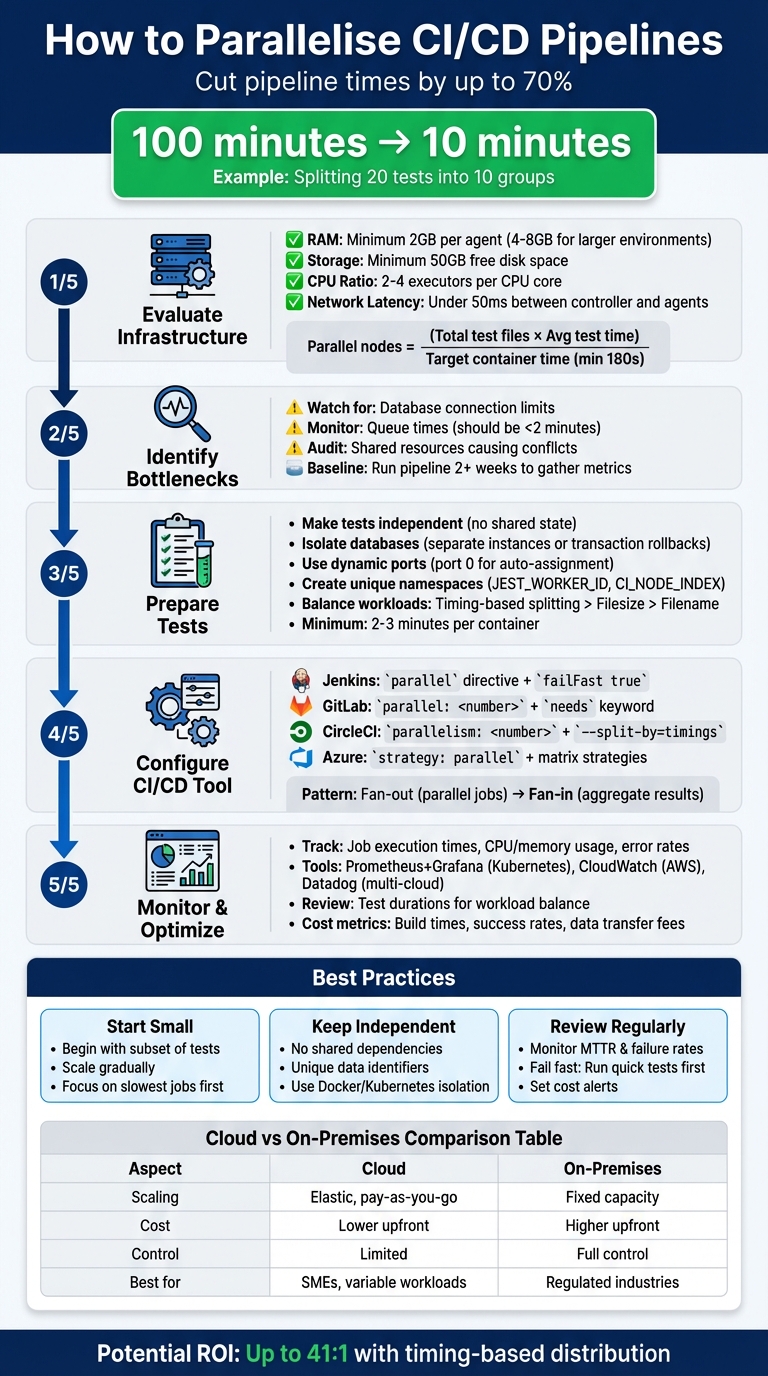 {5-Step Guide to Implementing CI/CD Pipeline Parallelisation}
:::
{5-Step Guide to Implementing CI/CD Pipeline Parallelisation}
:::
Run Parallel Stages in Jenkins Pipeline | Boost Build Speed Instantly!
Need help optimizing your cloud costs?
Get expert advice on how to reduce your cloud expenses without sacrificing performance.
Evaluating Your Infrastructure for Parallelisation
Once you've recognised the advantages of parallelisation, it's time to evaluate whether your infrastructure can handle the load. Without proper capacity, dividing tasks across multiple runners can create bottlenecks instead of boosting performance.
Checking Hardware and Network Capacity
Begin with the essentials: RAM, storage, and network latency. Each build agent should have at least 2GB of RAM, scaling up to 4–8GB for larger environments. Ensure you have a minimum of 50GB of free disk space to accommodate logs, reports, and temporary files.
Pay attention to the CPU-to-executor ratio. A good starting point is 2–4 executors per CPU core. For CPU-heavy builds, stick to the lower end, while I/O-driven tests can handle more executors. Network latency is another critical factor - keep it under 50ms between your CI/CD controller and its agents. For teams in the UK, this often means choosing a nearby cloud region, like AWS's eu-west-2, to minimise delays.
To determine the number of parallel nodes required, use this formula:
(Total test files × Average test time) / Target container time (minimum 180 seconds).
Once you've verified your hardware and network meet these requirements, shift your focus to spotting potential bottlenecks.
Finding Bottlenecks
Even with sufficient capacity, resource contention can derail parallelisation efforts. Watch for issues like parallel tests competing for limited database connections, file handles, or network ports. These conflicts can lead to test failures or inconsistent results. Monitor queue times - if jobs regularly wait more than two minutes for executors, your system is likely underpowered for the current load.
Before diving into parallelisation, audit your dependencies. For instance, shared resources like a single staging database can cause thundering herd
problems when hit by multiple jobs at once. A simple way to mitigate this is by staggering jobs using a short sleep command, such as sleep $((NODE_INDEX * 2)). As Michael Neale, Architect at CloudBees, explains:
A stage may have access to a finite resource, and you want to limit access (so only one at a time, and not waste it on redundant builds)[4].
Run your pipeline for at least two weeks to gather baseline metrics on CPU and memory usage, network throughput, and storage I/O. This data will help pinpoint actual bottlenecks rather than relying on guesswork.
Cloud vs On-Premises Options
After assessing your hardware and bandwidth needs, decide whether a cloud-based or on-premises setup better aligns with your goals. Cloud infrastructure offers elastic scaling and pay-as-you-go pricing, making it ideal for handling spikes in testing demand without overcommitting resources. You can quickly spin up additional runners and only pay for what you use.
On-premises solutions, however, come with higher upfront costs for hardware and facilities, as well as ongoing demands for maintenance, updates, and security. The upside is greater control over data residency and security, which is crucial for businesses in heavily regulated industries. In contrast, cloud options may raise concerns about data sovereignty and vendor lock-in.
For most SMEs, cloud-based CI/CD solutions offer lower overall costs and faster deployment. If you need the benefits of both, a hybrid approach could work well - use the cloud for scalable workloads while reserving self-hosted runners for compliance-sensitive tasks or specialised hardware requirements.
| Metric | Cloud Relevance | Assessment Goal |
|---|---|---|
| CPU Utilisation | Very High | Check if agents are over/under-provisioned, as this directly impacts costs |
| Memory Usage | Very High | Ensure adequate memory to avoid build failures caused by bottlenecks |
| Network Throughput | Medium | Evaluate data transfer rates, especially across regions |
| Storage I/O | Medium | Measure read/write speeds to optimise build/test performance |
| Queue Time | High | If jobs wait over 2 minutes, your hardware capacity may be insufficient for parallelisation |
Preparing Tests and Pipelines for Parallel Execution
Once you've confirmed that your hardware and network can handle parallel tasks, the next step is to prepare your tests and pipelines to run independently. This involves ensuring tests don’t interfere with each other, organising them for optimal parallelisation, and configuring pipelines to distribute tasks efficiently.
Making Tests Independent
One of the biggest challenges in parallel execution is shared state. Shared resources, like global variables, singletons, or caches, often lead to test failures when multiple tests modify them at the same time. Nawaz Dhandala from OneUptime explains:
Tests that pass individually but fail in parallel usually suffer from shared state, resource conflicts, race conditions, or order dependencies[9].
To avoid these issues, start by isolating databases. Use separate database instances or transaction rollbacks (e.g. BEGIN/ROLLBACK) to maintain a clean state [9]. Replace fixed ports (like port 3000) with dynamic port assignment by using port 0, which automatically assigns a free port [9]. For file paths and temporary directories, create unique namespaces by leveraging environment variables such as JEST_WORKER_ID or CI_NODE_INDEX. These steps help prevent conflicts between parallel jobs [6] [7].
Organising Tests for Parallelisation
Unit tests are typically fast and easy to parallelise since they are independent by design. However, integration and end-to-end tests require more careful handling to ensure proper isolation and sequencing.
Once your tests are independent, focus on balancing workloads across parallel containers. The method you choose to distribute tests can make a big difference. For example:
- Filename splitting: A simple approach but may lead to uneven workloads.
- Filesize splitting: Assumes larger files take longer to execute.
- Timing-based splitting: Uses historical JUnit XML data to distribute tests evenly. This ensures all containers finish around the same time, provided your reports include the
fileattribute in<testsuite>or<testcase>tags and thetimeattribute in<testcase>[5].
To offset the overhead of starting parallel containers, aim for each container to run for at least 2–3 minutes [2].
Pipeline Configuration Guidelines
When designing your pipeline, use the fan-out/fan-in pattern. This means running multiple independent jobs in parallel and then aggregating the results in a final step [1]. Remove unnecessary dependencies that force sequential execution, as they can slow down the pipeline.
You can use built-in environment variables, such as CIRCLE_NODE_INDEX or CI_NODE_INDEX, to divide test subsets among executors [5] [6] [7]. Adding a slight sleep delay based on the node index can also help prevent resource contention [2]. As Semaphore points out:
The pipeline cannot be faster than its slowest job, no matter how much parallelisation we use[8].
Setting Up Parallelisation in Common CI/CD Tools
Let’s dive into how you can configure parallelisation in widely-used CI/CD tools, building on earlier discussions about infrastructure readiness and independent testing.
Configuring Parallel Jobs in Jenkins
In Jenkins, you can use the parallel directive within a stage block to execute multiple sub-stages at the same time. To optimise resource usage, set agent none at the top level, then assign specific agents (like label 'linux-test') to each parallel branch. If you’re testing across various configurations, such as browsers or operating systems, the matrix directive is a handy way to automatically create parallel jobs based on predefined variables.
For efficiency, include failFast true in the parallel block. This stops all remaining branches if one fails, saving both time and resources. Tools like the Parallel Test Executor plugin can further optimise your setup by dividing test suites based on past execution times, ensuring a balanced workload across agents. With these methods, you could potentially cut pipeline execution time by 50% to 75% for compatible workloads [3].
To avoid conflicts, make sure each parallel stage uses unique identifiers (like timestamps or UUIDs) and isolated resources such as databases or containers. If you notice jobs waiting more than two minutes for an executor, it might indicate under-provisioning. Consider using elastic or auto-scaling agents to address this. Finally, the JUnit plugin can merge results from multiple parallel test branches into a single report, simplifying debugging.
Now, let’s see how GitLab CI/CD handles parallelisation to speed up pipelines.
Parallelisation in GitLab CI/CD

In GitLab, all jobs within the same stage run concurrently, provided there are enough runners available [10][14]. To create multiple instances of a single job, use parallel: <number>. Each instance gets CI_NODE_INDEX and CI_NODE_TOTAL environment variables, which help distribute tasks [13]. For jobs requiring different variable combinations - such as testing across Node.js versions or operating systems - use parallel:matrix [13][14].
The needs keyword is another powerful feature, allowing jobs to start as soon as their specific dependencies are complete, rather than waiting for the entire previous stage to finish [10][14]. However, parallelism is influenced by the configuration in the config.toml file. The concurrent setting determines the total number of parallel jobs across all runners on a host, while limit restricts jobs for a specific runner. A good rule of thumb is one CPU core per job, so an 8-core server can typically support concurrent = 8 [11].
Here’s an example: In January 2021, GitLab optimised its own CI/CD pipeline by parallelising the frontend-fixtures job. Initially taking 20 minutes, the team implemented parallel: 2 and used the Knapsack gem to distribute tests. Alongside splitting large fixture files into smaller batches, this reduced the job duration by about 6.5 minutes. This effort was led by Miguel Rincon with support from Rémy Coutable [12].
Next, let’s explore how CircleCI and Azure Pipelines approach parallelisation.
CircleCI and Azure Pipelines
CircleCI focuses on job-level parallelism, where a single job is duplicated across multiple containers to divide a test suite [5][2]. By using the --split-by=timings flag in the CircleCI CLI, you can distribute tests evenly based on historical JUnit data, minimising container runtime [5][2]. To avoid race conditions when caching, configure only one node for uploads (e.g., set CIRCLE_NODE_INDEX=0).
Azure Pipelines offers flexibility with parallel stages (independent stages running simultaneously), parallel jobs within a stage, and matrix strategies for testing across platforms [1]. The matrix strategy allows you to run the same job across different OS versions or language configurations at the same time [1]. By default, stages or jobs without defined dependencies run in parallel, so avoid unnecessary dependsOn keys in your YAML files [1]. For large test suites, Azure enables scaling with up to 99 agents [15].
| Feature | CircleCI | Azure Pipelines |
|---|---|---|
| Primary Configuration |
parallelism: <number> [5]
|
strategy: parallel: <number> [15]
|
| Test Splitting Tool | CircleCI CLI (circleci tests run) [5]
|
Manual slicing or built-in test task [15] |
| Environment Variables |
CIRCLE_NODE_INDEX, CIRCLE_NODE_TOTAL [5]
|
System.JobPositionInPhase, System.TotalJobsInPhase [15]
|
Each of these tools provides distinct methods to enhance CI/CD performance, tailored to different needs and environments.
Monitoring, Optimising, and Managing Costs
In parallelised CI/CD setups, keeping an eye on efficiency while controlling costs is a must. Pay attention to metrics like job execution times, CPU and memory usage, and error rates across parallel branches. Tools like Prometheus paired with Grafana are excellent for Kubernetes environments, while AWS CloudWatch fits perfectly with native AWS pipelines. For organisations operating across multiple cloud platforms, Datadog and New Relic provide comprehensive monitoring capabilities. These insights help refine your pipeline to ensure it stays efficient and cost-effective.
Distributing workloads evenly is another critical step. Keeping an eye on test durations can help you balance workloads and avoid situations where a single lengthy job holds up the entire pipeline.
Cost management is just as important as performance monitoring. Track key factors like build times, success rates, data transfer fees, and auto-scaling events. By combining performance and cost metrics, you can uncover inefficiencies and fine-tune your pipeline configuration. This not only speeds up deployments but also improves the overall performance of your CI/CD process.
| Monitoring Tool | Best For | Cloud Support |
|---|---|---|
| Prometheus + Grafana | Kubernetes environments | Multi-cloud |
| AWS CloudWatch | Native AWS pipelines | AWS only |
| Datadog | Cross-stack visibility | All major clouds |
| New Relic | Deployment impact tracking | All major clouds |
| Azure Monitor | Azure DevOps integration | Primarily Azure |
For organisations struggling with rising cloud costs, Hokstad Consulting offers services like DevOps transformation, cloud cost engineering, and customised cloud solutions. They claim to help reduce expenses by 30–50%. Additionally, their cloud cost audits can identify areas where parallelised pipelines may be generating unnecessary costs.
Best Practices for Long-Term Parallelisation
Building on earlier strategies, adopting these long-term practices can help maintain and improve your parallelisation efforts over time.
Start Small and Scale Up
Kick things off with a small subset of tests. Audit your test suite to identify shared dependencies and timing issues, which will help you prioritise which tests to parallelise first. This approach reduces the risk of introducing race conditions or resource conflicts. Once your initial parallel jobs are running smoothly, you can gradually scale up to cover more of your test suite. Remember, the overall speed of your pipeline is limited by its slowest job. To optimise throughput, focus on breaking down lengthy tests or running them on faster hardware.
Keep Tests Independent
Ensuring that tests are entirely independent is key to reliable parallelisation. Each test must run without relying on the state, data, or outcomes of others. To achieve this, use unique data identifiers - like random user IDs or dedicated database schemas generated with UUIDs or timestamps - for each test execution. Tools like Docker or Kubernetes can help isolate tests and prevent interference. If you encounter flaky tests that fail inconsistently, quarantine them to avoid pipeline disruptions while investigating the root cause. With fully isolated tests, you’ll set the foundation for consistent performance and easier optimisation.
Review and Optimise Regularly
Once your parallelisation setup is in place, regular reviews will ensure it evolves alongside your project’s needs. Monitor metrics such as build duration, queue times, failure rates, and Mean Time to Recovery (MTTR) to spot performance issues over time. Use fail fast
logic by running quick, essential tests - like linters and unit tests - before heavier integration tests. This approach provides faster feedback and saves resources. Additionally, set automated cost alerts to flag when parallel testing expenses exceed predefined limits, especially if you’re using auto-scaling cloud agents. Regular reviews will help you fine-tune workload distribution and ensure your parallelisation strategy remains effective.
Conclusion
Parallelisation speeds up CI/CD workflows and shortens feedback loops [16]. By running independent tasks simultaneously with tools like Jenkins, GitLab CI/CD, CircleCI, and Azure Pipelines, teams can identify bugs sooner, boost developer efficiency, and make better use of resources.
To implement effective parallelisation, start by evaluating your infrastructure, then organise independent tests into categories. Use features like GitLab’s matrix strategy or CircleCI’s parallelism attribute to configure parallel jobs, and track metrics to measure performance [16]. Timing-based distribution can also minimise idle resources and potentially deliver a return on investment as high as 41:1 [16].
The benefits of parallelisation are clear: faster workflows, improved testing coverage, and the ability to maintain quality even as your applications grow. Success relies on keeping tests independent, starting with small adjustments, and routinely reviewing your setup. As your projects scale, parallel execution allows for comprehensive regression testing and security checks without delaying releases.
Hokstad Consulting offers expertise in DevOps transformation and cloud cost optimisation, providing tailored CI/CD solutions for public, private, and hybrid environments. Their services, which include custom automation and strategic cloud migration, can help cut cloud costs by 30–50% while improving deployment efficiency. Whether you’re just starting to explore parallelisation or looking to enhance an existing system, Hokstad Consulting provides flexible engagement options - like their no savings, no fee
model - to ensure measurable outcomes.
For more insights into optimising CI/CD pipelines, visit Hokstad Consulting to see how their DevOps and automation expertise can help you achieve your goals.
FAQs
How do I choose the right level of parallelism?
To determine the best level of parallelism for your CI/CD pipelines, focus on test independence, infrastructure limits, and how well resources can scale. Make sure your tests run independently and that environments are isolated to prevent any clashes. Break down test suites based on their execution times and dependencies, and keep an eye on metrics such as resource usage and costs. The goal is to strike a balance: deliver quicker feedback while using resources wisely, without straining your infrastructure.
How can I stop tests becoming flaky in parallel runs?
To make parallel test runs more reliable, focus on ensuring test independence and creating isolated environments for each test. Flaky tests can be tackled by introducing retries, properly managing dependencies, and scaling your infrastructure as needed. Tools such as Docker and Kubernetes are excellent for setting up isolated environments, reducing interference between tests. Additionally, keeping an eye on execution times and cloud costs can help identify bottlenecks or inefficiencies, ultimately boosting both reliability and efficiency in parallel testing.
When does parallelisation cost more than it saves?
Parallelisation in CI/CD pipelines can end up costing more than it saves when the extra resource usage - like cloud computing expenses - outpaces the benefits of faster deployment or testing. This typically occurs when running multiple parallel jobs becomes financially impractical due to factors like steep infrastructure costs, over-scaling, or pricey licensing fees. In such cases, the reduced pipeline duration doesn't generate enough savings to offset the added costs.