
I match parallel tool results by provider call ID - not by which result arrives first. If two calls finish in reverse order, their IDs still link each result to the right request.
My rule is simple: one accepted outcome per expected call. To keep that rule intact, I:
- Save call IDs before dispatch and track retry attempts separately.
- Validate results and reject unknown IDs, duplicates and stale attempts.
- Resolve every call, including failures, before sending the next request.
- Return results in saved call order using the format required by OpenAI Chat Completions, OpenAI Responses or Anthropic Messages.
A timeout does not mean an action failed. Before retrying a payment or another state-changing action, I check its status to avoid doing it twice.
::: @figure 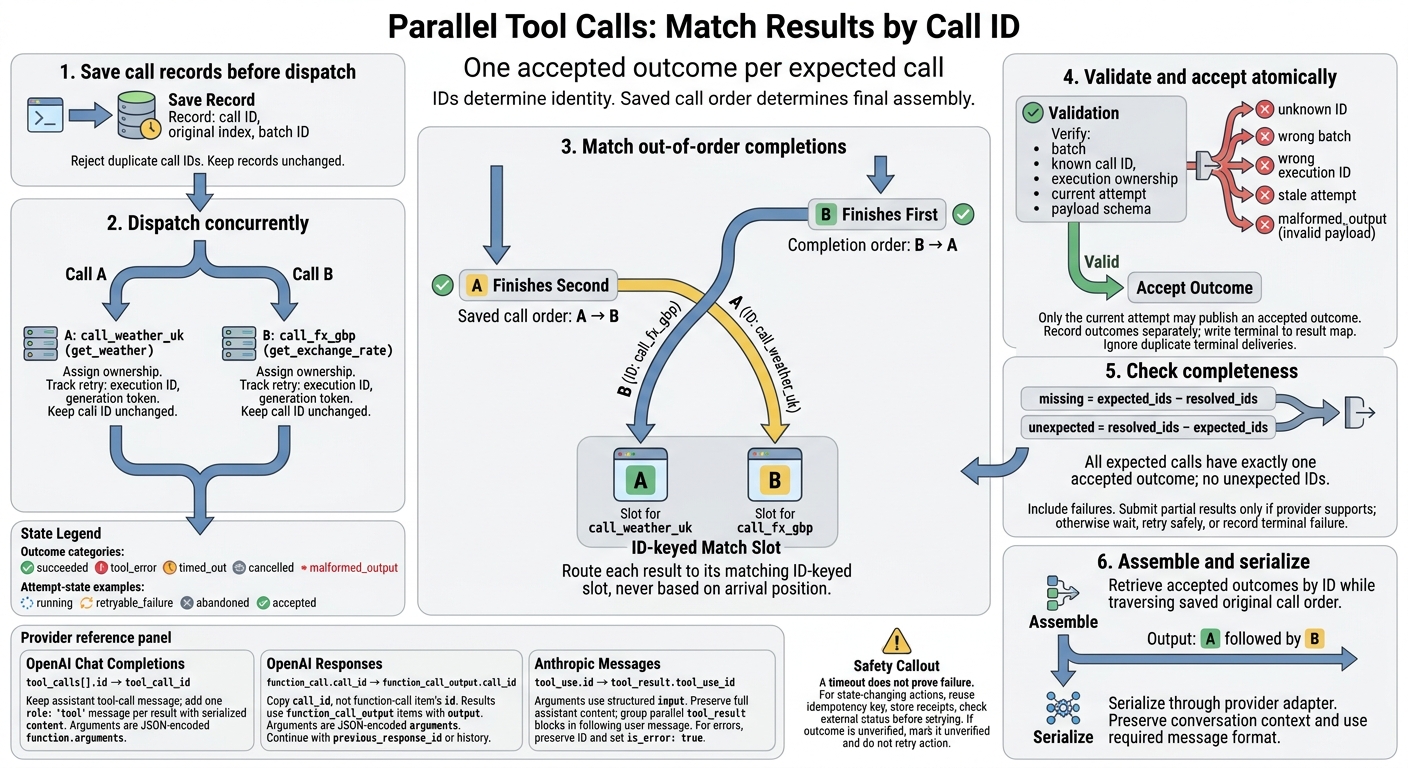 {Parallel Tool Calls: Match Results by Call ID}
:::
{Parallel Tool Calls: Match Results by Call ID}
:::
Match Out-of-Order Results by Call ID
Build Call and Result Maps
When completions arrive out of order, use the call map to identify each call. Build it before dispatch, reject duplicate call IDs, and store results in a separate map keyed by call ID. Dispatch calls concurrently.
Keep the call ID, original index and batch ID unchanged throughout execution.
calls_by_id = {}
results_by_id = {}

for index, call in enumerate(model_calls):
    if call.call_id in calls_by_id:
        reject("duplicate call ID")
    calls_by_id[call.call_id] = {
        request: call,
        original_index: index,
        batch_id: batch_id
    }

parallel_for call in model_calls:
    attempt = register_current_attempt(call.call_id)
    outcome = execute_and_classify(call)
    complete(batch_id, call.call_id, attempt.id, outcome)

function complete(batch, call_id, attempt_id, outcome):
    atomic_for_call(call_id):
        require batch == batch_id
        require call_id in calls_by_id
        require attempt_belongs_to(call_id, attempt_id)

        if call_id in results_by_id:
            return                     # Duplicate: no overwrite
        if not is_current_attempt(call_id, attempt_id):
            return                     # Stale attempt: reject

        validated = validate_outcome(outcome)
        record_attempt_outcome(attempt_id, validated)
        if acceptance_policy_is_terminal(validated):
            results_by_id[call_id] = validated
Classify each completion before deciding whether to write it to the result map.
Validate Outcomes and Attempt States
Classify each outcome as succeeded, tool_error, timed_out, cancelled or malformed_output. Leave unresolved calls as pending. Validation must check both the payload shape and call ownership. Treat every payload as untrusted until it passes schema validation, and classify invalid payloads as malformed_output.
Track attempt states such as running, retryable_failure, abandoned and accepted in a separate record. Assign ownership before dispatch. Give each retry a new execution ID and generation token, and reject stale attempts even if they finish later.
Reject unknown call IDs, results from the wrong batch and execution IDs that belong to another call. Log these as correlation errors. Ignore duplicate terminal deliveries without changing the accepted outcome. The ownership check and result write must be atomic.
These state rules determine which keys can safely identify each result.
Compare Ways to Match Results
| Matching key | Out-of-order completion | Repeated tool names | Retries | Provider field | Use |
|---|---|---|---|---|---|
| Arrival index | Unsafe: reflects arrival order | - | - | - | Never use for identity |
| Recorded original index | Safe for final ordering | Safe if recorded per call | Ambiguous across attempts | Local state | Assemble results in model order |
| Tool name | Cannot identify a call | Ambiguous | Ambiguous | Usually available | Diagnostics or routing only |
| Provider call ID | Safe | Safe | Identifies the logical call, not each retry | Maps to provider message fields | Primary logical correlation key |
| Application execution ID | Safe for local events | Safe | Distinguishes attempts | Local state | Attempt tracking, retries and logs |
Use the chosen call ID to serialise the follow-up request in the provider’s required format.
Assemble the Follow-Up Request
Check Completeness and Serialise Outcomes
Once every call is resolved, build the next request using the saved IDs.
Compare expected_ids from the assistant turn with resolved_ids in results_by_id:
missing = expected_ids - resolved_ids
unexpected = resolved_ids - expected_ids
Reject duplicates before serialisation. Proceed only when every expected tool call has exactly one accepted outcome. Submit partial results only if the provider explicitly supports them. Otherwise, wait, retry, or record a terminal failure.
Keep application state separate from provider payloads. Use an adapter to serialise each accepted outcome, and log metadata separately. Where JSON is expected, validate it before submission. Represent failures using a supported error payload or error state. Don’t omit failed calls or invent top-level API fields.
Preserve both the conversation context and the result. Serialise through the provider adapter so the next request uses the message shape required by the target API.
Return Results in Original Call Order
After validation, serialise the next request in the original call order, not completion order. Traverse the original calls, retrieve each accepted outcome by ID, then pass it through the provider adapter:
outgoing_results = [
    adapter.serialise(call.call_id, results_by_id[call.call_id])
    for call in model_calls
]
Original call order keeps requests stable for testing, debugging and replay. It does not replace ID matching or permit partial submission.
Use completion order only when the provider explicitly permits arbitrary ordering, and handle it through a documented provider-specific adapter. Otherwise, keep the original call order and follow the message-format rules below.
Claude Parallel Tool Calls: Several Tools in One Turn (CCAR-F)
Use the Correct Provider Message Format
Once you’ve matched the results, serialise them in the format the provider requires.
OpenAI Chat Completions
Keep the assistant’s tool_calls message, then add one role: "tool" message for each matched result. In the example below, arguments and results are JSON-encoded strings. Parse and validate arguments before execution.
The example shows two parallel tool calls and their matching tool_call_id values. Use parallel_tool_calls only with models and tools that support it.[4][5][6]
{
  "messages": [
    {
      "role": "assistant",
      "tool_calls": [
        {
          "id": "call_weather_uk",
          "type": "function",
          "function": {
            "name": "get_weather",
            "arguments": "{\"city\":\"London\"}"
          }
        },
        {
          "id": "call_fx_gbp",
          "type": "function",
          "function": {
            "name": "get_exchange_rate",
            "arguments": "{\"base\":\"GBP\",\"quote\":\"EUR\"}"
          }
        }
      ]
    },
    {
      "role": "tool",
      "tool_call_id": "call_weather_uk",
      "content": "{\"temperature_c\":12,\"condition\":\"Rain\"}"
    },
    {
      "role": "tool",
      "tool_call_id": "call_fx_gbp",
      "content": "{\"rate\":1.17}"
    }
  ]
}
OpenAI Responses
Responses uses items rather than tool-role messages. Keep the call ID in the follow-up item: copy call_id, not the function-call item’s id.
The first block shows model output; the second shows follow-up input. Use previous_response_id or an equivalent maintained history, retaining required reasoning items where applicable. These examples are fragments, not full requests.[1][2][3]
[
  {
    "type": "function_call",
    "id": "fc_123",
    "call_id": "call_weather_uk",
    "name": "get_weather",
    "arguments": "{\"city\":\"London\"}"
  },
  {
    "type": "function_call",
    "id": "fc_456",
    "call_id": "call_fx_gbp",
    "name": "get_exchange_rate",
    "arguments": "{\"base\":\"GBP\",\"quote\":\"EUR\"}"
  }
]
{ "previous_response_id": "resp_123", "input": [ { "type": "function_call_output", "call_id": "call_weather_uk", "output": "{\"temperature_c\":12,\"condition\":\"Rain\"}" }, { "type": "function_call_output", "call_id": "call_fx_gbp", "output": "{\"rate\":1.17}" } ] }
Anthropic Messages
Anthropic uses structured input objects, not JSON-encoded argument strings. Keep the full assistant content, then place all tool_result blocks in the next user message, before any text. For errors, keep the same tool_use_id and set is_error: true. Don’t add OpenAI-specific fields.[2]
{
  "messages": [
    {
      "role": "assistant",
      "content": [
        {
          "type": "tool_use",
          "id": "toolu_weather_uk",
          "name": "get_weather",
          "input": {"city":"London"}
        },
        {
          "type": "tool_use",
          "id": "toolu_fx_gbp",
          "name": "get_exchange_rate",
          "input": {"base":"GBP","quote":"EUR"}
        }
      ]
    },
    {
      "role": "user",
      "content": [
        {
          "type": "tool_result",
          "tool_use_id": "toolu_weather_uk",
          "content": "{\"temperature_c\":12,\"condition\":\"Rain\"}"
        },
        {
          "type": "tool_result",
          "tool_use_id": "toolu_fx_gbp",
          "is_error": true,
          "content": "{\"error\":\"Exchange-rate service timed out\"}"
        }
      ]
    }
  ]
}
Compare Provider Fields and Message Rules
Use the table below to map each provider’s call ID to its result container. IDs - not position - determine the match. Before deployment, check the linked official documentation for your chosen API, model and SDK version.[1][2][4]
| API and official documentation | Call → result identifier | Argument format | Result container | Message rule |
|---|---|---|---|---|
| OpenAI Chat Completions |
tool_calls[].id → tool_call_id
|
JSON-encoded function.arguments
|
Separate role: "tool" messages with serialised content
|
Keep the assistant tool-call message before its matching tool messages. |
| OpenAI Responses |
function_call.call_id → function_call_output.call_id
|
JSON-encoded arguments
|
function_call_output input items with output
|
Continue through previous_response_id or correctly maintained explicit history; retain required items. |
| Anthropic Messages |
tool_use.id → tool_result.tool_use_id
|
Structured input
|
tool_result blocks inside a user message |
Group parallel results in the immediately following user message, before ordinary text. |
Final Checklist for Reliable Tool Calls
Use this checklist after matching results and before you serialise the next request.
Keep Retries Safe and Call Records Unchanged
Keep provider call IDs unchanged within each model turn. Scope records by conversation and batch ID, and assign each retry its own execution ID. Set connection and execution timeouts, cap retries, and allow only the current execution ID to publish the accepted outcome.
A timeout does not prove failure. For state-changing tools, reuse the same idempotency key, store receipts and check the external status before retrying. If you cannot verify the outcome, mark it as unverified and do not retry the action.
Test Failures and Log Call Matching
Before production, test cases that can break ID matching: reverse completion order, repeated tool names, duplicate delivery, missing or unknown IDs, tool failures, timeouts, cancellations and stale retries. Include worker restarts and delayed delivery. Before execution, validate arguments against the schema, check authorisation and enforce least-privilege access.
Log the conversation or tenant ID, batch ID, provider call ID, execution ID, tool name and lifecycle state. Also record start and end timestamps, latency, retry count, timeout or cancellation reason, validation result and outcome category. Do not log credentials, personal data or full tool outputs. Set alerts for unknown IDs, duplicate accepted outcomes and incomplete batches.
Check Production Readiness
Before sending the next model turn, require exactly one accepted logical outcome per expected call, matched by provider call ID. Exclude unknown, duplicate and unvalidated results, and preserve the original call records.
Check that retries cannot silently repeat business actions. Before release, run contract, load and fault-injection tests.
FAQs
How do I preserve call IDs after a worker restart?
Save the agent’s state durably before any pause or hand-off. Store the call plan in a checkpoint or event history, including call IDs, status, dependencies and results.
When a new worker resumes, reload the saved state to restore the run’s progress. Replay recorded results instead of generating them again. This keeps outputs linked to their original call IDs, prevents duplicate external side effects and maintains tracking across the restart.
What if a timed-out call succeeds after a retry?
A timeout means the outcome is unknown - not that the request failed. If the call later succeeds, check its external status using the operation ID or business reference before taking further action.
If completion is confirmed, record the receipt and successful result. Do not repeat the request. If the outcome is still uncertain or cannot be verified, quarantine the transaction for manual review rather than retrying. This keeps records consistent and prevents duplicate side effects.
How can I test provider-specific result formats?
Separate parsing logic from agent reasoning. Pass raw responses directly to the parser to check schemas and data types. Compare the parsed objects with the expected format to spot truncation, schema drift or missing fields.
Test recorded arguments against a sandbox or stub to check authorisation, tool types and ranges. Don’t rely on a success status alone: check units, currency and error handling too.