
Choosing the right artifact management tool - open-source or proprietary - can impact your team's efficiency, costs, and security. Here's a quick breakdown:
- Open-source tools like Nexus Repository OSS and Artifactory Community Edition are free to use but require significant manual effort for setup, maintenance, and scaling. They are best for small teams or single tech stacks but lack advanced features like high availability and automated security.
- Proprietary tools such as Sonatype Nexus Pro and JFrog Artifactory Enterprise offer enterprise-grade features, including 24/7 support, security scanning, and seamless scalability. These come at a subscription cost but save time and reduce operational risks.
Key Comparisons:
- Cost: Open-source tools have no licensing fees but higher hidden costs (e.g., labour and infrastructure). Proprietary tools bundle features into predictable subscriptions.
- Scalability: Proprietary tools support large-scale operations with features like active/active clustering and multi-push replication. Open-source tools need manual upgrades for similar performance.
- Security: Proprietary platforms provide proactive threat detection and compliance tools, while open-source relies on community-driven updates.
- Support: Proprietary tools offer formal SLAs and dedicated teams, whereas open-source depends on community forums.
Quick Comparison
| Feature | Open Source Tools (e.g., Nexus OSS) | Proprietary Tools (e.g., Nexus Pro) |
|---|---|---|
| Cost | Free (hidden labour costs) | Starts at £120/user/year |
| Scalability | Limited, manual upgrades required | High availability, global replication |
| Security | Community-driven | Proactive scanning, automated compliance |
| Support | Community forums | 24/7 support with SLAs |
| Integration | Limited, manual setup | Pre-built CI/CD integrations |
For small teams with technical expertise, open-source tools may suffice. However, growing organisations or those prioritising security and uptime often benefit from proprietary solutions. Balancing upfront costs with long-term efficiency is key.
::: @figure 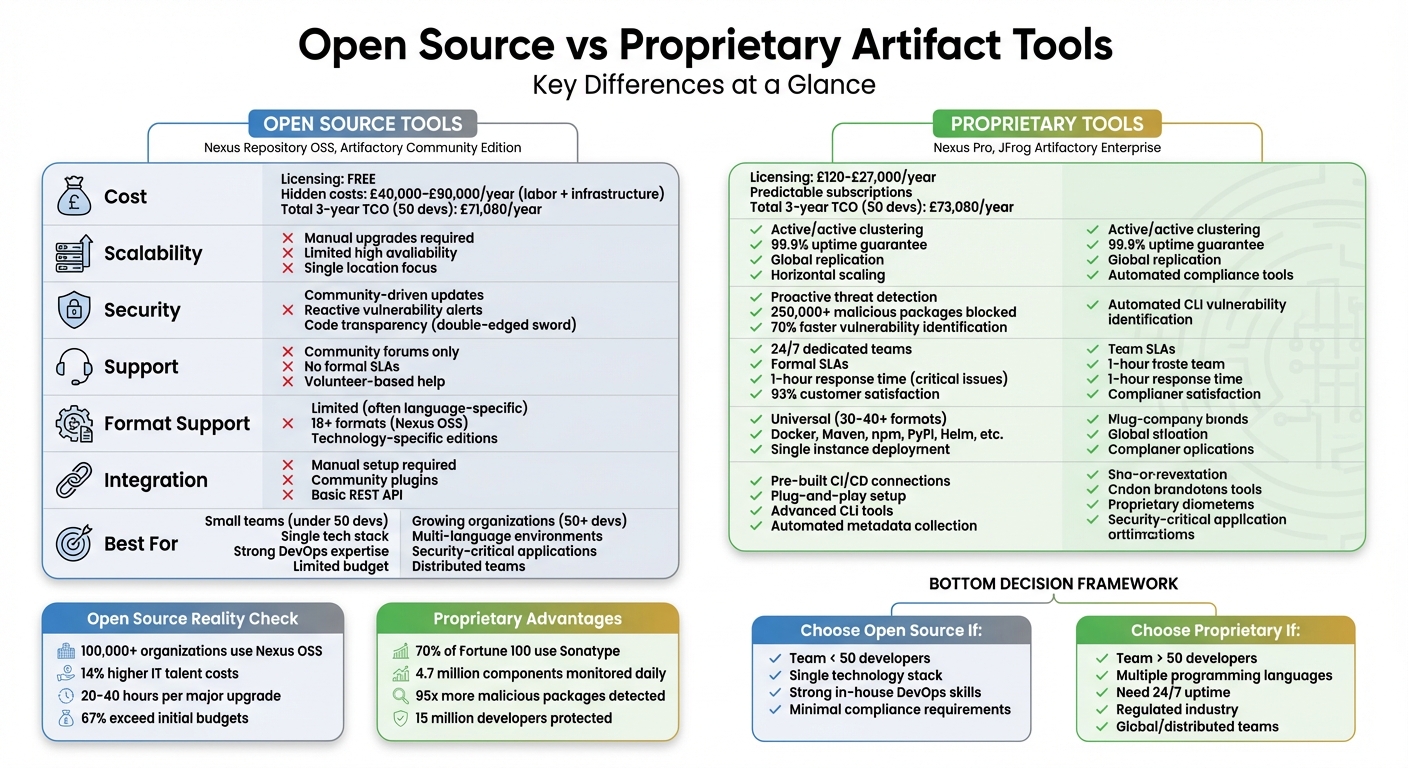 {Open Source vs Proprietary Artifact Tools: Feature and Cost Comparison}
:::
{Open Source vs Proprietary Artifact Tools: Feature and Cost Comparison}
:::
Open Source Artifact Tools: Main Features
Open-source artifact tools eliminate licensing fees, making it easier for teams to set up centralised repositories without incurring upfront costs. Tools like Nexus Repository OSS and Artifactory Community Edition follow this model and have steadily evolved since their inception. For instance, Nexus Repository OSS is now used by over 100,000 organisations worldwide [10], while Artifactory has shifted to offering community editions tailored to specific development needs [3].
These tools are designed to work in polyglot environments, thanks to their universal format compatibility. Nexus Repository Community Edition, for example, supports up to 18 package formats, including Maven, npm, Docker, Helm, and PyPI, all within a single deployment [10]. This feature allows development teams working with Java, Python, or containerised applications to rely on one tool instead of juggling multiple repositories. They also integrate seamlessly with automation platforms like Jenkins and GitHub Actions and provide full REST APIs for streamlined automation [9].
Another advantage is the innovation driven by community feedback. JFrog highlights this dynamic:
Our constant interaction with open source communities provides us with quick, high-quality and constant feedback that helps us make our products better[3].
However, there are trade-offs. These tools often lack formal SLAs, high availability clustering, and require manual upgrades [11]. Despite this, users find value in the reduced maintenance effort, as noted by Hagen R. from PeerSpot:
It has helped us reduce the effort in maintaining several systems. That is a huge benefit[10].
Below, we explore the strengths and limitations of Nexus Repository OSS and Artifactory Community Edition in more detail.
Nexus Repository OSS
Nexus Repository OSS is a cost-effective solution offering a well-rounded set of features. It centralises binaries across the development lifecycle and supports over 18 package formats, from Maven and npm to newer formats like Cargo (Rust) and Hugging Face [8][9]. Key features include private hosted repositories, caching proxies for public downloads, and role-based access control (RBAC) to secure sensitive artifacts [9].
Recent updates to the Community Edition address earlier limitations, such as supporting external PostgreSQL databases and Kubernetes [8][9]. Users can deploy on unlimited servers with unlimited user accounts [10]. However, they are responsible for tasks like database maintenance, backups, and scaling infrastructure. Anthony E. from PeerSpot highlights the importance of RBAC:
One of the most valuable features is the variety of permissions you can use on the repository. That helps us protect access to the information inside of the repository[10].
That said, the Community Edition lacks enterprise-level features like zero-downtime upgrades, multi-site replication, and Single Sign-On (SSO/SAML) [11]. For teams needing 24/7 uptime or distributed deployments, these gaps may pose challenges. Sonatype encourages users of older OSS versions to upgrade to the Community Edition for improved backup options and broader format support [11].
Artifactory Community Edition
Artifactory takes a different approach by offering technology-specific community editions rather than a universal free tier. For example, the Community Edition for C/C++ focuses on Conan package management and generic binaries [3], while Artifactory OSS targets Java development with Maven, Gradle, and Ivy [3]. This specialisation allows for optimised performance; for instance, Artifactory's checksum-based storage can deliver up to five times the performance of traditional file systems [6].
The free versions also include virtual repositories, which consolidate multiple local and remote repositories under a single URL. This simplifies developer configurations and reduces the need to update build scripts when repository locations change [6]. Like Nexus, Artifactory offers REST APIs and a dedicated CLI (JFrog CLI) for automating tasks like publishing, promotion, and cleanup [6].
However, Artifactory's free editions have limited format support compared to Nexus's broader coverage. Teams working across multiple programming languages may need to deploy separate instances or upgrade to a paid tier. Additionally, these editions lack high availability support, have limited external database options, and rely on community-based troubleshooting rather than formal support channels [11][12]. While these constraints are typical for free tools, they may be manageable for smaller teams using a single technology stack. For polyglot environments, however, the restrictions could become a bottleneck. Balancing these limitations with cost and scalability needs is crucial, as explored further in the following sections.
Need help optimizing your cloud costs?
Get expert advice on how to reduce your cloud expenses without sacrificing performance.
Proprietary Artifact Tools: Main Features
Proprietary artifact tools bring enterprise-level capabilities that go beyond basic repository management. Unlike open-source solutions, these tools are designed for high availability, advanced security, and robust support, making them ideal for mission-critical applications. Features like zero-downtime upgrades, automated threat detection, and dedicated customer support teams offering architectural advice are key benefits for organisations [16] [19].
Security is a standout feature. For instance, Sonatype's Repository Firewall doesn't just alert teams to malicious components - it actively quarantines them before they can impact the supply chain [13] [18]. Impressively, it identifies 70% of malicious package takedowns from NPM and PyPI ahead of other providers [13]. This is backed by daily analysis of over 4.7 million components, reportedly delivering 80% more accurate security data [5] [13]. Such capabilities make these tools indispensable for managing complex software supply chains.
In addition to security, these tools cater to distributed teams with features like content replication, which synchronises binaries across global locations to boost download speeds [16]. Advanced identity management options, including SAML, Single Sign-On (SSO), and user tokens, enhance security by reducing credential exposure in automation scripts [16] [17]. For organisations in regulated industries, tools like the Advanced Legal Pack streamline compliance by automating licence reporting workflows [5] [15].
Support is another area where proprietary tools excel. For example, Sonatype's Gold Support tier promises a one-hour response time for critical outages, with round-the-clock coverage. In Q1 2025, its AI assistant, Ask Sona, handled 15,093 customer queries, saving over 3,300 hours of manual effort. The company also reported a 93% customer satisfaction rate and a Net Promoter Score of 63 for 2024 [19]. Additionally, Customer Success Engineers perform Health Checks and architectural reviews to optimise tool performance [16] [19].
These advanced features come at a cost. Sonatype Nexus Repository Pro starts at £135 per month (billed annually), with additional fees for cloud storage and data transfer [15]. Modules like Repository Firewall (£18.67 per user/month) and Lifecycle for Software Composition Analysis (£57.50 per user/month) can be added as needed [15]. JFrog Artifactory Enterprise uses a per-server licensing model with unlimited users and repositories, but organisations should account for potential storage and transfer fees in cloud deployments [6]. Below, we explore the specific benefits of Sonatype Nexus Repository Pro and JFrog Artifactory Enterprise.
Sonatype Nexus Repository Pro
Nexus Repository Pro focuses on scalability and reliability. Its active/active clustering ensures CI/CD pipelines maintain 99.9% uptime, even during upgrades or infrastructure issues [5] [16] [17]. Disaster recovery and zero-downtime upgrades further enhance its resilience.
The platform goes beyond basic vulnerability scanning with its Repository Firewall, which blocks over 250,000 malicious and suspicious packages using proprietary behavioural analysis [5]. By quarantining threats at the proxy level, it prevents them from entering internal repositories. When paired with Sonatype Lifecycle, teams can enforce custom policies for security, licensing, and architecture throughout the development process [5] [18]. It also supports comprehensive Software Bill of Materials (SBOM) management to meet regulations like EO 14028 and NIS2 [13] [15].
Automation is another strength. Features like Staging and Build Promotion allow teams to isolate new components in staging repositories, where they must meet quality standards before being promoted to release repositories [16]. The platform supports cloud-native storage solutions, including Google Cloud Storage and Azure Blob Store, and offers Group Blob Stores for added flexibility [16].
JFrog Artifactory Enterprise
Artifactory Enterprise is a universal solution that supports over 40 package formats, from Maven and npm to newer formats like Hugging Face for AI models [5] [4]. This eliminates the need for separate repositories for different technologies. Its checksum-based storage architecture improves performance, especially when handling large volumes of artifacts, offering up to five times better efficiency than traditional file systems [6].
Artifactory's advanced search capabilities are a major asset. The Artifactory Query Language (AQL) allows teams to perform complex searches to manage licence risks, clean up outdated artifacts, or audit repository contents [6]. Replication features, including multi-push replication for geographically dispersed teams, ensure quick access globally [6]. The platform also supports hybrid deployments across on-premise Linux systems, Docker containers, and cloud platforms like AWS and GCP [6]. For highly regulated industries, Artifactory supports air-gapped and classified environments, a feature not commonly found in other proprietary tools [4] [14]. However, organisations should carefully consider additional costs for bi-directional transfers, storage, and extra nodes required for high availability or disaster recovery setups [5] [14].
Cost Comparison: Open Source vs Proprietary
After evaluating features and support, it's time to dive into the cost implications of open-source and proprietary tools.
The expenses tied to artifact tools go far beyond the initial licence fees. While open-source options like Nexus Repository OSS are technically free, the total cost of ownership (TCO) often tells a different story. For instance, maintaining a high-availability, production-grade setup requires about 0.25 of a DevOps engineer's time - translating to roughly £40,000 annually in labour costs alone. Add to that infrastructure expenses (servers, databases, load balancers, and storage), which amount to an additional £19,080 per year [20].
On the other hand, proprietary tools bundle vendor support, streamlined setup, and high availability into their pricing. For example:
- Nexus Repository Pro starts at £120 per user annually.
- JFrog Artifactory Pro X costs £27,000 per year for a single server [20][22].
These fees cover features that would otherwise demand considerable engineering effort to implement and maintain.
Hidden Costs Add Up
While open-source licences are free, the hidden costs can quickly escalate. Maintenance tasks like server upkeep and unexpected emergencies (think 3 AM fixes) are significant. Mid-sized enterprises typically spend between £40,000 and £90,000 annually on customisation and integration for open-source tools. Additionally, organisations relying on open source often spend 14% more on specialised IT talent compared to those using proprietary solutions [21].
Upgrading to major versions of tools like Nexus can also be a time sink, requiring 20–40 hours of engineering work for database migrations and testing [20]. Meanwhile, proprietary tools aren’t free from surprises either. Many use consumption-based pricing, which can lead to unpredictable costs - 67% of enterprises report exceeding their initial SaaS budgets due to unexpected scaling needs [21].
Cost Breakdown
Below is a comparison of TCO for a team of 50 developers:
| Cost Component | Minimal Open-Source Setup | Production OSS (HA) | Proprietary (Self-Hosted) |
|---|---|---|---|
| Licensing | £0 | £0 | £6,000 |
| Infrastructure | £2,044 | £19,080 | £19,080 |
| Operations/Labour | £4,350 | £46,000 | £42,000 |
| Total | £7,894 | £71,080 | £73,080 |
| Ongoing Annual | £6,394 | £65,080 | £67,080 |
As the table shows, a minimal open-source setup seems cheaper at first glance but lacks the resilience necessary for production environments.
Brian Fox, CTO at Sonatype, highlights the trade-off well:
Every hour spent maintaining Nexus is an hour not spent on your actual product. For most organisations, artifact repository management is undifferentiated heavy lifting[20].
Ultimately, businesses must weigh whether the engineering time spent on maintenance could be better allocated elsewhere - especially when managed services can eliminate operational burdens entirely.
Scalability and Performance
When your team grows or build frequencies increase, scaling your artefact tools becomes essential to maintain efficiency. Proprietary solutions like JFrog Artifactory Enterprise offer robust features such as active/active High Availability (HA) configurations. These include live failover capabilities and horizontal server scaling, allowing a large number of users to work simultaneously without slowing down performance. In contrast, open-source tools often require manual infrastructure upgrades to handle similar demands [6][23].
A key factor in scalability is how the storage system copes under pressure. Proprietary tools employ checksum-based storage, where each binary is stored once based on its SHA1 hash, with metadata managed in a separate database. This approach transforms operations like copying or moving artefacts into quick database transactions, avoiding the delays of traditional filesystem processes. The result? Up to 5x better performance compared to conventional methods [6]. Open-source tools, however, often rely on standard filesystems, which can falter during large-scale operations.
Proprietary platforms also shine with their support for sharded filestores and configurable redundancy. They natively integrate with cloud storage services like S3, Google Cloud Storage, and Azure Blob, offering near-unlimited scalability and strong disaster recovery options [6][25]. Open-source tools, by comparison, are typically restricted to local or network-attached storage, limiting their scalability.
Handling load bursts is another area where proprietary tools stand out. Their HA configurations are designed to manage sudden spikes in build activity without sacrificing response times [6]. Additionally, advanced caching mechanisms ensure consistent performance under heavy loads. Open-source alternatives often lack these features, making their performance more dependent on hardware upgrades or community-driven updates [24][25].
For teams spread across different regions, proprietary tools offer multi-push replication. This feature asynchronously replicates repositories to multiple remote sites, ensuring fast local access no matter where your team is based [6]. Open-source solutions, on the other hand, usually rely on basic scheduled synchronisation, which can create bottlenecks, particularly for global teams working across time zones. This global replication capability further complements the advanced support and security features proprietary tools provide.
Support and Security
When issues arise during unconventional hours, having dependable support can make all the difference. Proprietary tools shine here, offering dedicated vendor support teams and formal Service Level Agreements (SLAs). These agreements ensure guaranteed uptime and quick problem resolution. On the other hand, open-source tools often depend on community forums and volunteer developers, which lack the structure and reliability of formal SLAs[26].
Proprietary software typically includes dedicated customer support from the vendor. This means you can access professional help when issues arise, ensuring minimal downtime and efficient problem resolution.– Rajat Patel, ZetaMatic [26]
Security is another area where these tools diverge significantly. Open-source tools thrive on code transparency, allowing anyone to review the software for vulnerabilities and flag potential risks. But this openness is a double-edged sword - it also provides attackers with the same access to study the code for weaknesses[26][28]. Proprietary platforms, on the other hand, rely on proprietary security.
Their closed code is monitored and patched by dedicated internal teams to mitigate risks[26].
Proprietary tools often go a step further with proactive security measures. For instance, platforms like Sonatype Nexus Repository Pro include advanced features such as Firewalls
that block malicious components before they infiltrate your supply chain. Sonatype reports that it has intercepted over 250,000 malicious packages and identifies 70% of npm and PyPI takedowns before they are publicly disclosed[13]. In contrast, open-source tools usually offer reactive alerts rather than proactive defences[13][27].
For industries with strict regulatory demands, such as finance or healthcare, proprietary tools provide additional advantages. They often include automated policy engines to enforce licence compliance, generate Software Bills of Materials (SBOMs), and maintain audit trails for regulatory needs[4][26]. Open-source tools typically lack these enterprise-level governance features, requiring manual intervention or custom development to meet compliance requirements[4][13]. This is one reason why over 15 million developers rely on Sonatype tools for securing software supply chains[5].
These differences in support and security highlight the broader trade-offs between proprietary and open-source tools, reinforcing the need to align tool selection with organisational priorities.
Integration and Format Support
The integration capabilities of an artifact tool can either streamline or complicate your workflows. Proprietary tools are designed for plug-and-play
integration, offering ready-made connections to popular CI/CD platforms like Jenkins, GitHub Actions, GitLab CI/CD, Azure DevOps, Bamboo, and TeamCity [4][6]. On the other hand, open-source tools provide flexibility through open APIs and community-developed plugins. However, they often require manual configuration and in-house expertise to achieve a similar level of integration [23]. This difference in integration ease directly impacts how effectively these tools handle diverse package formats.
When it comes to format support, the gap becomes even clearer. Proprietary solutions like JFrog Artifactory Enterprise and Sonatype Nexus Repository Pro act as universal repositories, supporting over 30 package formats. These include Docker, Maven, npm, PyPI, NuGet, RubyGems, Helm, and several others - all within a single instance [4][6]. In contrast, open-source options are typically more focused on specific technologies. For example, Artifactory OSS is primarily geared towards Java/Maven, while Artifactory Community Edition for C/C++ supports only Conan [3]. This narrower scope can pose challenges in environments where multiple programming languages are used [4].
Artifactory was designed from the ground up to fit in with any development ecosystem... providing native-level support for any packaging format.– JFrog [6]
Integration is a major factor for most organisations, with nearly 80% of companies ranking it as a top priority when choosing software [29]. Proprietary tools cater to this demand with advanced features like automated metadata collection, Build Info
tracking, and promotion pipelines that help move artifacts through quality gates from Development to Staging and finally to Production [4][6]. Open-source tools, by contrast, often require manual processes or custom scripting to achieve similar workflows. While some native cloud tools offer deep integration, they may face limitations in hybrid or multi-cloud setups [29].
| Feature | Open Source Tools | Proprietary Tools |
|---|---|---|
| CI/CD Integration | Community-driven; manual setup required [23] | Pre-built, seamless integration with major platforms [4][6] |
| Format Support | Limited (often language-specific, e.g., Java) [3] | Universal (30+ formats, including Docker and npm) [4][6] |
| Customisation | High, via source code modification [31] | High, through APIs and user plugins [6] |
| Ecosystem | Vendor-neutral; avoids lock-in [29] | Tailored to specific vendor ecosystems [29] |
| Automation | Basic REST API [30] | Advanced CLI tools with checksum optimisation [6] |
The choice between open-source and proprietary tools largely depends on your organisation's technical expertise. Teams with strong DevOps skills might prefer the adaptability and vendor-neutral approach of open-source tools. Meanwhile, organisations with limited IT resources often benefit from the faster setup and managed support offered by proprietary solutions, especially in environments that involve multiple programming languages and container formats [23][4]. Ultimately, aligning the tool's integration and format support with your team's capabilities is key to making the right decision.
How to Choose Between Open Source and Proprietary
Deciding between open-source and proprietary artifact tools depends on factors like team size, expertise, budget, and growth plans. These considerations build on earlier comparisons of cost, scalability, and support. For smaller teams with strong DevOps skills, open-source solutions such as Nexus Repository OSS or Artifactory Community Edition can work well, especially if they stick to a single technology stack. However, as Brian Fox, CTO and Co-founder of Sonatype, points out:
The cost \[of open source\] may be invisible, but it shows up in your cloud bill, your developer velocity, and your carbon footprint[7].
For instance, a team of just 60 developers unintentionally generated Maven Central traffic comparable to that of major telecom companies [7]. This highlights how open-source tools can impact operational efficiency and long-term costs.
While open-source tools are free, they often require significant developer time for setup, maintenance, and troubleshooting. On the other hand, proprietary tools like JFrog Artifactory - which uses a per-server licensing model with unlimited users and repositories [6] - and Sonatype Nexus, known for its predictable pricing and scalability [4], offer a more structured cost approach. For organisations looking to optimise expenses, Hokstad Consulting provides DevOps and cloud cost engineering services that claim to reduce costs by 30–50%, ensuring tools align with overall infrastructure efficiency.
Scalability is another crucial factor, especially for teams planning future growth. If your roadmap includes geographically distributed teams or a microservices architecture, tools with High Availability (HA) clusters and multi-push replication - typically found in proprietary Enterprise versions [6] - are essential. For example, Sonatype Nexus Repository is trusted by 70% of the Fortune 100 because it can handle the rapid growth in artifacts that scaling organisations face [4]. Meanwhile, startups or single-location teams might find open-source solutions sufficient for now, as long as they plan for a future migration when the need for advanced features like AQL search or automated policy enforcement arises [1][6].
Infrastructure compatibility is equally important. If your setup involves multiple package formats (e.g., Maven, Docker, npm, or PyPI), a universal repository manager supporting over 30 formats can help reduce tool clutter [2][6]. For air-gapped or regulated environments, consider tools that enable disconnected deployment and offer strong vulnerability scanning [4]. While open-source tools allow full code-level customisation for specialised systems, organisations heavily tied to specific vendor ecosystems might benefit more from proprietary plug-and-play options [32].
For businesses grappling with these decisions, Hokstad Consulting provides tailored support, including DevOps transformation, strategic cloud migration, and ongoing infrastructure optimisation. Their expertise in custom development and automation aims to minimise downtime and streamline deployment cycles.
Conclusion
Deciding between open-source and proprietary artifact tools often comes down to balancing upfront costs with long-term efficiency. Open-source solutions like Nexus Repository OSS and Artifactory Community Edition eliminate licensing fees but may require additional developer effort and come with hidden infrastructure expenses. On the other hand, proprietary tools provide predictable subscription costs, enterprise-grade scalability, dedicated support, and advanced security features, such as automated policy enforcement and binary scanning.
Scalability is a key consideration. While open-source tools are often suitable for smaller teams in single locations, proprietary platforms are designed for enterprise environments. Features like multi-push replication and horizontal scaling make them better equipped to handle complex, large-scale operations.
Security is another area where these tools differ. Open-source tools rely on community-driven vulnerability management, which can work for some teams. However, proprietary platforms usually offer more proactive security measures. For instance, Sonatype monitors over 4.7 million components daily and has identified 95 times more malicious packages than many alternative solutions [5].
For businesses navigating these decisions, Hokstad Consulting provides expert guidance in areas like DevOps transformation, cloud cost engineering, and infrastructure optimisation. Their approach includes auditing build processes to eliminate inefficiencies, such as identifying unexpected Maven Central traffic from a 60-developer team [7], and implementing caching policies that reduce cloud expenses while speeding up deployments. Whether you're assessing tool compatibility, planning a migration, or looking to cut cloud costs by 30–50%, Hokstad Consulting offers tailored development and automation solutions that align artifact management with your broader infrastructure goals.
FAQs
When does an open-source setup stop being cost-effective?
An open-source setup may lose its cost advantage when operational costs - like infrastructure, maintenance, support, and customisation - start to outweigh the savings from free licensing. This tends to happen with larger-scale projects or more complex needs, where these hidden expenses can quickly surpass the initial benefits.
What features are essential for high availability and disaster recovery?
When it comes to reliability, a few key elements stand out. Redundancy plays a vital role by keeping multiple copies of data across different locations. This means that even if one site fails, your data remains accessible.
Another essential feature is system backups. These allow for quick restoration in case of unexpected issues, whether you use integrated tools or rely on third-party solutions.
Lastly, a strong disaster recovery setup makes all the difference. For instance, having secondary clusters with federated repositories ensures a smooth failover process. This helps minimise downtime and keeps your artefacts accessible without interruption.
How can we decide if we need automated security and compliance?
Deciding whether to use automated security and compliance tools comes down to your organisation’s specific needs - things like your risk profile, regulatory requirements, and how complex your software systems are. Automation plays a key role in tackling a variety of threats, ensuring security measures are applied consistently, and cutting down on human errors. It helps enforce standardised policies, keeps an eye on vulnerabilities, and simplifies compliance processes. This is especially useful in fast-moving environments where software updates and releases happen frequently, reducing security risks and maintaining strong compliance across today’s complex software supply chains.