
If you run Kubernetes across more than one cluster, the safe model is simple: keep desired state in Git, use bases for shared config, use overlays for env and cluster differences, target clusters with labels, keep secrets outside Git, and promote the same version from dev to staging to production.
I’d sum the article up like this: separate config, rollout, and secrets from day one. That one split stops a lot of pain later. It also fits how many teams already work today: 80% of organisations run Kubernetes in production, and 77% use GitOps principles. When cluster count grows, manual edits and one-off patches turn into drift, audit gaps, and hard rollbacks.
Here’s the whole model in plain English:
- Store desired state in Git
- Use bases for shared resources
- Use env overlays for dev, staging, and production
- Keep cluster overlays tiny and justified
- Use labels and cluster groups to decide where apps run
- Keep secret values out of Git
- Promote one immutable version through each stage
- Check drift, policy, cost, and review history across all clusters
A few points matter more than the rest:
- Config decides what should run
- Cluster metadata decides where it should run
- Secret rotation is not the same as a release
- A rollback should not change shared platform services by accident
- Base64 in a Kubernetes Secret is not encryption
If I had to reduce the guide to one rule, it would be this: make every change small, visible, reviewed, and easy to trace before it reaches production.
The rest of the article explains how to do that in a way that still works when you have more teams, more regions, and more clusters.
Multicluster GitOps ArgoCD + Open Cluster Management
Design your repository structure with bases, overlays and environment separation
::: @figure 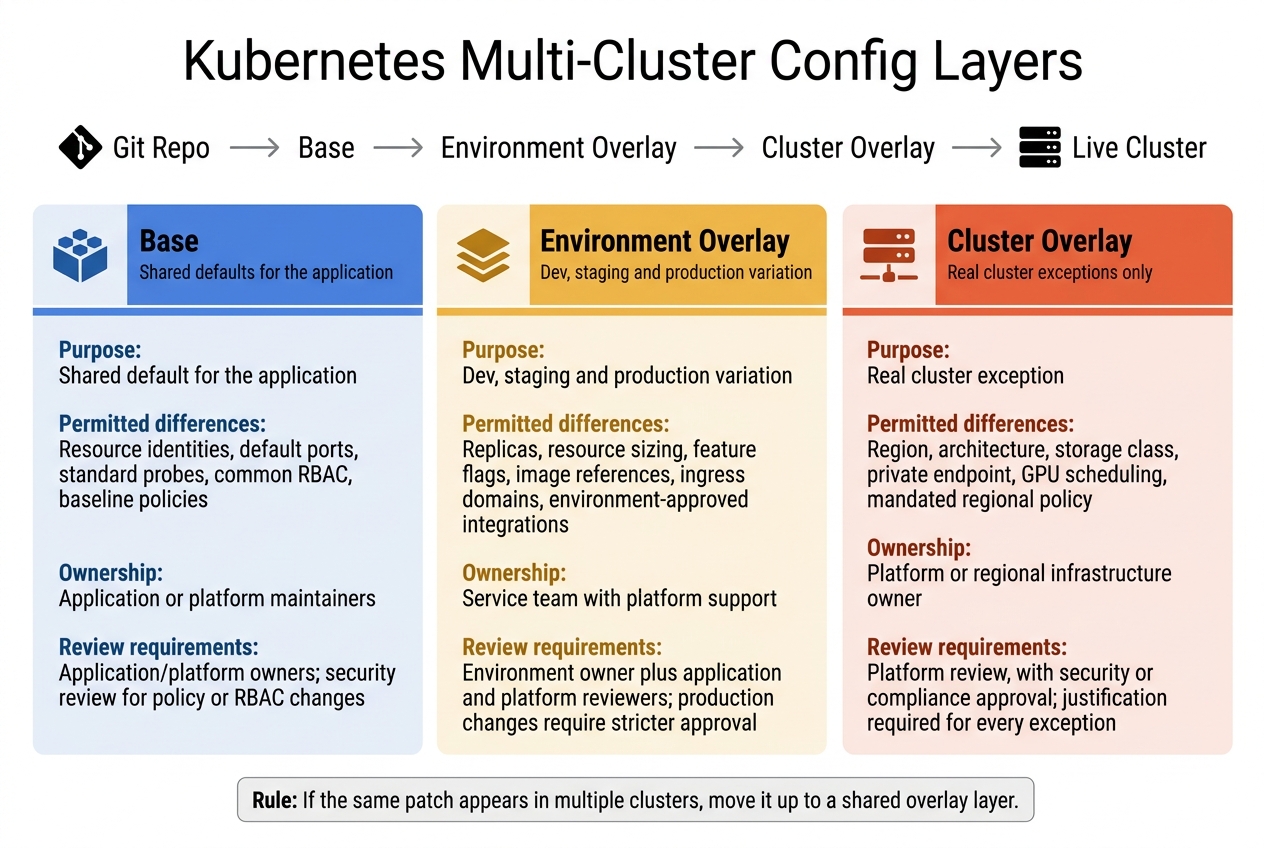 {Multi-Cluster Kubernetes Config Layers: Base vs Overlay vs Cluster}
:::
{Multi-Cluster Kubernetes Config Layers: Base vs Overlay vs Cluster}
:::
Once your app, platform and secret boundaries are clear, bake them into bases and overlays. A clean repository makes config easy to inspect instead of leaving people to assume it’s right. The aim is simple: keep shared settings in one place, and make every planned difference easy to see, small enough to review, and obvious before it hits a cluster.
Use bases for shared resources and overlays for dev, staging and production
A base should hold config shared across environments. That includes workload definitions, Services, shared labels, RBAC, network policies, health probes and pod-security settings. An overlay points to that base and changes only what a given environment needs.
A practical structure looks like this:
repo/
├── apps/
│   └── payments/
│       ├── base/
│       │   ├── deployment.yaml
│       │   ├── service.yaml
│       │   ├── rbac.yaml
│       │   └── kustomization.yaml
│       └── overlays/
│           ├── dev/
│           │   ├── kustomization.yaml
│           │   └── patches.yaml
│           ├── staging/
│           │   ├── kustomization.yaml
│           │   └── patches.yaml
│           └── production/
│               ├── kustomization.yaml
│               └── patches.yaml
└── clusters/
    ├── dev-london/
    │   └── kustomization.yaml
    ├── staging-london/
    │   └── kustomization.yaml
    └── production-manchester/
        └── kustomization.yaml
Environment overlays hold the differences between dev, staging and production. Cluster folders should add only cluster-level patches. A kustomization.yaml in each directory keeps the composition plain and easy to trace.
For example, the dev overlay might set one or two replicas, lower resource requests, internal ingress and non-production feature flags. The production overlay might patch in multiple replicas, a PodDisruptionBudget, stricter resource limits and an approved ingress domain. Each cluster folder then combines the right application overlay with any cluster-specific resources.
Every pull request should render the affected overlays and check the output before merge. Running kustomize build followed by kubectl apply --dry-run=server catches invalid schemas, missing labels and forbidden security settings during review. And reviewers shouldn’t stop at the patch. They should look at the rendered manifest, because a tiny overlay change can shift the final output in ways that aren’t obvious from the source diff alone.
Keep cluster-specific overlays small and justified
Use a cluster overlay only when there’s a real cluster constraint. Good examples include a regional ingress domain, a data-residency rule, available GPU or architecture, a cluster-specific storage class, a private network endpoint or a regulator-mandated policy. It should not become a handy escape hatch for a broken environment model or a quiet way to give one team an undocumented exception.
Use cluster overlays for exceptions, not routine environment differences.
The cluster overlay should stay thin. It should compose the environment overlay and add only what is actually different for that cluster:
# clusters/production-manchester/kustomization.yaml
resources:
  - ../../apps/payments/overlays/production

patches:
  - path: region-and-storage.yaml
The patch itself should include only the justified difference. For instance, that might be a node selector for topology.kubernetes.io/region: manchester, and nothing else. If the same regional rule shows up across several applications, the platform team should look at a shared regional component instead of pasting the same patch into every application directory.
This split helps keep ownership and review rules steady.
| Layer | Purpose | Permitted differences | Ownership | Review requirements |
|---|---|---|---|---|
| Base | Shared default for the application | Resource identities, default ports, standard probes, common RBAC and baseline policies | Application or platform maintainers | Application/platform owners; security review for policy or RBAC changes |
| Environment overlay | Dev, staging and production variation | Replicas, resource sizing, feature flags, image references, ingress domains and environment-approved integrations | Service team with platform support | Environment owner plus application and platform reviewers; production changes require stricter approval |
| Cluster overlay | Real cluster exception | Region, architecture, storage class, private endpoint, GPU scheduling or mandated regional policy | Platform or regional infrastructure owner | Platform review, with security or compliance approval where relevant; justification required for every exception |
If the same patch appears in multiple clusters, move it into a shared environment, region or capability overlay. Once cluster overlays start filling up with copied Deployments or different image references, you’re no longer looking at small exceptions. You’re looking at forks. And forks pile up operational risk as the fleet gets bigger.
Target the right clusters with groups, labels and controlled onboarding
After you define overlays, use cluster metadata to decide where each application should run. That split matters.
Overlays decide what runs. Cluster metadata decides where it runs.
Keeping those two jobs separate makes targeting much safer. You avoid baking cluster choices into manifest composition, which is where things can get messy.
Label clusters by environment, region, compliance and lifecycle
Use a small, documented set of labels for facts you can select on. Don’t treat labels like a notes field.
Label values should be short, stable and easy for machines to match. Longer explanations, contact details and change history belong in annotations, not labels. If you use organisation-specific keys, add a suitable DNS prefix. Keep names and values concise too, because Kubernetes labels are limited to 63 characters.[5]
| Targeting dimension | Example label values | Configuration decisions controlled |
|---|---|---|
| Environment |
environment=development, environment=staging, environment=production
|
Overlay selection, replica counts, resource limits, approval gates, monitoring policies |
| Region |
region=uk-south, region=uk-west, region=eu-west
|
Regional endpoints, data-locality settings, availability-zone rules, traffic configuration |
| Compliance |
compliance=standard, compliance=regulated, compliance=pci
|
Policy enforcement, encryption settings, audit tooling, restricted images, approved namespaces |
| Lifecycle |
lifecycle=provisioning, lifecycle=active, lifecycle=draining, lifecycle=retiring
|
Whether workloads may be added, migrated or removed |
| Disaster recovery |
dr=primary, dr=secondary, dr=standby
|
Backup agents, replication settings, failover configuration, recovery-only workloads |
| Workload role |
role=application, role=platform, role=edge
|
Which platform components or application portfolios are eligible for deployment |
So instead of a vague label like notes=temporary-cluster, use labels that say something clear and selectable. Vague labels cause two problems at once: they’re hard to reason about, and they make accidental targeting more likely.
Generate application targets from cluster groups rather than editing per cluster
Argo CD’s ApplicationSet Cluster generator reads the registered-cluster Secrets in the Argo CD namespace. It then exposes each cluster’s name, server URL, labels and annotations as template parameters.[2] That lets one ApplicationSet generate one Application per matching cluster, with matchLabels for inclusion and matchExpressions for exclusion.[3]
generators:
  - clusters:
      selector:
        matchLabels:
          environment: production
          region: uk-south
          lifecycle: active
          compliance: regulated
          workload.payments.example.com/enabled: "true"
template:
  metadata:
    name: '{{name}}-payments'
  spec:
    destination:
      server: '{{server}}'
      namespace: payments
    source:
      repoURL: https://git.example.com/platform/config.git
      path: apps/payments/overlays/production
The Cluster generator builds its target set from registered Argo CD clusters and updates as clusters are added, removed or relabelled.[4][6] That’s useful, but it also means selector changes are production changes. If you widen a selector or add a label, new Application objects can appear straight away. Treat that with the same review controls you’d use for code.
For production, keep selectors positive and specific. A selector that only checks environment=production is far too broad. At a minimum, require environment, region, compliance tier and an application opt-in label. Also exclude clusters marked lifecycle=draining or dr=standby. Before merging any selector change, preview the cluster set it will hit.
Controlled onboarding matters just as much as the selector design. A new cluster should begin with lifecycle=provisioning and no application opt-in labels. Only add those labels after automated checks show the platform baseline is working end to end: ingress, monitoring, policy enforcement, secret-provider integration, and network connectivity to the GitOps controller, repositories, registries, and secret or certificate services. Then set lifecycle=active after conformance tests and approval.
Retirement should follow the same logic in reverse. First set lifecycle=draining. Then move workloads in a controlled order, check that generated Applications no longer target the cluster, and only after that revoke credentials and remove registration. Joining or leaving a cluster group should be a reviewed, audited state change.[7][8]
Cluster selection is only one control. Secret delivery and release promotion should still follow their own lifecycles.
Manage secrets and release promotion as separate, controlled lifecycles
Cluster groups decide where workloads run. This section is about how secrets and releases move inside those boundaries. They should not share the same path.
Secrets and releases need different controls, different audit records, and different recovery steps. From this point on, treat secret delivery and release promotion as two separate tracks.
Store secret values outside Git and keep only references in configuration
Kubernetes Secrets are not a vault. By default, values are stored unencrypted in etcd, which is the API server’s backing data store. That means anyone with etcd access, an etcd backup, or enough RBAC permission can read secret values in the cluster.[1][9]
Use an approved external secret store, with a separate provider identity and path for each environment or cluster boundary. An ExternalSecret resource, a CSI volume mount, or a similar provider object tells the cluster where to fetch the value from, not what the value is. The external-secrets controller reads from the approved store and creates the Kubernetes Secret the workload uses.[9][10]
Your Git repository should contain only non-sensitive references, such as payments/prod/database-password, along with the target namespace, the Kubernetes Secret key, and the refresh policy. It should never contain the password itself.
Prefer short-lived workload identity or federated identity over long-lived cloud access keys stored inside Kubernetes Secrets.[11]
Access should stay tight. The workload or external-secrets controller should get only the permissions needed for its own environment and secret path. Kubernetes RBAC should limit Secret access to the smallest possible set of service accounts, namespaces, and verbs. Kubernetes guidance specifically recommends restricting get, watch, and list, with watch and list kept for components that actually need them.[9]
Separate namespaces by application and environment. Add network and admission policies where they fit. Audit both cloud-provider permissions and in-cluster RBAC.
Rotation frequency should match risk, provider support, and any regulatory duties, not an arbitrary diary date. The design should also make clear whether apps reload mounted secrets on their own or need a restart.
| Secret category | Recommended storage | Access scope | Typical rotation owner and cadence | Recovery procedure |
|---|---|---|---|---|
| TLS certificates and private keys | Managed certificate service or external vault | Ingress controller or narrowly authorised gateway namespace | Platform/security team; automate renewal before expiry | Reissue from the certificate authority, update the external reference and verify ingress termination |
| Registry credentials | Cloud registry identity or external secret store | Image-puller service account in the required namespaces | Platform team; rotate immediately after suspected exposure | Create a replacement credential, update the pull secret or identity binding, then revoke the old credential |
| Database credentials | Vault or managed database secret service | Only the application service account and approved migration job | Database/platform owner; automatic rotation where supported, otherwise on a defined schedule | Restore the secret-store version, rotate the database credential if necessary and redeploy affected workloads |
| API keys | External secret store with provider-side scopes | Only the workload calling the external API | Application/security owner; provider policy or risk-based schedule | Issue a replacement key, deploy it through the secret reference, test, then revoke the compromised key |
If a plaintext secret is committed, revoke it at once. Deleting the commit is not enough.
Once secret paths are isolated, promotion can move through the same cluster groups without exposing credentials.
Promote the same version from development through staging to production
Promotion changes artefacts. Secret rotation changes references.
Promotion should move one immutable application version, such as a container image digest, a signed Helm chart version, or a similar artefact, through each environment. The same digest reconciled in development should be the one that reaches production. Rebuilding at every stage breaks traceability and creates a nasty risk: staging and production may not be testing the same thing at all.
The release path follows four actions:
- Render manifests and run schema, security, policy, and vulnerability checks.
- Reconcile in development and verify health, logs, metrics, integration tests, and secret-store access.
- Promote the exact tested digest to staging and repeat deeper validation.
- Deploy to a small production canary, check error rate, latency, saturation, and business metrics against set thresholds, then expand bit by bit or roll back to the last known-good version.
A production release should promote an image digest without touching the database credential. A credential rotation should publish a new secret version in the external store and trigger a reload without rebuilding the application. If a release needs a new credential schema, deploy backward-compatible code first, provision the new secret, switch consumers, verify usage, and then revoke the old value.
| Environment | Approval requirements | Validation depth | Rollout scope | Rollback authority |
|---|---|---|---|---|
| Development | Automated checks and team-level review; emergency changes documented afterwards | Manifest rendering, policy checks, unit/integration tests and basic reconciliation | One development cluster or a limited cluster group | Service owner or development on-call |
| Staging | Reviewed promotion pull request and designated service/platform approval | Development checks plus end-to-end tests, migration rehearsal, observability verification and representative load testing | One or more staging clusters, normally with controlled exposure | Service owner with platform support |
| Production | Protected branch rules, two-person or designated approver review, change record and release approval | All earlier checks plus canary health gates, security evidence, capacity checks and rollback rehearsal where required | Canary workload or small cluster subset, followed by progressive expansion | Production incident commander or authorised release/platform owner |
Record the commit, digest, renderer version, approvers, validation results, timestamps, and rollback target. Rollback is an operational procedure: identify the previous immutable version, revert the promotion reference, reconcile the affected cluster group, and verify service and data compatibility.
Database migrations need extra care. An application rollback may not undo an irreversible schema change, so use expand-and-contract migrations or document a separate recovery plan.
Governance, drift control and conclusion
Enforce review rules, policy checks and drift monitoring across every cluster
Once config, secrets and promotion are set, governance is what keeps every cluster in line. That means clear ownership, policy checks, drift control and cost review.
Start with repository ownership. Use CODEOWNERS, or a similar setup, so platform teams own shared bases, overlays, cluster labels and secret references, while application teams own their own overlays. Protect the default branch with signed commits where that makes sense, mandatory status checks and no direct pushes. For changes to production overlays, require extra approval from the service owner and the platform or security owner. PRs, approvals, rendered manifests, policy results and the deployed revision make up the audit trail.
Policy-as-code turns platform standards into enforced controls. Run policy checks at pull-request stage and, where needed, at admission. Block privileged containers, unapproved registries, missing resource requests and limits, missing security contexts and plaintext secrets. Apply ResourceQuota and LimitRange per namespace so Kubernetes can enforce total usage limits. Every exception should include a named owner, business justification, compensating control and an expiry date.
Reconciliation health shows whether desired and live state match. Track sync status, time since the last successful reconciliation, the commit revision applied and failed resources. Alert if a cluster stays behind the approved revision longer than its agreed service-level objective.
Cost control should sit in the same loop. Review CPU and memory requests against actual use, flag idle namespaces and stale preview environments, and find unattached persistent volumes, unused load balancers and orphaned workloads. CNCF guidance points to over-provisioning and pod requests set too high as common causes of Kubernetes overspend. Keep cost reports, rightsizing actions and deletion records alongside the security and policy evidence.
When normal Git-based promotion is too slow, allow emergency changes only through a documented break-glass path with time-limited access and a named incident record. After stabilisation, reproduce the change in the repository, run the usual validation and reconcile the cluster back to the approved Git revision. Kubernetes audit logging gives you the chronological record needed to review break-glass activity.
These controls need named owners and retained evidence.
| Control area | Required practice | Evidence to retain | Failure signal | Responsible owner |
|---|---|---|---|---|
| Repository governance | Protected branches, code ownership and mandatory reviews | Pull request, approvals, commit, rendered diff and immutable audit log | Unreviewed or unauthorised change | Platform engineering |
| Production promotion | Promote an immutable image and configuration revision through defined stages | Release record, revision IDs and deployment result | Production revision differs from approved release | Release engineering |
| Security policy | Scan manifests and images; enforce admission policies | Policy report, exception and expiry | Privileged, non-compliant or unapproved workload | Security engineering |
| Resource governance | Require requests and limits; apply quotas and limits per namespace | Quota configuration, utilisation report and exception | Quota rejection or excessive requests | Platform and service owners |
| Reconciliation | Continuously compare desired and actual state | Sync history, health status and alerts | Persistent drift or failed reconciliation | Cluster operations |
| Emergency changes | Use time-limited break-glass access and reconcile afterwards | Incident record, audit event, access review and follow-up pull request | Manual change not represented in Git | Incident commander |
| Cost control | Review idle, orphaned and oversized resources | Cost allocation, rightsizing and cleanup reports | Rising spend without corresponding workload demand | FinOps or platform owner |
Key takeaways for a scalable multi-cluster operating model
At scale, undocumented cluster commands and per-cluster edits turn into a problem fast.
The model in this guide comes down to six rules:
- Treat configuration as versioned declarative state, not a pile of imperative commands.
- Keep shared resources in bases and put only real differences in small, reviewable overlays.
- Target workloads through explicit cluster groups and labels instead of brittle per-cluster edits.
- Keep secret values outside ordinary Git workflows, and commit only references and access policies.
- Promote the same tested revision through development, staging and production with approvals, automated policy checks and rollback by Git revision.
- Measure reconciliation health, security posture, resource efficiency and cost continuously across the fleet.
The result is a fleet that is auditable, reversible and built to scale.
FAQs
When should I create a cluster overlay?
Create a cluster overlay when you need settings for one cluster but still want to share the same base.
This works well for environment differences. For example, you might use lower resource limits or fewer replicas in non-production clusters. That way, your setup stays modular, cuts duplicate config, and avoids changes spilling into other environments.
How do I onboard a new cluster safely?
Standardise your platform first so you don’t end up with one cluster behaving differently from the next. Use the App of Apps pattern to bootstrap new clusters with the same core toolset, then apply GitOps so configuration stays version-controlled and peer-reviewed.
It’s the difference between building from a clean template and patching things by hand later. One approach keeps drift in check. The other usually turns into a headache.
Before anything goes live, add policy checks with OPA or Kyverno. That gives you a gate in front of deployment, not a clean-up job after the fact. For secrets, use the External Secrets Operator so the cluster pulls credentials from a central provider instead of depending on manual synchronisation.
What should trigger a release rather than a secret rotation?
A release should start when application code or infrastructure configuration changes. Those changes should move through GitOps workflows so teams have version control, peer review, and a clear audit trail.
Secret rotation should run as a separate automated process. That cuts the time secrets stay exposed and helps support GDPR compliance. In practice, releases move from development to production, while secret rotation sits alongside them as its own security maintenance task.