
Multi-cloud spend often grows because teams leave idle, oversized, duplicated, and untagged resources running. In the article, I show that Infrastructure as Code can cut this by making sizing, tagging, shutdown schedules, drift checks, and budget alerts part of the default build process.
If I had to boil it down, the article says this:
- About 27% of cloud IaaS and PaaS spend is wasted on idle and overprovisioned resources.
- Non-production environments are often the fastest place to cut cost, with 50–70% compute savings from start-stop schedules.
- Ephemeral environments can trim 20–40% from short-lived dev and test work.
- Rightsizing in code helps stop oversized instances before they go live.
- Tagging, budgets, and alerts in code make spend easier to track in £ by team, project, and environment.
- Regular reconciliation helps remove drift, duplicate services, and forgotten resources.
- A hybrid model usually works best: a platform team sets the rules, while product teams deploy within them.
My main point is simple: if you want lower cloud bills across AWS, Azure, and Google Cloud, put cost controls into code instead of relying on manual clean-up.
Here’s the article in one quick view:
| Area | What I focus on | Typical result |
|---|---|---|
| Rightsizing | Approved sizes in shared modules | Less overprovisioning |
| Non-prod scheduling | Stop workloads outside 09:00–17:30, Mon–Fri | 50–70% lower non-prod compute spend |
| Ephemeral environments | Auto-create and auto-destroy short-lived stacks | 20–40% lower non-prod compute and storage spend |
| Tagging and budgets | Mandatory tags plus 50% / 75% / 90% alerts | Better cost allocation and earlier warnings |
| Drift control | Regular checks against live infrastructure | Fewer duplicate and orphaned resources |
| Ownership model | Shared guardrails with team-level use | Better control without slowing delivery too much |
I then move from the cost problems, to the five IaC tactics, to ownership choices, and finally to the KPIs I’d track in GBP to prove the savings.
::: @figure 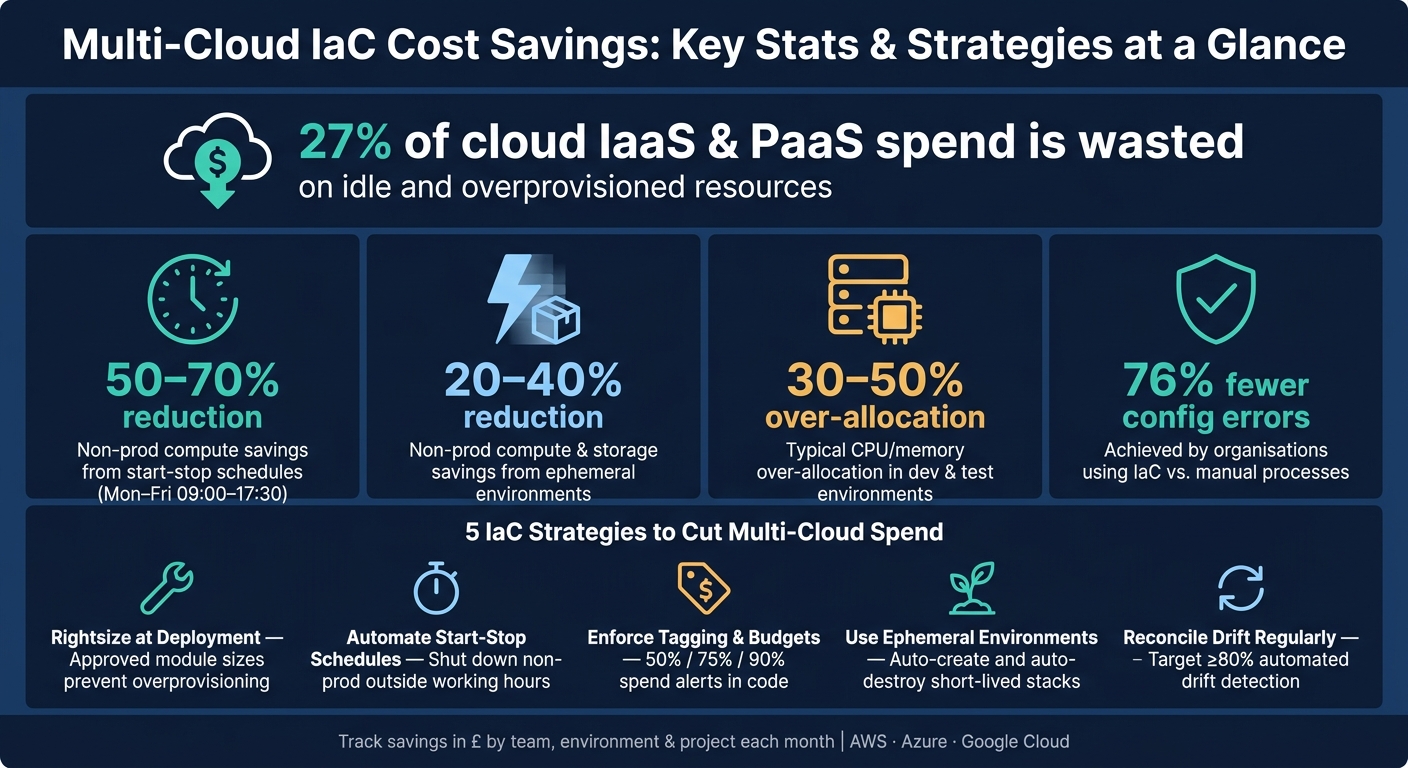 {Multi-Cloud IaC Cost Savings: Key Stats & Strategies at a Glance}
:::
{Multi-Cloud IaC Cost Savings: Key Stats & Strategies at a Glance}
:::
Build AI Agents for Infrastructure Cost Optimization | GitHub Copilot Custom Agent Tutorial
Need help optimizing your cloud costs?
Get expert advice on how to reduce your cloud expenses without sacrificing performance.
How IaC creates a cost-control baseline across clouds
IaC turns cloud builds into repeatable, reviewable changes. That means cost rules can be checked before deployment, not after a surprise lands on the monthly bill.
Instead of building resources by hand, teams store changes in version-controlled files, review them through pull requests, and run automated checks before anything goes live. That simple shift makes cost control far more consistent across clouds. In practice, the baseline rests on two things: shared modules for standard builds, and policy checks for non-negotiable limits.
A separate study on IaC in cloud migration reported organisations using IaC experienced 76% fewer configuration errors compared with manual processes, with network configuration errors falling by 82% and security configuration errors by 79%.[1]
That matters for cost just as much as reliability. Misconfigured networks, duplicate gateways, and over-permissioned resources can all push up the monthly spend.
Reusable modules for standard sizing, tagging and network patterns
Modules turn cost rules into defaults rather than one-off fixes. A reusable module can map approved service tiers to approved instance sizes in each cloud, so teams don't overprovision from day one. That directly tackles two common waste problems covered earlier: oversized resources and unallocated spend.
Tagging follows the same pattern. Modules can enforce mandatory labels on every resource they create, which makes cost allocation much less messy later on. Use one tag format across clouds: short, lowercase, hyphen-separated keys such as cost_centre, environment, owner, and project.
Without that, a big chunk of the monthly bill can slip into unallocated spend that neither engineering nor finance can tie back to a team, system, or project.
Policy as code for mandatory guardrails
Policy then backs up those defaults before any resource is created. Policy as code can block plans that break the rules, including missing tags, oversized instances, or disallowed regions. So instead of spotting problems after deployment and cleaning them up later, teams stop non-compliant changes at the point of change.
That helps with drift and governance in a very direct way: if the plan fails the check, it never enters the estate.
Once the baseline is in place, the next step is to apply it to sizing, schedules, and environment lifecycle.
5 IaC strategies that reduce multi-cloud spend
Once you have a cost-control baseline, the next job is simple in theory and hard in practice: apply it the same way every time. That’s where IaC starts to pay for itself. Done well, it turns modules and policy into lower spend across deployment, runtime and cleanup.
Standardise and rightsize infrastructure at deployment time
A lot of teams still allocate far more CPU and memory than they need. In dev and test, over-allocation often sits in the 30–50% range. Approved IaC modules deal with that problem at the start.
Instead of letting people pick whatever looks safe, you encode approved instance families, sizes and storage classes by workload type, such as web API, batch job or data pipeline. That cuts out the usual habit of reaching for an oversized tier “just in case”.
One practical Terraform case study found a 50% AWS cost reduction after combining rightsizing based on CloudWatch utilisation metrics with automated scheduling and built-in cost monitoring.[6] The big point here is control: if the module is the only approved route to deployment, ad-hoc “xlarge” choices never end up in the estate.
Automate start-stop schedules and teardown for non-production environments
For non-production environments, idle capacity should switch off by default. If it sits there doing nothing overnight, it shouldn’t still be running.
Native schedulers such as AWS EventBridge, Azure Automation and Google Cloud Scheduler can stop VMs, scale services to zero or pause non-critical databases outside working hours. For UK teams, that usually means Monday to Friday, about 09:00–17:30, which leaves evenings, nights and weekends as obvious windows to shut dev and test infrastructure down. Doing that can cut non-production compute spend by 50–70%.[5]
The UK Government’s own cloud guidance says the same thing: switch off non-production environments outside working hours and run test environments only during active testing.[5] When that logic sits inside IaC, it keeps happening even when teams are under pressure and nobody wants to stop and tidy things up.
Enforce tagging, budgets and alerts in code
Tagging rules tend to fall apart when they rely on memory or good intentions. It’s much safer to enforce one tag schema in policy, then add monthly budgets and 50%, 75% and 90% alerts in the same module.[7]
IaC can create monthly budgets in GBP for each team or cost centre, then send alerts through Slack, Teams or email.[7] That gives showback and chargeback a solid base, and it flags odd spend long before anyone gets to the end-of-month bill review.
A useful KPI here is tag coverage percentage: the share of resources that carry every required tag.[7] Track it from day one. It gives finance and engineering the same live picture of spend instead of two different versions of the truth.
Use ephemeral environments for short-lived work
Some environments simply shouldn’t hang around. Feature branches, performance tests and pre-release checks are the obvious examples. If the work is short-lived, the stack should be too.
IaC pipelines can spin up a full isolated stack when a branch opens, including networking, compute, data stores and observability, then destroy it when the branch is merged or closed. Add a TTL and automated cleanup, and those environments disappear on schedule instead of lingering for weeks.
Teams that use ephemeral environments often report 20–40% savings on non-production compute and storage. They also tend to move faster because engineers start with a clean, consistent environment each time.[4] In multi-cloud setups, parameterised templates make it easier to launch these short-lived stacks on whichever provider or region has the best price at that point.
Reduce drift and duplicate services with regular reconciliation
Drift is sneaky. A manual console change here, an emergency fix there, a quick experiment nobody cleaned up after - and suddenly the live environment no longer matches the IaC definition. That usually means forgotten instances, duplicate volumes and parallel services, all quietly adding to the bill.
Regular reconciliation keeps the live estate lined up with the declared module set. Tools such as driftctl, Terraform plan runs in CI and AWS Config rules compare the live environment with the code definition and flag differences before they pile up.[2][3]
Aim for at least 80% automated drift detection and remediation, and treat manual remediation as a failure pattern rather than a normal fallback.[3] When you run reconciliation on a set schedule and pair the output with tagging and cost dashboards, it becomes much easier to spot which gaps have the biggest financial hit and deal with those first.
Choosing the right operating model for multi-cloud IaC
Once the cost rules are set, the next step is simple: who owns them? Cost plans only work when ownership is clear and someone is accountable for keeping the rules in place.
Single IaC control layer versus provider-specific templates
A single IaC control layer gives you one way to apply policy and one way to report across clouds. For cost control, that's the big win. You have one pipeline and one place to update a rule when something changes.
Provider-specific templates let teams go deeper into each cloud's native features. That can work well for teams that are heavily invested in one provider. But there's a catch: governance starts to split. A cost control in AWS might not line up with what Azure applies, and cross-cloud reporting gets much harder to keep in step.
Many organisations land in the middle. They standardise on one shared control layer, then use cloud-native modules where deeper integration makes sense.
The control layer itself isn't the whole story, though. It only works if the operating model makes it easy for teams to use it without stepping around the rules.
Central platform team versus team-owned infrastructure code
The same tension shows up in ownership. Central control improves consistency. Team ownership improves speed. Most firms end up balancing those two forces.
A central platform team owns the reusable modules, state backends and CI/CD templates. Product teams then use approved building blocks instead of writing all their infrastructure code from scratch. This gives leadership one place to enforce cost, drift and compliance. The trade-off is pretty clear: if the platform team turns into a bottleneck, delivery slows and product teams are left waiting.
Team-owned infrastructure code moves faster. Product teams can provision what they need without sending requests through a central function. But if shared guardrails aren't in place, cost control can fall apart fast.
| Central Platform Team | Team-Owned Infrastructure Code | |
|---|---|---|
| Speed of change | Slower - potential bottleneck | Faster - teams deploy at their own pace |
| Policy enforcement | Strong - mandatory guardrails applied globally | Variable - depends on individual team discipline |
| Cost visibility | High - unified reporting across all units | Fragmented - requires central aggregation |
In many cases, a hybrid operating model is the best fit. The platform team sets the golden paths, approved modules and cost guardrails. Product teams deploy from those building blocks and own the cost efficiency of their own units. That way, teams keep moving, while cost governance stays under central control.
Implementation plan and success measures
Once the operating model is in place, the next step is execution. Start by auditing spend, fix the biggest sources of waste first, and then measure what changes. As you go, turn each fix into a module or policy so it becomes a repeatable rule across clouds instead of a one-off clean-up.
Start with a cost and configuration audit
Use the IaC baseline to spot the biggest leaks before you codify fixes. Pull in at least 30 days of billing and usage data from native tools such as AWS Cost Explorer and AWS Config, Azure Cost Management + Billing and Resource Graph, and Google Cloud Billing reports and Asset Inventory.[10] Then bring that data into one normalised view so you can compare spend by service, environment, and team.
The audit should flag a few problem areas straight away: tagging gaps where resources have no owner or cost centre, oversized instances where average CPU sits below 30%, non-production environments running 24/7, and duplicate services such as parallel monitoring stacks. Non-production workloads alone often account for 30–50% of total cloud spend.[12]
Rank findings by spend, effort, and risk. In most cases, tag enforcement and non-production scheduling should come first. After that, you can move to duplicated tooling and storage lifecycle policies. Policy-as-code controls usually make more sense later, once the basics are in good shape. Use the audit results to set the first savings targets and check the effect of each change as it lands.
Track savings with clear KPIs
Track these KPIs, reported in GBP, as proof that IaC is cutting waste across clouds, not just producing more reports.
| KPI | What to measure | Target |
|---|---|---|
| Monthly infrastructure spend (£) | Total spend across AWS, Azure and GCP, split by environment and team | Month-on-month decline |
| Tagged spend coverage | Percentage of total £ spend tied to a team, product or cost centre | ≥90% within 6–12 months[9] |
| Out-of-hours non-prod runtime | Hours per week non-production compute runs outside 08:00–18:00, Mon–Fri | 60–70% reduction after scheduling[11] |
| Drift incidents | Number of configuration changes made outside IaC per month | Steady reduction; zero in critical environments |
| Time to provision | Average time from request to usable approved environment | From days or weeks to hours |
| Rightsizing and shutdown savings (£) | Baseline versus post-change spend, adjusted for growth | Track over 3–6 months |
Measure tagging coverage by spend, not just by resource count. That detail matters. If the gap between resource-count coverage and spend-weighted coverage is more than 20 percentage points, cost reporting becomes unreliable.[8]
Use at least three months of baseline data, normalise for business volume, and report monthly so finance can follow savings in £ terms.
Conclusion: Building a multi-cloud cost programme with IaC
The idea here is straightforward: IaC turns one-off controls into a working model. Multi-cloud cost control doesn't come from occasional tidy-ups or manual checks. It comes from putting infrastructure choices into code, backing them with policy, and tracking the impact in £ over time.
Audit, KPIs, schedules and tagging only work properly when they work together. Each IaC change should be deliberate, traceable and linked to a financial result. That's what ties audit, deployment and reporting into a single cost programme.
Most savings don't come from big redesigns. They come from routine controls. A lot of waste sits in idle, over-provisioned or orphaned resources, especially in non-production environments. That's why it's smart to start with schedules, sizing and tagging. They tend to deliver the fastest savings.
Key takeaways for UK businesses
The earlier strategies only work when they become part of day-to-day practice. To make that happen, focus on four actions:
- Standardise IaC modules for sizing, tagging and network patterns across clouds.
- Automate non-production schedules, teardown and ephemeral environments for fast savings.
- Enforce policy as code, starting in audit-only mode and then moving to blocking rules.
- Link IaC changes to FinOps reporting so savings are tracked by team and environment each month.
The next step is clear: audit your current cloud patterns, spot the main sources of waste, and roll out codified controls bit by bit. If you're dealing with a regulated or more complex estate, specialist support can cut the time from audit to automated control.
When these controls run through code and policy, savings become repeatable instead of one-off. Done well, IaC makes multi-cloud spend measurable, governable and easier to cut.
FAQs
Which IaC cost controls should we implement first?
Start with a crawl-walk-run approach that puts visibility first. Build consistent resource tagging into your IaC templates, including fields like project, cost centre and owner, so every resource has a clear line of accountability.
Then add automated cost estimation to your CI/CD pipelines. After that, put policy-as-code guardrails in place to block non-compliant deployments, such as oversized instances or untagged resources.
How do we balance team autonomy with central cost governance?
Codify guardrails in the delivery workflow with Policy as Code across CI/CD and IaC. That puts rules where teams already work: in the pipeline, before anything goes live. Add tagging standards, cost estimation checks, and spending or resource limits so people get fast, steady feedback before deployment instead of dealing with surprises later.
Central teams set governance, budgets, and allocation rules. Platform teams handle the tooling and pipeline setup. Application teams check cost impact during code review, while the change is still easy to fix.
A simple rollout tends to work best:
- Start with advisory warnings so teams can see what the rules flag
- Tune thresholds based on what shows up in day-to-day delivery
- Move to hard blocks once the rules are settled and teams trust the process
That way, guardrails don't feel like a last-minute barrier. They become part of how software gets shipped.
What KPIs best prove multi-cloud savings in £?
Track KPIs that tie infrastructure efficiency to spend: cost per deployment or build, resource utilisation rates, the ratio of spot to on-demand instances, and data transfer costs between clouds and data centres.
It also helps to watch compliance score for accurate cost allocation, along with unit costs like cost per customer or per transaction. Those metrics show the clearest link between cloud operations and business value.