
If I run data across AWS, Azure and Google Cloud, I need one policy model, not three separate sets of rules. With 92% of organisations facing at least one multi-cloud security incident and 67% struggling to keep policies aligned, the risk is clear: split controls lead to gaps.
For me, the fix is simple on paper: set ownership, classify data, control change, lock down access, enforce retention, and check for drift. That also lines up with UK GDPR Articles 5(1)(f) and 32, which expect me to protect data integrity, keep systems resilient, and restore data after incidents.
Here’s the whole article in a short list:
- Ownership comes first: assign a business owner, steward, control owner, and evidence owner by dataset
- Use one classification model: Public, Internal, Confidential, Restricted
- Make change control standard: version control, review, approval, testing, rollback
- Use one access model across clouds: least privilege, MFA, short-lived credentials, separation of duties, break-glass rules
- Set retention by legal duty: personal data, finance records, staff records, logs, and backups all need clear time limits
- Check drift often: compare live settings with the approved baseline and treat major drift as an incident
- Keep proof: immutable logs, restore tests, checksum checks, and review records matter as much as the controls themselves
A short comparison helps show how the same policy areas map across each cloud.
| Policy area | AWS | Azure | Google Cloud |
|---|---|---|---|
| Access control | IAM, IAM Identity Centre, SCPs | RBAC, Entra ID, PIM, Policy | IAM, federated identity, Organisation Policy |
| Logging and audit | CloudTrail, Config | Activity Logs, Azure Policy | Cloud Audit Logs, Cloud Asset Inventory |
| Encryption and keys | KMS, CloudHSM | Key Vault, HSM | Cloud KMS, Cloud HSM |
| Retention and immutability | S3 Lifecycle, Object Lock | Blob lifecycle, immutable blob storage | Object Lifecycle Management, Bucket Lock |
| Drift checks | AWS Config, Security Hub | Azure Policy, Defender for Cloud | Organisation Policy, Security Command Center |
That is the core message: one written policy, mapped into each cloud’s native tools, with proof that it still matches the live estate.
Leveraging CDMC Framework for Effective Cloud Data Governance
Set the governance model: ownership, classification and accountability
Before you configure a single control in AWS, Azure or Google Cloud, decide who owns the data, who signs off changes, who applies controls and who gathers evidence. If you skip that step, teams start making up their own rules, and that’s when compliance gaps creep in. These choices set the ground rules for every control that comes next.
A sensible place to start is a RACI-style setup at the dataset or domain level. The business owner is accountable for the dataset’s purpose and approved use. The technical steward handles day-to-day quality, schema and lineage. The control owner checks access, logging and retention controls. The evidence owner gathers proof and shows that controls worked as expected. AWS IAM, Azure RBAC/PIM and Google Cloud IAM are just the mechanics underneath; the decision rights stay the same across providers.[12][14][17]
Assign data ownership and stewardship by dataset
Ownership should follow the data, not the platform. In a multi-cloud setup, the same dataset often sits across more than one provider, so assigning ownership by cloud account gets messy fast. It’s much clearer to assign it by domain.
Start by mapping customer records, payment data, employee records, product catalogues and support cases. Each has a different level of business sensitivity and a different governance need, so the policy should name the business owner, the technical steward and the control owner for each one.[12][14][17]
Set out the escalation path for incidents and exceptions: steward → data owner → security/compliance reviewer → executive sponsor for high-risk cases. If a restricted dataset is misclassified, or a drift check finds an unexpected permission change, the steward investigates first. The owner then judges the business impact, and security decides whether the right move is containment, rollback or a formal exception. Spell out how long exceptions can remain open, who can extend them and what evidence is needed to close them.[13][15][16][17]
Apply a shared classification policy across clouds
A four-level model - Public, Internal, Confidential and Restricted - gives teams enough detail to act without turning the whole thing into a bureaucratic headache. Keep the model small enough that every team can apply it in the same way across all providers. The labels stay the same everywhere; only the implementation changes. Each level should come with fixed rules for access approval, integrity checks, retention, logging and review frequency, so there’s no guesswork once a dataset is classified.[2][3][8][10][1]
The table below shows how each classification level maps to a UK business context, the integrity controls it needs, and how those controls are applied natively across all three providers.
| Classification | UK Business Use Case | Required Integrity Controls | AWS Implementation | Azure Implementation | Google Cloud Implementation |
|---|---|---|---|---|---|
| Public | Marketing site content; public API documentation | Audit logging; public access prevention on sensitive buckets | S3 Public Access Block; CloudTrail | Azure Policy (deny public blob access); Activity Logs | Organisation Policy; Cloud Audit Logs |
| Internal | IT service desk tickets; employee records | MFA for access; versioning enabled; weekly drift checks | IAM roles; S3 Versioning | RBAC assignments; Blob Versioning | IAM roles; Object Versioning |
| Confidential | SaaS customer PII; e-commerce order history | AES-256 encryption at rest; just-in-time access; audit logging | AWS KMS (CMK); CloudTrail; GuardDuty | Azure Key Vault; Purview; PIM | Cloud KMS (CMEK); VPC Service Controls |
| Restricted | Regulated financial or health data; encryption keys | Encryption; HSM; UK residency lock; auto-remediation | CloudHSM; AWS Organizations SCPs for region restrictions | Dedicated HSM; Azure Policy for location restrictions | Cloud HSM; Organisation Policy for resource location restrictions |
Classification should happen when a dataset is created, not bolted on after something goes wrong. Use tags and labels so classification flows straight into access, encryption and retention controls.[4][5][6][7][8][9][10][11] Once a dataset has a classification label, that label should drive change approval, access and retention rules.
Build the policy controls: change, access and retention
Turn ownership and classification into controls people must follow. In practice, the classification label should decide three things: how change is approved, who gets access, and how long data stays in place.
Standardise change control for schemas, pipelines and infrastructure
Untracked schema edits and pipeline changes cause chaos fast. The fix is simple: put every data-related change through the same process. That includes schema migrations, pipeline updates, new IAM roles, and small storage setting changes.
Use one five-step flow across AWS, Azure and Google Cloud:
- Version control
- Peer review
- Formal approval
- Testing
- A documented rollback plan
Infrastructure as Code (IaC) turns this from a good intention into something you can police. If S3 buckets, Azure Blob containers, IAM policies, KMS keys and lifecycle rules all live in Git as code, production only changes when the right people approve it. Protected branches and required pull request approvals make side-door changes much harder. In regulated setups, add CAB sign-off for production IAM and encryption changes.
| Change type | Required approvals | Validation steps | AWS tools | Azure tools | Google Cloud tools |
|---|---|---|---|---|---|
| Schema changes | Data owner + data engineer lead | Migration dry run on staging; compatibility tests; sample data validation | RDS/Aurora schema migration scripts; CodeBuild; CodePipeline | Azure SQL DACPAC/BACPAC; Azure DevOps pipelines | BigQuery schema updates via Terraform; Cloud Build |
| Pipeline changes | Data engineering lead | Test run against representative data; row count and null checks; canary monitoring | AWS Glue; CodePipeline | Azure Data Factory; Synapse | Dataflow; Cloud Composer; Cloud Build |
| IAM changes | Security team + platform lead | Policy linting; least-privilege checks; test from non-privileged account | IAM Access Analyzer; AWS Config; CloudTrail | Entra ID checks; Azure Policy; Activity Logs | IAM Recommender; Organisation Policy; Cloud Audit Logs |
| Storage configuration | Platform team + security | Verify encryption, replication destinations, logging and lifecycle rule alignment | AWS Config; CloudFormation | Azure Policy; Bicep/ARM templates | Terraform or Deployment Manager; Cloud Build with policy checks |
Approvals on paper don't mean much if you can't prove what happened. Every change needs an audit trail that shows who proposed it, who approved it, what was tested, and what reached production.
Define one access policy model for AWS, Azure and Google Cloud
Use one written access standard for all three clouds, then map it to each platform's native identity tools. That keeps the rule set simple even when the tooling differs.
Every privileged action should tie back to a named role or federated identity. Short-lived credentials should be the default for both people and workloads. So instead of handing out long-lived API keys, federate into each cloud through a central identity provider. AWS IAM Identity Centre, Azure Entra ID with Privileged Identity Management (PIM), and Google Cloud federated identity patterns all support this model.
Break-glass accounts need tight control too. These are emergency roles with high privilege, but they should be time-limited, explicitly assumed, and set off automated alerts the moment someone uses them. After that, there should be a mandatory post-incident review. If someone reaches for the fire axe, you want the alarm to ring straight away.
| Control theme | Policy requirement | AWS mechanism | Azure mechanism | Google Cloud mechanism |
|---|---|---|---|---|
| Least privilege | Role-based access; no wildcard permissions; no direct individual grants where possible; no persistent admin rights to production | IAM roles with tightly scoped policies; SCPs restricting dangerous actions; IAM Access Analyzer | Azure RBAC built-in and custom roles; Azure Policy to prevent broad assignments | IAM predefined/custom roles; Organisation Policy limiting roles/owner; IAM policy analyser |
| MFA | Required for all console logins and privileged role activation | IAM MFA enforcement; identity provider integration; SCPs preventing actions from non-MFA sessions where feasible | Entra ID Conditional Access; PIM requiring MFA on role activation | Google Workspace MFA policies; identity-provider controls |
| Short-lived credentials | Use federated sign-in and temporary tokens only; ban static API keys | AWS STS; IAM Identity Centre; OIDC federation | Managed Identities; PIM time-bound eligible roles | Federated identity and token-based access |
| Separation of duties | No single role can both deploy and approve; key admins cannot access production data directly | Distinct IAM roles for deployment vs approval; separate KMS key admin roles and data access roles | Separate RBAC roles for infra ops vs data access; PIM with different approvers per role | Different IAM roles for resource management vs data access; audit log checks for conflicts |
| Break-glass access | Emergency accounts exist; used only under documented incidents; automated alerts on use | Break-glass IAM roles in dedicated organisational units; CloudTrail alerts | Dedicated cloud-only global admin accounts; sign-in alerts; runbook procedures | High-privilege emergency accounts at organisation level; Cloud Audit Logs; alerts |
| Scheduled access reviews | Quarterly review of roles, group membership and high-privilege accounts | IAM Access Analyzer; IAM Credential Reports | Entra ID Access Reviews; RBAC role audits | Cloud Asset Inventory snapshots; IAM Recommender |
Map retention and residency rules to cloud-native lifecycle controls
Retention controls are about proof as much as storage. They preserve the records you need to show integrity, legal hold, and deletion timing. Set retention by data class and legal duty. UK-focused guidance suggests 7 years for financial records, 6 years after leaving for employee records, 6 years for completed client contracts, and keeping marketing lists only until consent is withdrawn[18].
Each rule should spell out its regulatory basis, retention period, storage tier and deletion trigger. Once that's in place, use cloud lifecycle controls to enforce it. On AWS, S3 Lifecycle rules move data between storage classes and into Glacier, while S3 Object Lock in governance mode blocks deletion until the retention period ends[20][22][24]. On Azure, Blob lifecycle management handles tier moves and deletion, but the Archive tier has a minimum 180-day retention. Early deletion or rehydration brings charges, so legal minimums need a careful match before you send data there[19][23]. On Google Cloud, Object Lifecycle Management with Bucket Lock or Object Retention Lock stops objects being deleted or replaced before their retain-until date, which suits financial and regulated data well[21][25][26].
| Data class | Regulatory requirement | Target retention | AWS configuration | Azure configuration | Google Cloud configuration |
|---|---|---|---|---|---|
| Customer personal data | UK GDPR (storage limitation) | As short as necessary for the stated purpose | S3 Lifecycle rules with a defined delete trigger | Blob lifecycle management with delete actions | Object Lifecycle Management with delete rules |
| Marketing lists | UK GDPR | Until consent is withdrawn | S3 deletion rule tied to consent status | Blob lifecycle with delete actions | Object Lifecycle Management with delete rules |
| Financial records | HMRC recordkeeping | 7 years | S3 Object Lock in governance mode; Glacier/Deep Archive | Immutable Blob Storage; Archive tier (minimum 180 days) | Bucket Lock retention policy; Coldline/Archive class |
| Audit and security logs | Accountability and operational monitoring | 1–2 years, or longer if required | CloudTrail with lifecycle transitions | Azure Monitor with archive tier | Cloud Logging with lifecycle management |
| Employee records | DPA 2018; employment law | 6 years post-employment | S3 Lifecycle delete rule at 6 years | Blob lifecycle delete after 2,190 days | Object lifecycle age set to 2,190 days |
| Data residency | UK GDPR; DPA 2018 | UK-approved regions only | Region restrictions in organisation controls | Allowed locations policy | Location restrictions in policy |
Backups need their own retention policy because restore copies often hang around longer than primary data. Treat backup retention as separate from primary data, with its own lifecycle and deletion settings.
Those lifecycle rules also need drift checks, so you can confirm the live setup still matches the written policy.
Detect drift and prove compliance across providers
Once ownership, access and retention are set, drift checks show whether the live estate still lines up with policy. Cloud misconfiguration is still a major breach risk: it caused 14% of global breaches in Q1 2026, and 23% of cloud incidents came from misconfigurations, mostly human error.[28][29] In a multi-cloud setup, that risk grows fast. A control that stays tight on AWS can quietly weaken on Azure or Google Cloud without anyone spotting it.
Use baseline policies and automated drift checks
Start with a version-controlled desired-state baseline for IAM, encryption, logging, lifecycle, schemas and storage settings. This baseline should act as the single source of truth, reviewed on a set schedule and approved through change control. If a live configuration drifts from it, treat that as a policy exception and investigate it.
Once the baseline is in place, native cloud tools can handle continuous checking. AWS Config evaluates resources against managed and custom rules and flags violations. Azure Policy does much the same, and can move from Audit to Deny for high-risk controls, or use DeployIfNotExists to fix non-compliant resources automatically.[32][33] On Google Cloud, Organisation Policies enforce hard constraints, such as constraints/gcp.resourceLocations for data residency, while Cloud Asset Inventory and Security Command Center bring missing controls and policy gaps to the surface across the estate.[34][35]
Material configuration drift - a newly public S3 bucket, a widened IAM role, disabled audit logging - should be treated as a security incident, not a routine configuration fix.[30][31] That changes the response. You contain it, investigate it and document the return to the approved baseline, rather than making a quiet correction and moving on.
A simple monitoring tier helps keep the response in proportion:
- Tier 1 datasets, such as customer PII and financial records, need real-time alerting
- Tier 2 datasets can use hourly or daily scheduled checks
- Tier 3 datasets can be covered by weekly scans
Run data-level integrity checks and collect audit evidence
Configuration checks show the platform is aligned. Data checks show the records themselves are intact. Use a standard checksum for each dataset, compare source and destination hashes, and alert on any mismatch. Pair that with row counts after every ETL/ELT run, schema validation against version-controlled definitions, and restore tests in non-production environments.
The extended 3-2-1-1-0 backup rule goes a step further: it requires restore verification to finish with zero errors. That turns restore testing into a formal integrity control, not an optional extra.[27]
All findings - hash comparisons, row count reconciliations, schema drift alerts and remediation actions - need to be stored immutably. Use S3 Object Lock in compliance mode, Azure immutable blob storage with time-based retention, or GCS Bucket Lock so remediation records cannot be changed after the fact. That is what gives auditors, the ICO or the FCA a verifiable chain of custody.
For board reporting, turn the low-level outputs into plain metrics people can act on:
- Percentage of critical datasets in compliance
- Mean time to remediate
- Number of open exceptions by severity
Track both the control state and the proof it produced.
| Integrity control | Scope | Frequency | AWS tools | Azure tools | Google Cloud tools | Evidence produced |
|---|---|---|---|---|---|---|
| Hash/checksum validation | Cross-region or cross-cloud object replication | Hourly/daily for critical; daily/weekly for non-critical | S3 replication + Lambda or Glue hash jobs; DataSync | Storage replication + Functions or Data Factory hash pipelines | GCS replication + Cloud Functions or Dataflow hash jobs | Hash comparison logs, mismatch alerts, immutable check records |
| Row count and reconciliation | Data warehouses and lakes (Redshift, Synapse, BigQuery) | After each ETL/ELT run; at least daily for critical datasets | Glue jobs, Athena queries, Lambda scripts | Data Factory and Synapse pipelines with stored procedures | Dataflow or BigQuery scheduled queries | ETL run logs, reconciliation reports, anomaly tickets |
| Schema validation and drift detection | Tables, files, event streams | On deployment; hourly or daily scheduled | AWS Glue Data Catalog comparisons, Lambda scripts | Data Factory, Synapse, Functions against baseline definitions | Dataform, Cloud Functions, Dataflow against version-controlled schemas | Schema validation reports, drift alerts, baseline version history |
| Backup restore verification | Databases, object stores, logs | Weekly/monthly for critical; monthly/quarterly for non-critical | AWS Backup restore tests, RDS snapshot restores with verification scripts | Azure Backup restore to test environments, SQL Database restore checks | GCP Backup and DR restore tests, snapshot restores with validation jobs | Test run logs, validation query results, audit-ready evidence of testing schedule |
| Configuration drift monitoring | IAM, encryption, storage settings | Near-real-time for critical; daily scans for others | AWS Config, IAM Access Analyzer, CloudTrail, Security Hub | Azure Policy, Activity Logs, Defender for Cloud | Organisation Policies, Cloud Asset Inventory, Security Command Center | Compliance dashboard exports, policy violation reports, immutable remediation records |
| Retention and lifecycle enforcement | Lifecycle-rule drift, log-retention drift, residency violations | Daily/weekly scans; continuous alerting on critical deviations | AWS Config rules monitoring S3 lifecycle policies; CloudTrail log retention checks | Azure Policy compliance reports for lifecycle and retention settings | Organisation Policy constraints monitored via Cloud Asset Inventory | Deletion logs, residency checks, lifecycle audit exports |
Implementation roadmap and conclusion
::: @figure 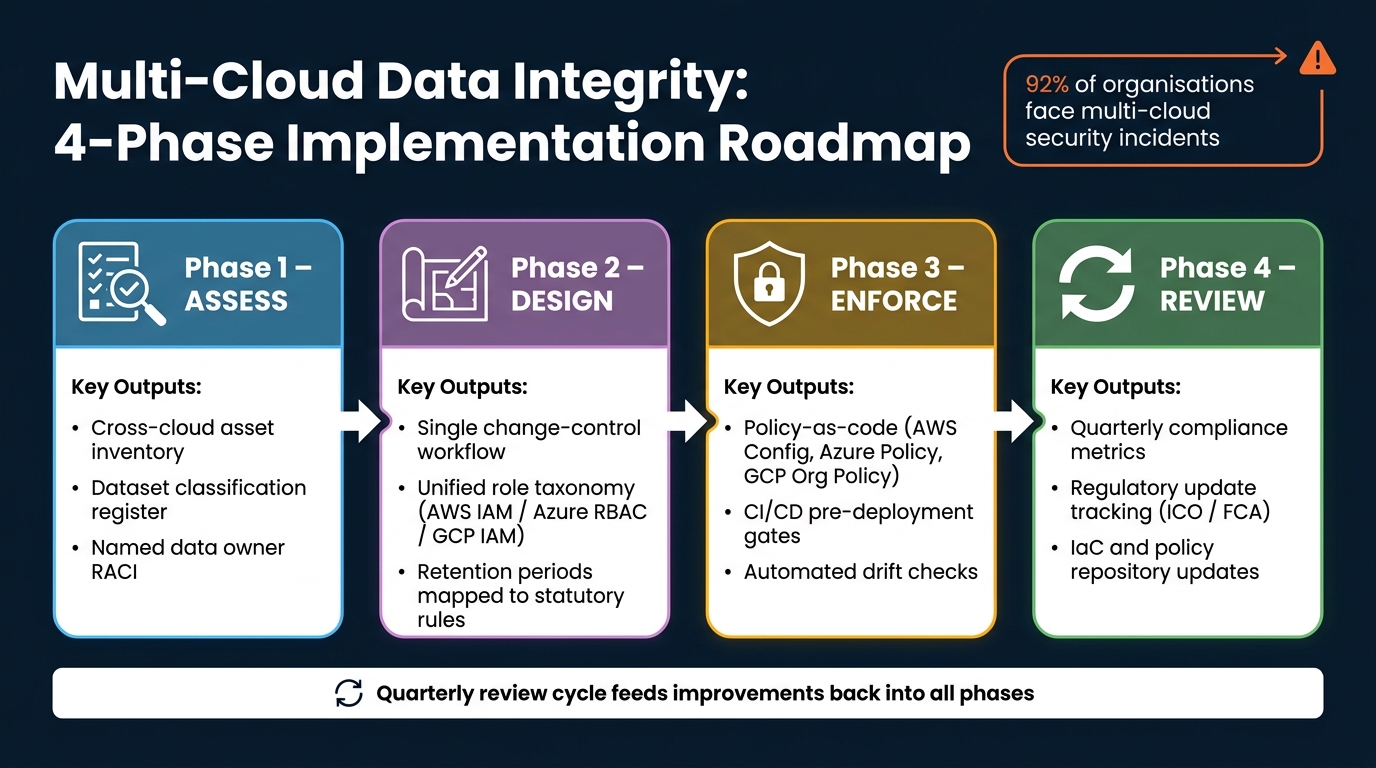 {Multi-Cloud Data Integrity: 4-Phase Implementation Roadmap}
:::
{Multi-Cloud Data Integrity: 4-Phase Implementation Roadmap}
:::
Roll out in 4 phases: assess, design, enforce and review
The best way to turn governance controls into day-to-day practice is to treat them as an operating model, not a one-off project. A simple way to do that is to roll out the framework in four phases: assess, design, enforce and review.
In the assess phase, build a cross-cloud inventory with AWS Resource Explorer, Azure Resource Graph and GCP Asset Inventory. Then classify datasets with a UK model - Public, Internal, Confidential and Restricted - and make sure that model reflects UK GDPR, the Data Protection Act 2018 and any sector-specific rules. Every critical dataset should also have a named data owner and steward, with both recorded in a central catalogue.
In the design phase, turn those decisions into clear standards people can follow. That includes a single change-control workflow, whether Git-based or ITIL-aligned, a unified role taxonomy across AWS IAM, Azure RBAC and GCP IAM, and retention periods mapped to statutory retention periods.
In the enforce phase, put those standards into policy-as-code using AWS Config and Service Control Policies, Azure Policy and GCP Organisation Policy. Then build pre-deployment checks into CI/CD pipelines, so issues are caught before they go live rather than after the fact.
In the review phase, check progress every quarter. Look at compliance metrics, audit findings and incident reports. Track updates from the ICO and FCA, then feed any changes back into IaC and policy repositories.
Each phase should produce one concrete output.
| Phase | Primary focus | Key outputs |
|---|---|---|
| Assess | Inventory, classify, assign ownership | Data catalogue, classification register, owner RACI |
| Design | Change control, access model, retention rules | Policy standards, role taxonomy, lifecycle mappings |
| Enforce | Policy-as-code, automated drift checks, access controls | Config rules, CI/CD gates, lifecycle policies |
| Review | Metrics, regulatory changes, continuous improvement | Updated policies, IaC changes, review metrics |
Built on ownership, change control, access, retention and drift checks, this framework is more than a set of controls. It gives teams a practical way to run data governance across AWS, Azure and Google Cloud. With quarterly reviews, it cuts manual audit effort, improves resilience and gives UK organisations a defensible, scalable base for data integrity.
FAQs
Where should I start with a multi-cloud integrity policy?
Start with a regulatory scoping exercise to work out which frameworks apply to you, such as UK GDPR, ISO 27001, or PCI DSS.
Then take stock of your cloud accounts and providers. Once you know what you're dealing with, set a small set of provider-neutral policies. Focus on the basics first:
- multi-factor authentication
- encryption standards
- region restrictions
- tagging baselines
Document these in a central governance repository and map each control to the cloud configuration that puts it into practice. A control-to-configuration matrix helps turn policy into something teams can check and use.
For rollout, take a monitor-first approach. Deploy policies in audit mode before you enforce them. That gives you a clear view of what would break, where gaps sit, and which teams may need time to fix issues before stricter controls go live.
How often should I check for drift across clouds?
Use continuous monitoring instead of periodic manual audits. It gives you near real-time visibility, so you can spot and fix configuration changes as they happen across AWS, Azure and Google Cloud.
At the same time, run formal policy reviews every quarter or every six months. That helps keep your governance framework in line with business needs, new cloud services and rule changes such as GDPR.
What evidence do I need to prove data integrity?
You need a clear, tamper-proof audit trail that links technical controls to compliance requirements.
Strong evidence usually includes:
- configuration state logs
- audit logs for control plane and data access events
- immutable, timestamped records of policy enforcement
It also helps to store records in centralised, tamper-proof storage and keep policies and configuration rules under version control. That way, you can show not just what your controls look like today, but how they changed over time.
Regular compliance reports add another layer of proof. They should show control mapping, drift, and remediation, so auditors can trace what happened, when it happened, and what was done about it.