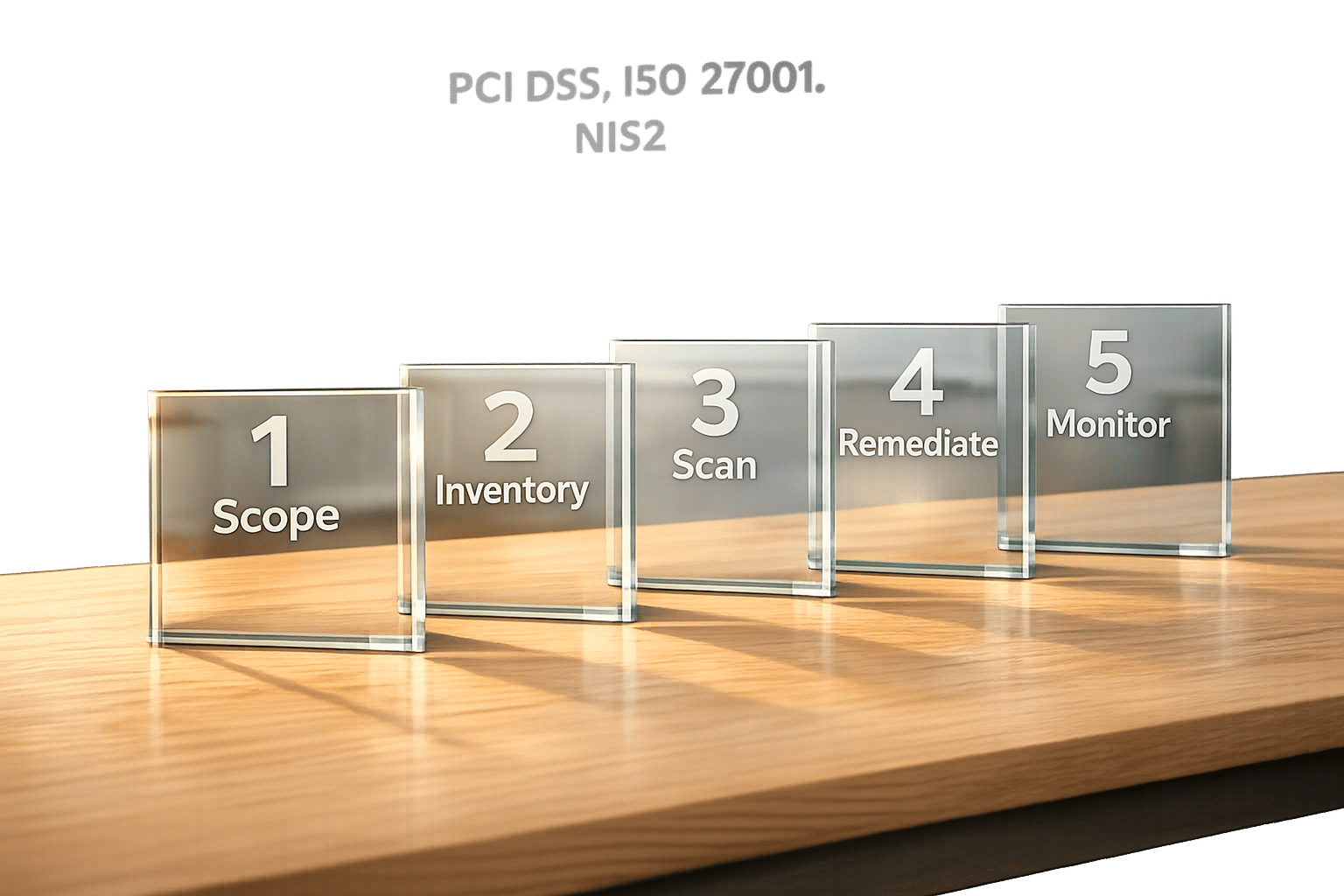
In today’s regulatory environment, aligning vulnerability scanning with compliance standards is essential for businesses in the UK. Failure to do so can result in fines, operational risks, and reputational damage. This guide outlines five practical steps to ensure your scanning processes meet frameworks like PCI DSS, ISO 27001, and NIS2, while reducing risks and audit workloads.
Key Takeaways:
- Define Scope: Identify which systems fall under compliance frameworks (e.g., PCI DSS focuses on cardholder data systems).
- Inventory Assets: Automate asset discovery to ensure no critical resources are missed.
- Perform Scans: Use credentialed scans for deeper insights and schedule them based on compliance requirements.
- Prioritise Fixes: Address vulnerabilities by risk level and compliance deadlines (e.g., critical issues within 7 days).
- Validate and Monitor: Rescan after fixes, generate compliance reports, and automate continuous monitoring.
By following these steps, you can reduce the likelihood of breaches, improve remediation timelines, and stay audit-ready while meeting regulatory demands.
::: @figure 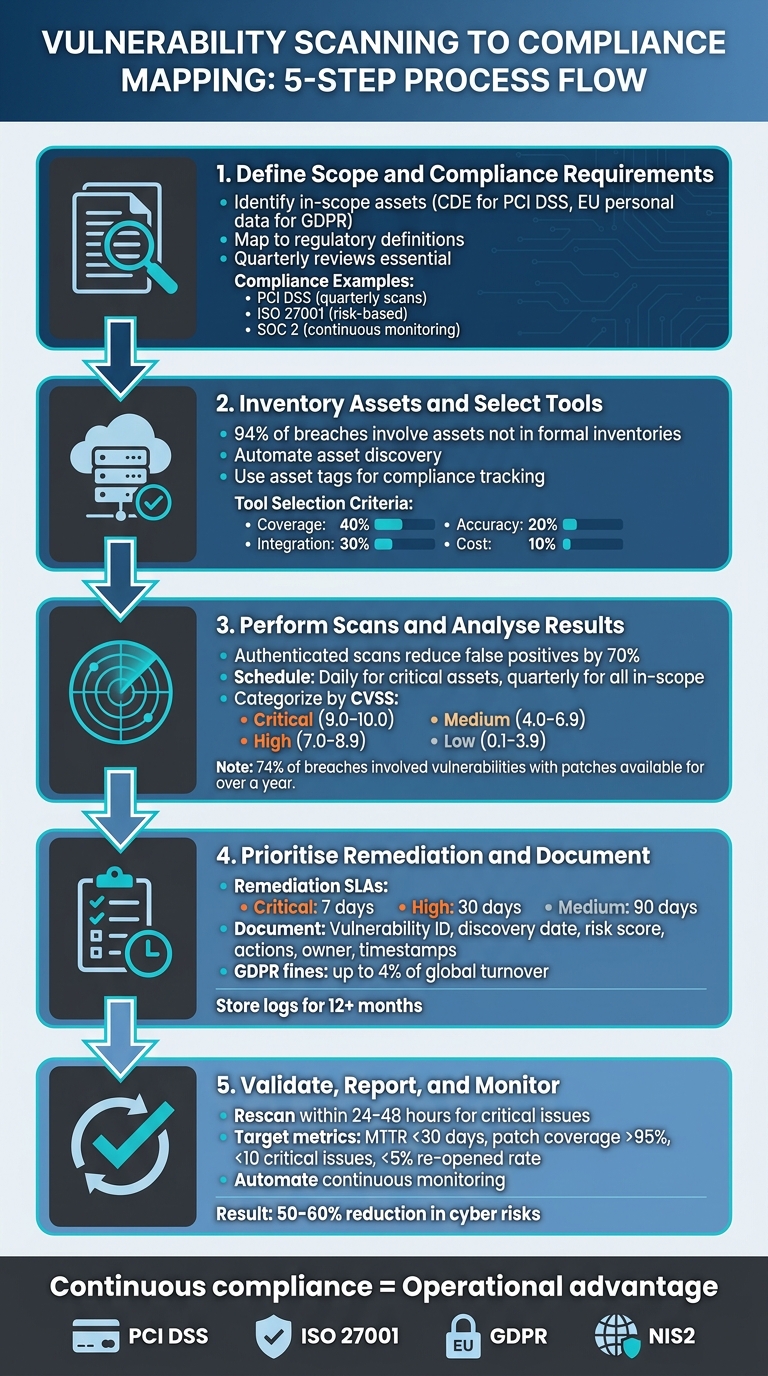 {5 Steps to Map Vulnerability Scanning to Compliance Framework}
:::
{5 Steps to Map Vulnerability Scanning to Compliance Framework}
:::
Step 1: Define Scope and Compliance Requirements
Identifying In-Scope Assets
The first step in any compliance journey is identifying which systems, applications, and data flows fall under the scope of your chosen framework. For PCI DSS, this means focusing on the Cardholder Data Environment (CDE) - essentially, any system that stores, processes, or transmits payment card information. Think payment gateways, point-of-sale terminals, and the databases supporting them.
The tricky part? Mapping your IT estate to these regulatory definitions. Start by classifying systems based on data sensitivity. For example, which servers handle EU personal data under GDPR? Which applications interact with ePHI under HIPAA? This process often uncovers shadow IT
- those forgotten cloud instances or legacy systems hiding in the network. Regular reviews, ideally quarterly, are essential, especially when launching new services or changing business processes. Missing even a single database could leave you exposed during an audit [7].
Mapping Scanning to Compliance Standards
Once you've defined the assets in scope, the next step is aligning your scanning processes with the specific requirements of each compliance framework. For instance, PCI DSS v4.0 is very clear: it requires quarterly internal and external scans, plus extra scans after major changes to the CDE [5][7]. On the other hand, ISO 27001 takes a more flexible, risk-based approach, as outlined in Annex A.8.8. Here, the focus is on identifying and addressing technical vulnerabilities based on their potential impact rather than following a set schedule [3][5].
Compliance is no longer about whether controls exist, but whether those controls are operational, measurable, and defensible under audit scrutiny.- Ashwani Paliwal, SecOps Solution [5]
For SOC 2, auditors expect continuous monitoring and trend analysis throughout the audit period - not just periodic snapshots [5]. Meanwhile, frameworks like NIST 800-53 focus on specific control IDs, such as SI-2 (Flaw Remediation), which mandates documented processes for identifying, reporting, and fixing system flaws [3]. To streamline this, tag scan findings with their relevant control IDs - whether it's CIS Control 7 for Continuous Vulnerability Management or ISO 27001 A.8.8. This method turns raw scan data into ready-to-use compliance documentation, saving significant time during audit prep.
| Framework | Primary Scoping Focus | Scanning Requirement | Key Control Reference |
|---|---|---|---|
| PCI DSS v4.0 | Cardholder Data Environment (CDE) | Quarterly internal/external scans | Requirement 11.3 |
| ISO 27001 | Risk-centric asset management | Risk-based continuous assessment | Annex A.8.8 |
| SOC 2 | Trust Service Criteria | Continuous monitoring with trend data | CC7.1 & CC7.2 |
| NIST 800-53 | Federal/comprehensive baseline | Flaw identification and remediation | SI-2 |
For systems that are internet-facing or considered critical, daily or continuous authenticated scans are recommended. These scans help uncover misconfigurations and patching gaps, addressing risks tied to real-world threats [4][6]. This approach ensures your scanning efforts stay aligned with the actual risks your organisation faces.
Step 2: Inventory Assets and Select Appropriate Tools
Building a Complete Asset Inventory
If you don’t have a full understanding of your IT environment, vulnerability scanning becomes a guessing game. According to Verizon's 2023 Data Breach Investigations Report, 94% of breaches involve vulnerabilities in assets that aren’t part of formal inventories [1]. This issue gets even trickier in fast-changing setups, like environments where containers appear and disappear in seconds, or where cloud resources grow faster than manual tracking methods can handle.
To tackle this, automate asset discovery. Cloud-native tools such as AWS Config or Azure Resource Graph work well for cloud environments, while platforms like ServiceNow can give you a centralised view in hybrid or on-premises systems. Use asset tags to categorise systems based on compliance requirements, criticality, or data sensitivity. These tags are incredibly useful when proving to auditors that all in-scope systems have been scanned.
For containerised environments, tools like Trivy or Clair can be integrated into your CI/CD pipeline to identify vulnerabilities during the build process. To ensure nothing slips through the cracks, schedule regular reconciliations - such as weekly API pulls into your CMDB - to track ephemeral assets often overlooked by traditional discovery methods. Gartner estimates that by 2025, 99% of cloud security failures will stem from misconfigurations in untracked assets, so this step is absolutely essential.
Once you’ve built a detailed and categorised inventory, the next challenge is selecting the right tools to scan these assets effectively.
Selecting Scanning Tools
With a robust asset inventory in place, the focus shifts to finding scanning tools that work well with your specific environment. The key considerations when choosing a tool are coverage, integration, and accuracy. The scanner must be able to handle everything from on-premises servers to multi-cloud setups and containerised workloads. Credentialed scans are particularly important, as they provide deeper insights into vulnerabilities compared to unauthenticated scans. Additionally, prioritise tools with an API-first approach, allowing seamless integration with platforms like Jenkins, GitHub Actions, or GitLab CI for automated scans triggered by code deployments or commits.
Here are some popular options to consider:
- Nessus Professional: Priced at around £2,150 per year for unlimited assessments, it offers broad coverage and detailed compliance reporting for standards like PCI-DSS and HIPAA.
- Qualys Cloud Platform: Starting at £2,000 per month for 1,000 assets, this tool provides agentless scanning, making it a strong choice for multi-cloud environments. However, its setup can be more complex.
- Trivy: An open-source tool ideal for DevOps teams on a budget. It scans container images in under a minute, with enterprise support available from £5,000 per year.
- AWS Inspector: Perfect for AWS-focused organisations, it integrates natively with AWS services and costs around £0.001 per instance-hour assessed.
To choose the best tool, use a weighted scorecard. Assign 40% to coverage, 30% to integration ease, 20% to accuracy, and 10% to cost. Start with a pilot programme on a small subset of assets. This approach helps reduce remediation timelines and ensures you generate audit-ready logs from the start.
Step 3: Perform Scans and Analyse Results
Conducting Vulnerability Scans
Once your tools are ready and your assets are catalogued, it’s time to run scans that produce compliance-ready evidence. To stay ahead of potential issues, schedule scans right after every CI/CD deployment or major code change. This approach helps catch vulnerabilities early, before they make it to production. For critical assets, run lightweight scans daily, and for all in-scope systems, perform full scans quarterly. This approach aligns with PCI DSS and ISO 27001 requirements while keeping things efficient.
Authenticated scans are non-negotiable for proper compliance mapping. Unlike unauthenticated scans, which only reveal what’s visible externally, credentialed scans dive deeper into internal systems. This method uncovers misconfigurations and application flaws that might otherwise go unnoticed. In fact, authenticated scans can reduce false positives by as much as 70%. Frameworks like NIST 800-53 demand this level of thoroughness. To streamline this process, set up your scans to trigger automatically in your CI/CD workflow using tools like Jenkins or GitHub Actions. Accurate scans are the cornerstone of effective compliance mapping, making detailed analysis much more straightforward.
Analysing Scan Results
Once your scans are complete, the next step is to carefully evaluate the results. Raw data from scans needs to be processed efficiently. Start by categorising vulnerabilities using CVSS scores: Critical (9.0–10.0), High (7.0–8.9), Medium (4.0–6.9), and Low (0.1–3.9). However, don’t rely solely on severity scores to guide your actions. According to the 2024 Verizon Data Breach Investigations Report, 74% of breaches involved vulnerabilities that had patches available for over a year [1]. This highlights the importance of deeper analysis beyond just scores.
Each vulnerability should be mapped to a compliance remediation timeline. Prioritise issues based on their compliance requirements, business impact, and exploitability. For example, a SQL injection vulnerability (CVSS 9.8) on a payment gateway should be addressed immediately, ideally within seven days. On the other hand, a low-risk information disclosure on an internal wiki might be resolved within 90 days [1].
Establish a triage process to weed out false positives. Assign team members to review flagged issues within 24 hours, reproduce the findings, and whitelist any benign results directly in your scanner’s exception rules. Keep a record of these decisions, along with supporting evidence, to maintain an audit trail. This approach can cut analysis time by 50% while ensuring compliance documentation remains thorough [2]. Monitor metrics such as mean time to remediate (MTTR), aiming to resolve critical vulnerabilities within 14 days, and store immutable logs for at least 12 months to meet audit requirements under standards like SOX.
If you need expert help to integrate effective vulnerability scanning into your DevOps workflow, Hokstad Consulting (https://hokstadconsulting.com) offers professional guidance to keep your compliance strategy secure and efficient.
PCI v4.0 - 11.3.2: Perform External Vulnerability Scans Frequently
Step 4: Prioritise Remediation and Document Evidence
Step 4 builds on your scan analysis by focusing on two critical tasks: tackling vulnerabilities promptly and keeping thorough records for compliance.
Prioritising Remediation Efforts
Start by ranking vulnerabilities based on their risk level. Factors like CVSS scores, exploitability, and compliance impact should guide your priorities. For instance, critical vulnerabilities (CVSS 9.0–10.0) that could compromise sensitive data protected by regulations like PCI-DSS or GDPR need urgent attention - ideally within 7 to 30 days. Medium-severity issues (CVSS 4.0–6.9) can follow later. Pay close attention to vulnerabilities that could jeopardise the confidentiality, integrity, or availability of key assets, such as public-facing servers or databases containing personal information.
To refine your priorities, combine CVSS scores with a business impact analysis. Map vulnerabilities to potential compliance penalties and the criticality of affected assets. For example, under GDPR, fines can be as high as 4% of global turnover. This makes a critical flaw in a payment system far more urgent than a minor issue in a non-customer-facing tool. A SQL injection vulnerability in a customer database would demand immediate action due to its potential for GDPR violations, while a low-risk information disclosure on internal systems might be less pressing.
Set clear remediation SLAs aligned with your compliance requirements. A common approach might involve fixing critical issues within 7 days, high-severity ones within 30 days, and medium-severity ones within 90 days. In PCI-DSS environments, prioritise vulnerabilities in the Cardholder Data Environment (CDE) above all else. Tools like EPSS (Exploit Prediction Scoring System) can help predict which vulnerabilities are most likely to be exploited within the next 30 days. Make remediation decisions collaboratively with a cross-functional team, including security, compliance, and operations, to ensure nothing is overlooked.
Once you've set your priorities, the next step is to document everything thoroughly.
Maintaining Documentation and Audit Trails
Comprehensive documentation is essential for demonstrating your compliance efforts during audits. Immutable audit trails should detail what was discovered, when it was found, and how it was resolved. Each record should include the following:
- Vulnerability ID
- Discovery date (use DD/MM/YYYY format for UK compliance)
- Risk score
- Remediation actions (e.g.,
patch applied version 1.2.3 on 15/03/2026
) - Responsible owner
- Timestamps
- Verification evidence, such as before-and-after scan screenshots
Automate this process wherever possible. Integrating tools like Jira or ServiceNow with your scanning software can help generate tickets automatically, pre-filled with all necessary details. Use custom fields to capture compliance-specific information, and configure your CI/CD pipelines to log fixes with timestamps and update documentation immediately after a patch is deployed. This ensures you maintain immutable audit logs, meeting requirements like PCI-DSS 6.3. Store these records centrally - platforms like Confluence can help with version control and quick retrieval. Keep logs for at least 12 months, as required by most regulatory frameworks.
Make it a habit to update your audit trails regularly to reflect ongoing improvements in your security posture. This not only supports compliance but also builds trust in your processes.
Step 5: Validate Fixes, Report, and Enable Continuous Monitoring
This step focuses on verifying remediation efforts, preparing compliance reports, and establishing systems for ongoing monitoring.
Rescanning and Validating Fixes
Once patches are applied, it's essential to rescan the affected systems to ensure the vulnerabilities have been resolved. Use the same scanning tools and methods employed during the initial assessment to focus on the specific assets and issues that were addressed. For critical vulnerabilities, validation should happen within 24–48 hours, while high-risk issues should be rechecked within a week [9].
For particularly critical or complex vulnerabilities, automated scans should be supplemented with manual penetration tests and a thorough review of security logs. These logs can reveal signs of attempted exploitation or instances where patches may have failed [9][10]. Considering that 38% of breaches exploit unpatched vulnerabilities [10], this step is crucial to maintaining a secure environment.
Generating Reports for Compliance
Create concise, audit-ready reports that highlight key metrics such as Mean Time to Remediate (MTTR), patch coverage, the number of unresolved critical issues, and the rate of re‑opened vulnerabilities. As a benchmark, aim for an MTTR under 30 days, patch coverage exceeding 95%, fewer than 10 critical issues remaining open, and a re‑opened vulnerability rate below 5%.
These reports should clearly map findings to relevant compliance standards like PCI‑DSS 11.2 or GDPR Article 32. Include timestamps (formatted as DD/MM/YYYY for UK standards), a list of affected assets, evidence of remediation efforts, and validation results.
Executives just want to know: how good are we, how bad are we?- Adam Zenedine, Host of the HIPAA Insider Show [8]
Keep the language straightforward and avoid overloading reports with technical jargon. The goal is to clearly communicate the organisation's security posture.
Automating Continuous Monitoring
Compliance is not a one-time task - it requires constant attention. Set up automated scans to run at intervals that match your compliance needs (e.g., weekly for PCI‑DSS). Configure these tools to send alerts whenever new critical vulnerabilities are identified and to automatically create remediation tasks.
Dashboards can provide real-time insights into your vulnerability landscape, tracking metrics like the number of vulnerabilities, remediation speed, and overall compliance status. Automate report generation for regular compliance reviews - whether monthly or quarterly - to ensure your audit records are always up to date. These steps not only help maintain continuous compliance but also prepare your systems for evolving DevOps processes.
Integrating Vulnerability Scanning with DevOps Transformation
Bringing security checks into CI/CD pipelines makes security a continuous part of the development process. By embedding vulnerability scanning directly into these pipelines, organisations can shift from periodic compliance checks to ongoing, automated security assessments that run with every code commit and deployment.
To make this work, configure your pipeline to trigger scans at critical stages. For example:
- Use containerised scanners immediately after code commits.
- Employ tools like Snyk or Trivy during the build phase.
- Conduct runtime vulnerability scans before deployment.
Set clear fail thresholds for critical vulnerabilities to prevent insecure code from moving forward. Integrating scan results into platforms like Jira ensures developers have clear workflows for remediation. One organisation reported a 60% reduction in the time it took to fix critical vulnerabilities, alongside a 30% decrease in security incidents over just six months [1].
This continuous approach not only improves security but also streamlines the development pipeline. Hokstad Consulting (https://hokstadconsulting.com) is an example of a firm that helps optimise DevOps processes by embedding scanning tools into CI/CD platforms like Jenkins or GitHub Actions. Their method includes automated scans during both build and deployment stages, offering developers real-time feedback while aligning results with standards such as PCI-DSS or ISO 27001. This shift-left
strategy catches vulnerabilities early, potentially cutting remediation costs by 30–50% per issue compared to fixing them later in the development cycle.
In addition to pipeline integration, periodic cloud security audits provide an extra layer of protection. These audits can uncover misconfigurations that automated scans might miss. For instance, Hokstad Consulting uses tools like Scout Suite to evaluate AWS, Azure, and GCP environments, producing detailed reports that integrate with DevOps monitoring systems. A notable example comes from Truist Financial Corporation, which, in December 2019, implemented a continuous compliance workflow. By using an observation mode, they scaled security checks across teams, centralised visibility for standards like CIS, PCI, and NIST, and significantly improved audit readiness [5].
Combining automated scanning, cloud audits, and a robust DevOps approach creates a security framework that’s always ready for audits. Organisations embedding these practices report faster deployment cycles - up to 50% quicker - while maintaining strong compliance and security standards [1][2]. This integration not only ensures adherence to regulations but also builds a seamless, efficient security posture.
Conclusion
Linking vulnerability scanning to compliance not only helps UK organisations tackle cyber threats but also ensures they meet legal requirements. This guide outlines five practical steps: defining your scope and compliance needs, creating a detailed asset inventory, conducting and analysing scans, prioritising remediation with thorough documentation, and validating fixes through continuous monitoring. Together, these steps transform security from a one-off task into a consistent, operational advantage.
The stakes for UK organisations are high. GDPR penalties can reach 4% of global turnover, and the average cost of a data breach stands at around £2.7 million (2024 government data). Additionally, the NIS2 Directive enforces vulnerability management for critical infrastructure, while Cyber Essentials certification mandates regular scanning. According to the UK NCSC, implementing these steps can slash cyber risks by 50–60% and reduce the mean time to remediate (MTTR) from weeks to days. Following NIST guidelines, this faster MTTR can lower exploit risks by up to 70%.
There are operational wins too. For example, Barclays managed to cut their critical vulnerability MTTR from 14 days to just 5, while another financial firm reduced response times by 40%. Such improvements show how robust processes not only enhance security but also streamline operations.
Adopting continuous monitoring shifts security from being reactive to proactive. Automating scans within CI/CD pipelines and integrating SIEM tools can reduce the likelihood of breaches by 40% (SANS Institute). This proactive stance, highlighted in Step 5, aligns with standards like PCI DSS, ISO 27001, and the UK Cyber Assessment Framework, ensuring faster deployments without sacrificing compliance.
To get started, review your existing scanning processes, trial a tool within your DevOps pipeline, and track MTTR improvements over 30 days before setting up quarterly reviews. With UK cyber attacks increasing by 15% year-on-year in 2025 (NCSC Annual Review), now is the time to strengthen your security measures while staying compliant.
For expert guidance in incorporating these practices into your operations, Hokstad Consulting (https://hokstadconsulting.com) offers support to help you navigate the complexities of vulnerability scanning and compliance.
FAQs
How do I determine the scope for PCI DSS, ISO 27001, and NIS2?
To define the scope for PCI DSS, ISO 27001, and NIS2, you need to focus on the specific assets, processes, and data relevant to each framework.
PCI DSS: This applies to systems that handle cardholder data. Include all components, processes, and technologies involved in storing, processing, or transmitting payment card information.
ISO 27001: The scope here is broader, involving all information assets that impact the security of your organisation. Risk assessments guide the identification of these assets and determine where controls are needed.
NIS2: This framework targets critical infrastructure entities. The emphasis is on risk management and ensuring the resilience of essential services.
To comply effectively, start by identifying the relevant assets, assess the risks associated with them, and implement the necessary controls to meet the requirements of each framework.
What’s the quickest way to build an accurate asset inventory for scanning?
The quickest way to build a precise asset inventory is to leverage automated discovery tools. These tools can identify a wide range of assets, including cloud resources, virtual machines, containers, and even shadow IT. For instance, solutions like AWS Config or Lansweeper simplify the process of resource discovery and tagging.
To enhance accuracy, you can integrate these tools with configuration management databases (CMDBs) like ServiceNow. This integration allows for automatic importing and updating of asset data, ensuring your inventory stays up to date without requiring manual effort.
How do I turn scan results into audit-ready evidence without extra work?
To make the process of turning scan results into audit-ready evidence easier, automated compliance mapping tools can be a game-changer. These tools link vulnerability findings directly to specific control requirements, such as ISO 27001, CIS, or NIST. This transforms raw data into organised, framework-compliant evidence.
With features like centralised reporting and ongoing evidence generation, these tools simplify audit preparation. They ensure that vulnerabilities, along with their mitigation status, are thoroughly documented and ready for review.