
I would choose self-hosted AI only when its full cost is 20–30% below a managed API - and it meets the same quality, speed, security and availability targets. That is a suggested savings buffer, not a verified market benchmark. For low or uneven demand, I would start with managed AI.
My comparison goes beyond token prices. I count GPU idle time, staff, setup, storage, support and spare capacity, then check whether the system can serve peak demand. I keep monthly savings, setup repayment and cash spending separate.
Quick Comparison
| What I compare | Managed AI | Self-hosted AI |
|---|---|---|
| Main costs | Tokens, commitments and extras | GPUs, staff, setup and running costs |
| Demand fit | Low, uneven or uncertain usage | Steady usage that keeps GPUs busy |
| Capacity and speed | Provider quotas, queues and network delay | Measured throughput, queues and spare GPUs |
| Quality and updates | Provider models and version rules | Chosen models, licences and testing |
| Data and security | Provider terms, locations and access | Internal controls, locations and access |
| Reliability and support | Provider service plus internal integration | Internal monitoring, recovery and on-call cover |
For mixed workloads, I would also test hybrid routing, including its extra costs and data restrictions. Before choosing, I would use 8–12 weeks of invoices and traffic data, label prices as verified or hypothetical, and compare costs in £ with VAT and currency-conversion details recorded.
My final check: prove the savings under load. A lower bill means little if quality drops, queues grow or UK data protection requirements are not met.
Rent AI or Own It? LLM API Costs vs Self-Hosted AI | TCO & Break-Even
Calculate the Full Cost of Each Hosting Model
Compare both options using monthly economic cost. Show upfront cash separately and exclude recoverable VAT. Include VAT the business cannot recover, subject to HMRC rules.[4] Use the same accounting period and shared-cost allocation for both options.
Managed API Token Prices and Extra Charges
Price the workload assumptions used above - not a lighter prompt mix or a lower service level. Calculate uncached input, cached input and output separately, using:
Token count ÷ 1,000,000 × the applicable £ rate
The supplied sources do not confirm current rates, so mark the pricing fields as unverified.[5]
| Provider / model | Token category | Billing currency and unit | Converted £ rate | Rules to verify | Source / verification |
|---|---|---|---|---|---|
| OpenAI / model not specified in supplied evidence | Uncached input | Confirm currency; rate per million tokens | Not verified | Context thresholds, region and tier | Official pricing; publication-date check required |
| OpenAI / model not specified in supplied evidence | Cached input | Confirm currency; rate per million tokens | Not verified | Cache eligibility, writes and storage charges | Official pricing; publication-date check required |
| OpenAI / model not specified in supplied evidence | Output | Confirm currency; rate per million tokens | Not verified | Batch discounts, commitments and billing conditions | Official pricing; publication-date check required |
Count all billed traffic, including retries and every model call within an agent workflow - not just completed user requests. Add paid extras: cache writes, storage, tool calls, retrieval, orchestration, batch processing, network transfer, observability and required third-party services.
Check how minimum commitments offset usage so you do not count them twice. Record discount conditions, too. A rate limit constrains capacity; it is not automatically a paid feature.
Use these same workload assumptions when comparing API prices with self-hosted GPU, staffing and setup costs.
Self-Hosted Hardware, Staffing and Setup Costs
C_self-hosted = C_GPU + C_platform + C_staff + C_operations + C_setup/N
Here, N is the setup amortisation period in months. GPU costs should include rental or hardware depreciation - never both for the same equipment.
Platform costs cover CPUs, RAM, storage, networking and separately charged power. Operations costs cover software, monitoring, security, evaluations, maintenance and on-call cover. Allocate spare capacity only once.
Separate existing staff time from extra payroll or contractor spend. Keep initial deployment hours out of recurring labour costs.
GPU Utilisation and Usable Throughput
Benchmark representative traffic at the required model quality, context length, input/output mix and latency targets. Measure usable throughput against the same quality, latency and capacity targets used for the managed option.
Record input and output throughput separately. Batching can increase throughput, but longer queues may breach service targets. GPU occupancy is not the same as productive utilisation.
Calculate monthly GPU cost per million usable tokens using paid hours, including idle time, and successfully served traffic. Reserve peak and failover capacity before calculating usable throughput. Test productive utilisation at 25%, 50%, 75% and 90%, rather than assuming every paid GPU-hour produces useful output.
Find the Monthly Break-Even Volume
::: @figure 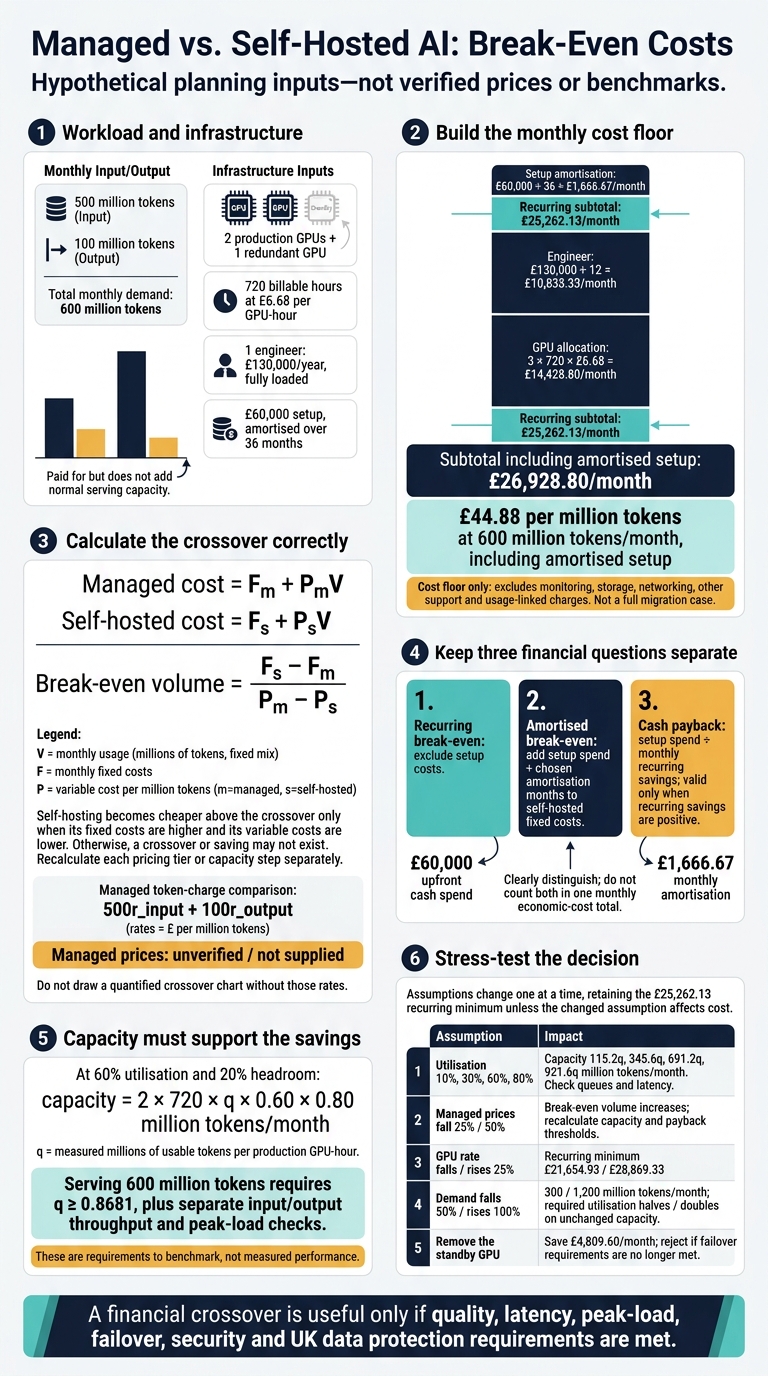 {Managed vs. Self-Hosted AI: Break-Even Costs}
:::
{Managed vs. Self-Hosted AI: Break-Even Costs}
:::
Apply the Break-Even Formula and Capacity Limits
For a fixed token mix, let V represent monthly usage in millions of tokens:
Managed cost = Fm + PmV
Self-hosted cost = Fs + PsV
Break-even volume = (Fs − Fm) / (Pm − Ps)
Self-hosting costs less above the crossover only when its fixed costs are higher and its variable costs are lower. Otherwise, there may be no crossover or no saving. Calculate each pricing tier or capacity step separately. The example below shows how staffing costs and GPU headroom affect the result.
Keep recurring break-even, amortised break-even and cash payback separate. Do not include setup costs in recurring comparisons. For amortised break-even, divide setup spend by the chosen number of months and add it to self-hosted fixed costs. Cash payback is setup spend ÷ monthly recurring savings, provided those savings are positive.
Neither crossover helps unless the deployment can handle that volume within latency, peak-load and failover limits.
Worked Example: A Hypothetical UK SaaS Workload
Hypothetical planning inputs - not verified prices or benchmarks: 500 million input and 100 million output tokens monthly; two production GPUs plus one redundant GPU; 720 billable hours at £6.68 per GPU-hour; one engineer costing £130,000 a year, fully loaded; and £60,000 setup spread over 36 months. These inputs produce the following cost floor, before monitoring, storage, networking, other support and usage-linked charges.
Monthly component Calculation Cost Three allocated GPUs 3 × 720 × £6.68 £14,428.80 Fully loaded engineer £130,000 ÷ 12 £10,833.33 Recurring subtotal GPU allocation + engineer £25,262.13 Setup amortisation £60,000 ÷ 36 £1,666.67 Subtotal including setup Before omitted operating costs £26,928.80 This is a break-even floor, not a full migration case, because it excludes monitoring, storage, networking and support overheads.
At 600 million tokens of monthly demand, the minimum monthly cost is £44.88 per million tokens including amortised setup. Compare it with 500r_input + 100r_output, not an unweighted average of API rates. At 60% utilisation and 20% headroom, capacity is 2 × 720 × q × 0.60 × 0.80 million tokens, where q is measured millions of usable tokens per GPU-hour; the standby GPU does not add normal serving capacity. The workload requires q ≥ 0.8681, plus separate input/output and peak-load checks.
Test Changes in Demand, Prices and Staffing
Change one assumption at a time, keeping token mix, staffing, billable hours and headroom fixed. The capacity tests below use the same two active GPUs to show how utilisation affects the crossover. These are requirements to benchmark, not measured performance.
For the other tests, keep the £25,262.13 recurring minimum unless the changed assumption affects that cost.
| Sensitivity | Effect | Decision check |
|---|---|---|
| Actual utilisation: 10%, 30%, 60%, 80% | Capacity: 115.2q, 345.6q, 691.2q, 921.6q million tokens | Do queues and latency remain acceptable? |
| Managed prices drop 25% / 50% | Break-even volume increases; recalculate | Check capacity and payback thresholds |
| GPU rate falls / rises 25% | Recurring minimum becomes £21,654.93 / £28,869.33 | Recalculate savings and payback |
| Demand falls 50% / rises 100% | Volume becomes 300 / 1,200 million tokens | Required utilisation halves / doubles on unchanged capacity |
| Remove the standby GPU | Saves £4,809.60 monthly | Reject if failover requirements are no longer met |
Re-test whenever batching, support coverage, interruptible capacity, context length or peak demand changes. Check any savings against UK data protection, security and reliability requirements before choosing a hosting option.
Compare Hosting Requirements Beyond Cost
Treat legal, security, quality and service requirements as pass/fail checks. Compare costs only for options that pass. Either hosting model can fail these checks, regardless of the break-even figures. Managed AI must meet scaling, data, latency and recovery requirements before its lower price matters. So must self-hosted AI.
| Requirement | Managed AI | Self-hosted AI | Verify before choosing |
|---|---|---|---|
| Scaling | Depends on quotas, throttling and regional capacity. | Requires extra GPUs, networking and operations. | Peak requests per second, queueing, quota increases and scale-out time |
| Availability | Provider redundancy reduces internal work, but outages and dependency failures still happen. | Internal teams must build redundancy, monitoring and recovery. | SLA, incident history, recovery time objective and recovery point objective |
| Data control | Depends on region, retention, logging, subprocessors and training policy. | Internal teams control and secure storage, network paths and logs. | Data flow, deletion evidence and backup locations |
| Deployment effort | Faster initial deployment still involves integration, governance and migration work. | Requires capacity, model serving, networking, patching and runbooks. | Time to go live, required skills and rollback process |
| Model updates | Providers may change models or behaviour under version and deprecation rules. | Internal teams choose update timing and maintain tested versions. | Version pinning, evaluation gates and notice periods |
| Observability | Metrics depend on provider coverage and granularity. | Full-stack telemetry requires internal capability. | Latency, errors, queue depth, traffic volume, GPU utilisation, quality regressions and unusual data access |
| Compliance duties | Customers remain accountable despite provider controls. | More control does not remove UK GDPR, security, retention or audit duties. | Contracts, assessments and audit evidence |
| Dependencies | High dependence on provider pricing, quotas, roadmap and acceptable-use rules. | High dependence on staff, hardware supply and specialist skills. | Lock-in, ownership and exit options |
| Latency | Network distance, API queues and retries affect response time. | Local inference reduces network delay, but queueing, batching and GPU contention still apply. | End-to-end p95 and p99 latency under load |
| Cost predictability | Usage spikes, model changes and extras alter token-based costs. | Staffing, power, repairs and capacity upgrades alter infrastructure costs. | Monthly cost range, not one average figure |
Check UK Data Protection, Security and Reliability
UK GDPR does not require all personal data to stay in the UK. Even so, check residency, transfer rules and access controls before comparing prices. Savings cannot compensate for failing UK data, security or resilience requirements.
Map where prompts, logs and backups are processed, and where support staff access them. Overseas access can constitute a restricted transfer, so record the safeguard and complete the transfer assessment.[8][10][11] Check whether sector policies or customer contracts impose stricter residency rules.
Document the lawful basis, purpose, data minimisation and retention rules. Confirm controller–processor roles and suitable processing terms. Require least-privilege access, strong authentication, encryption, deletion evidence and audit logs, without retaining sensitive prompts unnecessarily. Review model licences, commercial-use permissions and acceptable-use restrictions. Complete a DPIA where processing is likely to create high risks to individuals.[7][9]
Assign responsibility for patching, incident response, breach notification, backups and disaster recovery. Test restoration, throttling and infrastructure failure against agreed recovery-time and recovery-point objectives. NCSC guidance treats cloud security as a shared responsibility: neither hosting model guarantees compliance or availability.[6][12]
Choose Managed, Self-Hosted or Hybrid AI
Once the legal and service checks pass, use demand patterns and staffing capacity to choose a hosting model.
| Workload or constraint | Likely starting point | Required checks |
|---|---|---|
| Low or irregular demand; limited operations staff | Managed AI | Minimum charges, quotas, provider terms, regions and acceptable latency |
| Predictable, sustained demand; a suitable model | Self-hosted AI | Model quality, licence rights, usable capacity, security staffing and recovery |
| Sensitive data or strict network boundaries | Self-hosted AI or private managed AI | Isolation, administrator access, auditability and incident ownership |
| Mixed data classes or burst patterns | Hybrid AI | Permitted routes, data boundaries, fallback capacity and duplicated operating costs |
Hybrid routing needs explicit rules. Route requests by data classification, permitted location, capability and service health. Never let failover bypass a data restriction.
Budget for duplicate infrastructure, integrations, evaluations, monitoring, failover and support. Before routing traffic, use one evaluation suite to test accuracy, safety, schema compatibility, p95 latency, errors and capacity.
Conclusion: Require a Savings Buffer Before Migrating
Breaking even isn’t enough: require a savings buffer before migrating. Once cost, capacity and compliance checks are complete, apply a margin of safety. A practical starting policy is to require fully loaded self-hosted costs to sit 20–30% below the managed baseline. Include staffing, setup, migration, support and spare capacity.
Use 8–12 weeks of invoices and traffic data to inform the decision. Compare like-for-like capability, quality, context length and service targets - not token prices alone. Show one-off costs separately and calculate how long the savings will take to repay them.
If the model meets the savings threshold, test it in production before committing. Run a controlled pilot with normal traffic and peak load. Measure cost per successful task, usable throughput, p95/p99 latency and staff time. Proceed only when measured capacity covers peak demand with room to spare, and a named person or team owns day-to-day operations.
Recalculate monthly during the first quarter, then quarterly. Review sooner if demand, prices, model quality or staffing change materially. Include any consulting fees in the same cost model.
FAQs
How do I compare costs when models need different token counts?
Compare models by cost per 1,000 requests or cost per prediction, rather than raw infrastructure usage. This gives you a common financial basis, even when models use different token counts.
Work out your total monthly spend for the workload, including prompt and output tokens, caching and cloud fees. If you self-host, track GPU and RAM capacity and aim for high utilisation. Self-hosted infrastructure costs follow a different pricing model from token-based APIs.
How should I budget for unpredictable GPU demand?
Reserve baseline capacity for day-to-day workloads, then use cost-aware autoscaling to handle spikes. Aim for roughly 70% utilisation so there’s spare capacity while new instances start.
Set instance limits and per-team spending caps. Label resources to track costs, and simulate the budget impact before making changes.
Use spot instances for batch tasks that can tolerate delays. For mission-critical, user-facing inference, use dedicated, high-performance capacity to avoid cold-start delays.
What if my AI migration takes longer than planned?
If your AI migration takes longer than planned, review infrastructure allocation throughout the transition, rather than treating it as a one-off setup [1]. Delays can leave resources unused or cause performance bottlenecks.
Hokstad Consulting recommends small, testable steps. Start with focused assessments and prototypes that use real data to check costs and returns [2]. Track usage and adjust infrastructure to match demand, keeping costs under control during the move [1][3].