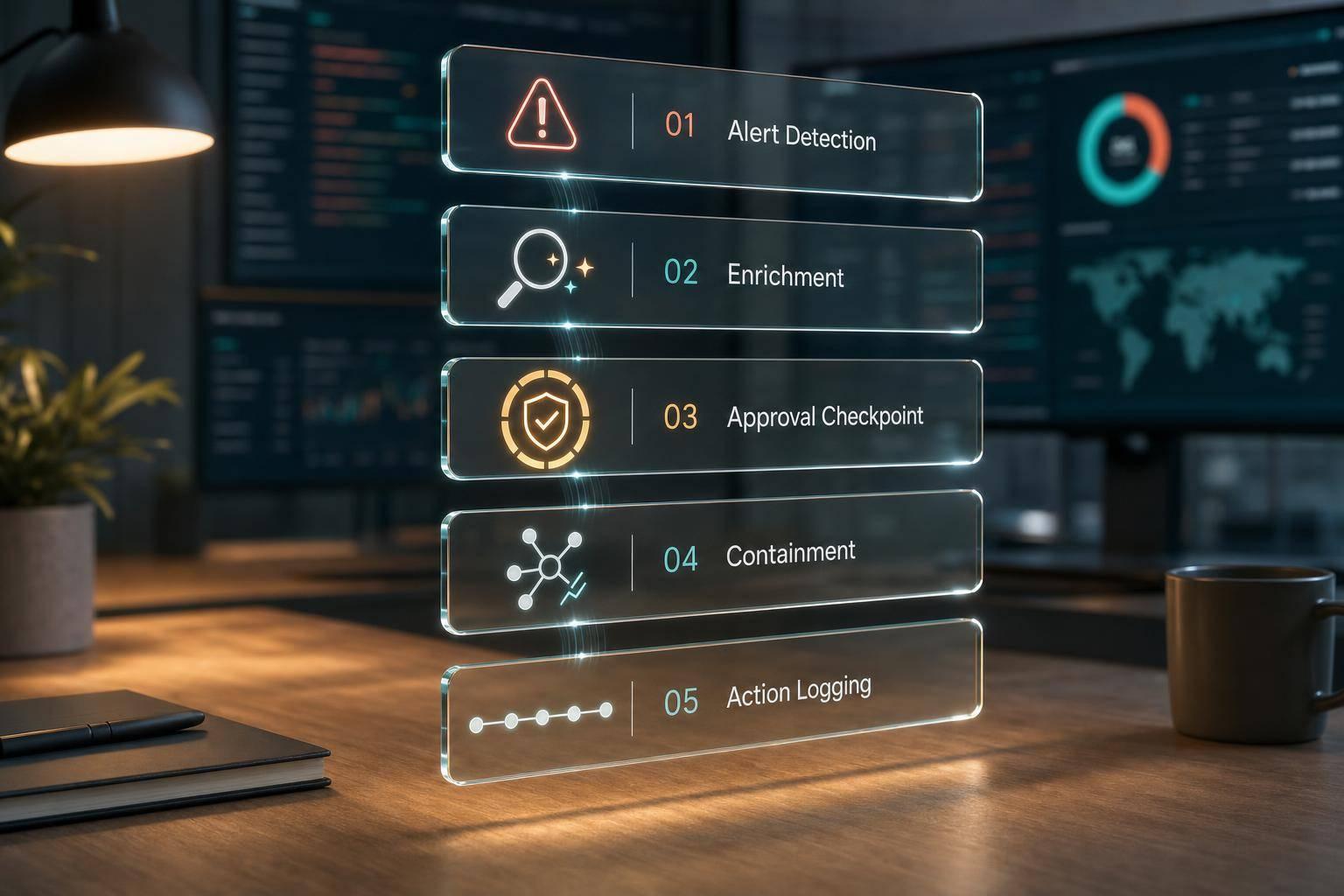
A SOAR malware playbook should do one thing above all: cut response time without letting bad data trigger risky action.
From this guide, I’d boil it down to this: if I want malware automation to work, I need clear workflow states, read-only enrichment first, hard approval gates for risky actions, and proof of what happened at every step. The article points to results such as 60% to 80% lower MTTR and one study showing response time dropping from 95 minutes to 28 minutes. But the message is plain: automation only helps when controls come first.
Here’s the article in simple terms:
- I start by mapping the response flow from new alert to closed or escalated
- I make sure each alert has the right fields before it moves forward
- I normalise data from tools like EDR, SIEM, cloud, email, and identity platforms
- I enrich alerts with host, user, hash, process, and threat-intel context
- I stop the flow when data is missing, stale, or conflicting
- I route cases by evidence, business impact, and owner
- I allow auto-containment only for pre-approved, lower-risk asset groups
- I put servers, domain controllers, OT, clinical, and other high-impact systems behind approval
- I collect evidence before isolation where policy allows
- I verify outcomes properly: command sent is not the same as endpoint isolated
- I test in dry-run mode first, then roll out to a small low-risk group
- I track results like time to triage, time to contain, false-positive containment, and ticket duplication
What matters most is simple:
- Normalise first
- Enrich second
- Contain only when checks pass
- Log every decision and action
- Keep a rollback path
If I had to sum up the whole piece in one line, it would be this: SOAR works best when it automates the repeatable parts and pauses before anything that could hit the wrong host, the wrong user, or the wrong service.
What is SOAR? | Simplifying Security Operations with Automation
1. Define the malware response workflow
::: @figure 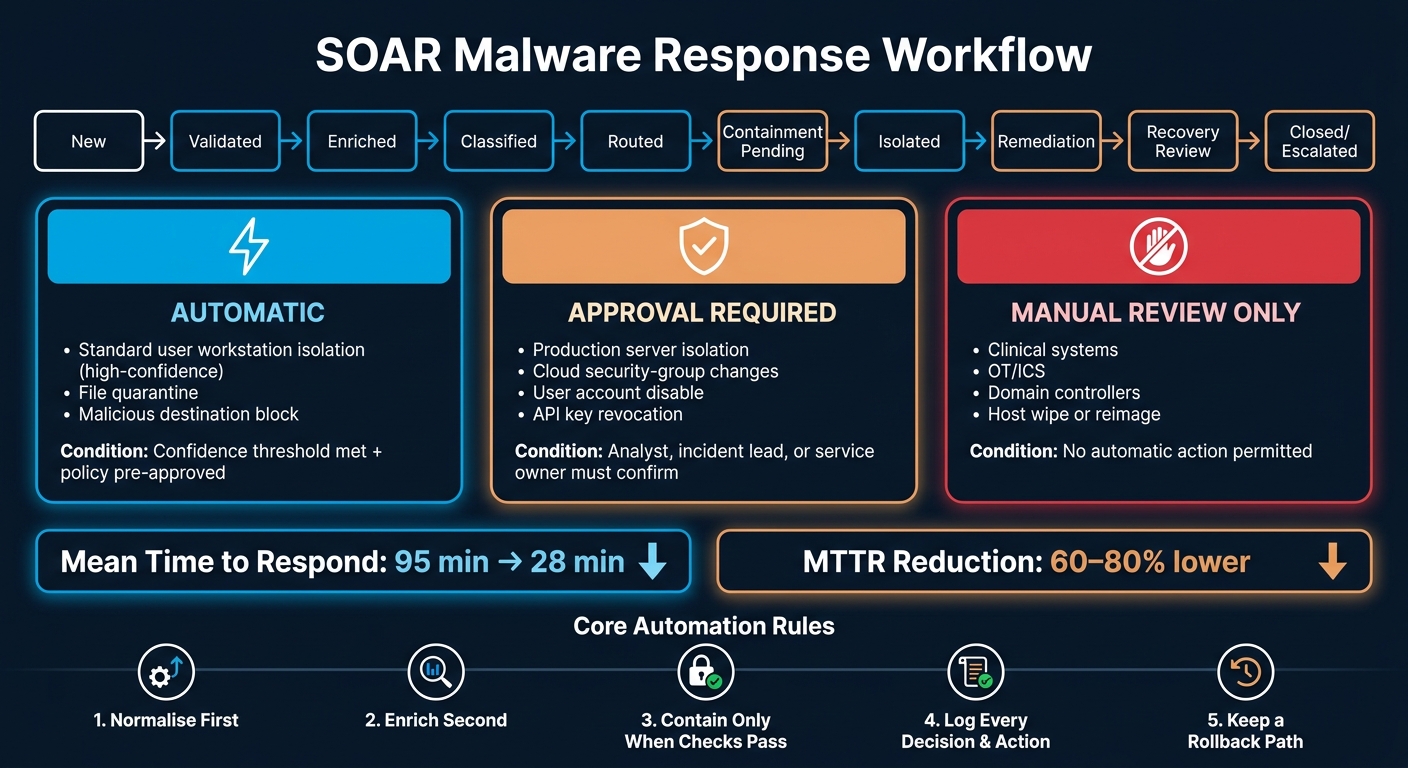 {SOAR Malware Response Playbook: Workflow States & Automation Gates}
:::
{SOAR Malware Response Playbook: Workflow States & Automation Gates}
:::
Before you write a single automation rule, map the playbook as a strict sequence of states: New → Validated → Enriched → Classified → Routed → Containment Pending → Isolated → Remediation → Recovery Review → Closed or Escalated.
Each state change needs its own clear condition. It shouldn’t move forward just because the last step finished. That matters for a simple reason: you need to collect evidence before containment changes the endpoint, and ticketing still needs to carry on if automation falls over [3]. This state model shows exactly where automation can step in, and where a human needs to stop and make the call.
Use the workflow to confirm what happened, where it happened, and whether containment is justified before taking any disruptive action against a suspected malware alert.
Map automated steps and approval gates
Use risk to decide what runs on its own and what must pause for review.
| Action | Treatment | Condition |
|---|---|---|
| Alert validation and deduplication | Automatic | Always |
| Indicator enrichment and asset lookup | Automatic | Always |
| Ticket creation or update | Automatic | Always; idempotent to prevent duplicates |
| Isolation of a standard user workstation | Conditional automatic | Confidence threshold met, policy pre-approved |
| Isolation of a production server or domain controller | Approval required | Service owner or incident lead must confirm |
| Isolation of clinical, OT and other business-critical systems | Manual escalation | No automatic action permitted |
| Recovery and isolation release | Approval required | Remediation confirmed, clean re-scan passed, analyst approval recorded |
Set approval gates by business risk, not only by alert severity. A high-confidence malware detection on a standard workstation may be fine for automatic isolation. The same detection on a production server should trigger an approval request and wait for confirmation.
Define decision points and validation checks
Make required fields a hard gate. If an alert is missing a unique ID, source system, UTC timestamp, detection type, endpoint ID, indicator details, asset owner, or business criticality, send it to an analyst before containment.
Next comes deduplication. Normalise hostname casing, file hashes, and timestamps. Then search for an open incident using a stable correlation key: organisation, endpoint ID, malware family, indicator, and detection window. If there’s a match, update that incident instead of opening a new ticket [1][2].
Before any isolation action, the workflow must also confirm that the endpoint identity is verified across EDR, asset inventory, and identity systems. Cross-checking those systems helps stop you isolating the wrong device.
Keep severity and confidence as separate fields. Severity shows the potential business impact. Confidence shows how strongly the evidence supports the malware finding. A medium-confidence alert on a production database should lead to more enrichment and an approval request, not automatic isolation.
Before moving ahead, require:
- a confidence threshold
- a confirmed asset identity
- a matching containment policy
Once the workflow states and gates are fixed, connect the alert sources that feed them.
2. Connect data sources and automate triage
After validation and before containment, EDR, SIEM, cloud, email and identity tools all produce malware alerts in different schemas. The fix is simple in principle: map each incoming alert into one shared incident model. Normalise first, then run read-only enrichment.
Every alert that enters the playbook needs:
- a stable source alert ID
- the raw alert payload stored alongside the normalised version
- a link to the original source record
If mandatory fields are missing, create a data-quality task instead of guessing. [8]
Normalise fields and enrich missing context
Run read-only enrichment in a fixed sequence. Start with the EDR. Pull host status, process tree, command line, file hash, quarantine state and recent network connections. Then search across other endpoints for the same hash, domain or command line so you can judge prevalence. After that, query your asset inventory or CMDB for owner, business service and criticality. Check identity systems for privilege level, recent authentication activity and account status. Last, query approved threat-intelligence services for indicator reputation, malware family and associated ATT&CK techniques. [5]
Keep confirmed facts, vendor verdicts and analyst inference separate. They shouldn't blur together in the case record.
If enrichment fails or the data clashes - an unresolved host, a stale CMDB record, threat-intelligence sources that disagree, or a missing timestamp - stop automated progression. Route the alert to a human queue, record the failed lookup with its response code and retry count, and mark the incident as needs review. A threat-intelligence outage should produce enrichment unavailable, not a quiet benign classification. [6][7][8]
Route alerts and create actionable tickets
Use the normalised record to route by impact, evidence and ownership. Classification should look at three things together: execution evidence, prevalence and asset criticality. Put plainly, did the malware run, is it on one host or many, and what does the system support?
Each ticket should include the normalised summary, affected entities, detection rationale, enrichment outputs, indicators, prevalence, recommended next action and the automation audit trail. Ticketing is an operational control. It gives you ownership, SLA tracking and a place to keep evidence and decisions. [4]
| Condition | Routing outcome | Ticket priority | Required owner |
|---|---|---|---|
| Confirmed malware execution on a critical server or privileged endpoint | Create or update a major incident; notify on-call SOC lead and service owner; request containment approval | P1 / Critical | Incident response lead and system owner |
| Confirmed malware execution on a standard endpoint | Create an incident; attach process tree, indicators and prevalence results; queue for endpoint response | P2 / High | SOC or CSIRT analyst and endpoint team |
| Same malicious hash or infrastructure found on multiple hosts | Create a parent campaign incident and link child alerts; notify threat hunting and SOC | P1–P2 / Critical–High | Incident response lead and threat-hunting owner |
| Malicious email delivered but no execution evidence | Create a phishing or malware-delivery case; search mailboxes and quarantine matching messages | P2–P3 / High–Medium | Email-security team and SOC |
| Missing owner, unresolved asset or conflicting evidence | Create a data-quality or investigation task; pause disruptive actions | P3 / Medium | SOC triage owner or CMDB owner |
| Duplicate alert for an existing incident | Append evidence and update the existing case; do not create another ticket | Existing priority | Existing incident owner |
For duplicate alerts, update the existing case with a stable correlation key. Don't merge events just because they share a filename. Use stronger keys, such as a cryptographic hash, process lineage or a matching email message ID. [8]
Map data sources to playbook actions
Map each source to the triage step it supports.
| Data source | Information supplied | Playbook action | Failure handling |
|---|---|---|---|
| EDR | Host identity, process tree, command line, file hash, quarantine state, user and network activity | Validate execution, collect telemetry, search other hosts, prepare isolation decision | Retry read-only queries; flag stale or unavailable telemetry; require analyst review before containment |
| Cloud security or cloud-provider logs | Account, region, workload ID, control-plane event and resource tags | Resolve cloud owner, assess workload criticality, search for the indicator, open a cloud incident | Use resource ID and cached tags with age shown; escalate if ownership is unresolved |
| SIEM | Correlated rule, event timeline, log sources, severity and related entities | Create the initial case, normalise fields, correlate alerts and trigger enrichment | Preserve the raw event; queue for analyst review if parsing or correlation fails |
| Secure email gateway | Sender, recipient, message ID, attachment hash, URL, delivery and quarantine status | Search for matching messages, identify recipients, quarantine or remove copies when authorised | Retain the message ID; retry mailbox search; do not claim removal without a confirmed result |
| Identity provider | User, authentication time, device, location, session, privilege and sign-in risk | Correlate the user with endpoint activity and request session revocation or account controls under policy | Do not disable an account on an ambiguous match; route to identity operations for verification |
| Threat-intelligence platform | Indicator reputation, malware family, confidence, sightings and related infrastructure | Enrich classification, identify campaign relationships and support blocking decisions | Record provider, verdict time and confidence; continue with internal evidence if the provider is unavailable |
| Asset inventory or CMDB | Owner, service, environment, business criticality and support group | Set impact, route the case and identify the accountable service owner | Mark ownership as unknown or stale; assign an asset-management task rather than guessing |
3. Implement containment, host isolation and cloud controls
Once triage is done and the incident has been routed, containment comes next. This is the point where speed matters, but so does restraint. You need to contain malware without wiping out evidence or knocking over a key service. That line should be set before the playbook runs.
Set isolation criteria and approval rules
Define three containment tiers in advance. The routed case's confidence, the asset's criticality and the asset owner should decide which tier applies.
Automatic isolation fits pre-approved, high-confidence detections. A good example is confirmed ransomware behaviour on a non-critical workstation.[9][13]
Analyst approval should be in place for medium-confidence cases, mainly when the alert might be tied to valid admin activity or a software rollout.
Explicit service-owner or incident-lead approval is required for production servers, domain controllers, clinical systems, industrial-control systems and any other asset where isolation could cause unacceptable operational impact.[9] If you don't need immediate isolation to stop active spread, start with narrower controls instead. Block the malicious destination, disable the compromised account or restrict one interface while approval is pending.
Run the containment sequence safely
After approval, check the target and the authority again before sending any command. Re-validate before isolation: confirm the alert is still open, the endpoint ID is current, the asset is in scope and the action has not already been run.[11] Pull the asset owner, environment, business criticality and current network state. Then require a second signal, such as a matching EDR detection, a suspicious process, a malicious file hash or a command-and-control connection, to cut false positives.
Where it is safe and authorised, collect volatile evidence before containment. That can include:
- process lists
- active network connections
- logged-on users
- endpoint telemetry
- relevant security and firewall logs
- suspicious files
- malware hashes[12]
Do not reboot, power off, wipe or reimage a host before the required evidence is collected. If the situation forces immediate action and collection can't happen, record that trade-off and push it to the incident lead.
A practical endpoint flow looks like this: open or update the incident with a unique correlation ID, validate the detection and the authority to isolate, preserve the volatile evidence you can get, send the EDR or endpoint-management isolation command, and then confirm that the endpoint reports an isolated or quarantined state.[11]
Use bounded retries, not an endless loop. Attempt once, retry once after a short delay if the failure looks transient, then stop. Before each retry, check whether the endpoint is already isolated so you don't fire off duplicate commands. If the host is offline, it can't confirm isolation. In that case, notify the responder, apply approved network-level or identity-based compensating controls, and queue verification for when the host reconnects. If you hit connector authentication or permission errors, treat them as integration incidents. Stop retrying and switch to manual action.
Use the same containment logic for cloud assets, but map it to the workload. For cloud workloads, that means workload-specific controls such as attaching a restrictive security group, applying a deny-all network policy to an isolated pod, revoking a compromised IAM key or snapshotting volumes before any destructive change.[12][10] In containerised setups, a pod-level deny-all network policy stops communication, but if the node itself may be compromised, you also need host-level firewall controls.[14] Production cloud workloads need service-owner approval and a rollback plan.[9][10]
Document allowed and blocked actions
Policy boundaries need to be plain. The table below shows what the playbook may do on its own, what needs approval and what must not happen without manual review.
| Action category | Examples | Required control |
|---|---|---|
| Automatic | Isolate a pre-approved workstation after a high-confidence EDR malware verdict; quarantine a malicious file; block a known malicious destination; create or update the incident ticket | Restricted to named tools, tested asset classes and high-confidence detections; verify the result and record all actions with timestamps |
| Approval required | Isolate a production server; change cloud security-group rules; disable a user account; revoke API keys; stop a business-critical workload | Analyst, incident-lead or service-owner approval based on asset criticality; include impact assessment and rollback details |
| Prohibited without manual review | Wipe or reimage a host before evidence capture; power off a system; delete cloud resources; make organisation-wide firewall changes; rotate credentials without dependency analysis | Manual authorisation, evidence records and change documentation required; emergency exceptions must be reviewed afterwards |
After containment is attempted, the playbook's audit record becomes the proof of what happened and what was checked. Record the incident and alert IDs, detection, asset, approval, evidence, action, timestamps, response or error, retries, isolation state and any compensating controls. Keep a clear distinction between command submitted
, control plane accepted
, endpoint confirmed isolated
and isolation could not be verified
. Those are four different outcomes, and mixing them up can cause trouble later.
4. Test, govern and measure the playbook
Roll out in stages and fix failures
Once your containment rules are set, test them in audit mode before you let the playbook take live action. Start with audit or dry-run mode. In this setup, the playbook handles live alerts, adds enrichment data and evaluates what it would do, but it does not take disruptive action. Then compare those proposed actions with what analysts decided. Log every mismatch: false positives, missing fields, permission issues and connector failures.
Your test matrix should cover the full decision path, not just the easy cases. That means testing:
- high-confidence malware alerts with full telemetry
- low-confidence detections
- duplicate alerts for the same host
- alerts missing hostnames or file hashes
- stale indicators
- unavailable endpoints
- simultaneous alerts that could hit rate limits
- connector outages
- expired credentials
- API throttling
A good test shows two things: the happy path works, and failure is handled safely. If endpoint isolation fails, for example, the playbook should open a high-priority ticket and notify the on-call analyst. It should not quietly mark the incident as contained.
When dry-run results look clean, switch on automatic containment for a small, low-risk asset group first. Test devices or one non-critical business unit are a sensible starting point. Set an observation period and rollback criteria before you expand by asset class or site. If failure rates or false-positive rates stay within the agreed thresholds, move forward. If they don’t, stop and fix the issue.
If something breaks, a short diagnostic flow helps people troubleshoot the same way every time. No trigger? Check the ingestion queue, schema, trigger conditions and tenant/workspace. Wrong routing or severity? Check field mappings, confidence thresholds, asset criticality and enrichment freshness. Containment rejected? Check connector health, permissions, token expiry, licence status and host connectivity. If the system reports success but the host is still active, query the endpoint or cloud platform again and treat the action as failed until it is verified. Duplicate tickets or repeated isolation usually point to the stable incident key or idempotency. If an approval times out, escalate to the backup approver. If there is partial failure, keep the actions that did complete, mark the incident as degraded and open a manual-response task.
Apply governance and change control
Every malware playbook needs clear ownership. That includes a named owner, a technical maintainer, an incident-response approver and a business service owner. Keep playbook definitions, connector mappings and test fixtures under version control. Any production change should need peer review, test evidence and approval. Record why the change was made, which assets it affects, the rollback plan and the date it takes effect.
Development, test and production workflows should stay fully separate, including credentials. Service accounts should have access only to the actions and asset groups they need. Store secrets in a managed vault, and rotate credentials on a regular schedule.
Every disruptive action should be idempotent. Isolate host if not already isolated is safe. Sending repeated isolation commands is not. Add time-outs, retry limits, circuit breakers and rate limits so that one malformed detection rule cannot isolate hundreds of endpoints in a single run. You also need a break-glass procedure with authorised contacts, emergency credentials, approval logging and a post-event review requirement. And it needs testing from time to time, not just a place in a document.
Audit logs should be append-only. Each log entry should record the triggering alert, enrichment results, playbook version, approval decisions, API requests and responses, action timestamps, retries and the final verified state. Limit modification rights and watch for any logging disruption. [16]
Track response metrics that matter
The main question is simple: does the playbook cut triage and containment time without driving up false isolations? The same audit trail used for containment can show whether the automation is fast, accurate and safe. One SOAR study found mean time to detect dropped from 22 minutes to 8 minutes, while mean time to respond fell from 95 minutes to 28 minutes. [17] Those numbers come from one study, so they are not a benchmark for every team. Still, they show the sort of gains a well-run playbook can deliver.
Before you automate, set a baseline. After that, track the same measures across matching incident classes.
| Metric | What it tells you |
|---|---|
| Mean time to triage | Alert receipt to validated owner and severity |
| Mean time to contain | Alert or confirmation to independently verified containment |
| Automatically enriched alerts (%) | Enriched alerts ÷ eligible alerts |
| Routing accuracy | Alerts assigned to the correct queue ÷ sampled alerts |
| Isolation success rate | Verified isolations ÷ attempted isolations |
| False-positive containment rate | Benign events that triggered containment ÷ all containment actions |
| Analyst approval time | Approval request to decision, by severity |
| Ticket duplication rate | Duplicate tickets ÷ total tickets created |
Don’t rely on averages alone. Report medians and percentiles as well, because a few severe delays can get buried inside a mean. Break results down by alert source, severity, asset type and approval path. [15]
It also helps to watch the risk side of the picture: emergency overrides, rate-limit trips, rollback events and any incidents caused by the automation itself. Review the numbers after exercises, major incidents, connector changes and planned governance cycles. If false-positive containment starts to climb, or isolation success starts to drop, pause expansion and review the workflow before you carry on.
Conclusion: build a malware playbook that is fast, controlled and auditable
A well-built SOAR malware playbook isn’t judged by the number of steps it automates. It’s judged by speed, accuracy and control. If those controls aren’t in place from the start, the rest of the playbook won’t hold up.
Workflow design comes first. Start by mapping the current response process, spotting repeatable tasks, assigning ownership and setting clear success criteria. Define the trigger, evidence, approvals, rollback and closure before any automation begins. Then connect only the data sources each step actually needs, so the playbook can enrich, assess and verify without piling on noise.
Once the workflow is set, automate the repeatable parts first: normalise, enrich, route, then contain under approval. Keep approval gates in place before anything disruptive happens. Record the evidence, approver, decision and timestamp every time. IBM's 2025 UK breach research found that organisations using AI and automation extensively reported a mean time to contain of 42 days, compared with 64 days for those that did not, and average breach costs of £3.11 million versus £3.78 million.[18] Those figures show associations from breach research, not a guaranteed result from SOAR alone. Even so, they show why a faster, better-coordinated response can have measurable value.
Audit logs turn speed into accountability. Every playbook run should leave behind a full, traceable record. Log the trigger, inputs, decision, action, outcome and rollback. Without that trail, you can’t review failures, show compliance or improve the workflow with any confidence.
The main idea running through all of this is controlled automation: cut manual effort without letting uncertain detections trigger disruptive action. Most teams should still roll this out in stages, expanding containment only after failure handling and rollback paths are proven. Organisations that need support can work with Hokstad Consulting, who focus on AI strategy, implementation and custom automation. Ownership of policies, approvals, data access and incident decisions should always stay with the organisation itself.
FAQs
How does SOAR safely reduce malware response time?
SOAR cuts malware response time by swapping slow manual work for automated, pre-set playbooks. Those playbooks can trigger containment actions in seconds.
Because it links security tools in one place, SOAR can isolate compromised hosts, block malicious IP addresses, and revoke compromised credentials. The safeguard is in the setup: predefined thresholds, human oversight for more complex cases, and rollback options if an action turns out to be unnecessary.
When should malware containment require human approval?
Human approval matters for high-stakes automated actions that could interrupt business operations.
Lower-risk issues can often be handled end to end with automation. But when a response could affect core systems or day-to-day work, a person should review it first.
That includes actions like:
- Isolating devices
- Locking accounts
- Making production database updates
That extra check helps stop an automated response from turning a small incident into a much bigger operational problem.
What data sources should a SOAR malware playbook use?
A SOAR malware playbook should pull data from sources that give the full picture for triage and response, including:
- SIEM platforms
- threat intelligence feeds
- cloud-native security services
- intrusion detection, firewalls and host-based monitoring tools
It should also use asset data from CMDBs, performance metrics, and logs from email, syslog and code repositories. That extra context helps teams prioritise alerts, support forensic analysis, and investigate root causes.