
When managing cloud infrastructure, load balancing and auto scaling are two key strategies for balancing performance with costs. Here's the difference:
- Load Balancing: Distributes traffic across servers to prevent overload. Costs include fixed hourly rates and usage-based fees, such as data transfer charges.
- Auto Scaling: Dynamically adjusts the number of servers based on demand. Costs are tied to the compute resources used, with no direct service fees.
Key takeaway: Load balancing is predictable but may cost more during low traffic. Auto scaling saves money by scaling resources to demand but can become costly with frequent scaling events. Combining both often yields the best performance and cost efficiency.
::: @figure 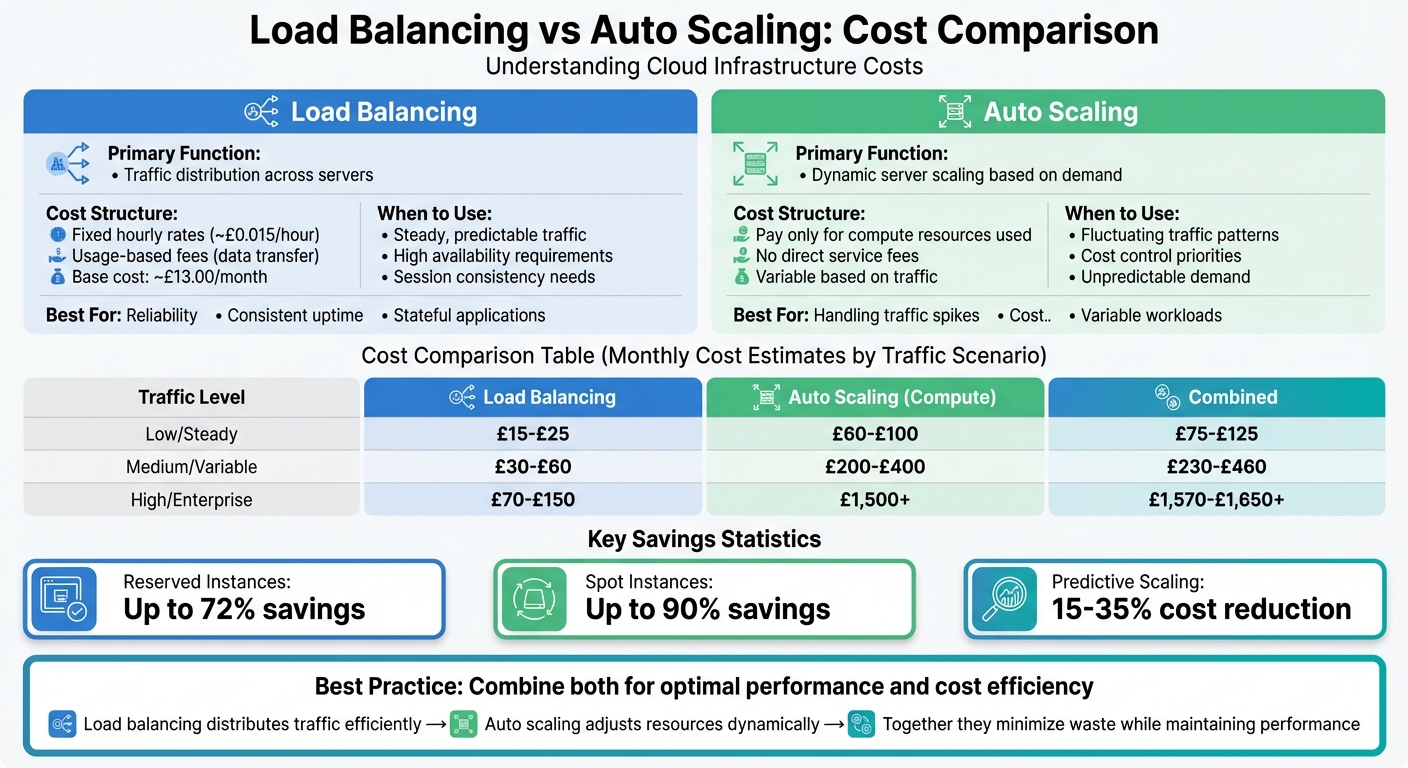 {Load Balancing vs Auto Scaling Cost Comparison Chart}
:::
{Load Balancing vs Auto Scaling Cost Comparison Chart}
:::
Auto Scaling and Load Balancing on AWS
Quick Comparison
| Feature | Load Balancing | Auto Scaling |
|---|---|---|
| Primary Function | Traffic distribution | Dynamic server scaling |
| Cost Structure | Fixed + usage-based fees | Tied to compute resources |
| When to Use | Steady traffic, high availability | Fluctuating traffic, cost control |
| Best For | Reliability, session consistency | Handling traffic spikes, cost savings |
For steady traffic, load balancing alone may suffice. For variable demands, auto scaling adjusts resources efficiently. Combining both ensures optimal performance and cost management.
What Is Load Balancing?
Load balancing is the process of distributing incoming network traffic across multiple servers. It acts as a middleman, directing requests to the server best equipped to handle them based on current conditions. This helps prevent any single server from becoming overwhelmed [5]. Let’s dive into how it works and why it’s so important.
How Load Balancing Works
When a request comes in, the load balancer determines which server should handle it. This decision is based on health checks and algorithms like round robin, least connections, or IP hashing. These methods ensure traffic only goes to servers that are functioning properly [5][6].
There are two main types of load balancers:
- Layer 4 Load Balancers: These make routing decisions based on IP addresses and TCP/UDP ports. They’re fast and efficient, with minimal overhead.
- Layer 7 Load Balancers: These go deeper, using application-level data like HTTP headers, cookies, or URLs to make smarter routing decisions [5].
Both types play a crucial role in ensuring smooth traffic management and server performance.
Main Benefits of Load Balancing
Load balancing offers several advantages that are essential for maintaining robust and efficient systems:
- Reliability: If one server fails, the load balancer automatically redirects traffic to healthy servers. This ensures continuous uptime without the need for manual intervention, protecting your application from single points of failure [5][6].
- Enhanced Performance: By distributing traffic evenly, it prevents any single server from being overwhelmed during busy periods. This results in quicker response times and better use of resources.
- Session Persistence: Load balancers can keep users connected to the same server throughout their session. This is especially important for stateful applications, like e-commerce sites, where maintaining a consistent experience - such as keeping cart contents intact - is critical [5][6].
In short, load balancing is a key tool for ensuring your systems remain reliable, responsive, and user-friendly, even under heavy loads.
What Is Auto Scaling?
Auto scaling automatically adjusts computing resources to match current demand. This is managed through Auto Scaling Groups, which define minimum, maximum, and desired numbers of instances. It also keeps an eye on the health of instances, replacing any that aren't performing as they should. This dynamic approach creates a foundation for the responsive mechanisms discussed below.
How Auto Scaling Works
Auto scaling adapts to changing demands by adding or removing instances based on specific metrics like CPU usage, network activity, or the number of requests. There are several ways this can be achieved:
- Dynamic scaling: Reacts to real-time changes in metrics, such as a sudden spike in CPU usage.
- Predictive scaling: Uses machine learning to analyse past traffic patterns and predict future demand up to 48 hours ahead. It can create capacity schedules with just 24 hours of historical data, though two weeks' worth of data generally provides more reliable forecasts [9].
- Scheduled scaling: Adjusts resources at set times, which is particularly useful for planned events like holiday sales.
Additionally, auto scaling distributes instances across multiple Availability Zones, ensuring high availability. These mechanisms help balance performance and costs effectively, as we'll explore further.
Main Benefits of Auto Scaling
One of the standout advantages of auto scaling is cost efficiency. You only pay for the resources you use. For instance, mixing different instance types can lead to significant savings - Reserved Instances can save up to 72%, while Spot Instances can reduce costs by as much as 90% [11].
Auto scaling also makes it easier to handle traffic fluctuations. For unexpected surges, target tracking policies can maintain performance metrics, like keeping CPU usage at 50%. Meanwhile, for predictable traffic patterns, predictive scaling prepares resources in advance, avoiding delays caused by instance warm-up
times.
A real-world example: In 2025, SpartanNash reported savings of approximately £234,988 over five years by using auto scaling to align capacity with demand [10].
Load Balancing Costs Explained
Load balancing costs typically include a fixed hourly charge and additional fees based on traffic levels. Cloud providers generally bill for every hour (or part of an hour) that the load balancer is active - even if it isn’t handling any traffic [3].
What Affects Load Balancing Costs
Several factors influence the cost of load balancing. The type of load balancer and how usage is measured are key considerations. Modern pricing structures often rely on capacity units, which account for metrics like new connections, active connections, and data processed [3]. For Application Load Balancers, the number of routing rules also plays a role. Most providers allow up to 10 rules at no extra cost but charge for additional rules [3].
Data transfer patterns also significantly impact costs. Transfers within the same zone are usually free, but cross-zone traffic incurs charges of about £0.008 per GB in each direction. Public IP traffic adds around £0.016 per GB for round trips [12]. These variables can lead to noticeable differences in monthly expenses, as illustrated below.
Cost Examples by Traffic Level
Here’s a breakdown of estimated monthly costs for different traffic scenarios, based on standard load balancer pricing. The estimates assume a usage of 730 hours per month and include both fixed and variable fees:
| Traffic Scenario | Configuration | Monthly Cost (GBP) |
|---|---|---|
| Low Volume | 5 rules, 100 GB processed | ~£15.00 |
| Medium Volume | 10 rules, 1,000 GB processed | ~£24.40 |
| High Volume | 50 rules, 10,000 GB processed | ~£88.00 |
For comparison, AWS Application Load Balancers charge £0.018 per hour plus £0.0064 per capacity unit-hour. Azure and Google Cloud services charge around £0.020 per hour for the first five rules, with data processing fees ranging between £0.004 and £0.0064 per GB [3] [1] [13].
To reduce expenses, consider strategies like consolidating routing rules, enabling CDN caching for static assets, and ensuring backend resources are closely aligned with load balancer nodes to limit cross-zone data transfers [12] [13].
Auto Scaling Costs Explained
Auto scaling adjusts resource usage based on demand, which means costs are tied to actual consumption. These expenses primarily come from compute instances, storage, and monitoring tools like CloudWatch [2][4]. When configured correctly, this usage-based pricing model can lead to notable savings compared to fixed charges.
Striking the right balance between capacity and demand is key. If you over-provision, you waste money on idle resources. On the other hand, under-provisioning risks downtime and lost revenue. By matching instance types to workload needs - a process called right-sizing - you could cut costs by as much as 50%. Active optimisation can further reduce expenses by up to 35%.
What Affects Auto Scaling Costs
The biggest factor in auto scaling costs is resource consumption. For example, EC2 instances often make up about 45% of total cloud spending. The frequency of scaling events also matters - frequent adjustments to handle unpredictable traffic can drive up both compute and monitoring costs.
How you purchase resources plays a major role, too. Reserved Instances are ideal for predictable workloads, offering savings of up to 72%. Meanwhile, Spot Instances - perfect for fault-tolerant applications - can cut costs by as much as 90%. For even more savings, predictive scaling (which forecasts demand using machine learning) can reduce costs by 15–35% compared to traditional reactive scaling.
Monitoring costs, while smaller, can add up over time. For instance, CloudWatch standard alarms cost £0.08 per metric per month, while high-resolution alarms are £0.24 per metric per month. To avoid unnecessary charges, regularly review and delete redundant alarms.
These factors collectively shape your overall expenses, as shown in the following examples.
Cost Examples by Traffic Pattern
Take a typical UK e-commerce business using auto scaling. Their monthly costs might include:
- Compute resources (e.g., web servers, databases): £2,000–£5,000
- Storage (e.g., product images, data): £500–£1,500
- Data transfer during peak times: £800–£2,000
- API usage (e.g., payments, inventory): £300–£800
Looking at real-world cases highlights the potential for savings. For example:
- ITV, a UK broadcaster, saved about £120,000 by combining AWS Auto Scaling with Spot Instances [2].
- Wildlife Studios cut Amazon EC2 costs by 45% by using a mix of Reserved and Spot Instances in their scaling groups.
- Freshworks slashed infrastructure spending by 80% by leveraging Spot Instances for flexible workloads while reserving instances for steady needs.
To reduce costs further, consider these strategies: enable scale-in policies, use AWS Compute Optimizer for right-sizing, and implement target tracking. Combining Reserved Instances for predictable workloads with Spot Instances for flexibility is another effective approach.
Need help optimizing your cloud costs?
Get expert advice on how to reduce your cloud expenses without sacrificing performance.
Load Balancing vs Auto Scaling: Cost Comparison
Let's break down the costs of load balancing and auto scaling to see how they stack up.
Load balancing comes with both fixed and usage-based fees, while auto scaling charges only for the compute resources it adjusts [2][4]. For example, a load balancer typically has a base cost of around £13.00 per month, with additional charges increasing as traffic grows [3]. On the other hand, auto scaling doesn’t have a direct service fee; its expenses are tied entirely to the compute resources it scales up or down. This makes load balancing costs more predictable but potentially higher during periods of low traffic, whereas auto scaling offers flexibility for workloads that fluctuate.
Here’s a quick look at estimated monthly costs across different traffic scenarios:
| Traffic Scenario | Load Balancing (ALB) | Auto Scaling (Compute) | Combined Total |
|---|---|---|---|
| Low/Steady (1 connection/sec, 300 KB/s) | £15–£25 | £0 (£60–£100 compute) | £75–£125 |
| Medium/Variable (100 connections/sec, daily peaks) | £30–£60 | £0 (£200–£400 compute) | £230–£460 |
| High/Enterprise (20 GB/hour processed) | £70–£150 | £0 (£1,500+ compute) | £1,570–£1,650+ |
As traffic increases, so do load balancing charges. For an Application Load Balancer (ALB), costs are determined by the highest usage across four factors: new connections, active connections, processed bytes, or rule evaluations [3]. Keeping an eye on which of these factors is driving your costs can help you fine-tune your application’s behaviour and manage expenses more effectively.
This side-by-side comparison offers a clearer picture of how these tools impact your cloud infrastructure budget.
When Load Balancing Is More Cost-Effective
For applications with steady and predictable traffic patterns, load balancing offers a cost-effective solution. With a stable hourly rate of approximately £0.015 per hour, it’s easier to plan budgets without worrying about unexpected spikes in compute costs [3][1]. This is particularly useful for applications where usage doesn’t fluctuate dramatically, ensuring you maintain control over expenses while meeting uptime requirements.
Load balancing also shines in scenarios where high availability is non-negotiable. Load balancers are designed with reliability in mind. For instance, Google Cloud ensures regional reliability by allocating a minimum of three proxy instances per internal Application Load Balancer, regardless of traffic levels [13]. As Google Cloud explains:
To ensure optimal performance and reliability, each load balancer is allocated at least three proxy instances in the Google Cloud region where the load balancer is deployed.[13]
This level of redundancy is essential for businesses where downtime directly impacts revenue.
Another advantage is the ability to consolidate multiple services under a single load balancer. Instead of incurring separate hourly charges for multiple load balancers, you can use tools like IngressGroups to route different services through one Application Load Balancer [14]. This approach is gaining traction among organisations aiming to cut cloud costs while maintaining robust functionality.
Finally, regular audits of load balancer usage can prevent unnecessary spending. Research from AWS highlights how businesses can waste millions on load balancers that have no healthy targets or registered instances [14]. By periodically reviewing your load balancer inventory, you can identify and eliminate these hidden costs, making your infrastructure more efficient and budget-friendly.
When Auto Scaling Is More Cost-Effective
Auto scaling shines as a cost-saving solution, especially for applications with unpredictable traffic patterns. Think about e-commerce platforms that experience massive spikes during sales events or product launches but return to normal levels afterward. With auto scaling, resources adjust dynamically to meet these shifting demands, ensuring you're not stuck paying for unused capacity during quieter times[9]. This adaptability lays the groundwork for automated strategies that fine-tune performance costs even further.
One advantage of AWS Auto Scaling is that it doesn’t come with extra service fees. You only pay for the compute resources and monitoring you use[2]. During periods of low traffic, the system scales in, shutting down unneeded instances and billing you solely for active resources[9][15].
For applications with longer boot times, predictive scaling can prepare instances in advance of expected traffic surges, while warm pools keep stopped instances ready to go. Both approaches help minimise delays during peak demand[7][8][9].
Another way auto scaling keeps costs in check is by automatically replacing unhealthy instances. This reduces the financial hit of running failing resources[8][11]. Additionally, target tracking policies help maintain specific metrics - like keeping CPU utilisation at 50% - so you only provision the resources necessary to maintain performance.
Using Load Balancing and Auto Scaling Together
Pairing load balancing with auto scaling creates a system that minimises resource waste while maintaining consistent performance. Load balancing ensures traffic is evenly distributed across instances, avoiding situations where one server is overloaded while others remain underused. Meanwhile, auto scaling adjusts the number of instances based on demand. Together, they help ensure you're running only the resources you need, precisely when you need them.
To implement this setup, connect your load balancer to your Auto Scaling Group. This ensures that new instances are automatically added, and terminated ones are removed seamlessly. It's also a good idea to configure the group to rely on Elastic Load Balancing health checks rather than just EC2 status checks. This way, any underperforming instances can be replaced automatically. Additionally, using target tracking scaling with load balancer-specific metrics, such as ALBRequestCountPerTarget, lets you scale resources in direct response to actual traffic. This approach not only fine-tunes resource usage but also reinforces the cost and performance gains discussed earlier.
For businesses in the UK, aligning resource availability with standard operational hours can be especially effective. By combining these tools, you can scale down to zero or a minimum capacity outside of typical business hours (09:00–17:30 GMT). Scheduled scaling actions can increase capacity just before 09:00 and reduce it after 17:30 to match peak activity periods. Enabling cross-zone load balancing across multiple Availability Zones also adds resilience, ensures even usage of instances, and helps control costs - all while adhering to GDPR requirements.
As highlighted earlier, this method has already delivered substantial savings for many organisations.
Elastic Load Balancing (ELB) works hand-in-hand with Auto Scaling to keep resources aligned with demand, avoiding unnecessary instance launches and reducing waste.- Hokstad Consulting
Another cost-saving tip is to use Spot Instances within your auto-scaling setup. These can reduce costs by over 66% compared to On-Demand instances, with only around 5% experiencing interruptions over a three-month period (as of March 2024). This ensures a reliable way to handle sudden bursts in demand without overspending.
Conclusion
Load balancing comes with fixed hourly and capacity fees, while auto scaling charges are based solely on the actual compute resources used [2][3][4]. This difference in cost structure plays a key role in deciding which approach suits your workload - steady or variable.
The best choice depends on your traffic patterns and operational needs. For workloads with consistent, predictable demand, load balancing alone might be enough. On the other hand, if your traffic fluctuates, auto scaling can help you avoid paying for unused capacity. Often, the ideal setup combines both tools: load balancing efficiently distributes traffic, while auto scaling adjusts resources dynamically to meet demand.
As discussed earlier, aligning your resource allocation with traffic patterns is critical for balancing performance and cost. To make the right decision, carefully analyse your traffic trends, peak usage periods, and budget limitations. Additionally, new users may take advantage of free usage allowances to get started.
For businesses aiming to cut cloud costs without compromising performance, Hokstad Consulting offers expertise in cloud cost optimisation and DevOps transformation. Their services include cloud cost audits, migration planning, and tailored automation solutions that help reduce expenses while maintaining strong performance. By applying these cost-focused strategies, you can achieve better control over both performance and your budget.
FAQs
How do load balancing and auto scaling work together to reduce costs?
Load balancing and auto scaling work hand in hand to help businesses manage costs effectively while keeping performance steady.
Auto scaling adjusts the number of active servers (or instances) automatically, depending on the current demand. This means you’re only paying for the resources you actually need, avoiding overprovisioning and cutting out unnecessary expenses.
On the other hand, load balancing ensures that incoming traffic is spread evenly across all active servers. This prevents any single server from being overloaded and makes sure resources are used efficiently. By avoiding idle or underused servers, load balancing also helps keep costs in check.
Together, these tools create a flexible and reliable infrastructure that adapts to changing demands without compromising performance.
How do I decide between load balancing and auto scaling for my cloud infrastructure?
Choosing between load balancing and auto scaling comes down to what your application needs, how your traffic behaves, and your budget. Load balancing spreads incoming traffic across multiple servers, ensuring no single server gets overwhelmed and maintaining consistent performance. On the other hand, auto scaling adjusts the number of servers dynamically based on demand. This means you can scale up during high-traffic periods and scale down when it's quieter, helping to manage resources and control costs.
For applications with unpredictable traffic patterns, auto scaling can be a cost-effective way to avoid overprovisioning. Pairing it with load balancing creates a powerful combination, as load balancing ensures traffic is evenly distributed while auto scaling keeps your infrastructure lean and responsive. While load balancing may come with additional operational costs, it enhances reliability and ensures your application remains available. For many organisations, using both strategies together offers the best balance between performance, cost control, and scalability.
What are the best ways to reduce costs when using both load balancing and auto scaling?
To keep costs low while using load balancing and auto scaling, it's all about smart resource management. Start by right-sizing instances to match your needs and consider cost-effective options like Spot Instances or Reserved Instances. By pairing dynamic and predictive scaling, you can adjust resources in real time to meet demand without over-provisioning.
For load balancing, opt for services that charge based on actual usage. Use built-in cloud tools to monitor resource consumption and avoid unnecessary spending. Automating policies to scale down resources during quieter periods can make a big difference. Additionally, setting up cost governance automation helps streamline expenses. Regularly reviewing and tweaking your setup ensures you're always in control of your costs.