
I use hard caps to block requests at a budget limit, and soft alerts to give owners time to act. For a £1,000 monthly budget, warnings at 50%, 80% and 90% leave room to respond - but an alert alone does not stop spending.
My approach is to combine early warnings with a final stop where the budget demands it:
- Set the rules: Name an owner, response deadlines, reset times and who can approve extra spending.
- Check before spending: Reserve the estimated cost before each request. Delayed billing and requests already running can otherwise push costs past the cap.
- Plan for exhaustion: Decide whether to reject, queue or use a funded fallback. Stop agent loops and avoid retrying budget rejections.
- Test and review: Check alerts, escalation, safe pauses and restarts, then compare usage estimates with provider charges.
Quick Comparison
| Criterion | Hard caps | Soft alerts |
|---|---|---|
| Requests at the limit | Block affected work | Continue unless a separate rule stops them |
| Spending control | Stronger, but depends on timely checks | Depends on action after a warning |
| Service continuity | May interrupt work | Keeps work running |
| Main risk | Blocked requests or overspend from delayed records | Missed warnings or slow responses |
| User impact | Errors, paused jobs or reduced features | Usually no immediate change |
| Setup | Budget checks, reservations and reset rules | Tracking, notifications and escalation |
| Best fit | Fixed budgets, tenant limits and agents | Customer-facing services and changing demand |
The choice comes down to which costs you more: interrupted work or spending beyond the budget.
Mastering Cost & Rate Limits in LLMOps - Efficient AI at Scale | Uplatz
Hard Caps vs Soft Alerts: Key Differences
Hard caps stop spend; soft alerts warn without stopping it.
| Criterion | Hard caps | Soft alerts |
|---|---|---|
| Request handling | Reject affected requests when the limit is reached | Let requests continue |
| Spending certainty | Greater control, but metering delays and work already in progress can cause overspend | Depends on someone acting in time |
| Service continuity | Can interrupt legitimate work | Keeps services running until action is taken |
| Main risks | Blocked work and spending beyond the limit | Ignored warnings and alert fatigue |
| User impact | Errors, paused jobs or reduced functionality | Usually no immediate change |
| Implementation complexity | Enforcement, reservations, rejection handling and reset logic | Monitoring, notification routing and escalation |
| Suitable workloads | Fixed budgets, isolated tenants and autonomous agents | Customer-facing services and variable demand |
Hard Caps: Enforce Budget Limits
If work must stop at a budget limit, enforce that limit at every control layer.
Set spend, token and request quotas for organisations, projects, API keys, users, agents and workflows. Choose the shortest limit period that fits the workload. Check every applicable limit before accepting work: an agent’s allowance cannot override its project’s ceiling. Request and token rate limits control throughput, not total spend.[3][4]
Recorded usage alone cannot prevent overspend. Before dispatch, estimate input tokens, maximum output tokens and tool costs, then reserve that amount atomically. After the work finishes, reconcile the reservation against actual usage. Limit concurrent requests and agent branches so two checks cannot spend the same budget.
Return a structured rejection that includes the scope, error code, last-known usage, remaining budget and reset time. Some implementations return HTTP 429, but the status code depends on the provider. Don’t assume it signals only a rate limit. Keep an audit trail of rejections, reconciliations and authorised overrides.[2][3][4]
Soft Alerts: Warn Before Budgets Run Out
When keeping a service running matters more than blocking spend immediately, alerts need clear thresholds and named owners.
Trigger warnings using percentage, monetary, token, request or forecast thresholds. Each alert should include its scope, current usage, spend rate, estimated exhaustion time and reset time, including the time zone. Use email for routine warnings, dashboards for investigation, webhooks for automated responses and incident notifications for urgent spikes. An alert warns; it does not stop spend.[1][3][4]
Set thresholds around the time needed to respond, not percentages alone. Track spending acceleration, repeated retries and unusually long agent loops. Remove duplicate warnings for the same condition, but escalate if the spending rate worsens or the owner misses the response deadline. Forecast warnings must leave enough time to investigate and reduce usage before the allowance runs out.
Choose controls based on which failure costs more: blocked work or overspend.
Match Controls to Business Risk
| Business requirement | Appropriate control | Policy detail |
|---|---|---|
| Strict procurement ceiling | Hard cap with advance reservations | Include all chargeable work and reconcile actual costs |
| Public endpoint | Alerts plus rate, token and concurrency controls | Protect legitimate demand while containing sudden spikes |
| Tenant isolation | Per-tenant cap plus organisation-level alerts | Stop one tenant consuming the shared allowance |
| Autonomous agents | Per-agent or workflow cap plus alerts | Enforce step limits, loop detection and concurrency limits |
| Development experiments | Modest project cap plus early warnings | Bound exposure without stopping every exploratory run |
| Customer-critical continuity | Alert-led policy with authorised extra allowance | Define a monetary ceiling and automatic expiry |
Allow temporary overruns only with approval, an expiry and a review.
After choosing the control, define how alerts trigger action.
Turn Budget Alerts into Action
::: @figure 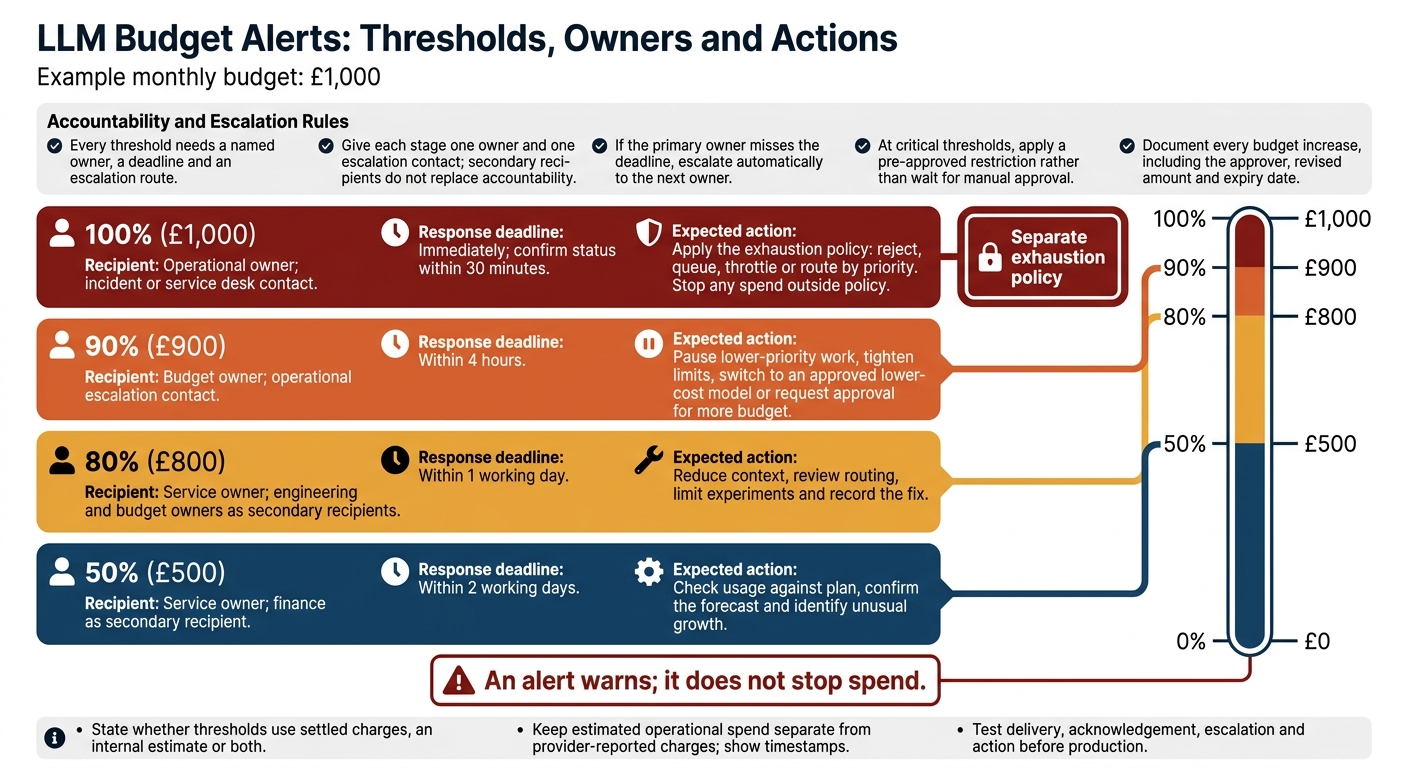 {LLM Budget Alerts: Thresholds, Owners and Actions}
:::
{LLM Budget Alerts: Thresholds, Owners and Actions}
:::
Soft alerts work only when every threshold has a named owner, a deadline and an escalation route.
Assign Alert Thresholds, Owners and Deadlines
Give each stage one owner and one escalation contact. A long distribution list is no substitute for accountability. Notify finance or engineering as secondary recipients only, and state whether thresholds use settled charges, an internal estimate or both.
Each spend level should trigger a specific response.
Use £1,000 a month as the example budget.
Threshold Recipient Response deadline Expected action 50% (£500) Service owner; finance as secondary recipient Within 2 working days Check usage against plan, confirm the forecast and identify unusual growth. 80% (£800) Service owner; engineering and budget owners as secondary recipients Within 1 working day Reduce context, review routing, limit experiments and record the fix. 90% (£900) Budget owner; operational escalation contact Within 4 hours Pause lower-priority work, tighten limits, switch to an approved lower-cost model or request approval for more budget. 100% (£1,000) Operational owner; incident or service desk contact Immediately; confirm status within 30 minutes Apply the exhaustion policy: reject, queue, throttle or route by priority. Stop any spend outside policy.
If the primary owner misses the deadline, escalate automatically to the next owner. At critical thresholds, apply a pre-approved restriction rather than wait for manual approval. Document every budget increase, including the approver, revised amount and expiry date.
Track Spending and Check Alert Responses
Keep estimated operational spend separate from provider-reported charges. Add timestamps so readers can see how current the data is. Show both figures in dashboards and alert messages, and retain the billing currency and exchange-rate method used for UK-facing £ figures.
Record request timing, budget period, workload identity, provider/model details, token counts, estimated and final cost, request outcome, retries, fallback use, remaining budget and alert history.
Treat spending spikes as suspect until retry counts, context length, tool calls and agent steps match normal ranges. For each alert, record delivery, acknowledgement, diagnosis, action, approval and evidence of completion.
Test the full alert path before production. Trigger each stage, delay the primary recipient, check escalation and confirm that restrictions affect only the intended workload. Check recipients, deadlines, acknowledgement and action - not just delivery. After ownership, pricing or integration changes, retest how the system handles delayed billing data and suppresses duplicate alerts.
The policy must also state how requests are rejected, queued or throttled once the budget runs out.
Handle Requests After Budgets Run Out
An alert triggers a response; it does not enforce a limit. Once the budget runs out, a separate enforcement policy decides whether to reject, queue or downgrade work. Apply the same rule across APIs, queues and agents.
| Budget state | Hard-cap handling | Soft-alert handling |
|---|---|---|
| Budget remains | Proceed if capacity and other limits permit. | Proceed and monitor spend. |
| Warning threshold reached | Proceed within the cap; apply any approved reduction policy. | Proceed and notify the owner or trigger an approved action. |
| Request would exceed the limit | Reject before execution. Queue only if execution after an approved reset or increase is guaranteed. | Apply any separate restriction: queue, downgrade or reject. Otherwise, proceed. |
| Budget exhausted | Reject new billable work unless an approved no-cost path or reserved budget covers it. | The alert alone changes nothing; apply the separate service policy. |
| Reset or approved increase | Recheck budget, request validity and applicable limits before resuming. | Recheck the same conditions before resuming. |
The rules below cover rejection messages, retries, fallbacks and safe pause points.
Explain Rejections and Limit Retries
Return a structured error with a stable code such as budget_exhausted, the affected quota, a request ID and the reset time, if known. Tell the caller whether to wait or use the published escalation route. Do not reveal account identifiers, credentials, hidden prompts or other tenants’ usage. Operator records should include the blocking policy, remaining balance and completed external actions.
Do not retry a deterministic budget rejection. Retry only confirmed temporary failures. Honour a valid Retry-After value or use bounded exponential back-off with jitter. Cap both the number of attempts and elapsed time, including SDK retries. An HTTP 429 alone does not mean a retry is appropriate.[5][6]
Keep Fallbacks Within Budget
Fallbacks also need budget. Serve cached answers where freshness and privacy permit, queue non-urgent work, or offer reduced functionality such as deterministic search, shorter output or human review.
Shorter output still costs money, and a lower-cost model still needs budget. Every fallback, tool call and background job must inherit the relevant limits. Protect contractual workflows with an enforced reserve that discretionary work cannot use. If that reserve cannot cover a request, reject or queue it.
Stop and Resume Agents Safely
When the budget runs out, mark the agent as paused and stop retries, recursion and parallel branches. Save completed steps, pending actions and tool results. Check limits before every model call, tool call and loop iteration.
After a reset or approved increase, recheck budget, permissions and task validity before resuming from the checkpoint. Check queued work against the current policy, price, model availability, data permissions and business deadline. Expire jobs that are stale or no longer authorised.
Record completed side effects and use idempotency keys so resuming cannot duplicate payments, messages or database changes.[7][8]
Conclusion: Put Your Budget Policy into Practice
Use soft alerts when you need time to investigate and act. Use hard caps when overspend is unacceptable. For production workloads, combine both to get an early warning and a final stop.
Set Budget Rules for Each Workload
Give each workload its own budget rules. Set stricter limits for autonomous agents, public endpoints and recursive workflows. For predictable internal work, use more flexible, alert-based policies with longer response windows.
Record each budget’s scope, owner, currency (£), reset window, time zone, alert thresholds, hard limit, escalation deadline and permitted fallback behaviour.
During each reset period, reconcile application usage with billing. Review spend variance, blocked requests and paused jobs. Usage data can lag, so test how your controls handle delayed usage records and concurrent requests.[9]
Get Help Implementing Budget Controls
If you need implementation support, require budget governance, usage instrumentation and safe stopping from the start. Hokstad Consulting can help implement AI strategy, custom agents and budget controls.
FAQs
How do I balance strict budgets with service continuity?
Pair budget alerts with automated, policy-driven guardrails. Set alerts at 50%, 80% and 95% of your budget so teams can adjust workloads before they hit the hard limit.
Keep baseline capacity for critical production services to support the goal of 100% uptime. Apply hard caps and replica bounds only to burst or non-production environments. Once spending reaches the budget, pause new provisioning for manual approval - not live applications that need to stay running.
How much response time should budget alerts allow?
The documentation doesn’t specify a fixed response time. Cloud billing data can take up to 24 hours to process, so track how quickly your teams respond to notifications.
If alerts regularly arrive too late to act, lower your threshold percentages or use forecast-based alerts for earlier warnings. Focus on giving teams enough time to act before costs climb, rather than following a fixed response window.
How do I prioritise queued work after a budget reset?
After a budget reset, review billing reports to see what drove past spending and check that the new allocation covers current business activity. Follow established tagging policies to assign costs accurately. Use automated approval workflows to check that new deployments meet budget criteria.
Work through the backlog in stages, starting with high-priority tasks. Monitor workloads using **tiered alert thresholds - typically 50%, 80% and 100% - **to help prevent another unexpected budget breach.