
I treat an LLM SDK upgrade as a contract change - not just a package update. Before release, I check method signatures, request fields, response types and removed features, then link each change to its affected applications and a named owner.
My checklist covers six steps:
- Record the scope: current and target versions, dependencies, runtimes and settings.
- Map the impact: find every consuming application and assign fixes and reviews.
- Check calls and requests: test arguments, defaults, serialisation, retries and streaming.
- Check responses and removals: test parsers, tool calls, replacement code and runtime support.
- Compare and rehearse: measure errors, latency, token use and £ per successful task, then test rollback.
- Approve or stop: release only when checks pass or named owners formally accept non-critical risks.
I set limits before testing - for example, no more than a 10% increase in p95 latency, unless a different limit is agreed. Then I start with a 1–5% canary. My release rule is simple: an unowned finding or untested rollback blocks release.
::: @figure 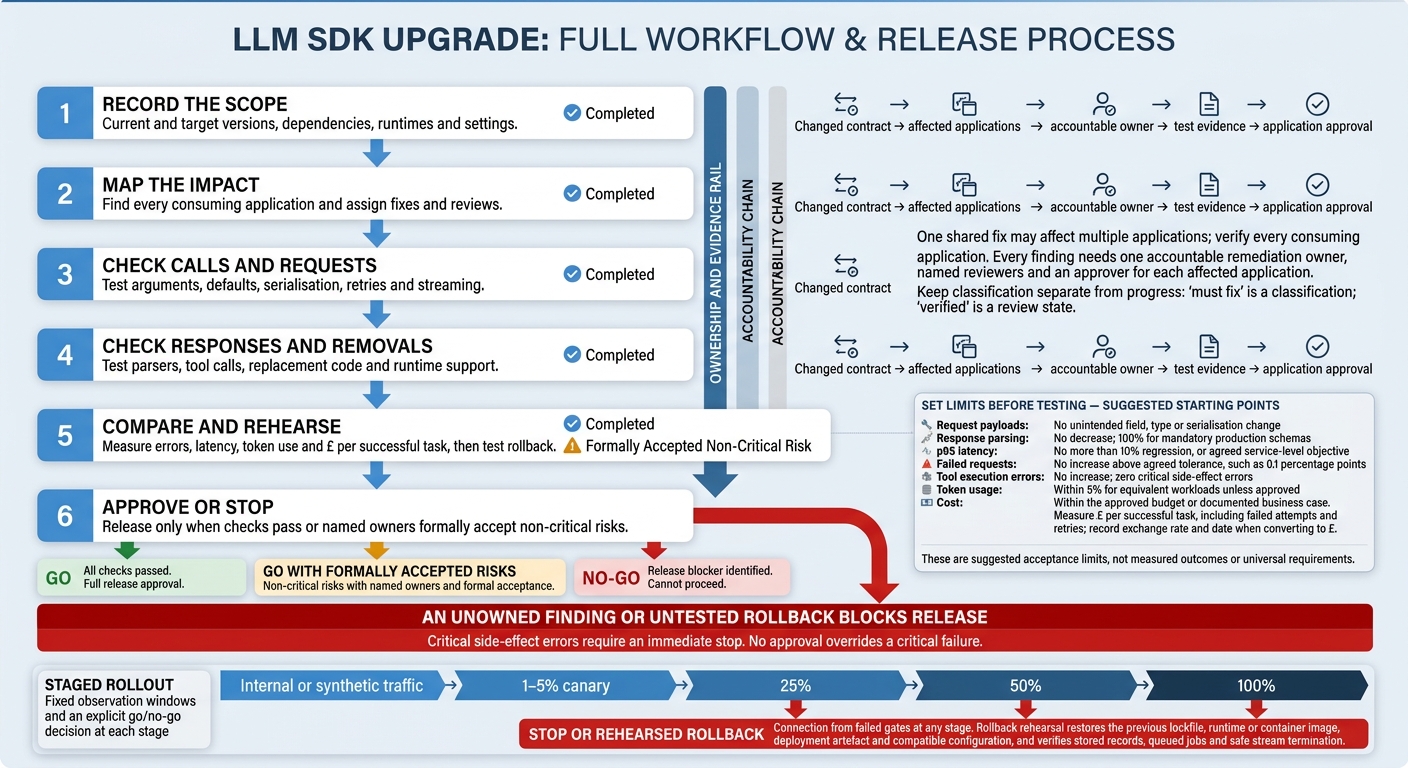 {LLM SDK Upgrade: Six-Step Release Checklist}
:::
{LLM SDK Upgrade: Six-Step Release Checklist}
:::
2. Map SDK changes to applications and owners
Once you’ve identified a breaking change, trace it to every application that uses it. Map consuming applications, not just imports. Check repositories, deployable services, scheduled jobs, background workers, shared client libraries, command-line tools, notebooks, integration test suites and custom agent workflows.
Cross-check manifests, lockfiles, imports, images and deployment configuration. Follow each shared dependency through to its consuming applications, and record the environment, deployment path, business purpose and owner. Ask repository owners to verify generated code, optional plugins and dynamically loaded agent tools that scans might miss.
Create a change register
Record one finding for each changed contract, with linked entries for every affected application. Include the documentation source, package and symbol, old and new contract, exact SDK versions, dependency path and call sites.
Add the business impact, risk, remediation action, accountable owner, reviewers, application approver, due date, test evidence, verification status and rollback note. Keep classification separate from progress: “must fix” describes the finding; “verified” describes its review state.
Classify each finding as:
- Must fix when production relies on the changed contract.
- Test-only when the path exists only in tests.
- Unused code only after checking imports, build targets, deployments, scheduled jobs and dynamic references.
Record the reason and supporting evidence. A search that finds nothing does not prove the code is unused.
Hypothetical e-commerce support agent: a customer-facing chat service and a nightly ticket-summary worker both call a shared
llm_request()wrapper. If the upgrade requires changingmax_tokenstomax_output_tokens, update the wrapper once, but link both consumers to the finding. The chat service needs latency, streaming and fallback checks, and the worker needs batch execution, retry and cost checks. The shared fix stays open until both application reviewers verify their paths.
Assign owners and reviewers
Assign request construction, tool payloads, response parsing and business behaviour to feature or service owners. Give platform owners responsibility for runtime, transport, authentication and deployment changes.
Every finding needs one accountable remediation owner, plus named reviewers and an approver for each affected application - not just a team alias. Escalate ownership gaps before release approval, and keep application approval with internal owners.
3. Check method signatures and request fields
Use the change register to trace each affected method to its call sites before checking payloads.
Check methods, arguments and call behaviour
Check live calls, not just installation. Compare SDK references and migration notes for renamed or removed methods, reordered arguments, changes from positional to named arguments, and new required parameters. Inspect live wrapper calls, dependency-injected clients and dynamic method selection. For calls without a request body, check whether the new signature requires null, undefined or {} for request options. These are not interchangeable.[6][7]
Test synchronous, asynchronous, raw-response, pagination and streaming paths. Check await behaviour, iterators, stream events, timeout units, cancellation and cleanup. Count SDK and application retries together, then cap both the number of attempts and total retry time. Do not automatically replay a stream after output has been consumed.[8]
Run compilers, type-checkers, linters and migration tools on a clean branch. Manually review argument changes, request construction and error handling. A clean result is only part of the evidence: dynamic dictionaries and weakly typed code can still hide incompatible calls.
Once the call signatures match, check outbound fields and serialisation.
Check request fields and serialisation
Compare sanitised outbound requests from both SDK versions, covering the HTTP method, path, headers, query parameters and JSON body. Check renamed, removed, newly required and optional fields, including defaults and nesting. Review model parameters, tool definitions, structured-output schemas, metadata and streaming flags. Confirm that valid options reach the wire, and record whether invalid or removed options are rejected, ignored or silently dropped.
Test explicit values against omission, null, empty strings, arrays and objects where allowed. Check language-specific serialisation, enum casing, numbers and nested values. Builders that rely on truthy checks must preserve false and 0. Attach before-and-after call traces, request snapshots and test results to each finding. Link each finding to the affected applications and the owner of the request-building code.
4. Check response types and removed features
Check response types and downstream consumers
Once you’ve confirmed request shapes, check that response shapes still match what every consumer expects.
A successful build does not prove response compatibility. Compare the old and target response models field by field. Cover nested content blocks, unions, enums, nullable and optional fields, headers, status values, raw-response wrappers and error payloads. Trace each change to the affected parser, stored payload, UI, logs and owner. Check Web-standard types directly: code written for a Node.js stream cannot assume a Web ReadableStream works the same way.[9][14]
Test parser, streaming, tool-calling and structured-output paths with successful, empty, partial, malformed and failed responses. Make sure asynchronous response readers are awaited where required. Check stream event types, ordering and termination - not just the assembled text. Tool handlers must rebuild argument fragments, validate identifiers and retain the context needed for the next agent step. Reject or quarantine incomplete structured results rather than saving them as valid records.[9][10][12][13]
Route token usage, finish reasons and content blocks to the relevant billing, quota, retry, workflow, display and storage owners. Attach sanitised fixtures and parser-test results to each finding. Treat partial output as incomplete until the affected owner confirms how it should be handled.[9][10]
Check removed features and runtime requirements
Search code, lockfiles, tests, config and deployment scripts for removed exports, helpers, shims, client options and transport dependencies. Classify each as unused, test-only, development-only, indirectly used or production-critical. For affected applications, record the documented replacement, behaviour difference, implementation owner and deadline for removing compatibility code. Check each migration step against the exact package, version, language and guide date. Then reproduce it in the application’s toolchain before applying it.[11][12][14][15]
Check minimum runtime, compiler and tool versions for every production deployment class. Test Fetch and Web Streams support, custom HTTP clients, proxies, TLS and certificate stores, authentication, regional endpoints and configuration failures. Keep compatibility code until replacement-path tests show the required behaviour for authentication, errors and observability. Record unused removals separately from production blockers.[5][11][14] Feed these findings into the rollout and rollback plan.
5. Test the upgrade, rollout and rollback
Use the compatibility check findings to set the regression matrix and rollout gates.
Compare behaviour across SDK versions
Build the previous and target versions in isolated staging environments. Use the same prompts, tools, configuration and locked dependencies. Record the build command, artefacts and any differences you cannot avoid. Test only the applications and paths listed in the change register.
Commit each lockfile, pin the runtime and container image, and use locked installs that fail when the manifest and lockfile disagree. Keep the artefacts. Use separate staging credentials or projects, without changing workloads or test fixtures.[21][22]
Run the smallest complete test matrix: unit, type, request-serialisation, integration, contract, streaming, tool, load and end-to-end tests. Use sanitised production journeys or logs, a fixed regression dataset and recent failures. Cover malformed inputs, timeouts, rate limits, authentication failures and interrupted streams. Repeat non-deterministic cases, comparing structured fields and business outcomes rather than exact wording. Block or mock side effects when replaying traffic.[16][18][19]
Set release thresholds before testing. Fill in the table with measured results and evidence links. The limits below are starting points. Measure cost per successful task, including failed attempts and retries. When converting charges to £, record the exchange rate and date used.[16][20][23] Add the results to the change register before rollout approval.
| Measure | Previous SDK | Target SDK | Suggested acceptance threshold | Evidence to link |
|---|---|---|---|---|
| Request payloads | Redacted canonical fixture | Redacted canonical fixture | No unintended field, type or serialisation change | Payload diff and test report |
| Response parsing | Baseline schema-pass rate | Candidate schema-pass rate | No decrease; 100% for mandatory production schemas | Contract-test report |
| p95 latency | Baseline milliseconds | Candidate milliseconds | No more than 10% regression, or agreed service-level objective | Dashboard snapshot |
| Failed requests | Baseline percentage | Candidate percentage | No increase above agreed tolerance, such as 0.1 percentage points | Error log query |
| Tool execution errors | Baseline percentage | Candidate percentage | No increase; zero critical side-effect errors | Tool-run report |
| Token usage | Mean input/output tokens | Mean input/output tokens | Within 5% for equivalent workloads unless approved | Usage export |
| Cost | Baseline £ per 1,000 tasks | Candidate £ per 1,000 tasks | Within the approved budget or documented business case | Billing report |
Approve rollout and test rollback
If a gate fails, use the rehearsal to check restoration speed and data safety.
Rehearse restoration, not just a version downgrade. In staging, restore the previous lockfile, runtime or container image, deployment artefact and compatible configuration. Then run smoke, integration and end-to-end checks, covering stored records, queued jobs and stream termination.
Verify feature flags, routing rules, secrets, environment variables, observability dashboards and alert definitions. Check that old code can read newly stored records and queued jobs. Where it cannot, provide a migration, dual-reader, replay or quarantine path. Test safe stream termination and job draining or replay without duplicate side effects. Record the rollback command, owner, recovery-time limit and rehearsal time.
Require sign-off from named application, platform and operations owners against the change register and test evidence. Add security approval for changes to authentication, TLS, transport, permissions or sensitive logging.
Release through internal or synthetic traffic, followed by a 1–5% canary, then 25%, 50% and 100%. Use fixed observation windows and an explicit go/no-go decision at each stage.[17]
Before deployment, define stop or rollback triggers for failed requests, malformed responses or schema failures, tool execution errors, authentication failures, p95 or p99 latency regression, token or cost growth, and critical journey failures. Critical side-effect errors require an immediate stop. Link every failed gate to the affected application and owner. No approval overrides a critical failure.
6. Conclusion: confirm release readiness
Once the rollout evidence is complete, use the change register to make the release decision. Check signatures, requests, responses, removals, runtime requirements and behavioural changes. Every material change must name the affected application, environment and owner.
Close findings and record the release decision
Close a finding only when it has linked code changes, test results or an approved, documented justification.
Record each tracked change in its own row, then use those rows to support the final release decision. Replace placeholders with application names, owners and evidence links. Split rows where needed.
| Change category | Affected application | Owner | Remediation status | Validation evidence | Release decision |
|---|---|---|---|---|---|
| Method signature or argument | List each affected caller | Name and role | Verification status | Linked fix and validation results | Go only when verified |
| Request field or serialisation | List each request producer | Name and role | Verification status | Payload comparison and validation results | No-go for unresolved incompatibility |
| Response type | List each downstream consumer | Name and role | Verification status | Parsing and contract-test results | No-go for critical mismatches |
| Removed feature or runtime requirement | List each dependent application | Name and role | Verification status | Replacement tests and rollback evidence | No-go without a safe recovery path |
Record the final decision: go, go with formally accepted risks, or no-go. Include the decision-maker, date and time, SDK versions and application scope. Keep unresolved risks on record, with accountable owners, controls, follow-up deadlines and acceptance criteria. An unowned finding or untested rollback remains a blocker.
Archive the table with the release evidence. If approval is conditional, schedule a post-release review and name the escalation contact. The approval must also name the owner, monitoring contact and rollback authority.
FAQs
How can I separate SDK regressions from model variability?
Keep immutable version histories for prompts, configurations and runtime settings. Pin model versions and standardise inputs to keep test runs consistent. For every output, log the exact system instructions, parameters and tool definitions used.
When an issue occurs, check the trace to confirm the runtime environment. If the output changes but the configuration stays the same, model variability is the likely cause. Configuration loading or execution failures point to an SDK regression.
How do I trace SDK changes through shared wrappers?
Audit API calls in application code and shared wrappers. Use OpenTelemetry (OTEL) traces to connect runtime telemetry with CI/CD pipelines, linking feature flag states and service health to SDK versions.
Keep audit logs searchable so you can trace who made each request, which environment it ran in and what happened. Compare current usage against the target vendor’s specifications to see how wrapper changes affect downstream application behaviour.
Which compatibility checks should I automate?
Automate checks for changes to method signatures, added or removed request/response fields, response types, structured output schemas and removed features [1]. Use contract tests to check that inputs and outputs between your application and the SDK match the agreed contract [2].
Before deployment, check for deprecated features and configuration mismatches [3][4]. Map each change to the affected applications and their owners. Hokstad Consulting helps teams optimise these workflows through AI strategy and implementation.