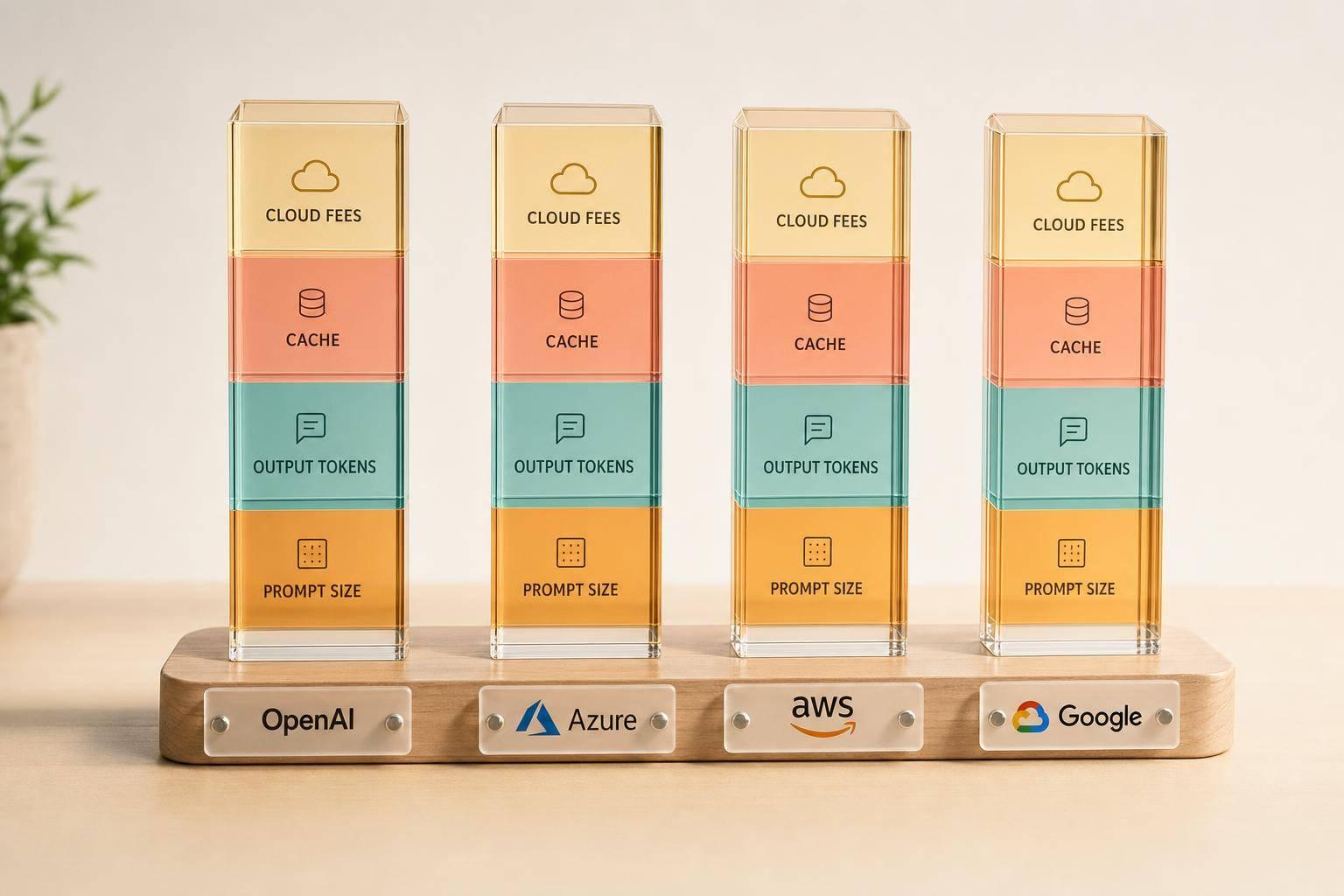
The cheapest token price often does not lead to the lowest monthly bill. From what I see in this comparison, your total cost usually comes down to four things: prompt size, output volume, cache use, and extra cloud charges.
If I were sizing this up for a UK business today, I’d keep these points front and centre:
- OpenAI direct is simple to price at first glance, but long prompts, cache miss rates, file storage and fine-tuned usage can push spend up.
- Azure OpenAI Service adds Azure quotas, networking, monitoring and private access costs on top of token charges.
- Amazon Bedrock can work well for steady traffic, but provisioned throughput means you may pay by the hour even when demand dips.
- Google Vertex AI can look strong for large-context work, especially where the same content is reused through context caching, though logging, storage and egress still count.
A few figures stand out:
- OpenAI account limits can range from 2,000,000 TPM at one tier to 40,000,000 TPM at a higher tier.
- Vertex AI supports context windows of up to about 2 million tokens on some models.
- OpenAI file search storage is listed at $0.10 per GB per day after the first 1 GB.
- In the sample scenarios, estimated monthly costs run from roughly £250 to £3,000, depending on workload shape.
What matters most is simple: measure cost per task, not just cost per million tokens. A support bot, an internal copilot and long-document analysis can each land in very different price bands, even when the list pricing first looks close.
Quick Comparison
| Provider | Best fit in simple terms | Main cost watchouts | Cost pattern |
|---|---|---|---|
| OpenAI | Teams that want direct API access | Long prompts, storage, fine-tuned rates, cache misses | Pay per input/output token |
| Azure OpenAI | Firms that need Azure controls and Microsoft stack alignment | Quotas, Private Link, Azure Monitor, regional setup | Token billing plus Azure platform costs |
| Amazon Bedrock | Steady workloads and firms already deep in AWS | Hourly provisioned capacity, networking, logging | On-demand or reserved throughput |
| Google Vertex AI | Large-context and repeat-query document work | Cache storage, logging, data processing, egress | Token billing with context cache options |
So if you’re comparing providers, I’d avoid choosing on headline rates alone. I’d price the actual workflow in £, include retries, logging, networking and reused context, and then compare the monthly total.
::: @figure 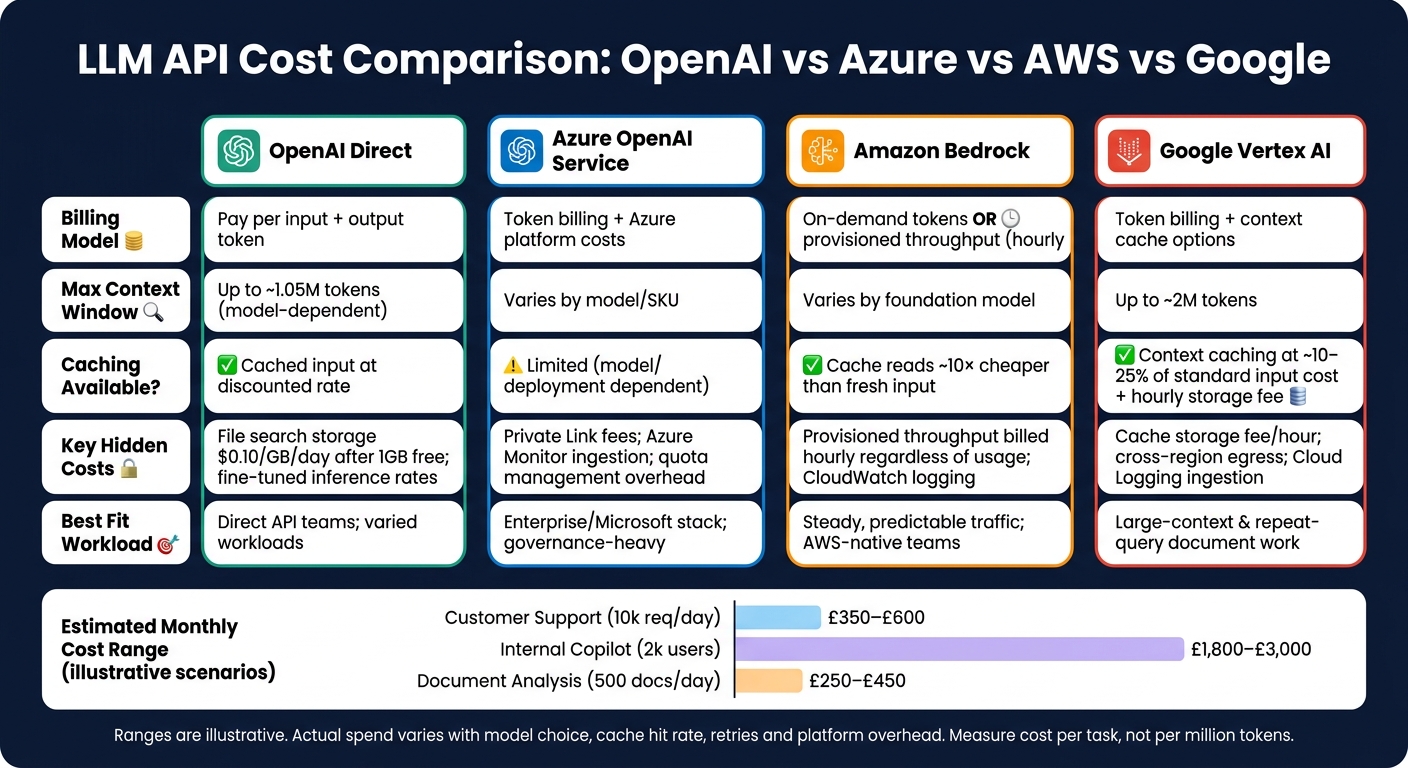 {LLM API Cost Comparison: OpenAI vs Azure vs AWS vs Google (2024)}
:::
{LLM API Cost Comparison: OpenAI vs Azure vs AWS vs Google (2024)}
:::
Stop Overpaying for LLMs: One API, Every Provider, Lowest Cost
2. How OpenAI, Azure, AWS and Google charge for LLM usage
All four providers bill by tokens. But there’s a catch: larger context windows can push up input costs before the model gives you a single reply. So while token billing looks simple on the surface, the bill you get each month often depends on a few extra moving parts.
The main gaps in cost usually come down to context size, cache use, quota limits and add-on services.
OpenAI direct API: token prices, cache discounts and fine-tuned inference
OpenAI bills input and output tokens separately. That means you pay once for what you send in, and again for what the model sends back.
Prompt caching can cut the cost of repeated prompt prefixes. This matters if your workflow keeps reusing the same system instructions or shared setup text. In that case, caching can trim spend without changing how the app works.
Fine-tuned models also have their own inference pricing. So before you ship anything to production, it’s worth checking the rate for the exact model you plan to use rather than relying on the base model price.
Azure OpenAI Service: billing, quotas and enterprise overhead
Azure OpenAI Service keeps token billing, but layers it inside Azure’s deployment, governance and quota controls.
That can change the picture quite a bit. Regional deployment choices, rate-limit tiers and quota management can affect how much capacity you get for the same spend. On top of that, networking and monitoring charges sit outside the headline model price, so the listed token rate is only part of the story.
Amazon Bedrock and Google Vertex AI: on-demand tokens, provisioned capacity and add-on charges
Amazon Bedrock and Google Vertex AI both support on-demand token pricing. They also offer provisioned capacity for steadier workloads, which can make sense when usage is predictable.
The extra charges matter here too. Logging, networking and data-processing fees can make a clear difference to the monthly total, especially once usage starts to scale. The next section shows which of these costs tend to grow fastest in production.
| Provider | How it charges | Cost factors to watch |
|---|---|---|
| OpenAI direct | Separate input and output token billing | Prompt caching where available; fine-tuned inference |
| Azure OpenAI Service | Token-based billing within Azure | Regional deployment, rate-limit tiers, networking and monitoring charges |
| Amazon Bedrock | Per-model token pricing | Provisioned throughput or reserved capacity; extra platform charges for logging and networking |
| Google Vertex AI | Per-model token pricing | Provisioned throughput or reserved capacity; extra platform charges for logging and data processing |
3. Cost drivers that change your final bill
List prices are only the starting point. In production, spend climbs when prompts get longer, throughput slows down, or platform fees start piling up. The biggest swings usually come from long prompts, throughput limits and reused context.
Context windows, long prompts and repeated retrieval costs
Long prompts, chat history and retrieved documents can push input costs up fast. Every token you send - system instructions, conversation history and RAG documents - is billed on every turn of a multi-step conversation.
That means the same content can be charged again and again. A long policy file, a big product catalogue, or a stuffed chat history might not look expensive at first glance, but over many turns it starts to bite.
Some very long-context OpenAI sessions move into a higher price band once prompts cross the threshold. So one oversized request can reprice the whole session.
Gemini on Vertex AI handles this in a different way. Context caching lets you pay the full input rate once, then reuse that content at roughly 10–25% of the standard input cost, plus a time-based storage fee.[2][6] If your workload keeps querying the same large policy document or product catalogue, that can make a noticeable difference to monthly spend.
| Provider | Max context window | Caching available | Long-context pricing behaviour |
|---|---|---|---|
| OpenAI direct | Model-dependent; some current models exceed 100k tokens and some 1.05M-context models are available | Yes - cached input billed at a discounted rate | Higher price band above the threshold: 2× input / 1.5× output[9][10] |
| Azure OpenAI Service | Varies by model version and SKU | Limited - depends on model and deployment | Enterprise agreements may affect actual unit cost |
| Amazon Bedrock | Varies by foundation model | Prompt caching available; cache reads are roughly 10× cheaper than fresh input[14][15][16] | On-demand or provisioned throughput; long-context costs scale with model choice |
| Google Vertex AI | Up to around 2M tokens | Yes - context caching at roughly 10–25% of standard input cost, plus an hourly storage fee[2][6] | Very large context windows; caching works best for stable, reused content |
If prompt length is under control, throughput becomes the next bottleneck.
Rate limits, throughput models and scaling constraints
Rate limits can force batching, queues or multi-region deployment, and each fix brings extra infrastructure cost.
OpenAI uses tiered account limits measured in tokens per minute (TPM) and requests per minute (RPM). At Tier 3, limits sit at 5,000 RPM and 2,000,000 TPM; at Tier 5, those rise to 15,000 RPM and 40,000,000 TPM.[9] Azure OpenAI wraps similar controls inside Azure's quota system, where capacity is allocated per resource and subscription.
Amazon Bedrock takes a different route. Its provisioned throughput model bills per model unit, hourly, with optional one- or six-month commitments. In plain English, you are paying for reserved capacity whether you use it or not.
Vertex AI ties throughput to project and region quotas. For high-volume UK workloads, that can mean multi-region deployment just to stay within limits, which then adds cross-region networking costs. One cost problem solved, another one appears.
| Provider | Throughput model | Scaling mechanism | Key budget implication |
|---|---|---|---|
| OpenAI direct | Tiered RPM/TPM per account | Move to higher tier; split across accounts | Batching and queueing add latency and engineering overhead[9] |
| Azure OpenAI Service | Quota per resource/subscription | Quota increase requests; higher-tier SKUs | Networking, storage and monitoring charges sit outside token pricing |
| Amazon Bedrock | On-demand tokens or provisioned throughput (hourly) | Buy additional model units; 1- or 6-month commitments[3][4][5] | Provisioned throughput is billed regardless of actual usage |
| Google Vertex AI | Project and region quota | Multi-region deployment; quota increase requests | Cross-region networking and operations cost for resilience |
Once traffic settles down, the next place to save money is prompt reuse instead of resending the same content each time.
Caching, fine-tuning and hidden platform charges
Caching only pays off when large prompts stay stable and get reused a lot. OpenAI's prompt caching can cut the cost of a repeated 10,000-token system prompt by a fair margin - but only if the prefix is reused consistently. Cache writes on some newer OpenAI models are priced at around $0.25–$1.00 per million cached tokens, compared with higher uncached input rates.[9][11][12][13] If your prompt structure changes between calls, cache hit rates fall and the saving disappears.
Fine-tuning can improve unit economics when it lets you run a smaller, cheaper model for a narrow task. But it also brings training, hosting, versioning and drift-monitoring costs. On Amazon Bedrock, fine-tuned models inherit provisioned throughput pricing, so a customised model may need dedicated hourly capacity no matter how often it is called.[3][4][5]
Then there are the charges that sit outside tokens and compute. These often show up later, when a production bill lands and looks higher than expected.
OpenAI charges $0.10 per GB per day for file search storage after the first 1 GB free, and the same rate for file and image upload storage.[1][7] Azure Private Link comes with separate endpoint and data-processing fees, so private networking is not free at scale.[8] Across all four providers, log ingestion and retention fees, VPC endpoints and cross-region data transfer can add meaningful cost as usage grows.
| Hidden charge | OpenAI direct | Azure OpenAI Service | Amazon Bedrock | Google Vertex AI |
|---|---|---|---|---|
| Storage | File search and uploads: $0.10/GB/day after 1 GB free[1][7] | Azure Blob Storage rates apply | S3 storage rates apply for datasets and artefacts | Context cache storage fee per 1,000 cached characters/hour[2][6] |
| Private networking | None direct | Azure Private Link: endpoint and data-processing fees[8] | VPC endpoint fees apply | Private Service Connect charges apply |
| Logging and monitoring | Log ingestion and retention fees | Azure Monitor ingestion and retention fees | CloudWatch logging and retention fees | Cloud Logging ingestion and retention fees |
| Fine-tuned model hosting | Training and serving costs for custom models | Affects quota allocation | Provisioned throughput often required[3][4][5] | Serving costs vary by model |
| Data transfer | Standard egress rates apply | Egress charges apply | Cross-region and internet egress charges apply | Cross-region and internet egress charges apply |
4. Provider fit for common UK workloads: budget scenarios
These examples show a simple truth: the same model can end up in very different cost bands depending on prompt length, output volume, and how often you reuse prompts. The scenarios below use public list prices to show how the shape of a workload changes spend.
Customer support, internal copilot and document analysis: cost scenarios
Customer support assistant - output-heavy. For 10,000 requests a day, with 500 input tokens and 300 output tokens per request, this setup is driven mostly by output volume. That also makes it sensitive to retries and caching. GPT-4.1 and Gemini 1.5 Pro sit at different public list prices, and if repeated system prompts can be cached, the input-side bill drops further. If traffic is steady and prompts repeat, caching helps. But when traffic is consistent, throughput can matter more.
Internal engineering copilot - concurrency-heavy. Using 2,000 active users, 5 requests per user per day, 1,500 input tokens and 400 output tokens per request, Amazon Bedrock's Claude Sonnet lands at a higher monthly spend on list price. Provisioned throughput is worth a look when usage is predictable. Azure OpenAI fits steady, governance-heavy workloads where quota management and enterprise controls matter more than raw token price. If prompts are long rather than frequent, input size and prompt reuse become the main cost levers.
Long-document analysis - input-dominated, lower volume. Using 500 documents per day, 20,000 input tokens and 1,000 output tokens per document, input cost does most of the damage. At public list prices, Google Vertex AI is the lowest-cost option for this profile, while very large prompts still need careful chunking and controls around reprocessing.
| Workload | Primary cost driver | Lowest-cost fit at list price | Estimated monthly range (£) | Key risk |
|---|---|---|---|---|
| Customer support (10k req/day) | Output volume, retry rate | Google Vertex AI / OpenAI with caching | £350–£600 | Rate limits and retry overhead |
| Internal copilot (2k users) | Concurrency, latency | Azure OpenAI / Bedrock provisioned | £1,800–£3,000 | Provisioned throughput billed regardless of usage |
| Document analysis (500 docs/day) | Long input context | Google Vertex AI with caching | £250–£450 | Reusing long prompts |
Ranges are illustrative. Actual spend varies with model choice, cache hit rate, retries and platform overhead.
How to build a cost model before procurement
To compare providers properly, build the model from your own workload, not the list price. Start with the things that shape the bill in practice:
- tokens per request
- requests per day
- context size
- cache hit rate
- retries
- monitoring costs
- networking costs
Those inputs give you a monthly estimate that is much closer to reality than list prices on their own.[17][18]
It also helps to compare providers on cost per 1,000 tasks, not just per-million-token rates. A provider may look cheaper on paper per million tokens, then end up costing more overall if its throughput model needs provisioned capacity or if your workload leans on long prompts or large context windows.
And this is where many teams get caught out: pilot prompts often look neat and tidy, while production prompts are messier, longer, and less predictable. Test a sample of real production prompts before signing anything, because that difference can change the bill fast.[17][18]
5. Conclusion: what UK teams should check before choosing an LLM API
The lowest token price almost never leads to the lowest production cost once you factor in throughput, support and platform overhead. The right way to compare providers is to run the same workload across each one, rather than getting pulled in by headline pricing alone.
Input-heavy work, like document analysis, tends to be shaped by prompt length. Output-heavy work, like support tools and copilots, is more affected by response volume and repeated context. That difference matters. Two providers can look close on paper, then drift apart fast once your actual usage pattern kicks in.
Support tiers and enterprise commitments can also change total spend in a big way at scale. A price that looks fine at small volume can become far less attractive once support plans, platform fees and delivery limits enter the picture.
Hokstad Consulting can help teams build provider-neutral cost models and cut AI, cloud and DevOps spend.
Key criteria for decision-makers
Before procurement, check these five points.
| Criteria | What to check |
|---|---|
| Total monthly cost (£) | Model input and output, plus support and platform overhead |
| Throughput fit | On-demand versus provisioned capacity; RPM/TPM limits at peak load |
| Governance requirements | Data handling and compliance requirements |
| Hidden platform charges | Support, egress and logging |
| Operational complexity | Integration effort and admin load |
Pick the provider that fits your workload, governance needs and day-to-day operating limits best.
FAQs
How should I estimate monthly LLM API costs?
Look past the headline token price. To get a usable estimate, work out your likely input and output token volumes first, then add the extras that often get missed: fine-tuning, large context windows, caching, and platform fees such as data egress, management API calls, and monitoring.
For UK businesses, there’s another layer. You may also need to account for VAT and the cost impact of your regional data centre choice. One region can be cheaper on paper, but data location, transfer fees, and internal policy can change the maths.
Provider cost calculators can help you track usage, spot areas to trim, and keep spend from drifting. In practice, that often means tightening prompt length, using batch processing where it fits, and watching whether longer context is doing useful work or just adding cost.
When does context caching save money?
Context caching cuts costs when you reuse large prompts or datasets that would otherwise rack up repeated input token charges. Instead of paying to process the same tokens on every API call, you reuse what’s already been cached.
It works best for static system instructions, large reference documents, and prompt parts that show up again and again. To get the most out of it, tune your cache policies and time-to-live settings so they match how often requests come in and how up to date the data needs to be.
Which hidden charges most often raise the final bill?
Data egress fees are often the biggest hidden cost in cloud spend. In many cases, they account for 6% to 12% of the total bill. For large-scale transfers, that figure can climb to 45%.
And that’s only part of the picture.
Other common extras include:
- Cross-region and cross-availability zone data transfers
- Snapshot backup storage
- High-frequency API operations
- Wasted spend from idle virtual machines and overprovisioned clusters
- VAT in the UK
These charges can stack up fast, especially when teams focus on headline compute and storage prices but miss the smaller line items sitting underneath.