
Before I sell a fine-tuned AI model, I check five things - not just whether commercial use is allowed. First, I define what the customer gets: API access, model files or a customer-hosted deployment. Permission for one does not automatically cover another.
Here’s my checklist:
- Commercial use: Can I charge for this exact offer, including its data and bundled components?
- Usage limits: What thresholds, prohibited uses or approval requirements apply?
- File distribution: Can I supply weights, adapters or checkpoints through the chosen delivery route?
- Attribution: Which licence copies, credits and modification notices must I include, and where?
- Customer terms: Which upstream rules must I pass on without taking away rights the licence grants?
Fine-tuning does not give me ownership of the base model. I keep proof of permissions and approvals for each release. If rights are unclear, I hold the sale and seek legal advice.
::: @figure 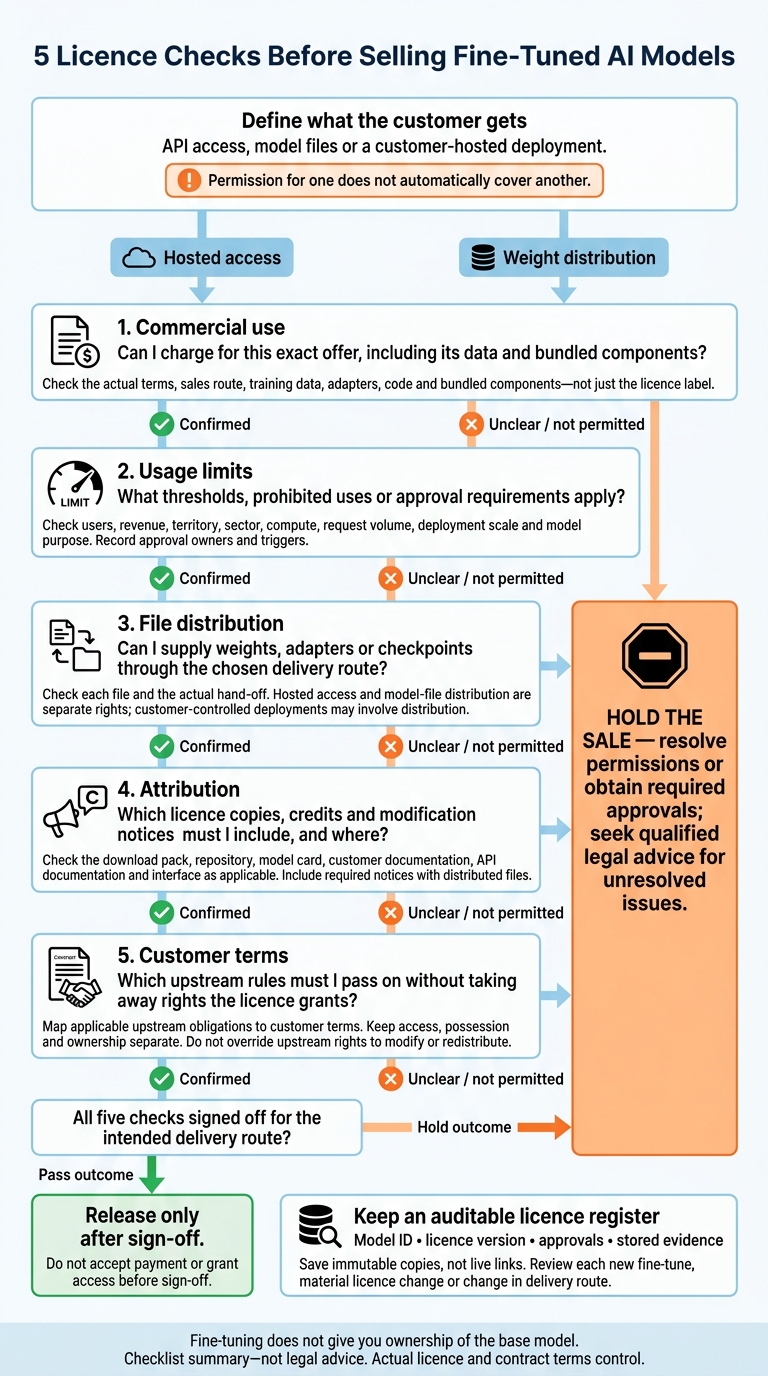 {5 Licence Checks Before Selling Fine-Tuned AI Models}
:::
{5 Licence Checks Before Selling Fine-Tuned AI Models}
:::
How AI Model Licenses Shape Deployment. - The rules behind the model
1. Check Permission for Commercial Use
Once you’ve defined the model and delivery route, check whether the licence allows you to sell it. Read the terms, not just the label. “Open”, “community” or “research” does not establish permission to sell. Review the licence, service terms, fine-tuning terms and any binding supplementary conditions. Confirm that they permit commercial use, modification and sale of the fine-tuned model - not just inference.
An acceptable-use policy may still restrict an otherwise permitted commercial service if it forms part of the contract. Check whether your intended use requires separate approval. If documents conflict, establish which term takes priority and get written clarification.
Confirm Your Sales Route Is Permitted
Give each offer a pass/fail check: do the applicable terms let you charge for this specific deployment or transfer? Check paid API access, managed hosting, embedded products, customer-hosted deployments, and weight or adapter transfers separately. Permission for one route does not cover the others.
Check commercial permissions for training data, adapters, code and bundled components too. A permissive base-model licence cannot override restrictions elsewhere.
If permission is unclear, hold off on launching until you have a commercial licence, addendum or written permission that names the intended activity. Record each sales route, the clause that permits it and any required approval.
2. Check Usage Limits and Prohibited Uses
Once you’ve confirmed that commercial use is allowed, check the limits for the specific route you plan to sell through. Review the model licence, fine-tuning terms, platform terms and any commercial agreement. Check for limits on users, revenue, territory, sector, compute, request volume, deployment scale and model purpose. Permission for commercial use does not remove other limits.
Track limits for hosted access and weight distribution separately. Record the exact delivery route: public API, private download, container image, repository or third-party platform.
Also check prohibited uses, including illegal or harmful activity, infringement of intellectual-property or privacy rights, surveillance, fraud, discrimination and regulated decisions. Turn the wording of these restrictions into onboarding checks and deployment controls.
Record Limits and Approval Requirements
Keep a restriction register linked to the model and licence version. Use the table below to record each limit, its owner and what triggers approval.
| Check | Hosted access | Weight distribution | Required action |
|---|---|---|---|
| Commercial-use restrictions | Record permitted services and limits on users, revenue, territory and sector. | Record permitted downloads, sublicensing, resale and distribution. | Obtain approval. |
| User or revenue thresholds | Monitor applicable account, user, request, token and revenue thresholds. | Monitor applicable recipient, installation, deployment and downstream thresholds. | Set alerts; pause expansion pending approval. |
| Prohibited uses | Enforce restrictions through onboarding, terms, filters, logging and escalation. | Include restrictions in model cards, documentation and customer agreements. | Assign an enforcement owner. |
| Breach consequences | Record suspension, termination, indemnity, audit rights and potential claims. | Record takedown, recall, termination, loss of distribution rights and liability. | Obtain legal review; maintain a response plan and preserve logs. |
Check monthly thresholds each month. Reassess restrictions whenever the customer segment, territory or deployment route changes.
Where prior written consent or an agreement is required, name the approval owner. Record the required documents, permitted territory, authorised model version and expiry date. Specify what the approval covers: hosted access, derivative models or weight transfers.
3. Check Rights to Distribute Model Files
Once commercial use is permitted, check whether the licence also allows you to distribute the files. Hosted access and model-file distribution are separate rights. Look for the terms ‘distribute’, ‘make available’ and ‘derivative works’. Even a managed service may count as distribution if it supplies weights to a customer-controlled environment.
Record your intended delivery route - API access, downloadable weights, on-device delivery or customer-managed hosting - and confirm that the licence covers it. Some model licences define redistribution as giving a third party access to weights, whether supplied on their own or within a product.[2][4]
Review Each File and Delivery Route
Check weights, adapters, checkpoints, tokenisers, config files and inference code separately. Each may have a different licence. Adapters are not automatically exempt from upstream conditions. Check whether the licence treats them as derivatives or model components, particularly when customers must obtain the base checkpoint separately.[3][4]
Treat merged or quantised releases as derivative files and check the licence again. Trace every source checkpoint and review its redistribution terms. Record the transformation tool, version and recipe. Changing the format or combining weights does not give you a new right to sell the resulting files.[3]
Review the actual hand-off, not just the product label. Embedded software, on-device delivery, customer-controlled environments and contractors with access to weights may all give another party access to those files. Establish who can extract, copy or independently run the weights, then confirm that the licence permits that arrangement.
Keep a file-by-file release checklist covering the source checkpoint and version, file hashes, applicable licences, transformations, package contents, recipient and permitted deployment route. State whether base weights are included or simply referenced. Hold the release until distribution rights are clear, and tie approval to that specific package, route and recipient.
4. Check Attribution and Required Notices
Once you’ve checked distribution rights, confirm which credits and notices must appear with the files, documentation or interface. Permission to sell does not remove attribution duties. Keep required notices separate from marketing copy.
Create an attribution register using the applicable licences, model cards, dataset terms and notices. Record the exact wording, placement and source links for copyright lines, licence copies, NOTICE or ATTRIBUTION text, model names, acknowledgements and modification statements.
Keep required model names and check naming or trade mark restrictions before releasing the fine-tuned model. Giving factual credit does not permit claims of approval, partnership or endorsement - or use of an upstream logo.
Put Notices in the Required Places
Match each notice to where it must appear: the download pack, repository, model card, customer documentation, API documentation or interface.
For distributed weights, include required licence copies and notices with the files. A website link alone may not meet the terms. For hosted access, check whether acknowledgements must appear in user-accessible documentation or be visible in the interface.
Under Apache 2.0, include the licence, preserve upstream notices and state modifications in prominent notices.
Check the download pack and hosted documentation separately. Then save the approved notice files and screenshots with the release record.
5. Check Terms Passed to Customers
The final check is the customer contract. It must pass on the upstream conditions that apply to the transaction. Map each upstream obligation to a customer clause or attached policy. Record whether it must be copied word for word, incorporated by reference or covered by an equivalent clause. Include acceptable-use rules, limits, approvals and the consequences of termination.[5][6]
Keep access, possession and ownership separate. An API subscription gives customers access to a service, not model files. Set out rights in customer data, outputs, adapters and modified checkpoints separately.[6]
Set Out Customer Rights and Restrictions
The contract should reflect the licence, not weaken it. Complete the table below using the actual upstream terms and proposed customer contract. These entries are checks, not automatic permissions.
| Delivery route | Permitted activity | Required notices | Terms passed to customers | Prohibited activity | Internal approval |
|---|---|---|---|---|---|
| API access | Submit inputs and receive outputs | Required attribution, output-use and safety obligations | Acceptable-use rules, usage limits, confidentiality, logging and suspension rights | Model extraction, reverse engineering, credential sharing and prohibited uses | Confirm upstream commercial permission and API restrictions |
| Embedded product | Use the product | Attribution and safety obligations | Integration, affiliate, contractor, support and update terms | Removing notices, bypassing controls, separating or copying model components | Confirm embedded-component licences and distribution rights |
| Customer-hosted deployment | Install, run, monitor and modify licensed components | Component licence obligations and deployment limitations | Installation, security, maintenance, audit, update, termination and deletion terms | Unapproved environments, copying without permission, prohibited deployment or onward transfer | Approve infrastructure, data, security and authorised users |
| Downloadable weights | Download, run, fine-tune or distribute as licensed | Required notices and licence text | Weight licence, derivative-model rules, redistribution conditions and warranty limits | Unlicensed resale, removing notices, prohibited uses or onward distribution without permission | Legal review before release and before permitting onward distribution |
State whether fine-tuning, deployment, affiliate and contractor access, derivative models and onward distribution are allowed, require approval or are prohibited. Address adapters, merged models and quantised versions explicitly. Require equivalent downstream obligations where they apply, and name the party responsible for permitted users.[6]
Service terms can cover fees, support and security, but they must not override upstream rights to modify or redistribute. Keep those commercial terms separate from the upstream licence. Obtain customer acceptance before access or download, and retain the versions accepted. Send any conflicting sublicensing, ownership or redistribution clauses to UK-qualified legal counsel before release.[5][6]
Conclusion: Sign Off Before Selling
Do not accept payment or grant access until all five checks have been signed off separately for hosted access and weight distribution: commercial permission, usage limits, distribution rights, attribution and downstream terms. Name approvers from the technical, data, licensing and sales teams.
After all five checks pass, keep the release evidence in an auditable licence register. Include the model ID, licence version, approvals and stored evidence. Review each new fine-tune, material licence change or change in delivery route. Save immutable copies, not live links.
Block the sale if ownership, dataset permissions or contract rights are unclear. Refer unresolved issues to a qualified legal adviser. Hokstad Consulting can support AI strategy and implementation, but legal review is still required.
FAQs
What if the model licence changes after I start selling?
Review the new terms immediately, alongside your original agreements, to check whether you can still sell model access, distribute model weights or sell outputs. A licence change may alter your rights to carry on with these activities. If the new terms clash with your business model, you may need to pause distribution or renegotiate your rights.
Can I sell API access without permission to distribute weights?
Only if API access stays separate from the distribution of model weights. If you don’t have permission to distribute the fine-tuned model weights, you must not sell access that lets downstream users distribute them. Access controls must enforce approved permissions and usage limits, and activity must be monitored and authorised. [1]
How do I resolve conflicting model and dataset licences?
Record every source licence and its requirements for attribution, commercial use and distribution. If records conflict or leave room for doubt, pause deployment until the legal risk has been addressed. Consult legal counsel to confirm ownership and usage rights. Contract terms cannot override regulatory or licence obligations.
At Hokstad Consulting, we focus on governance frameworks that align AI practices with internal risk plans and applicable regulatory requirements.