
Kubernetes scale-to-zero cuts idle GPU costs only when node billing stops too. Check when GPU nodes are released, then compare the savings with restart time and first-request latency.
In the article’s example, a 30-minute idle gap costs £1.00 warm versus £0.27 with scale-to-zero - about 73% less. That assumes £2.00 per node-hour, five minutes of billed scale-down delay and a three-minute billed restart. The next request still waits three minutes.
The choice comes down to traffic, model loading time and acceptable waiting:
- Scale-to-zero: suits long idle gaps and requests that can wait for node provisioning, model loading and warm-up.
- Warm replicas: suit frequent requests and tight latency targets, but GPU costs continue between requests.
- Hybrid capacity: keeps a baseline warm and adds capacity for bursts; extra replicas may still cold-start.
Quick Comparison
| Approach | Idle GPU cost | First request after an idle gap |
|---|---|---|
| Scale-to-zero; node removed | Stops when node billing ends | Waits for node and model startup |
| Scale-to-zero; node retained | Node charges continue | Waits for model startup |
| Warm replicas | Capacity remains billable | Avoids startup delay |
| Hybrid | Warm baseline remains billable | Avoids startup delay within warm capacity |
Before choosing, confirm scale-from-zero support and measure cold-start p50, p95 and p99, node-release delays, timeouts and cost per completed request. Include storage, model transfers and spending commitments: fewer running Pods do not always mean a lower bill.
Kubernetes GPU Autoscaling: Why Scale to Zero Costs You 10 Minutes Per Request
How scale-to-zero works
In KServe’s Knative deployment mode, scale-to-zero removes serving Pods. The Activator then queues incoming requests until an endpoint is ready.[5][7]
Use spec.predictor.minReplicas: 0 only in KServe’s Knative deployment mode. Standard mode does not support HTTP scale-from-zero. Check your KServe and Knative versions before relying on this setting.[4][5][7] Most of the cold-start delay comes from this activation path.
What happens during a GPU cold start
Before inference can begin, a request triggers several steps. Some can overlap.[3][6]
| Stage | Latency or cost contribution | Mitigation |
|---|---|---|
| Queue wait and activation | Requests wait for replicas | Measure queue time and timeout limits |
| Provisioning or reuse | New nodes add delay and may incur charges before readiness | Test GPU node availability |
| Scheduling and startup | Placement and container startup add delay | Check GPU placement constraints |
| Image and weight fetch | Uncached downloads extend startup | Use smaller images and cached artefacts |
| GPU load and runtime init | Loading weights and setting up the runtime delay readiness | Initialise critical components during startup |
| Compilation and warm-up | Compilation and autotuning delay inference | Precompile where supported and warm up production shapes |
| Ready-to-serve handoff | Requests wait for the model to become ready | Gate readiness on whether the model can actually serve requests |
Measure p50, p95 and p99 after idle periods. Test cached and uncached paths, using both existing and newly provisioned GPU nodes.[6] Warm replicas avoid this activation delay by keeping the model ready between requests.
When scale-to-zero cuts costs
Asynchronous processing, sporadic internal tools and demonstrations can usually tolerate activation delays more easily than interactive services. Cold starts can take seconds to minutes - or longer - particularly with large weights. Use queued jobs with status polling if synchronous requests would time out. Also check whether intermittent bursts repeatedly trigger downloads and initialisation.[5][6]
Warm replicas avoid that delay but incur continuous idle GPU costs. Scale-to-zero saves GPU costs only when billing stops too: if the node keeps running after the Pod exits, you still pay for it.[5][6]
Warm GPU replicas: less waiting, more idle cost
Compared with scale-to-zero, warm replicas offer lower latency in exchange for continuous GPU cost. A warm replica is a running Pod with its model already loaded into GPU memory. Each extra model instance may need its own copy of the weights in VRAM, which limits how many instances fit on one GPU.[9][10]
What warm replicas can and cannot do
Ready replicas make request handling more predictable for interactive applications and SLA latency targets. Run model warm-up before marking the Pod ready, so users don’t bear the first-inference compilation cost.[8][11] Warm does not mean instant, though: preprocessing, queueing, GPU compute, token generation and response transfer still take time.
Size the warm baseline for peak concurrent demand, not average request volume. Track queue time, in-flight requests, p95/p99 latency and GPU utilisation. Bursts above that baseline can still trigger new Pods and GPU nodes, so set a maximum queue wait and decide how to handle excess demand.
Spare capacity comes at a price. Warm replicas reserve GPU capacity and memory, plus supporting CPU and RAM. Capacity held for occasional peaks may sit idle while remaining unavailable to other workloads. Adding replicas can improve throughput without reducing tail latency if queueing stays poorly controlled.
Scale-to-zero versus warm replicas
Compare these options using the idle gap, model load time and latency budget.
| Criterion | Scale-to-zero | Warm replicas |
|---|---|---|
| Idle cost | No continuous replica cost | Continuous GPU capacity cost |
| Cold-start latency | First requests wait for activation | First requests avoid startup delay |
| Burst handling | Requests queue until capacity is ready | Serves up to warm capacity; extra replicas may cold-start |
| Management complexity | Activation, queueing and node scale-down | Baseline sizing, headroom and monitoring |
| Model-size sensitivity | Larger models can load more slowly | Larger models reserve more VRAM per copy |
| Suitable traffic | Sporadic, batch or latency-tolerant | Steady, interactive or SLA-sensitive |
Why GPU node charges can continue after Pods stop
Stopping Pods does not stop GPU charges if the node stays allocated. Scaling replicas and removing nodes are separate processes. A GPU node pool with a minimum above zero keeps capacity running. Other workloads, PodDisruptionBudgets, anti-affinity, safe-to-evict: false, local storage and long unneeded periods can also delay node removal.[12][14][15][16]
Scale-to-zero saves money only when nodes are released soon enough for the savings to outweigh the cold-start penalty. What matters is whether the node itself is released after the Pod stops.
Costs across 3 Pod and node states
| State | GPU-node capacity | Separately billed CPU and memory | Storage and platform overhead |
|---|---|---|---|
| Warm Pod on a running GPU node | Full running-node charge | Charged where applicable | Model cache, volumes and platform services remain |
| No Pod on a running GPU node | Full running-node charge continues | Node charges continue | Retained storage and always-on services remain |
| Pod and node removed | Node-level charges stop once the provider releases the capacity | Node-level charges stop; separate services may continue | Persistent storage, model-transfer, monitoring and request-admission services may remain chargeable |
Count each billed item once. If the GPU instance price includes the accelerator, CPU and RAM, don’t add them again. Removing a node may discard local model caches, requiring another download. Persistent volumes can survive node removal and remain chargeable. Unloading a model does not stop GPU billing.[12][13][15][16]
Check whether scale-down lowers the bill
Compare Pod termination time with node release time, then check both against the provider’s billable interval. Track the node-retention gap: GPU node release time minus the last serving-Pod termination time. Use this gap in the break-even calculation below.
If the gap grows, check autoscaler events and drain failures. Account for the configured unneeded period, drain time and any post-add delay - not just replica uptime.[12][14][15]
Confirm that the GPU pool allows a minimum of zero, remaining workloads can run elsewhere, and pending inference Pods can trigger replacement capacity. Review emptyDir, hostPath, eviction annotations and disruption rules before changing them: removing protection can discard data. Track retained volumes, model-transfer charges and always-on request-admission costs separately.[12][15][16]
Lower usage does not always mean cash savings. Terminating on-demand instances can cut the bill, but reserved or committed spend may continue. In a shared cluster, releasing capacity may simply make room for another workload. On owned hardware, savings come only from lower power use, not Pod deletion alone. A node that remains allocated for minutes or hours after the Pod exits can erase most or all of the savings.
Calculate the break-even idle gap
::: @figure 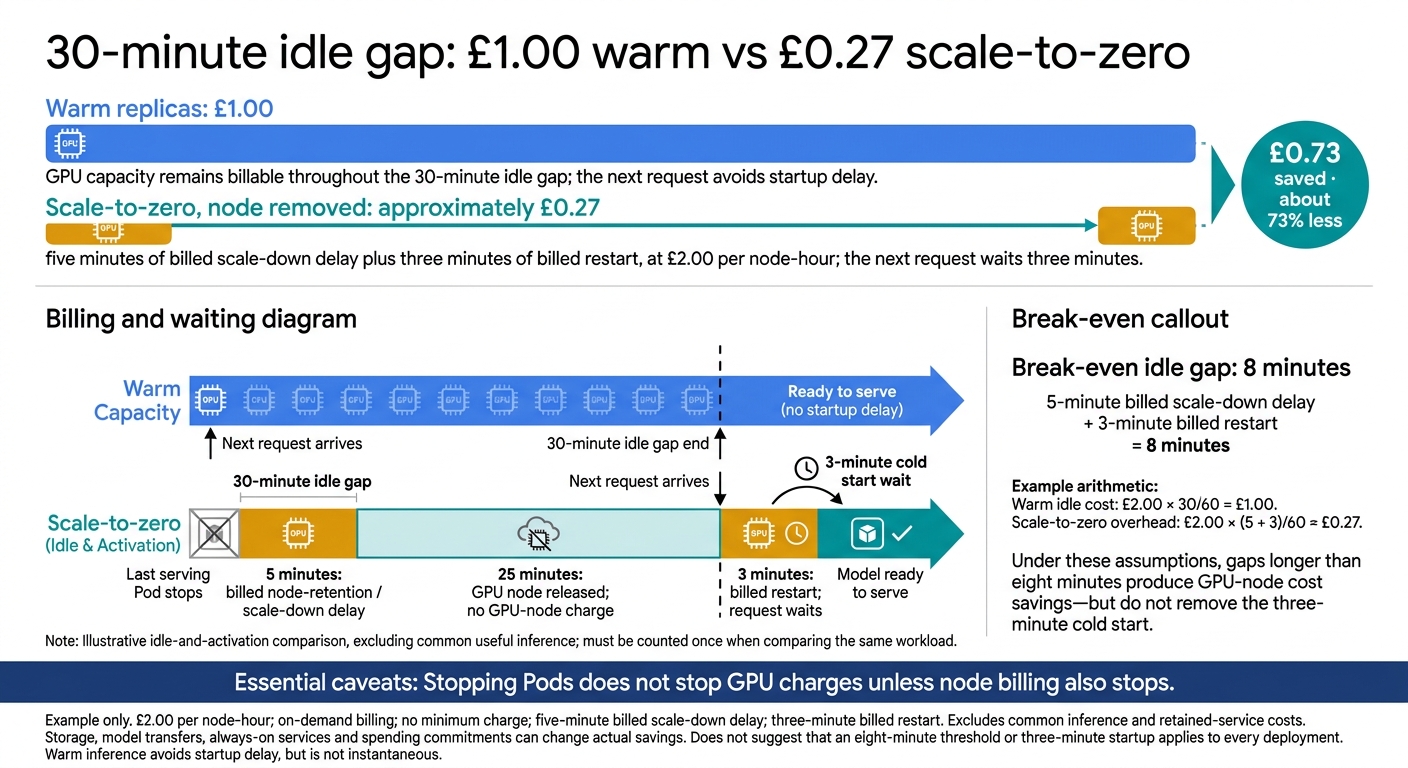 {GPU Scale-to-Zero: Cost Savings vs Cold Starts}
:::
Compare idle costs and restart costs
Use the node-retention gap from the previous section as the billed idle time after Pods stop. Compare both options over the same period and workload. Count useful inference once, then compare the remaining idle capacity, activation events and retained services. Scale-to-zero wins when avoided idle cost exceeds activation and retained-service costs. Useful inference cancels out only if both options serve the same workload at similar efficiency.
Check when billing starts: it may begin when the node is provisioned, the Pod starts or the model is ready to serve. Pod readiness alone is not a billing boundary.[18][21] Account for delays, failed starts, retries and possible SLA penalties separately from GPU-hours.
A break-even example in pounds
Example only: assume £2.00 per node-hour, a five-minute billed scale-down delay and a three-minute billed restart, with on-demand billing and no minimum charge. A 30-minute gap costs about £1.00 warm versus £0.27 with scale-to-zero, saving £0.73, excluding common inference and retained-service costs. Break-even is eight minutes, and the next request still waits three minutes.
That trade-off changes with traffic patterns and loading times.
How traffic, loading time and latency change the choice
Request timing matters more than the daily total alone. Compare idle-gap lengths and activation counts alongside request volume, model loading time and latency targets. Together, these determine whether scale-to-zero or warm capacity costs less. The table shows examples, not a rule for every workload:
| Request volume | Idle-gap pattern | Model loading time | Latency requirement | Best fit | Main cost risk |
|---|---|---|---|---|---|
| Low | Long overnight and multi-hour gaps | Several minutes | First response may tolerate delay | Scale-to-zero, if nodes are actually removed | Retained GPU nodes and repeated transfers |
| Moderate | Irregular gaps from minutes to hours | Tens of seconds to several minutes | Interactive requests need predictable startup | Hybrid: keep baseline capacity warm, scale burst capacity | Paying for warm capacity while still incurring activations |
| Sustained | Short gaps and high concurrency | Paid rarely after initial startup | Low and stable latency | Warm replicas or scheduled capacity | Idle capacity during unexpected quiet periods |
Longer model downloads, VRAM loading and runtime warm-up add to restart costs and lengthen the break-even gap. Local NVMe reduces repeat reads, while persistent-volume caching keeps weights available at extra storage cost.[17][19][20]
Track first-token latency separately from complete-response latency: shutting down may save money but still miss a two-second first-token target. Measure cost per completed request and p95/p99 first-response latency across quiet periods and bursts.
Conclusion: choose scale-to-zero, warm or hybrid capacity
Once you know the break-even gap, choosing a deployment becomes a decision about how to run the service.
Choose by latency target and break-even cost, not replica count alone.
| Strategy | Traffic and latency needs | Cost condition | Main risk |
|---|---|---|---|
Scale-to-zero with minReplicas: 0
|
Sparse demand; cold-start delays are acceptable | Lowest idle GPU cost if nodes also scale down | Cold starts, load failures and timeouts |
| Warm replicas | Steady interactive demand; low first-request latency | Avoiding cold starts justifies the baseline cost | Unused GPU time, over-provisioning and replica outages |
| Hybrid: warm baseline plus elastic capacity | Mixed traffic with a stable baseline and periodic peaks | Balances availability and cost | Autoscaling, queueing and capacity-planning complexity |
Next, check support, pre-warm timing and node scale-down behaviour in your own cluster.
Before enabling scale-to-zero, confirm that your setup supports it and test the wake-up path. Use a supported autoscaling signal: CPU or memory utilisation alone will not wake the service.[22] Test the full cold-start path and timeout limits, too.
Allow enough pre-warm time for node provisioning, image pulls, model loading and readiness checks. Check that unused GPU nodes actually terminate. Stopping Pods does not necessarily stop node charges.[23]
Track first-request and cold-start p50, p95 and p99 separately, alongside GPU utilisation, uptime, load time, timeouts and cost per completed request. Re-test with realistic idle gaps and bursts whenever traffic, models, prices or latency targets change.
FAQs
How can I estimate savings from my actual traffic?
Set a baseline with simulation modes before enabling live scaling [1]. Track cost per 1,000 inferences or per agent task. If unit costs stay flat month to month, baseline management may be a better fit than burst-based management [2].
Use anomaly dashboards to spot changes in cost and performance. Compare current spending against a cost-optimised baseline to estimate potential savings. Teams often achieve 30–50% savings with cost-aware autoscaling [1].
How can I prevent repeated GPU scale-up and scale-down?
Set a longer window for scaling down than for scaling up. This stops brief dips in demand from triggering capacity removal. After each scaling event, allow a cooldown of at least five minutes so the system can settle.
Keep a baseline buffer of spare capacity to handle demand spikes. For more accurate scaling, use queue depth or latency signals rather than relying on CPU metrics alone.
How many GPU replicas should I keep warm?
For user-facing and interactive AI systems, keep at least one warm GPU replica running in each region at all times. Scaling to zero can mean cold starts of 5–30 seconds - or several minutes for larger models. That’s too long for users to wait in a production service.
Treat reserved baseline capacity for day-to-day demand as a necessary infrastructure cost. Use autoscaling only for overflow traffic, once that baseline is fully utilised.