
When your Kubernetes cluster runs out of resources, preemption ensures high-priority workloads are scheduled by evicting lower-priority Pods. While this process is fast and useful for critical applications, it comes with risks like unintended evictions, instability, and potential data loss. Misconfigured priorities, affinity deadlocks, and abrupt terminations can disrupt services if not managed properly.
To manage preemption effectively:
- Define clear PriorityClasses: Use a simple hierarchy (e.g., High, Medium, Low) and avoid misconfigurations like
globalDefault: trueon high-priority classes. - Enable graceful shutdowns: Applications should handle
SIGTERMsignals to prevent data loss. AdjustterminationGracePeriodSecondsas needed. - Use PodDisruptionBudgets (PDBs): Limit disruptions and ensure availability during preemptions.
- Apply ResourceQuotas: Control resource usage tied to PriorityClasses to prevent abuse.
- Monitor preemption events: Track
nominatedNodeNameand preemption logs to identify issues early.
Preemption is a powerful tool, but balancing priorities and ensuring safeguards is key to maintaining resource efficiency and service reliability.
Kubernetes Pod Preemption Explained | Priority Classes & Eviction Tutorial for Beginners
Main Risks of Kubernetes Preemption
Preemption in Kubernetes can effectively address scheduling challenges, but it doesn’t come without risks. If not carefully managed, it can lead to serious problems that disrupt workloads. The most pressing concerns revolve around misconfigured priorities, instability in shared environments, and data loss during abrupt terminations.
Unintended Evictions from Misconfigured Priorities
Assigning priorities to Pods introduces the potential for unintended evictions, especially when PriorityClasses are misconfigured. By default, existing Pods have a priority of zero. If a higher priority is assigned to a non-critical workload before updating your critical services, essential components can be evicted. For example, Grafana Labs experienced a ~30-minute outage when newly prioritised non-critical Pods displaced critical services still running with the default priority of zero [5].
A particularly risky configuration is setting globalDefault: true on a high-priority PriorityClass. This assigns the high priority to all new Pods, which can trigger widespread evictions. In multi-tenant environments lacking ResourceQuotas, this becomes even more problematic. As Kubernetes documentation highlights:
In a cluster where not all users are trusted, a malicious user could create Pods at the highest possible priorities, causing other Pods to be evicted/not get scheduled[1].
Instability in Multi-Tenant and Multi-Cluster Environments
Shared clusters, especially those used by multiple teams, face unique challenges when resources are in high demand. Tools like Kueue allow ClusterQueues to borrow
unused capacity from other workloads. However, these borrowed workloads are at risk of being evicted as soon as the original owner reclaims its reserved quota [2].
Another issue is inter-pod affinity deadlocks. High-priority Pods that depend on affinity with lower-priority Pods can create scheduling loops. For instance, if the scheduler evicts a lower-priority Pod to make room for a high-priority one, the affinity rule may no longer be satisfied. This leaves the high-priority Pod unschedulable, creating a deadlock that disrupts service availability [5][1]. Additionally, fair sharing algorithms, while designed to balance resources, can inadvertently lower cluster efficiency by triggering frequent preemptions in an attempt to maintain fairness [2].
These challenges also heighten the risk of data loss and state corruption.
Data Loss and State Corruption During Abrupt Terminations
When a Pod is preempted, Kubernetes provides a 30-second graceful termination period [1][4]. If the application doesn’t finalise tasks like flushing buffers or committing transactions within this time, it’s terminated forcibly - leading to potential data loss or state corruption. The situation worsens under extreme node pressure, where the kubelet may terminate Pods immediately without any grace period [5].
PodDisruptionBudgets (PDBs) can help mitigate these risks, but they’re not foolproof. As Prashant Ghildiyal from Devtron explains:
PodDisruptionBudget is only on a best effort basis... if it is unable to find any such node, then it will evict low priority pods from the node to schedule high priority pod, even if eviction results in violation of PDB[5].
This means that even with PDBs in place, your application might fall below its required availability or quorum during critical times, leaving it vulnerable when reliability matters most.
How Kubernetes Preemption Works
Preemption in Kubernetes ensures that high-priority Pods can be scheduled by freeing up resources occupied by lower-priority workloads. This process helps maintain system performance and minimises disruptions when resources are scarce.
The Pod Priority and Preemption Workflow
When a high-priority Pod can't find a suitable node to run on, the scheduler evaluates existing workloads to see if evicting lower-priority Pods can create the necessary resources. Here's how the process unfolds:
- The scheduler identifies lower-priority Pods as potential candidates for eviction, ensuring their removal has minimal impact on other workloads.
- It considers PodDisruptionBudgets (PDBs), which define availability guarantees for Pods. While the scheduler attempts to respect these budgets, preemption may still occur if no suitable victims can be found. As Kubernetes documentation notes:
Kubernetes supports PDB when preempting Pods, but respecting PDB is best effort. The scheduler tries to find victims whose PDB are not violated by preemption, but if no such victims are found, preemption will still happen.[1]
- Once a node is selected, the scheduler updates the
nominatedNodeNamefield in the pending Pod's status. This reserves the node's resources until the termination process for the evicted Pods is complete [1].
However, certain constraints can disrupt this process. For example, if a high-priority Pod has an inter-pod affinity rule requiring a specific lower-priority Pod to be on the same node, the scheduler won't preempt that node - even if it's the only viable option. Such scenarios can lead to affinity deadlocks, leaving the high-priority Pod stuck in a Pending state [1].
Preemption Policies and Use Cases
Kubernetes provides two preemption policies that determine how Pods handle resource contention:
- PreemptLowerPriority (default policy): This allows high-priority Pods to evict lower-priority workloads to secure their place in the cluster. This policy is particularly useful for mission-critical services. As Bobby Salamat from the Kubernetes Scheduling SIG points out:
Preemption is much faster than adding new nodes to the cluster. Within seconds your high priority pods are scheduled, which is critical for latency sensitive services.[3]
- Never (non-preempting) policy: Instead of evicting workloads, this policy places the Pod at the front of the scheduling queue. It waits for resources to become available naturally, either through Pod completions or node scaling, making it suitable for non-critical batch jobs.
PriorityClass values in Kubernetes range from -2,147,483,648 to 1,000,000,000. Values above 1 billion are reserved for critical system components, such as system-cluster-critical [1]. To reduce wait times for high-priority Pods, administrators can configure shorter terminationGracePeriodSeconds for lower-priority workloads. However, this trade-off increases the risk of abrupt shutdowns [1].
A deep understanding of these preemption mechanics is essential for effectively managing resource allocation and minimising risks, especially in complex, multi-cluster environments.
Practices for Safe Kubernetes Preemption
These steps directly tackle the risks associated with preemption, ensuring it is managed effectively in multi-cluster environments.
Define Targeted PriorityClasses
To avoid conflicts over priorities, stick to a limited set of PriorityClasses. A three-tier system - High, Medium, and Low - is usually enough [6,16]. For instance:
- High Priority (value: 1,000,000) for front-end services and payment APIs.
- Medium Priority (value: 500,000) for backend services and reporting tasks.
- Low Priority (value: 100,000) for batch processing and CI/CD workers [7].
Avoid assigning values above 1 billion, as these are reserved for Kubernetes system components like CoreDNS and kube-proxy [1]. Additionally, create a PriorityClass with globalDefault: true (commonly set to a value of 0) so pods without an explicit class have a predictable priority [1]. When applying PriorityClasses to an existing cluster, start with high-priority pods to prevent accidental evictions of critical workloads.
For pods that should never trigger evictions, set preemptionPolicy to Never, allowing them to queue without disrupting running workloads [2,6].
Implement Graceful Shutdowns and PodDisruptionBudgets
Once PriorityClasses are in place, ensure pods terminate gracefully when preempted. Applications should handle SIGTERM signals to save their state and complete ongoing tasks [6]. Adjust the terminationGracePeriodSeconds in your PodSpec to provide enough time for cleanup (the default is 30 seconds) [2,9].
Use PodDisruptionBudgets (PDBs) to limit how many pods can be unavailable during voluntary disruptions. While the scheduler tries to respect PDBs during preemption, it may still remove lower-priority pods if necessary. As stated:
The scheduler tries to find victims whose PDB are not violated by preemption, but if no such victims are found, preemption will still happen, and lower priority Pods will be removed despite their PDBs being violated.[1]
For scalable workloads, opt for maxUnavailable in your PDBs, as it adjusts automatically with changes in replica counts. Also, set unhealthyPodEvictionPolicy to AlwaysAllow to ensure unresponsive pods don’t hinder cluster maintenance [9,18].
Combine ResourceQuotas with Monitoring
Apply ResourceQuotas with scopeSelectors to control the creation of high-priority pods. This lets you set limits on CPU, memory, and pod counts for specific PriorityClasses within a namespace. Configuring the kube-apiserver with LimitedResources ensures high-priority classes are only used when a corresponding ResourceQuota is in place [20,2].
Monitor preemption events by tracking the DisruptionTarget condition (introduced in Kubernetes v1.31+), which uses the reason PreemptionByScheduler to identify affected pods [6]. Additionally, check the nominatedNodeName field in pod status to see which nodes have reserved resources for pending high-priority pods [1]. Admission controllers like Kyverno or Gatekeeper can further enforce that pods in production namespaces are assigned the correct PriorityClass [7].
These strategies help ensure workloads are distributed effectively across clusters.
Methods for Multi-Cluster Workload Placement
In multi-cluster setups, ensure PriorityClass definitions are consistent across all clusters. This consistency is crucial for maintaining predictable preemption behaviour during cross-cluster failovers [20,4]. Assign latency-sensitive services to clusters with dedicated resources, while batch jobs can run in clusters that are more tolerant to preemption.
Separating production and non-production workloads into different clusters is another effective approach. This reduces the risk of development or staging pods competing with critical services for resources, easing preemption pressure and simplifying capacity management.
Mitigation Methods: Risks vs Practices
::: @figure 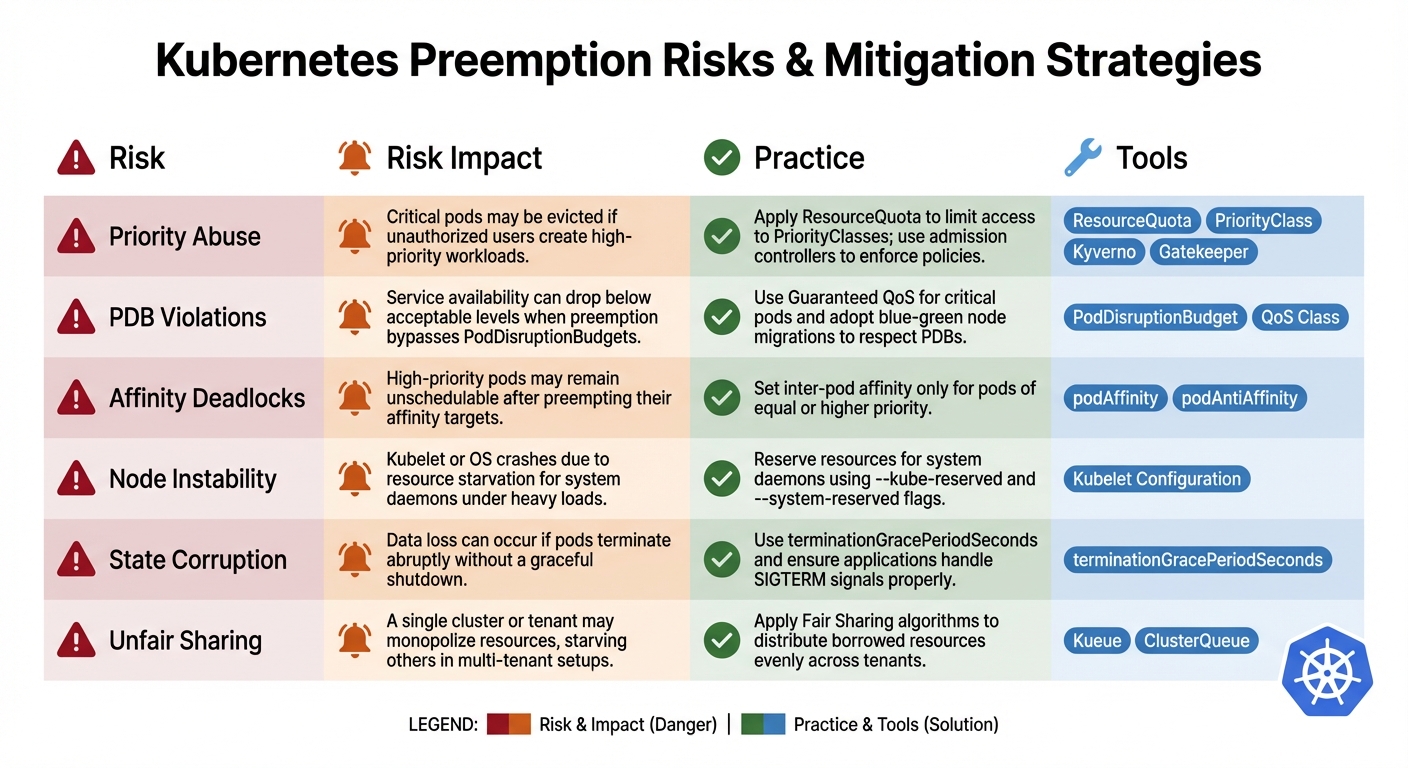 {Kubernetes Preemption Risks and Mitigation Strategies}
:::
{Kubernetes Preemption Risks and Mitigation Strategies}
:::
Below is a table that aligns each preemption risk with its corresponding mitigation strategy and the tools designed to address it. This structured approach complements the step-by-step measures previously outlined.
Preemption Risks and Mitigation Table
| Risk | Risk Impact | Practice | Tools |
|---|---|---|---|
| Priority Abuse | Critical pods may be evicted if unauthorised users create high-priority workloads. | Apply ResourceQuota to limit access to PriorityClasses; use admission controllers to enforce policies. |
ResourceQuota, PriorityClass, Kyverno, Gatekeeper [1][7]
|
| PDB Violations | Service availability can drop below acceptable levels when preemption bypasses PodDisruptionBudgets. |
Use Guaranteed QoS for critical pods and adopt blue-green node migrations to respect PDBs. |
PodDisruptionBudget, QoS Class [5][10]
|
| Affinity Deadlocks | High-priority pods may remain unschedulable after preempting their affinity targets. | Set inter-pod affinity only for pods of equal or higher priority. |
podAffinity, podAntiAffinity [1][5]
|
| Node Instability | Kubelet or OS crashes due to resource starvation for system daemons under heavy loads. | Reserve resources for system daemons using --kube-reserved and --system-reserved flags. |
Kubelet Configuration [9] |
| State Corruption | Data loss can occur if pods terminate abruptly without a graceful shutdown. | Use terminationGracePeriodSeconds and ensure applications handle SIGTERM signals properly. |
terminationGracePeriodSeconds [8]
|
| Unfair Sharing | A single cluster or tenant may monopolise resources, starving others in multi-tenant setups. | Apply Fair Sharing algorithms to distribute borrowed resources evenly across tenants. |
Kueue, ClusterQueue [2]
|
These mitigation strategies are designed to integrate seamlessly with earlier recommendations, creating a comprehensive framework to address preemption risks in multi-cluster environments.
Bobby Salamat from the Kubernetes Scheduling SIG highlights the importance of these practices:
Pod priority and preemption... allows you to achieve high levels of scheduling confidence for your critical workloads without overprovisioning your clusters.[3]
To strengthen your defences, combine multiple practices: use ResourceQuota to prevent priority abuse, enforce PodDisruptionBudgets, and implement graceful shutdowns for better resilience. Together, these measures lay the foundation for a robust and balanced multi-cluster environment.
Conclusion and Next Steps
Kubernetes preemption helps maintain balanced resource allocation through a structured PriorityClass hierarchy, the enforcement of PodDisruptionBudgets, and smooth shutdown processes that minimise the risk of data loss.
However, challenges such as misconfigured priorities, affinity deadlocks, and abrupt terminations can still arise, potentially leading to issues like state corruption. Thankfully, strategies like ResourceQuota enforcement and resource reservation can help address these risks effectively.
To strengthen your Kubernetes environment, start by auditing your workloads and setting up a priority hierarchy grounded in business criticality. For batch jobs that need queue priority but shouldn't disrupt other workloads, consider implementing non-preempting priorities. Before rolling out changes to production, test your configuration under load to see how the scheduler handles resource contention.
Hokstad Consulting specialises in fine-tuning Kubernetes environments by mapping strategic priorities, implementing RBAC governance, and enhancing resilience. Their expertise includes setting up PodDisruptionBudgets, configuring graceful shutdowns, and deploying centralised monitoring systems to track preemption events across clusters. They also focus on reducing operational costs by 30–50% through cloud cost engineering and custom automation, all while improving deployment cycles. This approach ensures a robust multi-cluster setup where critical services and cost-efficient batch workloads operate harmoniously.
Whether you're managing a single cluster or a complex multi-tenant infrastructure, the practices outlined here offer a strong starting point. By integrating priority management, disruption budgets, and observability, you can build resilient Kubernetes clusters that balance reliability with cost efficiency.
FAQs
What problems can arise from misconfigured PriorityClasses in Kubernetes?
Misconfiguring PriorityClasses can cause unexpected pod evictions and disrupt services. For instance, if a less critical workload is assigned an overly high priority or a low-priority class is mistakenly set as the global default, the scheduler might prioritise these pods more than intended.
This kind of mistake can lead to higher-priority pods preempting (or evicting) lower-priority ones, even when the evicted pods are running essential tasks. To prevent such problems, it’s essential to thoughtfully plan and thoroughly test PriorityClasses, ensuring they reflect the true importance of your workloads.
How can I minimise the risk of data loss during Kubernetes preemptions?
To safeguard against data loss during Kubernetes preemptions, focus on giving critical pods high-priority PriorityClasses. This ensures they are less likely to be evicted. Pair this with ResourceQuota to enforce strict limits on resource usage, preventing resource contention.
You can also use PodDisruptionBudgets to keep essential pods running during disruptions, maintaining application availability. For smoother shutdowns, configure graceful termination settings like terminationGracePeriodSeconds and pre-stop hooks. These settings allow pods to complete vital tasks, such as finishing data writes, before being terminated.
By implementing these measures, you can reduce disruptions, improve resource allocation, and maintain stability across multi-cluster environments.
How does Kubernetes manage preemption to ensure fair resource distribution in shared environments?
Kubernetes uses preemption to ensure resources are fairly distributed in shared, multi-tenant environments. Each Pod is assigned a PriorityClass, and when resources become limited, the scheduler can evict lower-priority Pods to make room for higher-priority ones. This approach guarantees that critical workloads have the resources they need, even during times of scarcity.
To avoid situations where one tenant monopolises resources, administrators can set up safeguards like ResourceQuotas or Kueue ClusterQueue policies. These tools limit how much priority any single tenant can consume, ensuring a balanced and stable resource allocation across all users in multi-cluster environments.