
Key management is the backbone of securing sensitive data in encryption systems. It involves generating, storing, and controlling access to cryptographic keys while ensuring they’re rotated and revoked when necessary. Poor key management can lead to data breaches or compliance issues.
Here’s what you need to know:
- Key Lifecycle Management: Keys must be securely generated, stored in dedicated vaults (not in plaintext or application code), and rotated periodically to minimise risks.
- Cloud-Specific Techniques: Methods like envelope encryption (using a Key Encryption Key to protect Data Encryption Keys) and crypto-shredding (destroying keys to render data unreadable) are vital for cloud environments.
- Access Control: Strict permissions, multi-factor authentication, and separation of duties help prevent misuse.
- Open-Source Tools: Popular options include HashiCorp Vault (centralised secret management), Mozilla SOPS (file-based encryption for GitOps), and OpenSSL (manual cryptographic operations). Each tool has its strengths and limitations.
For businesses, the focus should be on implementing secure practices like regular audits, least privilege access, and robust recovery plans. Effective key management ensures data security and compliance in today’s complex digital landscape.
How to Manage Encryption Keys with HashiCorp Vault | HashiCorp Vault 101
How Key Management Systems Work
A key management system is responsible for four main tasks: generating keys, storing them securely, controlling access, and rotating or revoking keys when needed. While open-source tools might approach these tasks in various ways, they all follow the same fundamental principles to safeguard cryptographic material throughout its lifecycle.
Generating Keys Securely
The strength of encryption relies heavily on the unpredictability of its keys. To withstand brute-force attacks, keys must be created using a high-quality source of randomness, known as entropy [5][8]. As the NCSC advises:
When a public/private key pair is generated, the key must be generated from a good source of randomness and should be generated by its end user.
For this reason, Cryptographically Secure Pseudo-Random Number Generators (CSPRNG) should be used instead of predictable sources like timestamps [7]. Hardware-based solutions such as Hardware Security Modules (HSMs) or Trusted Platform Modules (TPMs) further enhance security by generating keys within a secure environment that complies with standards like FIPS 140-2 or 140-3 [1][5].
Once keys are generated, their secure storage and controlled access become paramount.
Storing Keys and Controlling Access
Keys should never be stored in application code or conventional databases. Instead, they need to be kept in a dedicated cryptographic vault or a Key Management System. Open-source tools like OpenBao encrypt secrets before saving them to persistent storage [9].
To minimise risks, human operators should never handle unencrypted key material. All cryptographic operations - whether encryption, decryption, or signing - should take place entirely within the secure confines of a vault or HSM [1][2]. Organisations can bolster security by separating the responsibilities of key managers from key users and maintaining detailed logs of every key access attempt to identify unusual activity [2][3]. Additionally, employing integrity measures like Message Authentication Codes (MACs) ensures that any unauthorised changes to stored keys are quickly detected [1].
Rotating and Revoking Keys
Effective key management extends beyond storage to include regular rotation and swift revocation. Rotating keys periodically reduces exposure; if a key is compromised, only the data encrypted with that key is at risk [6]. Symmetric keys, for example, often have a lifespan of 30–90 days [10]. Open-source tools vary in their approaches: HashiCorp Vault and OpenBao support automated rotation through integration with a Key Management System, while GnuPG requires manual updates using the expire command [6][10].
Revoking keys is equally critical to prevent misuse. In GnuPG, this involves adding a revocation self-signature to the key and distributing it to relevant parties [6]. Some tools, like OpenBao, create secrets with leases that automatically expire, revoking access once the lease ends [9]. When destroying keys, it’s wise to impose a waiting period of 7–30 days to allow for recovery in case of accidental deletion [2]. Setting up alerts for key destruction or revocation events can help spot potential malicious actions early. It’s also better to prioritise revocation over deletion - this ensures all recipients receive an updated public key copy, keeping communication consistent [2][6].
Common Open-Source Key Management Tools
::: @figure 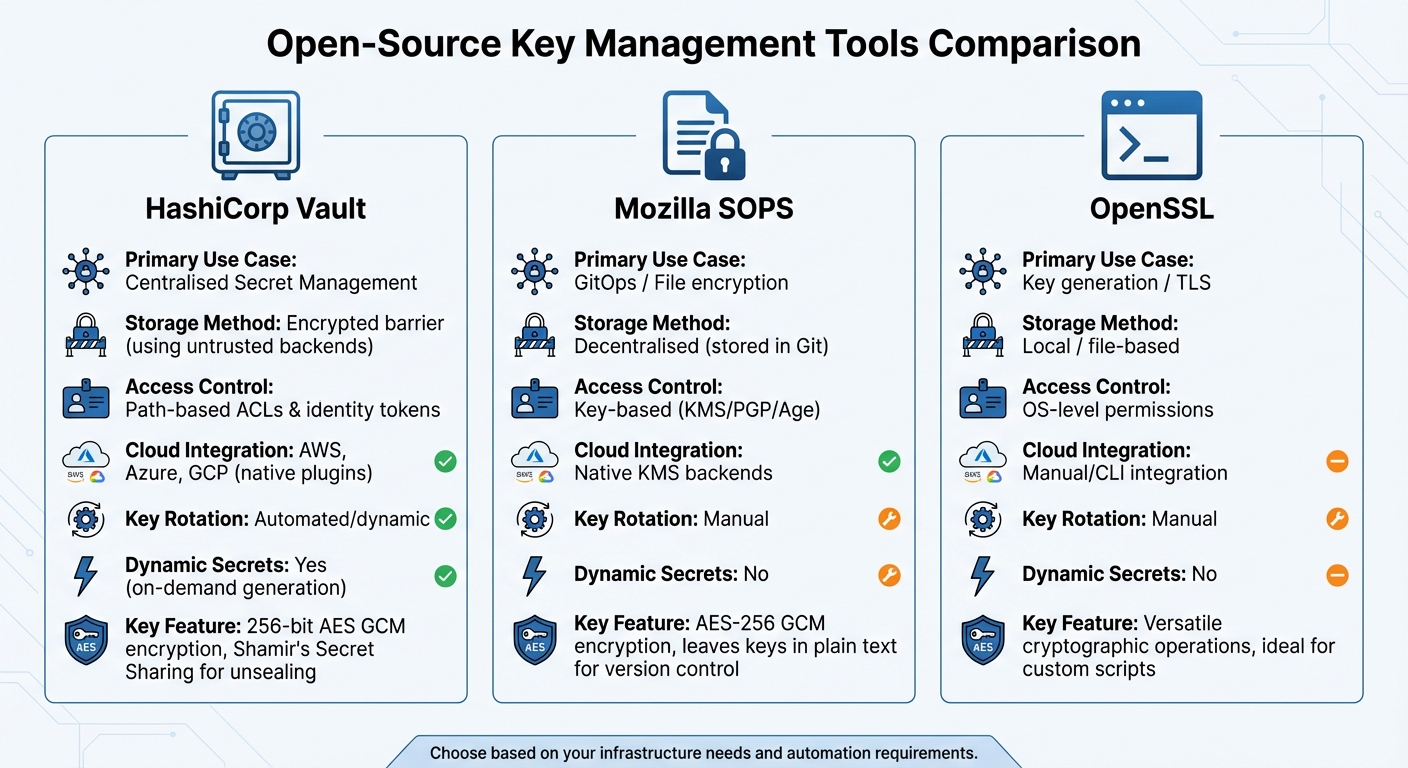 {Comparison of Open-Source Key Management Tools: HashiCorp Vault vs Mozilla SOPS vs OpenSSL}
:::
{Comparison of Open-Source Key Management Tools: HashiCorp Vault vs Mozilla SOPS vs OpenSSL}
:::
Open-source tools offer practical ways to implement key management systems, especially in cloud environments. Here's a look at three popular options: HashiCorp Vault, known for its centralised management of secrets across multiple cloud platforms; Mozilla SOPS, designed specifically for GitOps workflows; and OpenSSL, a go-to for cryptographic operations.
HashiCorp Vault
Vault is a powerful tool for centralising the management of sensitive information like API keys, passwords, and certificates. It uses 256-bit AES GCM encryption with 96-bit nonces to secure data, ensuring that even if the storage layer is compromised, the data remains safe [11][12][13].
One of Vault's standout features is its ability to dynamically generate and revoke credentials for services like AWS or SQL databases, with leases that automatically expire after a set time [12][9]. It also offers encryption-as-a-service through its transit
secrets engine, allowing applications to encrypt data without directly handling encryption keys [11].
Vault starts in a sealed
state, using Shamir's Secret Sharing to split the unseal key into multiple shards. By default, it creates five shards and requires three to reconstruct the root key [13]. For cloud environments, the unsealing process can be automated using trusted cloud KMS services from AWS, Azure, or GCP, reducing operational complexity [11].
Mozilla SOPS
SOPS is tailored for securing file-based secrets in GitOps workflows. It encrypts sensitive values within YAML, JSON, ENV, and INI files using AES-256 GCM, while leaving the keys in plain text. This approach makes it easier for developers to track changes in version-controlled files [16].
The tool integrates with native KMS backends, PGP, or Age to secure data keys. For added security, key groups
can be configured to require multiple master keys for decryption, enhancing protection for highly sensitive files [15]. Additionally, SOPS can log audit trails to a PostgreSQL database, recording who accessed specific secrets during decryption [15].
OpenSSL
OpenSSL is a versatile tool for cryptographic tasks, including generating RSA, ECDSA, and AES keys, creating certificate signing requests, and managing TLS integrations [11][14]. It's particularly useful for one-off operations or when building custom scripts for TLS certificate management.
However, OpenSSL lacks features like automated lifecycle management and identity-based access control. It relies on operating system-level permissions for security, and key rotation must be handled manually [14]. This makes it ideal for organisations that need direct control over cryptographic operations without the overhead of setting up a dedicated vault system. OpenSSL's flexibility complements tools like Vault and SOPS, offering a hands-on approach to security.
| Feature | HashiCorp Vault | Mozilla SOPS | OpenSSL |
|---|---|---|---|
| Primary Use Case | Centralised Secret Management | GitOps / File encryption | Key generation / TLS |
| Storage Method | Encrypted barrier (using untrusted backends) | Decentralised (stored in Git) | Local / file-based |
| Access Control | Path-based ACLs & identity tokens | Key-based (KMS/PGP/Age) | OS-level permissions |
| Cloud Integration | AWS, Azure, GCP (native plugins) | Native KMS backends | Manual/CLI integration |
| Key Rotation | Automated/dynamic | Manual | Manual |
| Dynamic Secrets | Yes (on-demand generation) | No | No |
Need help optimizing your cloud costs?
Get expert advice on how to reduce your cloud expenses without sacrificing performance.
Key Management Best Practices
Effective key management in cloud environments goes beyond selecting the right tools. The way keys are rotated, monitored, and access is controlled determines whether your encryption system remains secure or becomes a weak point.
How to Implement Key Rotation
Keys should be rotated every 90 days or after encrypting a significant amount of data to minimise potential exposure [18]. Keep previous key versions indefinitely to ensure access to older, encrypted data [17].
After rotation, re-encrypt data using the new key. This avoids dependency on outdated keys [18]. For instance, Google Cloud KMS charges £0.05 per software key version, while hardware-protected HSM keys range from £0.85 to £2.10 per key version per month [4].
Set a waiting period of 7–30 days before destroying keys and enable alerts for any pending deletion events [2][19].
Auditing and Monitoring Key Usage
Beyond regular rotation, thorough auditing is critical for identifying unusual activity and tracking key usage. Use logging tools like AWS CloudTrail or Google Cloud Audit Logs across all regions to ensure every key management action is documented. Set up real-time alerts for suspicious activities, such as multiple failed login attempts or unauthorised changes to IAM policies.
Accountability can be an effective tool to help prevent key compromises and to reduce the impact of compromises once they are detected.- OWASP [1]
Schedule hourly audits to check HMACs and validate key decryption processes. For industries like healthcare, logs often need to be retained for at least six years to comply with regulations. Store these logs in encrypted, integrity-validated storage to prevent tampering.
Setting Up Access Control and Permissions
Securing key management also requires strict access control. Separation of duties is crucial to ensure no individual has excessive control over your encryption system. Restrict key management tasks (like rotation or deletion) to specific identities, separate from those allowed to use keys for encryption or decryption [3]. Maintain detailed records of every user interacting with keys throughout their lifecycle [1].
Require multi-factor authentication for sensitive operations, such as key deletion [19]. This provides an additional safeguard against accidental or malicious actions. Also, implement strict controls to prevent unauthorised third-party root certificates from being added to your trust store [1].
| Feature | Centralised KMS | Decentralised Management |
|---|---|---|
| Security | High; unified control point | Variable; depends on individual teams |
| Compliance | Excellent; simplified auditing | Complex; requires multi-framework orchestration |
| Complexity | Low; single point of control | High; requires significant orchestration |
| Best For | Strict oversight and unified policies | Agile teams and autonomous units |
Conclusion
Summary of Key Points
Effective key management in open-source encryption hinges on three main elements: secure key generation and storage, automated rotation processes, and strict access controls. Tools like HashiCorp Vault, Mozilla SOPS, and OpenSSL provide a strong starting point, but their effectiveness depends on how carefully they are implemented. Techniques such as envelope encryption remain reliable for safeguarding key storage and transmission.
Maintaining separation of duties is another critical practice. By ensuring that those who manage cryptographic keys are not the same individuals performing encryption or decryption, organisations can minimise the risk of any single party having excessive control [20]. Tools like AWS CloudTrail or Google Cloud Audit Logs enable continuous monitoring, helping to detect unusual access patterns before they become full-blown security incidents [2][20]. For symmetric encryption, rotating keys every 30 to 90 days reduces the amount of data encrypted with any single key version, which limits the damage in the event of a compromise [10]. These practices form the backbone of a solid encryption strategy.
What Businesses Should Do Next
To build on these principles, businesses should take immediate steps to strengthen their encryption and key management strategies. Start by implementing least privilege access through IAM and key policies, ensuring only authorised users and services can access cryptographic assets [2][3]. Regularly audit key usage logs to spot unauthorised deletion attempts or suspicious activities.
Before deleting keys, disable them to block operations while retaining recovery options [19]. Have a clear recovery plan in place, including re-keying procedures, up-to-date contact details, and a detailed inventory of all keys [1]. Use centralised key management projects to isolate keys in a dedicated account, separate from application resources. Additionally, applying project liens can help prevent accidental deletion of critical encryption keys [19][20]. Always rely on cryptographic libraries that are actively maintained and validated by trusted organisations like NIST or FIPS [1].
For tailored advice on optimising your encryption strategies and key management in cloud environments, reach out to Hokstad Consulting for expert guidance.
FAQs
What are the best practices for rotating encryption keys in open-source tools?
To maintain strong security in open-source encryption tools, it's important to implement effective key rotation practices. Here are some key steps to consider:
- Set a rotation schedule: Align rotations with your organisation's policies. For example, rotate keys annually or more often if handling sensitive data.
- Automate the process: Integrate key rotation into your CI/CD pipelines to reduce manual errors and streamline updates.
- Enable online rotations: Use tools that support online key rotation without altering key identifiers, ensuring smooth and uninterrupted operations.
- Avoid hard-coded keys: Never embed keys directly into your applications or scripts, as this exposes them to potential breaches.
- Audit and monitor: Regularly review key usage and ensure compliance with industry standards like PCI-DSS.
Implementing these steps will help you safeguard your encryption systems and maintain a high level of security for cloud-based environments.
What’s the difference between how HashiCorp Vault and Mozilla SOPS manage encryption keys?
HashiCorp Vault serves as a centralised platform for handling encryption keys. It provides a secure way to store, generate, rotate, and audit keys through a single API. Additionally, Vault integrates seamlessly with external Key Management Systems (KMS), enabling policy-driven key management tailored to a variety of needs.
Mozilla SOPS, in contrast, is designed for file-level encryption. It encrypts individual files by wrapping a data encryption key with external PGP or cloud KMS keys. Unlike Vault, SOPS doesn’t maintain its own key store, making it a lightweight and straightforward choice for managing secrets directly within configuration files.
Why is it important to separate duties in key management systems?
Separating responsibilities within key management systems is a critical step in boosting security and reducing risks. By ensuring that no single person has full control over cryptographic keys, organisations can implement least-privilege access, lowering the chances of misuse and safeguarding sensitive information from potential insider threats.
This practice also helps organisations meet regulatory requirements, as many compliance frameworks demand strict access controls and clear accountability measures. Moreover, dividing duties ensures the creation of strong audit trails, which can simplify the process of identifying and addressing unauthorised actions.