When choosing a CI/CD tool, the decision often boils down to your team’s specific needs. Here’s a quick breakdown:
- Jenkins: Offers extensive customisation with over 1,800 plugins and is free to use. However, it requires self-hosting, significant maintenance, and expertise to manage infrastructure and plugins effectively.
- GitLab: Combines source control, CI/CD, and security tools into one platform. It’s easy to set up and integrates well with Kubernetes, but costs can rise with premium features, and it may not handle highly complex workflows as flexibly as Jenkins.
- CircleCI: Focuses on speed and simplicity with managed infrastructure, automatic scaling, and features like Docker Layer Caching. Its usage-based pricing is predictable for smaller teams but may become expensive for high workloads.
Quick Comparison
| Feature | Jenkins | GitLab CI/CD | CircleCI |
|---|---|---|---|
| Pipeline Setup | Groovy-based scripting | YAML (.gitlab-ci.yml) |
YAML (config.yml) |
| Hosting | Self-hosted only | SaaS or self-hosted | SaaS-first, self-hosted optional |
| Scaling | Manual/Plugin-based | Built-in auto-scaling | Automatic (cloud-native) |
| Docker Support | Via plugins | Native with registry | Native with caching |
| Cost | Free (high maintenance) | Tiered per user | Usage-based credits |
Each tool has strengths and trade-offs. Jenkins is ideal for teams needing full control and customisation. GitLab is perfect for those seeking an all-in-one platform. CircleCI is great for teams prioritising speed and minimal maintenance. Choose based on your workload, team expertise, and budget.
::: @figure 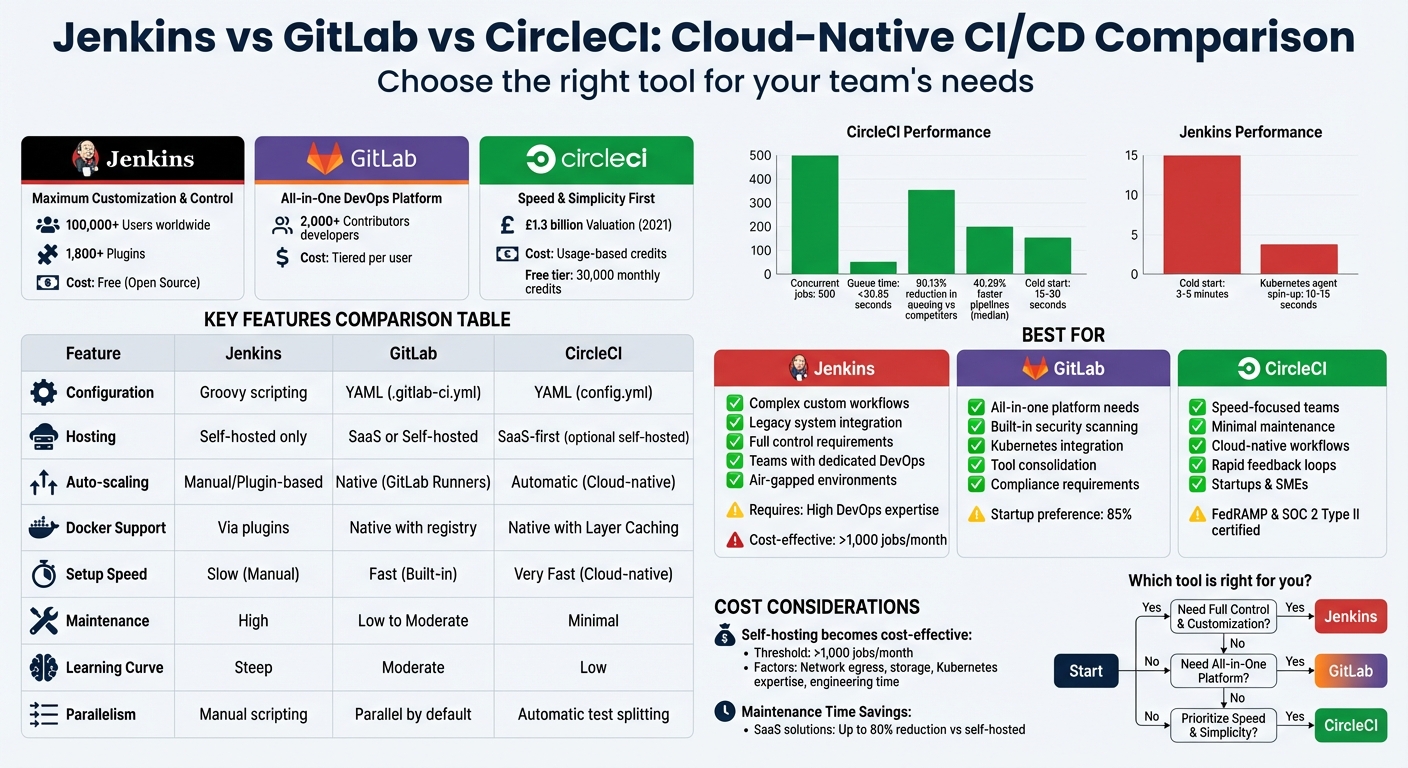 {Jenkins vs GitLab vs CircleCI: Complete CI/CD Feature Comparison}
:::
{Jenkins vs GitLab vs CircleCI: Complete CI/CD Feature Comparison}
:::
CI/CD Tools Comparison: CircleCI vs GitHub Actions vs Jenkins
Jenkins: Cloud-Native Features
Jenkins has been a cornerstone in the CI/CD space for over a decade, with more than 100,000 users worldwide [6]. Its popularity is bolstered by a vast plugin ecosystem - over 1,800 plugins contributed by the community - that integrates seamlessly with tools like Docker, Kubernetes, and cloud providers such as AWS, GCP, and Azure [9]. Jenkins also supports Pipeline as Code through the Jenkinsfile, which uses a Groovy-based syntax. This feature allows teams to version-control and share their pipelines easily [8].
The platform employs a distributed controller–agent model, enabling workload distribution and parallel builds across various platforms, including Linux, Windows, macOS, and Arm. It can also spin up ephemeral Kubernetes agents in about 10–15 seconds when configured correctly [3][10]. Jenkins' platform-agnostic nature makes it ideal for multi-cloud and hybrid environments. Additionally, it offers robust APIs - REST, JSON, and XML - along with incoming webhooks for programmatic control of pipelines. With this foundation in place, we can now compare Jenkins to other tools like GitLab and CircleCI.
Key Features and Advantages
Jenkins stands out for its customisation and control. Teams can use Docker-based agents to create consistent, isolated build environments, reducing issues like plugin conflicts and environment drift [8]. For organisations juggling legacy systems and modern containerised workloads, Jenkins offers the flexibility to craft tailored solutions. Its Shared Libraries feature is particularly useful, allowing teams to manage reusable Groovy code across multiple pipelines, streamlining development [3].
Another major plus is its cost transparency. Jenkins is free and open-source, eliminating licensing fees [5]. Its maturity is also evident in the wealth of third-party documentation, active community support, and extensive troubleshooting resources built up over its long history.
Limitations and Drawbacks
Despite its many strengths, Jenkins comes with notable challenges. Unlike managed SaaS tools, Jenkins requires self-hosting, which places the burden of server maintenance, security, and capacity planning on DevOps teams [2]. This often leads to higher total costs due to unpredictable hosting expenses, manual infrastructure provisioning, and the need for dedicated personnel to maintain stability. Studies suggest that self-hosting CI infrastructure only becomes cost-effective at scales exceeding 1,000 jobs per month - a level many teams underestimate [4].
The plugin-based architecture, while powerful, introduces its own set of issues. Plugins can lead to version conflicts and instability during updates, requiring constant monitoring to avoid pipeline failures [5]. Each plugin also represents a potential security risk that teams need to manage [3]. Many users report significant frustration with maintaining plugin dependencies.
Scaling Jenkins in cloud-native environments can be particularly tricky. It often requires custom scripts or complex configurations to handle Kubernetes scaling, which can result in slower boot times and inefficient resource usage [4]. Moreover, Jenkins lacks native support for key modern features like container registries, YAML-based configurations, and distributed caching [7]. Its reliance on Groovy instead of YAML further complicates onboarding for new developers [8]. As a result, organisations may need to allocate resources for specialised DevOps engineers or Jenkins experts to manage these complexities.
Up next, we’ll dive into GitLab’s cloud-native capabilities.
GitLab: Cloud-Native Features

GitLab offers a streamlined, all-in-one DevOps platform that combines source code management, CI/CD pipelines, and a container registry into a single application [8]. This approach eliminates the hassle of juggling multiple tools and plugins. At the heart of its CI/CD process are GitLab Runners - lightweight processes that handle jobs in isolated, scalable environments [7][12]. Configuration is managed through a single .gitlab-ci.yml file, allowing teams to version-control their pipelines with ease [7][13].
One of GitLab's standout features is Auto DevOps, which simplifies deployment by automatically detecting, building, testing, and monitoring applications using pre-configured pipelines based on best practices [7][11]. Its native integration with Kubernetes, supported through the GitLab Agent, enables modern deployment strategies without relying on external plugins [8][14]. Additionally, the built-in container registry ensures teams can build, store, and deploy Docker images directly within the pipeline, avoiding the delays and complexities of external registries [7][8].
Security is baked into the platform, with built-in tools for SAST, DAST, and dependency scanning - features that often require third-party plugins in Jenkins [7][8]. Sid Sijbrandij, CEO of GitLab, highlights this approach:
GitLab CI adds new functionality in the main code base, avoiding the need for needless configuration and ensuring everything still works when updating
[14]. This design reduces compatibility headaches during upgrades. GitLab also supports autoscaling for runners, dynamically provisioning infrastructure when needed and scaling down during idle periods to optimise resource use [8]. These integrated features make GitLab a strong choice for teams seeking a seamless DevOps experience.
Key Features and Advantages
GitLab's unified architecture eliminates many of the integration headaches common with multi-tool setups. Its open-core model, supported by contributions from over 2,000 developers, ensures ongoing improvements [14]. Teams can use tags in pipelines to assign jobs to specific runners equipped with the necessary hardware or software, such as Windows, macOS, or specific Linux distributions [11][12]. The cache keyword in .gitlab-ci.yml further speeds up workflows by preserving downloaded dependencies, reducing the time needed for subsequent job runs [8].
The platform offers flexible deployment options, including GitLab.com (multi-tenant SaaS), GitLab Dedicated (single-tenant SaaS), and GitLab Self-Managed [8]. This flexibility allows teams with strict security or compliance needs to host runners on private infrastructure while still benefiting from GitLab's integrated features. Security scanning templates, easily added via YAML configurations, simplify the transition for teams moving from Jenkins, making it easier to adopt DevSecOps practices.
Limitations and Drawbacks
Despite its robust feature set, GitLab's YAML-based configuration can feel limiting compared to Jenkins' Groovy-based scripted pipelines, especially for teams with complex, non-standard needs. Its reliance on built-in features might also frustrate those needing highly specialised third-party integrations.
Performance issues can arise in large-scale projects, particularly when using shared cloud runners. Repository size and pipeline complexity can slow execution, often forcing teams to manage their own runners. While this improves performance, it reintroduces infrastructure overhead and maintenance tasks - some of the very burdens SaaS platforms aim to reduce.
Cost is another consideration. GitLab's per-user pricing model can become expensive as teams scale up from the Free tier to Premium or Ultimate plans [5]. Advanced features like security scanning, auditing, and performance analytics are reserved for higher-tier subscriptions [8][2]. Furthermore, GitLab lacks certain optimisations present in tools like CircleCI, such as automatic test splitting and flaky test detection. Lastly, the interface, while feature-rich, can sometimes feel cluttered as it attempts to cover the entire DevOps lifecycle [1].
CircleCI: Cloud-Native Features
CircleCI provides a fully managed solution for CI/CD processes [3][5]. Teams can define their pipelines using a straightforward config.yml file located in their repository [15]. Its infrastructure is built with Docker in mind, using Docker Layer Caching (DLC) to speed up image builds by reusing unchanged layers, which is particularly useful for fast deployment cycles [15][5].
One of the standout tools CircleCI offers is Orbs - reusable YAML snippets that make it easier to integrate with popular cloud services like AWS, Azure, and GCP [15][16]. Henrik Helenius, co-founder of Droppe, highlights the impact of these integrations:
Everything we do is containerised - we're using Amazon ECS, ECR, and EC2 and with CircleCI and AWS, we're inspired to encourage even non-technical people to use these tools [16]
CircleCI also excels in performance optimisation. It supports parallelism and automatic test splitting, distributing test suites across multiple containers based on timing data to minimise feedback loops [15][3]. A performance analysis in December 2025 showed that CircleCI could handle 500 jobs simultaneously with queue times under 30.85 seconds, while GitHub Actions managed only 124 concurrent jobs with queue times exceeding 63 minutes [20].
The platform supports a variety of execution environments, including Docker containers, Linux VMs, macOS, Windows, and specialised hardware like GPUs and Arm processors [15][3]. For teams needing more control, CircleCI offers self-hosted runners. These include Container Runners for Kubernetes-native workflows and Machine Runners for full virtual machine access [17][18]. Dynamic configuration adds another layer of flexibility by enabling pipelines to be generated on-the-fly based on specific parameters, which is particularly handy for managing monorepos [15]. While the platform is largely cloud-based, these self-hosted options provide tailored control when required. Additionally, CircleCI is FedRAMP authorised, SOC 2 Type II compliant, and was valued at approximately £1.3 billion in 2021 [19].
Key Features and Advantages
CircleCI offers several standout features. One of these is SSH debugging, which lets developers log directly into a running build container to identify and resolve issues [3][5]. Nick Roosevelt, Senior Software Engineer at RepairPal, shared his experience:
The time we spent on Jenkins was a lot of work and frustration; CircleCI is leaps and bounds ahead of everyone else [3]
The platform also handles data persistence effectively through three mechanisms:
- Artifacts, for storing build outputs long-term.
- Caches, for dependencies like npm packages.
- Workspaces, for sharing data between jobs within the same workflow [15].
To optimise resources, CircleCI allows teams to configure Resource Classes, assigning the right amount of CPU and RAM to each job. This prevents over-provisioning and keeps costs under control [15][3]. For smaller teams and open-source projects, the free tier is generous, while annual plans can include soft concurrency limit increases without additional charges [15][19]. Back in 2018, CircleCI's config.yml was even recognised as the fastest-growing YAML file on GitHub [19].
Limitations and Drawbacks
Despite its strengths, CircleCI does have some limitations. Its proprietary YAML syntax and reliance on Orbs can lead to vendor lock-in, which might make switching to other CI/CD platforms challenging [19]. Additionally, its standardised cloud services may not always meet the specialised hardware or software needs of certain niche workloads [4]. Teams in highly regulated industries might also find the shared cloud infrastructure inadequate for strict data isolation or compliance requirements [4].
For those using self-hosted runners, there are added operational challenges. These include the need for Kubernetes expertise, ongoing cluster maintenance, security updates, and incident management [4][17]. Hidden costs, such as network egress, storage, and engineering time, can also add up. Self-hosted runners typically only become cost-effective for workloads exceeding 1,000 jobs per month [4]. Furthermore, Machine Runners lack support for service containers, and Container Runners rely on third-party tools for Docker-in-Docker support rather than offering native functionality [17].
Adjustable concurrency limits may still result in delays, and caches, artefacts, and workspaces all have finite lifetimes [15]. Integrating CircleCI with existing internal systems, particularly when dealing with VPC configurations and IAM policies, can also introduce operational complexities [4].
Feature Comparison Table
Here's a quick breakdown of how Jenkins, GitLab CI/CD, and CircleCI stack up when it comes to pipeline configuration, infrastructure management, and flexibility.
Jenkins stands out for its high level of customisation, offering over 1,800 plugins [2]. However, it’s entirely self-hosted, relies on Groovy scripting for pipeline configurations, and requires significant DevOps expertise to handle features like auto-scaling and Docker support.
GitLab, on the other hand, provides an all-in-one platform that combines source control with CI/CD. It uses simple YAML configuration and includes native Docker support through its integrated container registry.
CircleCI focuses on ease of use and speed, featuring automatic scaling, reusable configurations through Orbs, and SSH debugging for troubleshooting.
Comparison Table:
| Feature | Jenkins | GitLab CI/CD | CircleCI |
|---|---|---|---|
| Pipeline Configuration | Groovy (Scripted/Declarative) | YAML (.gitlab-ci.yml) |
YAML (.circleci/config.yml) |
| Managed Infrastructure | No (Self-hosted only) | Yes (SaaS available) | Yes (SaaS-first) |
| Auto-scaling | Manual/Plugin-based | Native (via GitLab Runners) | Automatic (Cloud-native) |
| Docker Support | Via plugins | Native with built-in registry | Native with Docker Layer Caching |
| Parallelism | Manual (Scripted blocks) | Parallel by default | Automatic (Test splitting) |
| Reusable Configuration | Limited (Shared Libraries) | Templates/Includes | Yes (Orbs) |
| Extensibility | 1,800+ plugins | Built-in features | Orbs and integrations |
| User Interface | Customisable/Classic | Modern/Integrated | Modern/Simple |
| Primary Pricing | Free (Open source) | Per user/Tiered | Usage-based (Credits) |
CircleCI’s free tier offers up to 6,000 build minutes per month [22], making it appealing for teams needing cost-effective scalability. GitLab also has a free tier, but its CI minutes are limited before requiring upgrades to the Premium or Ultimate plans. Jenkins, being free and open-source, avoids licensing costs entirely, but organisations should factor in the infrastructure expenses and the time investment needed for maintenance [5].
This sets the stage to explore how these tools perform and scale in cloud-based environments.
Need help optimizing your cloud costs?
Get expert advice on how to reduce your cloud expenses without sacrificing performance.
Pros and Cons Comparison Table
When evaluating these cloud-native CI/CD tools, it's important to weigh their operational trade-offs. Jenkins stands out with its massive library of over 1,800 plugins [2], offering unmatched customisation. However, this flexibility comes at the cost of significant manual configuration and ongoing upkeep [5]. As DevOps analyst Habiba Shahbaz explains:
Jenkins is the king of customization... However, that flexibility demands expertise and regular maintenance
[2]. For teams running more than 1,000 jobs per month, Jenkins may offer slight compute savings when self-hosting, but these benefits often shrink when factoring in the engineering hours required to maintain it [4]. Without dedicated DevOps personnel, the operational overhead can easily outweigh the benefit of its free licence [5].
GitLab CI/CD, on the other hand, combines CI/CD pipelines, source control, and security scanning into a single platform [7]. This integrated approach reduces the need for multiple tool subscriptions [23] and simplifies setup with YAML-based configuration [1]. However, it lacks the granular control Jenkins offers and reserves advanced security features for its higher enterprise tiers [4].
Meanwhile, CircleCI focuses on speed and simplicity. Its managed infrastructure eliminates the need for server maintenance, making it a low-effort choice [3]. However, its usage-based pricing model can lead to unpredictable costs, especially for teams with high build volumes [4].
| Aspect | Jenkins | GitLab CI/CD | CircleCI |
|---|---|---|---|
| Flexibility | Very High (Plugin-based) | Moderate to High (Integrated) | Moderate (Workflow-based) |
| Maintenance Burden | High (Self-hosted servers) | Low to Moderate | Minimal (Fully managed) |
| Setup Speed | Slow (Manual installation) | Fast (Built-in to repository) | Very Fast (Cloud-native) |
| Resource Management | Manual (Nodes/Agents) | Moderate (Runner architecture) | Automated (Dynamic scaling) |
| Learning Curve | Steep (Groovy scripting) | Moderate (YAML-based) | Low (Beginner-friendly) |
| Cost Scaling | Free software, high operational overhead | Tiered per-user pricing | Usage-based credits |
| Best For | Complex custom workflows | All-in-one DevSecOps | High-velocity cloud teams |
Performance and Scalability in Cloud Environments
When your CI/CD pipelines need to manage hundreds of builds simultaneously, the architecture behind your tools becomes a game-changer. CircleCI demonstrates its cloud-native advantage by running 500 concurrent jobs with queue times under 30 seconds - an impressive 90.13% reduction in queuing compared to standard cloud competitors - and delivering pipelines that are 40.29% faster at the median than GitHub Actions [20]. On the other hand, Jenkins struggles in this area due to its reliance on a manually tuned controller–agent model, which makes scaling a much more complex task.
Jenkins employs a controller–agent setup that requires significant manual optimisation. While it offers over 1,500 plugins for customisation, scaling it effectively demands a considerable engineering effort. Without proper adjustments, Jenkins can become sluggish and resource-heavy, particularly for large-scale projects [1]. Many teams express frustration with the operational challenges of maintaining its performance at an enterprise level.
GitLab CI/CD offers a middle ground. It uses lightweight Runners
that can be either shared or self-hosted, with built-in Kubernetes integration for container-based scaling [7]. Parallel execution is supported out of the box, but performance may dip with larger repositories or more complex pipelines [7]. For teams already using GitLab for version control, this integrated solution reduces operational overhead compared to Jenkins, while still allowing more control than a fully managed service. However, it does come with some performance trade-offs for very large repositories.
When it comes to balancing cost and operational efficiency, self-hosted solutions like Jenkins and GitLab only make sense at high job volumes. For smaller workloads, the time spent on managing Kubernetes clusters, applying security patches, and handling idle capacity often outweighs the savings on compute costs [4]. Carlos Villavicencio, a Software Developer at Stack Builders, highlighted CircleCI’s edge in this area:
CircleCI helps us pivot more quickly when business priorities shift - we can easily scale the workflow using parallelism or caching, with no extra overhead [21].
For organisations that must rely on self-hosted infrastructure due to compliance requirements or hardware constraints, CircleCI’s GOAT
version 3.1 container runner architecture offers a compelling solution. It delivers a 56% improvement in average queue times and a 49% improvement in maximum queue times compared to version 3.0. The optimal setup involves using three replicas of the container agent, each handling 80 concurrent tasks [24]. These results highlight the performance edge managed services can bring, reinforcing the advantages of cloud-native architectures.
Choosing the Right Tool for Your Team
When it comes to selecting the best CI/CD platform, your organisation's unique needs and constraints should guide your decision. For teams in regulated UK industries like finance, government, or healthcare, compliance is often a top priority. For instance, CircleCI is SOC 2 Type II certified and stands out as the first CI/CD tool to meet NIST FedRAMP standards [6]. Meanwhile, Jenkins and GitLab support air-gapped, on-premises installations, making them suitable for strict data residency requirements [25].
That said, Jenkins requires a hefty investment in DevOps resources to manage servers and keep plugins up to date. On the other hand, CircleCI and GitLab offer SaaS solutions that can reduce maintenance time by up to 80% [25]. For UK organisations, self-hosting typically becomes cost-efficient only if your workload exceeds 1,000 jobs per month - this accounts for costs like network egress, storage, and the expertise needed to manage Kubernetes [4].
Here’s a quick guide to help you decide which tool might be the best fit:
Jenkins: Ideal for teams operating behind firewalls, needing full control over execution environments, or supporting older systems without modern API compatibility. Its extensive plugin library - over 1,800 options - can handle nearly any custom workflow [2]. However, it does require a dedicated DevOps team to manage.
GitLab: A strong choice if you're looking to consolidate your toolchain. GitLab combines version control, CI/CD, and built-in security scanning (SAST/DAST) in one platform, helping to reduce tool sprawl. It also offers native Kubernetes support [7]. That said, if speed is more critical than consolidation, another tool may be a better fit.
CircleCI: Best for teams prioritising speed and minimal maintenance. UK startups, for example, can benefit from CircleCI's free tier, which includes 30,000 monthly credits and requires no server management [25]. However, public sector organisations often lean towards GitLab, thanks to its compliance features and
GitLab Dedicated
option, which ensures data sovereignty [7]. For large enterprises dealing with complex legacy systems, Jenkins might still be the go-to, despite its higher infrastructure and engineering demands [4].
Conclusion
When it comes to selecting the right tool for your CI/CD workflows, the choice between Jenkins, GitLab, and CircleCI boils down to your organisation's unique needs, resources, and existing setup.
Jenkins is the go-to option for handling complex or legacy workflows, thanks to its vast library of over 1,800 plugins that can meet almost any custom requirement [26]. However, this level of flexibility comes with a cost - it requires dedicated DevOps resources to maintain servers, apply security patches, and manage plugin updates. For many UK businesses, especially SMEs, the operational demands often outweigh the appeal of its free
licence.
GitLab offers an all-in-one solution that combines version control, CI/CD, and built-in security scanning (SAST/DAST) in one platform. This integration simplifies workflows and minimises the need for additional tools, making it a popular choice for teams already using GitLab for source control. In fact, startups show a strong preference for GitLab CI, with 85% citing its integration benefits as a key factor [27].
CircleCI shines in speed and developer experience, particularly in cloud-native setups. Its cold start
pipeline speeds of 15–30 seconds far outpace Jenkins' 3–5 minute start times [27], making it ideal for teams that prioritise rapid feedback loops. This speed advantage directly addresses common frustrations developers face when using Jenkins [3].
For UK businesses aiming to optimise their CI/CD processes, cloud-based options like CircleCI or GitLab SaaS provide a lower total cost of ownership, quicker implementation, and reduced staffing needs. Self-hosted solutions, on the other hand, only become cost-effective when running more than 1,000 jobs per month [4]. To maximise efficiency, focus on optimising pipelines through caching, parallelism, and appropriately sized resource allocations. Armed with these insights, you can align your CI/CD tools with your business goals and operational priorities.
FAQs
How does pipeline setup differ between Jenkins, GitLab, and CircleCI?
Jenkins, GitLab CI, and CircleCI all use declarative pipeline files, but their methods for setup and execution differ quite a bit.
Jenkins relies on a Jenkinsfile to define pipelines and operates on a self-hosted server. You'll need to manually configure agents, credentials, and other settings through its UI or plugins. While this approach allows for extensive customisation, it comes with a hefty maintenance workload.
GitLab CI integrates pipelines directly into your repository through a .gitlab-ci.yml file. It includes built-in runners that can automatically scale based on demand, eliminating the need for extra infrastructure. Its user-friendly interface simplifies job setups, and it can automatically provision environments using Docker or Kubernetes, making the process more streamlined.
CircleCI takes a cloud-first approach, with pipelines defined in a config.yml file stored in the repository. It manages execution environments for you, offering a quick setup with minimal effort. Its intuitive interface and pre-configured environments make it a great choice for fast deployments and minimal operational hassle.
To sum it up: Jenkins offers maximum flexibility but requires more manual effort, GitLab CI provides an integrated, repository-focused workflow, and CircleCI focuses on speed and ease of use with its cloud-native automation.
How do Jenkins, GitLab, and CircleCI compare in terms of costs for different team sizes?
The pricing models for Jenkins, GitLab, and CircleCI differ greatly, depending on the size of your team and how frequently the tools are used.
Jenkins: Being an open-source, self-hosted tool, Jenkins doesn’t come with licensing fees. However, it does require investment in infrastructure and skilled personnel. For a small team in the UK, initial costs for servers and networking can range from £5,000 to £50,000. On top of that, there are ongoing expenses for electricity, maintenance, and scaling as your team grows.
GitLab: The cloud-hosted SaaS version of GitLab charges on a per-user basis. The highest-tier plan is priced at around £80 per user per month. For instance, a team of 10 would spend £800 per month, while a 50-person team would face costs of £4,000 per month or more. If you opt for the self-hosted version, you’ll also need to account for infrastructure and staffing costs similar to those of Jenkins.
CircleCI: This tool offers pricing based on usage, with smaller teams benefiting from free credits. Additional credits are priced at approximately £12 for 25,000 credits, with costs tied to factors like build minutes and job parallelism. Small teams might operate at little to no cost, whereas medium to large teams could see monthly expenses ranging from a few hundred pounds to over £1,000.
For UK-based teams, CircleCI’s free tier could be appealing for smaller groups, while larger organisations might need to carefully compare the infrastructure and staffing demands of Jenkins with the more predictable per-user or credit-based pricing models of GitLab and CircleCI. If you’re looking to navigate these options, Hokstad Consulting offers services to help model costs and optimise your CI/CD workflows based on your team’s size and workload.
What makes Jenkins the best choice for managing complex CI/CD workflows?
Jenkins stands out as a powerful tool for managing complex CI/CD workflows, thanks to its open-source nature and a vast ecosystem of plugins. With more than 1,800 plugins available, it integrates effortlessly with a wide variety of tools and services, enabling teams to craft highly tailored pipelines that meet their precise requirements. Whether you're using declarative or scripted pipelines, Jenkins supports the creation of advanced, multi-stage workflows that can incorporate conditional logic and handle intricate processes with ease.
Another key advantage is Jenkins' distributed-build capability, which allows workloads to be distributed across multiple agents. This ensures efficient execution, even for large, parallel workflows, making it an ideal choice for projects that demand scalability and detailed pipeline designs. For organisations in the UK aiming to make the most of Jenkins in handling such complex tasks, Hokstad Consulting offers specialised expertise. They can help design and refine infrastructure to keep workflows running smoothly while managing cloud expenses effectively.