
Infrastructure as Code (IaC) allows teams to manage cloud resources using code, ensuring consistency, scalability, and efficiency. However, to maximise its potential, following best practices is essential. Here’s a quick summary:
- Version Control: Store all infrastructure code in a version control system for traceability and easy rollbacks.
- Testing: Validate templates with syntax checks, dry runs, and integration tests to catch errors early.
- Modularity: Use modules to create reusable components, keeping configurations organised and scalable.
- Immutable Infrastructure: Replace infrastructure components instead of modifying them to prevent drift and ensure reliability.
- Consistency: Use the same IaC templates across environments, injecting variables for environment-specific values.
- Secrets Management: Avoid hardcoding sensitive data; use tools like AWS Secrets Manager or HashiCorp Vault.
- Documentation: Maintain clear, up-to-date documentation for templates, variables, and dependencies.
- CI/CD Integration: Automate IaC processes in CI/CD pipelines for consistent and secure deployments.
- Automation: Leverage tools to generate templates and automate maintenance tasks.
- Drift Detection: Regularly check for configuration drift and resolve discrepancies promptly.
::: @figure 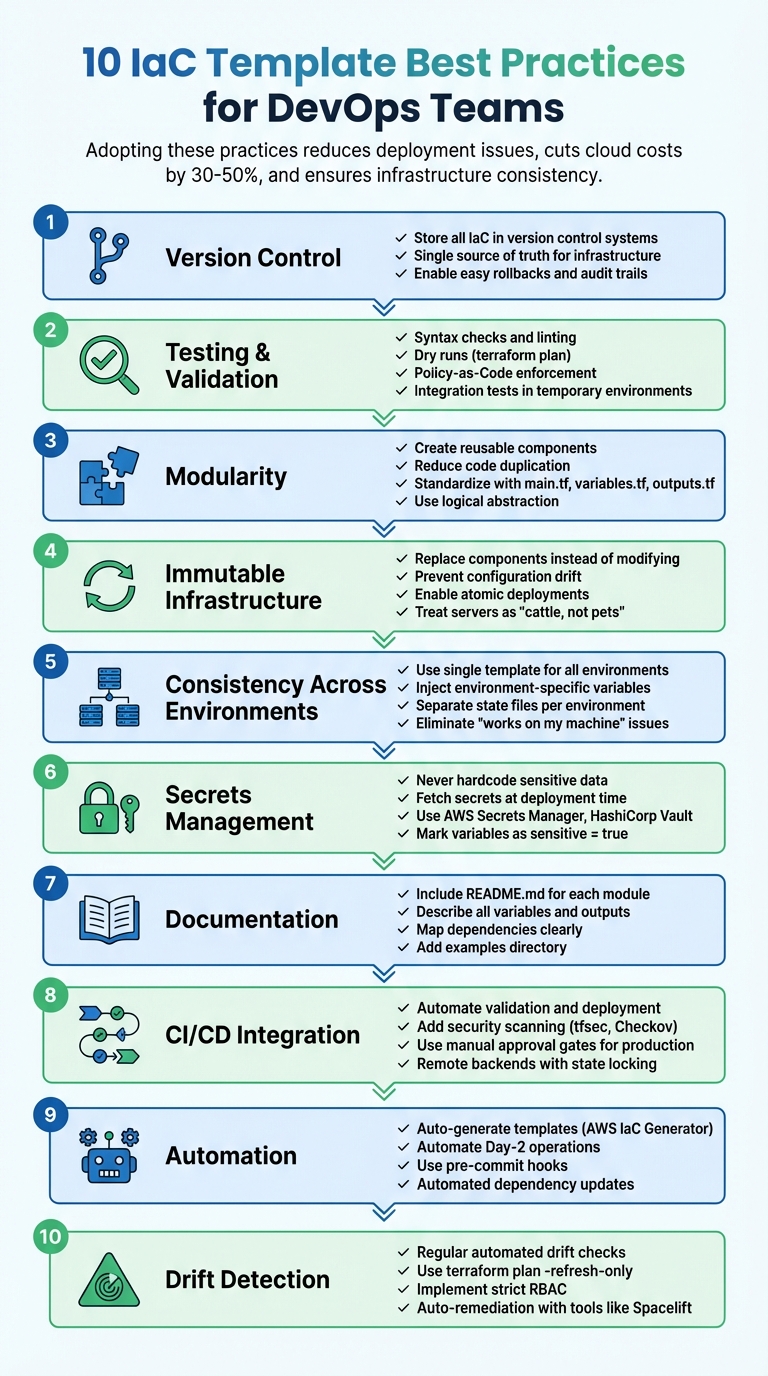 {10 IaC Template Best Practices for DevOps Teams}
:::
{10 IaC Template Best Practices for DevOps Teams}
:::
How You Should Store Your Infrastructure as Code (IaC, Terraform, ARM, etc)
1. Version Control All Infrastructure Code
Keep every piece of Infrastructure as Code (IaC) - whether it's Terraform configurations, CloudFormation templates, or Ansible playbooks - in a version control system. This establishes a single source of truth, reducing the risk of ad-hoc changes and ensuring consistent environments.
Version control systems track every modification, recording details like who made the change, what was altered, and when it happened. This detailed history is invaluable for incident reviews and compliance audits. If a deployment fails, teams can quickly roll back to a stable version using version tags or commit hashes, reducing downtime and stress.
As with other forms of code, store infrastructure code in version control to preserve history and allow easy rollbacks.- Google Cloud [7]
Centralised repositories also make collaboration seamless. Using pull request workflows, team members can review proposed changes, suggest improvements, and identify potential issues before they hit production. This process not only improves code quality but also broadens team expertise. A CODEOWNERS file can assign the right reviewers to specific modules, ensuring that experts evaluate critical updates.
To safeguard the main branch, require pull requests to be reviewed and approved before merging. Pre-commit hooks can help enforce best practices by running syntax checks (like terraform fmt), validation, and security scans automatically. Avoid storing secrets in your repository - use external tools like AWS Secrets Manager instead. These steps lay the groundwork for reliable automated testing and deployment workflows.
2. Test and Validate Templates Before Deployment
Testing Infrastructure as Code (IaC) templates early is crucial to avoid expensive mistakes and security vulnerabilities. A layered validation approach helps catch issues at various stages, starting with quick checks and moving on to more detailed tests that involve deploying actual resources. Here's how to build a robust validation process for your IaC templates.
Start with syntax checks and linting using tools like terraform validate and TFLint. These tools can identify typos, incorrect attribute types, and other coding inconsistencies without requiring access to your cloud account. As platform engineer Mattias Fjellström puts it: A good rule of thumb is that your deployment pipeline should never fail on the terraform validate command. You should catch these errors during development
[9].
Next, perform dry runs to preview changes before deploying anything. Tools like terraform plan and pulumi preview generate an execution plan, showing exactly what resources will be created, updated, or deleted. This step is especially important for complex templates with dynamic blocks or loops, ensuring the plan matches your expectations and avoids unintended changes.
Incorporate Policy-as-Code frameworks such as Open Policy Agent or HashiCorp Sentinel to enforce compliance and security rules. These tools can automatically block deployments that breach organisational policies, like ensuring storage buckets remain private or preventing security groups from exposing sensitive ports. As Sophia Parafina from Pulumi explains: Testing shifts left the risk inherent with distributed architectures composed of many resources
[10].
Finally, run integration tests by deploying infrastructure into temporary environments. This step verifies that components interact correctly under real-world conditions. Use randomised resource names and automated cleanup processes to prevent conflicts or leftover resources. Conduct these tests in isolated cloud accounts to safeguard production data.
3. Design Modular and Reusable Components
Creating modular and reusable Infrastructure as Code (IaC) components simplifies managing scalable infrastructure. This method not only reduces code duplication but also speeds up deployment cycles, aligning with earlier-discussed principles. Instead of copying code across projects, modules allow you to package infrastructure patterns into logical units that can be shared and reused across teams. HashiCorp explains it well:
A good module should raise the level of abstraction by describing a new concept in your architecture that is constructed from resource types offered by providers[11].
To standardise your modules, include key files such as main.tf for defining resources, variables.tf for inputs, outputs.tf for exported values, and README.md for documentation. Adding an examples/ folder with sample usage can further clarify how to use the module [12][14]. This consistent structure makes modules easier to understand and integrate.
When designing modules, aim for logical abstraction rather than creating minimal wrappers
around single resources. For instance, a module that defines a Consul Cluster
is far more useful than one that wraps only a single compute instance [11]. To keep things manageable, avoid nesting modules beyond two levels, as deeper nesting complicates troubleshooting [11][12]. Group resources based on their blast radius and rate of change - for example, keep static network configurations separate from application components that are updated frequently [13].
Clear input and output contracts are essential. Inputs should reflect high-level decisions, such as logging_enabled, rather than low-level resource arguments. Outputs should only expose the necessary attributes, like IDs or endpoints [12]. Always use explicit version constraints (e.g., version = "~> 2.4") when pinning module versions. This ensures safe updates while avoiding breaking changes [12]. As Mariusz Michalowski from Spacelift points out:
At scale, Terraform modules are no longer just a convenience layer. They become a product. They need clear ownership, versioning, documentation, and guardrails[12].
Publishing versioned modules to a central registry, whether public or private, can establish an internal marketplace of approved infrastructure components [12][13]. This empowers teams to self-provision resources without requiring deep IaC expertise, reducing DevOps bottlenecks [16]. To keep root configurations manageable, aim for fewer than 100 resources in a single state file; ideally, stick to just a few dozen [15]. This modular approach also supports immutable infrastructure practices and smooth CI/CD integration.
4. Adopt Immutable Infrastructure Principles
Immutable infrastructure is all about replacing components instead of updating them. If a server needs a patch or configuration change, you don't tweak the existing one. Instead, you create a fresh instance using your Infrastructure as Code (IaC) template and swap it in, leaving the old server untouched. This method eliminates the chaos caused by manually adjusted servers, which can lead to unpredictable environments over time. As Kief Morris, author of Infrastructure as Code, explains:
Advocates of immutable servers view making a change to the configuration of a production server as bad practice, no better than modifying the source code of software directly on a production server.[18]
This approach does more than just prevent configuration drift - it makes recovery simpler. By resetting your environment to a version-controlled state, rollbacks become effortless, especially when using deployment strategies like Blue/Green or Canary. Deployments are atomic, meaning they either succeed entirely or leave the system unchanged, which enhances stability. Plus, security gets a boost since you can disable remote access mechanisms like SSH, reducing potential vulnerabilities.
To make this work, follow these steps: automate image creation with tools like Packer, use declarative IaC tools such as Terraform or CloudFormation to define your desired state, and store application data externally so compute instances remain disposable. As the AWS Well-Architected Framework succinctly puts it:
Upgrades are just new deployments.[17]
Skipping immutable infrastructure practices can leave organisations facing a Medium
risk level for workload reliability [17]. Treating servers like cattle
- disposable and replaceable - rather than pets
that require constant care simplifies deployment processes, ensures consistency across environments, and makes your infrastructure predictable and reproducible.
5. Maintain Consistency Across Environments
Keeping Infrastructure as Code (IaC) templates consistent across all environments is key to smooth DevOps operations. It eliminates the classic it works on my machine
issue by ensuring development, staging, and production environments rely on the same IaC templates. As Microsoft's Azure Well-Architected Framework advises:
Avoid using different IaC assets for different environments. You shouldn't have different Terraform files for production and test environments, for example. All environments should use one file.- Microsoft Azure Well-Architected Framework
The solution? Use a single template and inject environment-specific values through variables. This method supports effective parameterisation, keeping your infrastructure predictable as it moves through the deployment pipeline.
Parameterisation for Flexibility
Replace hardcoded values - like instance sizes, regions, or resource counts - with variables. Store these values in environment-specific .tfvars files, such as production.tfvars for production or staging.tfvars for staging. This ensures the core logic of your template stays the same while only the data changes, making deployments more reliable.
Repository Organisation and State Management
Structure your repository with a clear layout:
- A
modules/directory for shared code. - An
environments/directory with subdirectories for each environment (e.g., dev, qa, prod) that instantiate the shared modules.
Use separate state files for each environment. This prevents changes in one environment from affecting others and reduces the risk of errors. Additionally, avoid setting default values for variables like project_id or vpc_id. Requiring explicit values minimises the risk of accidental copy-paste errors.
Enforcing Variable Constraints
To ensure consistency, apply validation blocks to restrict acceptable values for variables, such as environment names. Mark sensitive data with sensitive = true and include units in numeric variables (e.g., ram_size_gb). These practices help maintain predictability, reduce risks, and keep your infrastructure consistent across all environments.
6. Manage Secrets and Security Properly
After establishing solid version control and testing practices, the next step is safeguarding your templates. Avoid embedding sensitive information like API keys, passwords, or certificates directly in your Infrastructure as Code (IaC) templates. AWS Prescriptive Guidance highlights the risks:
Checking in secrets exposes sensitive credentials to anyone with access to the repository and, if the repository is public, to the world.[19]
Tools like Terraform store sensitive data in plaintext within state and plan files. Resources such as vault_generic_secret, tls_private_key, and google_service_account_key are particularly vulnerable, as their details are stored by default in the terraform.tfstate file [21][22][25].
Fetch Secrets at Deployment Time
Instead of hardcoding secrets, retrieve them dynamically during deployment. Use IaC data sources like aws_secretsmanager_secret_version or vault_generic_secret to pull values securely from secret management tools such as AWS Secrets Manager, HashiCorp Vault, or Google Cloud Secret Manager [21][22][26]. For example, AWS Secrets Manager encrypts secrets using 256-bit Advanced Encryption Standard (AES) keys, ensuring a high level of security [29]. The service costs £0.32 per secret per month, with an additional £0.04 for every 10,000 API calls [27].
To further enhance security, mark variables as sensitive = true. This ensures that sensitive data is excluded from CLI outputs and logs [20][28].
Protect State Files and Automate Secret Rotation
Store your remote state files in encrypted backends with restricted IAM access. Enable state locking using DynamoDB to prevent concurrent changes that could lead to configuration issues [23][25][26]. These measures, combined with automated state protection, reinforce the DevOps pipeline discussed earlier.
For secret rotation, automate the process using tools like AWS Lambda to refresh credentials on a regular schedule, such as every 30 days. This limits the risk posed by compromised credentials [21][24]. Additionally, adopt OpenID Connect (OIDC) in your CI/CD pipelines. OIDC allows you to exchange identity tokens for short-lived cloud credentials, eliminating the need for long-term access keys [23].
7. Document Templates and Dependencies
Effective documentation is the backbone of managing and scaling Infrastructure as Code (IaC) assets. While a solid version control system and modular design enhance deployment reliability, clear and accessible documentation ensures that every team member can confidently navigate and expand your infrastructure code.
A well-documented IaC template transforms into a maintainable and user-friendly resource. Each module should include a README.md file that outlines its purpose, usage, and how it connects with the rest of the infrastructure. This file acts as the go-to guide for team members, helping them understand the module’s role and how to implement it effectively [4][2].
Descriptions for all variables and outputs are essential. A one- or two-sentence explanation for each variable helps clarify its function and keeps technical documentation up-to-date when paired with tools like terraform-docs [4][14][2]. For more complex variable types, such as maps or objects, heredoc strings can be used in descriptions to provide detailed examples of the expected format [6].
Dependency mapping is another critical piece of the puzzle. Outputs can be used to reference resource attributes, allowing IaC tools to infer relationships and establish the correct provisioning sequence [4][31]. In cases where explicit dependencies, such as depends_on, are necessary, include an inline comment explaining the rationale - particularly for timing issues or dependencies that aren’t automatically detectable [31]. As Google Cloud Documentation highlights:
Variables and outputs let you infer dependencies between modules and resources. Without any outputs, users cannot properly order your module in relation to their Terraform configurations[33].
To make these dependencies more transparent, your documentation should include examples that illustrate module interactions. An examples directory showcasing usage patterns can significantly aid understanding [4][6]. Additionally, any helper scripts should be documented with clear instructions and sample commands [4][2]. For smoother team collaboration, include a CONTRIBUTING.md file with tool setup guidance and a CODEOWNERS file to indicate who is responsible for maintaining each module [4].
Despite the widespread use of IaC - adopted by nearly 90% of organisations - fewer than 7% have fully codified their infrastructure. One reason for this gap is the lack of thorough documentation, which can slow adoption and lead to inefficiencies [32].
Documentation should never be an afterthought. As AWS Prescriptive Guidance warns:
Ignoring documentation or treating it as an afterthought can lead to knowledge gaps, misunderstandings about system behaviour, and misleading users[19].
To keep documentation accurate as your templates evolve, automate its generation wherever possible. This approach ensures that your documentation remains a reliable and up-to-date resource.
8. Integrate IaC into CI/CD Pipelines
Integrating Infrastructure as Code (IaC) templates into CI/CD pipelines transforms the deployment process into a consistent and automated workflow. Instead of relying on manual execution of IaC commands from local machines, pipelines ensure that every infrastructure update follows a structured process. This includes validation, security checks, and approval steps before deployment, creating a more reliable and repeatable system.
To achieve this, treat IaC with the same discipline as application code. Every change should go through version control, with the CI/CD pipeline triggering automated tests such as:
- Linting: Tools like TFLint check for code quality issues.
- Security Scanning: Use tools like tfsec or Checkov to identify vulnerabilities.
- Syntax Validation: Catch errors early to avoid deployment failures.
A typical pipeline workflow consists of four main stages: Checkout, Validate, Plan, and Apply. During the Plan
stage, a speculative execution plan is generated, showing the exact changes that will be applied. For high-stakes updates, such as those affecting production environments or security configurations, manual approval gates can be added to maintain oversight. As Buildkite puts it:
Transitioning from a local Terraform workflow to a shared CI/CD pipeline can seem like a daunting task but if you take the leap, you won't look back.– Buildkite
To further streamline deployments, use remote backends like Amazon S3 with DynamoDB locking. This prevents simultaneous operations from corrupting the infrastructure state. Additionally, configure concurrency controls in the CI/CD platform to ensure only one deployment job runs per environment at a time. For authentication, opt for OpenID Connect (OIDC) to generate short-lived tokens, avoiding the risks associated with static IAM access keys.
One of the major benefits of integrating IaC into CI/CD is the ability to create ephemeral environments for pull request validation. These temporary setups are automatically cleaned up afterward, reducing unnecessary cloud resource usage. By making the Git repository the single source of truth, every change is documented in an audit trail, ensuring transparency and accountability in the deployment process.
9. Automate Template Creation and Day-2 Operations
Building on earlier IaC practices, automating template creation and maintenance can make DevOps workflows much smoother. By automating the creation of IaC templates, you can skip the manual work entirely. Tools like AWS IaC Generator can automatically generate templates from the resources already running in your cloud setup. Meanwhile, visual tools such as AWS Infrastructure Composer let teams design templates using simple drag-and-drop interfaces [3]. For developers, Pulumi supports over 52 cloud and service providers, allowing you to create IaC templates in familiar programming languages like TypeScript, Python, and Go [30]. This kind of automation sets the stage for easier ongoing operations.
Once deployment is complete, automation can also simplify Day-2 operations
like updates, backups, and monitoring. Desired State Configuration (DSC) tools, such as Ansible for virtual machines and Flux for Kubernetes clusters, handle these ongoing maintenance tasks. They ensure your systems stay aligned with their intended configurations [1]. Adding automated checks to monitor configuration accuracy further reduces the chance of errors. As Microsoft's Azure Well-Architected Framework highlights:
Relying on manual deployments puts your workload at risk of inconsistent configurations and potentially insecure design[1].
To catch errors before deployment, use validation tools. Linters like cfn-lint and TFLint, along with testing tools like TaskCat, can verify syntax and functionality [3]. Integrating pre-commit hooks into your Git workflows can automatically spot formatting and logic mistakes before code is pushed to the repository [3][5].
Once your templates are validated, manage your infrastructure with layered automation. Divide IaC pipelines into low-touch
layers for stable components like networking and high-touch
layers for frequently updated resources like applications [1]. Tools like Dependabot can automatically review and update version pins for providers and modules, ensuring security patches are applied without manual effort [34]. You can even automate the detection and removal of unused resources to keep your environment clean and efficient [1].
10. Detect and Fix Configuration Drift
Staying consistent with your infrastructure setup is essential, and a key part of this is identifying and addressing any configuration drift. Just like continuous testing boosts reliability, regularly checking for drift ensures your infrastructure matches the state defined in your Infrastructure as Code (IaC) templates.
Configuration drift happens when your live infrastructure veers away from the desired state in your IaC templates. This often occurs due to manual changes made directly in the cloud console - typically during urgent incidents - or when cloud providers update their services. If left unchecked, drift can lead to security vulnerabilities, deployment errors, and compliance headaches.
To spot drift early, use tools that compare your state file with the actual infrastructure without making changes. For Terraform, the terraform plan -refresh-only command is a safe way to identify discrepancies without altering your setup [37]. AWS CloudFormation also includes a drift detection feature that flags resources with status codes like DRIFTED, IN_SYNC, or DELETED [38]. Automating these checks with tools like HCP Terraform or Spacelift allows for daily scans and automatic reconciliation, saving time and reducing errors [35][36].
When you detect drift, you can fix it by reapplying your IaC templates to overwrite unauthorised changes or updating the templates to reflect intentional modifications. Trevor Rae, a Cloud Platform Engineer at 1Password, shared his experience:
With Spacelift, one of the first things we did was a big drift detection. We overhauled our drift detection, drift remediation, how to handle and solve it, and how to prevent it from happening. Spacelift handles all of that for us automatically now.[36]
This approach ties into earlier practices like automated testing and security scanning, ensuring your DevOps processes remain secure and compliant.
To minimise the chances of drift, implement strict Role-Based Access Control (RBAC) to limit manual changes in the cloud. Explicitly define critical resource attributes in your templates to make drift detection easier. For attributes that are expected to change externally - like tags - use lifecycle hooks, such as ignore_changes, to avoid unnecessary alerts.
Conclusion
These ten practices can transform how DevOps teams manage infrastructure. By incorporating version control, automated testing, and modular design, you build a solid foundation for deployments that grow with your organisation. Integrating Infrastructure as Code (IaC) into CI/CD pipelines and enforcing security scans helps identify and resolve issues early - before they escalate into costly production problems.
Beyond improving deployment processes, IaC offers lasting advantages. Simon Lee, Azure Expert & Consultant, highlights its importance:
If you've run out of backups or your backups don't work... having infrastructure as code means you can rebuild that environment super quickly[39].
This capability is vital for maintaining business continuity. Automated drift detection and immutable infrastructure principles further ensure that your environments stay stable and aligned with their intended configurations.
Cost savings are another key benefit. Automating resource lifecycles and avoiding configuration sprawl can reduce cloud spending by 30–50% [8]. At the same time, these practices enhance deployment speed and reliability.
For teams looking to optimise these strategies, professional guidance can make a big difference. Hokstad Consulting offers tailored IaC solutions, cloud cost management, and custom automation services. Their flexible pricing options, including retainer-based and savings-based models, provide support that fits your needs.
Adopting these practices early helps minimise deployment issues and technical debt. The result? Faster recovery times, consistent environments, and infrastructure that evolves with your business - without the need for constant manual intervention.
FAQs
How does Infrastructure as Code (IaC) ensure consistency across environments?
Infrastructure as Code (IaC) helps maintain consistency by automating how infrastructure is set up and managed. This approach removes the risk of manual mistakes and minimises configuration drift, ensuring that every environment - whether on a public or private cloud - is always set up in the same way.
With IaC templates, DevOps teams can create standardised configurations that can be reused across staging, testing, and production environments. This makes deployments more predictable and reliable every time.
What advantages does integrating IaC into CI/CD pipelines offer?
Integrating Infrastructure as Code (IaC) into CI/CD pipelines offers a range of benefits for DevOps teams. One major advantage is the ability to achieve consistent and reliable infrastructure deployments. By automating these processes, teams can significantly reduce the risk of manual errors, ensuring stable environments across development, testing, and production stages.
Another key benefit is how IaC integration accelerates delivery cycles. With continuous testing and validation of infrastructure changes, teams can catch potential issues early in the process. This not only boosts efficiency but also helps minimise downtime. By automating infrastructure management, organisations can shift their focus to scaling operations and driving innovation, instead of getting bogged down by repetitive troubleshooting tasks.
Why should you avoid hardcoding sensitive information in IaC templates?
Hardcoding sensitive information - like passwords, API keys, or access tokens - directly into Infrastructure as Code (IaC) templates is a risky move. It leaves your secrets exposed and vulnerable to unauthorised access, particularly if the code ends up in version control systems or shared repositories.
To keep your systems and data protected, opt for secure methods to manage these secrets. Use tools like environment variables, secret management systems, or encrypted storage. These practices not only align with security best practices but also help minimise the chances of data breaches or system vulnerabilities.