
Infrastructure as Code (IaC) simplifies cloud management but comes with serious security risks. Misconfigurations can expose sensitive data, allow unauthorised access, or lead to costly breaches. Here's what you need to know:
- Hardcoded Secrets: Embedding credentials in IaC templates can result in credential theft. Use secret managers like AWS Secrets Manager or HashiCorp Vault to secure sensitive data.
- Overly Permissive IAM Policies: Broad permissions (e.g.,
*actions) increase the risk of privilege escalation. Apply the principle of least privilege and use tools like AWS IAM Access Analyzer to identify risky policies. - Publicly Exposed Resources: Misconfigured defaults, such as public S3 buckets or open security groups, can expose your infrastructure. Scan templates with tools like tfsec or Checkov to catch these issues early.
- Unprotected Terraform State Files: State files contain sensitive information. Store them in encrypted remote backends (e.g., AWS S3 with KMS encryption) and secure access with IAM policies.
- Configuration Drift: Manual changes can lead to misalignment with IaC templates. Use drift detection tools and enforce policies-as-code with Open Policy Agent (OPA).
Key takeaway: Integrate security checks into your CI/CD pipeline, scan IaC templates for vulnerabilities, and enforce strict access controls. These steps can prevent misconfigurations from escalating into widespread security issues.
5 IaC security issues you need to fix
Hardcoded Secrets in IaC Templates
Including sensitive credentials directly in Infrastructure as Code (IaC) templates poses a serious risk to cloud security. Hardcoding API keys, database passwords, SSH keys, or authentication tokens in tools like Terraform or CloudFormation creates an easy target for attackers. While IaC tools simplify managing resources across multiple cloud providers, mistakes - like storing secrets in unprotected local files or committing them to source control - can expose your infrastructure to threats [1].
The risk grows significantly when developers push IaC templates with embedded secrets to version control platforms like GitHub. With around 35% of GitHub repositories being public [4], attackers actively scan for patterns that resemble API keys or tokens. Even private repositories aren't immune. Misconfigured access controls or leaked credentials can expose the entire commit history. Beyond version control, secrets might also leak during deployment - such as through CI/CD pipeline logs without proper masking - or from shared templates circulated within teams [1]. These vulnerabilities can lead to severe operational setbacks, as detailed below.
Impact of Exposed Secrets
The exposure of hardcoded secrets can have devastating consequences. Attackers gaining access to these credentials can infiltrate cloud environments, accessing databases, storage systems, and compute resources. This could result in stolen data, including sensitive intellectual property or regulated information, as well as lateral movement across interconnected systems and even full control of the infrastructure [1].
The fallout for businesses can be immense. Organisations might face system outages, regulatory penalties, and long-term damage to their reputation. The problem is amplified by the reusable nature of IaC templates - one compromised file can introduce vulnerabilities across hundreds of deployments. The OWASP Top 10:2025 highlights this issue, listing several Common Weakness Enumerations related to hardcoded passwords and storing sensitive information in plaintext, underscoring the widespread nature of this risk [2].
Mitigation Techniques
To address this risk, avoid embedding secrets in IaC templates altogether. Instead, leverage external secret management tools like HashiCorp Vault, AWS Secrets Manager, or Azure Key Vault. These tools integrate seamlessly with Terraform and similar IaC platforms, allowing templates to fetch credentials dynamically at runtime. This ensures that sensitive data isn't stored in code or state files [1].
Additionally, automate the scanning of IaC templates using tools like GitGuardian, Trivy, or Checkov. Set up policy gates to prevent deployments that include hardcoded credentials. Regularly rotate keys and handle sensitive information through environment variables or secure parameter stores rather than embedding them directly in templates. Cloud security platforms can also scan templates before deployment, helping to catch misconfigurations early in the development process. These proactive measures can significantly reduce the risk of exposing critical secrets.
Overly Permissive IAM Policies and Roles
Overly permissive IAM (Identity and Access Management) policies are a major security risk in Infrastructure as Code (IaC) configurations. Much like hardcoded secrets, these misconfigurations can create significant vulnerabilities. When IAM policies are misconfigured - especially using wildcard characters like "*", which grant unrestricted permissions - they open the door to privilege escalation, lateral movement, and unauthorised access across cloud environments. Worse, because IaC templates can be reused, a single misconfiguration can propagate across hundreds of resources, amplifying the risk [1][5].
The OWASP Top 10:2025 report lists Broken Access Control as A01, highlighting that 3.73% of tested applications have access-control weaknesses [2]. Similarly, the Cloud Security Alliance's Top Threats
report for 2025 underlines that weak IAM configurations and cloud misconfigurations are often more problematic than software vulnerabilities [6]. When combined with other issues, such as exposed network resources or compromised CI/CD pipelines, overly permissive IAM policies can give attackers a way to escalate from initial access to full control of the environment.
Examples of Common Misconfigurations
Some of the most dangerous IAM configurations include:
- Full wildcard policies: Granting permissions like
{ "Effect": "Allow", "Action": "*", "Resource": "*" }effectively hands over administrative control across all services and resources [1][5]. - Broad S3 permissions: Policies such as
s3:*applied to all buckets can allow attackers to read, write, or delete data across the entire S3 infrastructure, leading to complete data exfiltration [1][5]. - Wildcard principals in trust policies: Using
"Principal": { "AWS": "*" }in trust policies allows any AWS account to assume roles, enabling unauthorised cross-account access [1][5]. - Excessive IAM permissions: Permissions like granting
iam:PassRolewith"Resource": "*"can lead to chained privilege escalation, allowing attackers to gain administrative access starting from lower-level permissions [1][6].
Best Practices for IAM Role Configuration
To mitigate these risks, strict adherence to the principle of least privilege is essential. This means defining IAM policies with precise actions and resources instead of relying on broad wildcards. For example, instead of using ec2:*, specify only the required permissions, such as ec2:StartInstances for specific Amazon Resource Names (ARNs). By narrowing the scope of permissions, you significantly reduce the potential attack surface [2][6].
Automated tools can help identify and address overly permissive policies before deployment. Tools like Checkov, tfsec, and AWS IAM Access Analyzer scan IaC templates for risky patterns - such as wildcards in Action or Resource fields, policies allowing sensitive operations on multiple resources, or trust relationships with open principals. Additionally, policy-as-code frameworks like Open Policy Agent (OPA) or Sentinel can enforce least-privilege rules during the commit process, ensuring that only secure configurations are approved [1][3][5].
For CI/CD pipelines and automation workflows, use time-limited, environment-specific roles that only access the necessary accounts and resources. Self-hosted CI/CD runners, which often have elevated privileges, should be carefully managed to avoid excessive access to code and cloud resources. Segregating roles into categories - such as read-only, deployment, and administration - helps limit the impact of potential breaches. Regularly auditing roles, policies, and service principals ensures that unused or unnecessary permissions are removed before they can be exploited [6].
Publicly Exposed Resources in IaC
Publicly exposed resources are a major vulnerability in Infrastructure as Code (IaC) deployments. When IaC templates include insecure defaults - like S3 buckets with 'public-read' ACLs or security groups allowing 0.0.0.0/0 - they create a direct route for unauthorised access and potential data breaches. The problem escalates quickly because tools such as Terraform and CloudFormation can replicate these flawed configurations across hundreds of resources from a single template. A single oversight can, therefore, lead to a widespread security issue [1].
This risk is no small matter. In fact, exposed resources are now ranked as the second most critical issue in the OWASP Top 10 for 2025 [2]. Attackers often exploit these vulnerabilities as entry points, combining publicly accessible S3 buckets with overly permissive network rules to compromise entire environments. Additionally, templates that lack encryption settings or proper access controls can unintentionally deploy infrastructure that’s unprotected by default [1].
Common Exposure Scenarios
Certain misconfigurations appear time and again. For instance:
- S3 buckets with 'public-read' ACLs: These allow anyone to access their contents, and when encryption settings are missing, the data is left exposed at rest.
- Security groups permitting 0.0.0.0/0: This configuration opens critical ports - like 22 (SSH), 3389 (RDP), and 80/443 (HTTP/HTTPS) - to the entire internet, leaving EC2 instances and databases vulnerable.
These issues often arise because insecure settings are hardcoded into pre-built Terraform or CloudFormation templates. Without thorough security reviews, these templates are reused across multiple projects, further spreading the risk [1].
Preventative Measures
To address the risks of public exposure, it’s crucial to integrate security checks into your development and deployment processes. Here’s how:
Use AWS Config Rules: Rules like
s3-bucket-public-read-prohibitedandrestricted-sshcontinuously monitor resources for compliance. They can flag public S3 buckets or overly permissive security groups with 0.0.0.0/0 before they make it to production. Adding these checks to your CI/CD pipelines ensures that non-compliant IaC deployments are blocked early [1].-
Leverage Terraform Sentinel: This tool lets you enforce security policies during the planning phase. For example, the following rule prevents permissive security group configurations:
main = rule { not sg.ingress.cidr_blocks.value eq "0.0.0.0/0" }By catching these issues before deployment, you avoid the need for costly fixes later [1].
-
Scan Templates with Tools like tfsec or Checkov: These tools can be set up as pre-commit hooks to scan for vulnerabilities such as missing
aws_s3_bucket_public_access_blockconfigurations or databases withpublic_access=true. For example:- Ensure RDS instances are defined with
public_access=false. - Use VPC-only security groups and enable encryption for databases.
- Ensure RDS instances are defined with
-
Employ IaC Modules with CIDR Restrictions: Define variables for CIDR blocks and validate them using tools like Open Policy Agent (OPA). This ensures no 0.0.0.0/0 exposure is allowed in your environment [1][4].
Need help optimizing your cloud costs?
Get expert advice on how to reduce your cloud expenses without sacrificing performance.
Unprotected Terraform State Files
Unprotected state files in Terraform can pose a serious security threat, much like hardcoded secrets or misconfigured resources. These files act as a comprehensive record of your infrastructure, linking cloud resources to configuration code. They also store highly sensitive information, such as passwords, API keys, SSH keys, and metadata about resource dependencies. If exposed, these files can provide attackers with a detailed blueprint of your entire environment, making them a prime target for exploitation [1].
Risks of State File Exposure
The exposure of state files can lead to severe consequences. Attackers can use the detailed information within these files to pinpoint vulnerabilities or misconfigurations in your infrastructure. They might extract authentication credentials, impersonate legitimate users, provision unauthorised resources, or navigate laterally within your cloud environment. Specific misconfigurations, such as publicly accessible S3 buckets, can increase the risk of data breaches.
Poor storage practices are often the root cause of such exposures. For instance, storing state files locally and accidentally committing them to public repositories, using unencrypted remote backends without proper access controls, or misconfiguring S3 bucket policies can all lead to vulnerabilities. Additionally, self-hosted CI/CD runners without adequate security measures can exacerbate the problem [1][4]. The next section outlines practical steps to secure state files and reduce these risks.
Securing State Files
Protecting state files requires a combination of encryption and strict access controls. One effective approach is to use remote backends, such as AWS S3, to centralise state management. This not only ensures state locking to prevent simultaneous changes but also enhances security. Here's an example configuration:
terraform {
  backend "s3" {
    bucket         = "my-secure-tfstate-bucket"
    key            = "path/to/my/key"
    region         = "eu-west-2"
    encrypt        = true
    kms_key_id     = "arn:aws:kms:eu-west-2:123456789012:key/abc123-def456"
    dynamodb_table = "terraform-locks"
  }
}
In this setup, the state file is encrypted at rest using SSE-KMS with AES-256 encryption and managed KMS keys. Additionally, DynamoDB is used for state locking, ensuring safe and consistent state management [1].
To further secure state files, implement role-based access control (RBAC) with least-privilege IAM policies. For example, restrict actions like s3:GetObject on the state bucket to specific roles. Create dedicated IAM roles for Terraform operations and integrate them with OIDC for your CI/CD pipelines. This eliminates the need for long-lived credentials. Strengthen security by configuring bucket policies to block public access, enabling versioning, and using MFA delete to add an extra layer of protection.
Finally, adopt a proactive security approach by integrating shift-left
practices. Regularly scan IaC templates and state backends with tools like tfsec or checkov using pre-commit hooks. Monitor CI/CD workflows to quickly detect and address potential exposure risks [1][4].
Configuration Drift and Policy Enforcement Challenges
Even when infrastructure is defined in code, it can still stray from its intended templates. This misalignment, known as configuration drift, creates vulnerabilities that attackers can exploit. It adds a layer of dynamic risks to the static misconfigurations we’ve already discussed.
Understanding Configuration Drift
Configuration drift happens when the infrastructure defined in your IaC (Infrastructure as Code) templates - such as Terraform, CloudFormation, or ARM/Bicep - no longer matches the actual state of resources in your cloud or data centre. This often occurs because of manual changes during emergencies, quick fixes applied directly, or the use of multiple IaC tools without a unified source of truth [3].
In the UK, industries like financial services and healthcare are particularly prone to this issue. For instance, during a production incident, engineers might manually reopen ports to resolve an issue quickly, leaving those changes out of sync with IaC templates [3]. Similarly, an S3 bucket initially configured as private through IaC might later be made public via a manual UI change, reintroducing vulnerabilities that OWASP categorises as security misconfigurations [2].
The root causes of drift often stem from organisational practices. Weak controls over cloud consoles, incomplete IaC coverage for critical security settings, and fragmented responsibilities between DevOps, security, and operations teams all contribute to the problem [3]. Under time pressure, teams might prioritise immediate fixes through the console, neglecting to align these changes with IaC templates later. Without tools to detect drift or enforce policies as code within CI/CD pipelines, these discrepancies can remain hidden until they cause a breach or service disruption [3].
Policy Enforcement Tools
To counter the risks associated with drift, policy enforcement tools provide automated mechanisms to maintain compliance. By expressing security rules as code, these tools ensure that policies are consistently applied during development and deployment [3]. Instead of relying on outdated manuals or wikis, rules - such as prohibiting public S3 buckets or blocking SSH access from 0.0.0.0/0 - are encoded and enforced automatically. This prevents configuration drift from introducing new vulnerabilities by flagging or blocking non-compliant changes.
Open Policy Agent (OPA) is one such tool, serving as a flexible policy engine that evaluates policies written in the Rego language against configuration data like Terraform plans and Kubernetes manifests [3]. Tools like Conftest integrate OPA into CI/CD pipelines, allowing teams to catch IaC violations before deployment. For example, it can block public load balancers lacking WAF protection, restrict wildcard IAM permissions, or enforce encryption and logging requirements [3]. Kubernetes-specific tools like Gatekeeper extend OPA’s capabilities, enforcing policies at the cluster admission stage to prevent misconfigured resources - even if someone bypasses IaC and applies YAML directly [3].
Strong CI/CD practices also play a key role in reducing drift. Teams can enforce IaC-only changes by requiring pull requests, integrating automated scans, and mandating approvals for high-risk modifications [3]. Pipelines can also run post-deployment drift-detection scans and share summaries with team communication channels, ensuring everyone stays informed.
Mitigation Strategies: Summary of Best Practices
::: @figure 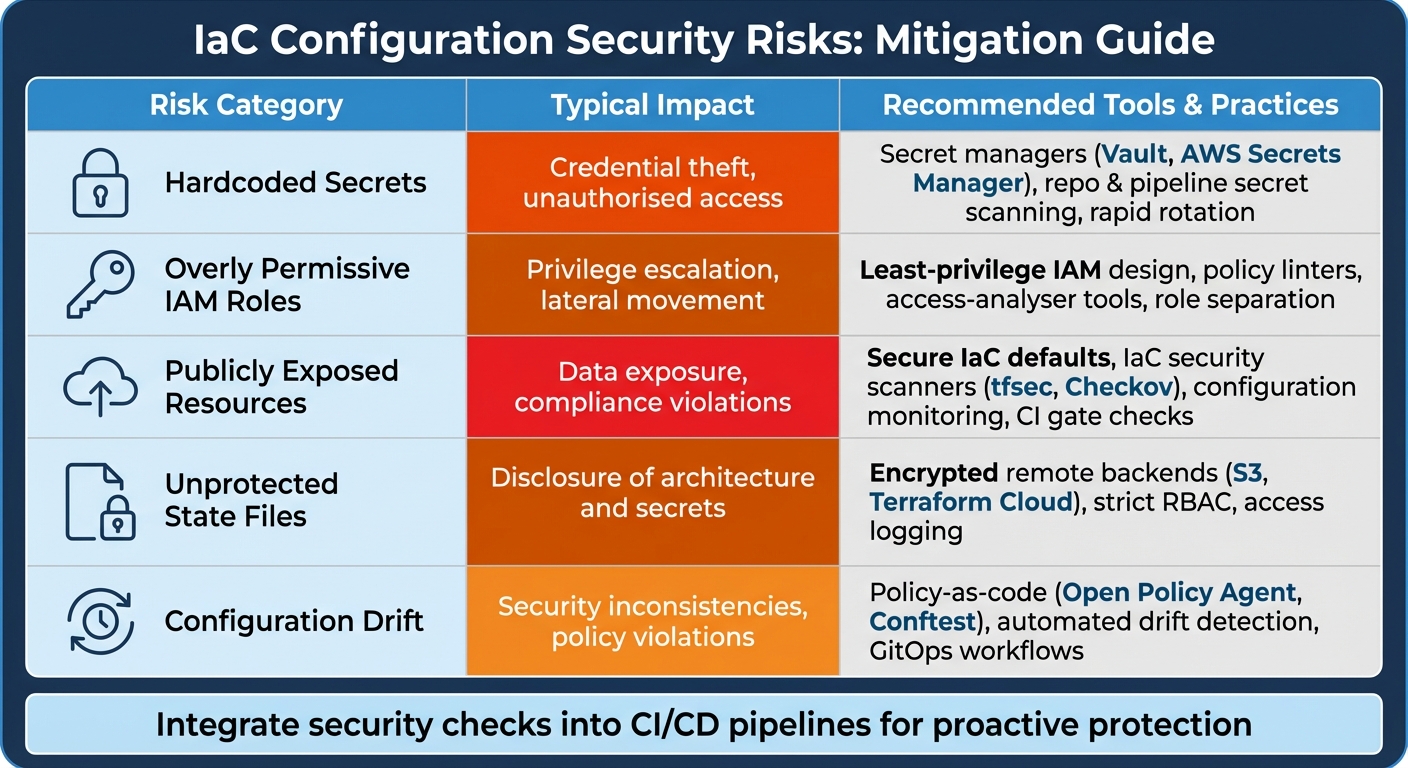 {IaC Security Risks: Impact and Mitigation Strategies Comparison}
:::
{IaC Security Risks: Impact and Mitigation Strategies Comparison}
:::
Addressing the risks associated with Infrastructure as Code (IaC) requires proactive measures, including automated scans and policy-as-code enforcement. Instead of waiting to catch misconfigurations in production, UK organisations should integrate IaC scanning within CI/CD pipelines. This ensures insecure deployments are blocked before provisioning, shifting security from being a reactive process to a proactive design principle [1][3].
Focus on Key Risks: Start by resolving the most critical issues, such as eliminating hardcoded secrets. Leaked credentials, often found in public or internal repositories, can lead to severe breaches; using secret managers is a safer alternative [1][4]. Next, address overly permissive IAM roles and public exposure in IaC templates. According to OWASP, security misconfiguration rose from fifth to second place in 2025 [2]. Secure state files by using encrypted remote backends and limiting access, as these files could provide attackers with detailed insights into your environment [1]. Finally, implement tools for detecting configuration drift and enforce security baselines with policy-as-code [3].
Risk-Mitigation Comparison Table
| Risk | Typical Impact | Recommended Tools/Practices |
|---|---|---|
| Hardcoded Secrets | Credential theft, unauthorised access | Secret managers (Vault, AWS Secrets Manager), repo & pipeline secret scanning, rapid rotation [1][5] |
| Overly Permissive IAM Roles | Privilege escalation, lateral movement | Least-privilege IAM design, policy linters, access-analyser tools, role separation [1][3] |
| Publicly Exposed Resources | Data exposure, compliance violations | Secure IaC defaults, IaC security scanners (tfsec, Checkov), configuration monitoring, CI gate checks [1][5][3] |
| Unprotected State Files | Disclosure of architecture and secrets | Encrypted remote backends (S3, Terraform Cloud), strict RBAC, access logging [1] |
| Configuration Drift | Security inconsistencies, policy violations | Policy-as-code (Open Policy Agent, Conftest), automated drift detection, GitOps workflows [3] |
This table serves as a guide for structuring your phased security action plan.
Implementation Checklist
To implement these strategies effectively, follow a phased approach:
- Weeks 1–4: Begin by cataloguing all IaC repositories and templates across platforms like AWS, Azure, and GCP. Enable multi-factor authentication (MFA) on cloud accounts and set up role-based access for IaC repositories. Also, migrate state files to encrypted remote backends [1][6].
- Weeks 4–8: Integrate IaC security scanning into CI/CD pipelines to block builds with critical misconfigurations. Add secret-scanning tools to developer workflows [1][3][4][5].
- Weeks 8–12: Implement policy-as-code to establish security baselines using tools like Open Policy Agent, and enforce these as mandatory checks. Standardise least-privilege IAM patterns and develop reusable modules [3][6].
- Months 3–6: Enhance security by introducing continuous drift detection and generating regular compliance reports. Define service-level agreements (SLAs) for resolving IaC misconfigurations and failed security checks in production [3].
UK organisations can streamline these steps by collaborating with consultancies like Hokstad Consulting, which specialise in embedding secure IaC practices while optimising cloud costs and deployment efficiency.
To ensure long-term success, embed secure IaC practices into your workflows. Make passing security and policy checks a prerequisite for merging changes - no exceptions [3]. Equip developers and DevOps engineers with training on common IaC misconfigurations, secure handling of secrets, and interpreting scanner results [1][3][5]. Introduce mandatory peer reviews for high-risk changes and maintain a library of centrally approved modules to encourage the use of secure, pre-vetted components [1][3]. For UK organisations, aligning IaC policies with UK GDPR and sector-specific standards such as the NCSC cloud security principles ensures compliance while bolstering operational resilience.
Conclusion
Infrastructure as Code (IaC) has revolutionised how organisations in the UK manage and provision cloud resources. However, it has also introduced security risks that can spread rapidly across entire environments. These vulnerabilities - ranging from unauthorised access to data breaches - can lead to severe financial losses and reputational harm if left unchecked.
The good news? These risks are manageable. By adopting secure-by-default IaC practices and prioritising security early in the development lifecycle, organisations can significantly reduce exposure. Practices such as using secret managers instead of embedding credentials in code, enforcing least-privilege IAM policies, implementing private networking by default, encrypting state files, and integrating policy-as-code with continuous drift detection can catch misconfigurations before they escalate. Automated CI/CD scanning and peer reviews further ensure that IaC becomes a reliable backbone for secure and predictable infrastructure.
Beyond enhancing security, these practices also improve operational efficiency. Secure IaC practices naturally align with streamlined resource management and cost control. Standardised templates and governance reduce manual interventions, freeing up engineering teams to focus on innovation rather than firefighting. For leadership, this ensures cloud resources adhere to security baselines and regulatory standards, including UK GDPR and NCSC cloud security principles.
For organisations seeking additional expertise, Hokstad Consulting provides tailored support to address these challenges. Their services include reviewing Terraform and CloudFormation code, redesigning IAM and networking frameworks, and embedding policy-as-code into CI/CD pipelines. This approach not only strengthens IaC security but also cuts cloud costs and accelerates deployment cycles, all while ensuring compliance with local regulations.
To get started, consider scanning your IaC repositories for secrets and misconfigurations or defining a strict security baseline. Whether you handle this internally or bring in experts for a targeted review, taking action now can help avoid costly breaches, minimise disruptions, and establish a robust foundation for secure cloud operations.
FAQs
What are the best practices for avoiding hardcoded secrets in IaC templates?
To keep sensitive information safe in Infrastructure as Code (IaC) templates, it's crucial to avoid embedding secrets directly in the code. Instead, organisations should use secure secret management tools. Options like environment variables, secret vaults, or specialised secret management services offer a more secure way to handle sensitive data while keeping it separate from the codebase.
Another key practice is to regularly rotate secrets, which helps minimise the risks if any information is exposed. Pair this with strict access controls to ensure that only authorised individuals or systems can access sensitive details. These measures not only improve security but also help organisations meet compliance standards and follow industry-recommended practices.
What are the best practices for setting up IAM policies to reduce security risks?
To minimise security risks when configuring IAM policies, consider these essential practices:
- Grant the minimum necessary permissions: Stick to the principle of least privilege, ensuring users or systems only have access to what they truly need.
- Leverage role-based access control (RBAC): Simplify permission management by assigning roles to groups of users rather than individuals.
- Conduct regular permission audits: Periodically review access rights to spot and eliminate any excess or outdated permissions.
- Enable multi-factor authentication (MFA): Add an extra layer of security for accounts with elevated privileges.
- Set policy conditions: Limit access by defining criteria like IP address, time of access, or device type.
- Use automation tools: Employ automated solutions to monitor IAM policies and maintain compliance with security guidelines.
By adopting these strategies, you can strengthen your IAM setup and minimise the chances of unauthorised access.
What is the best way to detect and manage configuration drift in Infrastructure as Code (IaC)?
To keep configuration drift in check when using Infrastructure as Code (IaC), combine continuous monitoring tools with automated compliance checks. This allows you to routinely compare your current configurations with the desired state, making it easier to spot and address any discrepancies as they arise.
Using automated remediation is a smart way to handle drift quickly and efficiently. It ensures your infrastructure stays secure, consistent, and reliable, while also cutting down on the need for manual fixes. This method keeps systems aligned with best practices and minimises disruptions.