
Hybrid cloud setups offer a mix of on-premises systems and cloud services, but data transfer fees can quickly add up if not managed properly. Here’s what you need to know:
- Data transfer costs: Moving data into the cloud (ingress) is free, but transferring data out (egress) incurs charges. These vary based on location and volume.
- Key drivers of costs:
- Transfers between cloud regions or availability zones.
- Egress to on-premises systems or the public internet.
- Volume-based pricing tiers - higher usage often means lower per-GB rates.
- Cost-saving tips:
- Keep data and compute resources in the same region to avoid unnecessary charges.
- Use private connectivity for large volumes, like AWS Direct Connect or Azure ExpressRoute.
- Compress data and use incremental syncing to minimise transfer volumes.
- Monitor traffic patterns and optimise configurations to avoid hidden fees.
For example, transferring 5 TB monthly with Azure Europe pricing could cost over £200, depending on the transfer type. Planning and monitoring are essential to avoid surprises and control expenses.
Cloud Data Costs: Hidden Fees Enterprises Must Know #shorts
What Drives Hybrid Cloud Data Costs
::: @figure 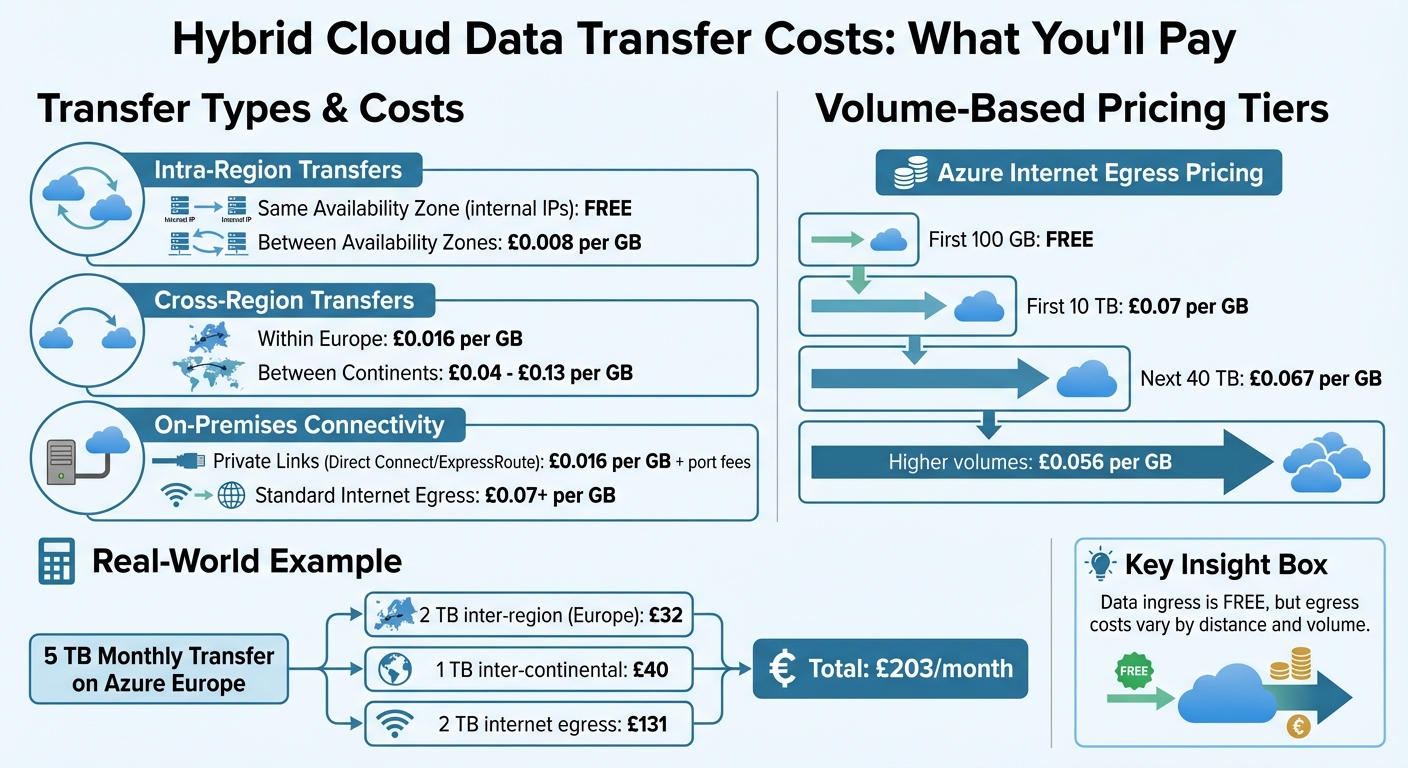 {Hybrid Cloud Data Transfer Costs Comparison by Type and Region}
:::
{Hybrid Cloud Data Transfer Costs Comparison by Type and Region}
:::
If you're trying to keep your hybrid cloud expenses in check, understanding what drives data transfer costs is crucial. These costs are influenced by multiple factors, and knowing how they work can help you make smarter architectural decisions. Let’s break down the types of data transfers and how they impact your bill.
Types of Data Transfer: Intra-Region, Cross-Region, and On-Premises
The cost of moving data depends on where it’s going and how far it travels. For starters, transferring data into the cloud (ingress) is free with all major providers, but sending data out of the cloud (egress) will cost you [5].
- Intra-region transfers: If you're moving data within the same Availability Zone and using internal IPs, there’s no charge. But transferring data between Availability Zones in the same region comes with a small fee, roughly £0.008 per GB [5].
- Cross-region transfers: These are pricier. For instance, Azure charges around £0.016 per GB for transfers within Europe. Moving data between continents, however, can cost anywhere from £0.04 to £0.13 per GB [2].
- On-premises connectivity: Anytime data leaves the cloud for on-premises systems, egress charges apply. Private connections like AWS Direct Connect or Azure ExpressRoute can reduce costs to about £0.016 per GB compared to standard internet egress, which can exceed £0.07 per GB [6]. While private links are more cost-effective for large workloads, they come with fixed monthly port fees, regardless of usage.
Data Volume and Pricing Tiers
Cloud providers use tiered pricing to reward higher data volumes with lower per-GB rates. For example, Azure offers the first 100 GB of internet egress free every month [2]. Beyond that:
- The first 10 TB costs about £0.07 per GB.
- The next 40 TB drops to around £0.067 per GB.
- Larger volumes can go as low as £0.056 per GB [2].
If your data transfers are high-volume and consistent, you’ll benefit from these lower rates. On the other hand, sporadic or low-volume transfers might leave you stuck in higher-cost tiers. Analysing your average monthly data usage can help you determine whether you're in the most economical pricing bracket or if adjustments to your architecture could reduce costs.
Connection Methods: Public Internet vs Private Links
How you connect your on-premises systems to the cloud plays a big role in your overall costs.
- Public internet connections: These are often used with Site-to-Site VPNs. They avoid fixed port fees, making them a good choice for temporary or low-volume workloads. However, they come with standard internet egress rates, which can add up [4].
- Private links: Services like AWS Direct Connect charge fixed port fees - such as ~£0.24/hour for a 1 Gbps port or ~£1.80/hour for a 10 Gbps port [6]. While these fees are unavoidable, private links offer much lower per-GB rates compared to public internet options. The trick is figuring out the breakeven point where the lower transfer costs outweigh the fixed fees [4].
Data transfer charges are often overlooked while architecting a solution in AWS. Considering data transfer charges while making architectural decisions can help save costs.- AWS Architecture Blog [5]
Next, we’ll explore practical strategies to help you cut down on these data transfer expenses.
How to Reduce Data Transfer Costs
Cutting down on data transfer costs doesn't always require complex technical changes. Sometimes, smart architectural decisions can make a big difference.
Keep Data and Compute in the Same Region
One of the easiest ways to save on data transfer costs is to ensure your data and compute resources are located in the same region. When data is transferred within the same Availability Zone (AZ) using internal IPs, there’s no charge. However, once data crosses an AZ boundary - even within the same region - you’ll face a per-GB fee [5].
Avoid cross-Region data transfer unless your business case requires it.- AWS Architecture Blog [5]
To further limit unnecessary costs, use VPC gateway endpoints and monitor VPC Flow Logs to identify and minimise cross-AZ traffic. These steps align with broader strategies for managing hybrid cloud expenses.
Use Private Connectivity Solutions
For businesses moving large volumes of data between on-premises systems and the cloud, private connectivity options like AWS Direct Connect can significantly reduce per-GB transfer costs compared to standard internet egress rates [4]. While Direct Connect comes with fixed port fees, its lower transfer rates are ideal for ongoing, high-volume data transfers.
It’s worth calculating your breakeven point before committing. For temporary or smaller-scale transfers, a Site-to-Site VPN might be more cost-effective. Similarly, if you’re using NAT gateways, placing them in the same AZ as your high-traffic instances can help avoid unnecessary cross-AZ charges [9].
Apply Compression and Incremental Sync
Since cloud providers charge based on the volume of data transferred, reducing the amount you send is an effective way to lower costs [4]. Compression tools - whether built into cloud services or used at the application level - can shrink the amount of billable data [8]. Using incremental synchronisation also ensures only updated or new data gets transferred, cutting down on bandwidth usage and fees.
Adding caching layers can help reduce redundant data transfers. For workloads involving large datasets, performing intensive processing close to the data source and transferring only the essential results can significantly reduce expensive data egress charges.
Need help optimizing your cloud costs?
Get expert advice on how to reduce your cloud expenses without sacrificing performance.
How to Calculate and Forecast Data Costs
How Cloud Providers Charge for Data Transfers
When it comes to data transfers, cloud providers usually follow a straightforward pricing model: data ingress is free, but egress comes with a cost [2]. Transfers that stay within the same Availability Zone are free, but moving data across regions - or even across continents - leads to higher fees [2]. Public internet transfers tend to be pricier compared to private connections like AWS Direct Connect or Azure ExpressRoute [4]. Additionally, services such as NAT Gateways, Transit Gateways, and Load Balancers can tack on extra processing charges per gigabyte [4].
One more thing to keep in mind: prices are usually listed in USD and converted to GBP based on London’s closing spot rates. This means fluctuations in exchange rates can directly impact your overall costs [2]. Let’s break this down with an example.
Example Cost Calculations
Imagine you’re using Azure Europe pricing for a hybrid cloud setup that transfers 5 TB of data each month. Here's the breakdown:
- 2 TB of inter-region transfers within Europe: At £0.016 per GB ($0.02 per GB), this would cost about £32.
- 1 TB of inter-continental transfers: Priced at £0.04 per GB ($0.05 per GB), this comes to roughly £40.
- 2 TB of internet egress: After the first 100 GB is free, the remaining 1.9 TB at £0.069 per GB ($0.087 per GB) would add £131 to your bill.
Adding these together, your total monthly data transfer cost would be around £203.
Common Mistakes That Increase Data Costs
Frequent Mistakes in Hybrid Cloud Setups
Managing hybrid cloud data costs effectively requires avoiding some common missteps. A frequent issue is designing hybrid cloud architecture with an on-premises mindset, failing to account for how cloud data transfer fees are calculated. These fees depend on factors like the source, destination, and volume of data, and overlooking this can lead to unexpectedly high bills [3].
One common error is connecting to the wrong endpoint. For instance, if you’re using globally replicated storage, connecting to a distant region instead of a local one can result in cross-region egress fees [1]. These charges often go unnoticed until they show up on your invoice, by which time they’ve already added up.
Another issue is misusing NAT gateways. Placing NAT gateways in a different Availability Zone from the high-traffic instances they support - or using them for services like S3 or DynamoDB - can lead to unnecessary hourly and per-GB charges [8].
Uncompressed virtual machine (VM) traffic is another source of wasted spending. As Kevin Bogusch, Senior Competitive Intelligence Analyst at Oracle, points out:
It's not always possible to compress network traffic, but infrastructure traffic - think VM to VM over a virtual network - can commonly be compressed for a tiny trade-off in increased CPU cycles. The incremental cost of that CPU use is orders of magnitude less than the network egress fees[1].
By addressing these issues, organisations can significantly reduce their data costs.
Best Practices for Controlling Data Costs
To keep costs under control, start with data transfer modelling during the design phase. Estimate costs at various usage levels before deployment to identify the most cost-effective setup for your workloads [3]. This proactive approach helps avoid costly architectural mistakes that may be challenging to fix later.
For services like S3 and DynamoDB, use Gateway VPC endpoints. These don’t incur hourly charges and ensure traffic stays within the provider’s network, avoiding NAT gateway fees and public internet egress charges [8]. When NAT gateways are necessary, place them in the same Availability Zone as the high-traffic instances they serve to avoid additional costs [8].
Enable VPC Flow Logs and leverage monitoring tools to identify cost-driving endpoints. Analysing detailed VPC Flow Logs can help you catch issues like incorrect endpoint connections early, preventing them from inflating your bill [1].
Next Steps
Key Takeaways
To keep your cloud costs under control, a proactive approach is key. As discussed earlier, reducing data transfer costs starts with thoughtful design and regular monitoring. Begin by planning your architecture carefully - this allows you to model data transfer costs and select a cost-efficient setup. Strategies like keeping data and compute resources local, using private connectivity for high-volume transfers, and applying compression to minimise data volumes can all help cut expenses.
One major cost to watch out for is egress fees, which can make up as much as 6% of an organisation's total cloud storage spending [10]. To avoid unnecessary charges, focus on optimising your network configurations, monitor them regularly, and use VPC endpoints to keep traffic within your provider’s network [7].
Effective cost management can make a big difference. For instance, organisations that adopt FinOps practices often see cloud costs drop by 20–30%. Those that integrate AI into their FinOps strategies are even more likely - 53% more, to be exact - to achieve savings of over 20%.
How Hokstad Consulting Can Help

Expert guidance can make all the difference when it comes to cutting costs. Hokstad Consulting specialises in hybrid cloud cost optimisation, helping organisations reduce expenses by 30–50%. Their services include custom network designs, strategies to lower data transfer costs, and FinOps implementation to ensure financial accountability in cloud spending.
What sets Hokstad Consulting apart is their flexible approach. They offer a range of engagement options, including cloud cost audits, migration planning, and ongoing optimisation. Plus, with their No Savings, No Fee
model, you only pay based on the savings they help you achieve, and fees are capped as a percentage of those savings. Ready to take control of your hybrid cloud costs? Visit Hokstad Consulting to get started.
FAQs
What are the best ways to reduce egress costs in a hybrid cloud environment?
To cut down on egress costs in a hybrid cloud environment, it's all about smart data management and transfer strategies. Start by using data compression and batch processing to reduce the amount of data being transferred. Another effective approach is implementing content caching with a CDN, which helps avoid repetitive data transfers.
Position your data close to the workloads that rely on it to minimise unnecessary movement. For more consistent and budget-friendly transfers, explore private connectivity options like AWS Direct Connect or Azure ExpressRoute. Lastly, keep a close eye on your data transfer patterns and analyse them regularly to uncover additional ways to save.
What are the cost advantages of using private connectivity like AWS Direct Connect?
Using private connectivity options like AWS Direct Connect can help cut down on data transfer expenses by bypassing the typically higher fees charged by internet service providers (ISPs). Rather than incurring internet egress costs, Direct Connect uses its own reduced data transfer rates, which can lead to more consistent and often lower costs when moving data between your on-premises systems and AWS.
Beyond cost savings, this solution also provides better network reliability and performance, making it an efficient choice for businesses operating within hybrid cloud setups.
How does tiered pricing impact the cost of data transfers?
Tiered pricing models work by lowering the cost per gigabyte as your data transfer volume grows. In practice, smaller data volumes are charged at a higher rate, while larger volumes benefit from reduced rates. As a result, while your total cost rises with increased usage, the marginal cost per gigabyte goes down.
To estimate your expenses accurately, it's crucial to evaluate your expected data transfer volumes. By reviewing your usage patterns, you can make the most of these pricing tiers, helping to manage your budget more effectively and avoid overspending.