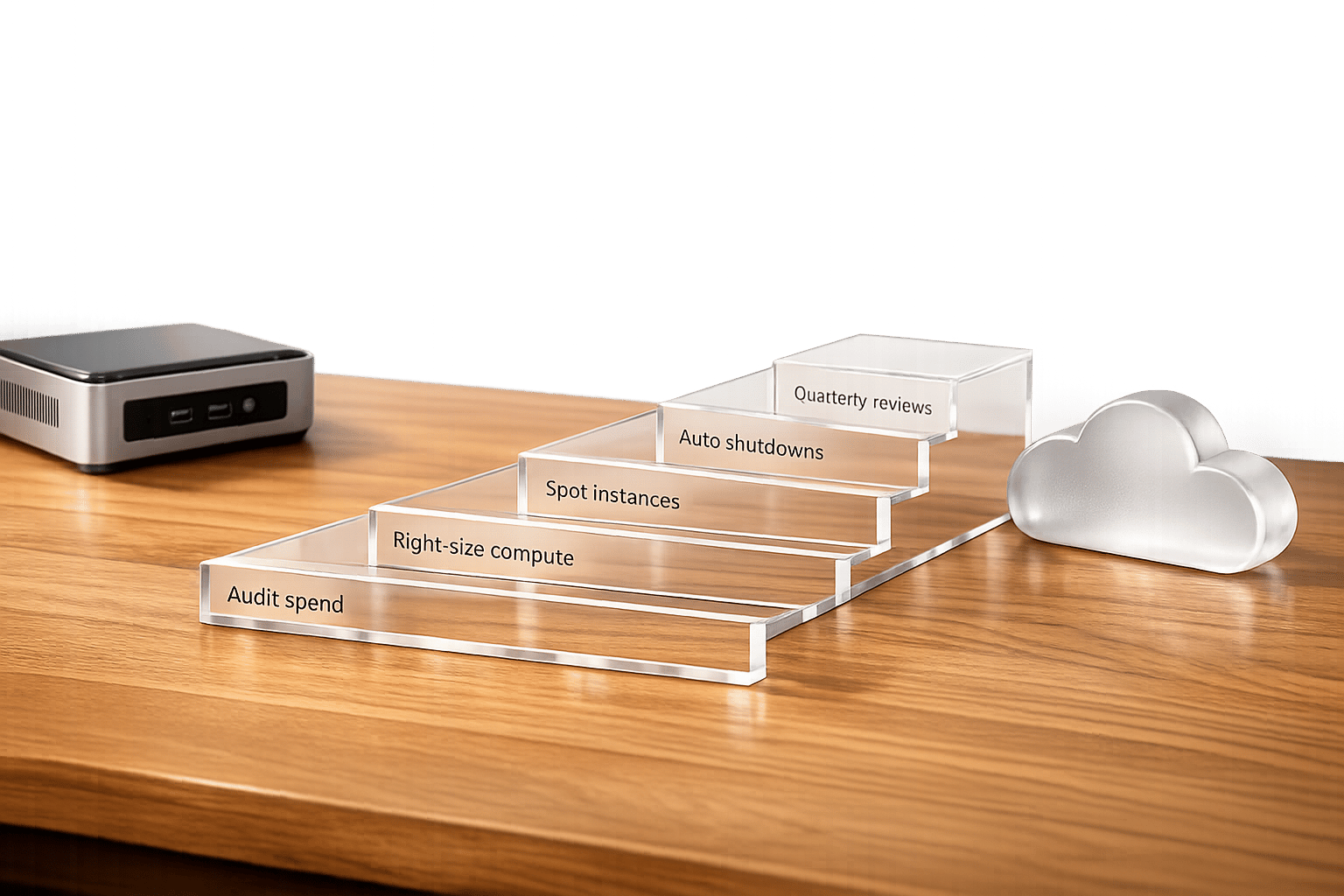
Hybrid cloud CI/CD pipelines can be costly without proper management. Here's how to control expenses while maintaining performance:
- Audit and Monitor Costs: Conduct full cost audits, enforce tagging policies, and use tools like AWS CloudWatch or Azure Monitor for real-time tracking.
- Optimise Resources: Right-size compute and containers, use spot instances for non-critical tasks, and implement storage tiering to reduce waste.
- Automate and Enforce Policies: Automate environment shutdowns during off-peak hours and apply cost guardrails with Infrastructure as Code (IaC).
- Quarterly Reviews: Regularly review costs to identify inefficiencies and adjust commitment-based discounts.
These steps can cut hybrid cloud CI/CD costs by 30–50%, improve efficiency, and align spending with business goals. For tailored solutions, consider expert guidance from Hokstad Consulting.
Assess and Monitor Current CI/CD Costs
Conduct a Full Cost Audit
To get a clear picture of your CI/CD expenses, start by connecting billing data from platforms like AWS, Azure, GCP, and any on-premises systems. Use FinOps tools with CMDB integration to standardise usage records and map resources to their respective owners. Make sure to enforce tagging policies with metadata such as owner, cost_centre, and environment before provisioning resources [2].
Next, pinpoint the key factors driving your costs. These might include environment complexity, cross-platform testing, data transfer fees, or pricing inconsistencies. For example, inefficient artefact transfers between data centres and cloud environments can lead to high bandwidth charges. Automating nightly checks can help here - flag untagged resources and create Jira tickets for follow-up [2].
These audits form the groundwork for implementing real-time cost monitoring, which will help you stay on top of expenses.
Set Up Real-Time Cost Monitoring
Integrating cost tracking into your CI/CD dashboards is the next step. Tools like AWS CloudWatch, Azure Monitor, or CircleCI's hybrid orchestration can provide the necessary visibility.
Monitor key metrics such as compute utilisation, data egress, job runtimes, and test volumes [5][1]. Set up alerts to notify you when spending approaches predefined thresholds. To optimise costs further, enable smart job routing - run steady workloads on-premises while using the cloud for peak demands. Additionally, tools like Kubernetes Cluster Autoscaler can help by automatically shutting down idle test environments [1].
Work with Hokstad Consulting for Custom Audits
If you’re looking for tailored guidance, Hokstad Consulting specialises in cloud cost engineering and DevOps transformation, especially for hybrid setups. Their audits address inefficiencies like poor resource allocation and excessive data transfers. They provide actionable recommendations to reduce costs and speed up deployments. Plus, their engagement models include a no-savings, no-fee option, with fees capped as a percentage of the savings achieved.
Need help optimizing your cloud costs?
Get expert advice on how to reduce your cloud expenses without sacrificing performance.
Cloud vs Hybrid | A Guide to Choosing Semaphore Editions
Optimise Resource Usage in CI/CD Pipelines
::: @figure 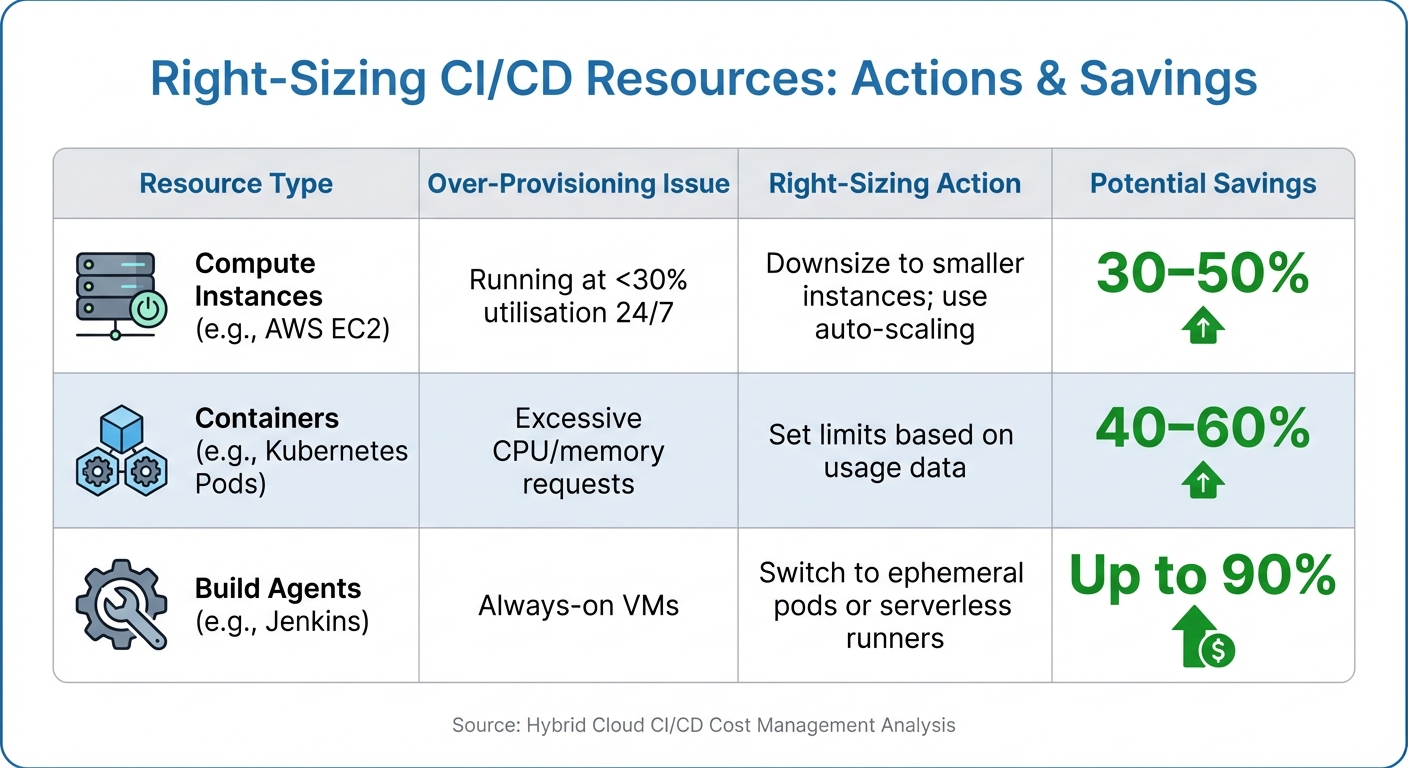 {Right-Sizing CI/CD Resources: Cost Optimization Strategies and Savings}
:::
{Right-Sizing CI/CD Resources: Cost Optimization Strategies and Savings}
:::
Managing resource usage effectively is crucial for keeping CI/CD pipeline costs under control, especially in hybrid cloud environments.
Right-Size Compute and Containers
Over-provisioning is a common issue that can quickly inflate your CI/CD budget. Start by reviewing utilisation metrics to pinpoint underused resources. For example, if a system consistently operates at 70% CPU usage over a month, it could be downsized or shifted to reserved instances to save costs [1][2].
For containerised environments, resource limits should be defined in YAML manifests. For instance, you could cap CPU at 500m and memory at 512Mi for less demanding builds. In hybrid setups, predictable workloads can remain on-premises, while public cloud resources handle bursts. This strategy can lower costs by 30–40% for workloads that resemble fixed infrastructure [1][2].
| Resource Type | Over-Provisioning Issue | Right-Sizing Action | Potential Savings |
|---|---|---|---|
| Compute Instances (e.g., AWS EC2) | Running at <30% utilisation 24/7 | Downsize to smaller instances; use auto-scaling | 30–50% through smaller instances and scaling [1][2] |
| Containers (e.g., Kubernetes Pods) | Excessive CPU/memory requests | Set limits based on usage data | 40–60% by consolidating services per node [1] |
| Build Agents (e.g., Jenkins) | Always-on VMs | Switch to ephemeral pods or serverless runners | Up to 90% with pay-per-execution models [1][3] |
Implementing these adjustments not only trims costs but also lays the groundwork for flexible and efficient workloads using spot and savings plans.
Use Spot Instances and Savings Plans
Spot instances are a cost-effective choice for tasks that can tolerate interruptions, such as unit tests or static analysis. Configure your CI/CD tools to use spot fleet requests with on-demand instances as a backup. In hybrid setups, batch jobs can be routed to spot instances in the cloud, while critical tasks remain on-premises. This approach can cut costs by up to 70% compared to on-demand pricing [1][3].
For workloads with predictable patterns, savings plans offer a better alternative. Unlike reserved instances, savings plans automatically apply discounts across different instance types and regions. By committing to a baseline capacity for builds and tests while leveraging spot instances or on-premises resources during peak times, you can save 50–70% compared to on-demand rates for steady workloads like nightly pipelines [1][3].
Between August 2023 and April 2024, Rippling's engineering team, led by Staff Engineer Remy DeWolf, transitioned their monolithic CI pipeline handling 60,000 tests to AWS Spot Instances. They introduced a custom persistence layer to skip already completed tests during retries and adopted a lowest-price allocation strategy. This reduced their EC2 compute costs by 60% and overall cloud expenses by 50%.
These cost-saving measures enhance the benefits of right-sizing by further cutting expenses during peak CI/CD operations.
Optimise Storage and Data Transfer
Storage costs can escalate quickly if not managed carefully. To address this, set lifecycle policies to move build artefacts from high-performance storage to more economical options. For instance, AWS S3 can automatically transfer files to Glacier Deep Archive after 30 days, while Azure Blob can shift data to its cool tier after seven days. Additionally, compressing and deduplicating artefacts can reduce storage volume by up to 40% [1][2].
Data transfer fees can also add up, particularly in hybrid environments. To minimise these costs, co-locate compute and storage in the same region to reduce egress charges. Caching solutions, such as Docker layer caching or Nexus Proxy, can help avoid repetitive data pulls. Use CMDB tools to identify high-cost inter-region data transfers, which can save 20–40% on bandwidth fees [1][2]. For hybrid setups, storing frequently accessed data on on-premises SSDs while archiving less critical data to cloud cold storage strikes a balance between performance and cost efficiency.
Implement Automation and Cost Guardrails
When it comes to managing resources effectively, automation and strict policies play a key role in keeping costs under control. Automation helps reduce the need for constant manual monitoring, while well-enforced policies ensure spending stays within limits. Together, they create a system that helps manage CI/CD costs without constant human intervention.
Automate Environment Shutdowns and Scheduling
One simple yet effective way to cut costs is by shutting down non-production resources when they're not needed - like outside business hours. Tools such as Harness CCM can automate this by using rules to power down resources like EC2 instances during evenings and weekends. These rules can be based on tags or patterns of inactivity [9]. For hybrid environments, similar scheduling can be applied to on-premises build agents, while cloud resources can automatically scale down during off-peak times.
Another useful tactic is setting up a manual review process for significant cost increases. For instance, if a Terraform plan suggests an increase of over £400 per month, it can trigger a review to catch potentially expensive deployments before they’re implemented [8]. Automated tagging through Infrastructure as Code (IaC) ensures every resource is tagged with cost allocation details, making showback reporting seamless and comprehensive.
These automation strategies build on earlier resource optimisation efforts, making sure that costs are consistently managed across hybrid setups.
Enforce Cost Guardrails with IaC and Policy as Code
Using Infrastructure as Code (IaC) helps prevent overspending and configuration drift. Pairing IaC with frameworks like OPA/Rego or Sentinel allows you to enforce policies programmatically. For example, you can deny the creation of costly resource types - like p4d or g5 instances - in non-production environments. Similarly, you can automatically terminate unused resources, such as unattached EBS volumes or idle load balancers [7].
Start by running these policies in audit mode to evaluate their impact without enforcement [7]. Once fine-tuned, apply them in tiers: stricter cost controls for development and staging environments, with more flexibility for production [7]. This tiered approach ensures policies are tailored to the needs of each environment. Whether your infrastructure is on-premises, in the cloud, or a mix of both, these guardrails ensure consistent cost management across the board.
| Tool | Function | Ideal for | Policy Engine |
|---|---|---|---|
| Terraform | Infrastructure as Code | Multi-cloud provisioning | Sentinel / OPA |
| Infracost | Cost Estimation | Pre-deployment PR comments | Custom Thresholds |
| Cloud Custodian | Policy Enforcement | Real-time remediation | YAML-based policies |
| Harness CCM | Resource Optimisation | Automated autostopping | Asset Governance |
| OpenCost | Kubernetes Monitoring | Container-level tracking | N/A |
Conduct Regular Cloud Cost Audits and Reviews
Daily automation and guardrails are helpful, but they can't replace the value of periodic, in-depth audits. Hybrid cloud CI/CD environments are constantly changing - new workloads pop up, usage patterns shift, and pricing models get updated. Without these regular reviews, unnoticed inefficiencies like testing costs, data transfer fees, or pricing mismatches can gradually inflate your budget [5]. While daily checks and automation are essential, periodic reviews dig deeper, revealing hidden areas where costs can spiral out of control.
Schedule Quarterly Cost Reviews
Set aside time every quarter to thoroughly review your key cost areas. Start by gathering usage and billing data from all cloud providers, virtualisation platforms, and SaaS services using established connectors [2]. Make sure costs are correctly assigned to the right owners, applications, or business units. This also involves checking that new resources are properly tagged and mapped through your configuration management database (CMDB) [2]. On top of that, evaluate commitment-based discounts - like Reserved Instances or Savings Plans - to ensure they match actual usage and that you're not paying for unused capacity [6].
During these reviews, track specific metrics to ensure your savings are holding steady. Look at the cost per deployment or build to measure pipeline efficiency, monitor resource utilisation to identify idle capacity, and check data transfer costs between clouds and data centres to see how they compare to your total CI/CD spend [5]. Also, assess the ratio of spot instances to on-demand instances for non-critical workloads. Spot instances, which can cut costs by up to 70%, are a smart choice for these scenarios [1]. These metrics help you catch potential budget issues before they escalate.
Take Caterpillar as an example. They achieved unified cost visibility across AWS, Azure, GCP, and SCCM-managed on-premises environments by leveraging Cloudaware's CMDB and FinOps modules. By integrating billing data connectors, mapping ownership through CMDB, and enforcing tagging policies, they gained full control over hybrid costs with auditable allocations and reduced spending leaks [2].
Work with Hokstad Consulting for Long-Term Strategy
Quarterly reviews provide valuable insights, but creating a long-term strategy requires a proactive approach to cost management. This is where Hokstad Consulting comes in. They specialise in cloud cost engineering and DevOps optimisation for hybrid environments, helping businesses cut cloud expenses by 30–50% while maintaining deployment speed. Their expertise includes strategies like intelligent workload placement - keeping critical cores on-premises to avoid hourly cloud fees and using the public cloud only when needed - and optimising commitment terms by balancing one-year and three-year plans for both savings and flexibility [1][6].
To stay ahead, cost considerations need to play a central role in engineering decisions rather than being treated as a compliance afterthought [10]. Hokstad Consulting provides ongoing support through cloud cost audits, strategic planning, and DevOps assistance. Their flexible engagement options - whether hourly, retainer-based, or no-savings, no-fee models - ensure their success is tied to yours, keeping your hybrid CI/CD pipelines efficient as your infrastructure evolves.
Conclusion
Keeping costs under control in hybrid cloud CI/CD pipelines is crucial to maintaining both performance and scalability. By following practical strategies, you can achieve fast deployments while staying within budget. For example, leveraging spot and reserved instances can slash expenses by up to 70% for non-critical workloads and 30–40% for predictable ones [1]. Similarly, storage tiering and compression can cut storage volumes by 40%, and eliminating redundant tools could reduce waste by half within just one quarter [1][2]. Together, these approaches help manage costs effectively without compromising deployment speed.
Striking the right balance between automation and oversight is key. Tools like automated guardrails and policy-as-code ensure resources stay aligned with budget constraints, while regular reviews can identify inefficiencies before they spiral out of control. Hybrid cloud setups offer the flexibility to host predictable workloads on cost-efficient private infrastructure, while using the public cloud for elastic scaling - allowing for innovation without overspending [1][4].
For more complex setups, expert guidance can provide an added layer of assurance. Hokstad Consulting offers tailored solutions for cloud cost management and DevOps optimisation in hybrid environments. They help businesses reduce cloud expenses by 30–50% while ensuring deployment speed is unaffected. Their services include strategic workload placement, optimising commitment terms, and ongoing support through flexible engagement models - whether hourly, on retainer, or with a no-savings, no-fee approach.
Take the first step now: audit your hybrid CI/CD pipelines, implement automated cost controls, and consider partnering with Hokstad Consulting to ensure efficient, cost-effective deployments.
FAQs
What tags should I use for CI/CD resources?
Tagging each CI/CD resource with labels such as project, environment, and cost centre is a smart way to keep your expenses organised. This approach helps you track costs accurately and simplifies expense management across your hybrid cloud setup.
Which CI/CD jobs are safe to run on Spot Instances?
Certain CI/CD jobs, like batch processing, data analysis, or pipelines equipped with checkpointing and fault-tolerance mechanisms, are ideal candidates for Spot Instances. These tasks should be designed to handle interruptions gracefully, allowing them to resume without issues. This approach not only minimises disruptions but also helps maximise cost efficiency.
How do I cut hybrid data transfer costs fast?
To cut hybrid data transfer costs efficiently, start by keeping a close eye on data egress patterns to spot costly trends. Compress your data before transferring it to reduce its size, and aim to keep it within the same region to avoid cross-region charges. Leveraging CDNs (Content Delivery Networks) can help by caching content closer to users, reducing transfer distances. For high-volume transfers, private connection services like AWS Direct Connect can offer more predictable costs. Additionally, automate and schedule transfers during off-peak hours to take advantage of lower rates and optimise expenses further.