
For UK businesses handling US healthcare data, ensuring HIPAA compliance is vital. The regulation extends beyond databases to include software artifacts like container images and configuration files, which can inadvertently store sensitive information or credentials. Non-compliance risks hefty fines, with penalties reaching up to £1.2 million annually.
Key points to focus on:
- PHI in Artifacts: Even test data or logs can contain Protected Health Information (PHI).
- Access Control: Strict user management and multi-factor authentication are required.
- Audit Trails: All activity must be tracked to meet HIPAA standards.
- Encryption: Data must be protected at rest and in transit.
- BAAs: Secure agreements with cloud providers are mandatory, even for encrypted data.
Practical steps include using encryption tools, enforcing role-based access, automating compliance evidence collection, and continuous monitoring. This ensures compliance while maintaining efficient workflows and reducing risks.
Challenges of HIPAA Compliance in Artifact Management
Protecting PHI in Artifacts
Protected Health Information (PHI) can show up in places you might not expect. While most teams know that patient databases need safeguarding, other artifacts - like log files, test datasets, configuration scripts, and metadata - can unintentionally include PHI. The challenge lies in the broad definition of PHI, which includes 18 specific identifiers[3], such as IP addresses, device serial numbers, and full-face images.
Using real or partially anonymised data for testing introduces risks of re-identification. Studies have shown that combining seemingly harmless details like date of birth, sex, and a 5-digit ZIP code can uniquely identify over half of U.S. residents[4]. This makes even safe
test data potentially vulnerable.
Free-text fields add another layer of complexity. Comments in code, metadata tags, or deployment logs can accidentally include PHI. To meet Safe Harbor de-identification standards, organisations need to constantly monitor and clean these fields using specialised scanning tools[4].
These risks highlight the need for strict controls, which leads us to the challenges of access and authentication.
Access Control and Authentication Problems
Managing access to artifact repositories is no small task. HIPAA requires unique identifiers for tracking user activity (45 CFR § 164.312(a)(i))[5], yet many organisations struggle with basic user management. A common issue is privilege escalation, where former employees or contractors retain access to systems after leaving, creating a significant security gap.
The problem isn’t limited to individual accounts. Administrative tools that oversee resources like storage, memory, and network interfaces can act as weak points if not properly secured. Multi-factor authentication (MFA) is essential to close these vulnerabilities[1][5]. The numbers are alarming: in 2023, 725 HIPAA breaches were reported, exposing over 133 million records - an average of more than 364,000 records per day[5].
Ensuring secure access is also critical for maintaining traceability, which we’ll dive into next.
Creating Audit Trails and Traceability
Effective audit trails are a cornerstone of HIPAA compliance. The Technical Safeguards (45 CFR § 164.312(b)) mandate that systems track all activity in environments handling electronic PHI (ePHI)[2][7]. In artifact management, this means recording who accessed what, when, and why - a task that becomes increasingly complex in cloud-based DevOps setups.
The shared responsibility model in cloud environments adds another layer of difficulty. While Cloud Service Providers might log access to administrative tools, it’s up to the customer to track specific user interactions with artifacts[1]. Without a comprehensive inventory of PHI locations, visibility gaps can emerge[8].
The U.S. Department of Health & Human Services offers some flexibility: The Security Rule... does not prescribe the level of detail, frequency, or format of reports of security incidents, which may be worked out between the parties to the business associate agreement (BAA)
[1]. This means organisations must proactively define their audit requirements rather than relying on default settings.
Encryption and Data Security
Encryption is a vital defence, but it’s only part of the solution. The U.S. Department of Health and Human Services emphasises that encryption alone doesn’t ensure the integrity or availability of ePHI. For instance, it doesn’t protect against malware or guarantee that authorised users can access the data during emergencies[1].
Even no-view
services - where providers store encrypted data without holding the decryption key - don’t eliminate HIPAA responsibilities. Providers are still considered Business Associates and must implement measures to safeguard data integrity and availability[1]. This underscores the need for a multi-layered security strategy. Beyond encryption, organisations should deploy endpoint protection, monitor for unusual behaviour, and guard against zero-day malware targeting artifact repositories[3].
The complexity doesn’t end there. Artifacts often move through various stages, from development workstations to CI/CD pipelines to production environments. Each transition requires encryption, adding layers of complexity to DevOps workflows. Protecting data at rest and in transit demands careful planning and robust security protocols at every step.
AWS re:Invent 2015 | (SEC304) Architecting for HIPAA Compliance on AWS
HIPAA Requirements for Artifact Management
When it comes to managing systems that handle electronic protected health information (ePHI), HIPAA lays out three key safeguards: administrative, technical, and physical. Steve Alder, Editor-in-Chief of The HIPAA Journal, emphasises:
The process must consist of at least a risk analysis, an actioned remediation plan, a sanctions policy, and procedures to regularly review information system activity[9].
Administrative Safeguards
Administrative safeguards are all about setting up policies and procedures to ensure the workforce handles sensitive information securely. A critical part of this is the Security Management Process, which requires a risk analysis to pinpoint and address vulnerabilities in artifact management. Appointing a dedicated security official ensures these policies are created and enforced effectively.
Access to PHI must be tightly controlled. This means defining job-specific roles to determine who can access what and revoking access immediately when someone leaves the organisation. Regular training is another must - covering essentials like malware protection, login monitoring, and password security.
Contingency planning plays a vital role too. Organisations need strong backup systems and disaster recovery plans to protect data in emergencies. If a third-party vendor is involved in managing artifacts, they must sign a Business Associate Agreement (BAA) to guarantee compliance with HIPAA standards. And don’t forget - keep all documentation, from training records to incident reports, for at least six years [9].
Technical Safeguards
Technical safeguards are designed to control access to ePHI and monitor how it’s used within artifact management systems. For starters, the Access Control standard requires unique user identification to track activity and emergency access procedures for retrieving data during crises. Adding multi-factor authentication - like electronic signatures, soft tokens, or biometric verification - provides an extra layer of security beyond standard passwords.
Audit Controls are equally important. They ensure that all activity within artifact repositories is recorded and examined. Automated tools can monitor these systems in real time, helping to detect and respond to unauthorised access quickly. Meanwhile, Integrity Controls use methods like digital signatures or checksums to confirm that artifacts haven’t been altered.
When it comes to transmitting artifacts over electronic networks, Transmission Security measures are vital. While encryption is technically addressable
rather than mandatory, it’s highly recommended if a risk assessment shows it’s necessary to protect ePHI during storage or transit.
| Technical Safeguard Standard | Implementation Specification | Requirement Level |
|---|---|---|
| Access Control | Unique User Identification | Required |
| Access Control | Emergency Access Procedure | Required |
| Access Control | Automatic Logoff | Addressable |
| Audit Controls | Record and Examine Activity | Required |
| Integrity | Mechanism to Authenticate ePHI | Addressable |
| Transmission Security | Encryption | Addressable |
While technical safeguards focus on securing digital access, physical safeguards are crucial for protecting the systems and infrastructure that store and process ePHI.
Physical Safeguards
Physical safeguards are about protecting the infrastructure that houses your artifact repositories from threats like natural disasters, equipment failures, and unauthorised access. According to HIPAA’s Security Rule, organisations must secure electronic systems and their physical environments against foreseeable risks.
For those using physical servers to host artifact repositories, device security is critical. If hardware is lost or stolen, ePHI must remain inaccessible without proper credentials. Physical access to both hardware and documentation should be limited to authorised personnel, following the principle of least privilege.
The NIST SP 800-66 Rev. 2, released in February 2024, is a key resource for implementing these safeguards. Additionally, tools like the HHS Security Risk Assessment Tool can help organisations evaluate their physical security measures and identify areas for improvement.
Need help optimizing your cloud costs?
Get expert advice on how to reduce your cloud expenses without sacrificing performance.
Practical Solutions for HIPAA-Compliant Artifact Management
Using Encryption for Artefacts
Encryption plays a critical role in ensuring artefact management aligns with HIPAA requirements. Kevin Henry, a HIPAA Specialist at AccountableHQ, emphasises:
Encryption is the backbone of HIPAA-aligned AI implementations. It protects Protected Health Information (PHI) across data pipelines, training workflows, inference endpoints, and backups, reducing exposure if other controls fail[12].
To secure artefacts at rest, use AWS CodeArtifact in combination with AWS KMS and customer-managed keys. This setup ensures controlled key rotation and provides detailed audit trails. Customer-managed keys give you full visibility into key usage through CloudTrail logs, which is essential for demonstrating compliance during audits [10]. For data in transit, always rely on Transport Layer Security (TLS) encryption - this is the standard for safeguarding data over the internet [10]. For workloads involving highly sensitive information, secure enclaves and memory protections can add an extra layer of security while data is being processed [12].
To strengthen key management, enforce multi-factor authentication (MFA) and role-based access control (RBAC). Use short-lived credentials and integrate automated CI/CD pipeline scans to ensure all artefacts remain encrypted. The importance of encryption is underscored by the HHS Breach Report Archive, which has documented nearly 5,000 breaches affecting 500 or more individuals - many of which were due to failures in encrypting data at rest [9].
Once encryption is in place, robust access controls are the next step in safeguarding artefacts.
Access Control Best Practices
Implementing strict access control measures is essential. Start by enforcing the principle of least privilege, granting only the permissions necessary for each role. To isolate PHI, create separate accounts for production and staging environments, and implement measures to prevent PHI from being used in development or testing environments [13][15]. Attribute-Based Access Control (ABAC) can further enhance security by dynamically restricting access based on artefact classification, using resource tags like data type: health [13][15].
For shared artefact repositories, enforce read-only access for most users, allowing only a designated IAM role to publish artefacts. This is particularly important, as Amazon reports that around 80% of packages are downloaded from shared repositories [14].
Automating access management is also crucial. Ensure access is revoked promptly when roles change or team members leave. Rotate secrets regularly and use temporary credentials in automated pipelines to minimise the risk of credential theft [12].
With access controls in place, the next step is to streamline compliance through automation.
Automating Compliance Evidence Collection
Automating the collection of compliance evidence simplifies HIPAA compliance management. These automated processes work hand-in-hand with the audit trails discussed earlier. Before processing PHI in any artefact management service, use AWS Artifact to review and accept the Business Associate Addendum (BAA). Conveniently, this service is part of the AWS Free Tier, so you can download compliance reports and manage agreements at no cost [11][18].
Enable AWS CloudTrail to log all API calls, creating an immutable audit trail [6][19]. Use AWS Config to monitor artefact repositories for configuration changes and trigger automated remediations if resources deviate from HIPAA-related rules [16]. For infrastructure definitions, validate CloudFormation templates with AWS CloudFormation Guard to ensure compliance before resources are deployed [16].
The adoption of the Open Security Controls Assessment Language (OSCAL) is transforming compliance documentation by replacing manual spreadsheets with machine-readable formats. Tools like IBM's open-source Trestle can automatically gather evidence from technical sources and present it in a format that auditors can easily review [17]. Additionally, enable AWS Artifact notifications to receive immediate alerts about new or updated compliance documents [18].
Continuous Monitoring and Audit Readiness
::: @figure 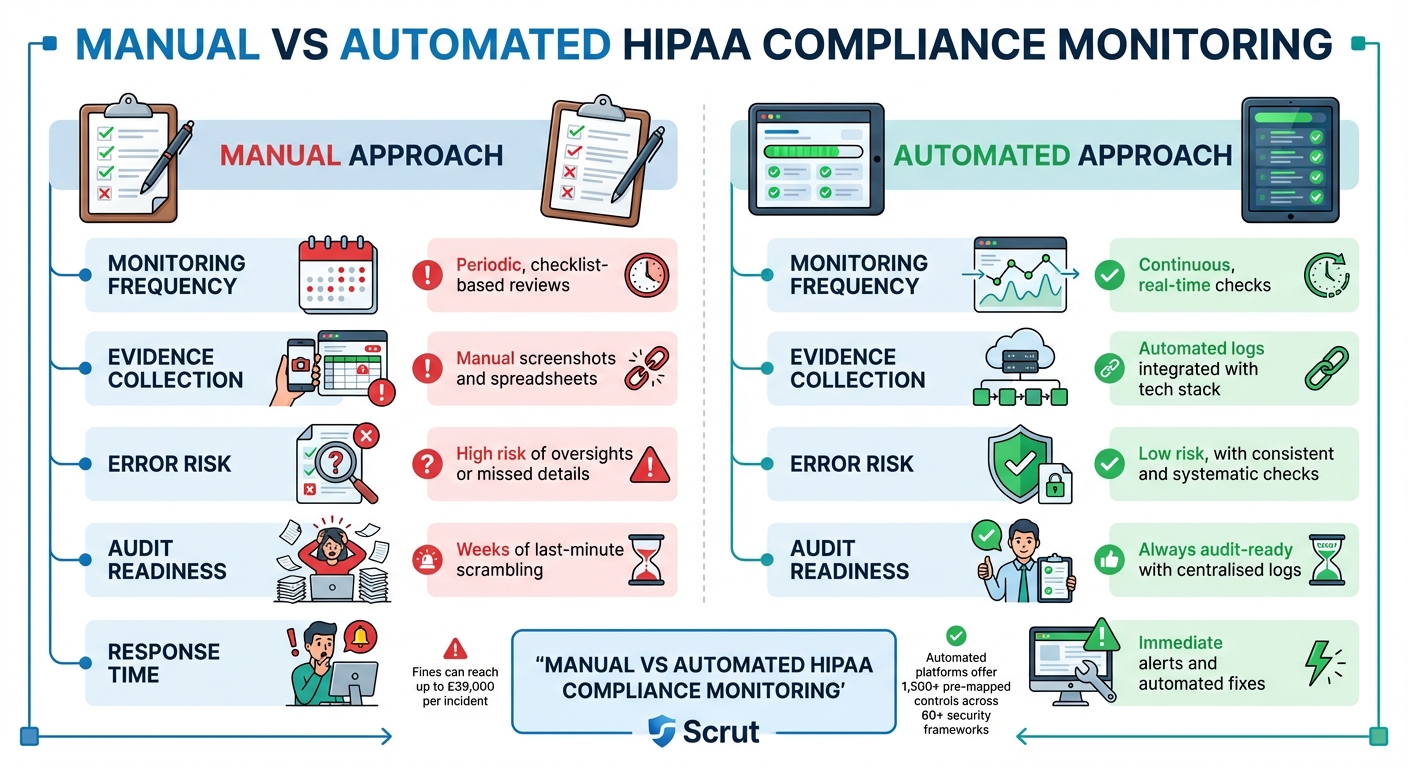 {HIPAA Compliance: Manual vs Automated Monitoring Approaches}
:::
{HIPAA Compliance: Manual vs Automated Monitoring Approaches}
:::
Automated Monitoring and Vulnerability Management
Continuous monitoring shifts HIPAA compliance from a once-a-year task to an ongoing process. Instead of waiting for an annual audit to uncover issues, automated systems can flag problems - like open ports, disabled multi-factor authentication, or unencrypted artefacts - as they arise [21].
By integrating your compliance platform with cloud services, identity management, and HR systems, you can automate evidence collection [21]. Real-time alerts can notify you of unauthorised access, firewall changes, or disabled audit logs. For instance, AWS Config can automatically trigger remediation actions, such as running a Lambda function to restore encryption [22].
As Fortinet puts it:
Compliance automation reduces the chance of an organisation getting stuck with fines for slipping out of compliance. Because the responses to potential issues are automated, both human error and excess time are eliminated[20].
Considering that HIPAA violations can result in fines of up to £39,000 per incident [20], this proactive approach not only safeguards patient data but also protects your finances. Automated monitoring ensures compliance evidence is continuously updated and centralised.
Centralising Compliance Evidence
Gathering audit logs, evidence, and compliance documentation in one place eliminates the last-minute rush that often happens before audits [22]. Tools like AWS Audit Manager can automatically collect evidence - such as resource configurations, access logs, and encryption statuses - across multiple accounts and regions. This creates a unified report that auditors can access immediately [22].
For organisations managing several AWS accounts, administrative aggregators allow compliance data to be centralised in a single audit owner
account, offering a complete view of compliance across the business [22].
The National Institute of Standards and Technology (NIST) has introduced the Open Security Controls Assessment Language (OSCAL), which is revolutionising compliance documentation. Instead of creating new documentation for every audit, OSCAL provides a machine-readable, reusable source of truth that updates automatically [17]. This compliance as code
method directly maps technical controls to HIPAA regulations, such as CFR 164.312(a)(iv) for encryption requirements [22][23].
Manual vs Automated Approaches
The advantages of automation become clear when comparing it to manual methods:
| Feature | Manual Approach | Automated Approach |
|---|---|---|
| Monitoring Frequency | Periodic, checklist-based reviews | Continuous, real-time checks [21] |
| Evidence Collection | Manual screenshots and spreadsheets | Automated logs integrated with your tech stack [22] |
| Error Risk | High risk of oversights or missed details | Low risk, with consistent and systematic checks [21] |
| Audit Readiness | Weeks of last-minute scrambling [22] | Always audit-ready with centralised logs [24] |
| Response Time | Reactive; issues found during reviews [24] | Immediate alerts and automated fixes [22] |
Scrut sums it up well:
Managing HIPAA compliance through spreadsheets is like trying to run a hospital with paper charts in the digital age: slow, error-prone, and tedious to scale[21].
Automated platforms simplify the process with over 1,500 pre-mapped controls spanning 60+ security frameworks. This makes aligning technical safeguards to HIPAA requirements far more efficient [21].
Conclusion
Key Points for UK Businesses
The discussion above highlights the importance of HIPAA compliance for UK businesses managing US healthcare data. This is not just a regulatory box to tick - non-compliance comes with hefty penalties. Fines can range from £100 to £39,000 per incident, and annual penalties can soar to £1.2 million [25]. A stark example is the £12.6 million fine imposed on Anthem in 2018 for HIPAA violations [25].
One crucial step for compliance is securing Business Associate Agreements (BAAs) with cloud providers before processing any electronic protected health information (ePHI) [1]. This requirement applies even to no-view
services, where the provider does not hold encryption keys. As clarified by the U.S. Department of Health and Human Services:
Lacking an encryption key does not exempt a CSP from business associate status and obligations under the HIPAA Rules[1].
To meet compliance, businesses must focus on key measures such as encrypting ePHI both at rest and in transit, implementing strict access controls, maintaining thorough audit trails, and isolating health data [15][6]. Tools like infrastructure-as-code automation can instantly identify and address unencrypted resources, while OSCAL ensures compliance documentation remains up-to-date and machine-readable [17].
How Hokstad Consulting Can Help

Navigating the complexities of HIPAA compliance requires a blend of expertise across regulatory frameworks, cloud architecture, security measures, and DevOps automation [26]. Hokstad Consulting offers tailored solutions to simplify this process. Their team specialises in fine-tuning DevOps and cloud infrastructure, ensuring businesses not only meet HIPAA requirements but also enhance their operational efficiency. With their support, implementing the technical safeguards needed for compliant artefact management becomes a more manageable task.
FAQs
What are the key challenges in ensuring HIPAA compliance for software artefacts?
Ensuring HIPAA compliance for software artefacts comes with its fair share of challenges, and organisations often stumble over a few common pitfalls. One major concern is inadequate encryption - whether data is at rest or in transit. Without robust encryption, sensitive information like protected health information (PHI) becomes vulnerable to breaches. Another common oversight is the absence of comprehensive audit trails, which are crucial for tracking who accessed, modified, or uploaded artefacts, as required by HIPAA’s technical safeguards.
Operational missteps also play a significant role. Many organisations rely on artefact repositories that are not designed to meet HIPAA standards, mistakenly assuming that the shared responsibility models of cloud providers will cover compliance gaps. In multi-region deployments, misconfigurations can lead to data residency violations, putting compliance at risk. On top of this, the lack of automated compliance checks can leave organisations blind to potential issues until they escalate into serious problems.
To tackle these challenges, organisations need to take proactive steps. This includes implementing end-to-end encryption, enforcing strict role-based access controls, and maintaining immutable audit logs. Ensuring that repositories meet HIPAA requirements is non-negotiable. Embedding automated compliance validation into CI/CD pipelines can also help catch issues early. If you need guidance, Hokstad Consulting specialises in designing and implementing these safeguards, helping you align your artefact management with HIPAA standards.
How can UK organisations ensure they have the correct Business Associate Agreements (BAAs) in place for HIPAA compliance?
To comply with HIPAA, organisations in the UK that handle Protected Health Information (PHI) must establish Business Associate Agreements (BAAs) with every third party involved in creating, storing, transmitting, or processing PHI. This includes not only cloud service providers but also any tools integrated into CI/CD pipelines.
The first step is identifying all third-party entities handling PHI and ensuring a signed BAA is in place for each. These agreements should clearly outline safeguards such as encryption, access controls, breach notifications, and audit rights, while strictly limiting the use of PHI to the purposes defined in the agreement. For cloud providers like AWS, BAAs can often be activated directly through their compliance portals, ensuring coverage for all associated accounts.
Keep a centralised record of your BAAs, review them annually, and seek advice from legal experts to ensure they align with both HIPAA and UK data protection laws, including GDPR. Regular audits, using tools like AWS CloudTrail, can help confirm adherence to the outlined safeguards. By taking these measures, organisations can fulfil their HIPAA requirements and safeguard sensitive health information effectively.
What are the best practices for automating HIPAA compliance in managing evidence?
Automating the process of collecting HIPAA compliance evidence can save valuable time, minimise errors, and ensure you meet all documentation requirements. Here’s how you can streamline this process effectively:
- Leverage tools like AWS Audit Manager: These tools can automatically gather and organise evidence - such as access logs and encryption details - into a centralised repository, making it easier to access and review.
- Use AWS Config for monitoring: Configure AWS Config to keep an eye on resource compliance with HIPAA controls. It can flag instances of non-compliance and feed those results directly into your evidence collection workflow.
- Automate document retrieval: Ensure you always have the most up-to-date compliance documents, such as certifications and agreements, by automating their retrieval and attaching them to your audit records.
- Secure log aggregation: Set up a system to aggregate logs securely, with retention policies in place. This ensures that all activity logs are safely stored and readily available for audit purposes.
- Enhance security measures: Implement least-privilege access controls and multi-factor authentication for any accounts involved in the automation process to bolster security.
For tailored solutions that align with UK-specific data protection standards, Hokstad Consulting offers expert guidance to help streamline and optimise your evidence collection process.