
If I want GitLab and Kubernetes to work well together, I need tight access, clear pipeline stages, safe rollouts, clean secrets handling, and close control of compute spend.
By 2024, 80% of organisations were using Kubernetes in production, yet many teams still hit the same problems: slow releases, security concerns, and wasted cloud spend. In the article, I’d boil the answer down to eight moves that cut risk and keep delivery on track.
Here’s the short version:
- I lock down cluster access with the GitLab Kubernetes Agent and least-privilege RBAC
- I keep manifests, charts, and release settings in Git
- I split pipelines into build, test, and deploy
- I use Helm so releases stay consistent between environments
- I pick safer rollout methods like canary, blue-green, or incremental
- I keep secrets, RBAC, and audit logs under close control
- I right-size runners and clusters to cut waste and watch £ spend
- I use GitOps so Git stays the source of truth after deploy
A few numbers stand out:
- Two-thirds of teams in one report said Kubernetes security concerns had delayed deployments
- 76% said Kubernetes complexity slows adoption
- One study found security misconfigurations in 20.2% of GitLab-hosted Kubernetes manifests
- Rightsizing and scheduling changes can target 20–40% lower compute spend
::: @figure 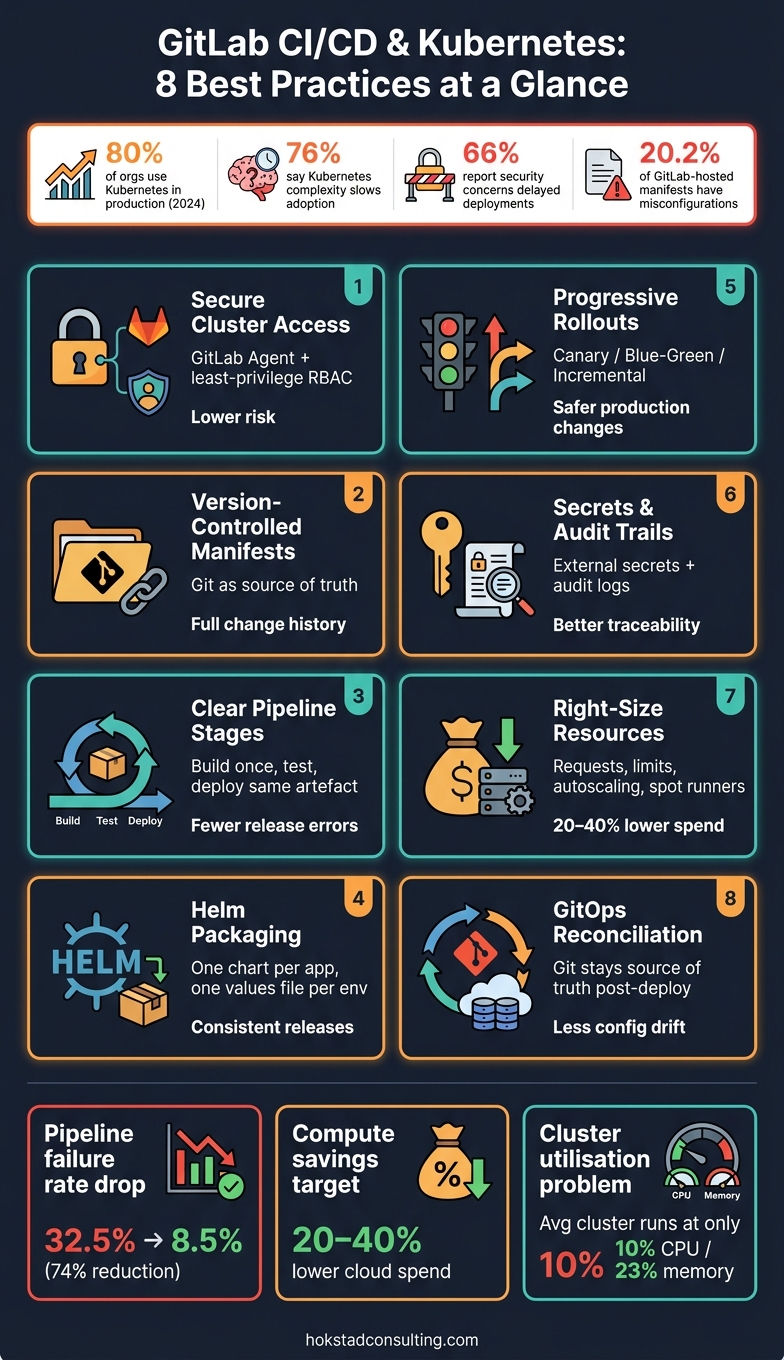 {GitLab CI/CD & Kubernetes: 8 Best Practices at a Glance}
:::
{GitLab CI/CD & Kubernetes: 8 Best Practices at a Glance}
:::
CI/CD Tutorial for Kubernetes: Build & Deploy with GitLab, Harbor and ArgoCD
Need help optimizing your cloud costs?
Get expert advice on how to reduce your cloud expenses without sacrificing performance.
Quick comparison
| Area | What I focus on | Main outcome |
|---|---|---|
| Access | Agent, short-lived credentials, RBAC | Lower risk |
| Pipeline flow | Build once, test, then deploy same artefact | Fewer release errors |
| Release method | Helm and controlled rollouts | Safer production changes |
| Secrets and logs | External secrets, audit trails, trace IDs | Better control and traceability |
| Cost | Requests, limits, autoscaling, spot runners | Lower £ cloud spend |
| Post-deploy control | GitOps reconciliation | Less config drift |
In short: I don’t need more pipeline steps for the sake of it. I need a system that is secure, traceable, and cost-aware from commit to cluster.
What Good GitLab–Kubernetes Integration Looks Like
Before you connect GitLab to Kubernetes, a few basics need to be in place: a working cluster, a well-organised repository, protected branches, a merge request workflow, registry access, and deployment roles with tight scope. Skip those, and teams often drift back to manual deployments with weaker audit trails. Put them in place, and GitLab pipelines become a controlled, traceable way to ship Kubernetes releases.
In practice, the main controls sit in four areas: access, configuration, release control, and resource use.
Secure Cluster Access and Least-Privilege Permissions
Start by getting rid of standing credentials. Static kubeconfig files and long-lived credentials create risk that tends to linger in the background until something goes wrong. A better route is the GitLab Kubernetes Agent, which creates an outbound connection from the cluster to GitLab. That cuts credential exposure and makes network setups like firewalls and private subnets easier to deal with.[1][8]
Short-lived tokens or certificates from GitLab, cloud IAM, or an identity provider also help keep the blast radius small.
RBAC should stay tight from end to end. Each environment or application should have its own service account, linked to a Role or ClusterRole that grants only what the pipeline needs. So, for instance, a pipeline might be allowed to update Deployments in one namespace, but not hold admin rights across the whole cluster. It also helps to draw a hard line between GitLab user permissions and Kubernetes pipeline permissions: developers merge into protected branches, while only pipeline service accounts deploy into production namespaces.[9]
Version-Controlled Manifests and Release Definitions
Treat cluster state as code. Keep Kubernetes manifests, Helm charts, and environment settings in Git so every change can be reviewed in a merge request, tied to a specific commit, and rolled back by reverting or redeploying an earlier tag.
That gives teams a plain, dependable release history. You can see what changed, who changed it, and when it happened without digging through half a dozen tools.
Before deployment, use merge request reviews and checks such as helm lint or kubectl apply --dry-run. Those checks catch obvious problems early, when they're still cheap to fix.
A study of open-source Kubernetes manifests found security misconfigurations in 20.2% of GitLab-hosted manifests.[5] That’s a sharp reminder that storing configuration in Git isn't enough on its own. Review and validation gates are what help cut that risk down.
Predictable Deployments, Rollbacks and Audit Trails
Once configuration is versioned, the next job is controlling how it reaches production. Predictable pipelines use immutable image tags like app:1.4.2, not latest, so there’s no guesswork about what is running where.
Production deployments should be gated with manual approvals. Rollback jobs should also be defined in GitLab as first-class pipeline steps, not left as a panic move for later. When things go sideways, you don't want the rollback plan living in someone's memory or buried in an old Slack thread.
It also pays to annotate resources with the commit SHA and pipeline ID. That way, the pipeline metadata alone can show who changed what and when.
Research across 18 enterprise pipelines found that practices such as IaC-driven environment parity and observability-based automated rollbacks cut average pipeline failure rates from 32.5% to 8.5%. That’s a 74% drop.[6]
Efficient Resource Usage Across Runners and Clusters
After release control, capacity tuning becomes the next step. Set CPU and memory requests and limits on Deployments to avoid noisy-neighbour problems and to support autoscaling.[7]
For CI runners, autoscaling setups, including scale-to-zero, help match capacity to demand instead of leaving idle compute running for no good reason. The same thinking applies to review apps and other short-lived environments. If they aren't needed anymore, they should be torn down automatically.
That matters even more when you're paying for UK-region cloud resources in GBP. Small bits of waste add up fast.
Tagging workloads by team or product also makes spend easier to track. It links CI/CD activity to cloud costs and helps surface pipelines or namespaces that are quietly becoming expensive.[4]
1. Align Delivery Goals and Cost Controls with Hokstad Consulting

GitLab and Kubernetes work best when your delivery, security and cost goals are clear from the start. Before anyone tweaks pipelines or resizes clusters, get engineering, operations, finance and product in the same room and agree what good looks like.
Put those goals into a Git-tracked charter and link it from your merge request templates. That way, the plan lives where the work happens. Include delivery, reliability, security and cost targets, plus monthly cloud spend targets for each product or environment in GBP (£). Once those targets are written down, they can guide the access rules, rollout choices and resource limits that follow.
Deployment reliability
Set clear targets for deployment frequency, change-failure rate and recovery time. Then connect those goals to the signals you already have: GitLab pipeline lead time, pipeline success rate and Kubernetes health data.
This gives teams something concrete to work from. If deployment speed slips or failed changes climb, you can spot it in the pipeline and cluster data instead of relying on gut feel.
Security and access control
After the targets are agreed, map them to access policies. Use a minimal-privilege model for each environment so teams can ship fast with automation, without opening the door wider than needed.
In practice, that means giving people and systems only the access they need for the job at hand. It keeps deployments moving while cutting avoidable risk.
Operational auditability
Every production change should be traceable from a Git commit all the way to the Kubernetes objects running in the cluster. Enforce protected branches, mandatory merge requests and deployment metadata through GitLab's environments feature.
On the Kubernetes side, API server audit logs should feed a central logging system that links GitLab job IDs, user identities and cluster events. That audit trail makes it much easier to trace changes, investigate reliability problems and spot cost leaks before they drift for months.
Cloud cost efficiency
Cost control should use the same metrics as delivery and operations, not sit off to one side. Aim for 50–70% average node utilisation to avoid long-term over-provisioning, and tie spend to business KPIs such as customer-facing uptime and infrastructure cost per active user, all tracked in GBP (£).
Hokstad Consulting's cloud cost engineering turns these goals into a DevOps roadmap. In plain terms, it links GitLab pipeline design and Kubernetes cluster sizing directly to business outcomes.
2. Configure the GitLab Kubernetes Agent for Secure Cluster Access
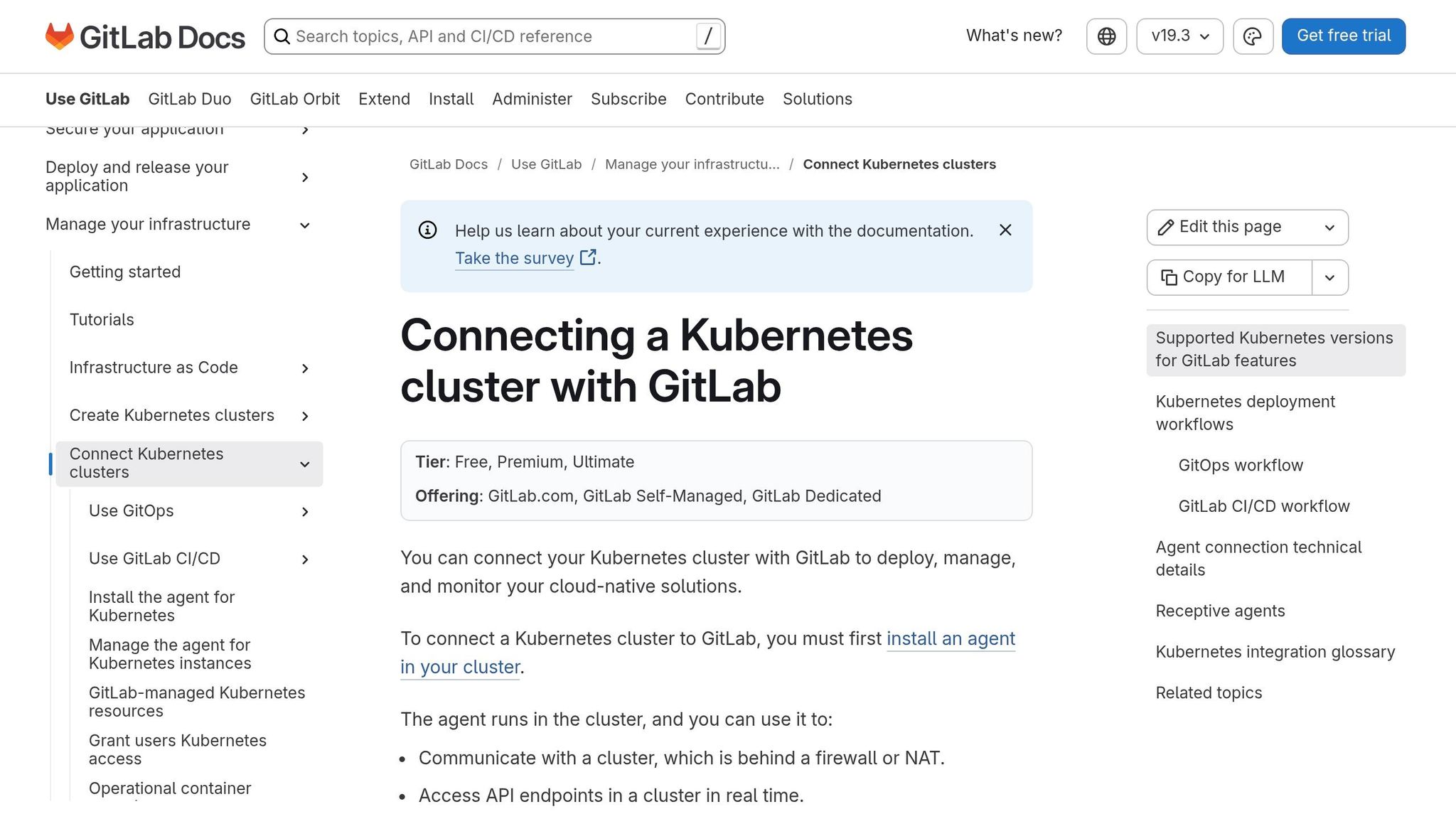
Build on your least-privilege setup by routing GitLab access through the Kubernetes Agent. Think of it as the controlled route from GitLab into the cluster. The agent creates a managed connection from the cluster back to GitLab, so you don’t need long-lived kubeconfig files or API tokens sitting in CI variables.
Security and access control
Run the agent in a dedicated namespace. Give it its own service account, then bind only the exact Roles and RoleBindings it needs. No more, no less. In .gitlab/agents/<agent-name>/config.yaml, lock access down so only the listed projects and groups can deploy.
Operational auditability
Treat the agent config like any other access-sensitive code. Protect the agent config repo with merge requests, so every change to access is reviewed and recorded. That way, if someone asks who changed what, you’ve got a clear trail instead of guesswork.
Deployment reliability
Run one agent per cluster, shared across projects and groups, rather than spinning up one per project.[10][12] Keep agent names clear and easy to scan - for example, agent-uksouth-prod or agent-euwest2-staging. Store separate config files for each environment alongside your application code.
Add health checks and connectivity alerts for the agent pod too. If the connection fails or starts to degrade, you want to know before deployments grind to a halt.[11][13]
With cluster access under control, the next step is to split delivery into build, test and deploy stages.
3. Structure GitLab Pipelines into Clear Build, Test and Deploy Stages
Once the agent has cluster access, split delivery into build, test and deploy stages. Give each job one job only. That makes failures much easier to spot and fix.
The flow is simple: the build stage creates one versioned image and tags it with the commit SHA. The test stage checks that image. The deploy stage then releases that same image to the target environment. Build once, then move the same artefact forward. This keeps release artefacts steady as they pass into Helm packaging and rollout control.[16][2]
Deployment reliability
Keep deploy jobs tied to a single environment. Start with a staging namespace, then use rules in .gitlab-ci.yml so production deploys run only from protected branches or tags, and only after all required tests have passed.[14][15]
It also helps to catch problems before they hit the cluster. Running kubectl --dry-run=server or helm lint during the test stage can spot manifest issues early, when they are still cheap and easy to fix.
Security and access control
Keep permissions tight at every stage. Build jobs should have access only to source code and the container registry, with no cluster credentials at all. Test jobs can run in short-lived namespaces with tightly scoped RBAC. Cluster credentials should sit only with deploy jobs.
Store sensitive Helm values and credentials in protected, masked CI/CD variables.[3]
Operational auditability
Traceability matters when something goes wrong at 16:45 on a Friday. Pass metadata through every stage, including the image tag, Helm chart version and Git reference. Then label resources with gitlab-ci-pipeline-id and app-version so you can trace what was deployed, where it went, and which pipeline pushed it.
4. Package Kubernetes Deployments with Helm for Repeatable Releases
Once your build, test and deploy stages are set up, Helm helps keep the deploy step the same from one environment to the next. Plain Kubernetes manifests are fine for small, simple setups. But when the same app needs to ship the same way across multiple environments in GitLab, Helm makes life a lot easier. It cuts down drift by keeping shared config in one chart, while environment-specific settings live in separate values files.
A simple rule works well here: one chart per application, and one values file per environment. Then your GitLab deploy job just picks the right file at runtime:
helm upgrade --install web-app-${ENVIRONMENT} ./charts/web-app \
  -f charts/values.${ENVIRONMENT}.yaml \
  --set image.tag=${CI_COMMIT_SHA} \
  --namespace ${K8S_NAMESPACE} \
  --atomic --wait --timeout 300s
That means the deploy job itself stays the same, while the values files handle what changes between environments.
Deployment reliability
For production pipelines, --atomic matters a lot. If a rollout fails, Helm rolls back to the previous revision on its own. That’s a much safer setup than letting a failed release sit half-finished.
It also helps to pair --atomic with --wait --timeout 300s. This makes the GitLab job report deployment failures straight in the pipeline log instead of showing a false success. And --history-max 10 is worth adding too. It keeps enough revision history for rollbacks without hanging on to more than you need.[17][18][19]
Before deploy, run:
-
helm lint -
helm template
These checks catch chart problems early, before they hit the cluster.
Security and access control
Security settings should live in the chart, not in one-off deploy scripts. Put Pod security contexts like runAsNonRoot and readOnlyRootFilesystem straight into your chart templates. That way, every deployment started by GitLab gets those settings by default.
Helm should also have access only to the namespace and resource types it needs. When you pair that with the GitLab Kubernetes Agent from the previous section, Helm runs through a scoped, authenticated connection instead of broad cluster credentials.[20]
Operational auditability
Use semantic versioning in Chart.yaml, and tag chart releases in GitLab. That gives each deployment a clear chart version you can trace later. It also helps to annotate deployed resources with GitLab metadata, such as the pipeline ID, so you can match what’s running in the cluster to a specific pipeline run.
After each deploy, log the chart version, values file and commit SHA.[20]
Once releases are packaged this way, rollout strategy becomes the main lever for reducing deployment risk.
5. Use Canary, Blue-Green and Incremental Rollouts for Safer Releases
Once you've packaged releases with Helm, the next question is simple: how should traffic reach them? That choice shapes how safe the release feels in practice.
Pick the rollout approach that fits your traffic-routing setup, your team's comfort level, and whether you're prepared to run two live environments at the same time. The right rollout strategy turns a deploy job into a controlled release, not a fingers-crossed moment.
Canary works well when you want to test a new version with live users while keeping the blast radius small. Traffic moves to the new version bit by bit, and you only promote it when error rates and latency stay within your agreed limits. GitLab's canary guidance uses labels such as track: canary so the rollout is easy to spot on the deploy board and easy to separate from stable traffic.[21]
Blue-green is a better choice when instant rollback matters more than slow exposure. In this setup, two near-identical environments run side by side, and traffic switches across in one move.[22]
Incremental rollout increases exposure in steps. That's handy when you want tighter control over progression without sending full traffic to the new version straight away.
Deployment reliability
Set success criteria before the deployment begins, not after the fact. Define thresholds for error rate, latency, and uptime, then bake those checks into the pipeline so promotion happens only when those checks pass.
A recent progressive-delivery paper reported a phased rollout that started at 10% of user traffic. During that rollout, error rates increased only slightly, from 0.5% to 0.9%, while uptime stayed at ≥99.8%.[23] That's the point of progressive delivery in plain terms: the pipeline should watch the signals, not a person.
Operational auditability
Each rollout step should be recorded in GitLab and Kubernetes, so incident reviews can trace every traffic shift and every promotion event without guesswork.
Cloud cost efficiency
Blue-green usually costs the most because it keeps two environments running at once. Canary and incremental rollouts tend to need less spare capacity.
| Strategy | Rollback style | Temporary cost | Best fit |
|---|---|---|---|
| Canary | Reduce traffic to the new version | Low | Live-user validation, limited blast radius |
| Blue-green | Switch traffic back to the previous environment | High | Instant cutover, breaking changes |
| Incremental | Halt or reverse stepwise progression | Low | Controlled progressive delivery |
6. Manage Secrets, RBAC and Audit Trails Across GitLab and Kubernetes
Poorly handled secrets and missing audit records can undo a secure pipeline in no time. Once your release paths are under control, tighten secrets, logs and access scopes.
Security and access control
Keep deployment identities locked to the namespace, resource types and verbs they actually need. Nothing more.
Skip plain-text CI/CD variables. Instead, use GitLab secrets: with an external secret manager and short-lived identity tokens, so pipelines pull credentials at runtime.[34][36] On the Kubernetes side, External Secrets Operator can sync values from those same secret managers into Kubernetes Secret objects.[28]
Deployment reliability
Secrets that never change are a security problem, and they can also cause awkward failures later. Short-lived credentials with automatic rotation are the safer route. Pair that with operators that restart pods when a secret changes, so workloads pick up new values in a predictable way.[26][27]
Use Sealed Secrets to store encrypted secret manifests in Git and decrypt them only inside the cluster.[33][35]
Operational auditability
Your audit trail should make one thing easy to answer: who accessed what, when and from where.
Enable Kubernetes audit logging at Metadata level for most requests. Keep detailed request logging tightly limited to high-value resources. Never use RequestResponse for Secrets, because that writes plain-text values into the audit log.[25][29][30][32] Also, alert on repeated secret reads from the same identity.[24]
Bring GitLab and Kubernetes logs into one system, then limit access with RBAC.[25][31][32] Add the GitLab pipeline ID or commit SHA as a correlation identifier in Kubernetes annotations and log messages. That way, an on-call engineer can trace a production incident back to the exact pipeline run, the user who triggered it and the configuration that was applied.[25][31]
Keep audit policies lean so log volume and storage spend don't get out of hand.[25][31]
7. Right-Size Runners and Cluster Resources to Cut Kubernetes Spend
With secrets and audit trails locked down, the next place money leaks is compute waste. CAST AI looked at data from more than 2,100 organisations and found that the average cluster runs at only 10% CPU and 23% memory use, while 70% of requested resources sits unused.[43] That’s a lot of idle capacity. The answer is simple in theory: set tighter requests, use lower-cost runner capacity, and scale with control.
Cloud cost efficiency
Oversized resource requests are one of the main causes. Instead of estimating by feel, set requests.cpu from 90th-percentile CPU usage × 1.2 and requests.memory from 99th-percentile memory usage × 1.15.[42] For limits, keep memory at 1.2–1.5× requests and CPU at 2–4× requests. Start with the Vertical Pod Autoscaler (VPA) in recommendation mode so you can watch actual usage before changing anything. After that, review those numbers every three to six months as workloads shift.
For GitLab runners, spot instances are one of the biggest cost levers. Spot runners with autoscaling can cut CI compute costs sharply.[40][38] CI jobs are a strong fit because they are short-lived, stateless and easy to retry. If a spot node disappears, the job can simply run again on another node.[37][39] Pair those runner nodes with a Cluster Autoscaler that adds nodes when jobs stack up and removes them when demand drops.
There’s also a simple scheduling win here: scale non-production clusters down outside core UK working hours. Combined with rightsizing and autoscaling, that can target 20–40% savings in compute spend.[41]
Keep CI runner node pools separate from production application nodes with taints and tolerations. Otherwise, a burst of build jobs can eat into the same pool your live services need. At the namespace level, use ResourceQuota and LimitRange to put clear spend boundaries around each team and stop any one workload from taking more than its share.
Deployment reliability
Cut too hard and you’ll feel it fast: pod evictions, CPU throttling and OOM kills. Make changes in steps. Tune staging first, check the results there, then move into production. Put Pod Disruption Budgets on critical services and keep minimum node counts high enough to cover peak deployment windows. Watch OOMKilled and Pending pod events closely. If either one climbs after a rightsizing change, add more buffer before moving on.
Hokstad Consulting uses workload profiling, autoscaling and time-based scheduling to cut compute waste without harming release speed. Once those settings settle down, keep them in Git and reconcile them automatically.
8. Use GitOps and Declarative Configuration for Consistent Operations
GitOps keeps your cluster state in sync with Git after deployment. A GitOps controller such as Flux or Argo CD continuously reconciles the cluster to match what’s in Git, instead of relying on manual kubectl edits or CI-driven pushes.[44][46][47] The payoff is simple: deployment, security and cost policy stay enforced even after the pipeline has finished.
Deployment reliability
Continuous reconciliation makes rollbacks much less painful. A rollback is just another Git change. You can promote the same commit from staging to production, and the controller will converge each environment to the declared state. If something breaks, revert the commit and the controller applies that change on its own.[48][51][54]
It also helps to separate Kubernetes manifests, Helm charts and Kustomize overlays into different GitLab repositories or environment folders, such as clusters/uk-staging and clusters/uk-prod. That way, each environment can change on its own without causing trouble for unrelated services.[49][51][52]
Security and access control
This pull-based setup also cuts down direct production access. Because the in-cluster controller applies changes from Git, developers and pipelines don’t need direct write access to the production cluster.[45][50][53] Put production changes behind GitLab merge requests, code review, approvals and automated security scanning, so every deployment is checked before it reaches the cluster.[44][51][55]
Operational auditability
Every change comes with a commit, author, timestamp and diff. Paired with GitLab audit events and Kubernetes logs, that gives you a clear record of what changed, when it changed and who signed it off.[44][45][46] It’s also worth tagging Pods and Deployments with the Git commit SHA and pipeline ID, so during an incident you can see what’s running without digging around for ages.[51][53]
Cloud cost efficiency
GitOps can also make cost control far less murky. Instead of hiding spend-related settings in live cluster config, declarative configuration keeps resource requests, limits, autoscaling rules and namespace quotas in Git, where reviewers can see them in merge requests.[51][56] GitOps-managed right-sizing and spot instances can cut Kubernetes spend sharply.[56]
At-a-Glance Comparison Tables
These tables give you a quick way to compare delivery stages, release strategies and cost levers. They pull together the controls behind secure access, repeatable releases and lower cluster spend. Start with the pipeline stages, then look at rollout and cost options.
Build, Test and Deploy Stage Responsibilities
Each stage has its own job. Keeping build, test and deploy work separate makes the pipeline easier to follow and much simpler to debug when something breaks.
| Stage | Main Purpose | Typical GitLab Jobs | Cluster Actions | Failure Signals |
|---|---|---|---|---|
| Build | Compile code and produce immutable artefacts | Build image | Validate manifests; push image to registry | Build, push, scan and validation failures |
| Test | Validate code and deployment readiness before release | Unit, integration and security tests | Ephemeral namespaces or review apps | Test, readiness and scan failures |
| Deploy | Promote validated artefacts into long-lived environments | Promote validated artefacts | Agent access, namespaces, workloads and services | Rollout, probe and rollback failures |
Canary, Blue-Green and Incremental Rollout Methods Compared
No single rollout method fits every case. The best pick depends on how much risk you can take, what infrastructure is in place, and how fast you need to recover when a release goes sideways.
| Method | Rollout Speed | Risk Level | Rollback Simplicity | Traffic Routing | Best-Fit Scenario |
|---|---|---|---|---|---|
| Canary | Moderate; gradual traffic increase | Low to medium | Moderate | Percentage-based routing | High-traffic customer-facing APIs or frontends where small errors have material impact |
| Blue-Green | Fast | Medium to high | Very simple | Two live environments | Compliance-heavy workloads, payment systems, or planned maintenance windows requiring instant rollback |
| Incremental | Moderate | Low to medium | Moderate | Standard Service routing | Routine updates, minor version bumps, or config changes where continuous availability matters most |
Cost Optimisation Methods for Runners and Clusters
For spend control, compare the four levers below. These methods are not mutually exclusive, and the best results usually come from mixing them. Right-sizing and smaller images are solid starting points because they take less effort and the impact shows up fast.
| Method | Effort | Reliability Impact | Cost Effect | Main Trade-off |
|---|---|---|---|---|
| Right-sizing | Low to medium | Positive when requests match usage | Cuts wasted CPU and memory | Needs ongoing review |
| Autoscaling to zero | Medium | Manageable with health checks | High | Cold-start delay |
| Per-project quotas | Moderate | Protects cluster health | Predictable | Can block urgent workloads |
| Smaller container images | Low to medium | Positive | Small to medium | Best combined with other controls |
Common Mistakes to Avoid in GitLab Kubernetes Pipelines
These mistakes can turn GitLab–Kubernetes pipelines into a security risk, a maintenance headache or a money drain. Each one ties back to the four control areas above: access, configuration, release control and resource use.
The first place to look is usually security. In practice, secrets and permissions are where secure delivery tends to fall apart first.
Secrets and Permissions Mistakes
Never store secrets in Git or expose them in pipeline logs. Keep them in protected, masked CI/CD variables or an external secret store, scope them by environment, and rotate credentials every 90 days.
Service account scope matters just as much. Use one service account for each environment and function, and limit it to the exact namespace, verbs and resources it needs. Never hand out cluster-admin or wildcard * access. Research across 12,000 production Kubernetes clusters found that 58% had RBAC misconfigurations severe enough to allow privilege escalation to cluster-admin, and 23% had ClusterRoles with wildcard (*) verbs or resources.[57] If a pipeline runs with cluster-admin, it can change anything in the cluster.
Pipeline Design and Release Control Mistakes
Don’t cram build, test and deploy into one job or stage. Keep each step focused on one task. It makes failures easier to spot and cuts down the blast radius when something goes wrong.
It’s also a bad idea to reuse the same job, namespace or credentials across dev, staging and production. Production should have its own namespace, its own credentials, its own config overlay and a manual approval gate. Rollback planning belongs here too. Every production deployment needs a defined verification step and a tested rollback path that the team can trigger fast from GitLab.
Resource and Operations Mistakes
The same level of discipline applies to spend and runtime stability.
Set CPU and memory requests and limits for every workload, and size runners based on observed demand rather than guesswork.
Avoid latest. Pin images to immutable, scanned tags such as semantic versions or commit SHAs.
And don’t allow ad-hoc kubectl edits or dashboard changes in production. Every production change should be committed to Git and applied through the pipeline. If it isn’t in Git, it’s a problem waiting to happen.
| Category | Mistake | Quick Check |
|---|---|---|
| Secrets & Permissions | Secrets in Git or pipeline logs | Are all secrets in masked, protected CI variables or an external secret store? |
| Secrets & Permissions |
cluster-admin tokens in CI |
Does every service account list only the namespaces and verbs it needs? |
| Pipeline Design | Mixed build, test and deploy logic | Are stages clearly separated with single-purpose jobs? |
| Pipeline Design | No approval gate for production | Does production require a manual approval from a different role? |
| Resources & Ops | Missing requests and limits | Do all workloads define CPU and memory requests and limits? |
| Resources & Ops |
latest image tags in manifests |
Are all production images pinned to immutable, scanned versions? |
| Resources & Ops | Manual kubectl changes in production |
Is every cluster change committed to Git and applied through the pipeline? |
Conclusion
These practices work best as one operating model, not a box-ticking exercise. Secure access, clear pipeline stages, and traceable releases need to work together as a single system.
Once access controls and pipeline flow are in place, release packaging and rollout strategy become the main levers for reliability. Helm helps keep releases repeatable, while progressive rollouts cut release risk and make rollback faster.
To keep that model in good shape over time, tight secrets handling, RBAC, and GitOps help keep the cluster in line with Git and make change control simpler.
The result is a pipeline that ships faster without giving up control. The payoff is faster, safer delivery: higher deployment frequency, lower change-failure rate, shorter lead time, and faster recovery, tracked through GitLab DORA metrics[58][60][59].
For teams that need hands-on support, Hokstad Consulting supports UK teams with DevOps transformation, cloud cost engineering, and automation across GitLab and Kubernetes.
FAQs
How do I start with the GitLab Kubernetes Agent?
Connect your cluster straight to GitLab so it can handle deployments and keep GitOps workflows in check. You can do this from the GitLab interface, where the agent watches your repository and syncs the cluster state with the configuration you’ve set.
It also works with standard deployment tools like kubectl and Helm, with no extra plugins needed.
Which rollout strategy should I choose?
Choose the release approach that fits your risk tolerance and day-to-day needs:
- Blue-green if you want zero-downtime updates and a safe place to test in an idle environment before sending traffic over.
- Canary if you’d rather roll changes out to a small group of users first.
- Progressive delivery if you want tighter control with feature flags and percentage-based traffic shifts.
Hokstad Consulting can help you pick the right setup and put it into place.
How can I cut Kubernetes CI/CD spend safely?
Focus on right-sizing resources and getting more out of your infrastructure. Set resource requests and limits with care, then use Kubernetes autoscalers so capacity tracks demand as it changes. For non-critical jobs, run them on spot or lower-cost nodes.
It also helps to use ephemeral test environments that shut down on their own, instead of hanging around and burning through budget. On top of that, regularly clear out orphaned resources, such as persistent volumes and idle namespaces.
These automated, data-led steps can cut spend without hurting performance or reliability.