
If many teams share CI/CD, the main goal is simple: standardise the path, automate the checks, and track speed, failures, and cost.
When I look at enterprise CI/CD, I do not see a tooling problem first. I see an ownership and control problem. Across dozens of teams and hundreds of services, delivery works best when I set one clear model, give teams a default path, put policy checks inside pipelines, and measure results with DORA metrics plus spend in £.
Here’s the whole article in a short version:
- I need a scaling model that fits the business: central platform, federated ownership, or GitOps
- I should keep branching simple with trunk-based development, protected
main, and coded promotion rules - I should give teams golden paths and self-service through an internal platform
- I should put checks into every pipeline: SAST, dependency scans, secrets scans, SBOMs, artefact signing, and audit logs
- I should use policy as code for repeatable rules, and keep manual approvals for higher-risk changes only
- I should map delays from commit to production so I can see where teams are waiting
- I should keep pull request feedback to about 5–10 minutes with the right test mix
- I should cut waste with caching, parallel jobs, selective triggers, artefact reuse, and autoscaling runners
- I should track both delivery and spend: deployment rate, lead time, failure rate, restore time, queue time, flakiness, and £ per release
- I should roll this out in phases, starting with pilot teams and measuring before-and-after results
A few numbers stand out. Elite delivery teams deploy multiple times a day, keep lead time under one day, hold change failure rate at 0–15%, and restore service in under one hour. On the pipeline side, caching can trim build time by 30–50%, while parallel jobs can cut runtime by up to 70% when set up well.
How to Scale Thousands of CI/CD Pipelines on AWS without Additional Overhead #cicd #devops
Quick comparison
| Model | Team freedom | Control | Setup effort | Audit trail | Best fit |
|---|---|---|---|---|---|
| Central platform | Low–medium | High | Medium–high | Good | Firms that want one standard way of working |
| Federated ownership | High | Medium | Spread across teams | Fair with strong rules | Teams that want more local control |
| GitOps | High | High | High at the start | Very strong | Higher-risk estates and Kubernetes-heavy setups |
The short answer: for enterprise scale, I would use shared standards, team-owned delivery inside guardrails, and GitOps where audit and change control matter most.
Choose a CI/CD architecture that scales across teams
::: @figure 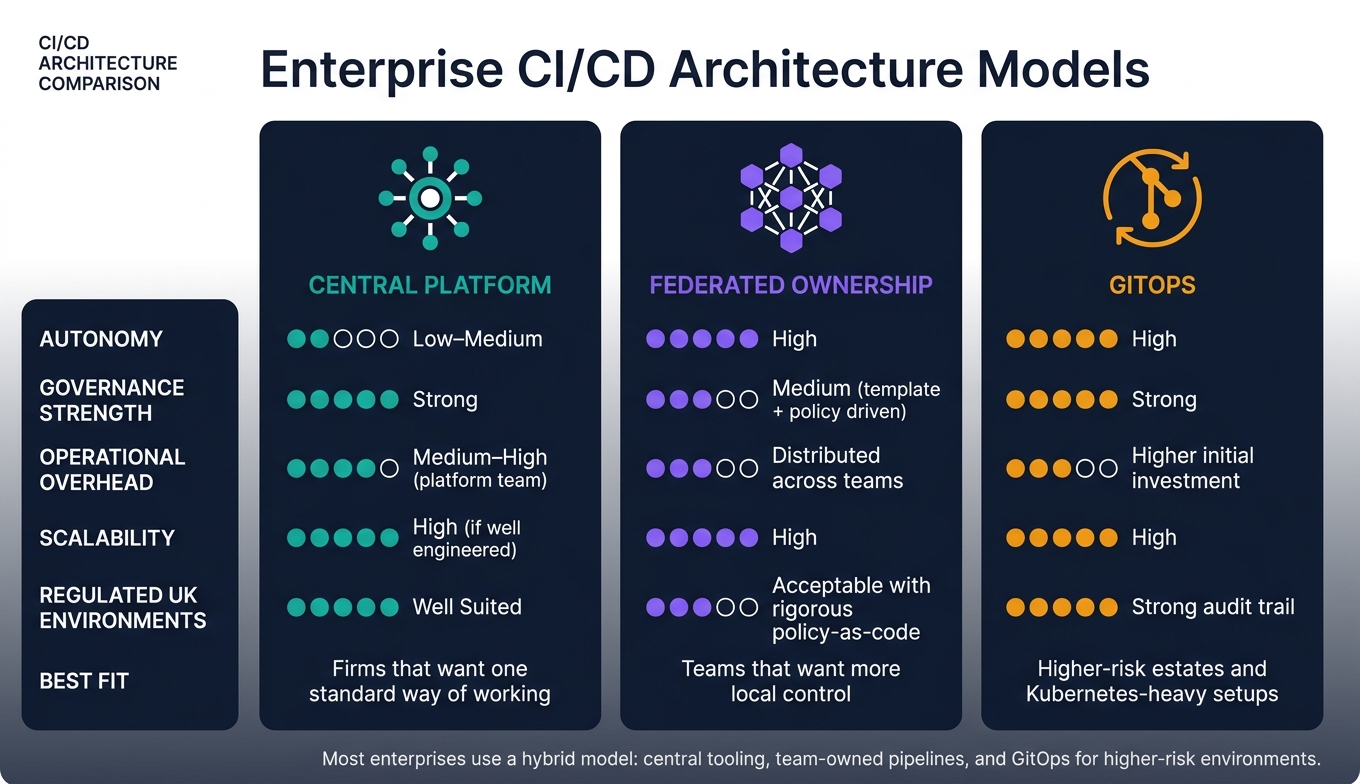 {Enterprise CI/CD Architecture Models: Central vs Federated vs GitOps}
:::
{Enterprise CI/CD Architecture Models: Central vs Federated vs GitOps}
:::
Once delivery goals are clear, the next step is choosing the operating model behind them. Get this right early and life is a lot easier later. Get it wrong and you end up with bottlenecks, fed-up teams, and governance that feels harder instead of simpler. Most enterprises land on one of three common patterns. The best fit depends on organisational structure, regulatory needs, and team maturity, not tooling.
Central platform, federated ownership or GitOps: which model fits your organisation
A centralised platform gives teams standard pipelines managed by a shared CI/CD team. A federated model puts pipeline ownership with individual teams, backed by central templates and guardrails. GitOps keeps environment configuration - Kubernetes manifests, Helm charts, and Terraform - in Git, then uses automated controllers to reconcile live state with the desired state. Every environment change becomes a signed, time-stamped Git commit, which creates a strong audit trail with very little manual work.
The table below compares these models across the areas that matter most for UK enterprises.
| Model | Autonomy | Governance Strength | Operational Overhead | Scalability | Regulated UK Environments |
|---|---|---|---|---|---|
| Central platform | Low–medium | Strong | Medium–high (platform team) | High if well engineered | Well suited |
| Federated ownership | High | Medium (template + policy driven) | Distributed across teams | High | Acceptable with rigorous policy-as-code |
| GitOps | High | Strong | Higher initial investment | High | Strong audit trail |
Most enterprises use a hybrid model while moving from one setup to another: central tooling, team-owned pipelines, and GitOps for higher-risk environments.
Branching, repositories and environment promotion rules
Trunk-based development is the branching strategy that fits fast, reliable CI/CD at scale best.[6] Developers work in short-lived feature branches, merge often, and lean on automated tests and CI gates instead of long-lived branches. That keeps pipelines simpler and cuts down the merge pain that tends to grow with the codebase.
Branch protection rules help enforce that discipline across teams. Requiring pull requests before merging to main, making passing status checks mandatory, and blocking direct commits to protected branches creates a clear record of who approved what and when. For UK organisations under regulatory scrutiny, that matters.[7][8] GitHub's enterprise-level repository rulesets can apply these protections across many repositories at once,[9][10] so teams do not have to set up each repo one by one.
Repository structure brings its own trade-offs. Monorepos make shared dependency management easier and help with cross-cutting changes, but they add CI load and need tooling that runs only the pipelines affected by a change. Multi-repo setups give teams clear ownership lines and separate release cycles, but changes across services are harder to coordinate. Many UK enterprises with large microservice estates end up with a mix: monorepos for tightly coupled libraries and multi-repos for independent services.
Environment promotion should follow a clear, coded path. Changes merged to main deploy automatically to a shared development environment. Tagged releases move to staging, where they face extra integration and security tests. Promotion to production happens only after all checks pass and any required release approval is in place. Putting these rules into pipeline stages, with manual approval gates where needed, and lining them up with UK working hours and change-free periods, keeps promotion auditable and predictable.
Golden paths and internal developer platforms
A golden path is an opinionated, recommended way to build, test, deploy, and run a service. Instead of every team building its own pipeline from scratch, the platform team puts best practice into reusable templates for common service types such as REST APIs, event-driven services, and front-end applications. Teams adopt the golden path and get automated tests, security scans, logging, and metrics by default. They can still override certain steps when needed, but the baseline stays consistent across the organisation.
Internal developer platforms (IDPs) make golden paths easy to use through self-service portals where engineers can create new services, set up environments, provision infrastructure, and check deployment status without raising tickets.[4][5] That cuts the coordination drag that slows teams in large organisations. Platform engineering guidance suggests starting with a small team of three to four people, then scaling to about one platform engineer for every 15–25 developers as the platform matures.[3]
Treat the platform as a product. In practice, that means keeping templates well documented, building feedback loops so teams can suggest changes, and tracking adoption measures such as shorter lead times and fewer production incidents. Hokstad Consulting designs golden paths that bake cloud cost checks and resilience controls into standard pipelines by default.
These architecture choices work best when governance and quality controls are built into the pipeline.
Build governance and quality controls into every pipeline
Governance needs to sit inside the pipeline, not off to the side. That’s what makes the pipeline the right place to enforce control, evidence and traceability.
Shared security and compliance gates
The simplest way to apply the same controls across lots of teams is to use shared templates. Those templates can enforce the same gates in every pipeline, so teams inherit the baseline as soon as they onboard instead of building it all themselves.
A good starting point includes branch protection, SAST, dependency and licence scanning, secrets scanning, container scanning, test gates, artefact signing and tamper-evident logs.
Run SAST, secrets and dependency scans on every pull request. Leave SBOM generation and artefact signing for tagged releases.
Supply-chain risk is now high enough that signed artefacts and SBOMs are no longer optional in regulated environments.
Once these baseline gates are in place, the next step is deciding which changes still need a person to approve them.
Risk-based approval controls cut delay without loosening governance. Low-risk changes can deploy on their own once they pass every gate. Standard changes need peer review plus automated checks. High-risk changes that touch payments, customer data or regulatory reporting need formal sign-off, linked to an approved change record in a change-management tool.
Policy as code and tenant isolation in shared platforms
Policy as code keeps governance rules in version control and enforces them automatically. That means less reliance on tribal knowledge or one-off approvals, and it creates an auditable history of governance changes.[11][12][14]
Common controls include:
- requiring pull requests with an external reviewer
- blocking production deploys without a signed tag on main
- restricting deployments to approved regions
A pre-deployment policy gate can stop a release if the target environment is non-compliant. That matters for UK organisations dealing with data-residency rules.[13]
Separate namespaces or cloud accounts for each team, a central secrets vault and team-scoped artefact repositories help stop cross-team access. UK organisations handling personal or financial data should also set retention policies that line up with UK GDPR and run regular access reviews to confirm that only the right roles can trigger deployments.[12]
Run compliance checks in every pipeline and stream audit events to a central place. Compliance reports can then flag violations without asking teams to configure the controls themselves.[12][15] The UK NCSC's secure development guidance echoes this, stating that build pipeline controls should improve repeatability of security controls and generate detailed log and audit data.[16] Microsoft's Zero Trust guidance recommends generating an SBOM in every release pipeline, with organisational standards covering format, storage, signing, verification policy and exception handling.[17][18]
Finding bottlenecks with value stream mapping
Standard controls don’t help much if they still leave teams waiting around.
Value stream mapping tracks each step from code commit to production deployment: commit, review, build, scan, approve and promote. For every step, teams record processing time, waiting time and failure rate. When you layer in regulatory checkpoints such as penetration test windows, change review boards and mandatory sign-off periods, it becomes much easier to see which controls are doing useful work and which ones are just slowing things down.
The table below compares three common governance mechanisms by the factors that matter most for UK enterprises.
| Governance mechanism | Risk reduction | Lead-time impact | Ease of adoption |
|---|---|---|---|
| Manual approvals (e.g. CAB, change manager sign-off) | High for unknown or poorly modelled risks; depends heavily on approver expertise | High - often adds hours to days of delay per change | Moderate; can be added without major tooling change but requires cultural and process alignment |
| Automated policy checks (policy as code, branch rules, deployment constraints) | High for well-defined, repeatable risks; enforces rules consistently | Low to moderate - decisions are made in seconds to minutes inside the pipeline | Moderate to high once templates and rules are established |
| Audit logging and traceability (pipeline logs, change records, deployment history) | Medium directly; high indirectly through accountability and compliance evidence | Low - usually passive, with negligible delay | High; most CI/CD platforms support this by default |
In practice, automated policy checks and audit logging should be the default. Manual approvals are best kept for changes that are genuinely high-risk or unusual. If a CAB used to review every deployment, incident and deployment data can help show where automation already gives the same control - or better.
After governance is standardised, the focus shifts to removing avoidable delay, failure and cost from the pipeline.
Improve pipeline speed, reliability and cost
Once governance is standardised, the next pain point tends to show up fast: pipelines that are slow, flaky, or costly to run at scale. In a large enterprise, a delay of just 5–10 minutes per pipeline can snowball into hours of waiting across a single day.
Test automation that does not become the bottleneck
Test sprawl is one of the main reasons pipelines slow down. The fix is simple in principle: run fast tests on pull requests, and leave the full suites until after merge.
A disciplined test pyramid puts most of the weight on fast unit tests. A good target is about 70% unit tests, because they are the fastest and cheapest to run.[30] Above that sit contract tests. These check API agreements between services in seconds, without needing a full environment running. That makes them especially useful in microservice setups, where end-to-end tests are often slow and brittle.[23][24]
| Test type | Typical runtime | Fault detection value | Best pipeline placement |
|---|---|---|---|
| Unit | Seconds | High - logic errors | Every pull request |
| Contract | Seconds | High - API compatibility | Every pull request |
| Integration | Minutes | Medium - interface issues | Pull request or mainline |
| UI / E2E | 10+ minutes | Lower - prone to flakiness | Post-merge or nightly |
| Performance | 30+ minutes | High - regressions | Staging or release candidate |
| Security | Minutes | Very high - vulnerabilities | Pull request (lightweight) + nightly (full) |
For pull requests, aim to keep feedback within 5–10 minutes. That usually means unit tests, contract tests, a small set of integration tests, smoke UI checks, plus lightweight static analysis and security scans. Full UI, performance, and deep security suites can run after merge or on a schedule. It helps to encode this split in shared templates and policy as code so teams do not have to reinvent it.
Test sharding splits large suites across parallel jobs, which helps keep integration and UI suites within sane runtimes as they grow.[25][29] Ephemeral environments, created per pull request and torn down afterwards, give each team isolated and repeatable test conditions without cross-team clashes in shared staging systems.[24]
Once the test scope is right-sized, the next gains usually come from cutting wasted work and reducing idle queue time.
Pipeline performance improvements that matter at scale
Slow pipelines are rarely caused by one issue. More often, the drag comes from repeated work, serial stages that could run side by side, and runners waiting in a queue. The biggest gains usually come from fixing these together, not picking them off one by one.
Caching is often the easiest place to start. Caching dependencies and container layers can cut repeated work by 30–50% on dependency-heavy builds.[27] Parallelisation of independent jobs - such as test shards, multi-platform builds, or separate microservice pipelines - can reduce end-to-end runtime by 50–70%, as long as those jobs do not share state.[31][25]
Selective triggers are the next lever. A UI test job should run only when front-end code changes. Backend tests should not fire because someone edited documentation. Artefact reuse also saves time: promote the same built artefact through test, staging, and production instead of rebuilding it at each stage. That cuts waste and keeps environments consistent. Autoscaling runners deal with peaks by scaling up during working hours and scaling down overnight and at weekends, which removes queue bottlenecks without paying for idle capacity all the time.[25][28]
| Optimisation lever | Expected speed impact | Complexity | Key trade-offs |
|---|---|---|---|
| Caching | High (30–50% faster) | Low | Stale cache risk; needs clear invalidation rules |
| Parallelisation | Very high (up to 70% faster) | Medium | Higher compute cost; jobs must be independent |
| Selective triggers | High | Medium | Misconfigured paths can skip necessary tests |
| Artefact reuse | Medium | Low | Requires a reliable artefact repository |
| Autoscaling runners | Medium (queue-time reduction) | High | Potential queue time while new runners spin up |
Observability is what ties this together. If you are not tracking queue time, stage duration, failure rates, and flakiness across teams, you are mostly guessing about what to fix first. Tagging pipelines by team, product, and value stream lets platform engineering compare performance across domains, spot outliers, and measure the effect of each change. DORA metrics - deployment frequency, lead time for changes, change failure rate, and mean time to restore - show whether pipeline speed is turning into better delivery results.[32][1][2]
Cost-aware CI/CD for cloud and hosting efficiency
Faster pipelines often cost less simply because jobs finish sooner and runners spend less time sitting idle. But if nobody is tracking spend on purpose, shared cloud costs can creep up quietly as teams add more jobs, longer test suites, and larger runners.
The first step is visibility. Tag every CI/CD workload - runners, pipelines, and artefact repositories - with cost-centre identifiers linked to teams, products, or value streams. Then combine CI usage data, such as job runtime, storage use, and pipeline frequency, with unit costs to estimate spend per release in £. Managed CI runners are billed by the minute, so wasted minutes add up fast.[19][20][22]
Right-sizing runners is often the quickest win. Plenty of teams default to large instances out of habit, even when the jobs are lightweight. Matching runner size to actual job needs - and using autoscaling so you are not paying for idle machines overnight - can cut monthly spend in a meaningful way.[21] Retention policies are another easy lever. Non-production artefacts from pull request and branch builds rarely need to stay longer than 7 days, and test reports or coverage artefacts rarely need more than 14 days.[26] Regular pruning lowers storage costs without affecting compliance or production traceability.
It also helps to spend more only where faster delivery pays back. If a team handles 50 pull requests a week and each one waits an extra 15 minutes for CI, that adds up to more than 12 hours of developer waiting time each week. In plenty of cases, a modest increase in spend on parallelisation or slightly larger runners for key value streams pays for itself through lower cycle time. Put in business terms, it becomes easier for product and finance teams to see what is happening: £X per month buys Y hours of developer time back and cuts feature lead time by Z days. That makes CI/CD performance much more than an infrastructure line item.
Once speed, reliability, and cost are under control, the next step is rolling standard patterns across teams.
Roll out standard CI/CD patterns and keep improving over time
Once pipelines are fast, governed and measurable, the next challenge is spreading the standard without taking control away from individual teams.
Ownership models and phased rollout
A common mistake is to treat a CI/CD shift like a one-off tooling job. That rarely sticks. A model that lasts usually has a dedicated platform team, a live backlog and a roadmap tied to delivery results. That backlog should focus on the pain teams hit most: onboarding, pipeline drift and slow approvals.
A hybrid operating model tends to work well. The platform team owns the golden path, shared runners and policy templates. Product teams own service-specific pipeline steps inside those guardrails. That gives teams room to handle their own needs without everyone rebuilding the same thing from scratch. The platform team keeps improving the patterns, tracks adoption and reacts to feedback.
Roll the change out in phases, and measure adoption at each stage. Start with two or three pilot teams that reflect different risk profiles - for example, one internal service and one customer-facing application. Measure deployment frequency, lead time for changes and change failure rate before and after. Once the golden path has proved itself, expand in waves and put high-risk domains first, such as payments and regulated data. Start with pilots, then move out in waves, using adoption and delivery metrics to show that the pattern works.
The goal is not sameness for the sake of it. The goal is repeatable delivery that teams can pick up without extra friction.
Conclusion: The core practices that make multi-team CI/CD work
Scaling CI/CD across an enterprise comes down to a small set of choices made the same way over time. Pick an ownership model that fits your organisation’s shape. Build a golden path that works out of the box, with documented extension points for teams that need them. Automate governance through policy as code instead of manual gates, and introduce it in advisory mode before you enforce it. Put time into test efficiency and pipeline performance so speed and reliability improve together, not at each other’s expense. Track DORA metrics and CI/CD spend in £ per team and per release so platform gains stay visible to engineering and finance.
The organisations that get this right treat their CI/CD platform like any other critical system: with a clear owner, a roadmap, a budget and a feedback loop. If you are working through a large-scale DevOps transformation and want to tie CI/CD improvements directly to cloud cost reduction and delivery outcomes, Hokstad Consulting specialises in exactly this - combining DevOps transformation, cloud cost engineering and automation to make the business case as clear as the technical one.
FAQs
Which CI/CD model suits my organisation best?
The best CI/CD model comes down to how your organisation balances autonomy, governance, and architecture. For many enterprises, a platform-led model with golden paths is a strong fit. It gives teams shared security and compliance controls, while still leaving room for day-to-day flexibility.
Your choice should match the way you work. Microservices often fit independent pipelines. Global deployments may call for fan-out/fan-in patterns. In regulated settings, policy-as-code and automated guardrails can help teams move with confidence without drifting away from required controls.
How do I standardise pipelines without slowing teams down?
Use a platform-led approach that balances central governance with team autonomy. Put shared pipeline templates for builds, security scans and deployment gates in a central, version-controlled repository, and pin them to specific versions so updates don't disrupt day-to-day work.
Keep those templates modular. That way, teams can extend them for their own needs while still staying compliant. And instead of relying on manual reviews, move policy checks into the pipeline itself. Developers get feedback straight away, and delivery moves faster.
What should I measure to improve CI/CD at scale?
Track both leading and lagging metrics so you can see the full picture of pipeline health and team output.
Start with the DORA metrics: deployment frequency, lead time for changes, change failure rate and mean time to recovery. Then add day-to-day measures such as build duration, queue times, flaky test frequency, platform adoption, resource utilisation, developer satisfaction and the Four Golden Signals: latency, traffic, errors and saturation.