If your Docker setup uses one flat network, compliance gets harder and breach impact gets bigger. I’d put it simply: split containers into separate networks, block traffic by default, keep data tiers off the internet, and store the rules in version control.
Here’s the short version:
- Flat Docker networks let containers talk too freely
- Segmented networks limit lateral movement
- Internal networks help keep regulated data off the internet
- Encrypted overlay networks protect multi-host traffic, with a 10–15% throughput hit
- Host mode removes network isolation and should be rare
- Version-controlled network rules give auditors a clear trail
- Good segmentation can cut PCI DSS scope and lower audit effort
In this article, I’d explain how Docker segmentation supports PCI DSS 4.0, UK GDPR, ISO 27001, NIST SP 800-190, and UK sector rules such as FCA and NHS DSPT. The core point is simple: you need a clear boundary between sensitive and non-sensitive workloads, and you need to show that boundary in a way auditors can check.
::: @figure 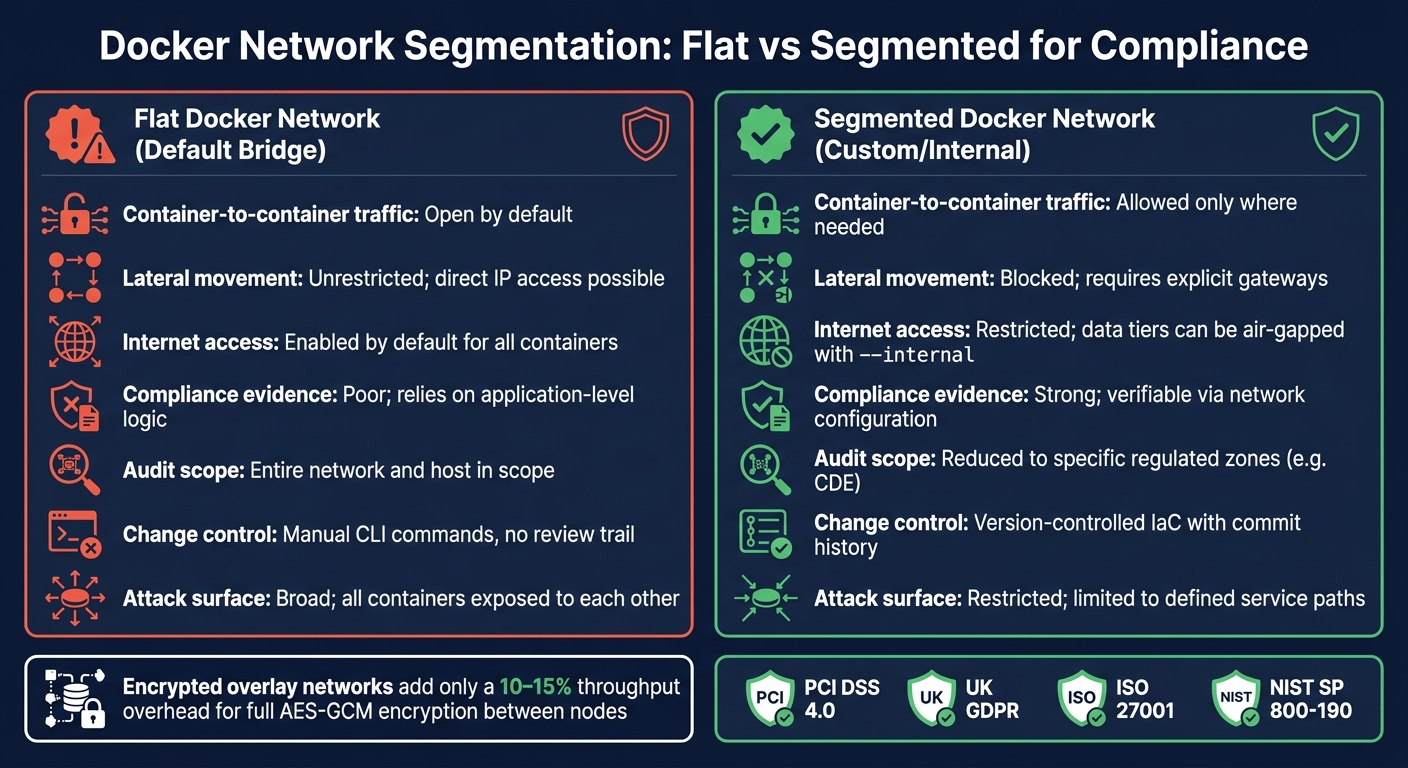 {Docker Network Segmentation: Flat vs Segmented Networks for Compliance}
:::
{Docker Network Segmentation: Flat vs Segmented Networks for Compliance}
:::
Setting Up Network Policies to Control Traffic Between Containers Hands-On
Need help optimizing your cloud costs?
Get expert advice on how to reduce your cloud expenses without sacrificing performance.
Quick comparison
| Area | Flat Docker network | Segmented Docker network |
|---|---|---|
| Container-to-container traffic | Open by default | Allowed only where needed |
| Lateral movement | Easy after compromise | Limited by network boundaries |
| Internet access | Often open | Can be blocked for data tiers |
| Audit evidence | Weak | Stronger and easier to check |
| PCI DSS scope | Can spread across more systems | Can stay limited to regulated zones |
| Change control | CLI changes are hard to track | Rules can sit in Git with review history |
If I were setting this up, I’d start with user-defined bridge networks for single-host services, use --internal for databases and other sensitive tiers, avoid --network=host unless there’s no other option, and enforce traffic rules through the DOCKER-USER chain and CI/CD checks.
That’s the main answer up front. The rest of the piece shows where these controls map to compliance and how to turn them into audit-ready policy.
Which compliance controls Docker segmentation helps satisfy
Those framework requirements come down to one practical issue: which containers are allowed to talk to each other? Compliance rules don’t just ask for good intentions. They ask for controls you can prove. Docker network segmentation gives you a clear boundary and a communication map that can be checked.
Separating sensitive workloads and regulated data
With user-defined Docker networks, you can isolate each tier on purpose. A database container that handles personal data can sit on an --internal network with no outbound internet access, and only the application tier that needs it can reach it. That lines up with PCI DSS Requirement 1.2.1 and minimum necessary access [1][6]. In plain terms, network isolation becomes a control an auditor can see and test.
Segmentation can also reduce audit scope. Under PCI DSS, if segmentation isn’t in place or doesn’t work, every system on the network can end up in scope for assessment. Put the right isolation in place, and scope narrows to the regulated zone instead, which can reduce audit effort and cost [7].
How unsegmented Docker networks create audit and risk problems
That same boundary does another job: it creates evidence. The default Docker bridge network links containers on the same host and lets them reach one another by IP address. On a shared network segment, that can open the way to ARP poisoning and man-in-the-middle attacks [1]. Internet access is also switched on by default, so if one container is compromised, it may try to exfiltrate data unless you stop it at the network layer [4].
For auditors, the issue is simple: where are the control points? Teams checking network controls under ISO 27001 need places where traffic can be logged and monitored [1][5]. In a shared network, one badly set up container can talk straight to sensitive databases or internal APIs [1][4]. That’s the sort of gap that turns a tidy diagram into a messy audit.
Comparison table: unsegmented vs segmented container networks
The table below shows why segmentation matters for both audit scope and control evidence.
| Feature | Unsegmented (Default Bridge) | Segmented (Custom/Internal) |
|---|---|---|
| Attack surface | Broad; all containers exposed to each other [1] | Restricted; limited to defined service paths [2] |
| Lateral movement | Unrestricted; direct IP access possible [1] | Blocked; requires explicit gateways [2] |
| Internet access | Enabled by default for all containers [4] | Restricted; data tiers can be air-gapped with --internal [4]
|
| Compliance evidence | Poor; relies on application-level logic [1] | Strong; verifiable via network configuration [1] |
| Audit scope | Entire network and host in scope [7] | Reduced to specific regulated zones, such as the CDE [7] |
Docker segmentation methods that support compliance
Those controls only work if you pair them with the right Docker network type. That’s the next step: pick the option that fits each control without making life harder than it needs to be. Every network type comes with trade-offs around isolation, visibility and day-to-day admin.
Bridge, overlay and macvlan networks in regulated environments
For most single-host deployments, user-defined bridge networks are the best place to start. They improve on the default bridge by giving you built-in name resolution and isolated communication. In practice, that means you can split each application tier onto its own network and permit only the paths you need.
For multi-host deployments, such as Docker Swarm clusters, encrypted overlay networks are the better fit. Turning on --opt encrypted enables AES-GCM encryption for traffic moving between nodes, so data stays protected while in transit across the cluster [1][4]. The trade-off is a 10–15% drop in network throughput because of the encryption overhead [1]. For many workloads, that’s a fair exchange. Still, if you’re dealing with high-throughput services, test it before going live.
Macvlan networks serve a much narrower role. They give containers direct IP addresses on the physical network, which helps with legacy workloads that need direct VLAN access. The downside is plain enough: they skip Docker’s usual bridge isolation and push more manual work onto the physical network side [8][10]. Use macvlan only when legacy integration leaves you no other clean option.
When to restrict host mode and apply deny-by-default rules
Host mode removes isolation. When you run --network=host, Docker drops all network namespace isolation. If that container is compromised, it could inspect traffic from other host services, including SSH [11]. In regulated settings, host mode should be the exception, not the default. If you have to use it, put default-deny controls in place first.
These steps give you a traffic boundary you can point to during review:
- Publish ports to
127.0.0.1instead of all interfaces. For example,-p 127.0.0.1:8080:8080is far safer than-p 8080:8080because it stops Docker from exposing that port across every host interface, including VPNs and corporate LANs [3][10]. - Use the
DOCKER-USERiptables chain. Docker processes it before its own rules, and it remains in place after daemon restarts [2][4]. - For sensitive tiers like databases and caches, create networks with
--opt com.docker.network.bridge.enable_icc=false. That blocks container-to-container communication on the same bridge unless you permit it on purpose, which adds another control inside the segment [9][2].
Comparison table: Docker network types and compliance fit
| Network type | Isolation level | Common use case | Compliance suitability | Operational complexity |
|---|---|---|---|---|
| Default bridge | Low | Development and testing | Unsuitable - flat topology, easy lateral movement | Low |
| User-defined bridge | High | Production microservices, single-host tiers | High - DNS-based isolation and tiered segmentation | Moderate |
| Internal | Maximum | Regulated data environments | Critical - no outbound internet | Moderate |
| Overlay (encrypted) | High | Multi-host clusters, Swarm deployments | High - encrypted multi-host data transit | High |
| Macvlan | Medium | Legacy apps needing direct VLAN access | Moderate - suitable for legacy/VLAN integration but bypasses bridge security | High |
| Host | None | System monitoring, high-speed workloads | Unsuitable - bypasses all isolation | Low |
From segmentation to auditable policy enforcement
Network choice gives you isolation. But for an auditor, isolation on its own isn't enough. They need proof that the rules are written down, reviewed, and left untouched unless someone approved a change. Once you've set the network boundary, the next job is to make that boundary auditable.
Microsegmentation and least-privilege service communication
Start by grouping services based on sensitivity, then allow only the paths they need. Keep data tiers on internal networks to block outbound internet access [4][1].
For sensitive workloads, add mTLS so only authenticated services can connect. That links service identity straight to the allowed paths defined by Docker segmentation. In plain terms, the network isn't just organised well - it's enforcing who can talk to whom.
That shift matters. Segmentation stops being a design preference and becomes a control you can point to during a review.
Embedding network controls into CI/CD and change management
Move network definitions out of ad hoc CLI commands and into version-controlled files. Versioned Docker Compose files and firewall rules give every change an author, a timestamp, and a review trail. That's the sort of evidence auditors look for when they check isolation and change control.
In practice, your CI/CD pipeline should validate network configuration before deployment, not after. Runtime monitoring can flag drift and unexpected inter-container traffic [5][2]. Put those two checks together and you keep policy and runtime state in sync.
If you're running more complex microservices, a GitOps operator like Flux can synchronise network policies automatically. The Git history then becomes a clear record of who changed network segments and when [12].
Comparison table: ad-hoc networking vs codified segmented networking
The difference shows up in the evidence, not just the topology.
| Feature | Ad hoc networking | Codified segmentation |
|---|---|---|
| Change control | Manual CLI commands, no review trail | Version-controlled IaC with commit history |
| Auditability | Fragmented logs, difficult to trace intent | Clear record of policy commits, authors and timestamps |
| Incident response | Hard to map lateral movement after the fact | Fast isolation using pre-defined security zones |
| Policy consistency | Drift occurs as containers are added or restarted | Automated enforcement through CI/CD pipelines |
Conclusion: Better isolation, clearer evidence and lower compliance risk
Docker network segmentation cuts the blast radius, separates sensitive workloads, and gives you audit-ready evidence. Moving away from a flat default bridge to custom networks is not just a security upgrade - it’s a control choice that makes compliance easier to show. That matters, because when segmentation fails, the problem can turn into cost and audit pain very fast.
A failed segmentation design can turn one compromise into breach response and remediation costs.
Beyond cost, the bigger win is evidence. Clear, documented boundaries make audits faster and less contentious. There’s less prep work, and the network design itself helps demonstrate control.
Key takeaways for UK technical and business decision-makers
For CTOs, IT managers, and anyone answerable for compliance readiness, the message is simple. Segmentation is a measurable control. It limits the blast radius of a breach and supports PCI DSS, UK GDPR, and ISO 27001 requirements, while giving your infrastructure a disciplined, auditable structure.
For teams planning change, the next move is to codify the network design. Hokstad Consulting can help design segmented container environments that align with CI/CD, security hardening, and cloud governance.
FAQs
How do I start segmenting an existing Docker network?
Start by moving away from the default bridge network and setting up isolated, user-defined bridge networks with docker network create --driver bridge <network_name>. This gives you tighter control over which containers can talk to each other, instead of dropping everything onto the same default network.
You can then assign containers in docker-compose.yml, or attach a running container with docker network connect <network_name> <container_name>.
If you need tighter separation, add --internal when you create the network to block external internet access. That works well for sensitive services like databases, which should sit on a private backend network rather than being exposed more than needed.
It also helps to document the traffic paths you allow between networks and services. That makes life a lot easier during compliance audits, because you can show exactly what is allowed to connect, and what is not.
When should I use an internal network instead of a bridge network?
Use an internal network when a container must not start outbound connections to the internet or any external network. This matters for sensitive services like databases, cardholder data environments, and internal processing queues that don't need public access.
When the internal flag is set to true, the container stays on a restricted, non-routed network segment. Use a standard bridge network only for services that need external connectivity.
What evidence will auditors expect from Docker network rules?
Auditors will want proof that network-level isolation is in place between security zones. Application-level controls on their own usually won’t be enough.
In practice, that proof often includes documented user-defined network setups, explicit firewall policies such as iptables rules, network activity logs, records of blocked connections, and checked configurations showing that sensitive services can’t be reached from unauthorised segments.
They’ll also expect centralised, immutable logs to support audit controls.